Finance teams already ask ChatGPT or Claude about spend, invoices, and cash. The hard part is getting the AI the right numbers. Each finance app now ships its own MCP server, and each one sees a single slice of the business: cards in Ramp, payments in Stripe, the general ledger in NetSuite, and so on.
I checked the best MCP servers for finance teams against vendor documentation from November 2026. For each one, you’ll see what it reads, what it can change, who controls access, and what it costs. Coupler.io comes first because it covers the part app-level servers skip: blending QuickBooks, Xero, Stripe, and your CRM into one dataset for financial reporting.
Key takeaways
- Most finance MCP servers see one app at a time. NetSuite covers the ledger, Stripe covers payments, and Ramp and Brex cover spend. Each one answers questions about its own app.
- App-level servers are built for actions. Use them to approve bills, issue refunds, or update records, and turn on the human-confirmation steps where the server offers them, as Stripe does for refunds.
- Questions that span several apps need blended data. Coupler.io MCP blends QuickBooks, Xero, Stripe and your CRM into one dataset. The AI writes the query and Coupler.io runs it, so AI answers match the numbers in your reports.
- Check write access and status before you connect. BILL and Adaptive Planning are read-only, while Ramp, Mercury and Stripe can approve or move money. Brex, BILL and Mercury are still in beta.
- Most MCP access costs nothing extra. App-level servers usually come with the product. Coupler.io plans start at $24/month billed annually, with a free 7-day trial.
What are finance MCP servers?
The Model Context Protocol is an open standard, introduced by Anthropic, that lets AI agents and assistants call tools in other apps. An MCP server is the app’s side of that connection. It tells the AI which actions exist (list bills, run a report, create an invoice) and enforces who can run them.
Finance MCP servers fall into three groups, and only one of them is built for company reporting:
- Company finance servers connect to the systems your team runs on: ERP, accounting systems, corporate cards, accounts payable, banking and payments.
- Market data servers return stock prices, forex rates, fundamentals, and technical indicators. Alpha Vantage MCP and community-built Yahoo Finance servers fit here. These finance MCP servers pull stock market data for analysts and traders more than for finance operations.
- Personal finance and DeFi servers read household budgets, bank accounts, or crypto wallets. They work for individuals tracking their own money, not for company reporting.
This list focuses on the first group. If your job is month-end close, budgets, forecasting, or board reporting, the model context protocol (MCP) for finance matters because it replaces copy-paste between finance apps and your AI tool.
Best MCP servers for finance teams compared
These are the top MCP servers for finance teams, all built and run by the vendors themselves. Coupler.io comes first for reporting across apps. The rest run from ERP to payments, spend, banking, planning and warehouse.

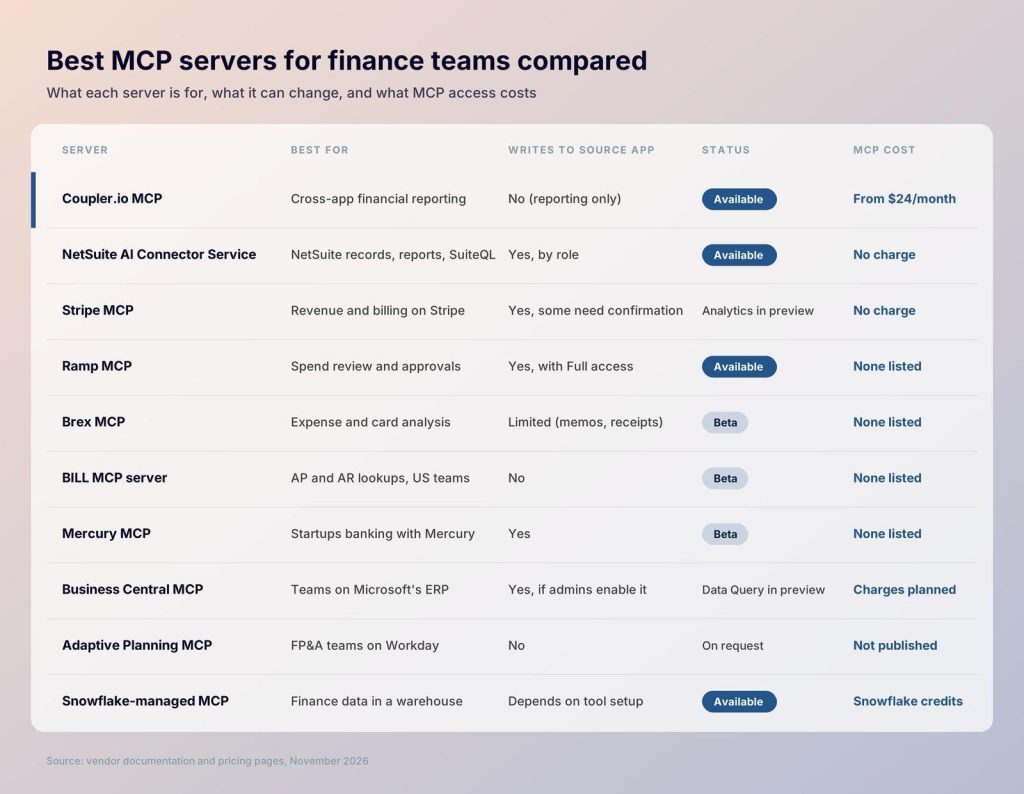
Most teams start with the app that holds the numbers they report on most. If that’s Stripe or Xero, these step-by-step guides show how to connect Stripe to Claude and connect Xero to Claude for financial analysis.


Analyze QuickBooks and Xero together in Claude
Try Coupler.io free for 7 daysTop MCP servers for finance teams reviewed
1. Coupler.io MCP
Every server below answers questions about one app. Coupler.io MCP answers questions that span several, like revenue from a QuickBooks entity and a Xero entity in one consolidated view.

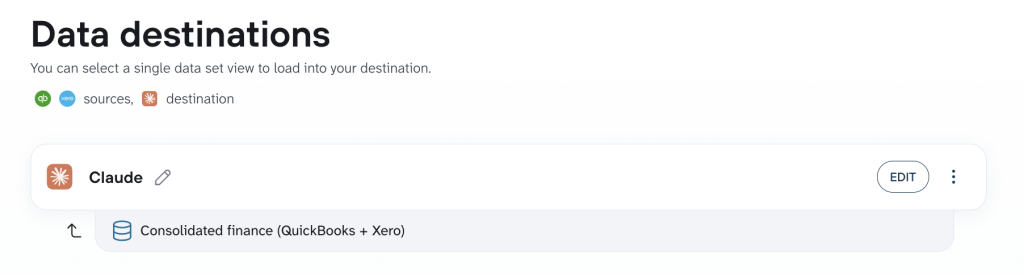
Coupler.io is a reporting automation platform for business teams. It automatically collects and blends data from 400+ apps and keeps it up to date for your reports and AI. For finance, that means QuickBooks, Xero, Stripe, Chargebee, Plaid, and HubSpot in one dataset, plus Yahoo Finance for market data like stock prices. The same dataset feeds your Google Sheets model, your Power BI dashboard and your AI tool.
Coupler.io works as a financial data MCP server in Claude, ChatGPT, Gemini, Copilot, Perplexity, and Cursor, and through Custom MCP for other clients. The AI asks; Coupler.io calculates. The AI writes the query, Coupler.io runs it on your prepared data and returns the computed result, and every query is logged. You can define metrics like gross margin or MRR once, so every tool uses the same formula.
Pros
- Blends accounting, billing, banking, CRM, and ad spend in one dataset
- Same numbers in AI answers and in your financial reporting
- Scheduled refresh and stored history for month-over-month comparisons
Cons
- Works with data on a refresh schedule, so it isn’t for second-by-second balances
- Doesn’t approve bills or move money; use the app’s own server for that
Coupler.io bills by connected accounts and destinations, not by data flow. Pricing plans start at $24/month billed annually, and your AI tool counts as one destination. Every account starts with a free 7-day trial.
2. NetSuite AI Connector Service
For companies running Oracle NetSuite, this service reaches records, reports, saved searches, and SuiteQL, within the limits of the connecting role. The NetSuite AI Connector Service exposes NetSuite through MCP, and the free MCP Standard Tools SuiteApp adds the tools. The AI can create, read, and update records, and manage files; SuiteQL queries stay read-only. MCP Apps add interactive filters and forms inside the AI client.
Oracle blocks Administrator roles on purpose. You connect through a custom role with MCP Server Connection and OAuth 2.0 permissions, so the AI only sees what that role allows.
| Pros | Cons |
|---|---|
| Works with Claude, ChatGPT and any remote MCP client | A NetSuite admin has to create roles and enable features |
| Real write access to records | Concurrency limits are shared with other integrations |
| Execution logs for audit trails; custom tools via SuiteScript | Not assessed for HIPAA |
The service and SuiteApp carry no charge and don’t consume NetSuite AI Units. You pay for NetSuite and for your AI client.
3. Stripe MCP
If revenue lives in Stripe, connect this one first. The remote server at mcp.stripe.com gives the AI two generic tools, stripe_api_read and stripe_api_write, which cover most of the API: customers, invoices, subscriptions, refunds, disputes, and payouts. A stripe_analytics tool (in preview) queries metrics and runs financial reports.
Stripe adds guardrails for money movement. Refunds and Treasury transfers require human confirmation in the Dashboard before they run. Admins can switch MCP access on or off, and tool calls are logged in Workbench.

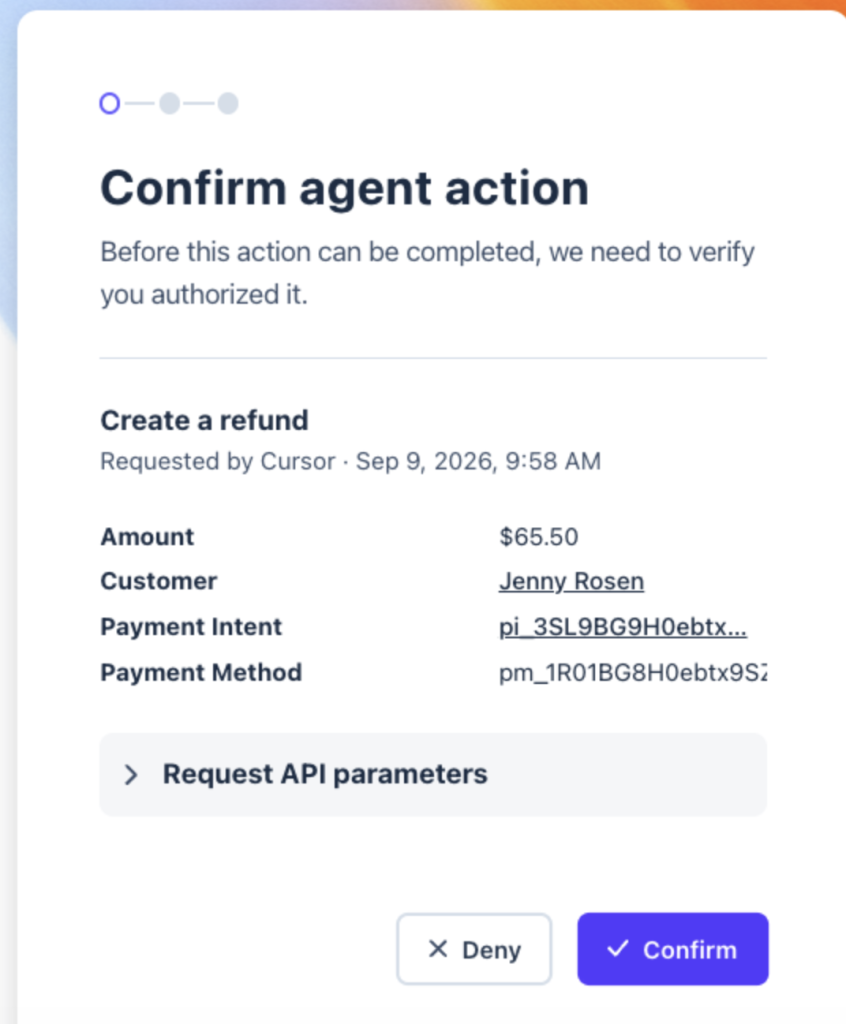
stripe_api_write covers most write methods, so grant only the permissions the agent needs. From December 2026, Stripe MCP stops accepting full-access secret keys and restricted keys without the Agent tag, so older setups need agent API keys or OAuth.
There’s no MCP fee. Stripe’s standard rate is 2.9% + 30¢ per successful domestic card transaction.
4. Ramp MCP
Ramp MCP suits teams that want the AI to act, not just read. At sign-in, each user picks Full access or Read-only. With Full access, approvers can approve or reject transactions, reimbursements, and bills from Claude or ChatGPT, and approving a bill can send it to payment.
On the read side, it covers spend analysis, open bills and due dates, receipt status, policy checks, and Ramp Banking balances.
Pros
- Clear access choice per user
- Actions are attributed to the person who ran them
- Listed in the Claude and ChatGPT directories
Cons
- Connections expire after 30 days
- Some tools aren’t available to every business
- Custom clients need Ramp to allowlist the redirect URI
Ramp’s base tier is $0, Ramp Plus is $15/user/month plus a platform fee, and Enterprise is custom.
5. Brex MCP
Brex took a cautious route. Its server is mostly for reading expenses, cards, bills, banking transactions, travel, and analytics. Write actions are limited to memos, receipts, and attendees, and approvals and card management aren’t available.
Card numbers, CVVs and expiration dates never reach the AI. Card tools return names, statuses and limits only.
| Pros | Cons |
|---|---|
| Card data stays protected by design | Beta, and tools may change |
| Every user connects with their own OAuth login | An admin must accept the Developer API agreement and turn on the beta |
| Works with Claude, ChatGPT, Cursor and Codex | No approvals or card management |
Brex Essentials is $0, Premium is $12/user/month, and Enterprise is custom.
6. BILL MCP server
BILL’s server is a low-risk place to start with AI in accounts payable because it can’t change anything yet. You can search bills by vendor, due date or approval status, check payment delivery status, look up AR invoices and review Spend & Expense card transactions.
It runs with each user’s BILL permissions and needs no admin role. Still, it’s in beta, works only for US organizations, connects to one organization at a time, and is validated only on Claude desktop and ChatGPT web.
AP & AR plans run $49 to $89 per user per month, and Spend & Expense is $0.
7. Mercury MCP
Startups that bank with Mercury get fewer clicks for routine work. The AI reads transactions, balances, and statements, and with extra permissions it can categorize transactions, set budgets, match receipts, and draft payment requests.
Payments still go through approval in Mercury. Approving a reimbursement through the AI is different: it triggers a payout right away.
Write permissions need separate consent. It’s still in beta, and Mercury advises checking answers against the account before making decisions.
The base account is $0, Plus is $29.90/month, and Pro is $299/month.
8. Dynamics 365 Business Central MCP
Business Central is the pick for teams on Microsoft’s ERP. By default, it gives read-only access to the API pages and queries a user is allowed to see. Admins can turn on create, modify, and delete operations for selected objects, and Data Query Tools (preview) run read-only queries on the database.
| Pros | Cons |
|---|---|
| Every action runs under the user’s identity, so audit trails stay intact | Non-Microsoft clients need their own Entra app registration |
| One endpoint for Copilot Studio, VS Code, Claude and ChatGPT | Microsoft plans to introduce charges for MCP tools |
Licenses cost $80/user/month for Essentials and $110/user/month for Premium, paid yearly. MCP charges haven’t been announced yet.
9. Workday Adaptive Planning MCP
For FP&A teams, this server opens budgets and forecasting models to the AI. It’s read-only: explore sheet data, compare versions like budget against actuals, and pull metadata for accounts, time periods, and dimensions.
Each agent gets its own system user identity, access follows existing permission sets, and only MCP-enabled sheets and versions are visible. The downside is access: it’s off by default, you request it through Workday Customer Care, and there’s no write-back to plans.
Pricing isn’t published; Workday sells it through its sales team.
10. Snowflake-managed MCP server
If your ERP, billing, and bank data already land in Snowflake, the Snowflake-managed MCP server turns governed tables into AI tools: Cortex Analyst for natural-language SQL, Cortex Search, Cortex Agents, and direct SQL execution that you can lock to read-only.
| Pros | Cons |
|---|---|
| Role-based access per tool | Someone has to land and model the data first |
| Works with Claude, ChatGPT, and Cursor | Limits of 50 tools per server and 250 KB per SQL response |
Coupler.io handles the landing part: it loads QuickBooks, Xero, and Stripe data into Snowflake on a schedule. Snowflake bills by consumption: warehouse compute and Cortex credits.
Build consolidated P&L reporting across finance apps
Book a demo with Coupler.ioHow to choose the right MCP server for finance?
Most finance MCP servers look alike on paper; the differences show up in five places.
1. Decide what the AI may change. BILL and Adaptive Planning are read-only; Ramp, Mercury, and Stripe can approve, categorize, or move money. For finance operations, I’d start every new server on read-only access.
2. Look for OAuth and role-based access. NetSuite and Business Central run each call as the user, which keeps audit trails clean.
3. Brex, BILL, and Mercury are in beta, and tool names can change. Fine for exploring, risky for a process the month-end close depends on.
4. An MCP server for accounting sees the ledger, not the bank feed or the CRM. If your question crosses apps (revenue by channel, cash runway against open deals), one app’s server can’t answer it.
5. Most MCP access is free with the product, but Business Central charges are coming, and Snowflake bills by usage.
Plaid’s Dashboard MCP returns developer diagnostics like Link conversion and API usage, not your company’s bank transactions. For Plaid balances and transactions in a report, use Coupler.io’s Plaid connector. Intuit and Xero publish open-source QuickBooks and Xero servers that you run locally, which suits developers more than finance teams.
Pair app-level servers with a financial data MCP server
Native servers are the right tool for actions: approve a bill in Ramp, issue a refund in Stripe, update a record in NetSuite. Need one app in your AI tool for a quick question? The native server may be enough.
Reporting is different. A CFO asking “how many months of runway do we have if Q1 pipeline closes at last quarter’s rate?” needs bank balances, QuickBooks expenses and HubSpot deals in one place. With app-level servers, the AI pulls each source separately and lines up dates and definitions on its own. Nothing is saved, and next month’s answer may use different logic.

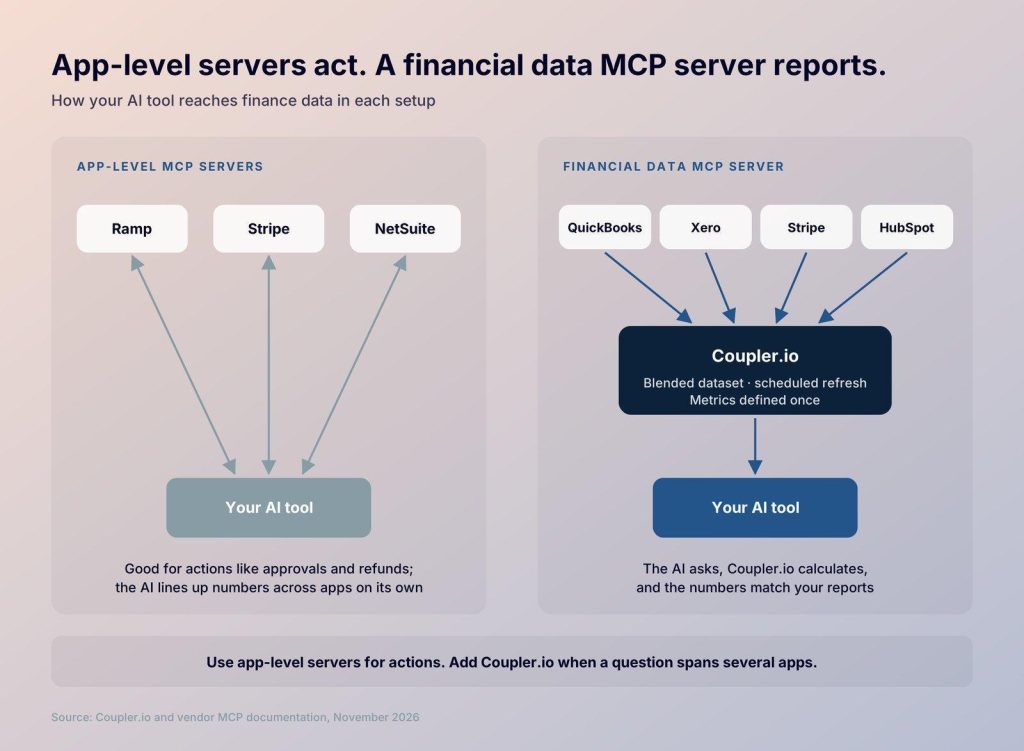
Coupler.io is the MCP server for financial data that sits next to them. It blends the sources on a schedule, stores history, and keeps one definition for each metric, so the AI assistant for finance teams gives the same numbers as your reports. If your AI client runs scheduled tasks, AI agents for finance can pull the same numbers for a weekly cash summary.
The setup is short:
1. Connect QuickBooks, Xero, Stripe, or any connector from the integrations directory to Coupler.io.
2. Blend and filter the data, and add metric definitions.
3. Add Claude, ChatGPT, or another AI tool as a destination and ask your question.
Here’s the “AI asks, Coupler.io calculates” part in action. Claude queried a QuickBooks P&L dataset and traced a 37% profit drop to subcontractor costs, which rose from $4,200 to $31,400.

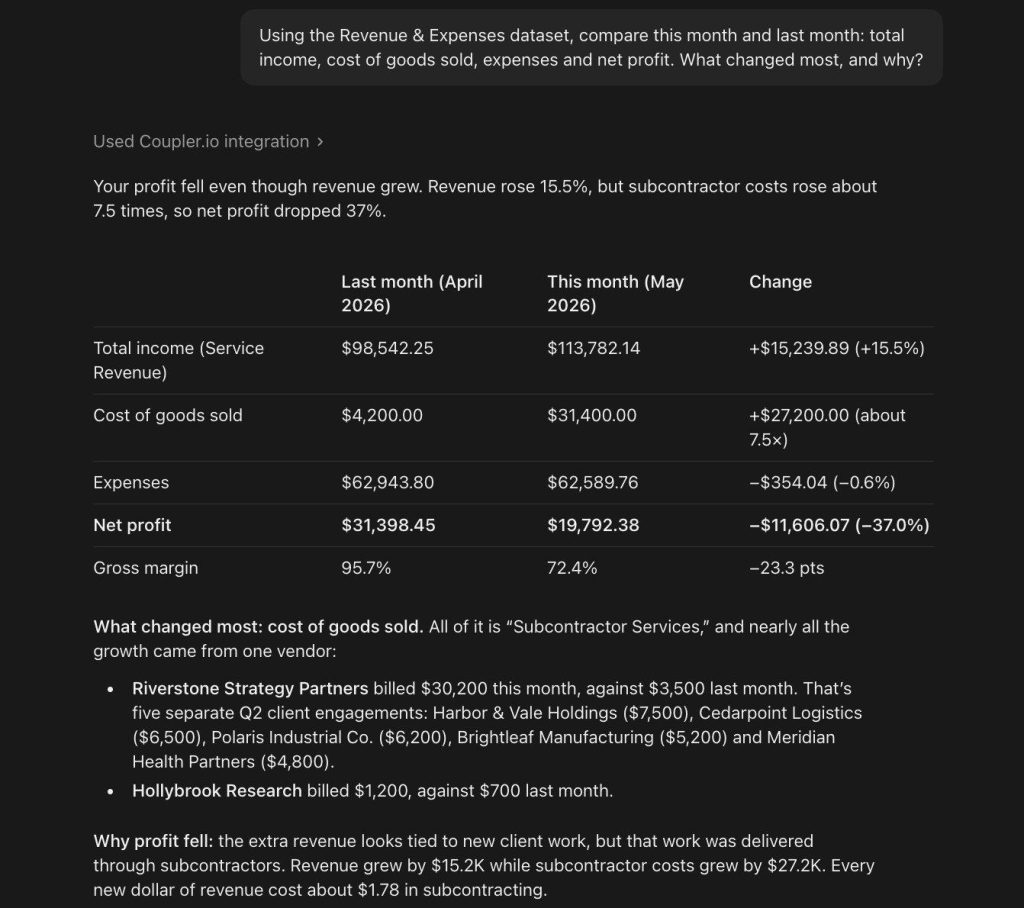
Every query Coupler.io runs is logged. If the $31,400 looks off, you can see exactly how it was calculated before it goes into a board deck.
Run your reports and AI on one set of numbers
Start a 7-day Coupler.io trialWhich servers to connect first
There’s no single winner among the best MCP servers for finance teams; the right set depends on where your data lives. Connect the app-level server for the system you act in most: NetSuite or Business Central for the ledger, Ramp or Brex for spend, Stripe for revenue.
When the questions start crossing apps, add Coupler.io as your financial MCP server for reporting. Coupler.io has 200K+ users and a 4.8/5 rating on G2 and 4.9/5 on Capterra. Start your free 7-day trial and blend your finance apps into one dataset your AI and your reports share.
FAQ
Are MCP servers safe for financial data?
They’re as safe as the permissions behind them. Pick a financial MCP server with OAuth, role-based access, and logging, start with read-only scopes, and turn on your AI client’s tool approval setting. For write actions, choose servers that require human confirmation, like Stripe for refunds.
With Coupler.io MCP, every query is logged. Coupler.io is SOC 2 Type II and ISO 27001 certified and compliant with GDPR
Which MCP servers for financial services are best for regulated firms?
Banks and regulated firms usually start with servers that run inside their existing governance: Snowflake for warehouse data, NetSuite or Business Central for ERP data. NetSuite, for example, says its AI Connector Service isn’t assessed for HIPAA.
Do I need a different MCP server for each finance app?
For actions, yes. For reporting and financial analysis across apps, one financial data MCP server like Coupler.io covers QuickBooks, Xero, Stripe, and your CRM together.
Can MCP servers give me real-time data?
App-level servers query the source when you ask, and market data servers like Alpha Vantage return current quotes depending on your plan. Coupler.io refreshes data on a schedule, which suits reporting and month-over-month comparisons.