Say you have a table of goods shipped to your store, and you only need the rows within a certain price range or set of dates. In BigQuery, that’s a job for the BETWEEN operator. It’s one condition in the WHERE clause instead of two separate comparisons.
A BETWEEN filter only helps once the data is actually in BigQuery. Most of the data people filter by date starts somewhere else. Ad spend lives in Facebook Ads or Google Ads, orders in Shopify, pipeline in HubSpot, and revenue in QuickBooks. Coupler.io moves data from 400+ sources into BigQuery on a schedule, so the tables you’re about to query keep themselves up to date. Everything below assumes you have a loaded table to work with.
How the BETWEEN operator works in BigQuery
The BigQuery BETWEEN operator checks whether an expression falls within a range of values. Due to the inclusive nature of this operator, it includes both the beginning and ending values of the range. The values may be of any kind, including text, numeric, date data, etc. This operator can be used in conjunction with the SELECT, WHERE, INSERT, UPDATE, and DELETE statements.
BigQuery BETWEEN syntax
This operator is most commonly used in conjunction with the WHERE command. The syntax for this is as follows:
SELECT column_name(s)
FROM table_name
WHERE column_name BETWEEN value1 AND value2- The
SELECTstatement indicates which columns are to be obtained. - Using the
FROMstatement, you may specify which table contains the columns you want to get. - The
BETWEENoperator is indicated in theWHEREclause. - The
column_nameargument represents the column where you want to apply the range condition for the start value and the end value.
BigQuery BETWEEN example with text values
Here’s a simple table with the name and price of goods to show how BETWEEN works.

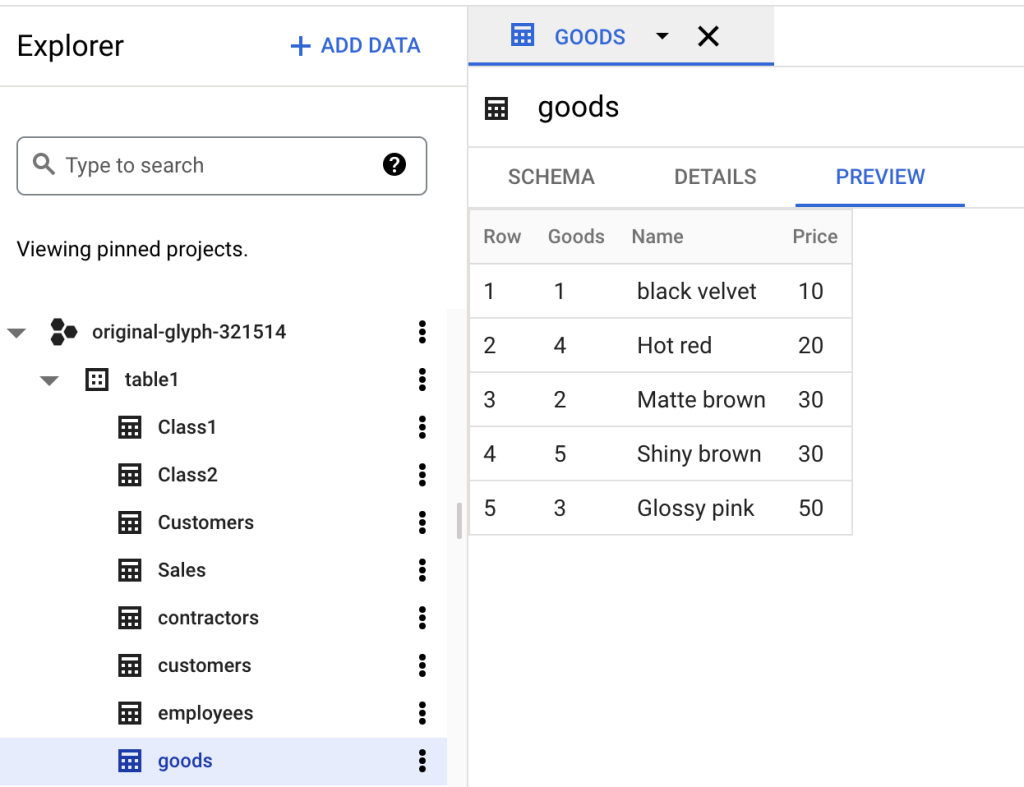
I’ll use BETWEEN to select all the names of goods between ‘Glossy Pink‘ and ‘Shiny Brown‘. BETWEEN returns all the names that fall within the range, including the specified names.
SELECT * FROM `original-glyph-321514.table1.goods`
WHERE Name BETWEEN 'Glossy pink' AND 'Shiny brown'

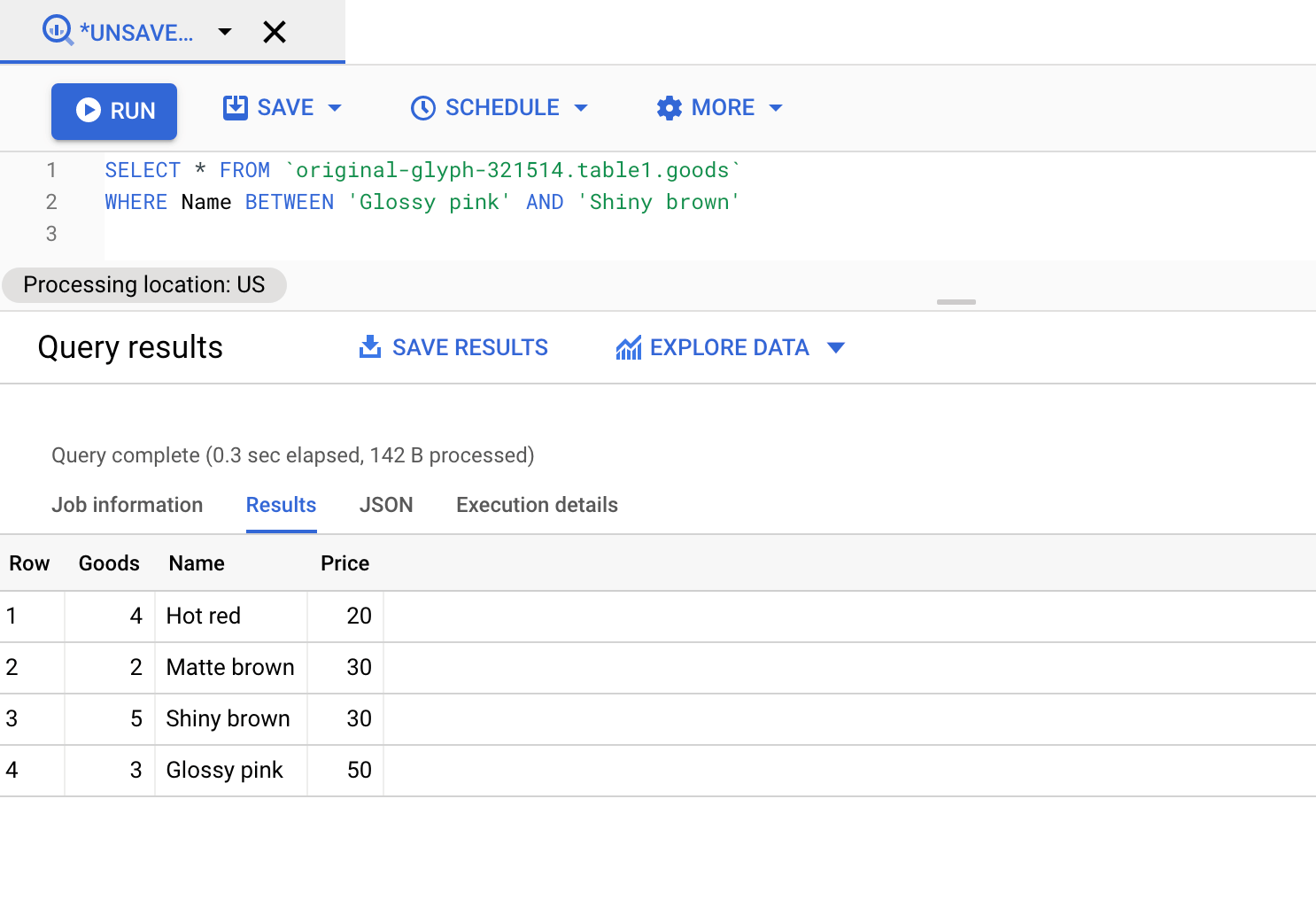
BETWEEN found the values within the range ‘Glossy Pink‘ to ‘Shiny Brown‘. It doesn’t return ‘black velvet‘ because alphabetically B comes before G and does not fall in the range of G to S. The next examples move on to dates.
BigQuery BETWEEN two dates
For the date examples, I used Coupler.io to load a Pipedrive dataset into BigQuery.
I picked Coupler.io for a practical reason. CRM data doesn’t sit still. Deals move between stages, close dates shift, and new records come in every day. If I had uploaded a one-time export, every date query below would describe the pipeline on the day of the export.
I set up the flow using the AI Agent:
Let Coupler AI do the data work for you
Tell Coupler AI what you need to know, from which source, and how often. It connects your account, sets up the data flow, keeps it refreshed, and lets you analyze the results inside Coupler.io or another AI tool.
Try for free
But you can also set it up manually. It takes three steps: connecting Pipedrive as the data source, formatting the data, and picking BigQuery as the destination. No Google Cloud console work, no Python, no ticket to the dev team.
You can blend several sources into one table before it lands in BigQuery, so you’re not writing JOINs to reunite data that arrived separately. Sending data to more than one destination within a single data flow is also possible.
Here are the records the flow pulled:

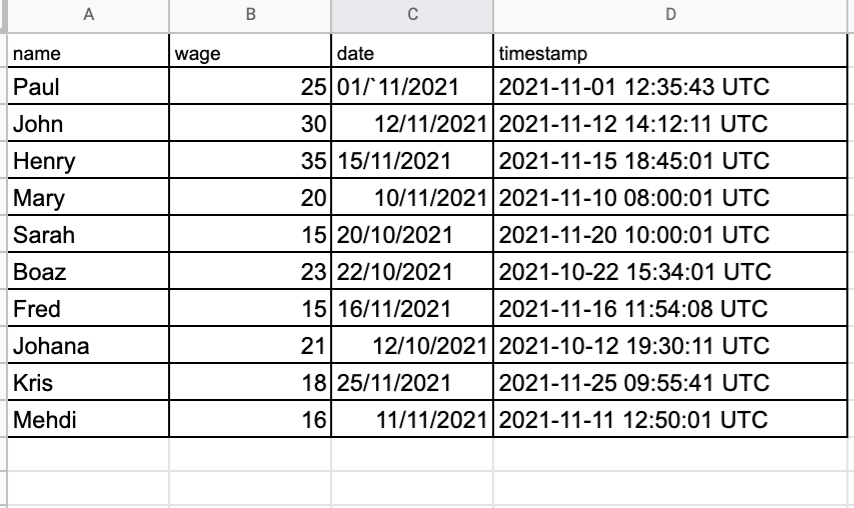
After the import, the table looks like this:

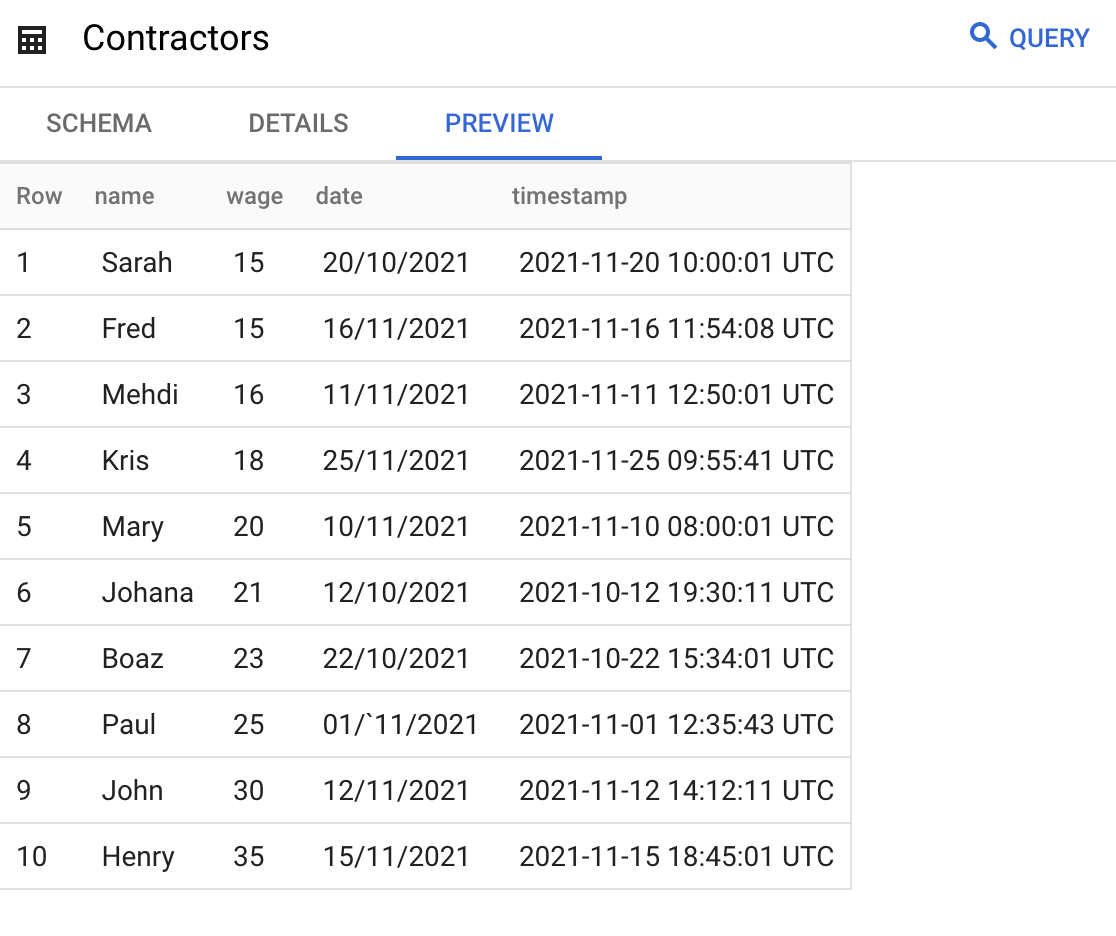
The imported table is the base for the next examples.
The statement below returns all dates between two dates I picked from the table.
SELECT date
FROM `original-glyph-321514.table1.contractors`
WHERE date BETWEEN '12/11/2021' AND '20/11/2021'

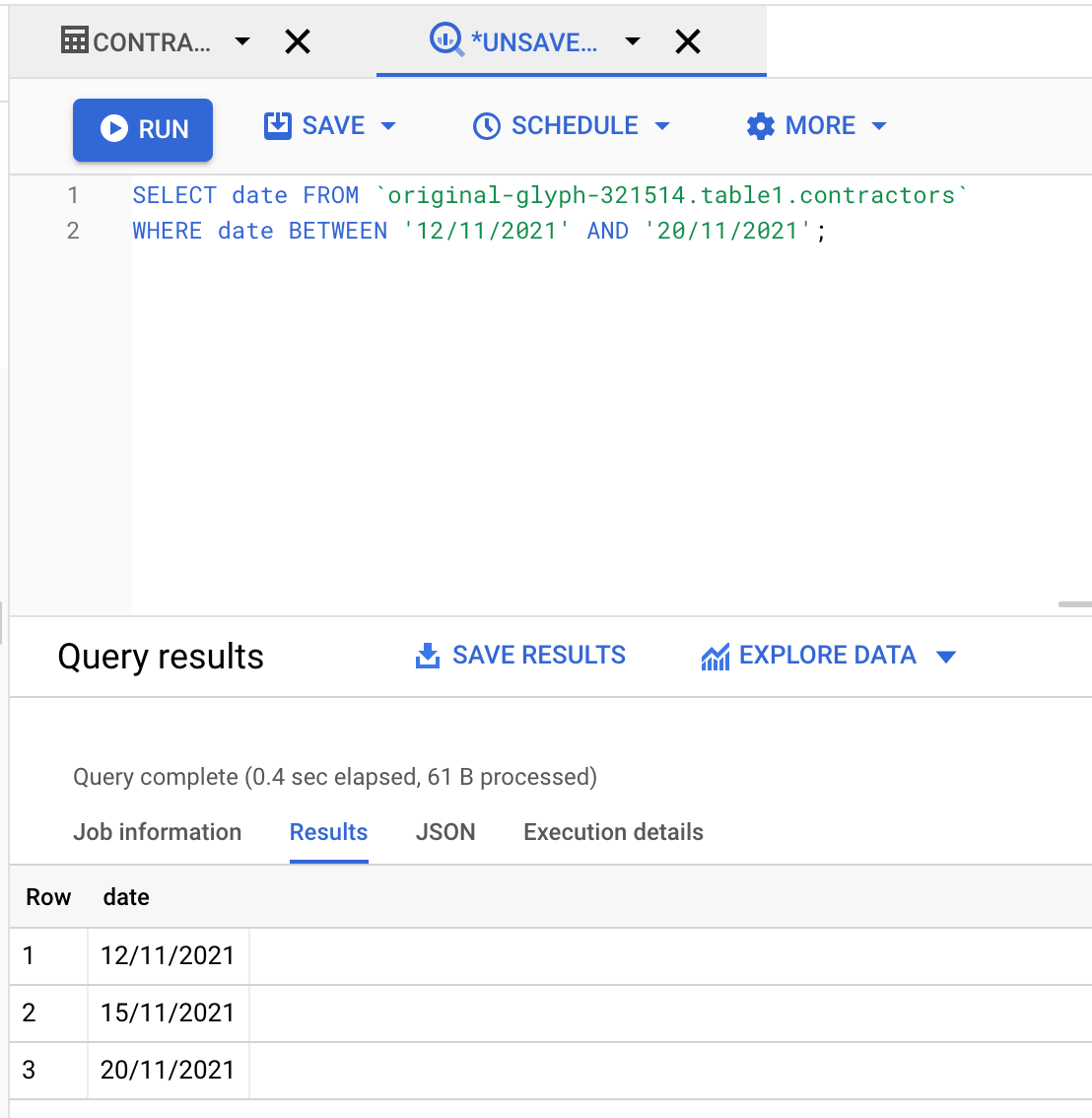
The result includes every date between the two specified dates.
💡 The most common real-world BETWEEN query is a date filter over ad spend, like campaign cost and conversions between the 1st and the 15th of the month. The catch is that ad platforms revise attribution after the fact. Your query is only as accurate as the table underneath it. Coupler.io refreshes BigQuery tables on a schedule, as often as every 15 minutes, and each refresh can re-import a rolling date range (say, the last 30 days). So when Facebook updates conversions for a campaign from two weeks ago, your table gets the new number.


Get up-to-date BigQuery data for every date range
Try Coupler.io for freeSQL BigQuery timestamp BETWEEN dates
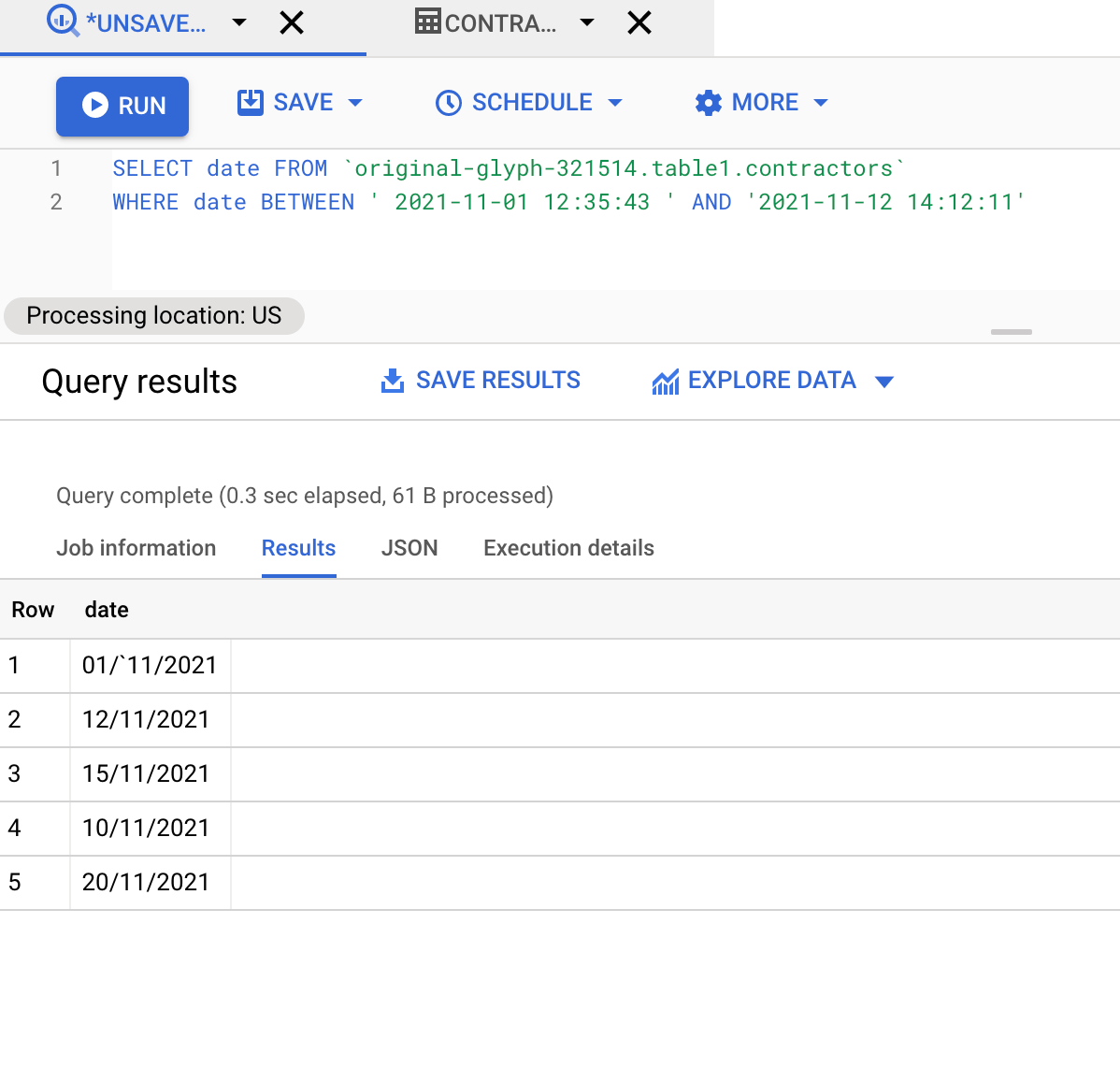
This example uses the same table and two timestamps: ‘2021-11-01 12:35:43‘ and ‘2021-11-12 14:12:11‘. Timestamps contain both the date and the time. Here, the goal is to extract only the date from the timestamp range, and BETWEEN handles it like this:
SELECT date
FROM `original-glyph-321514.table1.contractors`
WHERE date BETWEEN ' 2021-11-01 12:35:43 ' AND '2021-11-12 14:12:11'

💡 Date and timestamp filters behave most predictably when the column lands in BigQuery with the right type and name. Coupler.io lets you rename, filter, and reshape columns before the data reaches BigQuery.


For more complex cases, it also supports SQL transformations. Clean the column once in the data flow, and every refresh keeps it that way.
Google BigQuery BETWEEN dates inclusive
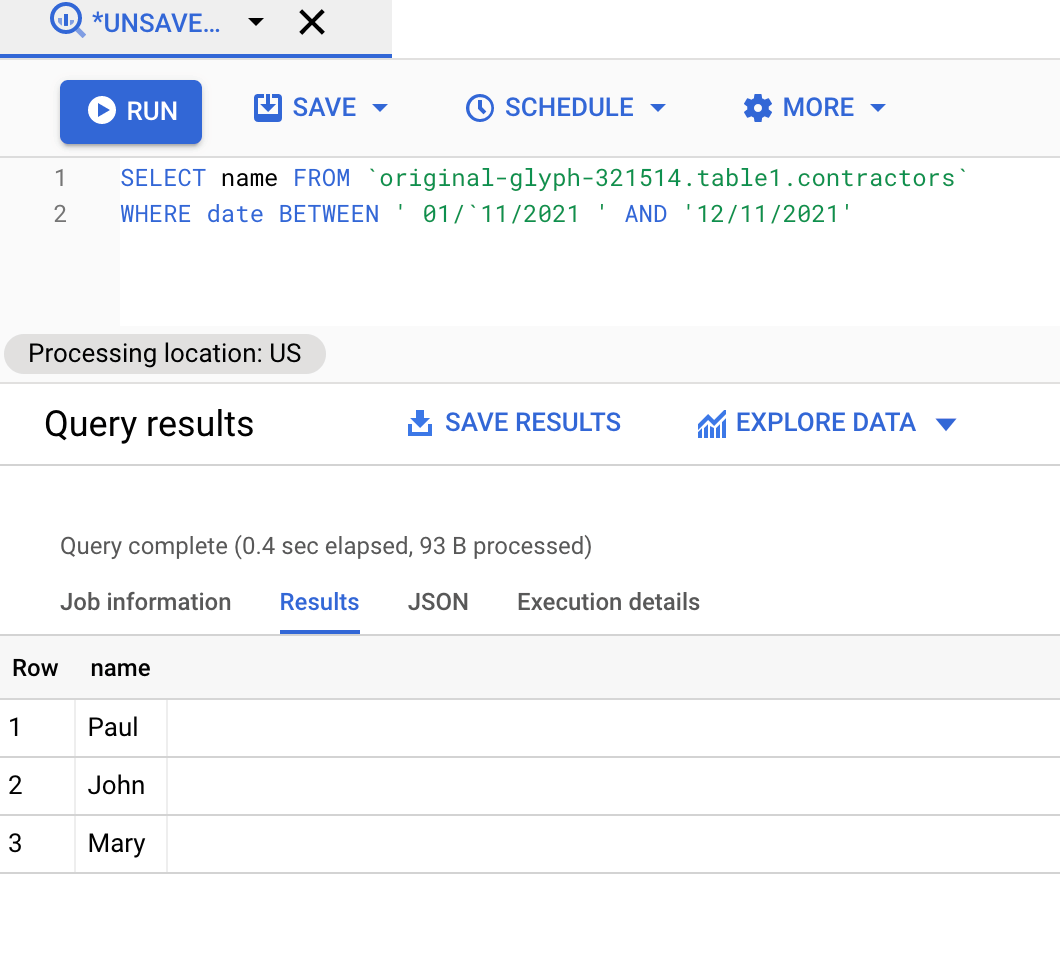
Both the start and finish values are included when using the BETWEEN operator. It is possible to use the BETWEEN operator to include or exclude values.
The query below returns dates between ‘01/11/2021‘ and ‘16/11/2021‘. BETWEEN includes the specified values in the result.
SELECT date
FROM `original-glyph-321514.table1.Contractors`
WHERE date BETWEEN '01/11/2021' AND '16/11/2021'

BigQuery range BETWEEN 2 dates
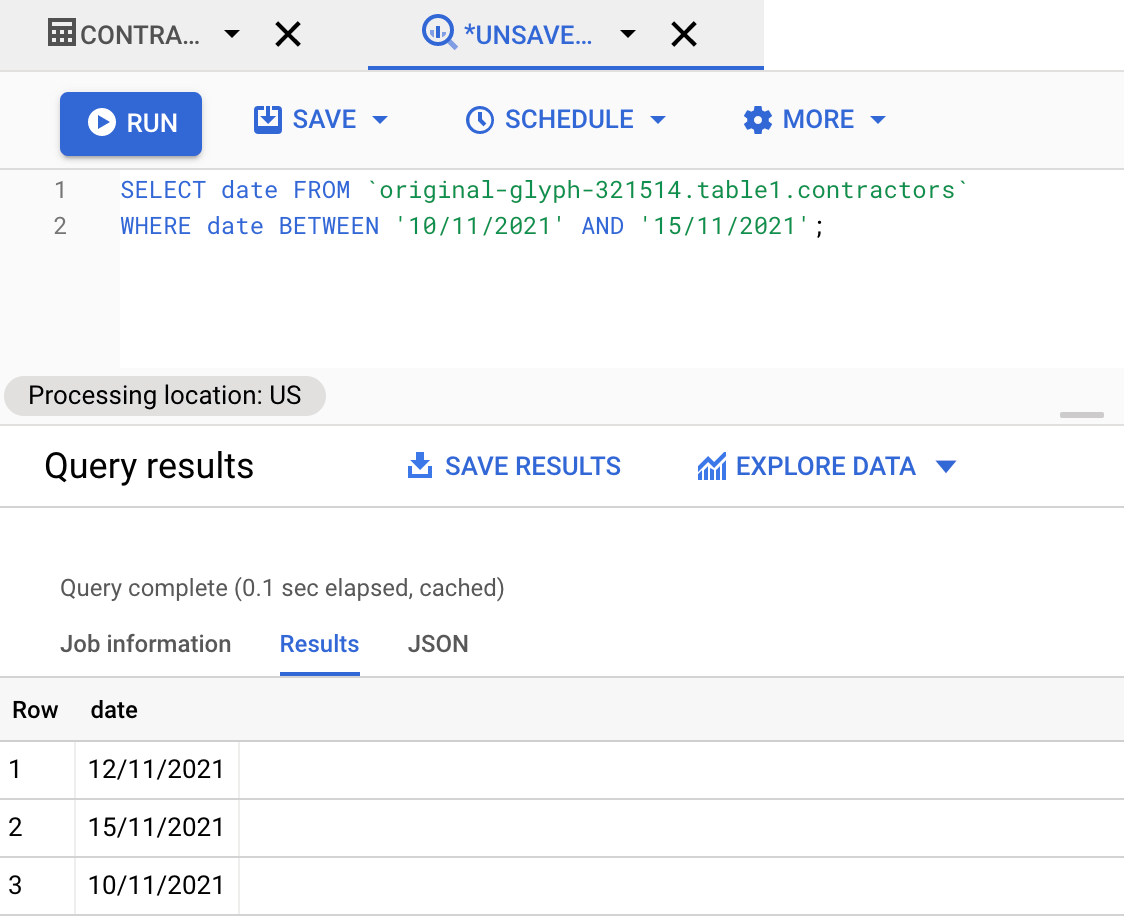
This example uses the same table. To get the range between ‘10/11/2021‘ and ‘15/11/2021‘, use the following statement:
SELECT date FROM `original-glyph-321514.table1.contractors`
WHERE date BETWEEN '10/11/2021' AND '15/11/2021'

Can I query between datasets for BigQuery?
For numerous tables or datasets, the BETWEEN operator is not immediately relevant. However, there are alternative methods to query datasets, such as combining the tables together and querying them using the JOIN clause. You can also query the two tables together using the UNION operator. Here’s an example.
BigQuery difference between 2 tables
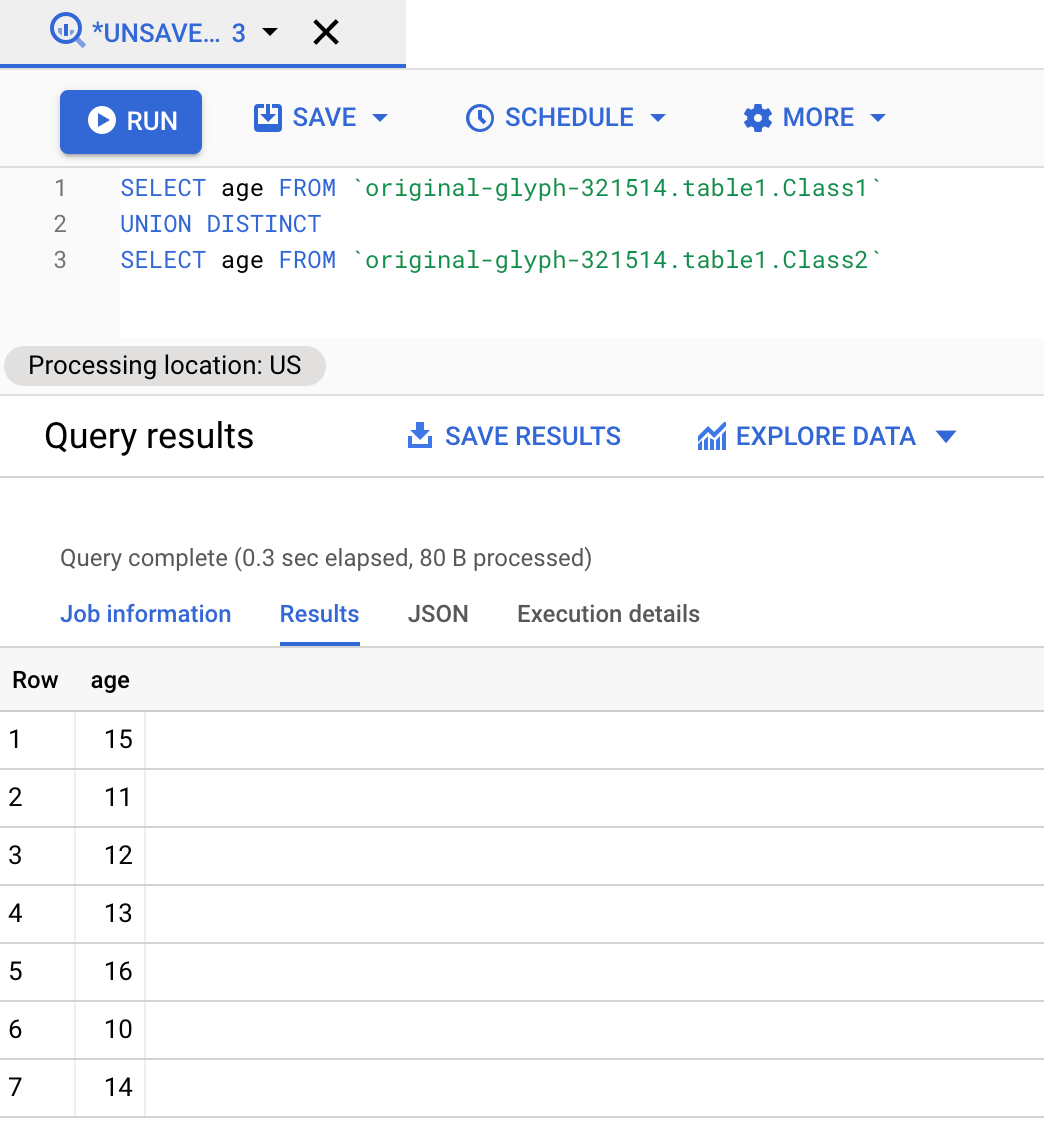
This example finds the difference between the values in two tables, ‘Class 1‘ and ‘Class 2‘, using the UNION DISTINCT operator. It compares the two tables and returns all the values except duplicates.
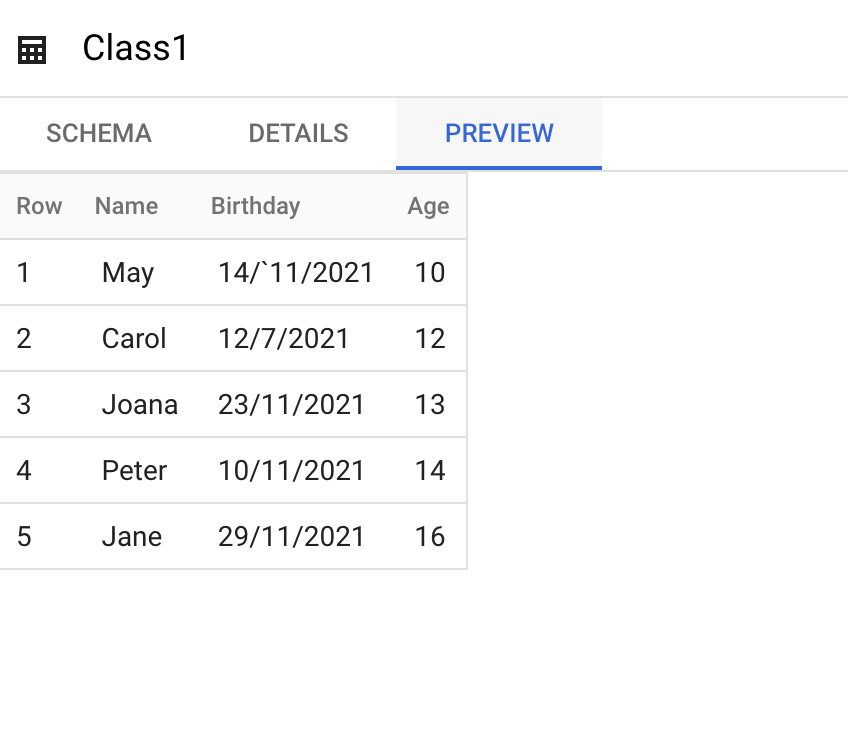
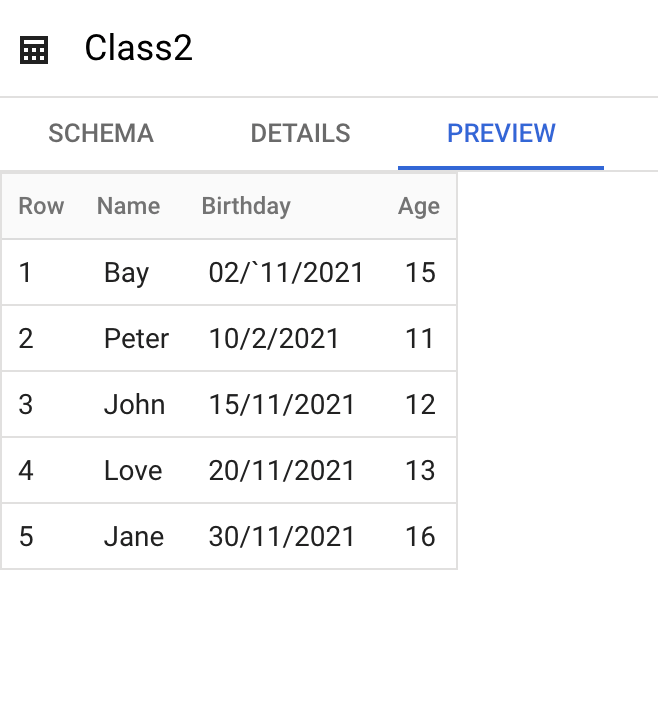
Here’s the UNION DISTINCT query for the ‘age‘ value in both tables:
SELECT age FROM `original-glyph-321514.table1.Class1`
UNION DISTINCT
SELECT age FROM `original-glyph-321514.table1.Class2`

A lot of cross-table work in BigQuery exists only because each source landed in its own table. Coupler.io joins and appends data from multiple sources during the import. Six ad platforms can arrive as one table with a shared date column, and a single WHERE date BETWEEN covers all of them.
Append fits tables with the same columns, like Class1 and Class2, or the same report from several ad accounts. Join fits sources that share a key, such as Pipedrive deals and QuickBooks invoices matched by customer. Either way, the combining happens before the data reaches BigQuery, so there’s no UNION to write each time.
Blend multiple sources into one BigQuery table
Try Coupler.io for freeBigQuery difference between 2 rows
This example calculates the difference between values in different rows, using this Production table:

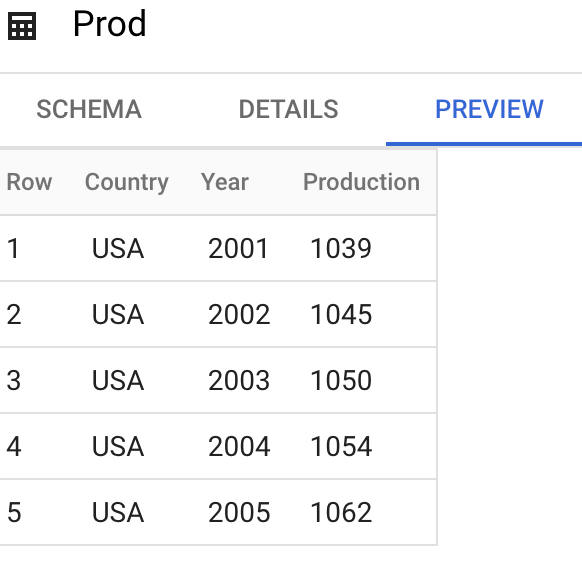
The table has a production value and a year for each row. To get the difference between the current and previous rows, order the data by year.
BigQuery offers the first_value , which returns the first row based on the order you provide. In this example, the order is ‘year‘.
Note: Each row that comes after the first_value is relative to the first row. Here is how it works:
SELECT
`original-glyph-321514.table1.Prod`.country,
       `original-glyph-321514.table1.Prod`.year,
       `original-glyph-321514.table1.Prod`.production,
`original-glyph-321514.table1.Prod`.production - first_value(`original-glyph-321514.table1.Prod`.production) OVER (ORDER BY `original-glyph-321514.table1.Prod`.year) AS diff_first
FROM   `original-glyph-321514.table1.Prod`
WHERE  `original-glyph-321514.table1.Prod`.country = 'USA'
LIMIT 10

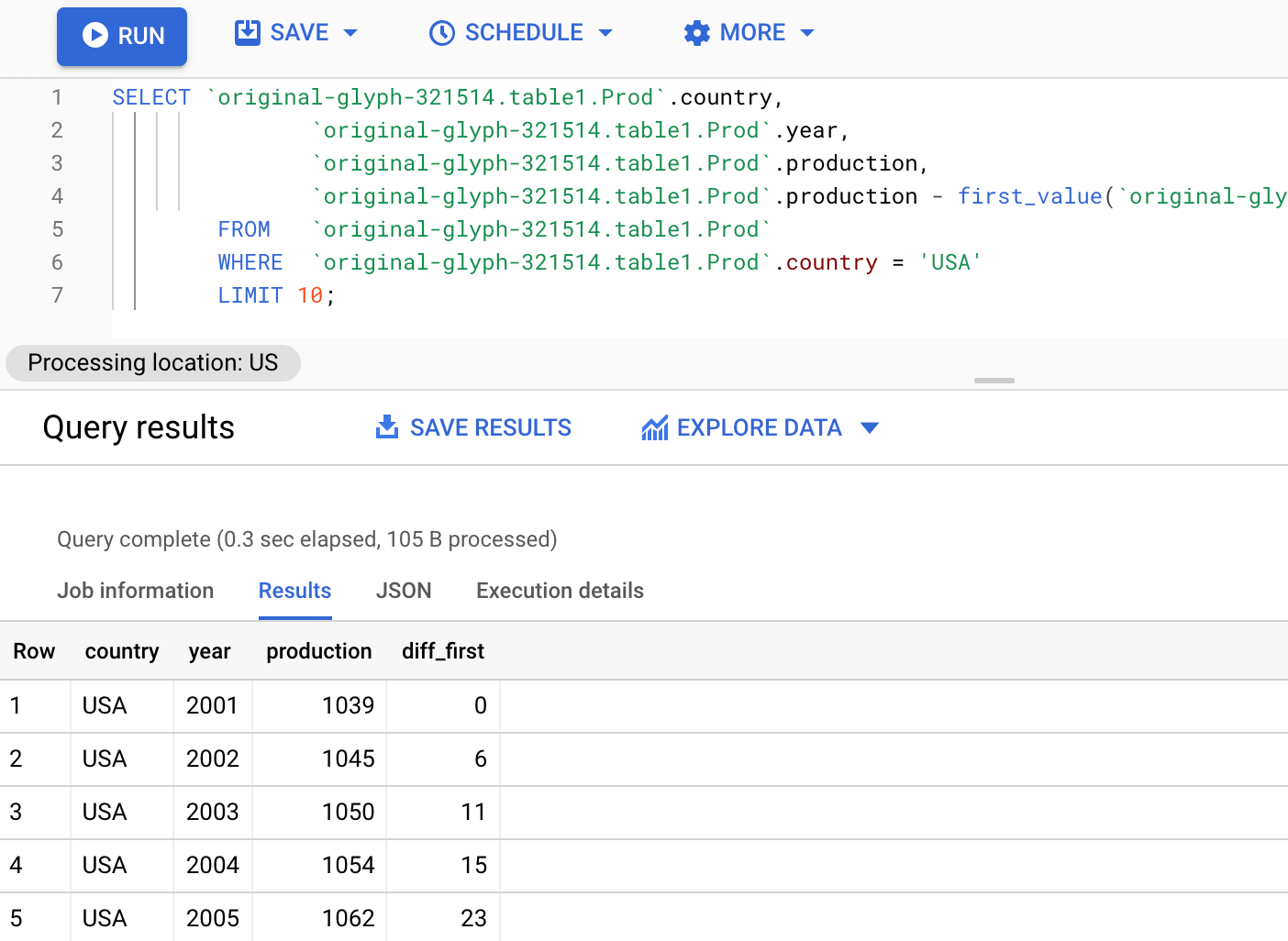
The first value BigQuery returns is 0. To check the results, do the math on the production values: for the next row, it’s ‘1045-1039 = 6‘ then ‘1050-1039 = 11‘ and so on.
Each row’s result is relative to the first-row value.
💡 Window functions like FIRST_VALUE get long quickly, and not everyone who needs the answer writes SQL. Coupler.io can send this BigQuery table to AI tools like Claude or ChatGPT. There, a teammate can simply ask, “Which year had the biggest increase in USA production?” and then follow up with “Is growth speeding up or slowing down?” Coupler.io’s Analytical Engine runs the calculation on the full table, and the AI explains the result. See how to connect BigQuery to Claude for the setup.
Pros and cons of the BigQuery BETWEEN operator
One of the primary limitations of the BETWEEN operator is that it cannot simultaneously query several databases and tables. Also, if you use the BETWEEN operator with any other data type, such as boolean, string value range, or date, you will get no result.
Aside from these limitations, the major benefits of the BETWEEN operator are:
- It is useful for making comparisons with the present timestamp.
- It enables you to set a test range.
- The SQL BETWEEN condition makes it simple to determine if an expression falls inside a specified range of values (inclusive).
From the BETWEEN operator syntax, you can customize your queries to retrieve the type of information that you need.
Keep the table behind your BETWEEN queries up to date
BETWEEN is a small operator that does a lot of work, as long as the table it filters is current.
That’s where Coupler.io fits. Use BigQuery as a destination: pull data from Facebook Ads, Google Ads, Shopify, HubSpot, QuickBooks, and 400+ other sources into BigQuery on a schedule, with transformations applied before the data lands. Or use BigQuery as a source: send your warehouse tables to Looker Studio, Power BI, Google Sheets, or to Claude and ChatGPT for analysis in plain language.
Pick your source in the form below and click Get started for free.

FAQ
Does BETWEEN work with dates in BigQuery?
Yes. BETWEEN includes both endpoints and works with DATE, DATETIME, and TIMESTAMP columns. Compare dates to date literals, not strings. WHERE date BETWEEN ‘2026-01-01’ AND ‘2026-01-31’ works on a DATE column. The same comparison on a STRING column sorts alphabetically and gives wrong results.
Can BETWEEN filter across two tables?
No. BETWEEN checks a single expression against a range within one query scope. To filter across tables, combine them first with JOIN or UNION, or load them into BigQuery as a single blended table.
How do I get data into a BigQuery table to query in the first place?
You can load files manually or use Google’s BigQuery Data Transfer Service, which mainly covers Google products and cloud storage. For everything else, Coupler.io pulls data from 400+ sources (ad platforms, ecommerce, CRM, accounting) into BigQuery on a schedule, with no code.
Load 400+ sources into BigQuery, or let Coupler AI set it up
Get started for free