Google BigQuery centralizes analytics, but results depend on how data pipelines ingest, transform data, and load data. BigQuery ETL tools standardize data integration, reduce schema issues, and improve data quality across datasets. Selecting the right solution depends on setup complexity, connector reliability, transformation depth, data freshness, pricing scalability, and governance needs. This guide compares five BigQuery ETL tools built for reporting, orchestration, replication, and warehouse-native ELT workflows.
Google BigQuery ETL tools: Table comparison
| Tool | Setup complexity | Connectors | Transformations | Pricing | Best for |
| Coupler.io | No-code | 400+ | Filter, sort, blend (append + join), aggregate, and manage fields | $24 | Marketing/ops reporting into BigQuery without engineers |
| Apache Airflow | Technical setup | Custom via Python | Python, SQL, dbt orchestration | $0 (self-hosted) | Data engineering pipelines with dependencies and custom logic |
| Hevo Data | Self-serve setup | 150+ | No-code + SQL, ELT/ETL patterns | $399/month | Near-real-time replication into BigQuery with low maintenance |
| Integrate.io | Low-code | 140+ | Visual builder + functions + optional Python | $1,999/month | Centralized, governed pipelines for cross-team warehouse loading |
| Fivetran | Low-code | 700+ | In-warehouse SQL transformations via dbt | Custom | “Set it and forget it” connector library with schema automation |
Top ETL tools for BigQuery
These 5 Google BigQuery ETL tools solve various problems. Some optimize speed to value for reporting teams. Others optimize reliability at scale through automation, orchestration, and governance.
1. Coupler.io
Coupler.io is a no-code ETL tool that automates data flows from 400+ business apps into BigQuery and other destinations. It fits teams that need fast setup, scheduled refresh, and light transformations before data lands in BigQuery for dashboards and ad-hoc SQL.

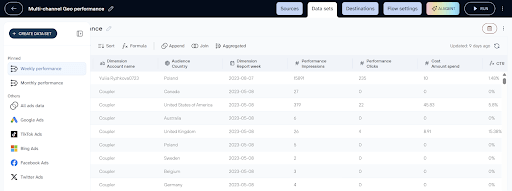
Extract capabilities:
Coupler.io collects data from business applications commonly used in analytics workflows, including sales platforms like Salesforce, marketing tools such as HubSpot and Google Analytics, finance systems like Xero and Stripe, and operational tools including Jira and Clockify. The platform is particularly strong in SaaS-heavy environments where data is distributed across multiple tools rather than centralized databases.
A key advantage is Coupler.io’s ability to unify and blend data from multiple sources before loading into BigQuery. Teams frequently consolidate multi-platform datasets such as Facebook Ads and Google Ads, extend pipelines with GA4 or Google Search Console for attribution analysis, or combine CRM systems like HubSpot with advertising data to measure ROI. Similar patterns appear in eCommerce stacks (Shopify + Ads + GA4/Klaviyo) and finance-oriented workflows (QuickBooks + Stripe + operational tools), where fragmented SaaS data must be merged into a single analytical dataset.
Transformation capabilities:
- Type: No-code
- Where transforms happen: Inside Coupler.io before BigQuery
- Transformation depth: Allows you to apply filters, add/hide/rename and format fields, join and append data from multiple sources, and aggregate data.
BigQuery load:
Coupler.io loads data into BigQuery using configurable write modes, allowing teams to choose between append and replace strategies depending on pipeline requirements. Append mode supports incremental updates that preserve historical records, while replace mode fully refreshes destination tables when complete dataset updates are needed.
Append-based loading fits naturally with reporting and analytics workflows, particularly when working with partitioned BigQuery tables. Queries remain fast, and scan costs stay lower because pipelines avoid repeatedly reprocessing unchanged BigQuery data.
Replace strategies, by contrast, are better suited to smaller datasets or scenarios that require full table recalculation.

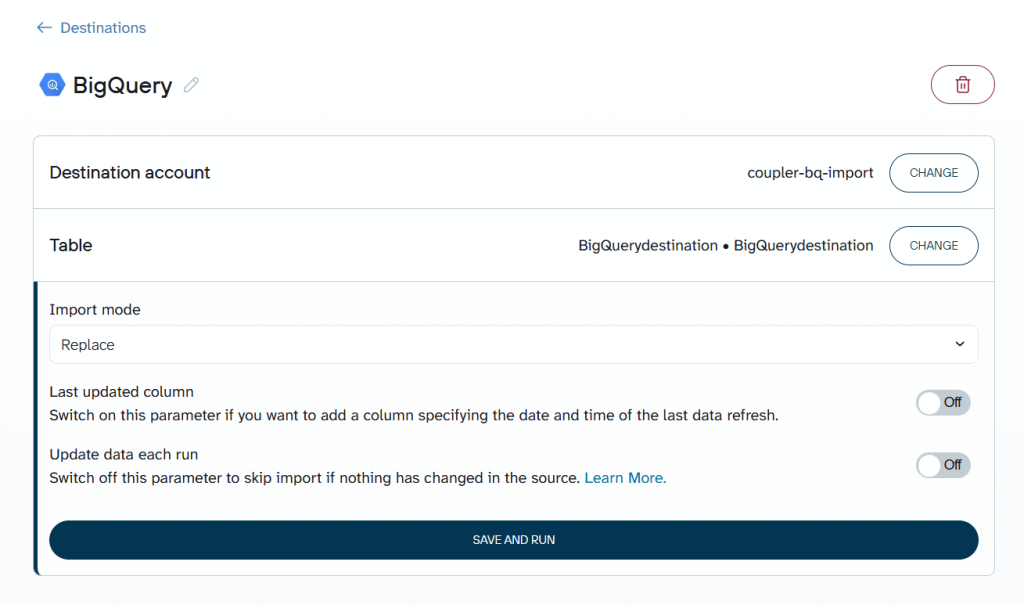
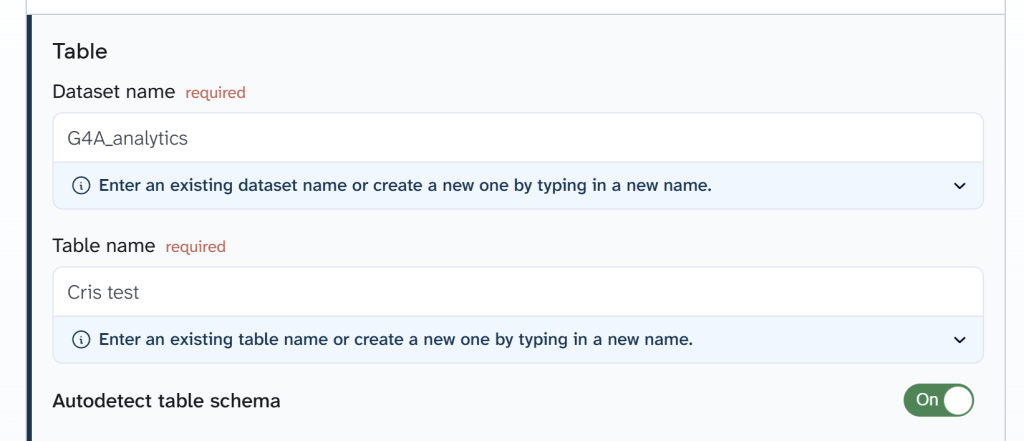
Coupler.io also supports automated BigQuery schema detection. When enabled, BigQuery infers column types dynamically during ingestion. This simplifies pipeline setup and reduces manual schema management. For teams requiring strict control, schemas can be defined manually using JSON to specify column names, data types, and field modes.

You can try it out right away for free with no credit card required. Just select the needed data source in the form below and click Proceed to create a new ETL data flow in Coupler.io:

Key features:
- 400+ BigQuery integrations and 15+ destinations, including Snowflake, Looker Studio, PostgreSQL, and more
- BigQuery is supported as both a destination and a data source (load data from BigQuery to BI tools for visualization or AI tools for analysis)
- No-code scheduling for automated pipelines
- Built-in transformations with real-time preview
- Multi-source unification (append and join)
- Webhook-based pipeline triggering
- AI capabilities (AI agent, AI integrations, and AI insights in dashboards)
Limitations:
- Limited fit for complex orchestration (multi-step dependencies, branching)
- Limited fit for heavy transformation/modeling without BigQuery SQL/dbt downstream
Pricing model:
Coupler.io uses an account-based pricing model, where you pay based on connected data source accounts, not users or BigQuery usage.
BigQuery as a destination does not affect Coupler.io pricing.
Once a source account is connected (Google Ads, HubSpot, Shopify, etc.), you can create unlimited pipelines loading data into BigQuery without additional Coupler.io charges.
Pricing starts at $24/month for unlimited sources, one chosen destination (in this case BigQuery), unlimited data flows, and daily refresh. The most popular plan is Active at $99/month, which offers up to 3 destinations and unlimited data volume.
BigQuery costs depend on storage and queries. Coupler.io supports cost-efficient BigQuery usage via:
- Incremental refreshes
- Selective field imports
This reduces expensive full-refresh patterns.
Who is it for?
Coupler.io fits best as the ETL layer for marketing and operations teams that consolidate data from multiple SaaS tools into BigQuery for unified reporting. The platform enables them to handle everything on their own without relying on data engineers.
The most common pattern is multi-channel ad reporting. Teams pull Facebook Ads, Google Ads, and additional paid channels like LinkedIn Ads, TikTok Ads, and Microsoft Advertising into BigQuery to build cross-platform performance dashboards. This workflow is especially prevalent among digital marketing agencies managing multiple clients or brands, where each account generates its own set of pipelines. Beyond paid ads, teams commonly extend their BigQuery pipelines with:
- Web analytics (GA4, Google Search Console) for attribution context
- CRM data (HubSpot, Salesforce, Pipedrive) for connecting leads to ad spend
- eCommerce stacks (Shopify + Klaviyo + ads) for end-to-end revenue analytics
- Financial tools (QuickBooks, Stripe) for invoicing and payment reporting
- Organic social sources (Instagram Insights, Facebook Page Insights, LinkedIn, TikTok, YouTube) for social media performance — a pattern common among media organizations and NGOs.
The typical Coupler.io + BigQuery team is a mid-size company or agency running 15–50+ dataflows with data visualization in Looker Studio or Power BI. These teams value fast setup, scheduled automation, and the ability to add new sources as reporting needs grow without managing infrastructure or writing code.
Fable Food represents this scenario in practice.
As the company expanded across multiple regions, critical operational and financial data became distributed across Fishbowl Inventory, MySQL databases, Xero entities, and regional systems. Reporting required manual exports, reconciliation work, and repeated consolidation efforts, slowing decision-making and increasing the risk of inventory and financial blind spots.
By automating data flows into BigQuery with Coupler.io, Fable established a centralized analytics layer powering live dashboards. The shift eliminated manual reporting bottlenecks and significantly improved operational visibility.
Outcomes included:
- Savings exceeding $60k per year in analytics workload
- Reduction of close-to-expired inventory by 2×
- Budget variance stabilized within 6–8%
Create automated ETL pipelines to BigQuery with Coupler.io
Get started for free2. Apache Airflow
Apache Airflow is an open-source orchestration platform for authoring, scheduling, and monitoring ETL/ELT workflows as code. It fits BigQuery teams that need complex multi-step pipelines, strict dependencies, retries, and production-grade operations across many systems.

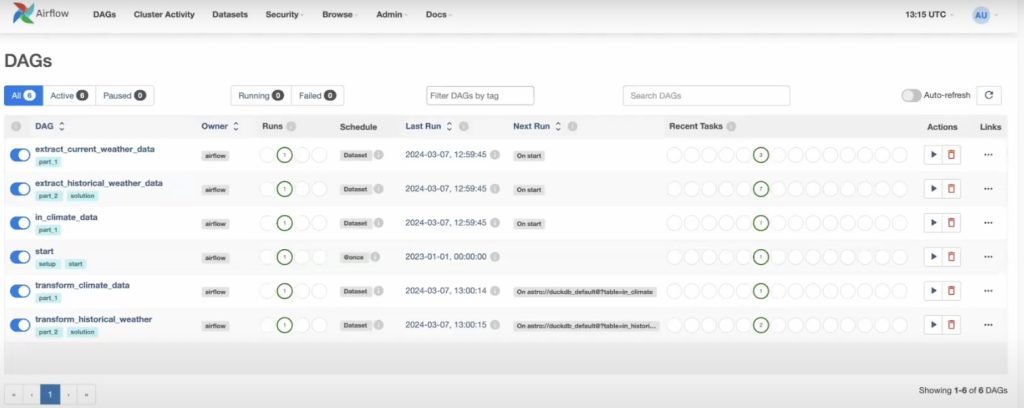
Extract capabilities:
Apache Airflow does not provide a native connector library like managed ETL tools. Instead, data extraction is handled through operators, hooks, and custom Python logic. Teams connect Airflow to APIs, databases, cloud storage, and internal systems using prebuilt integrations or custom code. Pipelines frequently rely on SDKs, custom plugins, or Java-based connectors when integrating proprietary systems or legacy Oracle environments.
This model is particularly strong in environments where pipelines pull from internal databases, proprietary systems, or sources requiring custom authentication and logic.
Transformation capabilities:
- Type: Python / SQL / dbt
- Where transforms happen: Pre-load or in-BigQuery
- Transformation depth: Unlimited flexibility via code
Airflow supports transformations through Python scripts, SQL queries, or downstream tools like dbt. This provides full control over logic, dependencies, branching, error handling, and conditional workflows.
The trade-off is operational complexity. Transformations require engineering expertise and pipeline maintenance.
BigQuery load:
Airflow loads data into BigQuery through operators that execute SQL jobs, load jobs, or custom ingestion logic. Pipelines commonly implement append, overwrite, or merge/upsert strategies depending on the workflow design.
BigQuery performance depends entirely on pipeline architecture. Efficient partitioning, incremental loads, and cost optimization require deliberate engineering decisions rather than tool defaults.
Key features:
- Python-based DAGs for explicit dependency management
- Scheduling, retries, error handling, and alerting patterns
- Large ecosystem of operators and integrations
- Works well with dbt and Spark as orchestrated tasks
- Web UI for monitoring, run history, and operational visibility
Limitations:
- Requires engineering expertise to build and maintain
- No built-in “managed connector” experience (you own connector reliability)
- Real-time processing requires streaming systems beyond Airflow itself
Pricing model:
Apache Airflow is open-source and free to use when self-hosted. Costs arise from infrastructure, maintenance, and operational management.
Managed Airflow platforms (Astronomer, Cloud Composer) introduce subscription-based pricing tied to compute resources and environment size.
BigQuery usage does not influence Airflow pricing but heavily influences warehouse costs depending on pipeline design.
Who is it for?
A data engineering team loads events into BigQuery, runs dbt models, validates KPI tables, and triggers downstream exports, while enforcing SLAs, retries, and audited backfills. They prioritize control, correctness, and repeatable releases.
3. Hevo Data
Hevo Data is a managed ETL/ELT platform designed for fast ingestion and real-time replication into BigQuery and other warehouses. It fits teams that want minimal maintenance, strong monitoring, and flexible transformation options across ETL and ELT patterns.

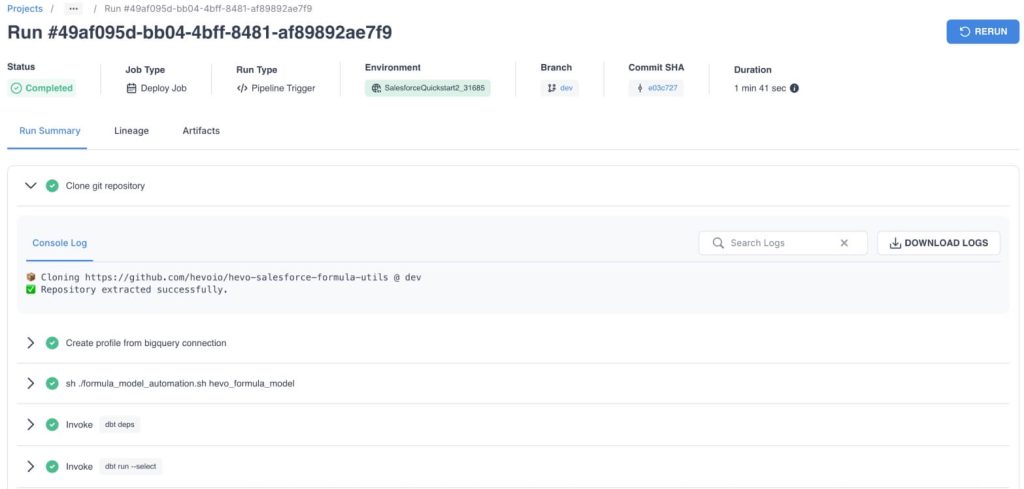
Extract capabilities:
Hevo Data connects to 150+ sources commonly used in analytics and operational workflows. This includes SaaS applications, relational databases, and event-stream systems.
The platform is particularly strong in environments requiring continuous replication from databases or systems where data freshness is critical. Compared to reporting-focused ETL tools, Hevo places greater emphasis on incremental syncing and change data capture (CDC).
Transformation capabilities:
- Type: No-code + SQL
- Where transforms happen: Pre-load or post-load (ELT)
- Transformation depth: Light shaping + SQL logic
Hevo supports transformations through a visual interface and SQL-based logic. Teams perform filtering, enrichment, mapping, and basic modeling either before loading or directly inside BigQuery.
This flexibility supports analytics workflows without requiring full engineering orchestration.
BigQuery load:
Hevo Data loads data into BigQuery using incremental updates and change data capture (CDC) pipelines optimized for continuous data capture and incremental syncing. Instead of repeatedly refreshing entire tables, pipelines sync only new or changed records.
This ingestion model aligns naturally with BigQuery cost efficiency by minimizing full-table scans and preserving partitioned table performance. It performs particularly well for fast-changing datasets and operational analytics workloads.
Key features:
- Real-time data sync with low-latency pipelines
- Monitoring, logging, and alerting designed for operational reliability
- Automatic schema detection and mapping
- ETL/ELT flexibility (transform during or after load)
- Broad connectivity across SaaS, databases, and event sources
Limitations:
- No on-prem deployment
- Transformation customization becomes constrained without a modeling layer for complex analytics use cases
- Usage-based pricing scales with data volume
Pricing model:
Free tier available for small workloads. Paid plans start at $399/month. Hevo Data uses a usage-based pricing model primarily driven by events and data volume.
BigQuery as a destination does not change Hevo pricing. Warehouse costs depend on BigQuery storage and queries.
Costs typically increase as:
- Data volume grows
- Sync frequency increases
- Event throughput expands
This model works well for dynamic workloads but introduces variability compared to fixed subscription tools.
Who is it for?
A mid-size company replicates Shopify, HubSpot, and Postgres into BigQuery in near-real-time to power daily ops and revenue dashboards. They require low-latency updates, minimal pipeline maintenance, and stable incremental syncing without managing infrastructure or orchestration workflows.
4. Integrate.io
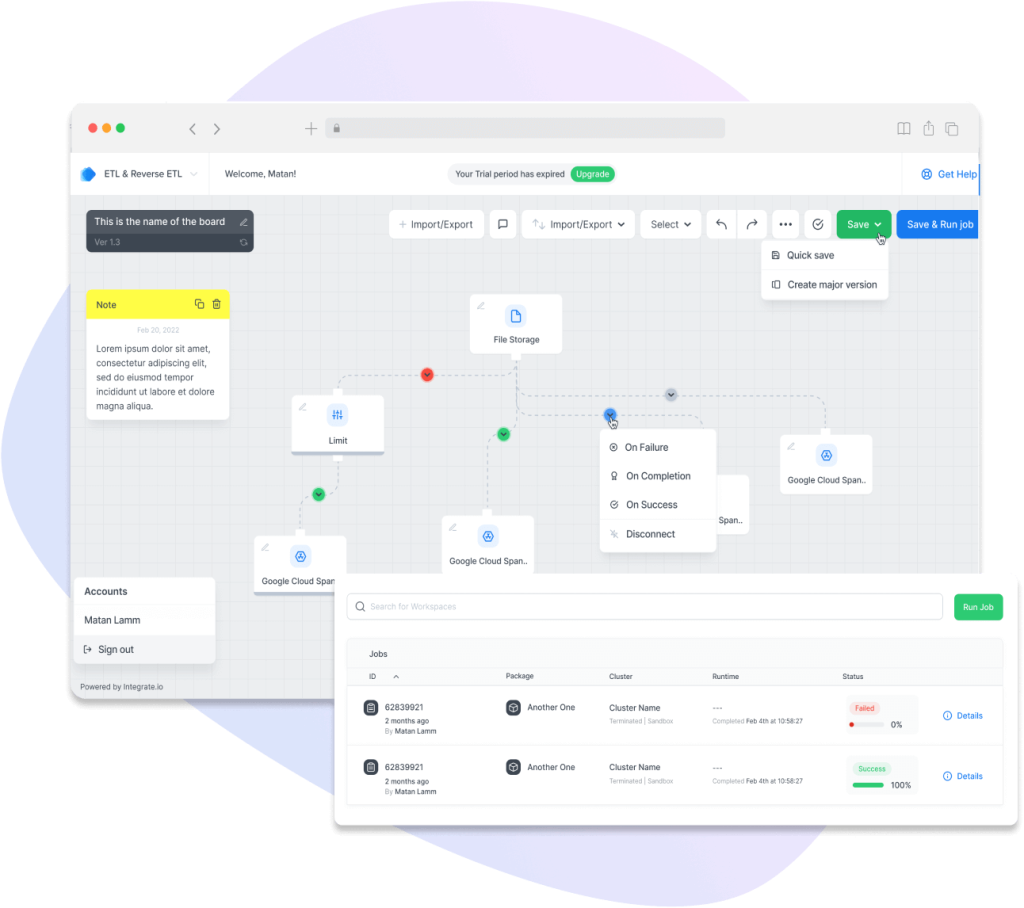
Integrate.io is a low-code ETL platform that moves data into BigQuery through a visual pipeline builder. It fits teams that want built-in transformations, monitoring, and a predictable fixed-fee pricing model for scaling ingestion across many sources.

Extract capabilities:
Integrate.io connects to 140+ sources spanning SaaS applications, databases, and cloud storage systems. The platform performs particularly well in mixed environments where pipelines combine business applications with structured databases.
Compared to connector-heavy ELT tools, Integrate.io emphasizes pipeline design flexibility rather than pure connector scale.
Transformation capabilities:
- Type: No-code visual builder + optional Python
- Where transforms happen: Pre-load ETL
- Transformation depth: Moderate shaping + custom logic
Integrate.io provides a visual transformation builder supporting filtering, mapping, aggregations, joins, and conditional logic. For more advanced needs, teams extend pipelines using Python.
This makes the platform suitable for structured data preparation and moderate complexity transformations before loading into BigQuery.
BigQuery load:
Integrate.io supports append, overwrite, and scheduled refresh patterns when loading into BigQuery. Pipelines are typically batch-oriented rather than CDC-driven.
BigQuery efficiency depends on pipeline design. Incremental loading strategies reduce scan costs, while repeated full refresh workflows increase query overhead for large datasets.
Key features:
- Drag-and-drop workflow builder for ETL pipelines
- Built-in transformations + optional Python for customization
- Monitoring and alerts for production pipelines
- Security features such as field-level encryption and data masking
- Webhooks/REST support for custom sources and event-triggered loads
Limitations:
- Limited real-time streaming compared to specialized CDC/streaming stacks
- Limited fit for advanced engineering orchestration across many dependent jobs
- Price point is high for very small teams or simple sync needs
Pricing model:
Integrate.io uses a fixed-fee pricing model starting at $1,999/month.
BigQuery as a destination does not influence pricing. Costs remain predictable regardless of data volume.
Pricing typically reflects:
- Platform access
- Pipeline complexity
- Enterprise features
This model favors cost predictability over usage-based scaling. This model favors cost predictability over usage-based scaling but introduces a higher entry point compared to reporting-focused ETL tools.
Who is it for?
An enterprise analytics team consolidates Salesforce, Shopify, MySQL, and custom REST API data into BigQuery. They need governed, auditable flows with masking for sensitive fields and predictable monthly spend.
5. Fivetran
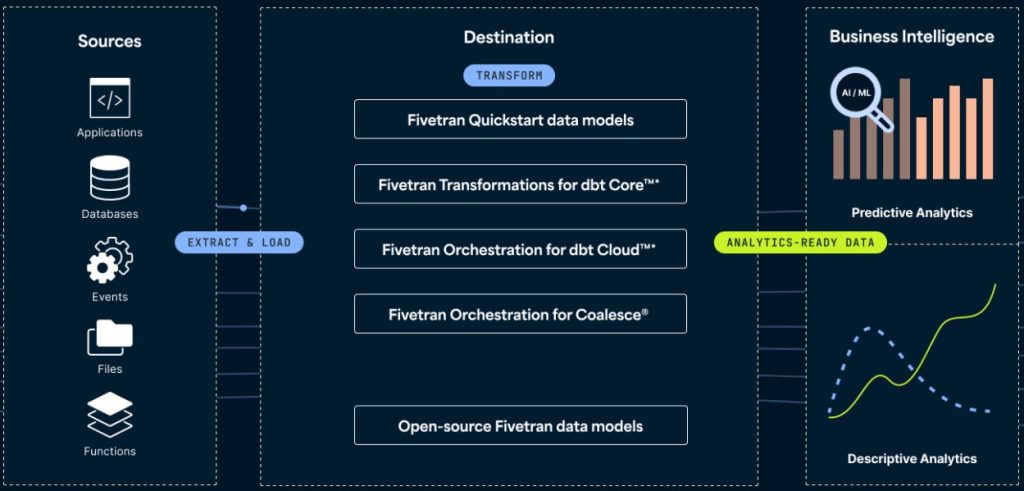
Fivetran is a fully managed ELT platform optimized for automated replication into warehouses like BigQuery. It fits teams that want “set it and forget it” connectors, automated schema management, and incremental syncing at scale, with transformations handled via dbt in the warehouse.

Extract capabilities:
Fivetran connects to various sources spanning SaaS applications, databases, and event-driven systems. The platform is particularly strong in connector breadth and database replication scenarios, especially when pipelines require stable, continuously maintained integrations.
Compared to ETL-focused tools, Fivetran emphasizes automated extraction and replication rather than transformation logic.
Transformation capabilities:
- Type: ELT (SQL / dbt downstream)
- Where transforms happen: Inside BigQuery
- Transformation depth: Warehouse-native modeling
Fivetran follows an ELT architecture where raw data loads first, and transformations occur directly in BigQuery using SQL or dbt.
This approach aligns naturally with BigQuery’s separation of storage and compute, enabling scalable analytical modeling while preserving pipeline simplicity.
BigQuery load:
Fivetran loads data into BigQuery using incremental updates and change data capture (CDC), depending on the source type. Pipelines sync new or modified records rather than refreshing entire datasets.
The model supports BigQuery performance by minimizing full-table reload patterns and automatically adapting to schema changes, a critical factor in large-scale warehouse environments.
Key features:
- Fully managed connector maintenance
- Automated schema drift handling
- Incremental and CDC-based syncing
- Native BigQuery warehouse integration
- Minimal operational overhead
Limitations:
- Limited transformation layer without dbt (ELT-first approach)
- Pricing scales with usage and connector volume
- Limited flexibility for highly customized pipelines
Pricing model:
Fivetran uses a usage-based pricing model driven primarily by Monthly Active Rows (MAR).
BigQuery as a destination does not affect pricing. Warehouse costs depend on BigQuery storage and queries.
Costs scale with:
- Data volume
- Row activity
- Connector behavior
This model performs well for scalable workloads but introduces cost variability as pipelines grow.
Who is it for?
A data or analytics team centralizes large volumes of SaaS and database data into BigQuery while prioritizing pipeline reliability and automation. The team transforms data directly inside BigQuery using SQL or dbt and prefers a “set-and-forget” ingestion layer with minimal connector maintenance.
Fivetran fits environments where warehouse-centric analytics and schema stability dominate architecture decisions.
Common mistakes when choosing BigQuery ETL tools
BigQuery pipelines rarely fail because of missing features. They fail because of mismatched assumptions. These are the 6 mistakes that repeatedly break BigQuery implementations.
Choosing a tool that your team can’t realistically operate
Many teams evaluate Google BigQuery ETL tools by capability rather than operability. Pipelines require monitoring, schema adjustments, refresh management, and data cleanup. When a tool demands skills the team doesn’t possess, automation degrades into manual intervention.
Two common mismatches appear frequently:
- A no-code tool gets selected, but pipelines require complex dependencies, branching logic, retries, and backfills.
- A technical orchestration platform gets selected, but nobody owns DAG maintenance, infrastructure, or incident response.
Bulungula Incubator faced exactly this challenge. Their internal data management system depended on heavy manual data transfers across siloed platforms. Data movement became time-intensive, error-prone, and operationally disruptive.
After implementing automated data workflows into BigQuery with Coupler.io, the organization reduced analytics, data cleaning, and reporting time by 70%, saving approximately two full weeks of manual data work per month.
The outcome illustrates a critical principle: the best ETL tool is the one your team can sustain daily, not the one with the longest feature list.
Automate your data workflows with Coupler.io
Get started for freeOptimizing for connector count instead of connector fit
Connector libraries look like a safety metric. In reality, most teams actively use 5–12 data sources. Reliability depends on connector maturity, incremental sync support, schema drift handling, and API stability, not raw quantity.
What goes wrong:
- Teams overpay for breadth they never use.
- Critical connectors lack incremental loading and default to full refresh.
- Schema drift handling is inconsistent, breaking downstream models.
Decision filter
Validate your top 10 production sources only. Confirm three behaviors:
- Incremental strategy
- Schema evolution logic
- Rate-limit and retry behavior
Connector quality directly determines pipeline stability. This becomes especially visible in GCP environments where pipelines interact with Cloud Storage, Dataflow jobs, or API-driven ingestion patterns.
Underestimating transformation and data preparation effort
ETL tools do not simply transform data; they standardize metrics, resolve schema conflicts, and maintain downstream data quality. Raw ingestion rarely produces analytics-ready datasets. Field inconsistencies, duplicated records, naming conflicts, and missing attributes introduce reporting errors.
What goes wrong
- Teams assume ingestion equals usability.
- Cleanup logic becomes fragmented across SQL queries and dashboards.
- Full refresh transformations repeatedly scan large tables.
Decision filter
- Use upstream ETL transforms for light shaping (naming, typing, filtering, joins).
- Use BigQuery ELT (SQL/dbt) for reusable analytics logic designed around incremental patterns.
Transformation placement drives both cost efficiency and data reliability.
Paying for real-time pipelines without real-time decisions
Real-time replication is technically impressive and financially expensive. Many BigQuery workloads operate on daily or hourly decision cycles. Overengineering freshness inflates cost and complexity without improving insight quality.
What goes wrong:
- Low-value datasets refresh every 15 minutes.
- Teams fund latency nobody queries.
- Late-arriving data creates inconsistent metrics.
XRay.Tech built an internal time-tracking system using Google Calendar and Airtable. Their requirement was not streaming analytics but reliable automated ingestion into BigQuery for analysis and billing optimization.
They chose Coupler.io as their ETL connector and managed to automatically move structured event data from Airtable into BigQuery on a schedule.
A single scheduled pipeline enabled deep workload analytics while saving nearly 50 minutes per client on billing workflows.
Freshness strategy must align with decision frequency.
Decision filter
Define freshness per dataset:
- Executive reporting → 24h
- Operational dashboards → 1–4h
- Alerting / automation → 5–15 min
Not every dataset requires low latency.
Connect over 400 data sources to BigQuery with Coupler.io
Get started for freeChoosing pricing based on entry cost instead of scaling behavior
BigQuery ETL costs rarely come from a single source. They emerge from the interaction between the ETL tool’s pricing model and BigQuery’s compute and storage behavior. Many teams optimize for entry price and underestimate how costs evolve as pipelines scale.
Usage-based tools often appear affordable early on but increase as data volumes grow. Fixed-fee tools may look expensive initially yet remain stable as workloads expand. The most common hidden cost driver is inefficient loading, particularly full refresh pipelines that repeatedly scan large BigQuery tables.
What goes wrong
- Usage-based tools spike as row/event volume increases.
- Fixed-fee tools look expensive early but become cheaper at scale.
- Full refresh loads inflate BigQuery compute costs.
Decision filter
Estimate the expected rows or events processed per day, dataset refresh frequency, and transformation intensity. Then compare tools based on their actual pricing drivers, such as accounts, rows or events, connectors, and compute usage. Predictability matters more than entry price.
Which BigQuery ETL tool fits your stack?
BigQuery ETL tool selection is not a feature comparison exercise. It is an operational design decision. The tool that performs best is the one your team can set up, maintain, and scale without outgrowing it or underusing it.
A practical way to narrow the choice is to start from your team’s reality:
Start with who operates the pipeline. Most teams loading data into BigQuery are marketing analysts, ops managers, or data analysts — not data engineers. If that describes your team, Coupler.io lets you go from source to BigQuery dashboard without writing code or managing infrastructure. Engineering-heavy teams with complex dependency chains and custom logic may need Airflow’s flexibility, but that comes with significant maintenance overhead.
Then match the tool to your dominant data pattern. If your core workflow is consolidating SaaS data (ad platforms, CRM, analytics, eCommerce, or financial tools) into BigQuery for reporting, Coupler.io covers that with 400+ connectors and built-in data blending. For database-heavy environments requiring real-time CDC replication, Hevo Data or Fivetran are stronger fits. For multi-step orchestration with strict SLAs, Airflow gives you full control.
Finally, project costs at scale, not at entry. Coupler.io’s account-based pricing stays predictable as you add pipelines and dataflows. You pay per connected source account, not per row or event. Usage-based tools like Fivetran and Hevo can start lower but grow unpredictably as data volumes increase. Model your expected growth over 12 months before committing.
For most marketing and operations teams, the fastest path to reliable BigQuery reporting is a no-code ETL tool that handles extraction, light transformation, and scheduled loading in one workflow.