BigQuery for ecommerce puts your Shopify orders, refunds, and ad spend in one place, so you can query them together. Shopify shows what you sold, but it can’t show what that sale cost you after ad spend and refunds, or whether the buyer came back. Those are Shopify analytics limitations, and pasting orders next to ad spend in a sheet stops being sustainable around the second store.
Below are six decisions that need that data, from ad budgets to reorders. Each comes with the tables it needs and SQL you can copy, built on the Shopify tables you load into BigQuery with Coupler.io.
Key takeaways
- BigQuery for ecommerce pays off when you need to compare several stores or channels, see LTV by cohort, or run three or more ad platforms off one view. If you run one store, one or two ad channels, and don’t need history questions, stay in Sheets.
- Coupler.io loads Shopify, your ad platforms, and other stores into BigQuery with no code and refreshes on a schedule you set.
- SQL is optional. Every decision ends with a plain-language question for Claude, ChatGPT, Gemini, or the AI Agent, and Coupler AI can save the preparation as a reusable SQL transformation.
- For a 1,800-order/month store, storage and queries typically fit inside BigQuery’s free monthly tier. Coupler.io plans start at $24/month billed annually.
What can I do with Shopify data in BigQuery? The case for BigQuery for ecommerce Shopify brands is six recurring decisions made on your own numbers: which channel pays back, which products to reorder or drop, whether discounts buy repeat customers, what to pay per customer, which store gets the next dollar, and how this season compares with last.
- Which channel actually pays back? Weekly ad-spend allocation across Meta, Google, and TikTok.
- Which products to reorder, mark down, or drop? Reorder-point and markdown decisions by SKU.
- Are discounts buying loyal customers or one-time buyers? Repeat-rate by discount code.
- How much can we pay to acquire a customer? CAC ceilings from LTV, by channel.
- Which store or sales channel gets the next dollar? Budget and inventory split across stores and marketplaces.
- How does this season compare with last? Year-over-year by product, channel, and store.
Each one is a question your team already asks on a regular cadence, and the SQL and plain-language versions for both are below.
Before SQL: the tables you’ll use
These tables are the core of a Shopify data warehouse for a 1–50 person brand, and every query below uses them. Treat the list as a checklist: the first column is what you select in Coupler.io, and the last one shows which decision needs it. You only need the rows for the decisions you care about.
| Select in Coupler.io | What’s in it | Needed for |
|---|---|---|
| Orders | One row per order: totals, discounts, tax, shipping, discount codes, landing page | Decisions 1, 3, 4, 5, 6 |
| Orders refunds transactions | Refunded amounts by date | Decisions 1, 4, 5, 6 |
| Orders with line items | One row per product in an order | Decision 2 |
| Orders with refunded items | Refunded units by variant | Decision 2 |
| Products with variants | Catalog at variant (SKU) level | Decision 2 |
| Inventory | Stock on hand by variant | Decision 2 |
| Facebook (Meta) Ads, Google Ads, TikTok Ads | Daily ad spend, appended into one table | Decisions 1, 6 |
For example, to answer only Decision 1 (which channel pays back), you need Orders, Order refunds transactions, and your ad spend.
To load the tables, connect your Shopify account in Coupler.io, select the entities from the first column, and set a schedule. Add Facebook Ads, Google Ads, and TikTok Ads as sources in one data flow and append them, so spend lands in a single table with date, channel, and spend columns. And you don’t need to do this yourself. Just ask the Coupler AI agent to do the setup. Here is what I got in the end.

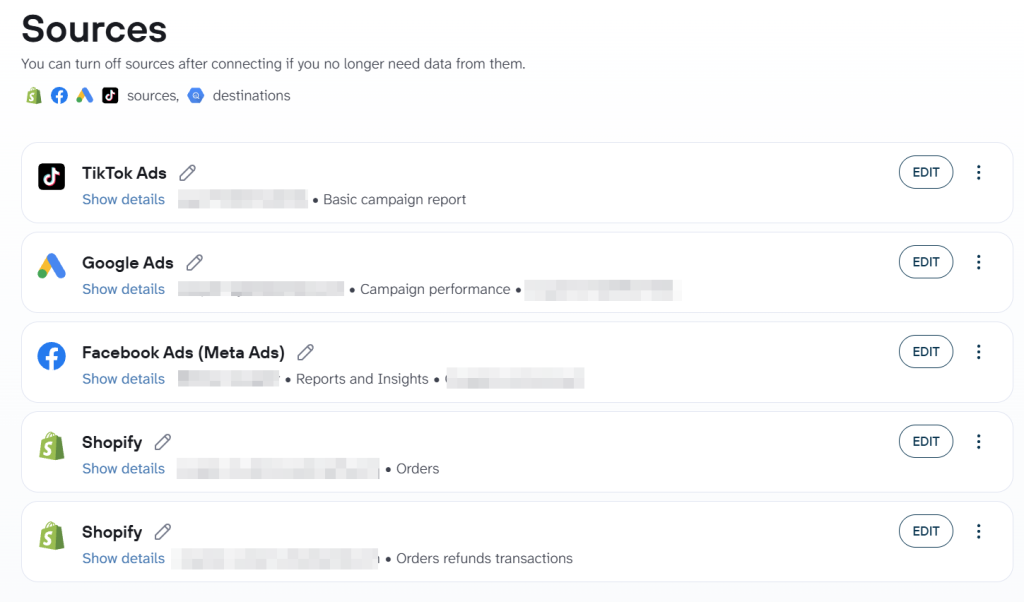
Coupler.io builds the tables in Google BigQuery on the first run, and the first sync pulls your full Shopify order history (within your plan’s data volume).
Because Coupler.io bills by source account, one Shopify account powers every table in this article, and BigQuery is a destination on every plan. Fable Food, a mushroom-based meat alternatives brand running across Australia, the UK, and the US, uses this same setup. Coupler.io loads their business apps into BigQuery on a schedule, with reporting and AI layered on top. This saved them $60k+ a year on data analytics while holding paid-media budget variance to 6–8%.


Discuss how you can optimize your data reporting with Coupler.io
Book a demoIf you don’t write SQL, you can skip the code blocks: every decision ends with a plain-language question you can ask AI over the same tables. If you do, every block follows the same rules, so any one of them works on its own:
- Replace
your_projectwith your Google Cloud project ID before running a block. - Net revenue means order revenue after discounts, minus refunds, excluding tax and shipping.
- Each block opens with a comment naming the question, tables and definitions, and sets its date range with DECLARE at the top.
- Queries are BigQuery standard SQL, built from CTEs with a one-line comment each, and every rate uses
SAFE_DIVIDE.
All example numbers come from one illustrative brand: a two-store skincare brand (US and UK) with 9 people, selling through Meta, Google, and TikTok, at about 1,800 orders a month and a 68% gross margin.
Prefer plain language over SQL? Ask Coupler AI over the same tables
Every decision below ends with a plain-language question. Coupler.io AI integrations send the same Shopify data to Claude, ChatGPT, Gemini, and other AI tools, so you can ask Claude or ChatGPT about your store. If you’d rather not leave Coupler.io, the Coupler AI Agent answers the same questions inside it. In the same conversation, it can also set up or extend the data flow that loads your next source into BigQuery.
In the Data Set view, add a description to any column whose meaning isn’t obvious. For net_revenue: “Order revenue after discounts, minus refunds. Excludes tax and shipping.” Now the AI reads net revenue as net.
The AI gets the schema and your definitions, and the calculations run outside the model, so a net ROAS figure is computed rather than guessed.
If you make the same decision every week, like Decision 1’s channel ROAS or Decision 3’s discount cohorts, Coupler.io can save the preparation as a SQL transformation that runs on each data refresh. Describe the result in plain language, and the Coupler AI Agent generates the query, saves it, and keeps it visible for you to review. The next analysis then starts from the prepared dataset instead of rebuilding it every time.
That’s a separate layer from the BigQuery queries below. A SQL transformation is written in DuckDB SQL and runs inside Coupler.io before the data reaches BigQuery, so the result arrives as a ready table. The BigQuery blocks still matter for ad-hoc checks and for showing exactly how each decision is defined.
For six analyses built this way, including a Shopify cohort example, see AI data analysis with SQL transformations.
Coupler.io is SOC 2 Type II certified and GDPR compliant, and your data is written to your own BigQuery project.
One limit, plainly: AI can’t fix a missing UTM. The answers are only as good as your tagging and your definitions.
Let Coupler AI do the data work for you
Tell Coupler AI what you need to know, from which source, and how often. It connects your account, sets up the data flow, keeps it refreshed, and lets you analyze the results inside Coupler.io or another AI tool.
Try for free

Decision 1: Which channel actually pays back?
Every Monday, the person setting next week’s Meta, Google, and TikTok budgets makes this call. Each platform reports its own ROAS and conversion rates, and its own attribution lets two of them claim the same order. This query puts revenue after refunds next to spend, so channels compete on your store’s numbers.
It reads Orders, Orders refunds transactions, and daily spend from Facebook Ads, Google Ads, and TikTok Ads, appended into one ad_spend_daily table.
-- Decision 1: Which channel actually pays back? Weekly net ROAS by channel.
-- Tables: shopify.orders, shopify.orders_refunds_transactions, ads.ad_spend_daily
-- Net revenue = subtotal_price (after discounts, excl. tax and shipping) minus refunds
DECLARE start_date DATE DEFAULT DATE_SUB(CURRENT_DATE(), INTERVAL 8 WEEK);
DECLARE end_date DATE DEFAULT CURRENT_DATE();

WITH refunds AS ( -- successful refunds per order
  SELECT order_id, SUM(amount) AS refunded
  FROM `your_project.shopify.orders_refunds_transactions`
  WHERE kind = 'refund' AND status = 'success' GROUP BY order_id
),
revenue AS ( -- weekly net revenue by channel, from utm_source on the landing page
  SELECT DATE_TRUNC(DATE(o.created_at), WEEK(MONDAY)) AS week,
    IFNULL(LOWER(REGEXP_EXTRACT(o.landing_site, r'utm_source=([^&]+)')), 'unattributed') AS channel,
    SUM(o.subtotal_price - IFNULL(r.refunded, 0)) AS net_revenue, COUNT(*) AS orders
  FROM `your_project.shopify.orders` AS o LEFT JOIN refunds AS r ON r.order_id = o.id
  WHERE DATE(o.created_at) BETWEEN start_date AND end_date AND o.cancelled_at IS NULL
  GROUP BY week, channel
),
spend AS ( -- weekly spend by channel, from the blended ad spend table
  SELECT DATE_TRUNC(date, WEEK(MONDAY)) AS week, channel, SUM(spend) AS spend
  FROM `your_project.ads.ad_spend_daily`
  WHERE date BETWEEN start_date AND end_date GROUP BY week, channel
)
SELECT week, channel, net_revenue, orders, spend,
  SAFE_DIVIDE(net_revenue, spend) AS net_roas, SAFE_DIVIDE(spend, orders) AS cost_per_order
FROM revenue LEFT JOIN spend USING (week, channel)
ORDER BY week, net_roas DESC;
Attribution here is last-click by UTM: the utm_source the buyer landed with before checkout. Orders without UTMs show up as “unattributed” on purpose; if that row is large, fix the tagging before you move budget. Channel labels in the spend table must match your utm_source values.
The same join can also happen before the data reaches BigQuery. Coupler.io joins, appends, filters and aggregates sources and adds calculated fields, so you can blend before it lands and orders arrive next to ad spend in one table.
The rule: cut any channel under 1.5 net ROAS for two weeks running. Break-even net ROAS is 1 ÷ gross margin, so the example store breaks even at about 1.47. If you track contribution margin (after shipping, fulfillment and payment fees), divide by that instead, and the cut line moves up.
Example output, illustrative:
| Week | Channel | Net revenue | Spend | Net ROAS |
|---|---|---|---|---|
| Week 40 | Meta | $9,840 | $5,200 | 1.89 |
| Week 40 | $6,120 | $3,100 | 1.97 | |
| Week 40 | TikTok | $2,310 | $1,900 | 1.22 |
TikTok is under the line. One more week like this and its budget moves to Google.
No SQL? Ask it in plain language:
Using orders minus refunds, excluding tax and shipping, as net revenue, show net ROAS by channel for each of the last four weeks. Flag any channel under 1.5 two weeks in a row.
Get Shopify orders and ad spend into BigQuery with Coupler.io
Book a demoDecision 2: Which products do we reorder, mark down, or drop?
Whoever places purchase orders, often the founder at this size, needs this every week before the reorder deadline. The query combines Products with variants for the catalog, Orders with line items for units sold, Orders with refunded items for returns, and Inventory for stock on hand.
-- Decision 2: Which products do we reorder, mark down or drop?
-- Tables: shopify.products_variants, shopify.orders_line_items,
-- shopify.orders_refunded_items, shopify.inventory
-- Sell-through = sold / (sold + on hand); refund rate = refunded / sold (units, last 28 days)
DECLARE start_date DATE DEFAULT DATE_SUB(CURRENT_DATE(), INTERVAL 28 DAY);
DECLARE end_date DATE DEFAULT CURRENT_DATE();

WITH sold AS ( -- units sold per variant in the window
  SELECT variant_id, SUM(quantity) AS units_sold
  FROM `your_project.shopify.orders_line_items`
  WHERE DATE(order_created_at) BETWEEN start_date AND end_date GROUP BY variant_id
),
refunded AS ( -- units refunded per variant in the window
  SELECT variant_id, SUM(quantity) AS units_refunded
  FROM `your_project.shopify.orders_refunded_items`
  WHERE DATE(refund_created_at) BETWEEN start_date AND end_date GROUP BY variant_id
),
stock AS ( -- units on hand per inventory item, summed across locations
  SELECT inventory_item_id, SUM(available) AS on_hand
  FROM `your_project.shopify.inventory` GROUP BY inventory_item_id
)
SELECT v.sku, v.title, IFNULL(s.units_sold, 0) AS units_sold, IFNULL(st.on_hand, 0) AS on_hand,
  SAFE_DIVIDE(IFNULL(r.units_refunded, 0), s.units_sold) AS refund_rate,
  SAFE_DIVIDE(IFNULL(s.units_sold, 0), IFNULL(s.units_sold, 0) + IFNULL(st.on_hand, 0)) AS sell_through
FROM `your_project.shopify.products_variants` AS v
LEFT JOIN sold AS s ON s.variant_id = v.id
LEFT JOIN refunded AS r ON r.variant_id = v.id
LEFT JOIN stock AS st ON st.inventory_item_id = v.inventory_item_id
ORDER BY sell_through DESC;
For the mark-down check, run the same query with INTERVAL 56 DAY in the first DECLARE.
The example store turns the output into three calls:
| Call | Rule | Next step |
|---|---|---|
| Reorder | Sell-through above 70% in 28 days and refund rate under 5% | Reorder before stock covers less than three weeks of sales |
| Mark down | Sell-through under 30% after eight weeks on sale | Discount, bundle, or move to a clearance collection |
| Drop | Refund rate above 15% two months in a row | Stop reordering after checking the product page and reviews |
Ask it without the query:
List variants with sell-through above 70% over the last 28 days and a refund rate under 5%, and how many units of each are on hand.
Decision 3: Are discounts buying loyal customers or one-time buyers?
The marketing manager planning the next promo asks this once each code campaign has had 90 days to show repeat behavior. Orders is the only table it needs, since each order carries the customer ID and the discount codes used at checkout.
-- Decision 3: Are discounts buying loyal customers or one-time buyers?
-- Tables: shopify.orders
-- Repeat rate = share of a cohort with a second order within 90 days of the first
DECLARE start_date DATE DEFAULT DATE_SUB(CURRENT_DATE(), INTERVAL 455 DAY);
DECLARE end_date DATE DEFAULT DATE_SUB(CURRENT_DATE(), INTERVAL 90 DAY); -- lets cohorts mature

WITH ranked AS ( -- every order, numbered per customer across full history
  SELECT customer_id, created_at, discount_codes,
    ROW_NUMBER() OVER (PARTITION BY customer_id ORDER BY created_at) AS n
  FROM `your_project.shopify.orders`
  WHERE customer_id IS NOT NULL AND cancelled_at IS NULL
),
firsts AS ( -- first orders in the cohort window, labeled by the discount code used
  SELECT customer_id, created_at AS first_at,
    IFNULL(JSON_VALUE(discount_codes, '$[0].code'), 'full price') AS first_code
  FROM ranked
  WHERE n = 1 AND DATE(created_at) BETWEEN start_date AND end_date
),
repeats AS ( -- customers whose second order came within 90 days of the first
  SELECT r.customer_id
  FROM ranked AS r JOIN firsts AS f USING (customer_id)
  WHERE r.n = 2 AND r.created_at <= TIMESTAMP_ADD(f.first_at, INTERVAL 90 DAY)
)
SELECT f.first_code, COUNT(*) AS customers, COUNT(rp.customer_id) AS repeat_customers,
  SAFE_DIVIDE(COUNT(rp.customer_id), COUNT(*)) AS repeat_rate_90d
FROM firsts AS f LEFT JOIN repeats AS rp USING (customer_id)
GROUP BY f.first_code
ORDER BY customers DESC;
If buyers whose first order used a code repeat at under half the rate of full-price buyers, stop using that code to acquire customers and keep it for win-back. In the example store, WELCOME15 first-time buyers repeat at 9% within 90 days and full-price buyers at 21%, so WELCOME15 moves to win-back. If win-back runs through email, Klaviyo data can join the same dataset (Klaviyo to BigQuery).
For a deeper treatment of Shopify cohort analysis, including how to handle guest checkouts and maturity windows, see AI data analysis with SQL transformations.
The plain-language version:
Compare the 90-day repeat purchase rate of customers whose first order used a discount code with customers who paid full price, broken down by code.
Ask Coupler.io about your Shopify store performance
Get started for freeDecision 4: How much can we pay to acquire a customer?
Once a month, the founder and whoever runs paid acquisition set the most they’ll pay for a new customer in each channel. That ceiling is your maximum CAC, and it comes from customer lifetime value (LTV) on a gross-margin basis, measured at fixed windows after the first order. The query uses Orders and Orders refunds transactions, grouped by the channel of each customer’s first order.
-- Decision 4: How much can we pay to acquire a customer?
-- Tables: shopify.orders, shopify.orders_refunds_transactions
-- Gross-margin LTV = net revenue per customer within N days of first order x gross margin
-- Net revenue = subtotal_price (after discounts, excl. tax and shipping) minus refunds
DECLARE start_date DATE DEFAULT DATE_SUB(CURRENT_DATE(), INTERVAL 2 YEAR);
DECLARE end_date DATE DEFAULT CURRENT_DATE();
DECLARE gross_margin FLOAT64 DEFAULT 0.68;

WITH refunds AS ( -- successful refunds per order
  SELECT order_id, SUM(amount) AS refunded
  FROM `your_project.shopify.orders_refunds_transactions`
  WHERE kind = 'refund' AND status = 'success' GROUP BY order_id
),
customer_orders AS ( -- net revenue per order, plus each customer's first date and channel
  SELECT o.customer_id, o.created_at, o.subtotal_price - IFNULL(r.refunded, 0) AS net_revenue,
    MIN(DATE(o.created_at)) OVER (PARTITION BY o.customer_id) AS first_date,
    FIRST_VALUE(IFNULL(LOWER(REGEXP_EXTRACT(o.landing_site, r'utm_source=([^&]+)')), 'unattributed'))
      OVER (PARTITION BY o.customer_id ORDER BY o.created_at) AS channel
  FROM `your_project.shopify.orders` AS o
  LEFT JOIN refunds AS r ON r.order_id = o.id
  WHERE o.customer_id IS NOT NULL AND o.cancelled_at IS NULL
)
SELECT channel, w AS days_after_first_order, -- one row per channel and window
  SAFE_DIVIDE(SUM(IF(DATE_DIFF(DATE(created_at), first_date, DAY) <= w, net_revenue, 0)),
    COUNT(DISTINCT customer_id)) * gross_margin AS gross_margin_ltv
FROM customer_orders, UNNEST([60, 90, 180, 365]) AS w
WHERE first_date BETWEEN start_date AND DATE_SUB(end_date, INTERVAL w DAY) -- mature only
GROUP BY channel, w
ORDER BY channel, w;
The query returns one row per channel and window. Pivoted for reading, the example store’s output looks like this (gross-margin LTV, illustrative):
| First-order channel | 60 days | 90 days | 180 days | 365 days |
|---|---|---|---|---|
| Meta | $41 | $49 | $62 | $84 |
| $46 | $55 | $71 | $97 | |
| TikTok | $29 | $33 | $38 | $45 |
For payback within six months, the CAC ceiling is the 180-day column: Meta $62, Google $71, TikTok $38. Brands with more cash can use the 365-day column, and setting gross_margin to your contribution margin gives a stricter ceiling.
Without SQL, ask Claude, ChatGPT, or any other AI agent:
What is the average 180-day net revenue per customer, grouped by the channel of their first order? Multiply it by a 68% gross margin.
Analyze your Shopify performance with AI using Coupler.io
Try for freeDecision 5: Which store or sales channel gets the next dollar?
Each month, the owner or head of ecommerce decides where the next dollar of ad budget and inventory goes. That only works with every store and channel in one table, under the same definitions.
Combine multiple Shopify stores in BigQuery
Coupler.io loads several Shopify stores into one BigQuery dataset, appended into one Orders table with a store column. Brands on Shopify Plus often run one expansion store per market, and the example brand’s US and UK stores work the same way.
The query reads Orders and Orders refunds transactions from each store.
-- Decision 5: Which store or sales channel gets the next dollar?
-- Tables: shopify.orders, shopify.orders_refunds_transactions (stores appended, store column)
-- AOV = net revenue / orders; refund rate = refunds / subtotal; growth vs. previous month
-- Net revenue = subtotal_price (after discounts, excl. tax and shipping) minus refunds
DECLARE start_date DATE DEFAULT DATE_TRUNC(DATE_SUB(CURRENT_DATE(), INTERVAL 2 MONTH), MONTH);
DECLARE end_date DATE DEFAULT LAST_DAY(DATE_SUB(CURRENT_DATE(), INTERVAL 1 MONTH));

WITH refunds AS ( -- successful refunds per store and order
  SELECT store, order_id, SUM(amount) AS refunded
  FROM `your_project.shopify.orders_refunds_transactions`
  WHERE kind = 'refund' AND status = 'success' GROUP BY store, order_id
),
monthly AS ( -- net revenue, orders and refund rate per store per month
  SELECT o.store, DATE_TRUNC(DATE(o.created_at), MONTH) AS month,
    SUM(o.subtotal_price - IFNULL(r.refunded, 0)) AS net_revenue, COUNT(*) AS orders,
    SAFE_DIVIDE(SUM(IFNULL(r.refunded, 0)), SUM(o.subtotal_price)) AS refund_rate
  FROM `your_project.shopify.orders` AS o
  LEFT JOIN refunds AS r ON r.store = o.store AND r.order_id = o.id
  WHERE DATE(o.created_at) BETWEEN start_date AND end_date AND o.cancelled_at IS NULL
  GROUP BY store, month
)
SELECT store, month, net_revenue, orders, refund_rate,
  SAFE_DIVIDE(net_revenue, orders) AS aov,
  SAFE_DIVIDE(net_revenue, LAG(net_revenue) OVER (PARTITION BY store ORDER BY month)) - 1
    AS growth_vs_previous_month
FROM monthly
WHERE TRUE -- BigQuery needs a WHERE clause before QUALIFY
QUALIFY month = DATE_TRUNC(end_date, MONTH)
ORDER BY net_revenue DESC;
Multichannel ecommerce reporting: adding WooCommerce and TikTok Shop
The same query extends to other ecommerce platforms once their orders map to the same columns: order ID, date, net revenue and refunds. Coupler.io loads WooCommerce and TikTok Shop orders to BigQuery, where they append next to the Shopify stores. The example brand opened a TikTok Shop this year, so it gets its own row (illustrative):
| Store or channel | Net revenue | AOV | Refund rate | vs. last month |
|---|---|---|---|---|
| US Shopify store | $68,400 | $54 | 4.1% | +6% |
| UK Shopify store | $21,900 | $47 | 6.8% | +11% |
| TikTok Shop | $8,300 | $31 | 9.5% | +24% |
The next dollar goes to the fastest-growing store or channel whose refund rate stays within two points of the brand average (5.2% here). The UK store gets it; TikTok Shop waits until its refund rate comes down.
In plain language:
Show net revenue, AOV, refund rate, and month-over-month growth for each store and sales channel for last month, side by side.
Unify multi-store Shopify data using Coupler.io
Get started for freeDecision 6: How does this season compare with last?
Each quarter, the person planning inventory and the promo calendar compares this year’s weeks with last year’s. Shopify Analytics compares two date ranges, but it won’t put net revenue after refunds next to what you spent to get it. This query uses Orders with its full history, Orders refunds transactions and the ad spend table.
-- Decision 6: How does this season compare with last?
-- Tables: shopify.orders, shopify.orders_refunds_transactions, ads.ad_spend_daily
-- YoY change = (this year - last year) / last year, matched by ISO week
-- Net revenue = subtotal_price (after discounts, excl. tax and shipping) minus refunds
DECLARE start_date DATE DEFAULT DATE_TRUNC(DATE_SUB(CURRENT_DATE(), INTERVAL 1 YEAR), ISOYEAR);
DECLARE end_date DATE DEFAULT CURRENT_DATE();

WITH refunds AS ( -- successful refunds per order
  SELECT order_id, SUM(amount) AS refunded
  FROM `your_project.shopify.orders_refunds_transactions`
  WHERE kind = 'refund' AND status = 'success' GROUP BY order_id
),
revenue AS ( -- net revenue per ISO year and week
  SELECT EXTRACT(ISOYEAR FROM o.created_at) AS yr, EXTRACT(ISOWEEK FROM o.created_at) AS wk,
    SUM(o.subtotal_price - IFNULL(r.refunded, 0)) AS net_revenue
  FROM `your_project.shopify.orders` AS o LEFT JOIN refunds AS r ON r.order_id = o.id
  WHERE DATE(o.created_at) BETWEEN start_date AND end_date AND o.cancelled_at IS NULL
  GROUP BY yr, wk
),
spend AS ( -- ad spend per ISO year and week, for the weeks where history exists
  SELECT EXTRACT(ISOYEAR FROM date) AS yr, EXTRACT(ISOWEEK FROM date) AS wk, SUM(spend) AS spend
  FROM `your_project.ads.ad_spend_daily`
  WHERE date BETWEEN start_date AND end_date GROUP BY yr, wk
),
weekly AS (SELECT * FROM revenue LEFT JOIN spend USING (yr, wk)) -- one row per week
SELECT t.wk AS iso_week, t.net_revenue AS this_year, l.net_revenue AS last_year,
  SAFE_DIVIDE(t.net_revenue - l.net_revenue, l.net_revenue) AS yoy_change,
  t.spend AS spend_this_year, l.spend AS spend_last_year
FROM weekly AS t LEFT JOIN weekly AS l ON l.yr = t.yr - 1 AND l.wk = t.wk
WHERE t.yr = EXTRACT(ISOYEAR FROM end_date)
ORDER BY iso_week;
This comparison is only as good as the historical data behind it. The first Coupler.io sync pulls your full Shopify order history, so the query works from day one. For ad spend: Your ad platform forgets. Your warehouse doesn’t.
If net revenue runs more than 10% behind the same week last year for three weeks while spend is flat, bring the next promo forward or trim the next purchase order.
The question without the query:
Compare weekly net revenue this year with the same ISO week last year for the current quarter, and show ad spend next to it.
Do you need a data warehouse for Shopify yet?
Should a Shopify store use BigQuery? Only once Shopify reports and a spreadsheet stop answering the questions you actually ask.
Is BigQuery worth it for a small ecommerce brand? For most ecommerce brands that ask the six questions above every week or month, yes. Most of the cost of BigQuery for small ecommerce business setups is the hour it takes to decide what to track; the storage and query bill usually stays inside Google’s free tier.
I’d stay in Sheets if you run one store, advertise on one or two channels, and never ask a question that needs more than a few months of orders. A sheet the team opens every Monday beats a warehouse nobody queries.
None of the six decisions needs a data engineer. They need order history and more than one source in the same place.
Not ready for a warehouse? Analyze your Shopify performance in Google Sheets with Coupler.io
Try for freeWhen to move from Google Sheets to BigQuery
Move when two or more of the signs below apply to your store.
Five signs you’ve outgrown spreadsheets
- Several stores or sales channels need to show up in one report.
- Three or more ad platforms feed your budget decisions.
- LTV or cohort questions need the full order history, not last quarter’s export.
- Your sheet is creeping toward the Google Sheets limit of 10 million cells.
- Asking AI questions about your store’s data is on the list, and pasted tabs don’t give it enough to work with.
BigQuery vs Google Sheets for Shopify reporting
Sheets handles a lot of ecommerce analytics before it runs out of room:
| Question | Google Sheets | BigQuery |
|---|---|---|
| How much data fits | Up to 10 million cells per spreadsheet | Full order history for a 1–50 person brand, with room to spare |
| Joining stores and ad platforms | Lookups across tabs, slower as rows grow | SQL joins across tables |
| Who can use it | Anyone on the team | Anyone who writes SQL, or asks AI over the same tables |
| Cost | Included with Google Workspace | Free monthly tier for storage and queries; pay per TiB scanned beyond it |
| Best for | One store, one or two channels, weekly checks | Several stores or channels, LTV and cohort questions |
BigQuery cost for Shopify stores: what you’ll pay
Pricing for BigQuery for ecommerce Shopify brands comes down to two meters on the Google Cloud invoice: storage and queries.
| Cost line | What drives it | Free each month |
|---|---|---|
| Storage | GiB of tables kept | First 10 GiB |
| Queries (on-demand) | Data scanned by each query | First 1 TiB; after that $6.25 per TiB |
| Getting the data in | Coupler.io bills by connected source accounts, not per data flow | Free plan; paid plans from $24/month billed annually |
For scale, a 1,800-order-per-month store’s full history fits comfortably inside BigQuery’s free monthly 10 GiB storage tier. On-demand queries are billed by the columns they read, and the blocks above read only the columns they need; the DECLARE date filters cut the scan further once tables are partitioned by date.
The BigQuery sandbox needs no credit card, but its tables expire after 60 days, and it can’t run Data Transfer Service. Anything you plan to keep belongs in a project with billing enabled (Google Cloud BigQuery pricing).
How Shopify data gets into BigQuery
The six queries above only work once your Shopify data is in BigQuery, and BigQuery doesn’t fetch it on its own. Here’s what the warehouse does, what loads the data into it, and three ways to set that up.
Is Google BigQuery an ETL tool?
No. Google BigQuery is a data warehouse, in the same category as Snowflake or Redshift: it stores and queries data. A data pipeline has to extract the data from Shopify and load it. Transformations can then run inside BigQuery with SQL, which is why the queries above work on the tables as loaded.
Three routes for Shopify data
| Route | Setup | Upkeep | Best for | Watch out for |
|---|---|---|---|---|
| Google’s BigQuery Data Transfer Service Shopify connector | Shopify custom app token and BigQuery admin role | Low; Google runs it | Shopify-only reporting | In Preview, with no transfer cost during Preview; one transfer per source; not available in the sandbox |
| Custom pipeline on the Shopify API | Engineering time to build | Ongoing: API versions, rate limits, schema changes | Teams with a data engineer and custom reporting needs | Maintenance stays with your team |
| Coupler.io | Connect the store, pick entities, set a schedule | Low | Shopify plus ad platforms and other storefronts in one place | Refresh frequency and data volume depend on the plan |
Google’s route is documented in the Data Transfer Service docs for Shopify. To load Shopify and your ad platforms into one dataset without engineering work, connect Shopify to BigQuery with Coupler.io.
See which channel, product, and store pays back, on your own numbers
Talk to Coupler.ioFAQ
Do I need to know SQL to use these queries?
No. Copy a block, replace your_project with your Google Cloud project ID, and run it in the BigQuery console. Each block stands on its own, with its tables and definitions in the header. If you’d rather skip SQL entirely, ask the plain-language question at the end of each decision over the same tables.
Is BigQuery free for a small store?
Yes, if 10 GiB of data and under 1 TiB scanned per month is enough for your Shopify store. Google’s free monthly tier covers both. Loading the data is separate: Coupler.io’s free plan handles the basics; paid plans start at $24 per month billed annually.
Can I combine Shopify with ad data in BigQuery?
Yes. Decision 1 joins Shopify orders to Facebook Ads, Google Ads and TikTok Ads spend by week and channel, inside BigQuery. You can also blend the sources in Coupler.io before the data lands, so orders and spend arrive in one table. Either way, keep your UTM sources consistent with the channel labels in the spend table.
How often does the data refresh?
On a schedule you set, as often as your plan allows. Each run updates the tables in your BigQuery project, and every query picks up the new rows the next time it runs. For decisions made weekly or monthly, what matters is that the last refresh happened before the meeting.
Can I bring several Shopify stores together?
Yes. Coupler.io loads several Shopify stores into one BigQuery dataset, with a store column that keeps every order traceable to its source. Decision 5 shows the query that compares stores by net revenue, AOV, refund rate, and month-over-month growth. WooCommerce and TikTok Shop orders can join the same dataset.
Can I build Data Studio (Looker Studio) dashboards on these tables?
Yes. In a typical Shopify Looker Studio BigQuery setup, the tables stay in BigQuery, and Google Data Studio reads from them, so dashboards show the same net revenue as the queries. Start with the free Shopify orders dashboard. Power BI, Tableau, and other BI tools connect to BigQuery the same way.