
Text columns in BigQuery often hold more than one piece of information. A campaign name encodes the quarter and the region. A URL carries UTM parameters at the end. BigQuery treats each as a single string, so there’s no way to filter or join on what’s inside without parsing it first.
Regular expressions, or simply regexp in BigQuery, are the parser. A pattern describes the shape of what you’re looking for, and BigQuery returns the matching piece as a value you can select or group by. I’ve put together the six regexp functions BigQuery supports and run each one on a realistic table. Coupler.io collected and blended data from Google Ads and Facebook Ads for this use case, so let’s dig in.
The six BigQuery regexp functions you’ll actually use
These are all the regexp functions BigQuery gives you, with no curation on my end. I’ve grouped them by what they do: check whether a string matches a pattern, pull out the matching piece, locate where the match starts, or replace it with something else.
| Function | Syntax | Description |
|---|---|---|
| REGEXP_CONTAINS | REGEXP_CONTAINS(value, regexp) | Verifies whether the input matches the given regular expression pattern |
| REGEXP_EXTRACT | REGEXP_EXTRACT(value, regexp) | Extracts the first matched sequence of characters that matches the regular expression pattern. |
| REGEXP_EXTRACT_ALL | REGEXP_EXTRACT_ALL(value, regexp) | Extracts every matched sequence of characters that matches the regular expression pattern. |
| REGEXP_INSTR | REGEXP_INSTR(source_value, regexp, [position], [occurrence], [occurrence_position]) | Extracts the position where the first matched pattern is starting. |
| REGEXP_REPLACE | REGEXP_REPLACE(value, regexp, replacement) | Replaces the matched sequence of characters that matches the regular expression pattern with the given string. |
| REGEXP_SUBSTR | REGEXP_SUBSTR(value, regexp, [position], [occurrence]) | It’s a synonym to the REGEXP_EXTRACT function, and it works the same way. |
Before I introduce you to each of the functions, make sure you have proper data in BigQuery to test regexp on your own. Use Coupler.io, a data integration and AI analytics platform that supports over 400 BigQuery integrations with marketing, finance, and other data sources. To get your data, you only need to describe your request in plain language in the Coupler AI agent. For example, “pull Google Ads campaign performance for the last 90 days into BigQuery, refreshed daily”, and the setup happens through the conversation.
Let Coupler AI do the data work for you
Tell Coupler AI what you need to know, from which source, and how often. It connects your account, sets up the data flow, keeps it refreshed, and lets you analyze the results inside Coupler.io or another AI tool.
Try for free

If you’d rather see the manual path first, choose your data source in the form below to connect it to BigQuery. Follow the simple steps in the app, and you’ll get your data to try regexp functions.

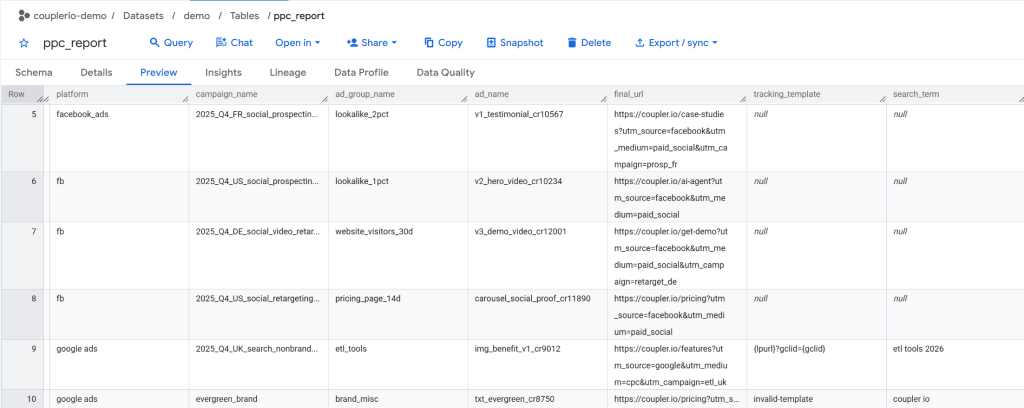
Table to test BigQuery regexp tips & tricks
I built a sample table that blends Google Ads and Facebook Ads data in BigQuery to run every query below on. The columns are what you’d see in any production ads table: platform, campaign name, search term, impressions, clicks, cost, and so on. Swap in your own project.dataset.table path when you run the queries.

Blended ad data in a single BigQuery table isn’t a toy setup. It’s how data teams work in production. Productive, a B2B SaaS platform for professional services, runs the same shape across five sources: Google Ads, Facebook Ads, LinkedIn Ads, HubSpot, and Xero. The marketing team saved 20+ developer hours on the setup using Coupler.io, and now ships new BigQuery integrations without opening a dev ticket.
Now that I’ve loaded my sample dataset, let’s look at tips and tricks for applying BigQuery regular expressions.
Read our BigQuery Tutorial guide to check out how it works.
Check whether a string matches a pattern using BigQuery regular expressions
BigQuery regexp: How to check if a column is a valid value such as a phone number or tracking template
Validation is where I reach for REGEXP_CONTAINS first. It returns TRUE or FALSE depending on whether a value matches a pattern, which is exactly what I need when a column should always follow a specific shape and I want to catch the rows where something’s off. I’ve used it to flag malformed emails, URLs missing https://, phone numbers in the wrong format, and, in the example below, broken tracking templates in ad campaigns.
Here’s the setup. In my sample table, the tracking_template column should always start with {lpurl} on Google Ads rows. When it doesn’t, click attribution breaks and the campaign stops joining back to BigQuery correctly, usually without anyone noticing until the end-of-month report looks weird. I check for it with this query:
SELECT
  platform,
  campaign_name,
  tracking_template,
  REGEXP_CONTAINS(tracking_template, r"^\{lpurl\}") AS has_valid_template
FROM `couplerio-demo.demo.ppc_report`

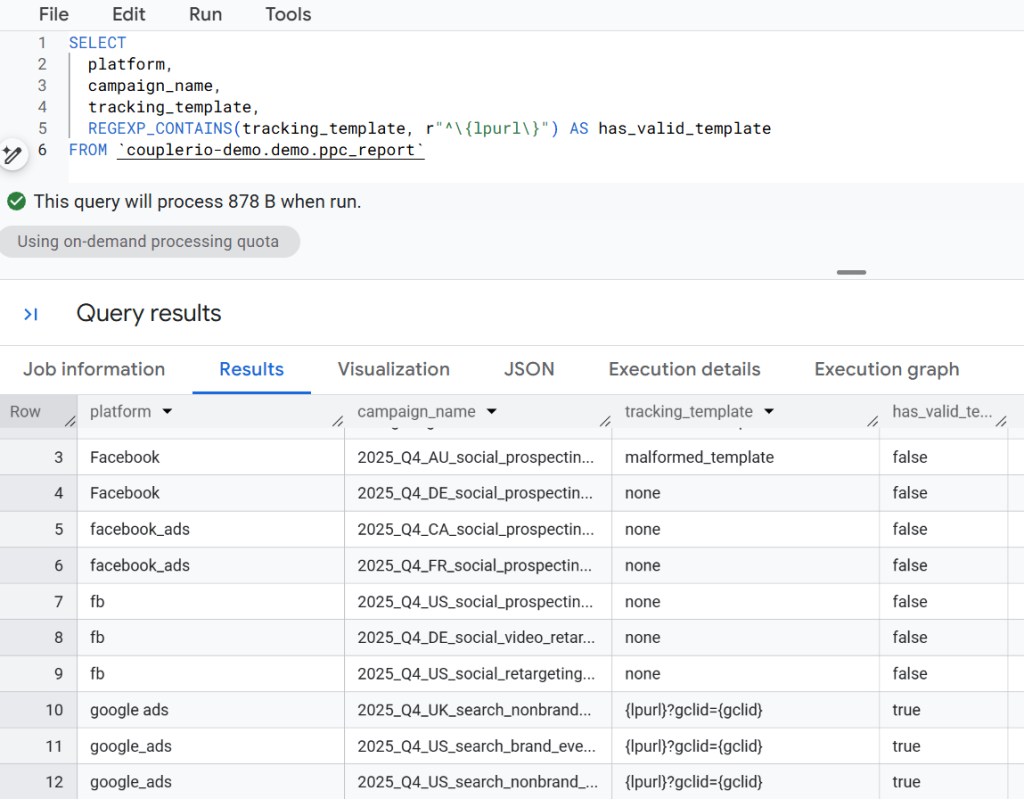
Any row returning FALSE on a Google Ads line is one I’d follow up on. The pattern itself swaps out for any shape check I need: an email regex, a URL regex, a phone-number regex. The function stays the same.
BigQuery regexp: How to find a specific word or value in a column
Sometimes I just need to know which rows mention a particular word somewhere in a string. Not an exact match, not a format check — just “does this value contain the thing I’m looking for.” REGEXP_CONTAINS handles this too. Same function as the validation check above, different pattern.
In my sample table, I want to find every retargeting campaign across both ad platforms. The campaign names don’t follow a single convention (some use retargeting, some use retarget, some are structured like 2025_Q4_DE_social_video_retargeting, some are freeform like retargeting-cart-abandoners), so an exact WHERE campaign_name = 'retargeting' wouldn’t catch half of them. A regex substring search catches them all:
SELECT
  platform,
  campaign_name,
  REGEXP_CONTAINS(campaign_name, r"retarget") AS is_retargeting
FROM `couplerio-demo.demo.ppc_report`

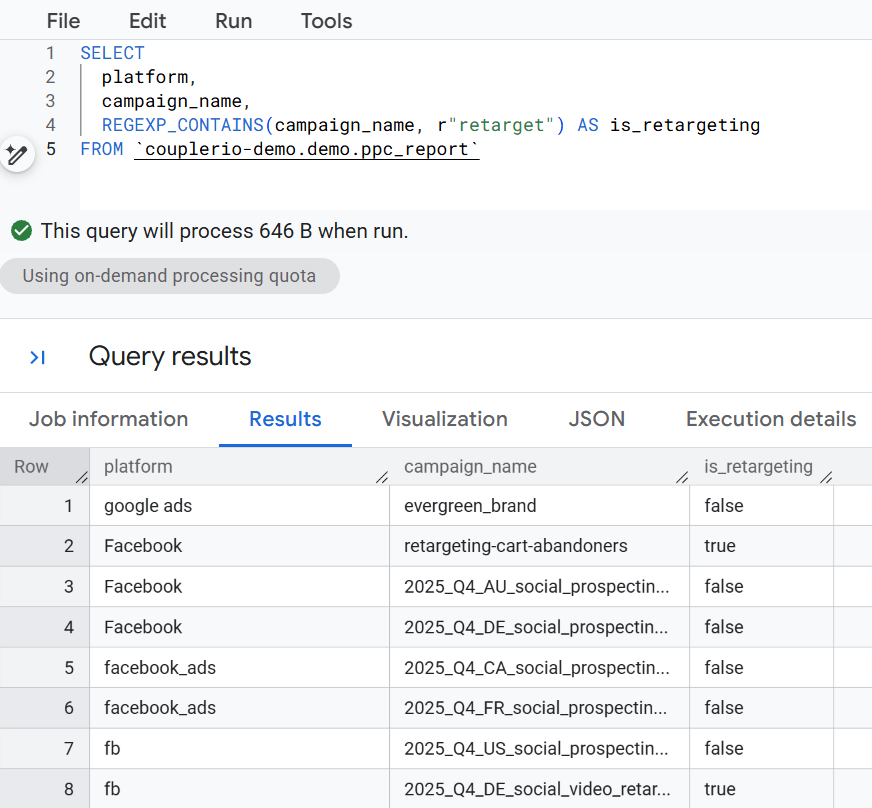
The pattern r"retarget" matches anywhere in the string, which is why both retargeting and retargeting-cart-abandoners come back TRUE. Case-sensitive by default — if campaigns might be named Retargeting or RETARGETING, prefix the pattern with (?i) to make it case-insensitive: r"(?i)retarget".
I use this constantly when the naming convention has drifted. Or when I need to pull together a group of campaigns that mean the same thing in reality but look different in the data.
BigQuery regexp: How to check if a column does not contain a specific word or value
The inverse of the previous trick. Sometimes I need the rows that don’t match a pattern rather than the ones that do. For a single word, the [NOT] LIKE operator works fine too, but regex earns its keep when I’m looking for more than one word or want to make the search case-insensitive.
The approach is the same as the previous section, just reversed. I take the same REGEXP_CONTAINS call and prefix it with NOT:
SELECT
  platform,
  campaign_name,
  NOT REGEXP_CONTAINS(campaign_name, r"retarget") AS is_not_retargeting
FROM `couplerio-demo.demo.ppc_report`

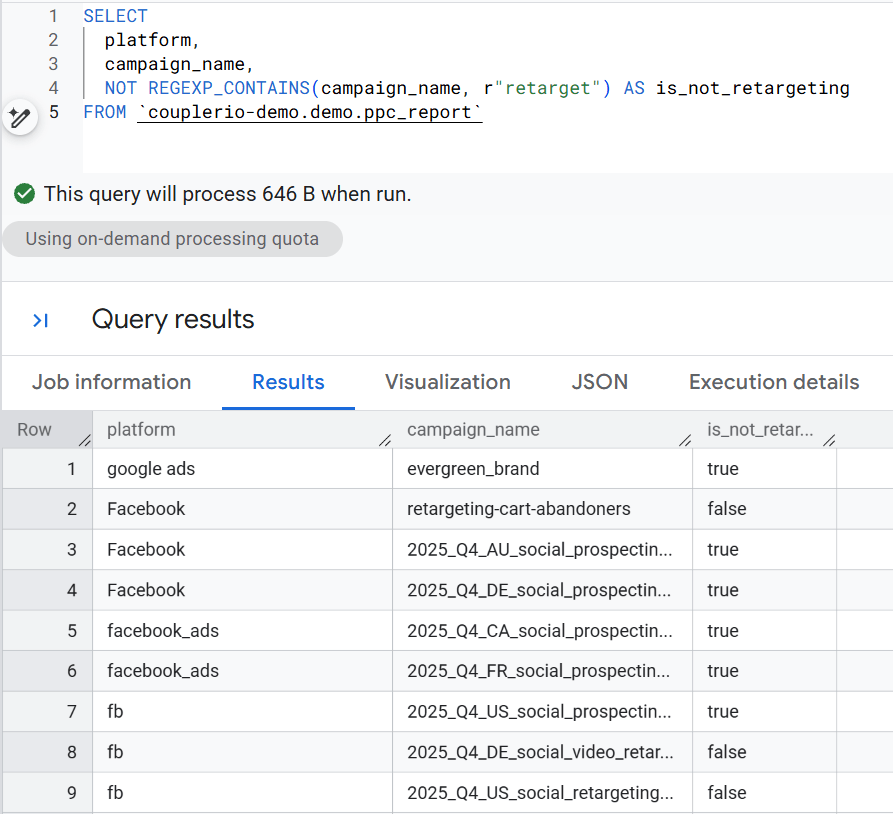
Same function, same pattern, result flipped. I use the inverse version inside a WHERE clause more often than I display it as a column: WHERE NOT REGEXP_CONTAINS(campaign_name, r"retarget") filters retargeting rows out of a report entirely, which is usually what I’m after when I’m isolating prospecting performance.
BigQuery regexp: How to check if a column contains a word/value from another column
Static patterns are easy. The harder case is when the thing I’m checking against lives in another column of the same table, so the pattern itself needs to change row by row. For this, I still use REGEXP_CONTAINS, but I build the pattern dynamically with CONCAT so each row gets its own regex:
CONCAT(r'(?i)', brand_term, r'')
The (?i) flag at the start makes the match case-insensitive, which matters here because search terms rarely follow a casing convention.
In my sample table, search_term holds the query the user typed into Google, and brand_term holds the brand name I want to classify against. The question I’m answering is: for each row, is this search query a branded search? Here’s the query:
SELECT
  search_term,
  brand_term,
  REGEXP_CONTAINS(search_term, CONCAT(r'(?i)', brand_term, r'')) AS is_branded
FROM `couplerio-demo.demo.ppc_report`

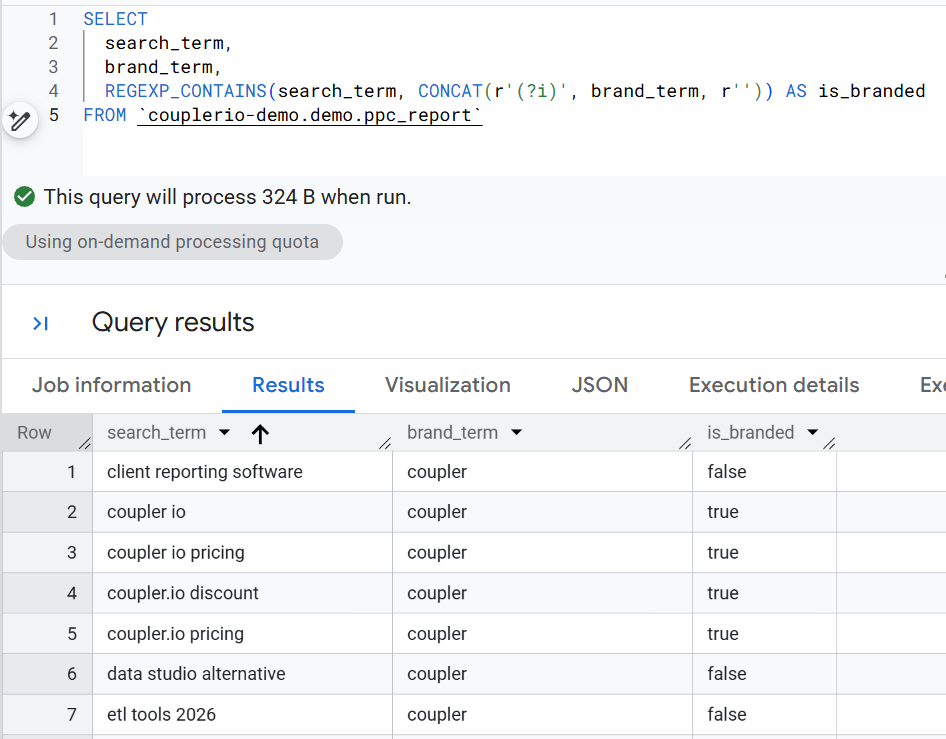
Rows return TRUE when the brand name appears anywhere in the search term, regardless of case. The pattern itself scales with the table, which is what makes this version useful. If I had different brands in each row, the same query would still work. Each row builds its own pattern from its own brand_term value.


Build a BigQuery data flow with Coupler.io
Book a demoPull a value out of a string using BigQuery regular expressions
BigQuery regexp: How to split a string
Splitting a string on a delimiter and keeping one part is one of the most common things I do with regex. REGEXP_EXTRACT with the pattern ^(.+?) plus the delimiter character splits the string at the first delimiter and returns the piece before it. For a campaign naming convention that uses underscores, the first segment is usually the most useful one (year, in my case):
SELECT
  campaign_name,
  REGEXP_EXTRACT(campaign_name, r"^(.+?)_") AS first_segment
FROM `couplerio-demo.demo.ppc_report`

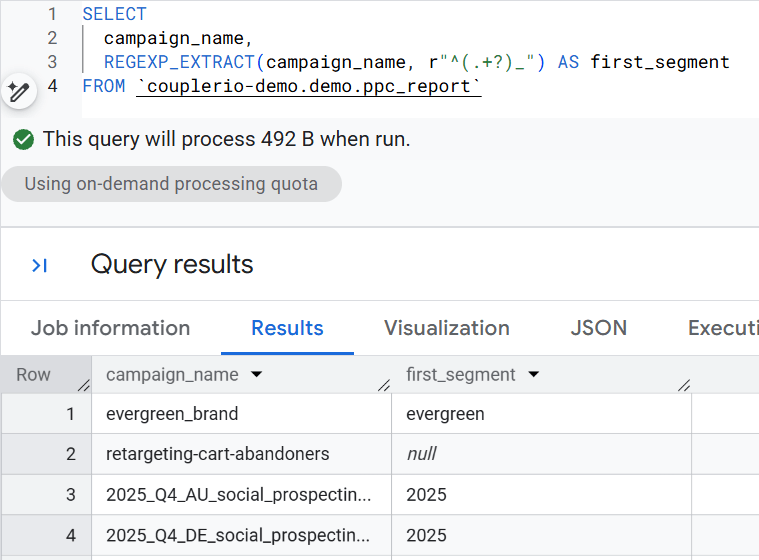
Rows following the convention return the year: 2025. Rows that have underscores but don’t follow the convention return whatever happens to be before their first underscore: evergreen from evergreen_brand, brand from brand_misc_cleanup. Rows with no underscore at all return NULL.
The same split works for any delimiter. Swap the underscore for a comma, a dash, a pipe, or a space, and the pattern extracts the first segment up to that character.
BigQuery regexp: How to extract UTM parameters from a URL
Every URL that carries tracking info packs it into the query string after the ?. UTM parameters, click IDs, affiliate codes, custom tracking tags. They all live there as key=value pairs separated by &. In BigQuery, that’s one long text column I can’t group or filter on. This means the moment I need to analyze traffic by source, medium, or campaign, I have to pull those values out first.
REGEXP_EXTRACT with a capture group handles each parameter. The pattern [?&]utm_source=([^&]+) finds utm_source= after either a ? or an &, then captures everything up to the next & or end of string. One extract call per parameter:
SELECT
  final_url,
  REGEXP_EXTRACT(final_url, r"[?&]utm_source=([^&]+)")   AS utm_source,
  REGEXP_EXTRACT(final_url, r"[?&]utm_medium=([^&]+)")   AS utm_medium,
  REGEXP_EXTRACT(final_url, r"[?&]utm_campaign=([^&]+)") AS utm_campaign
FROM `couplerio-demo.demo.ppc_report`

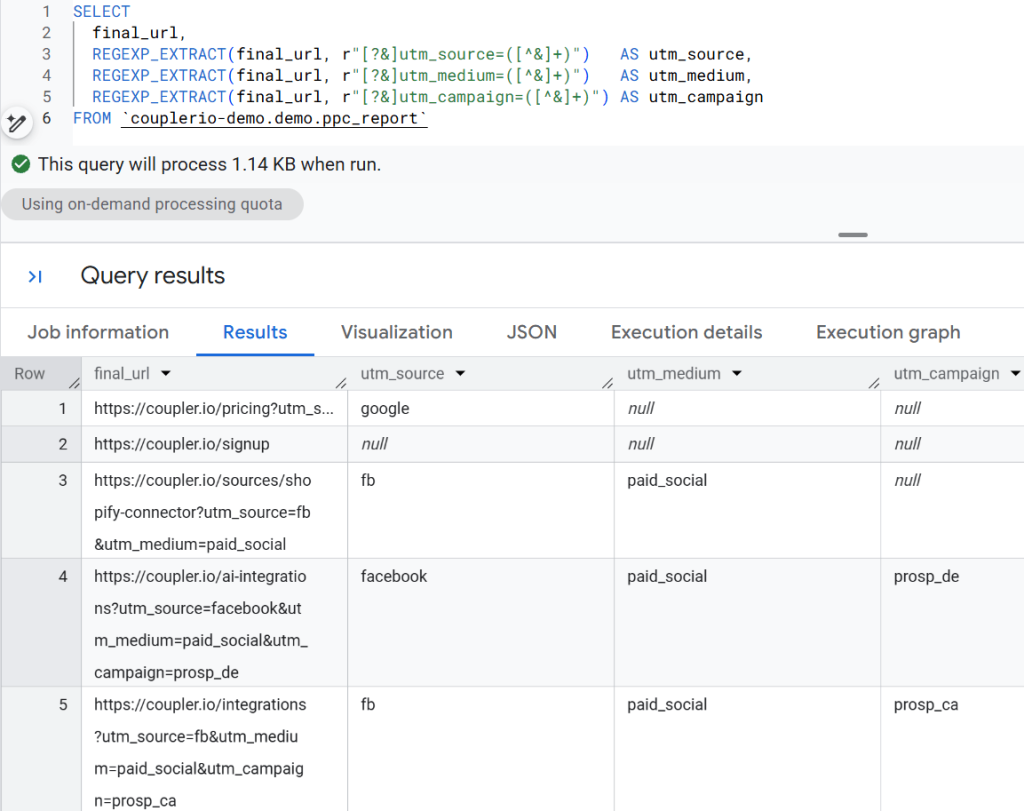
Each UTM lands in its own column, ready to group by, filter on, or join against. Rows where a parameter wasn’t attached (missing utm_campaign, for example) return NULL, which is useful on its own: those are the campaigns leaking into “direct” or “unknown” in attribution reports because nobody set the tag. The pattern itself swaps out for any URL parameter: change utm_source to gclid, fbclid, ref, or whatever you’re tracking.
BigQuery regexp: How to parse a structured naming convention
Campaign names, SKUs, order numbers, product codes — teams invent naming conventions to pack metadata into a single string. Something like 2025_Q4_US_search_brand_evergreen tells a human the year, quarter, country, channel, and objective at a glance, but BigQuery still sees one string. To report on any of those pieces separately, I need to pull each one into its own column.
Where the split trick earlier grabs the first segment and stops, the convention parse pulls every piece in one query. Each REGEXP_EXTRACT call targets a specific position in the pattern:
SELECT
  campaign_name,
  REGEXP_EXTRACT(campaign_name, r"^(\d{4})_")        AS year,
  REGEXP_EXTRACT(campaign_name, r"_(Q\d)_")          AS quarter,
  REGEXP_EXTRACT(campaign_name, r"_Q\d_([A-Z]{2})_") AS country,
  REGEXP_EXTRACT(campaign_name, r"_([^_]+)$")        AS objective
FROM `couplerio-demo.demo.ppc_report`

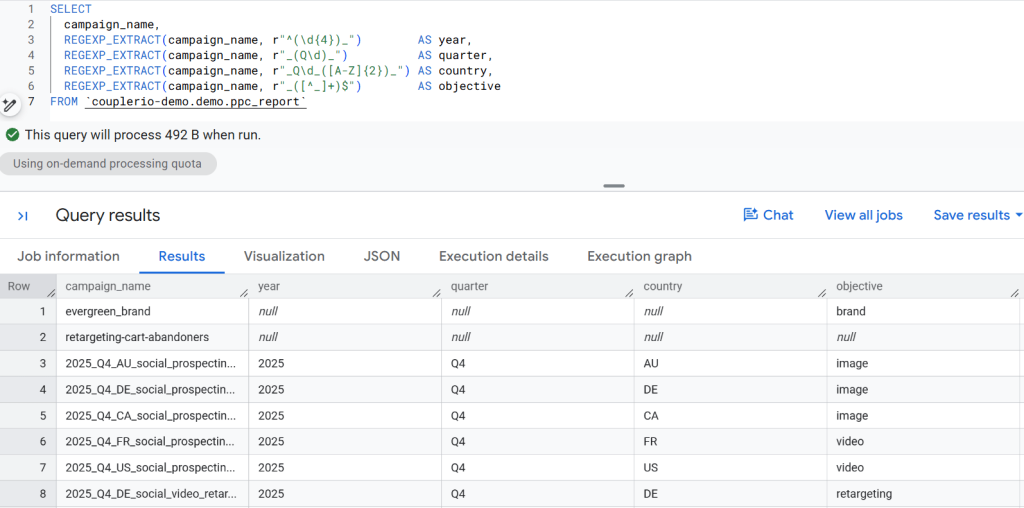
Conforming rows return clean values I can group on: GROUP BY country for geographic rollup, GROUP BY quarter for seasonality. Legacy rows that don’t follow the convention return NULL on the strict columns (year, quarter, country) where the pattern requires a specific position and format. The looser objective pattern can still match — evergreen_brand returns brand because the pattern just needs “something after an underscore at the end.” A quick WHERE year IS NULL gives me the list of campaigns to rename or document as exceptions.
BigQuery regexp: How to use extract groups
Groups are a way of asking regex to return multiple matches from the same string, usually structured. A common use is tokenizing a string that packs several pieces into one field. The pattern ([a-zA-Z0-9]+) captures each run of letters and digits, and REGEXP_EXTRACT_ALL returns all matches as an array.
In my sample table, ad names like txt_evergreen_cr8750 encode the creative format, the hook, and the creative ID in a single string separated by underscores. Extracting all three tokens at once gives me an array I can work with per element:
SELECT
  campaign_name,
  REGEXP_EXTRACT_ALL(campaign_name, r"(\w+)") AS words
FROM `couplerio-demo.demo.ppc_report`

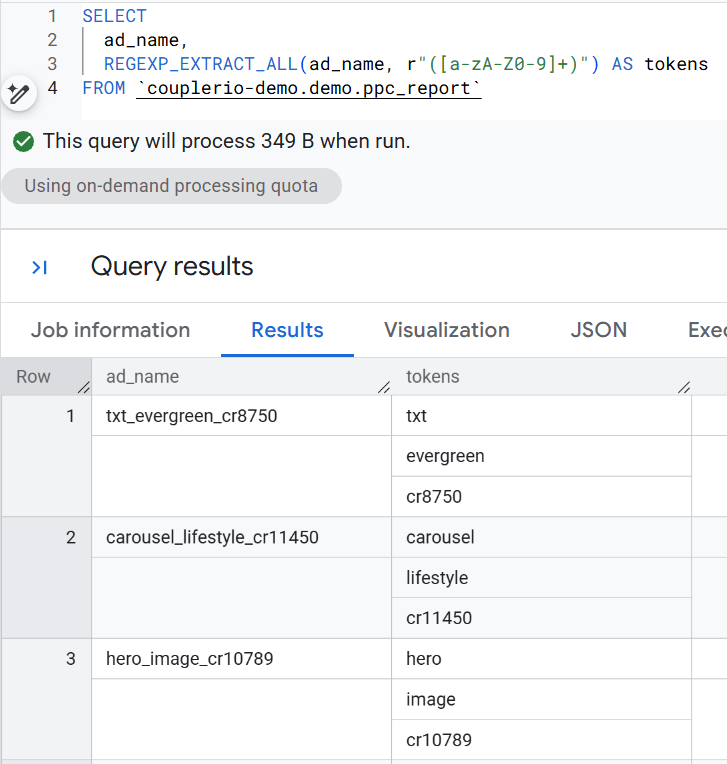
Every token comes back as its own array element. That’s useful when I want to grab a specific piece by position (first element = format, last element = creative ID), unnest the array to turn each token into a row, or count how many tokens an ad name uses as a quick convention check.
A quick note on the pattern: the common (\w+) is close but not identical. \w matches letters, digits, and underscores, which means it wouldn’t split an underscore-separated string at all. [a-zA-Z0-9]+ excludes underscores from the “word” definition, so a string like txt_evergreen_cr8750 splits cleanly on each underscore. Use whichever matches how your data is structured.
BigQuery regexp: How to extract a number from a string
Text columns often bury numeric identifiers inside strings: creative IDs in ad names, order numbers in email subjects, version numbers in filenames, invoice numbers in payment references. When I need to join on one of those numbers, group by it, or sort by it, I have to pull it out of the string first. REGEXP_EXTRACT_ALL with the pattern ([0-9]+) returns every numeric substring from a column as an array, in the order they appear.
In my sample table, the ad_name column embeds a creative ID in a cr#### suffix: txt_evergreen_cr8750, carousel_lifestyle_cr11450. Pulling the numbers out gives me the ID as an array:
SELECT
  ad_name,
  REGEXP_EXTRACT_ALL(ad_name, r"([0-9]+)") AS numbers
FROM `couplerio-demo.demo.ppc_report`

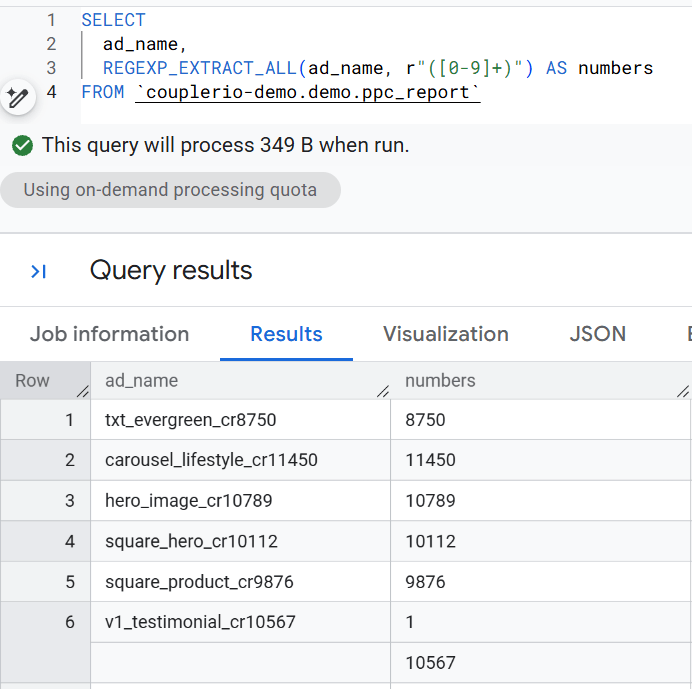
Ad names with a version number in them (like v2_hero_video_cr10234) return two elements: the version and the creative ID. For ad names with just a creative ID, the array has one element. If I always want the creative ID specifically, I’d take the last element of the array with ORDINAL(ARRAY_LENGTH(numbers)) or use REGEXP_EXTRACT(ad_name, r"cr(\d+)") with a capture group to pull just that one match as a scalar. Depends on whether I need all numbers or just the one.
Set up a multi-source BigQuery stack with Coupler.io
Book a demoReplace or clean strings with BQ regexp
BigQuery regexp: How to replace a word or value
When I need to swap a word inside a string for something else, REGEXP_REPLACE is the function. It takes three arguments: the column, the pattern to find, and the replacement string. Everything in the column that matches the pattern gets replaced; everything else stays untouched.
A common case for me is normalizing campaign naming after a strategy shift. If marketing stops calling top-of-funnel work “prospecting” and starts calling it “awareness,” I don’t need to go back and rename every campaign in the ad platforms. I can rename them on the fly in BigQuery so dashboards and reports read the new vocabulary without anyone touching the actual campaign setup:
SELECT
  campaign_name,
  REGEXP_REPLACE(campaign_name, r"prospecting", "awareness") AS campaign_renamed
FROM `couplerio-demo.demo.ppc_report`

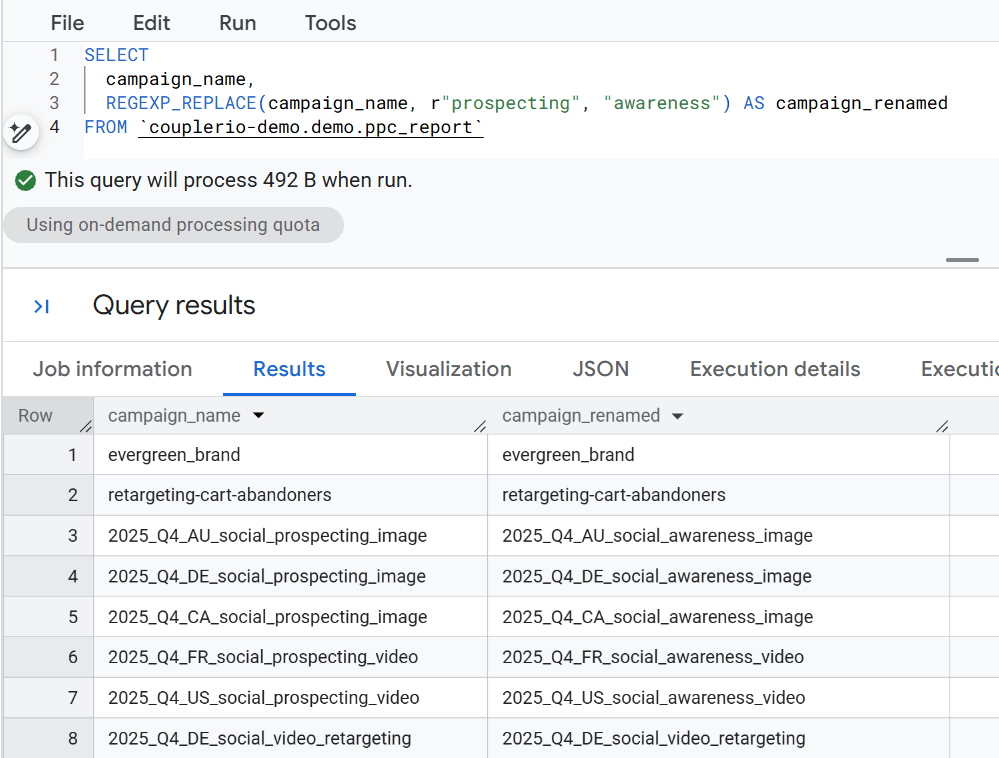
Side-by-side output makes it easy to verify the replacement worked where it should and left the other rows alone. The pattern can be more complex than a plain word (anchors, groups, alternations), and the replacement string can reference captured groups if I need to restructure the match rather than just substitute it. For most day-to-day renames, this flat form is enough.
BigQuery regexp: How to normalize values across variants
The same column can hold the same concept in different ways. Platform names arrive from different sources with different capitalization, abbreviations, or formatting: fb, Facebook, facebook_ads, facebook all mean one thing, but when I try to GROUP BY platform for cross-channel totals, each spelling becomes its own bucket and the numbers don’t add up.
REGEXP_REPLACE fixes this when I combine it with alternation (|) and the case-insensitive flag (?i). The pattern below matches any of the Facebook variants, exact match from start (^) to end ($), and replaces them with a single canonical value. I chain a second REGEXP_REPLACE to collapse the Google Ads variants the same way:
SELECT
  platform,
  REGEXP_REPLACE(
    REGEXP_REPLACE(platform, r"(?i)^(fb|facebook_ads|facebook)$", "Facebook"),
    r"(?i)^(google_ads|google ads|google)$", "Google Ads"
  ) AS platform_clean
FROM `couplerio-demo.demo.ppc_report`

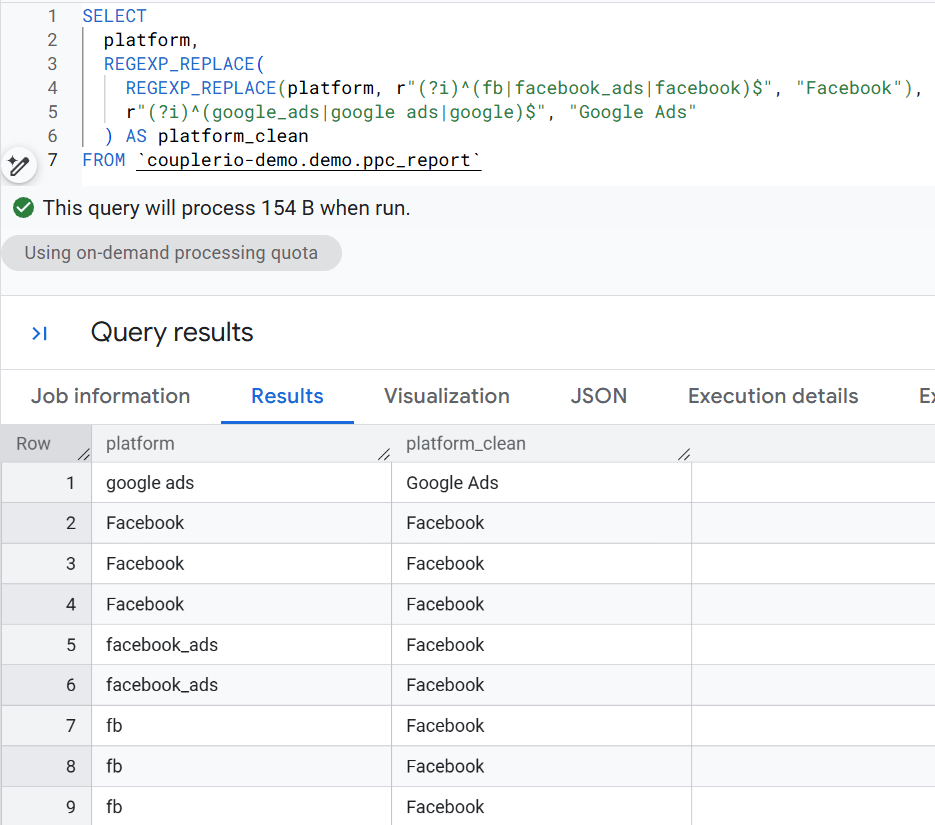
Every row’s platform value gets normalized before anything else happens with it. Once this column is clean, GROUP BY platform_clean returns two rows instead of six, and cross-channel totals finally add up. For the long term, I’d push this normalization upstream so BigQuery never sees the messy versions, but as a quick fix in the query, this works.
BigQuery regexp: How to replace special characters
Related to the escape case, sometimes I want to remove or replace every special character in a string at once. A special character is anything that isn’t a letter or a number: dots, commas, spaces, dashes, slashes, everything in that family. The pattern [^a-zA-Z0-9]+ matches one or more consecutive characters that are not alphanumeric, and REGEXP_REPLACE swaps them for whatever I pass in.
In my sample table, ad names like txt_headline_v3_cr8842 or carousel_social_proof_cr11890 encode a lot of information with underscores and version numbers. If I need a clean key for joining or comparing across systems that don’t tolerate special characters, I can strip them out:
SELECT
  ad_name,
  REGEXP_REPLACE(ad_name, r"[^a-zA-Z0-9]+", "") AS ad_name_clean
FROM `couplerio-demo.demo.ppc_report`

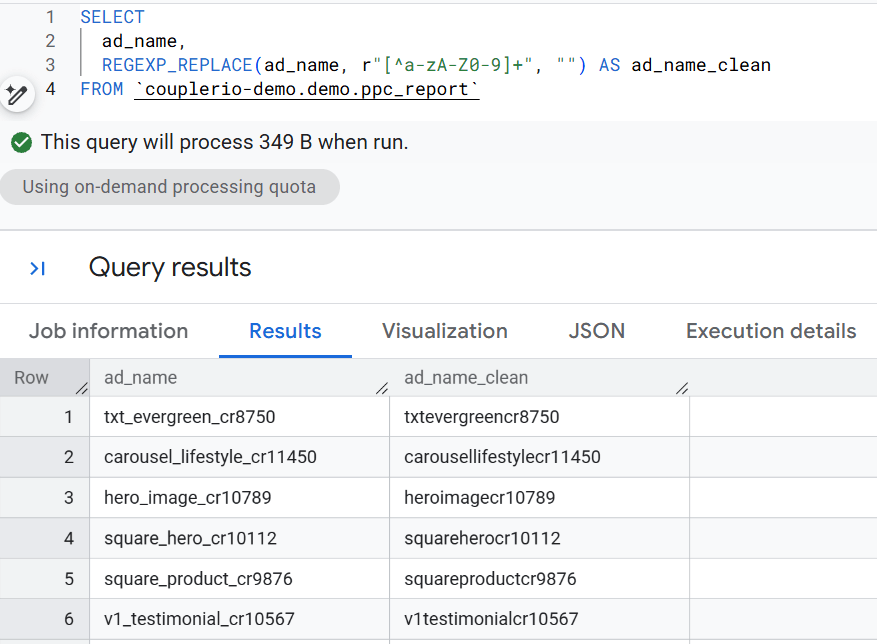
The underscores are gone, the result is a single alphanumeric string per row. Swapping the empty string for a different replacement (a dash, say, or an underscore if I want to normalize mixed delimiters) does the same trick: REGEXP_REPLACE(ad_name, r"[^a-zA-Z0-9]+", "-") would turn every run of special characters into a single dash.
Automate your BigQuery reporting with Coupler.io
Book a demoHandle special characters and edge cases in BigQuery regexp
BigQuery regexp: How to escape a special character
Some characters have special meaning in regex and get interpreted as instructions instead of literal text. Below are some examples of popular special characters reserved for regular expressions:
- Dot (.): Matches any possible character or symbol
- Asterisk (*): Expects zero or more occurrences of preceding character
- Question Mark (?): Expects zero or one occurrence of preceding character
- Plus sign (+): Expects one or more occurrences of preceding character
- Vertical Bar (|): Add to denote an alternative match
- Circumflex (^): Used to denote the beginning of a buffer
- Dollar Sign ($): Used to denote the end of a buffer
To review all reserved special characters, you can visit Mozilla’s Regular expression syntax cheat sheet.
To match one of these characters as its literal self instead of its regex meaning, prefix it with a backslash (\). The pattern \. means “a literal dot,” not “any character.”
In my sample table, I want to find search queries that contain a literal dot. The reason is practical: a user who types coupler.io is more brand-aware than one who types coupler io. They already know the domain. Separating the two lets me analyze the groups independently. For this, I use the function REGEXP_CONTAINS with the escape character in the pattern:
SELECT
  search_term
FROM `couplerio-demo.demo.ppc_report`
WHERE REGEXP_CONTAINS(search_term, r"\.")

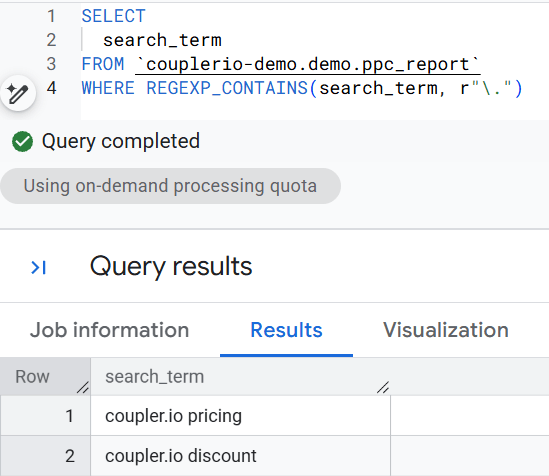
Only the rows with a literal dot in search_term come back. Without the backslash, the pattern would match every row because the plain dot matches any character.
BigQuery regexp: How to lookahead
Lookaheads aren’t the most common pattern, but they’re genuinely useful when I need them. A positive lookahead matches a pattern only if it’s followed by another pattern, without including the second pattern in the result. A negative lookahead matches only if a pattern is not followed by another specified pattern.
The catch: Google BigQuery uses the RE2 expression library, which doesn’t support positive or negative lookaheads at all. There’s no flag to enable it, no workaround at the regex level.
When I actually need lookahead behavior, I have two options. I can split the logic into two separate REGEXP_CONTAINS checks combined with AND or AND NOT in a WHERE clause, which covers most practical cases. Or I can do the parse in a layer upstream of BigQuery, before the data lands, where the regex engine isn’t RE2.
Make the data regexp-ready before it reaches BigQuery
Every regexp above runs after the data is already in BigQuery. That works, but it means I write the same parse again in every dashboard, every ad hoc query, every notebook. If a teammate forgets to normalize the platform column before grouping, the totals quietly disagree with mine. If the campaign naming convention shifts, I update the parse in half a dozen places and hope I caught them all.
The alternative is to run the parse once, in the pipeline, before BigQuery ever sees the data. Coupler.io supports this through SQL transformations: a DuckDB SQL query that runs at the data flow step, between the source and the destination. The resulting table lands in BigQuery with UTMs already split into columns, channel names already normalized, tracking templates already validated. Every analyst, every dashboard, every notebook gets the clean version. The transformation refreshes on each run.
Here’s the DuckDB equivalent of two of the regexp patterns from earlier in the article, written as a single transformation:
SELECT
  *,
  regexp_extract(final_url, '[?&]utm_source=([^&]+)', 1)   AS utm_source,
  regexp_extract(final_url, '[?&]utm_medium=([^&]+)', 1)   AS utm_medium,
  regexp_extract(final_url, '[?&]utm_campaign=([^&]+)', 1) AS utm_campaign,
  regexp_replace(platform, '(?i)^(fb|facebook_ads|facebook)$', 'Facebook') AS platform_clean
FROM ads
Two differences from the BigQuery versions worth noticing. First, regexp_extract in DuckDB takes an extra argument (1) that specifies which capture group to return. BigQuery’s REGEXP_EXTRACT infers that from the pattern. Second, DuckDB uses different function names overall: BigQuery’s REGEXP_CONTAINS is DuckDB’s regexp_matches, and standard regex g flag behavior (replace all) is handled by regexp_replace‘s global default in DuckDB rather than needing a flag.
If writing the SQL from scratch isn’t appealing, Coupler AI generates it from a plain-language request. For example, I describe the result I need: “extract UTM parameters and normalize the platform column.” Coupler AI reads the data set schemas, generates the DuckDB query, and saves it to the Custom SQL field as part of the data flow. The query stays visible so I can review and edit it.
Centralize data from your whole stack with Coupler.io
Book a demoOnce the clean table lives in BigQuery, AI Skills can take over for recurring analyses. A Skill wraps a dataset plus the instructions and context around it, so questions like “which campaigns had the biggest week-over-week CPA increase?” run the same way every time, against the same prepared data, regardless of who’s asking.
For a longer walkthrough of this pattern, check out six practical use cases of SQL transformations for AI data analysis: cross-channel ad performance, campaign deterioration detection, cohort retention, and others.