Claude Code was launched as a tool for engineers. Then more marketers started using it.
Over the past few months, a growing number of marketing practitioners have been sharing what they’ve built with Claude Code: ad campaign management systems, AI agent teams for analytics, account scoring models, content refresh workflows. Not in theory. In production, running against real data, across real clients.
One pattern keeps coming up: Claude Code for marketers can analyze, automate, and build almost anything. But first, it needs data to work with. The quality of the output depends entirely on the quality (and freshness) of the input. That’s the problem Coupler.io solves by connecting over 400 business apps to Claude Code through MCP to keep the data fresh and secure. You’ll see that thread across every case study below, whether the practitioners use Coupler.io or build their own data pipelines.
What Claude Code actually does (and why marketers care)
If you’ve used Claude.ai, you already know what the model can do. Claude Code is a different interface to the same intelligence, that runs on your computer instead of in a browser tab.
The practical difference: Claude Code can read local files, execute scripts, connect to external APIs, and run multi-step workflows without you copying and pasting anything in between. Drop a CSV into a folder, point Claude Code at it, and ask a question. It reads the file and gives you an answer.
The part that matters for marketing teams is how it connects to data: MCP (Model Context Protocol). MCP is a standardized way to connect Claude to your existing tools: Google Ads, GA4, HubSpot, Slack, Meta Ads, Salesforce, and hundreds of other platforms.
Coupler.io provides an MCP server that connects 400+ of these sources to Claude Code, with scheduled data refreshes and no custom engineering required. Instead of building API integrations from scratch for every data source, Claude Code gets structured access to your business data and can go straight to building workflows, running analysis, and creating tools on top of it.
You don’t need to write code. To use Claude Code for marketers, just describe what you want. Claude writes the code, runs it, and delivers the result. That’s the shift: marketers who used to wait on engineering tickets can now build their own tools and connect their own data sources.
One thing worth noting: when you connect business data to an AI tool, security matters. Coupler.io connector gives you control over which datasets Claude can access, without exposing raw credentials or API keys. Your data flows through a managed layer rather than through direct API connections that you have to build and maintain yourself.
Connect your business data to Claude securily with Coupler.io
Get started for freeThe other key concept in Claude Code is skills. These are reusable instruction sets stored as markdown files that Claude references automatically when a task matches. One skill for your monthly reporting format, another for competitive analysis, another for your brand voice. Build a skill once and Claude will use its instructions across all relevant tasks.
Useful marketing skills for Claude Code
Two open-source repos are worth bookmarking if you’re getting started:
- Maja Voje’s GTM Strategist Skills cover the full go-to-market process in 12 skills: from competitor analysis frameworks and positioning to pricing, launch planning, and sales execution. Each phase feeds the next. 100+ tasks across the full GTM lifecycle, all as markdown files you can install and customize.
- Corey Haines’ Marketing Skills focus on execution: CRO, copywriting, SEO, analytics, email sequences, landing page optimization, and growth engineering. Built for technical marketers and founders who want Claude Code to handle the tactical work. Works with Claude Code, Cursor, Windsurf, and any agent that supports the Agent Skills spec.
Gen Furukawa, founder of SuperMarketers, takes a simpler approach: a folder structure with brand voice, ICP, brand guidelines, and content rules as markdown files. Claude reads all of it and works from that context.
The pattern across all three: give Claude your context upfront as structured files, not as instructions you repeat every conversation. Skills turn one-off prompts into permanent, shareable capabilities.
Real life cases of how to use Claude Code for marketing
These are real practitioners sharing what they built, what data they connected, and what actually happened.
| Who | What they built | Data sources | Key result |
| Olexander Paladiy, Coupler.io | AI agent team for analytics | HubSpot, GA4, ad platforms via Coupler.io MCP | 5-role team with data validation outperforms 10-agent setup |
| Kaancata (r/PPC) | Google Ads campaign management system | Google Ads, GA4, GTM, client docs | Full campaign management across multiple clients |
| Austin Lau, Anthropic | One-person growth marketing engine | Meta Ads API, Google Ads API, Figma API | Non-coder runs all growth marketing solo |
| Matt Firestone | Account scoring model | CRM data, intent signals, ICP criteria | 2-3x positive response rate on top accounts |
| Eoin Clancy, AirOps | Content refresh playbook for AI search | GSC, Slack, Gong, Granola, AirOps | Data-to-live content refresh in under 60 minutes |
AI analytics team that queries live data
Who: Olexander Paladiy, Product Director at Coupler.io
What it runs on: Claude Code agent teams, Coupler.io connector live data queries, documented data schemas with business context files

What he built:
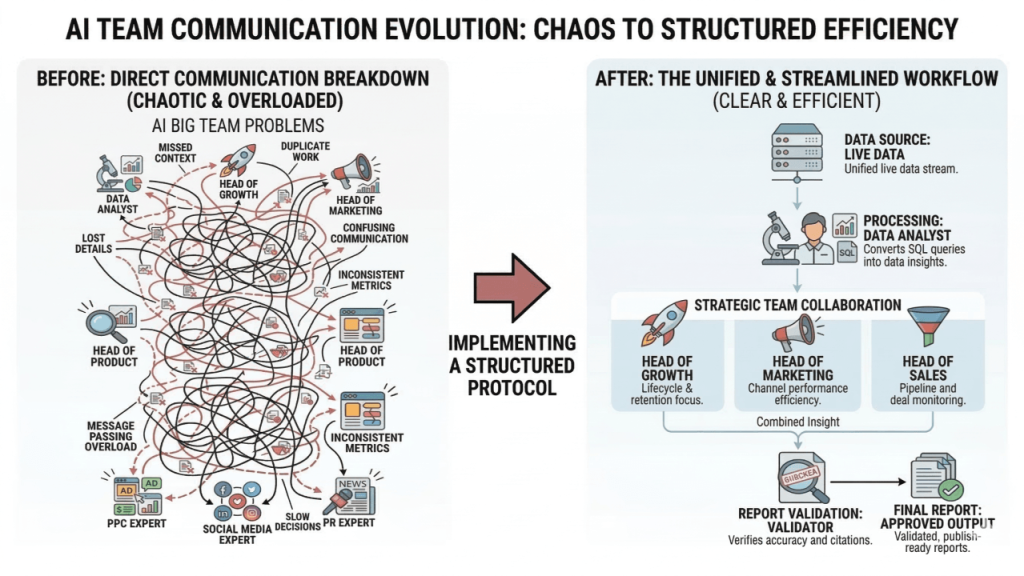
When Anthropic released agent teams for Claude Code, Olexander tested them to see if a structured agent team could run analytics the way a real team operates. He set up several different roles:
- Data Analyst
- Head of Growth
- Head of Marketing
- Head of Sales
- Head of Product
- SEO Expert
- PPC Expert
- Social Media Expert
- PR Expert.
All agents queried fresh data from HubSpot, GA4, and ad platforms through Coupler.io connector, which is the single data access point for the entire tea
The first attempt failed. Every specialist went straight to the Data Analyst with questions, independently, in parallel. Many questions were identical. The Data Analyst had no way to prioritize, no protocol to follow, and nobody was verifying the outputs. The main culprit was orchestration: no coordination layer, no one in charge.
After several iterations, he reduced the team to five roles with strict boundaries:
- Data Analyst: translates questions into SQL, queries live data via Coupler.io MCP. The only agent that touches data directly.
- Head of Growth: owns customer lifecycle, activation, retention, growth loops.
- Head of Marketing: owns channel performance and acquisition patterns.
- Head of Sales: owns pipeline health, deal economics, win/loss patterns.
- Data Auditor: re-runs every SQL query independently. No number gets into the report without a verified source.
The Heads write briefs for the Data Analyst. They own scope, not execution. The Auditor catches errors before they reach the final output.
The biggest unlock wasn’t the structure though. It was the business context file. Olexander documented every event that could impact the data: a lead scoring model introduced in October, a pricing change in November before Black Friday, a simplified welcome survey in December. Without that context, agents read the numbers correctly but explain them incorrectly.
The takeaway:
More agents don’t give you more clarity. Five focused roles with strict boundaries and a defined process beat ten generalists every time. And the context that matters most is the stuff no model can discover on its own: what changed in your business, when, and why.
How to take it further:
Don’t start with the roles in your Claude Code for marketing workflow. Start with the data layer. Document your schemas, column types, and how each metric is calculated. Then write down the business events from the last six months: pricing changes, new campaigns, process shifts. That’s the context no model will infer on its own. On the data side, Claude integrations by Coupler.io are what made this setup possible. It keeps HubSpot, GA4, and ad platform data connected, fresh, and queryable through a single access point. Without that persistent data layer, the agents have nothing meaningful to query.
Google Ads campaign management entirely through Claude Code
Who: Kaancata, PPC manager (shared on Reddit’s r/PPC community)
What it runs on: Claude Code, custom skills and plugins, Google Ads RAG, Google Tag Manager, Google Analytics, Telegram for automated reporting, client data from spreadsheets and Excel files.

What he built:
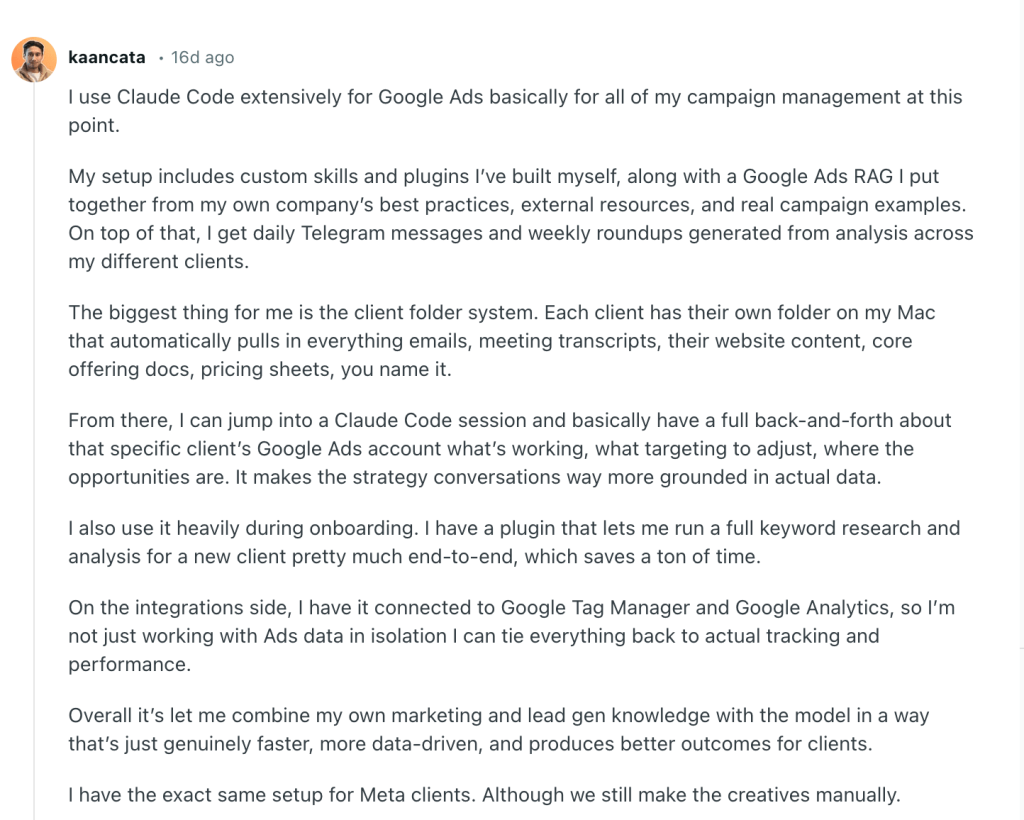
A full Google Ads campaign management system across multiple clients. The setup includes custom skills, plugins, and a Google Ads RAG built from their company’s best practices, external resources, and real campaign examples.
The core is the client folder system:
- Each client gets their own folder on their Mac that automatically pulls in emails, meeting transcripts, website content, core offering docs, pricing sheets.
- Every Claude Code session starts with full context about that specific client: what’s working, what targeting to adjust, where the optimization opportunities are.
- A Claude plugin handles onboarding: full keyword research and analysis for a new client, end-to-end.
On the integrations side, he connected Claude Code to Google Tag Manager and Google Analytics, so Ads data ties back to actual tracking and performance. No working in isolation.
Daily Telegram messages and weekly roundups get generated automatically from cross-client analysis. Same setup runs for Meta clients too, though creatives are still done manually.
The takeaway:
The strategy conversations become “way more grounded in actual data” when Claude has full context about a client. Not just their ad metrics: their business, their offering, their transcripts. That combination of marketing knowledge and real data is what makes the output useful.
How to take it further:
The real leverage here is the client folder system. When Claude has a client’s full context, the analysis is grounded in reality instead of generic best practices. The bottleneck is keeping that data current.
If you’re pulling CSV exports manually from Google Ads, GA4, and Meta every week, those folders go stale fast. Automating the data pipeline through Coupler.io is what makes the difference between a useful system and one that runs on last month’s numbers. Coupler.io connects Claude to Google Ads, GA4, Meta Ads, and the rest of the stack he’s using, and keeps the data up to date on a schedule.
Anthropic’s own growth marketer runs a one-person marketing engine
Who: Austin Lau, Growth Marketing at Anthropic (detailed breakdown on Anthropic’s blog)

What it runs on: Claude Code, Figma API, Google Ads API (sub-agents), Meta Ads API (custom MCP server), experiment memory system
What he built:
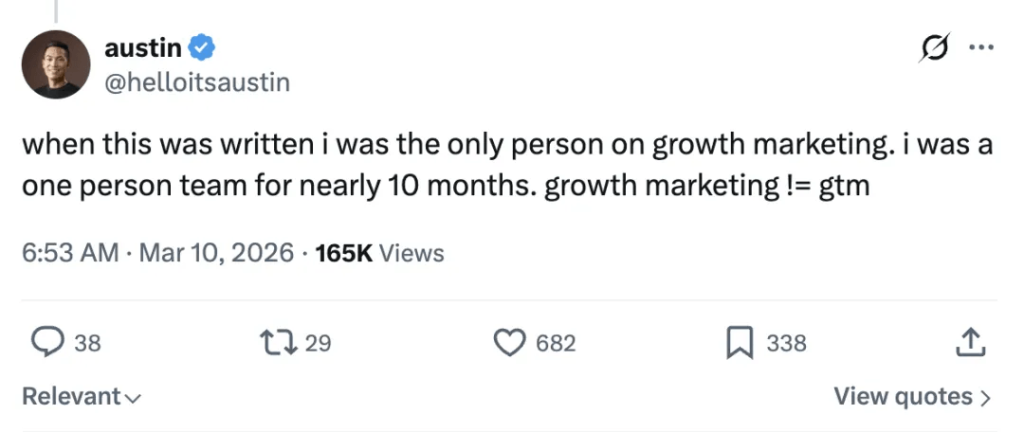
Austin runs growth marketing at Anthropic as a one-person, non-technical team. He’d never written a line of code before Claude Code.
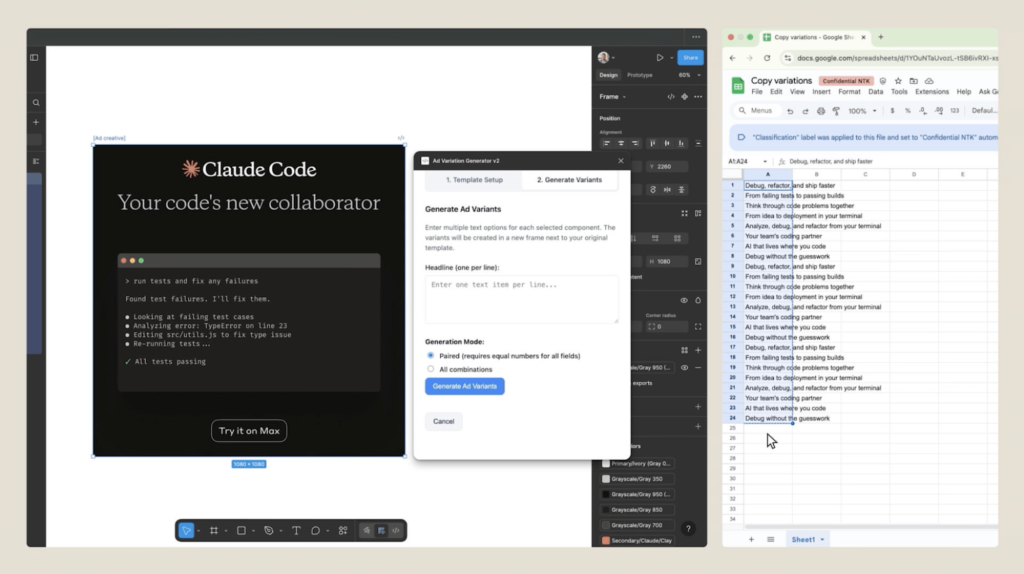
His first build was a Figma plugin. Paid social and app store marketing mean adapting copy variants across multiple aspect ratios, which used to mean duplicating frames and copy-pasting between Google Docs and Figma for each variation. He described the problem in plain English. Claude Code built the plugin.

Second was a Google Ads RSA generator:
- A custom slash command pulls in campaign data, existing copy, and keywords, then cross-references against predefined skills containing Anthropic’s brand voice and Google Ads best practices.
- Two specialized sub-agents split the work: one writes headlines (30-character limit), the other writes descriptions (90-character limit). Splitting by constraint means fewer edge-case failures.
- The system packages results into a CSV ready for upload.
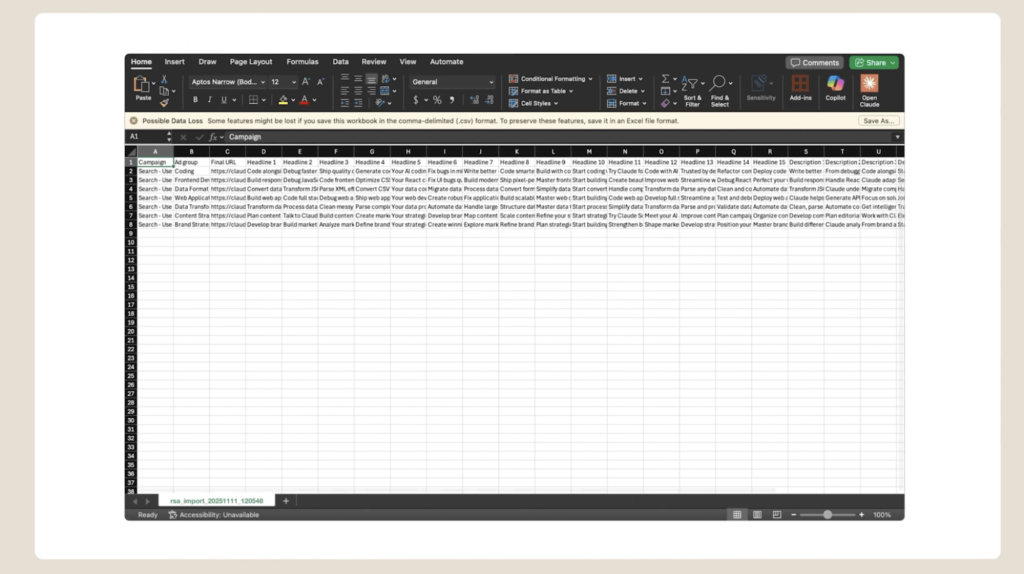
From there he built a Meta Ads MCP server that queries campaign performance, spend, and individual ad effectiveness directly from Claude. No more opening the Meta Ads dashboard.
The most sophisticated piece is the experiment memory system. It logs hypotheses and test results from each round of ad iteration. When launching new variants, Claude pulls all prior test data so the next round builds on what already worked. Each cycle gets smarter.
The takeaway:
The closed loop between data and creation is the competitive advantage. Look at a bad ad, ask Claude to rewrite it using the last two months of learnings, get candidate copy in the same session. That tight iteration cycle: data in, AI-generated creative out, results logged, next cycle starts. That’s what scales a one-person team.
How to take it further:
Austin built a custom MCP server to pull Meta Ads data into Claude. That’s powerful but takes engineering effort. If you don’t have the resources to build custom servers for each data source, use the Coupler.io connector in your Claude Code for marketing projects. It connects to Meta Ads, Google Ads, and 400+ other platforms out of the box, giving Claude the same live data access without the infrastructure work.
CRM data and intent signals for account scoring with Claude Code
Who: Matt Firestone, SDR Training & Workshops, 3x YC GTM leader (shared on LinkedIn)
What it runs on: Claude Code, CRM data exports, intent signal feeds, ICP criteria documentation
What he built:
While most people chase flashy AI use cases (content generation, chatbots, personalized outreach at scale), Matt focused on something less exciting and more impactful: account scoring.

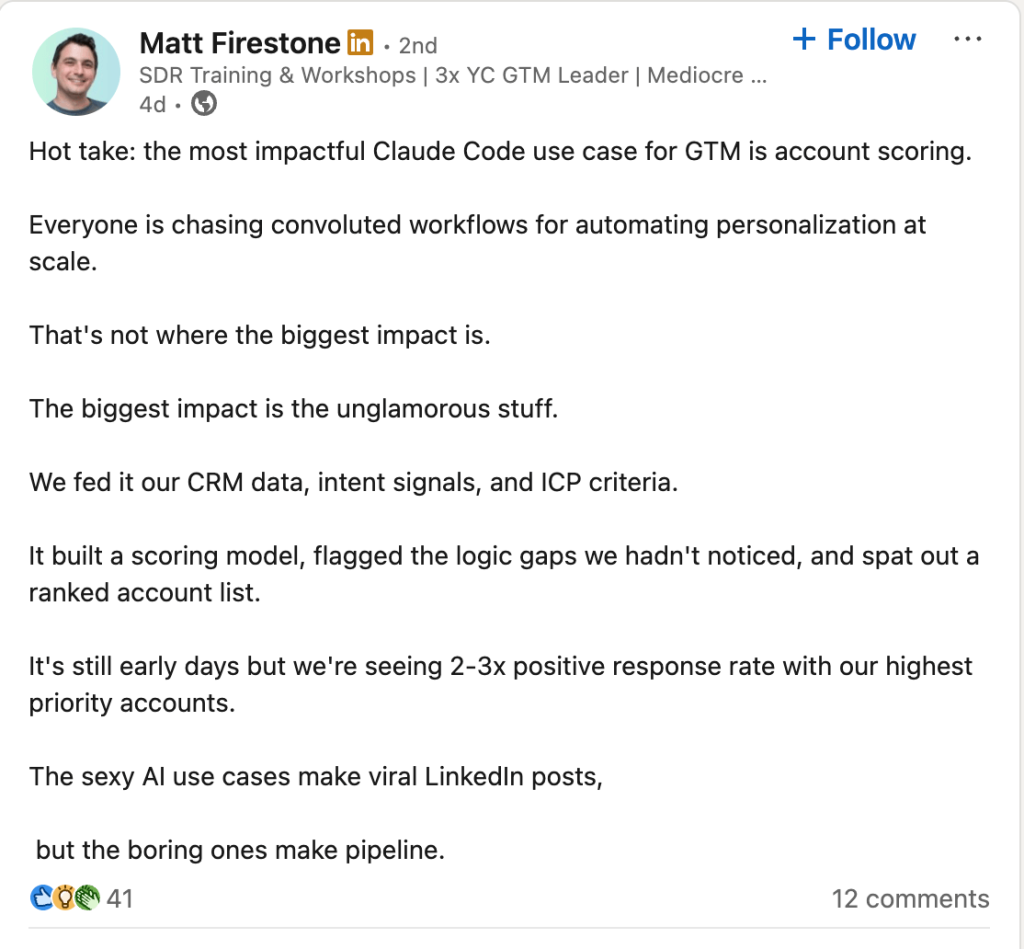
His team fed Claude Code their CRM data, intent signals, and ICP criteria. Claude built a scoring model, flagged logic gaps the team hadn’t noticed, and produced a ranked account list.
Early results: 2-3x positive response rate with their highest-priority accounts.
The takeaway:
As Matt put it: “The sexy AI use cases make viral LinkedIn posts, but the boring ones make pipeline.” Account scoring isn’t glamorous. But when the model flags logic gaps you’ve missed and ranks accounts by actual fit rather than gut feel, the impact on the pipeline is immediate.
How to take it further:
The scoring model only works when multiple data sources (CRM records, intent signals, ICP definitions) flow together cleanly. If those exports are manual and infrequent, the model trains on stale data. Connecting your HubSpot, Salesforce, or other CRM via the Coupler.io Claude connector keeps your datasets up to date and well-structured. So the scoring model in your Claude Code for marketing implementation always reflects what’s actually happening in your pipeline. Layer ICP documents, sales transcripts from Gong or other conversation intelligence tools, build a skill to instruct Claude Code on how to use the data, and you’ll have a powerful system in place that runs on real-time data.
Mining internal data for content that AI search engines actually cite
Who: Eoin Clancy, VP Growth at AirOps (workflow shared by Hila Qu, full playbook on Notion)
What it runs on: Claude Code/Cowork, Google Search Console data, Slack MCP, Gong MCP, Granola MCP, AirOps MCP for AI citation data
What he built:
A content refresh playbook that treats existing blog posts as the fastest path to AI search visibility. The premise: most content teams create new posts when traffic stalls. That’s the slow path. Your existing blog already has domain authority, backlinks, and reader history. Refreshing with better answers is faster and higher-leverage.
The playbook is a six-step process:
- Export a CSV from Google Search Console. Filter for queries with 10 or more words — these long-tail, conversational queries mirror how people prompt ChatGPT and Perplexity.
- Layer in voice-of-customer data from Gong call transcripts and Slack channels. GSC tells you how people search. Gong and Slack tell you how they talk.
- Cluster everything by buyer intent (evaluation, fear, outcome, process) rather than by topic or product feature.
- Cross-reference against AI citation data to find the topic with the biggest gap between buyer interest and current visibility.
- Mine meeting notes, customer calls, and Slack threads for the insights that only your company has access to.
- Build a structured brief and content tracker to act on the refresh.

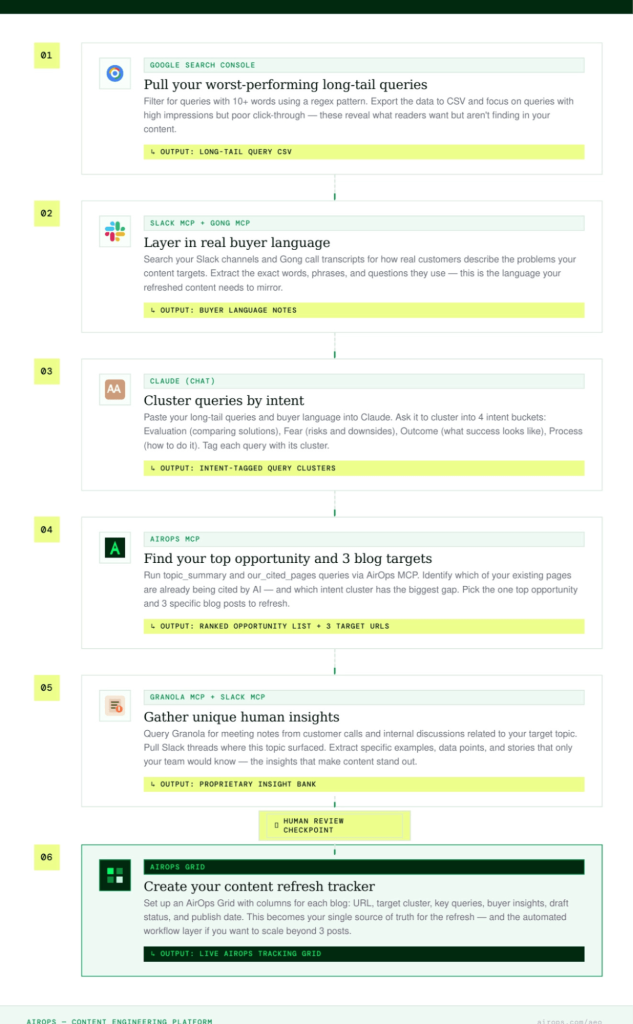
The result: three blog posts to refresh each week, a bank of authentic customer insights to enrich them, and a structured brief ready to execute. The full AI-powered workflow runs end-to-end in Claude with MCP connections to Slack, Gong, Granola (for meeting notes), and AirOps.
The takeaway:
The unique insights, such as real customer language, specific objections from sales calls, unexpected use cases from Slack, are what separate a useful content refresh from a surface-level rewrite. AI search engines are more likely to cite content that contains specifics no competitor can replicate.
How to take it further:
Step one of Eoin’s playbook, exporting a CSV from Google Search Console, is the part that introduces friction. A manual CSV export is a static snapshot that goes stale the moment you download it. Coupler.io replaces that step by pulling GSC data on a schedule, so Claude Code for marketing always has fresh query data to work with. The same applies to the analytics and CRM layers downstream in the workflow.
The pattern across all Claude Code marketing use cases
Five different practitioners, five different workflows, one shared dependency: data.
Olexander’s agent team queries live business data via MCP. Kaancata’s client folders pull in Ads, GA4, and GTM data. Austin’s Meta Ads MCP server feeds campaign metrics into the same environment where he creates variants. Matt’s scoring model ingests CRM and intent data. Eoin’s content playbook starts with a Search Console export.
Every workflow begins the same way: getting real data into the system. Claude Code handles the analysis, the automation, and the building. But without a clean data pipeline feeding it, there’s nothing to analyze.
Coupler.io connects 400+ data sources to Claude, keeping that data fresh on a schedule. No manual exports, no stale CSVs, no building custom MCP servers for each platform. It’s the data layer that makes these workflows reliable.
Integrate data from 400+ sources with Claude
Try Coupler.io for freeWill Scott, founder of Search Influence, put it directly: LLMs can hallucinate during data analysis. He’s seen Claude confidently report a number that didn’t match the source file. His advice: treat the output like work from a new analyst. Trust but verify, especially before anything goes to a client.
Claude Code is reading your data and finding patterns across sources faster than you can manually. It’s not telling you what to do about those patterns. You still need someone who understands the client’s business, their competitive situation, and what they’re actually trying to accomplish. The tool finds the interesting data. The strategist decides what to do with it. You also need to verify what it gives you. LLMs can hallucinate, and that includes data analysis.
What makes a Claude Code for marketers actually work
Across the examples above, a few best practices keep surfacing:
- Start with one workflow, not ten: Pick one manual task you repeat every week and hand it to Claude. Build from there.
- Document your business context: Business events that live outside the data, such as pricing changes, new lead scoring models, seasonal campaigns, are exactly what the model needs to interpret numbers correctly. Without them, Claude reads the data right but explains it wrong. Keep a markdown file with your business context updated and in the project folder.
- Connect your data sources before writing prompts: Every example in this article started with data infrastructure, not clever prompts. The prompt is the easy part. The hard part is making sure Claude has access to the right information. Get your data connections working first.
Coupler.io connector is the fastest way to get that foundation in place. Connect your sources once, set a refresh schedule, and Claude always has up-to-date data to work with.
- Keep a human in the loop for judgment: Reviews every piece of AI-generated ad copy individually. Claude handles the volume. You handle the judgment.
FAQ
Do I need to know how to code to use Claude Code for marketing?
No. You describe tasks in plain language and Claude handles the technical execution. That said, familiarity with file structures and basic terminal commands helps you move faster.
Learn how to chat with your data in other tools except for Claude.
How is Claude Code different from using ChatGPT for marketing tasks?
The main difference is that Claude Code runs on your computer and can directly access your files, execute scripts, and connect to external tools through MCP. ChatGPT operates in a browser and requires you to copy-paste data in. Claude Code can read an entire project folder, pull live data from APIs, and run multi-step workflows end-to-end without manual intervention between steps.
What data sources can I connect to Claude Code?
Coupler.io connects Claude Code to 400+ data sources, including Google Ads, GA4, HubSpot, Salesforce, Meta Ads, Gong, and more. The integration does not require custom engineering. You can also build your own MCP connections to any tool with an API if you have specific requirements.
How much does Claude Code cost?
Claude Code requires a Claude Pro subscription ($20/month) or a Max plan ($100-200/month for heavier usage). The Pro plan has usage limits that most individual marketers won’t hit for standard workflows. Teams managing multiple clients or running frequent data-intensive analyses may need the Max plan.
Can Claude Code replace a marketing team?
No. Claude Code handles execution and analysis, not strategy and judgment, compressing the time between question and answer. It doesn’t replace the person asking the right questions.