You asked your AI assistant about the Q3 revenue. It said 47% up. But your actual number is 12% down. Sounds familiar? LLMs are great at conversations but struggle with accurate calculations. They love to talk but hate to count. Coupler.io delivers precise, validated results that bridge the gap between shaky data and decisions you can actually rely on. Once Coupler.io did the maths, LLMs can do what they do best: interpret, spot patterns, and converse naturally. Give them accurate numbers, and they transform into sharp analysts. In this article, you’ll see the power of Coupler.io and AI for fast and reliable data analysis with minimal effort and no tech skills required.
Data integration & AI analytics with Coupler.io
Get started for freeWhy LLMs alone are not enough for data analysis
Large language models are exceptional at understanding questions in natural language and delivering fluent, insightful explanations. They rely on transformer-based neural networks trained to predict the next logical word in a sequence. That’s great for language, but not suitable for heavy computation or accurate data handling.
Because of this, LLMs have limits when used on their own for data analysis:
- Context windows cap dataset size: Large uploads get truncated. Only a fraction of your data fits in one go, so the model works with an incomplete picture. Moreover, it can even show “error”, so you are not able to push your data to AI.
- Business context stays missing: LLMs explain concepts like ROAS or churn beautifully, but they don’t inherently know your specific metrics, seasonality patterns, or internal rules.
- Calculations rely on pattern matching, not execution: Numbers emerge from learned text patterns rather than real math engines, which can lead to inconsistencies without external verification.
- Outputs shift with phrasing: Slight wording changes sometimes produce different results, which becomes a challenge when analytics demands reproducible, trustworthy answers.
These aren’t flaws; they reflect what LLMs were designed to do: reason over language, not function as calculators.
The real solution: conversational analytics powered by Coupler.io’s Analytical Engine
Coupler.io creates a seamless connection between LLMs and structured data. A dedicated Analytical Engine does the precise, behind-the-scenes work: it executes queries, crunches complex formulas, and double-checks every digit. Only rock-solid results reach the LLM. Then the model lights up and connects the dots, explains the “why” and “what”, and answers in plain language you can actually understand.
It’s like hiring two specialists instead of asking one person to be both a mathematician (Analytical Engine) and a storyteller (LLM).

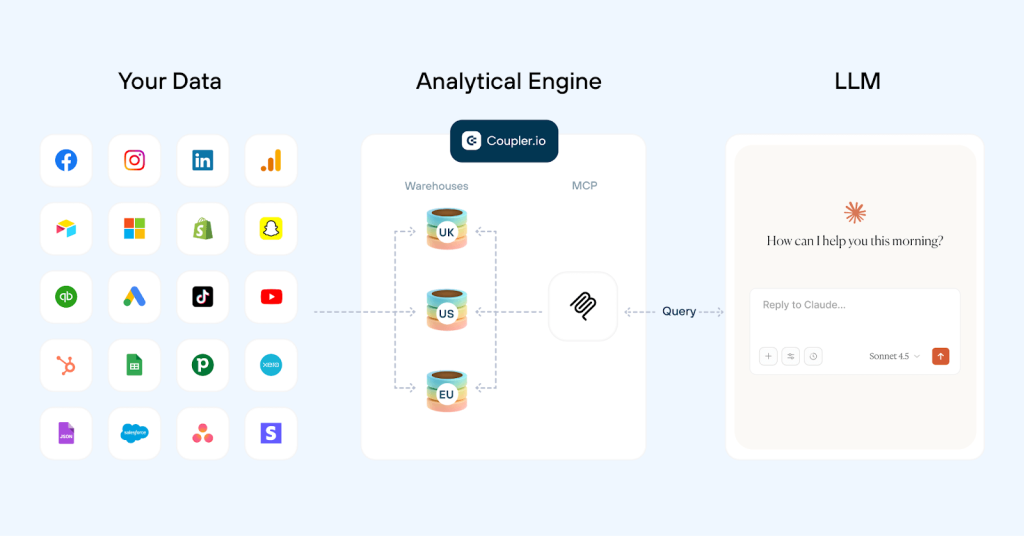
Coupler.io lets you experience accurate data analysis in two ways:
- AI Agent — chat with your data instantly, without leaving Coupler.io
- AI Integrations — connect Coupler.io to the AI tools you already use every day, like Claude, ChatGPT, or Perplexity, and get accurate answers inside the tools you love
Coupler.io does what other tools don’t: it separates the thinking from counting.
Coupler.io’s four-step process for trustworthy results
Coupler.io’s Analytical Engine powers both AI Agent and AI Integrations through the same reliable four-step flow:
Step 1: Smart context, not data overload
Instead of dumping your entire dataset on the LLM, we send only what it needs: the structure of your data (column names, types) and the first 20 example rows. The model instantly “gets” what’s available. No confusion, no hallucinated columns.
Step 2: Your question becomes a precise instruction
You type something like “What’s our average order value by region this year?”
The LLM translates that into clean, correct SQL and hands it to Coupler.io’s Analytical Engine.
Step 3: The engine takes over and nails it
- Executes the query on your live, synced data
- Merges sources, sums and groups data, runs every calculation
- Validates results for accuracy
- Returns only the exact, verified numbers needed (a tiny fraction of your dataset)
Zero room for error or hallucination.
Step 4: The LLM brings meaning
With solid facts in hand, the model interprets trends, spots surprises, explains causes, and answers in clear, human language you can trust and act on.
As a result, you get fast, conversational answers that actually match reality. No more “sounds good but probably wrong.”

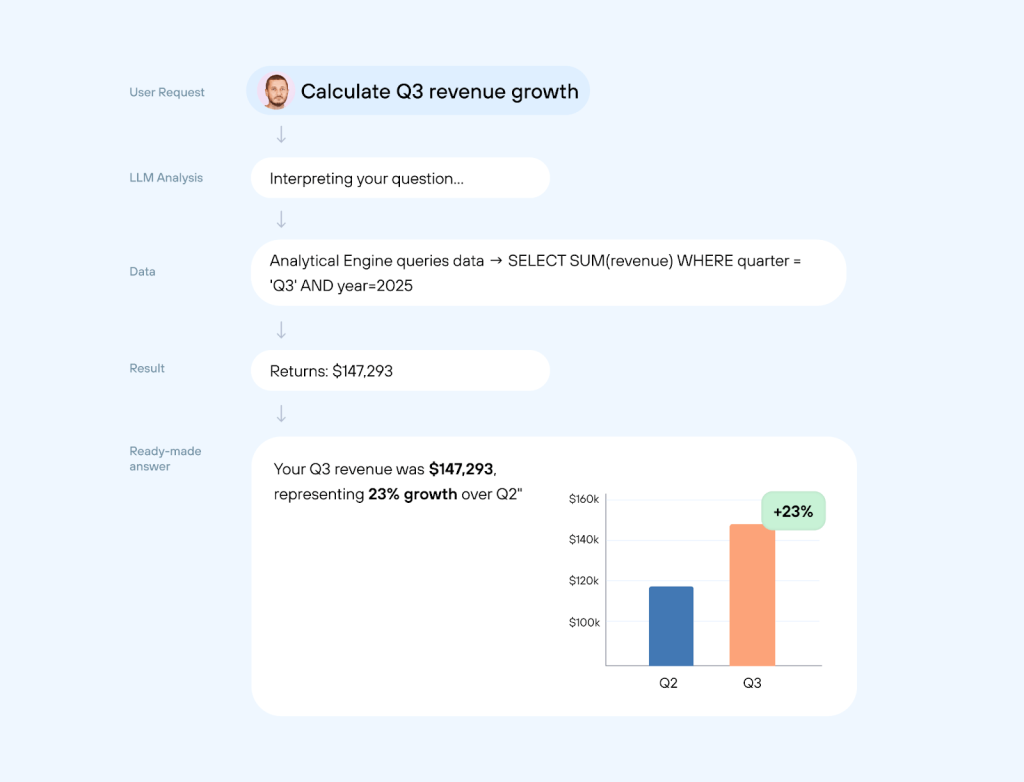
| The old way (without the Analytical Engine) | The Coupler.io way |
| LLM sees your data and tries to calculate itself. Result: “Revenue grew 47%—that’s $165,000 more!” Sounds good. Completely wrong.❌ | The Analytical Engine does the calculation first. Result: “Revenue grew 23%—exactly $147,293 more.” No guesswork. Numbers match reality.✅ |
Integrate your data with AI for conversational analysis
Try Coupler.io for freeAI Agent: built-in analysis inside Coupler.io
What if you could ask, “What’s our customer acquisition cost trend this quarter: are we getting better or worse compared to the previous quarter?” and get the true number in 8 seconds?
Think of AI Agent as someone who knows your data inside out and provides verified, instant answers to your questions.
How to access Coupler.io AI Agent
- Log in to your Coupler.io account
- Select the AI Agent option in the left-hand sidebar
- Ask questions about any of your successfully completed data flows

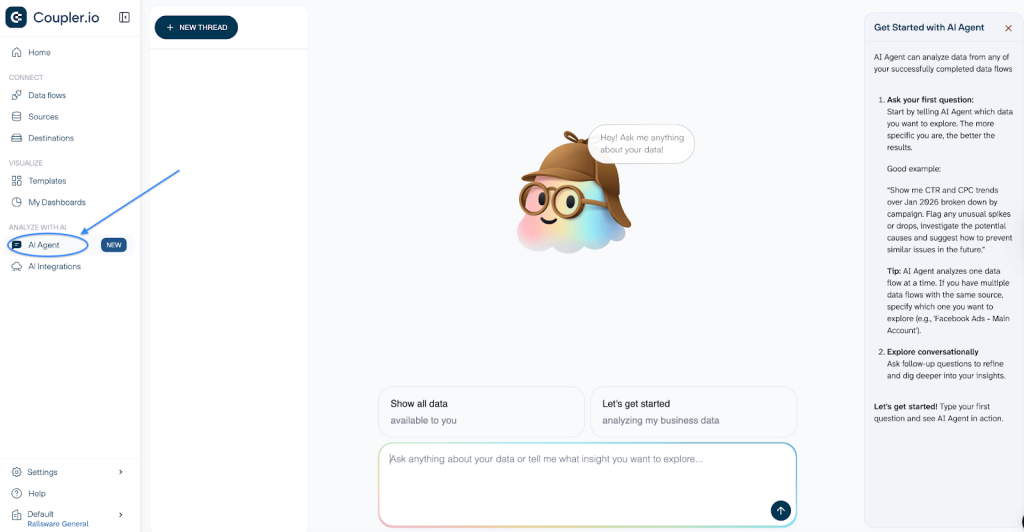
Each conversation will be stored as a separate thread and will be easy to access anytime.
Another way to get insights from the AI Agent is to navigate to a specific data flow:
- Go to the Data flows page
- Click Ask AI next to the data flow you want to analyze

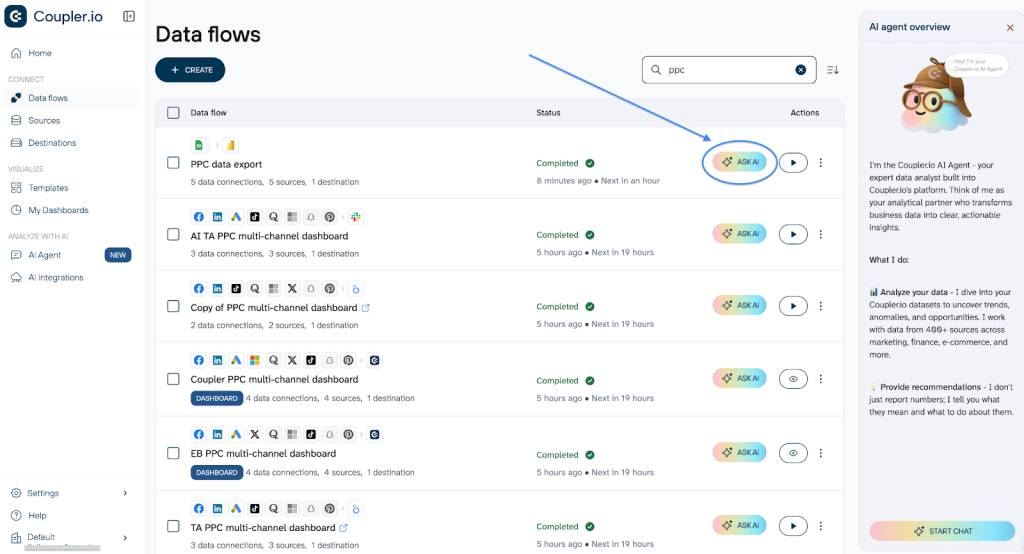
- Ask questions about the data within this exact flow

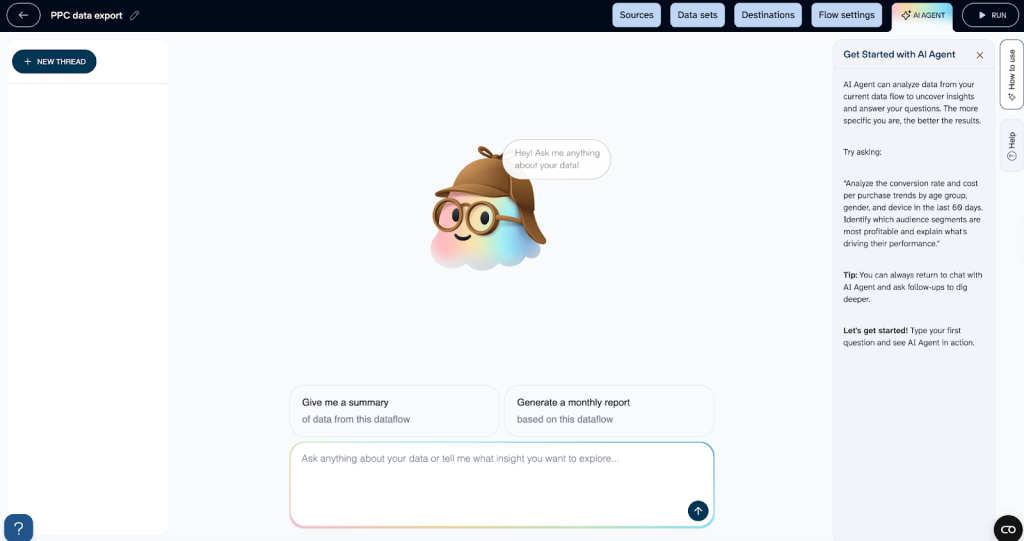
In this case, your conversations with AI Agent will be stored as threads within this exact data flow. Whenever you want to access them, once again, click Ask AI next to the data flow you need.
How it works
In the chat window, enter the question you want to ask about your data and get instant, comprehensive answers. For example:
- “
Show me month-over-month revenue growth for Q4“ - “
Which products have the highest return rate?“ - “
Analyze my paid ads data: compare Q3 to Q2 across all platforms.”

Analyze your data with Coupler.io AI Agent
Start your free trialAI Integrations: analyze data in your favorite AI tools
The AI Integrations feature lets you connect your data directly to leading AI platforms. Once linked, you can ask questions inside those tools and get precise, verified answers pulled from your actual business data. And there’s no need to switch from your favorite AI apps.
Unlike uploading huge CSVs that overwhelm LLMs, Coupler.io runs queries on large datasets and sends only verified, aggregated results (plus data schema). Your AI stays effective and focused, which is perfect for combining instant insights with planning, brainstorming, writing, or other tasks all in one flow.
Supported AI destinations
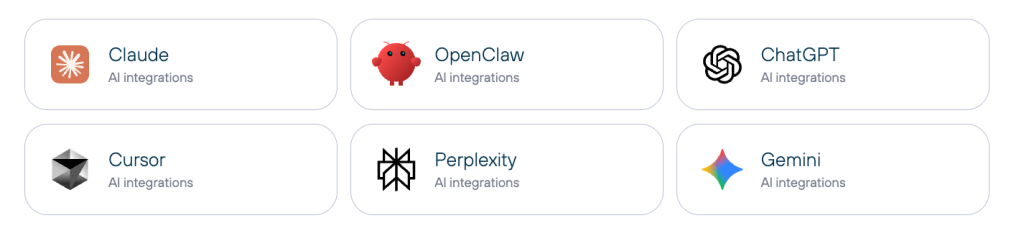
Currently, Coupler.io supports the following AI tools as destinations for your efficient data analysis:

How it works
This is how Claude integration feels in practice:
- Build a data flow in Coupler.io → connect your data sources.
- Choose Claude as the destination for your data.
- Connect Coupler.io to Claude.
- Back in Claude, ask: “Show me profitability by product this quarter” or whatever’s on your mind.
- Get a solid, numbers-first reply you can act on immediately.

AI Agent vs AI Integrations: which and when should you use?
Both AI Agent and AI Integrations provide the same chatting options with your data. Here’s a quick breakdown to help you choose the right approach:
| Choose AI Agent | Choose AI Integrations | |
| Location | Right inside Coupler.io | Inside your favorite AI tool (Claude, ChatGPT, Perplexity, Cursor, Gemini CLI). |
| Setup required + speed to 1st insight | Click AI Agent in the left sidebar and enter your question. The answer is instant. Zero extra setup. | Create a data flow → choose your preferred AI tool as a destination → connect. The setup takes 3–5 min to get the first answer (next ones are instant). |
| Best for | • Quick answers while managing data flows • Exploring data on the fly • Keeping everything in one platform | • Daily work inside Claude, ChatGPT, Perplexity, or similar tools • Combining data analysis with other AI work (e.g., projects with context and instructions) • Giving your team insights inside the tools they use constantly • Querying large datasets for accurate analysis |
| Multi-source analysis | Yes | Yes |
| Use case examples | • Ad spend report landed 5 minutes ago (to get quick insights on it) • “ Compare ROAS across all campaigns vs last month”• “ Which creative had the lowest CPC?” | • You’re already deep in a Claude conversation about next quarter’s plan. • Every morning: “ What’s today’s MRR run rate based on the synced Stripe + HubSpot data?”• Claude Project “Monthly Finance Sync & Insights” contains budget models, historical forecasts, and board slides. Ask inside it: “ With the latest Stripe + QuickBooks data Coupler.io just delivered, update MRR breakdown by customer segment and flag any segment growing >20% MoM.” |
Pro tip: Use both
AI Agent for instant checks in Coupler.io.
AI Integrations to bring verified data into Claude/ChatGPT/Perplexity for strategy, planning, and writing.
Quick truth + deep work = faster decisions.
What’s next: upcoming features
We’re just getting started with AI. A sneak peek into what’s coming next:
- AI-powered data flow setup: Enable AI-powered data source & destination setup in Coupler.io.
- Scheduled AI prompts: Introduce scheduling capabilities for AI prompts to let users automate recurring use cases. For example, enable triggered actions such as data loading or email sending, etc.
- Project and context sharing within the AI Agent: Introduce project and context sharing within the AI Agent.
- Advanced AI-powered capabilities: Develop AI-powered dashboard generation and enable direct data chat inside dashboards.
- AI-driven alerts and anomaly detection: Add AI-driven alerts and anomaly detection to move beyond pre-set filters toward intelligent, automated data monitoring.
You just spent ~10–12 minutes reading this article. That equals ~50 quick, verified insights with Coupler.io AI Agent! Your next insight is roughly 10 seconds away, no credit card needed. Ready to try? Get your first data insights now.
400+ data sources for AI analytics with Coupler.io
Get started for freeFAQ
Do I need technical skills to use Coupler.io’s AI features?
No. Both features are easy-to-use for non-technical users. No code, no SQL, no expertise needed. Powerful analysis for marketers, executives, and business owners.
Can I analyze multiple data sources together?
Yes! And it’s Coupler.io’s core advantage. Combine your data from CRMs, ad platforms, e-commerce, spreadsheets… (400+ sources) directly in Coupler.io. Then ask questions in simple language, for example: “How does Google Ads spend compare to Shopify revenue per category?” And get an instant, data-backed answer.
Is it safe and secure to use Coupler.io’s AI features?
Yes, Coupler.io keeps security first. It is SOC 2 certified; GDPR, HIPAA, and DORA compliant. Your data source never integrates directly with an LLM because Coupler.io acts as the middle layer.
Control stays with you:
- Share only filtered, selected data
- Choose only the datasets you want analyzed
For AI Integrations: turn off training and memory in Claude/ChatGPT/etc. (verify what’s included in your plan). For AI Agent: no model training from your conversations.
How is this different from just uploading a CSV to an AI tool?
There’s a critical difference between using (a CSV + AI solution) vs Coupler.io
CSV route:
Export file manually → upload to the AI tool→ LLM attempts math → errors, hallucinations, size limits, stale data, no verification for results ❌
Coupler.io route:
Connect sources once → Analytical Engine handles math & verification → works with live multi-source data of any size → AI gets clean facts → reliable answers ✅