You want to ask Claude “which campaigns wasted budget last week?” and get a straight answer from your own Google Ads data. That’s the promise behind any Google Ads MCP, and it is a good one.
The catch is that “a Google Ads MCP” means two very different amounts of work. One is Coupler.io’s managed Google Ads MCP server, where you connect an account and start asking questions right away. The other is a self-hosted Google Ads MCP you build yourself, which needs a developer token, a runtime installed, and a working knowledge of OAuth.
This piece compares both so you can pick the one that fits your team. I will be upfront: for most PPC and marketing analytics teams, the managed Coupler.io route wins, so you can see where the difference actually shows up for your own reporting.
What is Google Ads MCP, and why should marketers care?
MCP stands for Model Context Protocol. It is a standard way to hand a data source to an AI assistant so you can ask about it in plain language, and there’s no need to write queries or export spreadsheets.
A Google Ads MCP server is the piece that sits between your Google Ads account and the AI tool. When you ask a question, it pulls the relevant numbers through the Google Ads API and returns them to the model. No manual exports or copy-pasting.
The reason this matters: campaign reporting eats hours. You export, clean, pivot, then answer the same questions about ad spend and ROAS your manager always asks. An MCP lets you skip to the answer.
There is no single official Google Ads MCP published by Google. Several open-source implementations exist, and they differ in setup, runtime, and features. That leaves two real paths. You can run a self-hosted Google Ads MCP yourself, or you can use a managed one like that of Coupler.io. For most teams, the managed route is the easy call. The self-hosted one only pays off in specific cases, which I’ll flag as we go.
Google Ads MCP for Claude: what you can ask on day one
Once a Google Ads MCP is linked, you can talk to your campaigns in plain language. You connect Google Ads to Claude and ask things like:
Which campaigns spent the most last week and what did they return?Show me ad groups and keywords with high cost and zero conversions.Compare this month's ROAS to last month by campaign type.

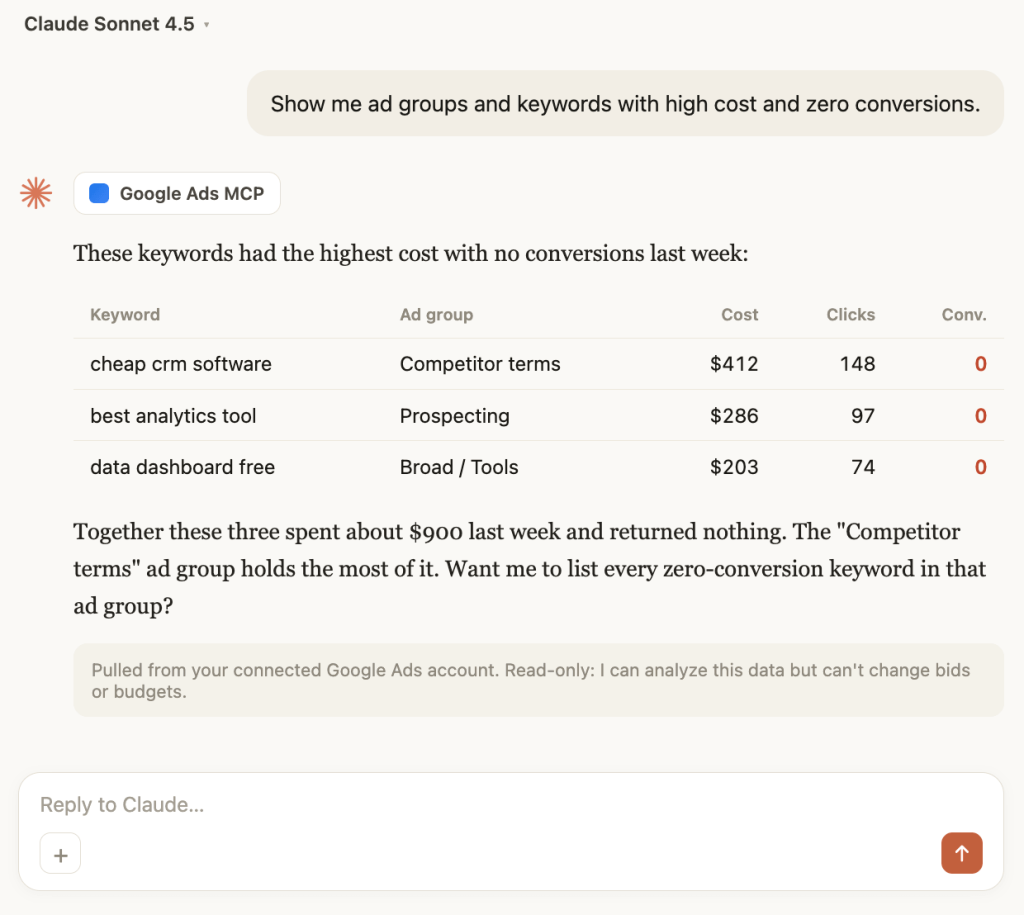
Most Google Ads MCPs are read-only, including open-source servers and Coupler.io’s. They read your data so the AI can analyze it, but they do not change bids or budgets. A few third-party servers advertise Google Ads MCP write access, which lets the AI edit campaigns directly. That sounds convenient, but handing an LLM permission to change live spend carries real risk, so it is safer to keep analysis and campaign editing separate.


Give Claude a safe view of your Google Ads via Coupler.io
Start for freeWhat is the Coupler.io Google Ads MCP? The no-code option
Coupler.io is the managed route on that list, and the easiest one to start with. The Coupler.io Google Ads MCP is a hosted MCP server that connects your Google Ads data to AI tools without any setup on your machine. You authorize your account in the browser, pick your AI tool, and start asking questions. This lets you connect and analyze Google Ads data without any technical skills.
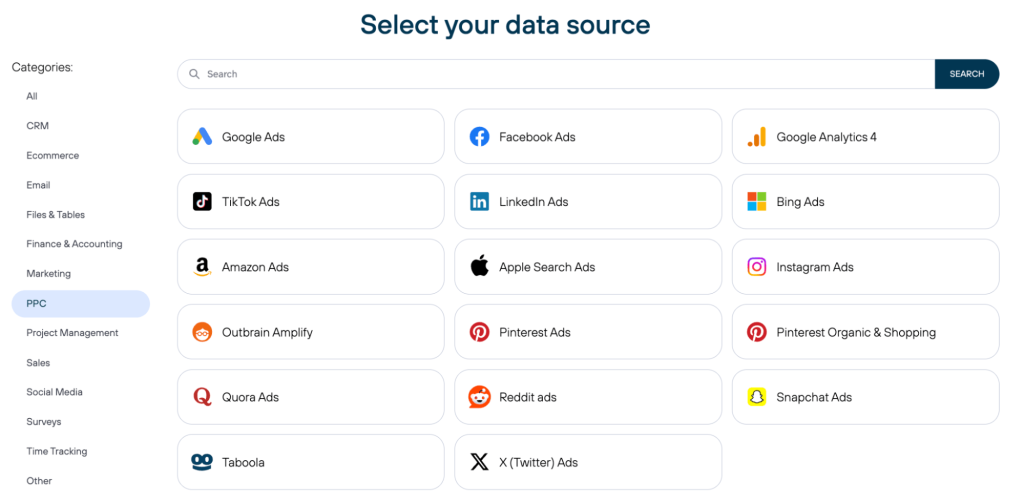
The setup is no-code and runs through a guided browser sign-in, so there is no developer token needed, no runtime to install, and nothing to configure by hand. Your data stays up-to-date with a refresh as often as every 15 minutes, so you ask about this morning’s spend and get this morning’s numbers. And Google Ads is one of 400+ data sources on the platform, so it can sit next to Google Analytics, Meta Ads, LinkedIn Ads, HubSpot, and Shopify in a single workspace.

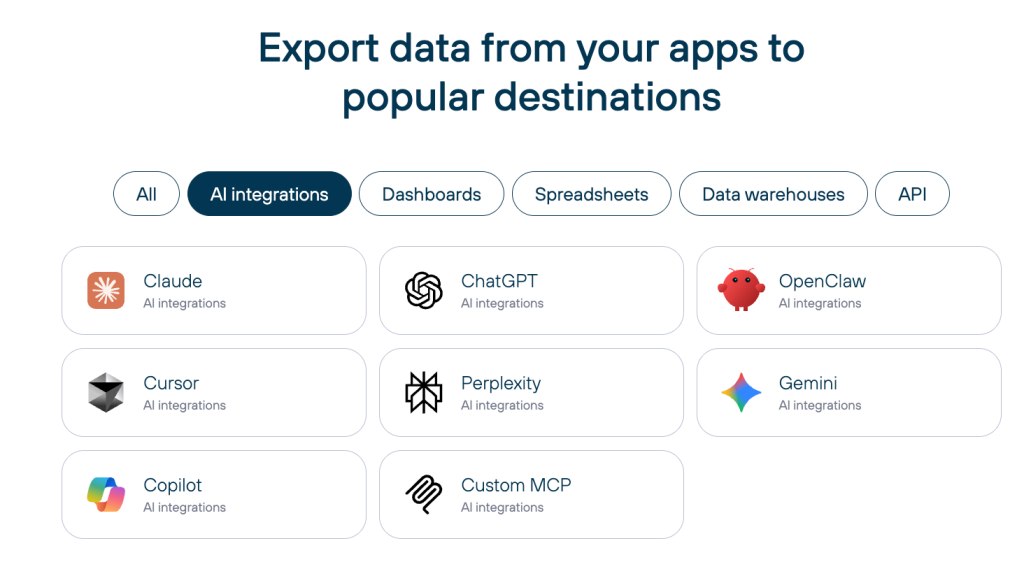
You are not locked to one assistant, either. Coupler.io connects to Claude, ChatGPT, Gemini, Perplexity, Cursor, Microsoft Copilot, and OpenClaw.

If you would rather not connect an external tool at all, Coupler.io also has an AI Agent, a chat assistant built into the platform that answers questions on the same data.
Ask. Coupler AI does the rest
Say what you need, from which source, and how often. Coupler AI connects your account, keeps the data fresh, and hands you reliable answers you can act on.


Google Ads AI reporting you can actually trust
Reporting is only useful if the numbers are right, and that is the real weak spot of a bare MCP. Many Google Ads MCP server setups primarily expose raw API data to an LLM and let it compute metrics like CPA, ROAS, CPC, or CTR. That asks the model to do arithmetic. LLMs are good at reading and explaining. However, they can make arithmetic mistakes when calculating metrics directly from raw data, sometimes stating a wrong number with full confidence.
Coupler.io handles this with its Analytical Engine. Think of it as a mathematician working next to a storyteller. The engine runs a SQL query against your full dataset and does the calculation. The AI takes those verified calculations and explains what they mean in plain language. Coupler.io can also apply data transformations such as filtering and joins before the data reaches the model.

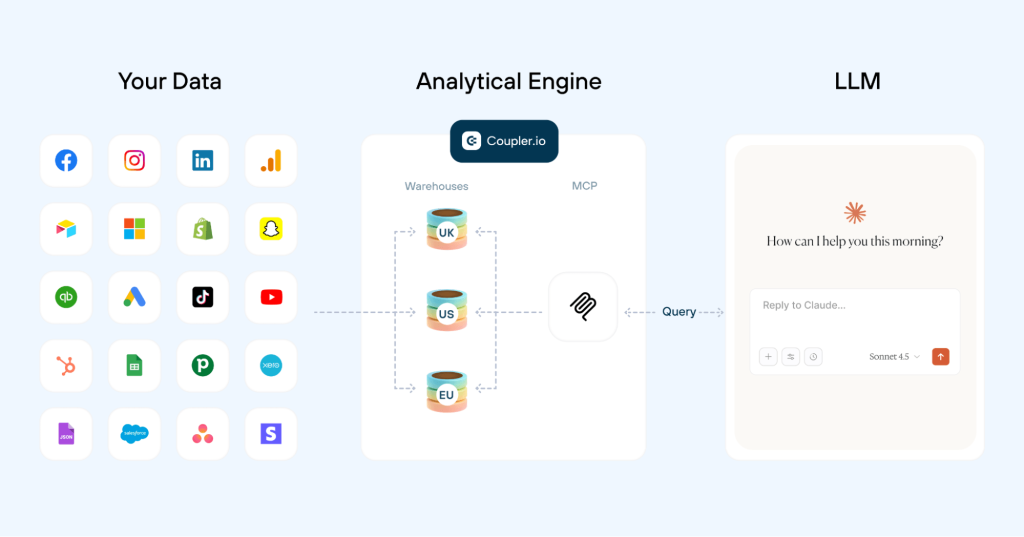
That split is why the answers hold up. The model receives precomputed metrics instead of calculating them itself, so your Google Ads AI reporting rests on numbers that came straight from your data. It also beats pasting a CSV into Claude, since the CSV arrives with no schema and no refresh.
What a Monday reporting check looks like with Coupler.io Google Ads MCP
Picture a PPC manager who runs paid search for four e-commerce clients. Every Monday, the first thing a client wants to know is whether performance held up. With the Coupler.io Google Ads MCP connected to Claude, that answer is one message away.
The question is “What was our blended ROAS last week, and how did it move versus the week before?” The answer means adding up spend and conversion value across every campaign for two date ranges and dividing; the kind of math an LLM guesses wrong from raw rows. Coupler.io pulls the data, its Analytical Engine runs the totals, and Claude comes back with 4.3x, down from 4.9x. It points to Display / Prospecting as the drag: a campaign that spent $1,244 and returned 0.7x.

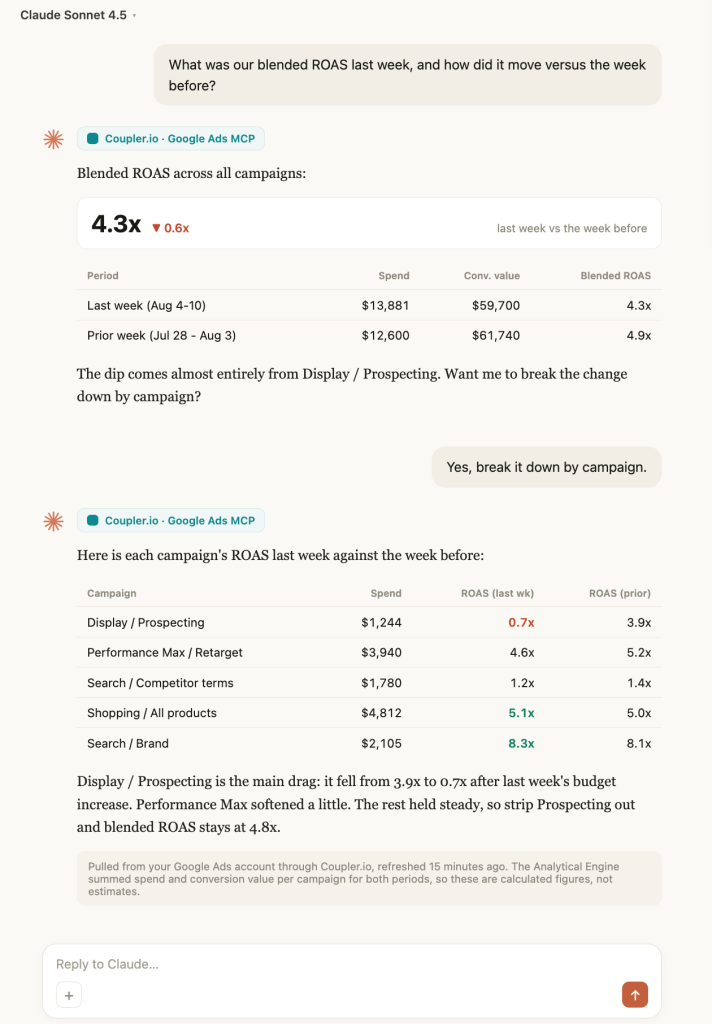
Because the Analytical Engine did the arithmetic, that 4.3x can go straight into the client update (no need to double-check it in a spreadsheet). The data refreshed 15 minutes earlier, so it reflects the latest spend.
That is one question on one account. Clear Performance Ads shows what this looks like across a whole book of business. The agency runs Google Ads, Meta Ads, and Amazon Ads for e-commerce clients, and founder Lance Johnson handles all client reporting in about 15 minutes a week, solo, on live Coupler.io dashboards. As he puts it, “as an agency, if we can showcase our results, it helps us gain that trust and stay in business.“
Get campaign numbers you can trust with Coupler.io
Try it for freeGoogle Ads MCP setup: minutes with Coupler.io, hours on your own
Setup is where the self-hosted and managed routes split, and it is the clearest reason most people pick the managed one.
With Coupler.io, the Google Ads MCP setup is three steps. Connect your Google Ads account, choose your tool (from the list of available AI integrations) as the destination for your data, and start asking questions. You do this in a browser, and you are done in a few minutes.
A self-hosted Google Ads MCP asks for more before you can run a single query:
- A Google Ads API developer token, which you request from Google. Approval time varies with the type of access you request and Google’s review process.
- Depending on the implementation, Python or Node.js installed and configured on your machine.
- OAuth credentials and a secrets file you set up by hand.
Running a query is quite easy. But everything before this is not: token approval and OAuth setup might run into a weekend, and once live you still own updates, quota limits, and breakage when Google changes something.
If that setup is what stops you, it is the exact friction the managed route removes. You connect your account through Coupler.io and start asking the same day, with no token and no runtime.
Google Ads MCP vs Coupler.io, side by side
Here is the short version of both options, as of August 2026.
| Self-hosted Google Ads MCP | Coupler.io Google Ads MCP | |
|---|---|---|
| Setup | Developer token, a runtime, OAuth, secrets file | Guided browser sign-in, no code |
| Maintenance | You own updates and quota limits | Managed and hosted for you |
| Access | Read-only | Read-only |
| Calculation accuracy | Depends on the implementation; many rely on the model to analyze returned data | Analytical Engine computes, AI explains |
| Data freshness | Queries the Google Ads API on demand | Cached, managed refresh as often as every 15 min |
| Other sources | Google Ads only | 400+ sources in one workspace |
| AI tools | Claude, Cursor, Windsurf | Claude, ChatGPT, Gemini, Perplexity, Cursor, Copilot, OpenClaw |
| Security | Your responsibility | SOC 2 Type II, GDPR, HIPAA |
| Cost | Free, plus your time | From $24/month, free plan and trial |
To be fair to the open-source route, it has certain strengths. It is free, fully self-hosted, and gives a technical team complete control over the code and the data path. If that control is the priority, it can be a legitimate choice for tech-savvy users.
Marketing data connectors like Supermetrics move Google Ads data too, but they are built for dashboards rather than AI chat, so they solve a different job. Coupler.io also sends the same prepared data to dashboards and spreadsheets, through Looker Studio, Power BI, Google Sheets, Microsoft Excel, or BigQuery, with ready-made dashboard templates to start from. One connector, several destinations.
Running Meta alongside Google? See our Coupler.io vs Meta Ads MCP comparison for the same breakdown on the Meta side.
What a “free” Google Ads MCP really costs you
A self-hosted server is Google Ads MCP free in the licensing sense. Most open-source implementations cost nothing to download. That price tag leaves out the setup hours, the ongoing maintenance, and the cost of a wrong number in a client report.
Coupler.io charges on simple logic. You pay for the accounts and destinations you connect, not per data flow. Connect one Google Ads account and build as many reports and AI data flows as you want on top of it, and you still pay for one account. Pricing starts from the entry-level plan at $24 per month billed annually, with a free plan and a 7-day trial.
If your reporting takes 3 hours/week, saving even 2 hours weekly pays for the entry-level plan quickly.
Which Google Ads MCP should you choose?
Choose the self-hosted Google Ads MCP if you are a developer, you already hold a Google Ads API token, and you want full control over the code more than you want your time back.
Choose Coupler.io if you want to connect Google Ads to Claude right away, you need reporting numbers you can trust without rechecking them, or you want more than Google Ads in your AI workspace. For most marketing and data analysis teams, that is the practical pick.
Need multiple ad platforms in one AI workspace?
Book a demo with Coupler.io