What is ETL in finance?
ETL in finance stands for “extract, transform, load.” It is the core workflow finance teams use to move, clean, and prepare financial data for reporting, forecasting, and regulatory compliance. ETL collects financial data from three major categories of systems: accounting platforms (like QuickBooks and Xero), operational and business systems (such as ERPs, CRMs, and payroll tools), and financial institutions or banking systems. It then moves this data through three essential stages: financial data extraction, data transformation, and loading financial data into tools like Excel, Power BI, or a cloud data warehouse. This creates a single, reliable source of truth for month-end close, cash flow analysis, budgeting, and real-time data decision-making.
Why your company needs financial ETL pipelines
Without ETL, finance teams often struggle with inconsistent spreadsheets, manual data entry, and reporting delays. Companies across financial services and accounting have already solved these challenges. They’ve automated their ETL finance workflows to reduce latency, improve data governance, and streamline accuracy across their reporting pipelines. One example is Project Alfred, an Australian accounting firm that used Coupler.io to automate Xero and HubSpot reporting. The firm managed to save 20–40 hours per month while improving data reliability and reducing manual errors. These improvements matter even more for financial institutions and organizations, where compliance reporting, access controls, and GDPR requirements demand clean, validated, well-structured datasets.
Today, ETL is also the foundation for AI-driven analytics and machine learning workflows. The Load stage is no longer limited to spreadsheets or dashboards. It now includes AI destinations like ChatGPT or Claude. However, the data isn’t directly loaded into AI tools the way it flows to spreadsheets or dashboards. Instead, AI platforms query your datasets through secure MCP (Model Context Protocol) servers, such as the one provided by Coupler.io. These servers act as a controlled gateway, allowing you to specify exactly which data AI can access and what it can do with it.
How ETL works in a finance workflow
ETL in finance is a structured pipeline that moves your raw data through three critical stages: extract, transform, load. So, finance teams can trust their reports, dashboards, and even AI-powered insights.
Let’s break down how each stage works and why it matters for daily financial operations.
Financial data extraction
Financial data extraction is the first step, where you pull data from disparate systems and centralize it into a unified stream. This matters because most finance teams work with data trapped across 5-10 different platforms that don’t talk to each other. In a typical finance workflow, data might come from:
- Accounting platforms like QuickBooks, Xero, NetSuite: invoices, expenses, P&L data, balance sheets
- Banking systems like Chase Business Banking, Mercury, Stripe: transaction logs, account balances, reconciliation data
- Payroll systems like ADP, Gusto, Rippling: salaries, taxes, benefits, contractor payments
- CRMs and billing tools like Salesforce, HubSpot, Chargebee: customer records, subscriptions, revenue data
- Enterprise finance systems like SAP, Oracle Financials, Microsoft Dynamics: general ledgers, cost centers, budget allocations
During extraction, ETL finance tools connect to each source via APIs, CSV exports, bank-feed integrations, or direct database access. This means that data flows automatically (on a schedule or triggered by an event). No more redundant CSV downloads, manual copy-paste errors, or waiting for someone to export last month’s numbers.
For example, a company might extract invoice records from QuickBooks, bank reconciliation data from bank APIs, and payroll entries from a payroll system, all in one automated flow that runs on schedule (daily, hourly, or on-demand). With unified extraction, every subsystem stays synchronized and up-to-date.
Transforming financial data
Once data is extracted, it rarely arrives “analysis-ready.” That’s where transforming financial data becomes critical to any modern ETL finance workflow. At this point, teams strengthen data management, reduce latency, and prepare information for downstream machine learning, forecasting, and regulatory reporting. This stage typically involves:
- Cleaning: Removes duplicates, eliminates test entries, and normalizes date and currency formats to restore data quality
- Mapping: Aligns chart-of-accounts codes across different sources (for example, matching “Payroll-Salaries” with “Salary_Expenses”) to ensure consistency across systems
- Joining: Merges related datasets such as invoices with payments, or bank transactions with ledger codes, to create complete financial views
- Validating: Checks data accuracy through rules like “total debits = total credits,” verifies currency conversions, and reconciles bank balances for audit readiness, so impeccable audit trails
- Aggregating: Sums monthly totals, groups activity by cost centers, calculates accrued revenues and expenses, or prepares consolidated financial statements
The transformation step turns messy raw data into standardized, reliable tables. Accountants, FP&A teams, and auditors can trust such kind of data even more. It greatly reduces errors caused by manual data entry or spreadsheet misalignment and saves countless hours of reconciliation.
Loading financial data into reporting tools (now AI-ready too)
With clean, transformed financial data in hand, the final step of the ETL in finance is to load into the tools where your team actually works:
- Spreadsheets (Google Sheets, Excel) for flexible modelling or ad-hoc analysis
- Data warehouses or databases (BigQuery, Snowflake, Redshift) for scalable storage and complex queries
- BI tools and dashboards (Power BI, Looker Studio, Tableau) for visual reporting, P&L statements, balance sheets, cash flow dashboards
Today, loading also means preparing data for AI-driven workflows. By using tools like Coupler.io to prepare cleaned financial datasets for AI platforms like ChatGPT or Claude, finance teams unlock new capabilities:
- Conversational analytics: they can ask natural-language questions like “What was our net cash flow last quarter?” or “Which vendor payments are overdue by more than 60 days?” and get instant answers.
- AI-generated summaries: easily convert complex balance sheets or P&L tables into human-readable narratives, useful for board reports or external stakeholders.
- Automated anomaly detection and forecasting: accurately detect unusual expense spikes, predict liquidity shortfalls, or forecast cash flow under different scenarios.
Using clean data in AI-ready environments, finance teams finally combine data accuracy, speed, and insight. ETL makes it possible; AI makes it actionable.
Best ETL tools for finance
Modern finance teams rely on ETL solutions to turn scattered data from QuickBooks, Xero, banks, and ERPs into clean, analysis-ready datasets. The right platform determines how quickly you can automate month-end close, build cash flow dashboards, or enable AI-driven insights. Of course, without engineering support.
Below are the most popular ETL tools for finance, ranging from no-code platforms purpose-built for accounting workflows to enterprise solutions for large organizations.
Coupler.io
Coupler.io is a no-code ETL platform purpose-built for business owners and finance teams. It connects to 400+ sources including QuickBooks, Xero, Stripe, HubSpot, Google Sheets, and more. Coupler.io offers built-in transformation capabilities for aggregating, blending, and cleaning data.

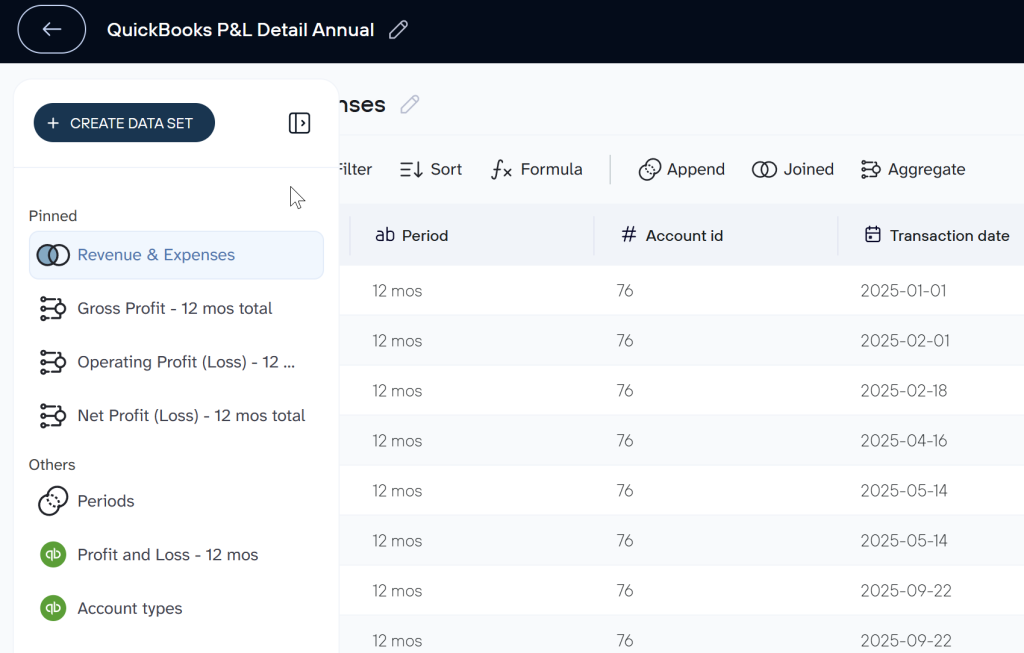
In addition, it provides pre-built finance-specific dataset templates that eliminate manual data work. These templates eliminate manual data transformation work. You can simply connect your data source account and get analysis-ready datasets that feed directly into spreadsheets, dashboards, data warehouses or AI tools like ChatGPT and Claude.
Best for: Small to mid-sized finance teams (1-20 people) that want fast setup, pre-built templates, and AI-ready data pipelines without engineering resources
Pros:
- Finance-specific templates reduce setup time from days to minutes
- Direct AI integrations with ChatGPT and Claude via MCP server
- No-code interface accessible to non-technical finance users
- Automatic data refresh on a custom schedule
Cons:
- Best suited for SaaS and cloud-based companies vs. on-premises infrastructure
- Most financial data set templates are designed for QuickBooks and Xero
Automate financial reporting with Coupler.io
Get started for freeAWS Glue
AWS Glue is a fully managed, serverless ETL service designed for large-scale data operations within the AWS ecosystem. It automates data discovery, cataloging, transformation, and movement across AWS services like Redshift, S3, and Athena. Glue excels at processing millions of transactions daily across multiple subsidiaries, making it a powerful choice for multinational corporations and financial institutions with complex data architectures.
Best for: Enterprise finance teams (50+ people) with existing AWS infrastructure, dedicated data engineering resources, and multi-system data integration needs
Pros:
- Scales effortlessly for huge datasets (billions of rows) and multi-department operations
- Native integration with AWS ecosystem (Redshift, S3, Athena, QuickSight)
- Serverless model eliminates infrastructure management overhead
- Built-in data quality and governance features for compliance
Cons:
- Steep learning curve for teams unfamiliar with AWS services
- Costs increase significantly with frequent job runs (can reach $1,000+/month for active use)
- Requires Python or Scala knowledge for custom transformations
- Not ideal for teams using non-AWS tools or cloud-agnostic workflows
Microsoft SSIS
SQL Server Integration Services (SSIS) is Microsoft’s enterprise ETL platform for on-premises and hybrid cloud deployments. Built into the SQL Server ecosystem, SSIS is a proven choice for finance teams in regulated industries (banking, insurance, healthcare) that must keep sensitive financial data on-premises for compliance reasons. It handles complex, high-volume transformations reliably and integrates deeply with Microsoft’s business intelligence stack.
Best for: Large enterprises (500+ employees) with on-premises SQL Server infrastructure, dedicated IT/engineering teams, and regulatory requirements that mandate on-premises data storage
Pros:
- Deep integration with SQL Server, Power BI, and Azure services
- Proven reliability for mission-critical financial transformations
- Full control over data security, access, and compliance in on-premises environments
Cons:
- Not designed for modern SaaS integrations (QuickBooks, Xero, Stripe)
- Requires dedicated server infrastructure, maintenance, and updates
- Steeper learning curve than no-code cloud ETL platforms
- Limited support for real-time data sync (primarily batch-oriented)
Talend
Talend is an open-source ETL platform (with paid enterprise features) that bridges the gap between no-code simplicity and developer-friendly customization. It offers 900+ pre-built connectors, including QuickBooks, Xero, and Salesforce, with drag-and-drop visual design for common workflows and code-level access (Java) for complex transformations. Talend works for finance teams that have outgrown spreadsheets but need more control than pure no-code platforms provide.
Best for: Mid-sized finance teams (20-100 people) with some technical resources who need customizable ETL finance workflows and aren’t locked into a single cloud provider
Pros:
- Broad connector coverage (900+ sources) including financial systems
- Open-source core version available (Talend Open Studio) for budget-conscious teams
- Flexible deployment (cloud, on-premises, or hybrid)
- Visual interface for common tasks; code access for advanced logic
Cons:
- Pricing increases significantly as data volume scales
- Requires Java knowledge for complex transformations
- Support and documentation quality varies between open-source and enterprise tiers
- Steeper learning curve than no-code ETL finance tools like Coupler.io
Check out an extended list of ETL tools.
How to implement ETL for finance with Coupler.io
Most finance teams want to see ETL in action before committing to implementation. This section walks through a complete workflow: connecting QuickBooks to AI tools (ChatGPT or Claude) using Coupler.io, so you can ask natural-language questions about your financial data and get instant answers. The same approach works for Xero, Stripe, or any other financial system.
Step 1. Extract financial data from QuickBooks
Sign up for Coupler.io for free and create a data flow. For this, you need to choose a source app – in our case, this is QuickBooks Online. Pick the data entity you want to explore. Bills are a common starting point, but you can pull in anything: invoices, transactions, bank statements, sales, etc.
Coupler.io also allows you to combine data from multiple entities in one data flow or even blend financial data with information from other apps like CRM tools, ecommerce apps, etc.


Step 2. Transform financial data into a data set
After your data loads, go through a quick cleanup phase of your ETL in finance pipeline. Here you can:
- Hide columns you don’t need
- Rename or reorder fields
- Filter rows to focus on specific time periods or categories
- Sort values for easier analysis
- Aggregate totals or averages across dimensions
- If you’ve connected multiple data sources, merge them into one unified dataset

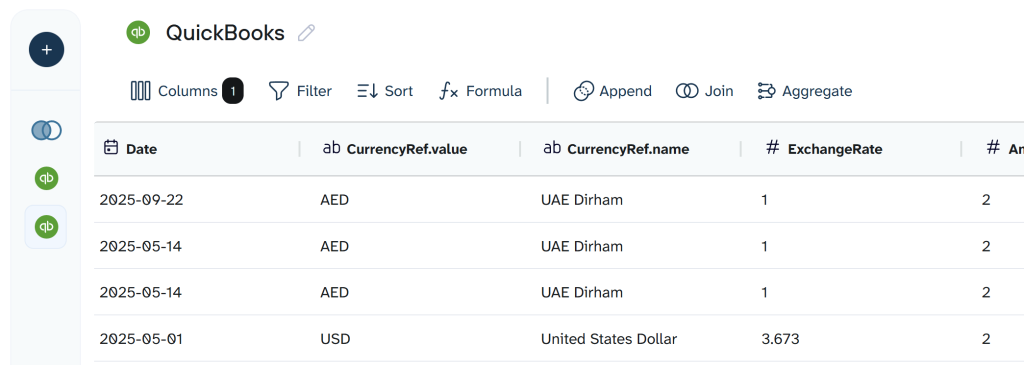
In this step: You can hide sensitive columns (like employee names or bank account numbers) before loading data to AI, ensuring only the financial metrics you want analyzed are accessible.
Note: If the data is unrelated (such as bills mixed with customer lists), separate flows usually work better. We recommend you keep separate data flows for conversational AI analytics in ChatGPT or Claude.
Step 3. Load financial data to your destination
Once everything looks tidy, move to the final step: choosing your destination. Spreadsheets, BI tools, or data warehouses are a regular thing. We live in the AI era, so AI integrations look like a quite interesting choice, especially for financial data analysis or manipulation.

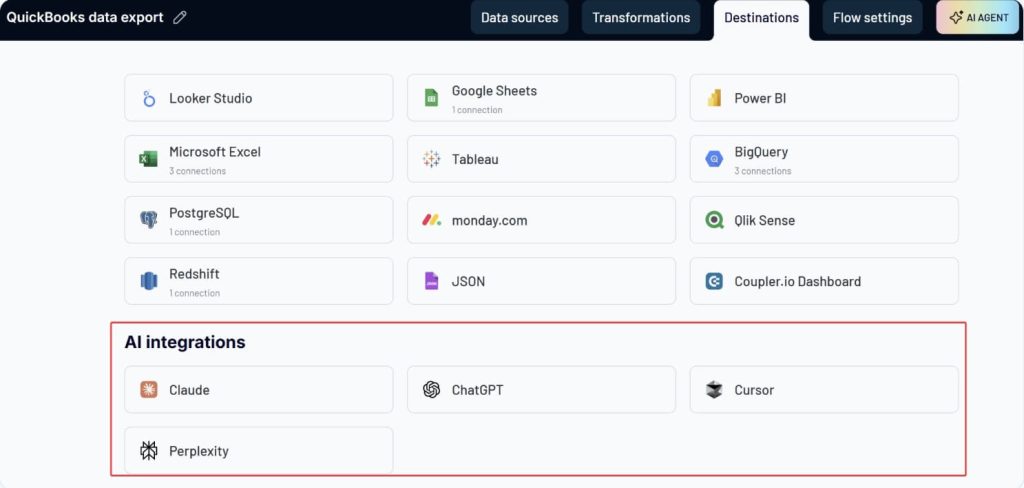
Whichever option you choose, follow the in-app instructions, then save and run your flow. This run is critical because it loads the dataset into your chosen AI tool. When it completes successfully, you’re ready to start asking questions about your QuickBooks data. For this example, we chose ChatGPT.
How teams use Coupler.io to analyze QuickBooks data in AI tools
Once your QuickBooks data is connected, open ChatGPT and access the custom Coupler.io GPT. Instead of digging through spreadsheets, you can now ask natural-language questions and get instant answers with context.
For example, here’s what a QuickBooks bills summary looked like when ChatGPT analyzed it:

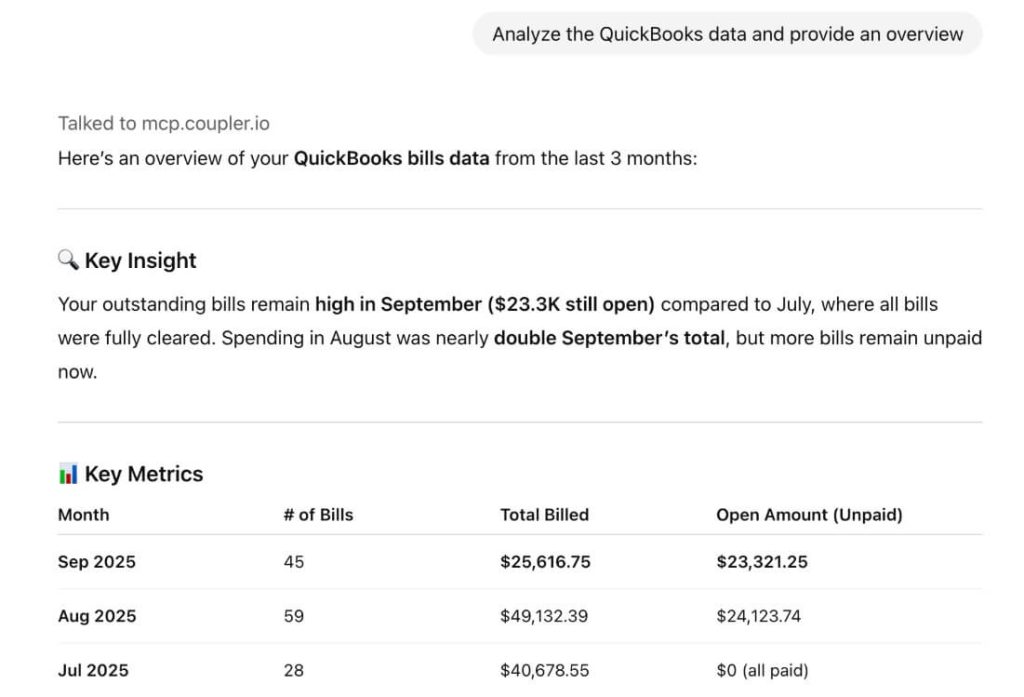
Once your QuickBooks data is flowing into ChatGPT or Claude, you can start treating AI like your on-demand financial analyst. A simple starter prompt could be something like:
What was my total expenditure in last quarter?
AI will pull your synced QuickBooks data and give you a clean number plus the context behind it. Most tools even add a short recommendation or pattern they spot, which is extremely useful for fast reporting.


Here’s another powerful example. If you want help planning your upcoming cash flow, try asking:
What is the total cash outflow required to pay all bills due in October 2025?
Instead of scrolling through long bill lists or running custom filters, you get the answer in seconds.

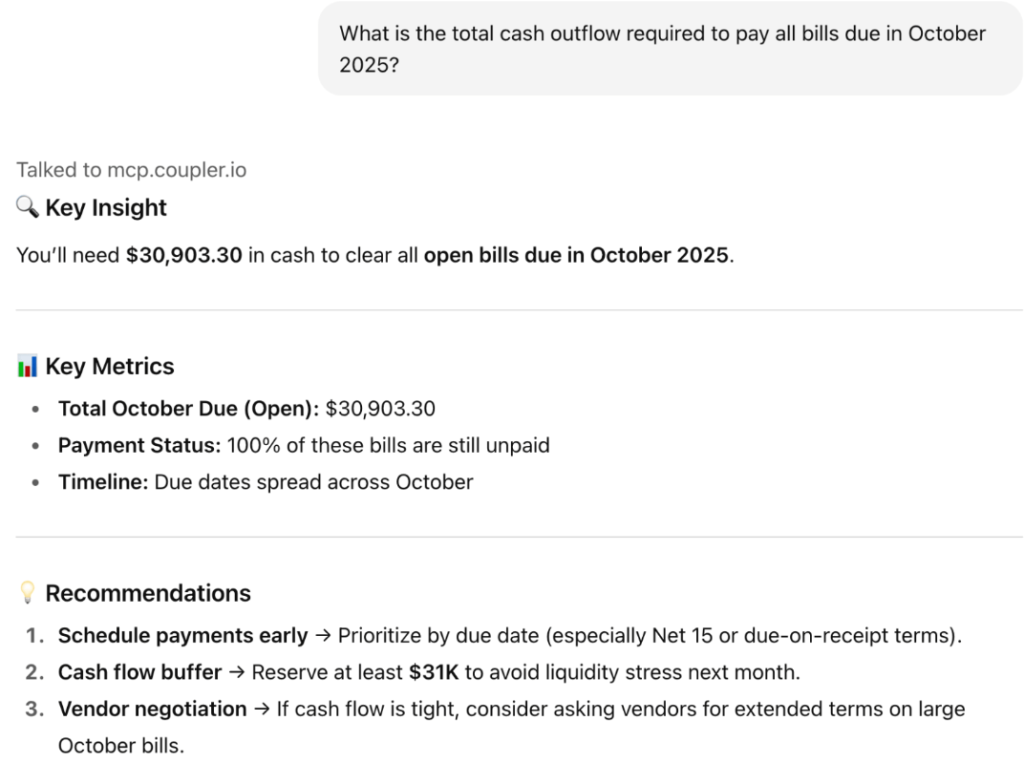
And the best part is that you can ask follow-up questions naturally. AI will refine your query and return a structured view based on the same synced dataset.
We’ll respond to AI’s follow-up with a polite, Yes, please list.


If you prefer Claude, you can do the same conversational analysis there too. Both AI tools can generate basic visuals when the data allows, but their real power lies in quick insights, summaries, and pattern detection. Read more about QuickBooks data analysis in AI.
Use cases of ETL in finance industry
When financial data lives in many different systems, forecasting, reporting, and decision-making become slow and error-prone. Traditional finance ETL requires teams to extract raw reports, then spend hours cleaning, reconciling, and structuring data manually before any analysis can begin.
Coupler.io eliminates this work by providing pre-built dataset templates—already cleaned, combined, and structured for specific finance workflows. Instead of exporting raw QuickBooks P&L reports and fixing them manually, users connect their accounts and instantly get analysis-ready tables like “QuickBooks P&L Annual”. It already combines multiple reports, calculates variances, and structures data for a custom financial dashboard.

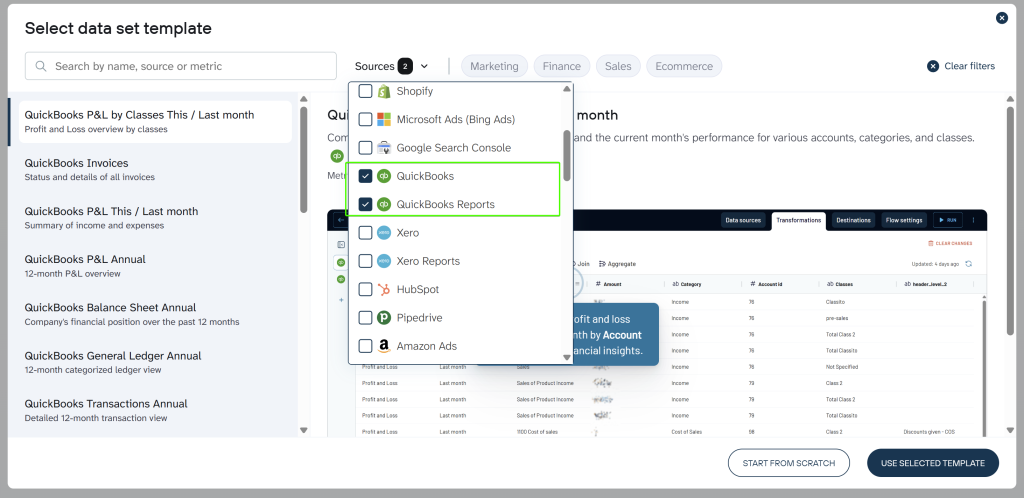
Below are the eight most common finance workflows, each powered by Coupler.io’s dataset templates and dashboard solutions.
1. Executive financial reporting automation
Executive teams need real-time visibility into financial performance. However, finance teams often spend days manually compiling P&L statements, balance sheets, and cash flow reports from multiple systems. By the time reports are ready, the data is already outdated.
Coupler.io solves this with two options: dataset templates that automatically pull and structure executive-level financial data into clean, analysis-ready tables, and dashboard templates that provide ready-made visual reports with KPIs, trends, and summaries. Both connect directly to your QuickBooks or Xero account and update automatically on schedule
Data sets:
- Xero Executive summary
- Xero projects financial overview
- QuickBooks P&L Annual
- Xero P&L This year
- QuickBooks Cash Flow Annual
- Xero Balance Sheet This / Last year
Dashboards: Xero financial dashboard, QuickBooks financial dashboard

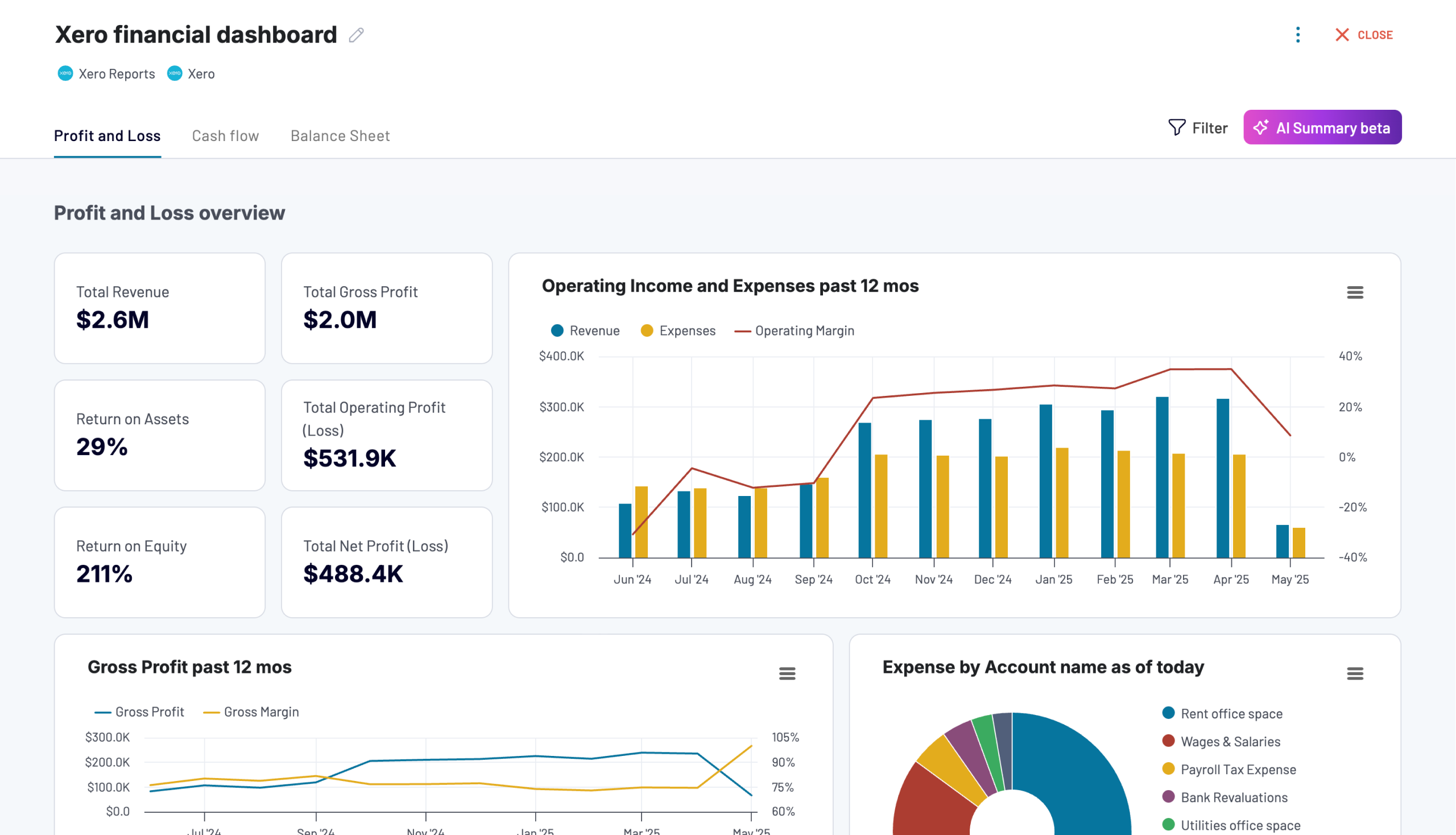
Xero financial dashboard
Get comprehensive financial insights from your Xero account with key performance metrics, balance sheet analysis, and cash flow projections. Quickly assess your business health and make informed financial decisions.


QuickBooks financial dashboard
Tracks earnings, monitor cash flow, and analyze balance sheet changes with a dedicated dashboard that provides a clear picture of your business finances.

2. Automated period-over-period performance analysis
Finance teams need to compare performance across months, quarters, and years, but manually calculating variances in spreadsheets is time-consuming and error-prone. Different team members use different formulas, leading to inconsistent results and confusion during financial reviews.
Coupler.io simplifies this with dataset templates that automatically pull comparative data from QuickBooks and Xero with variance calculations already built in. Alternatively, dashboard templates provide ready-made visual reports that reveal shifts in margins, expenses, and revenue at a glance.
Data sets:
- QuickBooks P&L This / Last month
- QuickBooks P&L Detail This / Last month
- Xero P&L This / Last year
- QuickBooks Cash Flow This / Last month
- Xero Bank Summary This / Last month
Dashboards: Xero financial dashboard, QuickBooks financial dashboard
Xero financial dashboard
Get comprehensive financial insights from your Xero account with key performance metrics, balance sheet analysis, and cash flow projections. Quickly assess your business health and make informed financial decisions.
QuickBooks financial dashboard
Tracks earnings, monitor cash flow, and analyze balance sheet changes with a dedicated dashboard that provides a clear picture of your business finances.
3. Budget variance monitoring and alerting
Budget tracking becomes chaotic when actuals are scattered across multiple exports and teams manually copy numbers between files. By the time variances are identified, overspending has already occurred and corrective action comes too late.
Coupler.io fixes this with dataset templates that pull budget vs. actual data from Xero and QuickBooks into unified, structured tables that align budget and actual columns automatically. For instant visual insights, dashboard templates highlight variances, flag deviations, and show exactly which departments or categories are over or under budget.
Data sets:
- Xero Budget vs Actual report
- QuickBooks Budget vs Actual report
- QuickBooks P&L by Classes This / Last month
Dashboards: Xero financial dashboard, QuickBooks financial dashboard
Xero financial dashboard
Get comprehensive financial insights from your Xero account with key performance metrics, balance sheet analysis, and cash flow projections. Quickly assess your business health and make informed financial decisions.
QuickBooks financial dashboard
Tracks earnings, monitor cash flow, and analyze balance sheet changes with a dedicated dashboard that provides a clear picture of your business finances.
4. Cash flow forecasting and liquidity management
Accurate cash flow forecasting requires historical transaction data and consistent categorization. This information is typically scattered across bank feeds, accounting systems, and operational databases. Without a unified view, finance teams struggle to predict liquidity needs or identify potential cash crunches before they happen.
Coupler.io provides dataset templates that pull annual and monthly cash flow data, bank transactions, and general ledger summaries from QuickBooks and Xero into structured tables ready for forecasting and analysis. For visual insights, dashboard templates show trend charts, inflow-outflow groupings, and bank activity summaries at a glance.
Data sets:
- QuickBooks Cash Flow Annual
- QuickBooks Cash Flow This month
- Xero Bank Statement Annual
- Xero Bank Transactions Annual
- Xero Bank Summary Annual Totals
- QuickBooks General Ledger Annual
Dashboards: Xero financial dashboard, QuickBooks financial dashboard
Xero financial dashboard
Get comprehensive financial insights from your Xero account with key performance metrics, balance sheet analysis, and cash flow projections. Quickly assess your business health and make informed financial decisions.
QuickBooks financial dashboard
Tracks earnings, monitor cash flow, and analyze balance sheet changes with a dedicated dashboard that provides a clear picture of your business finances.
5. Customer and product profitability analysis
Understanding which customers and products truly drive margins is difficult when revenue and cost data are scattered across invoices, transactions, and sales records. Without structured data, teams resort to manual exports and pivot tables that quickly become outdated and error-prone.
Coupler.io provides dataset templates for such ETL use cases. They pull sales by customer, sales by product, invoice line items, and transaction data from QuickBooks and Xero into unified profitability tables ready for analysis. Alternatively, dashboard templates provide pre-built visual reports that show margin trends, identify high-value customers, and highlight low-margin products at a glance.
Data sets:
- QuickBooks Sales by Customer Annual
- QuickBooks Sales by Product Annual
- QuickBooks Invoices & Items
- Xero invoices with line items
- QuickBooks Transactions Annual
Dashboards: QuickBooks revenue dashboard, Revenue dashboard for Xero
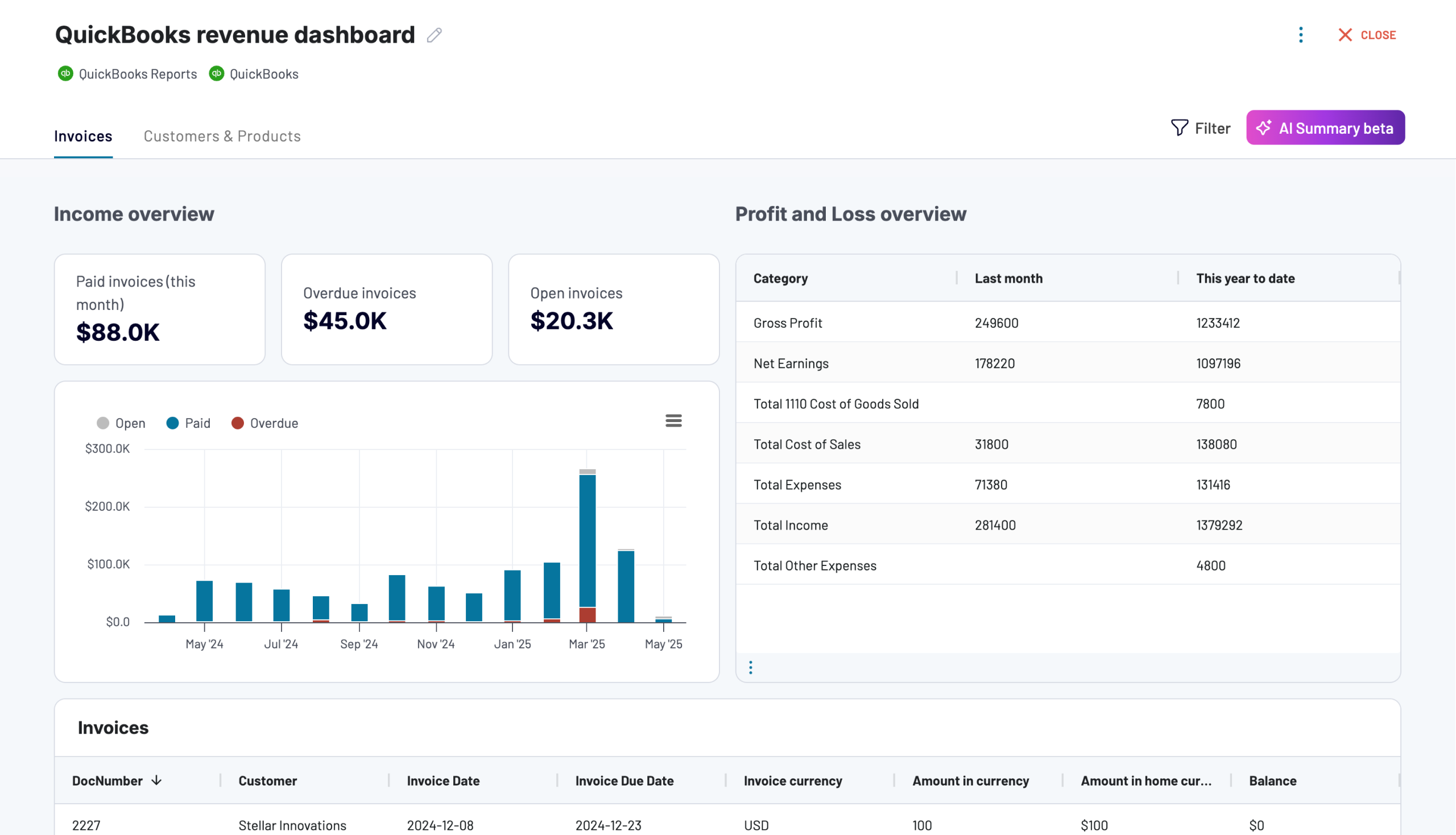
QuickBooks revenue dashboard
Transform your QuickBooks data into actionable revenue intelligence with visualized sales trends, product performance metrics, and customer value analysis. This dashboard helps identify growth opportunities and optimize pricing strategies through easy-to-understand charts.
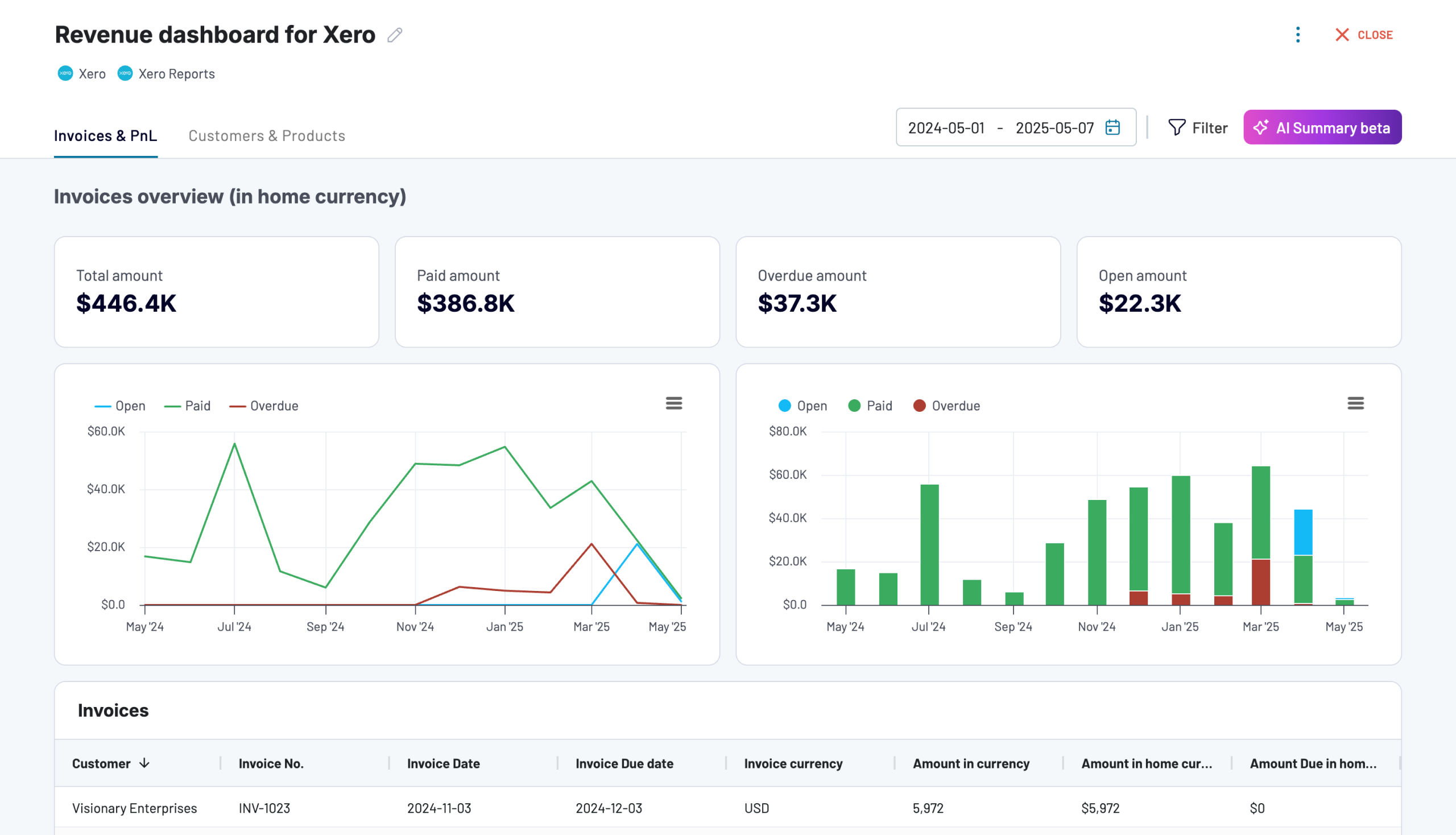
Revenue dashboard for Xero
Analyze revenue streams, customer spending patterns, and product performance with data automatically synced from Xero. Gain actionable insights into sales trends, top-performing products, and high-value customers to drive growth strategies.
6. Accounts receivable optimization
AR management gets messy when invoice data, credit notes, and customer payment histories live in different reports that must be manually reconciled. Teams spend hours each week exporting data to identify overdue invoices, calculate aging buckets, and prioritize collection efforts.
Coupler.io simplifies this with dataset templates that automatically consolidate invoice tables, credit notes, and customer-level transaction histories from QuickBooks and Xero into structured AR tables. For visual tracking, dashboard templates display aging buckets, overdue balances, and customer payment patterns without manual extraction
Data sets:
- QuickBooks Invoices
- Xero Invoices
- Xero invoices with line items
- Xero Credit Notes
- Xero Account Transactions with Contacts
Dashboards: Accounts receivable dashboard for Xero, Accounts receivable dashboard for QuickBooks

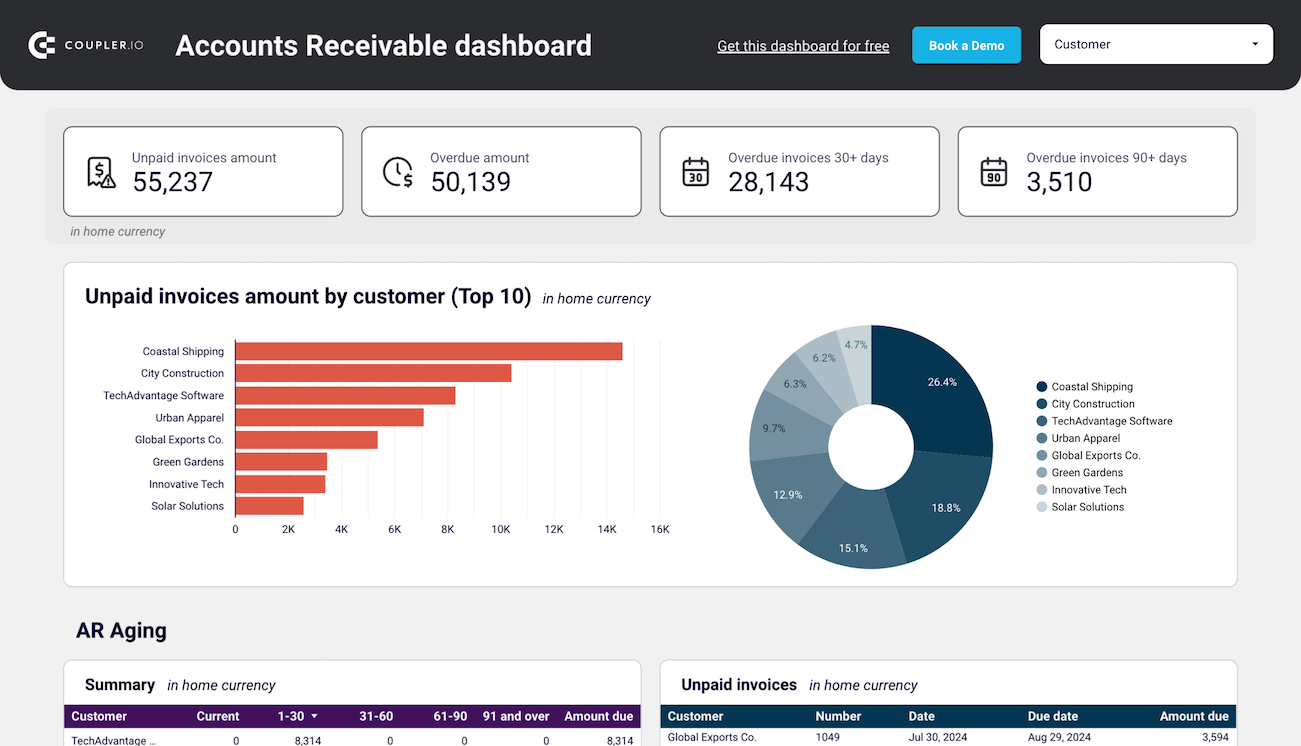
Accounts receivable dashboard for Xero
See which customers accumulate unpaid and overdue invoices, analyze AR aging, and track changes over time.


Accounts receivable dashboard for QuickBooks
See which customers accumulate unpaid and overdue invoices, analyze AR aging, and track changes over time. Get useful insights for maintaining financial health.
7. Accounts payable management and cash optimization
Managing accounts payable gets complicated when bill data, vendor transactions, and payment histories are scattered across different reports within QuickBooks or Xero. Finance teams spend hours each week manually exporting and consolidating this information to understand who needs to be paid, when payments are due, and how to optimize cash outflows.
Coupler.io solves this with dataset templates that automatically pull bills, vendor transactions, and payment data into unified, structured AP tables. For visibility, dashboard templates show upcoming liabilities, payment due dates, and vendor aging at a glance.
Data sets:
- QuickBooks Bills
- Xero Account transactions
- Xero Account Transactions with Contacts
- QuickBooks Transactions Annual
- Xero Bank Transactions Annual
Dashboards: Accounts payable dashboard for Xero, Accounts payable dashboard for QuickBooks
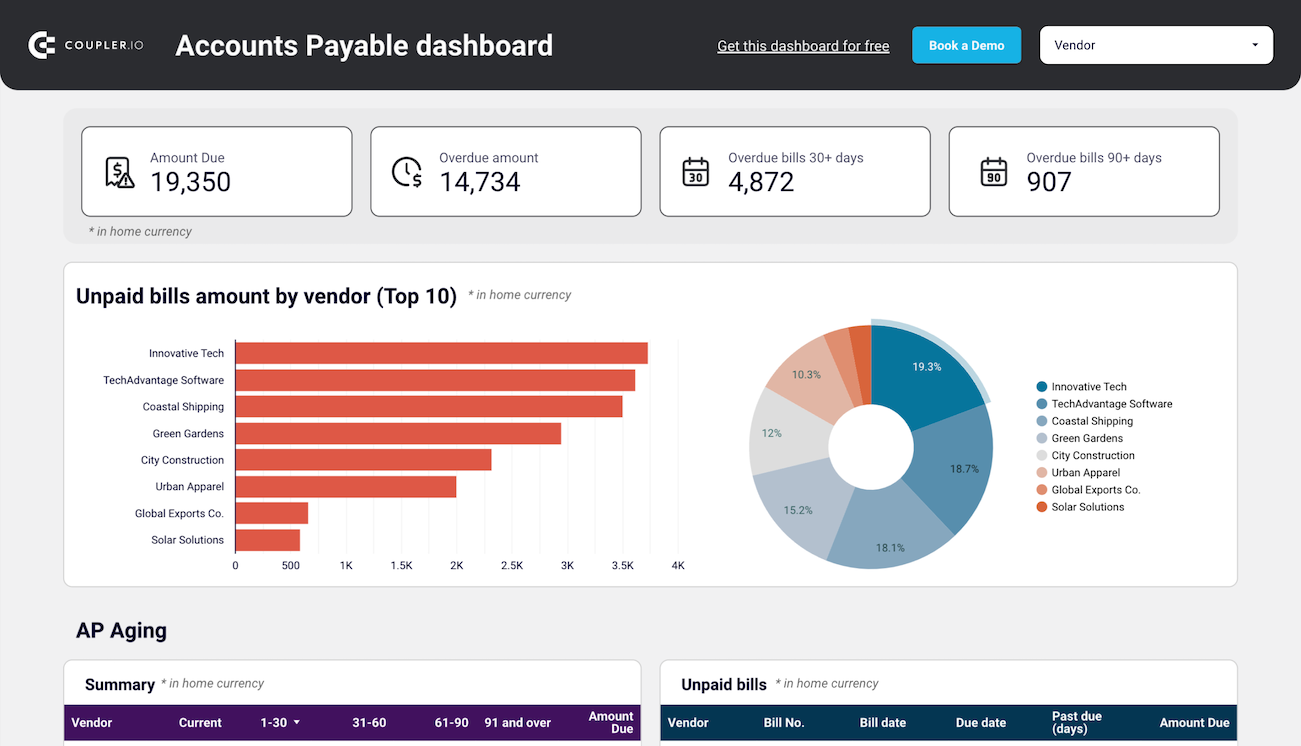
Accounts payable dashboard for Xero
Track outstanding, overdue, and paid bills to optimize payment schedules, manage vendor relationships, and ensure smooth cash flow.
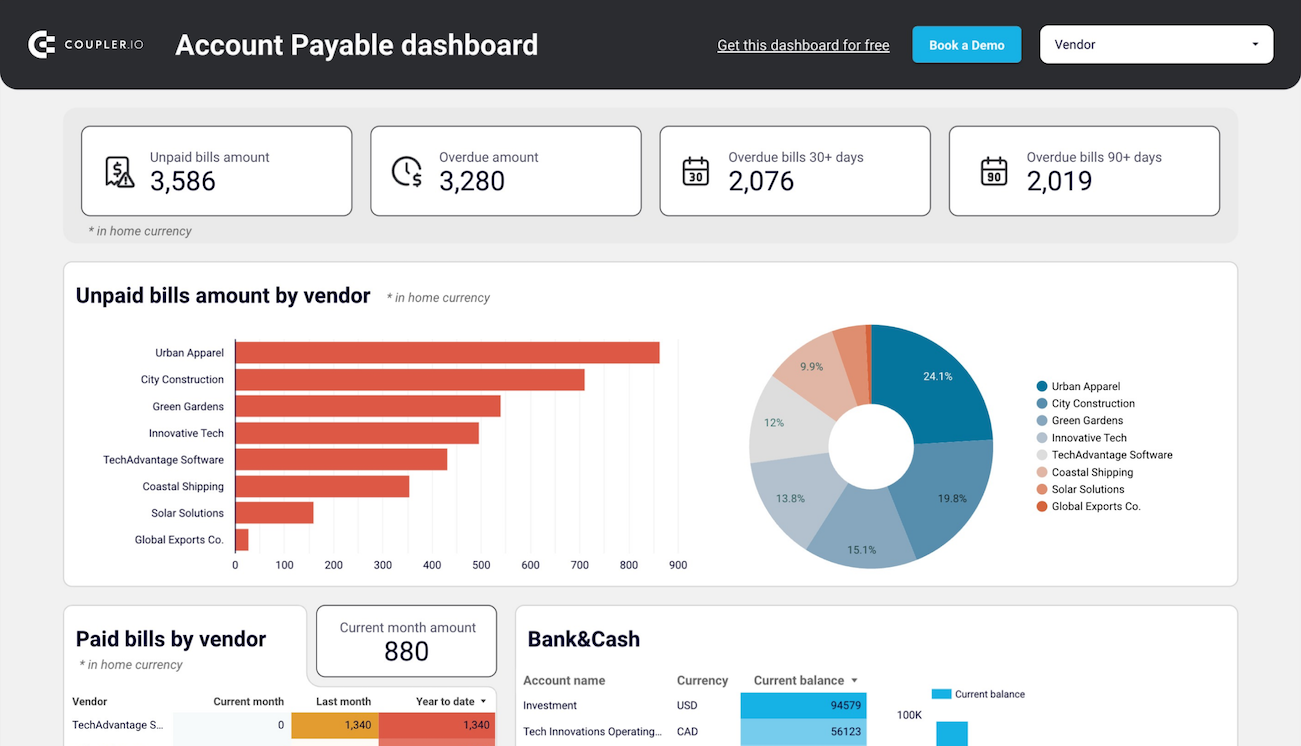
Accounts payable dashboard for QuickBooks
Get an overview of unpaid, overdue, and paid bills grouped by vendor. The dashboard helps you prioritize payments and improve cash flow management.
8. Revenue recognition and billing automation
Revenue recognition becomes complex when invoice timing, project milestones, and billing data sit in different systems, especially for subscription or project-based businesses. Manual tracking leads to errors, compliance risks, and delayed revenue recognition that impacts financial reporting accuracy.
Coupler.io provides dataset templates that pull QuickBooks invoices, Xero line items, project billing summaries, and customer-level revenue reports into unified, structured tables.
Data sets:
- QuickBooks Invoices
- Xero Invoices
- Xero invoices with line items
- QuickBooks Sales by Customer Annual
- Xero projects financial overview
Dashboards: Billing dashboard for Xero, Billing dashboard for QuickBooks
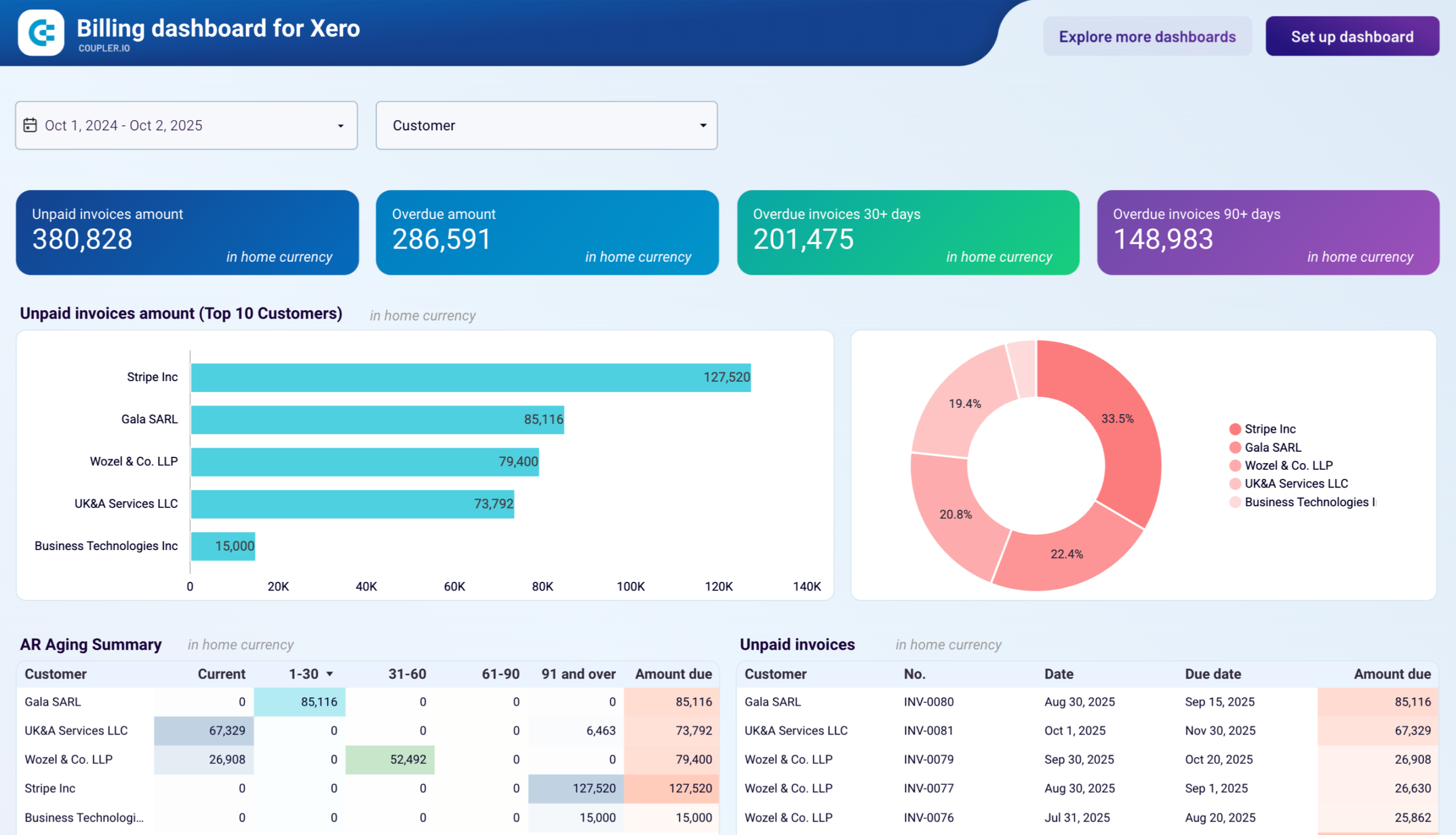
Billing dashboard for Xero
Manage your complete billing cycle with combined accounts receivable and payable tracking. Monitor outstanding invoices, upcoming bill payments, aging analysis, and net cash flow to maintain healthy vendor relationships and optimize working capital.
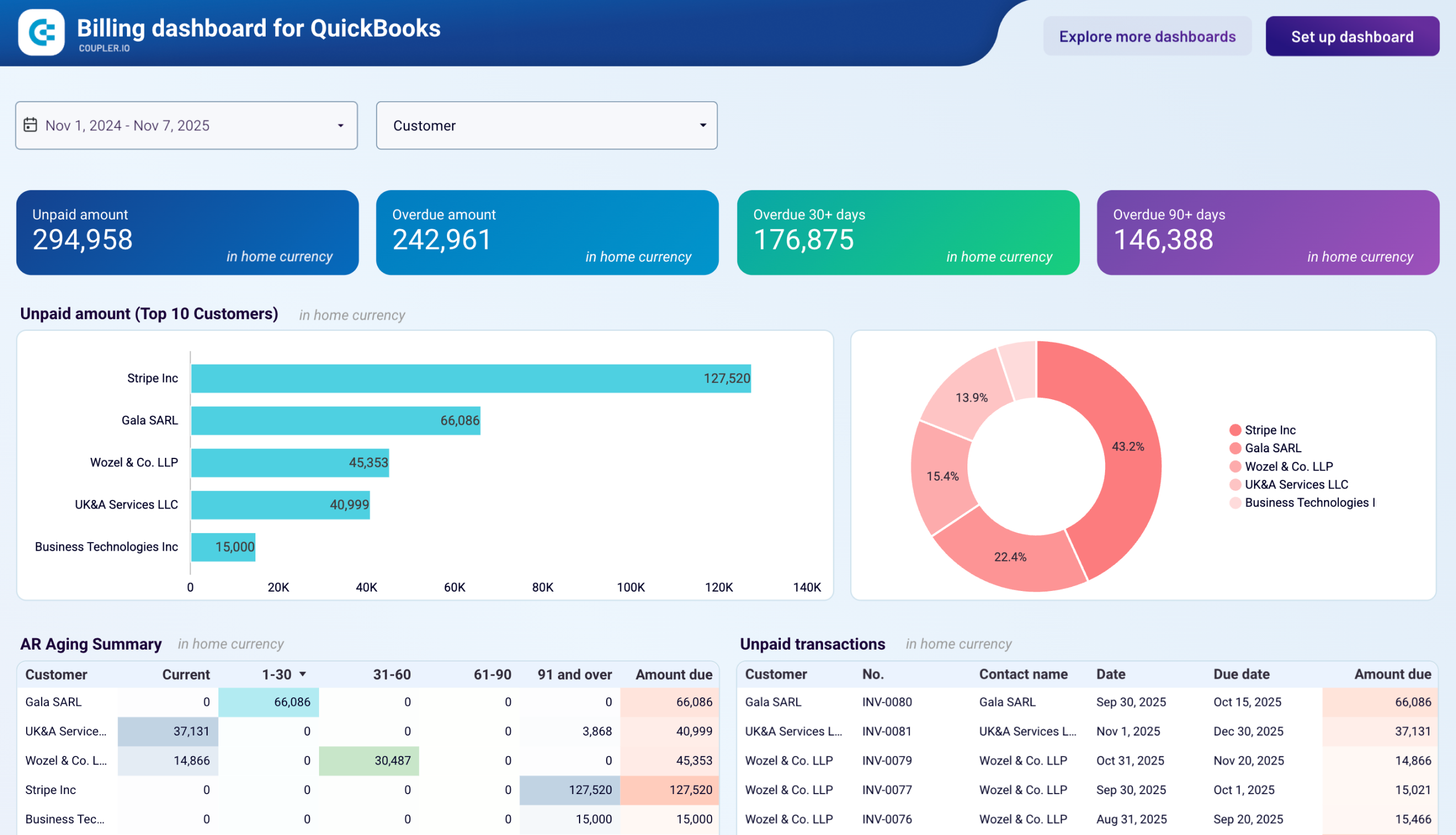
Billing dashboard for QuickBooks
Track both customer invoices and vendor bills in one comprehensive QuickBooks dashboard. Monitor aging balances, manage payment schedules, analyze cash flow across bank accounts, and maintain healthy financial relationships by staying on top of all receivables and payables.
Common challenges of implementing ETL in finance
Most finance teams still depend on a bunch of scattered spreadsheets, manual CSV exports, and disconnected systems to manage their data. And that only works for so long. As transaction volumes grow and reporting cycles speed up, raw spreadsheets become unreliable for financial reporting, forecasting, or compliance. This is where ETL (extract, transform, load) becomes essential. How? It centralizes data, improves accuracy, and gives teams real-time visibility into their financial performance.
But implementing ETL in finance comes with its own challenges.
Data silos
Financial data lives across ERPs, accounting tools, banks, CRMs, and payroll systems that don’t communicate with each other. Without ETL, teams export CSVs from each system, copy-paste data into master spreadsheets, and reconcile discrepancies by hand.
How ETL solves it: ETL platforms automatically pull data from all source systems into a unified pipeline, eliminating manual exports and consolidation. Instead of five separate spreadsheets that need manual reconciliation, finance teams get one centralized dashboard that updates automatically.
Real-world example: Terminal 1, a last-mile logistics platform, faced exactly this challenge. Their financial data was scattered across QuickBooks for accounting, Salesforce for revenue tracking, and multiple operational databases. The finance team spent significant time each week manually consolidating this data for executive reporting and financial analysis. By implementing Coupler.io’s ETL workflow, they automated data integration from all sources into unified Looker Studio dashboards. This eliminated hours of manual consolidation work by 80% and gave their leadership team real-time visibility into key financial metrics across the entire operation.
Excel dependency
Finance teams often rely on Excel as their primary reporting tool, but spreadsheets break down quickly once data comes from multiple accounting systems, banking platforms, and operational sources. Excel does not support real time data extraction or scalable financial consolidation, which leads to version conflicts, inconsistent formulas, and delays in closing the books.
How ETL solves it:
An ETL pipeline automates the entire data integration process so finance teams no longer need to download CSVs or rebuild models manually. Cleaned and validated data flows directly into dashboards and forecasting tools, allowing teams to work with accurate, real time data instead of constantly updating Excel files.
Real-world example:
PlumbBooks transitioned from spreadsheet-heavy workflows to automated ETL pipelines using Coupler.io. They consolidated key financial datasets such as P&L, balance sheet, AP, and AR into a unified reporting structure inside Looker Studio. This move reduced manual setup by 4 to 6 hours per client and contributed to a 40 percent growth in revenue.
Real-time syncing issues
Month-end close becomes slow and error-prone when financial data is refreshed manually. Teams can only make informed decisions based on the last exported report, which often means outdated numbers and delayed visibility into cash flow, expenses, and operational performance.
How ETL solves it:
ETL finance tools automate scheduled data refreshes so reports stay up to date throughout the day. This reduces latency, eliminates stale data, and ensures that dashboards reflect the most accurate figures available. Finance teams gain continuous visibility without waiting for manual exports or rework.
Real-world example:
Project Alfred used Coupler.io to sync QuickBooks and HubSpot data on an automated schedule. This created a consistent, near real time reporting process and eliminated delays caused by outdated exports. As a result, the team saved 20 to 40 hours per month and improved forecasting accuracy with 12 to 24 months of reliable visibility.
Data quality and maintenance challenges
When finance teams rely on manual exports, CSV uploads, or custom-built scripts, data quality deteriorates fast. Duplicate records, inconsistent naming, misaligned categories, and formatting issues often slip into financial statements. These errors then cascade into BI dashboards and forecasting models, making it harder to trust month-end reports. The problem grows when internal ETL scripts require constant engineering support, since every schema change, new data source, or API update can break the pipeline.
How ETL solves it:
A modern ETL platform automates the entire data integration process. It continuously extracts data from different sources, applies consistent transformations, validates totals, standardizes categories, and loads clean, analysis-ready datasets into your reporting tools. Rather than maintaining fragile internal scripts, finance teams use no-code workflows that scale without extra engineering effort. This ensures accurate, real-time data while reducing the cost and overhead of managing pipelines manually.
Real-world example:
Project Alfred’s accounting team previously relied on several tools and manual processes to combine data from Xero and HubSpot. Their workflows frequently produced inconsistent fields and outdated numbers. After switching to Coupler.io, they eliminated manual prep, improved data reliability, and saved 20 to 40 hours per month, giving them cleaner financial datasets without the engineering burden.
Modern finance runs on clean data
Finance teams know AI can speed up analysis, uncover patterns, and answer questions that normally take hours. Yet many still hesitate to use AI for financial reporting because they worry about one thing: losing control of sensitive data. It is a valid concern. Most AI tools require you to upload entire files or grant broad access, and that is not an option when you handle payroll records, banking activity, or confidential financial statements.
This is where ETL becomes more than a data workflow. It becomes a security filter. By running financial data through an ETL pipeline first, teams decide exactly which fields, columns, or datasets flow into AI tools like ChatGPT or Claude. Nothing leaves the pipeline unless you allow it, which removes the biggest barrier to adopting AI in finance.
Coupler.io strengthens this model through MCP servers that act as a secure bridge between your data and AI tools. You can stream only the datasets you choose into AI, while keeping employee salaries, vendor contracts, and bank account details completely out of scope. You maintain full GDPR-aligned control over what AI can and cannot see. This selective loading is what makes AI safe to use for tasks like forecasting, variance explanations, and narrative generation. It is also the foundation for clean finance data to become a secure input for conversational analysis.
Once teams trust how their data flows, AI becomes far easier to adopt. Analysts can explore cash flow trends. CFOs can ask questions instead of digging through spreadsheets. Leaders can get clearer explanations without exposing confidential information.
If you want to bring AI into your finance workflows without compromising data privacy, start by building an ETL pipeline that keeps you in control.
Coupler.io makes this simple so your financial data stays clean, secure, and ready for smarter decisions.
Try building your first secure AI-ready ETL flow with Coupler.io for free.