Businesses use more data than ever, but that data often sits across disconnected apps, services, and databases. ETL tools solve this fragmentation by automating how data is collected, processed, and centralized. Whether you need a no-code solution, open-source flexibility, or enterprise-grade reliability, this article highlights the 15 top ETL tools for data integration in 2026.
Top ETL tools comparison in a table
In this table, we will compare some of the best ETL tools for SaaS companies. Each ETL software offers a different level of complexity based on how it’s designed and who it’s meant for:
- No-code (🎨): Built for non-technical users. You can set up data pipelines using a drag-and-drop or simple visual interface, without writing code.
- Low-code (💻): Some coding knowledge is helpful. Visual interfaces are available, but more complex logic often requires SQL or Python.
- Technical setup (🛠️): Requires developers or data engineers. Expect configuration files, command-line tools, or scripting for setup and maintenance.
- Enterprise setup (🔐): Built for large-scale enterprise use. Includes advanced configuration, self-hosting, access control, and integration with enterprise ecosystems. Requires technical teams to manage.
| Tool | Setup | Connectors | Transformations | Pricing starts at | Best for |
| Coupler.io | 🎨No-code | 400+ | No-code UI: filter, sort, blend (append and join), format, aggregate | $24/month for 3 accounts | Preparing data for analytics and reporting to support better decisions across teams |
| Apache Airflow | 🛠️Technical setup | Custom via Python | Python scripts, SQL queries, dbt integration | $0/month | Orchestrating batch jobs and workflows to streamline complex data engineering processes |
| Databricks Lakeflow | 🛠️Technical setup | Native Databricks & files, streams | SQL statements, Python functions, declarative pipeline configuration | $0.20/DBU | Building large-scale data pipelines for machine learning and real-time analytics in a lakehouse architecture |
| Talend | 🔐 Enterprise setup | 100s (legacy + cloud) | Visual designer, SQL scripts, Java code, AI-assisted pipelines | Custom | Integrating and governing data across systems to power enterprise analytics and compliance workflows |
| Integrate.io | 💻Low-code | 140+ | Visual builder, field-level functions, Python code | $1,999/month | Syncing SaaS and database data into warehouses for unified analytics and team reporting |
| Fivetran | 💻Low-code | 700+ | In-warehouse SQL transformations via dbt | Custom | Loading and syncing data to systems like Salesforce, NetSuite, and HubSpot |
| Informatica PowerCenter | 🔐 Enterprise setup | 100+ | Drag-and-drop transformation components, 100+ built-in functions | Custom | Transforming and consolidating structured data for large-scale enterprise reporting and compliance |
| Informatica IDMC | 🔐 Enterprise setup | 100+ | Visual UI, rule-based automation, scripting, AI-recommended mappings | Custom | Migrating, managing, and governing cloud data at scale to enable trusted enterprise insights |
| Oracle Data Integrator | 🔐Enterprise setup | 100+ | SQL and PL/SQL procedures, ELT mapping interface | Custom | Performing high-speed ELT on Oracle systems to support BI and data warehouse performance |
| Hevo Data | 🎨 No-code | 150+ | Drag-and-drop, SQL editor, data modeling | $399/month for 10 users | Replicating data in real time for dashboards and decision engines across departments |
| Matillion | 💻Low-code | 100+ | Drag-and-drop components, SQL expressions, Python scripts | Custom | Transforming data in cloud data warehouses to drive reporting and predictive analytics |
| Portable | 🎨No-code | 1500+ (long-tail) | ELT only (no transformations) | $1,800 | Extracting data from long-tail SaaS tools to centralize reporting without engineering resources |
| Airbyte | 🛠️Technical setup | 350+ | dbt transformations, SQL, custom connectors in Python | Custom | Replicating operational data into cloud warehouses to power real-time dashboards and workflows |
| Pentaho (PDI) | 🔐Enterprise setup | 100+ | Drag-and-drop UI, scripting (Python, R), metadata injection, Spark/ML support | Custom | Blending and orchestrating data across hybrid environments to enable analytics and AI deployment |
| AWS Glue | 🛠️Technical setup | Dozens (AWS + JDBC) | Spark-based: PySpark, Scala, SQL, Glue Studio (visual), DataBrew (no-code) | Custom | Preparing and cataloging data for analytics, ML, and real-time applications within the AWS ecosystem |
15 Best ETL Tools for 2026
Below, we break down 15 of the top ETL tools for 2026, covering cloud-based solutions, open-source options, workflow orchestrators, and platforms optimized for real-time or high-volume data movement. Each profile includes a breakdown of how the tool extracts, transforms, and loads data, plus pricing, strengths, and best-fit use cases.
Coupler.io
Type: Cloud-based ETL tool
Coupler.io is a no-code data integration platform to automate data flows from over 400 business apps and sources into spreadsheets, BI tools, data warehouses, and AI tools.

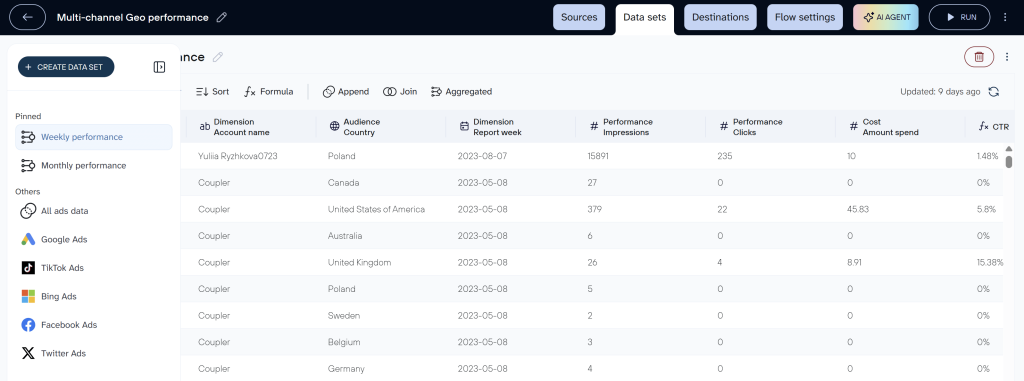
With the ETL model as a backbone, Coupler.io is not limited to data pipeline automation. The platform also provides ready-to-use templates for data visualization and reporting. Moreover, with the release of AI integrations, Coupler.io offers extensive capabilities for AI analytics.
| Extract | Collects data from over 400 business sources, including: – Marketing apps like HubSpot, Google Analytics, Mailchimp, etc. – Sales software like Salesflare, Planthat, etc. – Time tracking tools such as Jira and Clockify – Finance and accounting software such as Xero, Zoho Billing, Stripe, etc. – And more |
| Transform | Allows you to apply filters, add/hide/rename, and format fields, join and append data from multiple sources, and aggregate data. |
| Load | Loads data sets to: – Spreadsheet apps such as Google Sheets and Microsoft Excel – Data warehouses like BigQuery, PostgreSQL, and Amazon Redshift – BI tools: Looker Studio, Power BI, Tableau, and Qlik – AI tools: ChatGPT, Claude, Perplexity, Cursor, and Gemini |
Key features:
- 400+ integrations
- No-code interface for creating and scheduling automated data pipelines
- 15+ destinations
- Built-in transformation editor with real-time data preview
- Field-level data filtering, sorting, and formatting capabilities
- Multi-source data unification into a consolidated view
- Dashboard and data set templates
- AI capabilities (AI agent and AI insights in dashboards)
Limitations:
- No on-prem deployment or advanced orchestration options
- Not suited for large-scale engineering workflows
Ideal use case:
Businesses and companies without technical experts that need to automate reporting or build live dashboards. Great for marketing, finance, and operations teams working with SaaS apps and spreadsheets.
Pricing:
Coupler.io uses an account-based pricing model, where you pay based on the number of connected data source accounts—not per user, data flow, or dashboard. This means once you connect an account (like Facebook Ads or HubSpot), you can create unlimited data flows and dashboards using that account without additional costs.
Coupler.io pricing starts at $24/month for the Starter plan, which includes up to 3 accounts, unlimited data flows, and one destination with daily refresh.
The most popular plan is Active at $99/month, which supports up to 15 accounts. This plan is ideal for growing teams because it includes unlimited users, unlimited data flows and dashboards, no import size limits, and three destinations with daily syncs.
Imagine, for example, a marketing team managing 10 accounts, such as Facebook Ads, Google Ads, LinkedIn Ads, TikTok Ads, HubSpot, Google Analytics, and four different client QuickBooks accounts. They can create dozens of dashboards, and data flows across three destinations (Google Sheets, Looker Studio, and ChatGPT) and invite their entire team to collaborate without additional fees.
Create automated ETL pipelines with Coupler.io
Get started for freeApache Airflow
Type: Open-source workflow orchestration tool
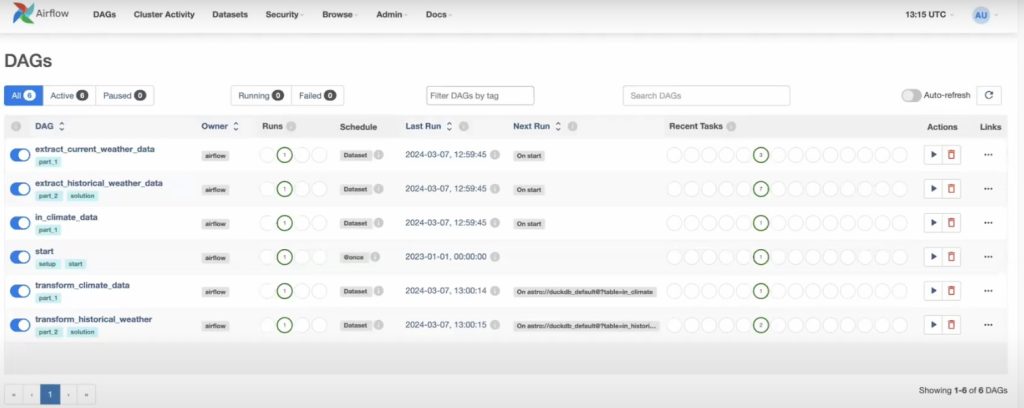
Apache Airflow is an open-source platform used to author, schedule, and monitor data workflows using code. Rather than being a standalone ETL tool, Airflow orchestrates ETL and ELT processes by coordinating tasks across databases, APIs, data warehouses, and processing engines. Pipelines are defined as Python-based Directed Acyclic Graphs (DAGs), giving engineering teams fine-grained control over dependencies, retries, and execution logic.

| Extract | Connects to databases, APIs, cloud storage, and message queues using prebuilt or custom Python operators. Examples include: – Databases: MySQL, PostgreSQL, Snowflake – Cloud storage: Amazon S3, Google Cloud Storage – APIs: RESTful endpoints, internal tools |
| Transform | Supports custom transformation logic written in Python, SQL, or using dbt. |
| Load | Loads processed data into: – Data warehouses: BigQuery, Redshift, Snowflake – Data lakes: Amazon S3, GCS – External systems via API connectors |
Key features:
- Python-based DAG configuration
- Workflow scheduling and retry configuration
- Error handling and alerting
- Integration support for dbt, Spark, Kubernetes, Snowflake, BigQuery, and Redshift
- Web-based user interface for pipeline monitoring
- Distributed execution via Celery or Kubernetes
- Open-source extensibility with a large plugin ecosystem
Limitations:
- Requires engineering expertise to build and maintain pipelines
- No built-in connectors or no-code interface
- Not suitable for simple data syncing or business-user workflows
- Real-time processing requires integration with streaming tools
Ideal use case:
Engineering teams that need to orchestrate complex, multi-step data pipelines. Suitable for preparing data for analytics and reporting to support better decisions across teams, as well as coordinating batch ETL, ELT, dbt models, machine learning workflows, and data quality checks.
Pricing:
Apache Airflow is an open-source project, which means there is no cost to use the core platform. However, operational costs can add up depending on how it’s deployed.
For teams looking for a hosted solution, managed Airflow platforms like Astronomer or Cloud Composer (by Google) offer pre-configured environments with pricing starting around $300/month.
Databricks Lakeflow Spark Declarative Pipelines
Type: Data Pipeline and Workflow Orchestration Tool
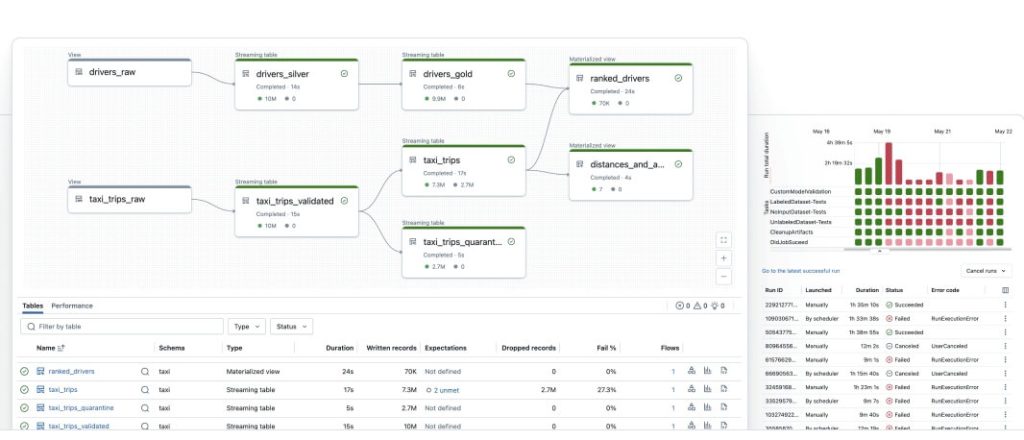
Databricks Lakeflow Spark Declarative Pipelines (formerly Delta Live Tables) is a pipeline orchestration layer built on Apache Spark. It allows teams to define reliable data workflows using a declarative approach that automates dependency resolution, error recovery, and data quality checks. Designed for the Databricks Lakehouse, it eliminates manual orchestration logic and simplifies the creation of production-grade ELT pipelines.

| Extract | Ingests structured, semi-structured, and streaming data from multiple sources. Examples include: – Cloud storage: Delta Lake, S3, Azure Data Lake – Streaming: Kafka, Auto Loader – Databases: PostgreSQL, SQL Server |
| Transform | Uses a declarative syntax in Python or SQL to define transformations. Supports streaming and batch processing, materialized views, and automatic data quality enforcement with built-in expectations. |
| Load | Outputs data to destinations inside and outside the Databricks ecosystem. Examples include: – Lakehouse tables – Delta Lake – BI and analytics platforms: Power BI, Tableau – Downstream storage: S3, ADLS |
Key features:
- Declarative pipeline authoring using Python or SQL
- Native integration with Apache Spark
- Batch and streaming data
- Built-in data quality checks with expectations
- Automatic lineage, monitoring, and error handling
Limitations:
- Requires Databricks environment (not standalone)
- Limited connectors outside of the Databricks ecosystem
- More suited for technical teams with Spark or SQL experience
Ideal use case:
Data engineering teams building robust ELT pipelines within the Databricks Lakehouse. Ideal for operational analytics, ML model prep, and enterprise data warehousing in cloud-native environments.
Pricing:
Databricks uses a usage-based pricing model built around DBUs (Databricks Units), where you pay based on the compute resources consumed during job execution. You can choose between pay-as-you-go (no up-front costs) or committed-use contracts for volume discounts and flexible multi-cloud usage.
For data engineering workloads, which include Lakeflow Spark Declarative Pipelines, pricing starts at $0.15 per DBU. This rate applies to workloads such as building streaming or batch pipelines, orchestrating data processing jobs, and integrating data from multiple sources. Check out their pricing page for more details.
Talend
Type: Enterprise/Commercial ETL Tool
Talend is an enterprise-grade data integration platform offering both open-source and commercial solutions for building ETL and ELT pipelines. It provides a drag-and-drop interface for designing data workflows, supports custom transformations via code, and includes robust data governance, quality, and security features. Talend integrates well with cloud platforms, databases, and on-prem systems.


| Extract | Connects to a wide range of enterprise systems and SaaS platforms. Examples include: – CRM/ERP: Salesforce, SAP, Oracle – Databases: SQL Server, Amazon RDS – Cloud: Amazon S3, Azure Blob – Legacy: FTP, mainframes |
| Transform | Offers visual and code-based options (Java, SQL) for: – Data cleansing, validation, enrichment – Schema mapping and quality checks – Integration with Talend Data Quality modules |
| Load | Supports multiple output types: – Warehouses: Redshift, BigQuery, Snowflake – Databases: PostgreSQL, SQL Server – APIs and data lakes (e.g., S3, HDFS) |
Key features:
- Visual workflow builder with auto-generated code
- Integrated data quality and deduplication components
- Governance tools for data lineage and compliance
- Hybrid, multi-cloud, and on-prem deployment options
- Centralized scheduling, monitoring, and logging via Talend Management Console
Limitations:
- Steeper learning curve for advanced features
- Open-source version lacks key enterprise capabilities
- Commercial licenses can be expensive for smaller teams
Ideal use case:
Organizations with complex, multi-source data environments that require enterprise-grade governance, integration flexibility, and scalability. Best suited for mid-to-large teams with technical expertise.
Pricing:
Talend (by Qlik) uses a tiered enterprise pricing model, designed to scale with data integration needs and governance requirements.
The Starter plan offers managed cloud pipelines, prebuilt SaaS connectors, and ready-to-query schemas. It’s ideal for teams moving data into cloud warehouses quickly.
The most popular plan is likely the Standard tier. These include real-time CDC, hybrid deployment support, lakehouse automation, batch processing, and application/API integration. These tiers are typically suited for data teams automating pipelines at scale across hybrid environments. Pricing is not publicly listed; you must contact sales for a quote based on usage, deployment type, and required features.
Integrate.io
Type: Cloud-based ETL platform
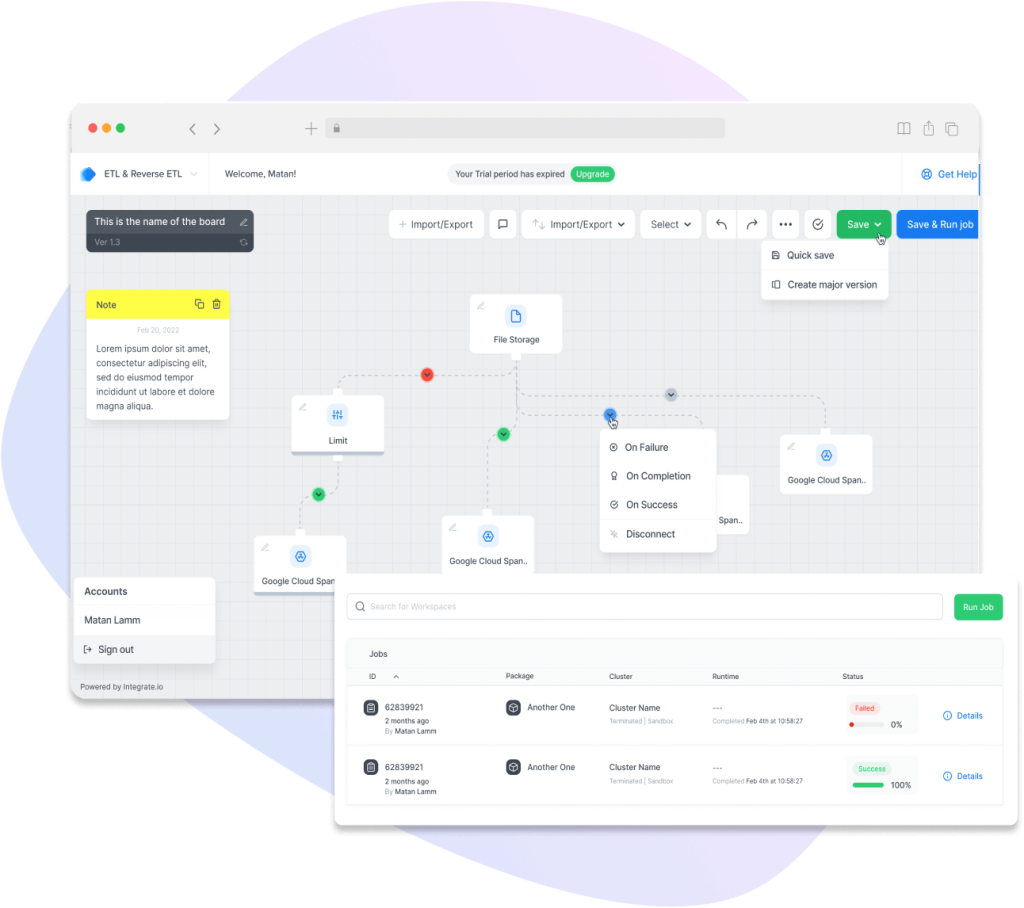
Integrate.io is a low-code ETL platform that enables data teams to build pipelines through a visual interface without managing infrastructure. It supports data movement between databases, data warehouses, and SaaS platforms, with built-in tools for transformation, scheduling, and monitoring. Designed for ease of use, Integrate.io is suited for both technical and non-technical users who need to centralize data for analytics.

| Extract | Collects data from over 140 sources, including: – CRM systems like Salesforce – E-commerce platforms such as Shopify – Databases like MySQL and MongoDB – REST APIs for custom data connections |
| Transform | Provides a no-code, visual transformation builder with support for filtering, joining, aggregating, deduplicating, and enriching data. Includes user-defined expressions, conditional logic, and optional Python-based transformations. |
| Load | Loads data sets to: – Cloud data warehouses such as Redshift, Snowflake, BigQuery, and Azure Synapse – Databases like Amazon RDS and PostgreSQL – Scheduled or event-triggered loads with real-time monitoring and alerts |
Key features:
- Drag-and-drop visual builder for ETL workflows
- Prebuilt connectors for Salesforce, Shopify, S3, Redshift, MySQL, and more
- Built-in transformations, field-level encryption, and data masking
- Batch and near-real-time data processing
- REST API and webhook support for custom integrations
Limitations:
- Lacks full real-time streaming capabilities
- Limited support for advanced engineering workflows or orchestration
- Fewer customization options compared to open-source tools
- Pricing may not be suitable for very small teams or simple use cases
Ideal use case:
Business teams and data analysts who need to move and transform data across SaaS tools and cloud data warehouses with minimal technical setup. Suitable for companies focused on data security, compliance, and ease of deployment.
Pricing:
Integrate.io uses a fixed-fee pricing model, offering unlimited data pipelines, data volumes, and connectors for a flat rate of $1,999/month. This eliminates overage charges or per-connector fees and makes costs predictable for teams scaling data operations.
All plans include full platform access, 60-second pipeline frequency, and a 30-day onboarding period. Higher-tier options add features like GPU support for AI/ML workloads, HIPAA compliance, and tailored enterprise services.
Fivetran
Type: Cloud-based ELT platform
Fivetran is a fully managed ELT platform designed to centralize data from hundreds of sources into cloud data warehouses. It focuses on automation, offering prebuilt connectors, schema management, and real-time syncs without manual coding or pipeline maintenance. Fivetran handles schema drift, API changes, and scaling behind the scenes, making it ideal for fast-moving teams.

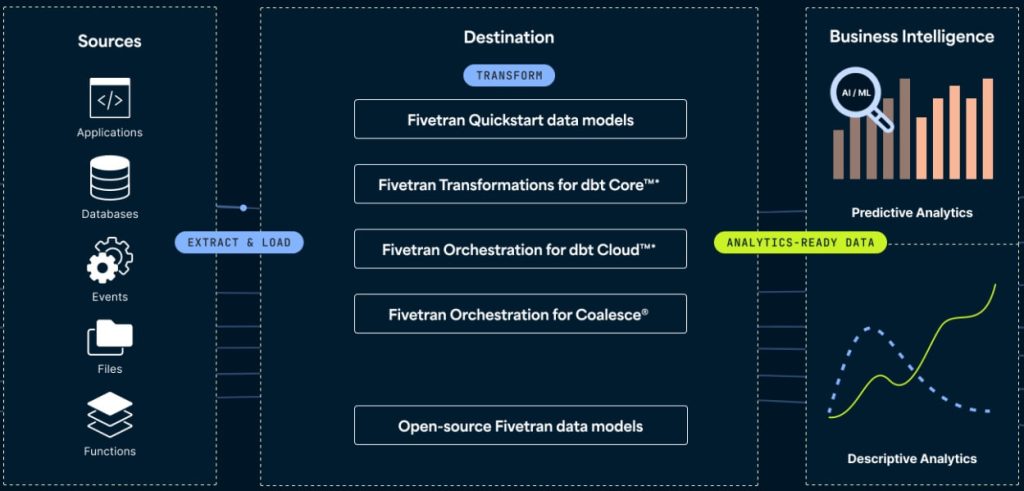
| Extract | Connects to over 700 data sources, including: – Marketing platforms like Google Ads, Facebook Ads, HubSpot – Databases such as MySQL, Oracle, PostgreSQL – Finance systems like NetSuite and QuickBooks |
| Transform | Integrates natively with dbt for post-load transformations using SQL. Offers prebuilt dbt packages, scheduling, and dependency management. |
| Load | Loads data into leading cloud data warehouses, including Snowflake, BigQuery, Redshift, Databricks, Azure Synapse |
Key features:
- Automatic schema mapping and updates
- Change data capture (CDC) support for real-time syncs
- Integrated dbt Core for in-warehouse transformations
- Usage analytics and activity logs for pipeline transparency
- Secure, compliant architecture for enterprise-grade data handling
Limitations:
- No transformation layer unless combined with dbt or other tools
- Less flexibility for custom connectors or advanced use cases
- Pricing scales with usage and connector volume, which may be high for large orgs
- Limited support for on-prem systems and hybrid architectures
Ideal use case:
Teams looking to automate ELT pipelines with minimal engineering effort. Best for centralizing SaaS, database, and event data into cloud warehouses for BI and analytics at scale.
Pricing:
Fivetran uses usage-based pricing based on Monthly Active Rows (MAR) and Monthly Model Runs (MMR). A free plan is available with a 500,000 MAR cap and limited transformation runs.
The most popular option is the Standard plan, which includes 15-minute syncs, access to the Fivetran REST API, SSH tunneling, dbt Core integration, and role-based access control.
A mid-sized marketing team, syncing 10 million rows per month from 6 data sources (Facebook, LinkedIn, TikTok, Instagram, LinkedIn, and HubSpot), the pricing starts at $160. This setup is best served by the Standard plan, with actual cost varying based on row usage.
Informatica PowerCenter
Type: Enterprise ETL platform
Informatica PowerCenter is one of the original enterprise-grade ETL platforms, designed for building complex data integration workflows across on-premise environments. It provides a robust, scalable framework for extracting, transforming, and loading high volumes of structured data across enterprise databases and applications. PowerCenter offers a visual development environment, metadata management, and support for data governance and lineage.

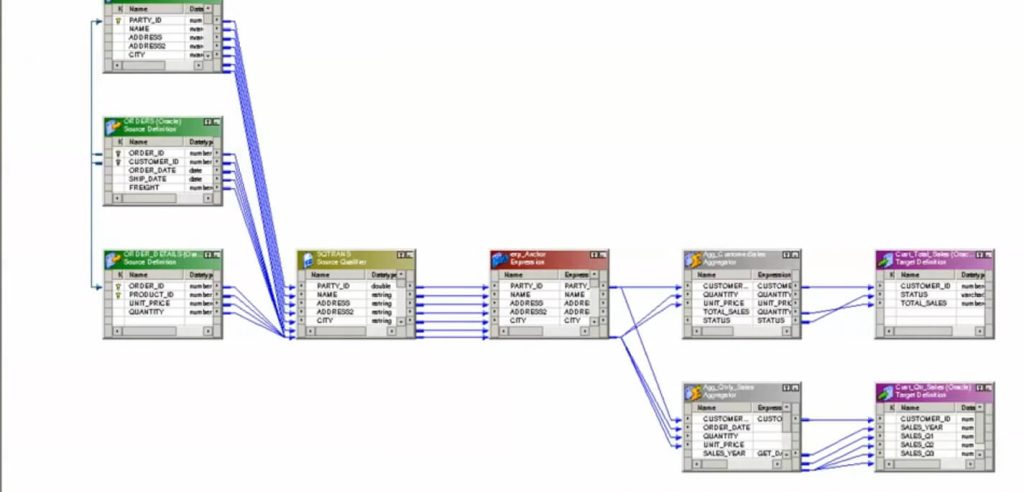
Despite its legacy status, it’s still widely used in industries like finance, healthcare, and telecom where regulatory requirements and legacy infrastructure persist.
| Extract | Connects to on-premises and legacy sources: – Databases like Oracle, SQL Server, and DB2 – Flat files and XML documents – ERP systems such as SAP |
| Transform | Uses a graphical design environment with over 100 built-in transformation functions.Supports expression building, data cleansing, type conversion, lookups, and data validation. |
| Load | Loads data into: – Traditional data warehouses such as Teradata and Netezza – Relational databases like Oracle and SQL Server – Mainframes and legacy systems. |
Key features:
- Visual interface for building ETL workflows
- 100+ connectors for databases, cloud platforms, applications, and mainframes
- Built-in scheduling, workflow orchestration, and monitoring tools
- Integrated data quality, profiling, and governance capabilities
- Scalable architecture for cloud, on-premises, and hybrid environments
Limitations:
- Complex setup and steep learning curve
- High licensing and infrastructure costs for smaller teams
- Not optimized for real-time or low-latency data syncs
- Requires dedicated IT resources for ongoing management and updates
Ideal use case:
Enterprises managing mission-critical ETL workloads with strict security, governance, or regulatory demands. Common in financial services, healthcare, and manufacturing environments, integrating large volumes of structured data.
Pricing:
Informatica PowerCenter uses an enterprise licensing model rather than transparent tiered pricing. Costs vary based on deployment type (on‑premises, cloud, or hybrid), number of connectors, support levels, and data volumes. Enterprises typically purchase site licenses or bundle PowerCenter with other Informatica products under volume‑based contracts.
Informatica ends standard support for PowerCenter 10.5.x in March 2026. Extended support is available, but customers are encouraged to migrate to Intelligent Data Management Cloud (IDMC), which offers broader cloud, AI, and ELT capabilities.
Informatica Intelligent Data Management Cloud (IDMC)
Type: Cloud-based data management platform
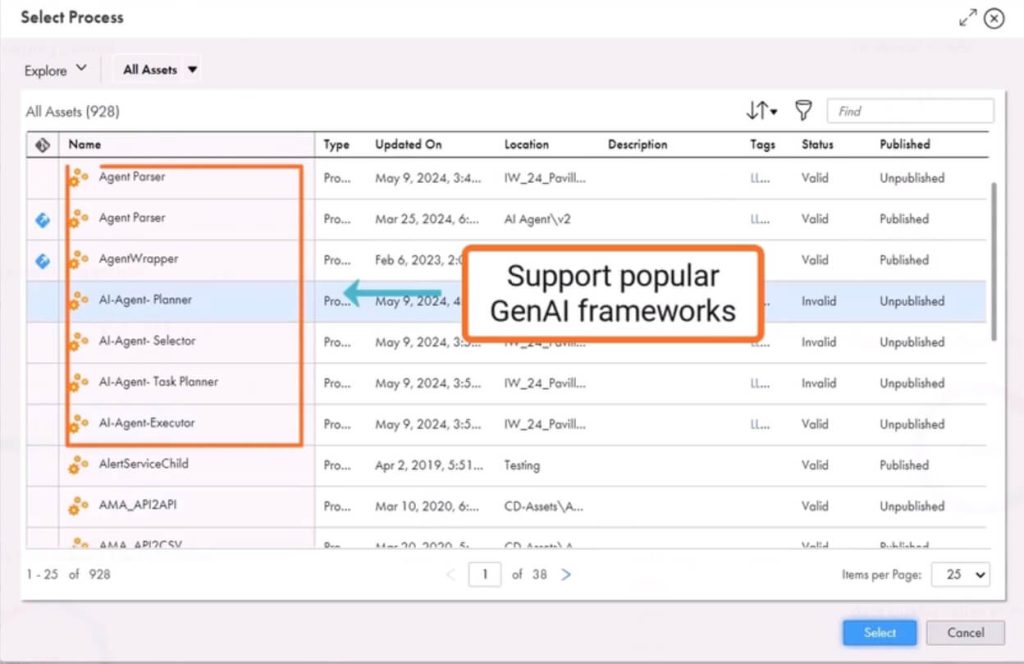
Informatica Intelligent Data Management Cloud (IDMC) is an AI‑powered, cloud‑native data management platform designed for modern enterprise environments. Built on a scalable serverless microservices architecture, IDMC unifies data integration, data quality, governance, cataloging, API and application integration, and master data management (MDM). It helps organizations ingest, transform, govern, and deliver trusted data at scale across multi‑cloud and hybrid environments.

| Extract | IDMC supports extraction from hundreds of sources, including: – Enterprise databases like Oracle and SQL Server – SaaS applications such as Salesforce and Workday – Cloud storage services like Amazon S3 and Azure Blob – Message queues like Kafka |
| Transform | Data transformation is handled through a mix of low-code/no-code interfaces and advanced scripting. IDMC supports batch, ELT, and real-time transformation patterns with built-in orchestration and optimization for performance and cost-efficiency. |
| Load | IDMC can load data into a wide range of cloud data warehouses including Snowflake, BigQuery, Redshift, Azure Synapse, Databricks, and Amazon RDS. |
Key features:
- AI-powered automation for discovery, mapping, and optimization
- Cloud-native architecture with multi-cloud and hybrid support
- Connectivity to databases, SaaS apps, APIs, and streaming sources
- Integrated catalog, data quality, governance, and MDM services
Limitations:
- Enterprise pricing and complexity
- Steep learning curve for teams without dedicated data engineering staff.
- Observability and interface complexity can lag behind simpler competitors.
- Real‑time and streaming integrations are supported but may require additional configuration
Ideal use case:
Enterprises that need a unified platform for data ingestion, transformation, governance, and quality, especially across hybrid and multi‑cloud environments. IDMC is well-suited for organizations modernizing their data stack, managing large volumes of diverse data, and building cloud‑scale ELT or data mesh workflows with governance and AI‑assisted automation.
Pricing:
Informatica IDMC uses a flexible, volume-based consumption pricing model. Customers pay for what they use, allowing for scalable deployments without upfront infrastructure costs. Pricing is not publicly listed and requires a custom quote.
Oracle Data Integrator
Type: Enterprise-grade ETL and ELT platform
Oracle Data Integrator (ODI) is a high-performance data integration platform optimized for complex, high-volume environments. It follows an ELT architecture, pushing transformation workloads to the database layer for better scalability and performance. ODI is designed for large enterprises with deep integration needs across Oracle and non-Oracle systems, supporting both batch and real-time data movement.

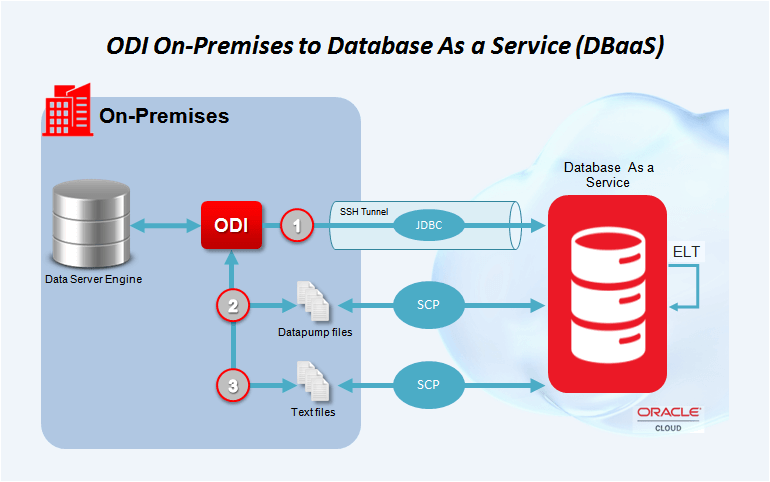
| Extract | Connects to a wide range of structured and semi-structured sources, including: – Databases like Oracle DB, SQL Server, Teradata – Enterprise systems such as SAP – File formats: flat files, XML |
| Transform | Uses ELT architecture to push transformation logic to the target database engine. Leverages native SQL or PL/SQL for complex transformations, including mappings, lookups, reusable procedures, variables, and user-defined functions |
| Load | Loads data into: – Oracle databases and cloud services – Cloud data warehouses like Snowflake – Hybrid environments (on-prem + cloud) |
Key features:
- Real-time replication via Oracle GoldenGate integration
- Declarative design with reusable mappings and procedures
- Built-in data lineage, auditing, and error handling
- Supports on-premises, hybrid, and multi-cloud environments
- Native integration with Oracle Cloud, Autonomous DB, and Exadata
Limitations:
- Steeper learning curve for new users
- Optimized for Oracle environments; less intuitive for non-Oracle systems
- High total cost of ownership for small or mid-sized teams
Ideal use case:
Best for large enterprises using Oracle databases and infrastructure. Suitable for teams building large-scale data warehouses or integrating operational systems across hybrid cloud environments.
Pricing:
Oracle Data Integrator does not publish fixed list prices; pricing is license‑based. Costs depend on factors such as the number of processors or users, the choice between on‑premises, cloud, or hybrid deployments, and whether ODI is bundled with other Oracle products like Oracle Cloud Infrastructure or Autonomous Database.
Hevo Data
Type: Cloud-native ETL/ELT platform
Hevo is a fully managed, no-code data pipeline platform designed to move and transform data from over 150 sources into data warehouses and analytics destinations in real time. Built for agility and speed, Hevo automates much of the data integration process, handling schema mapping, data consistency, and error tracking without manual intervention.

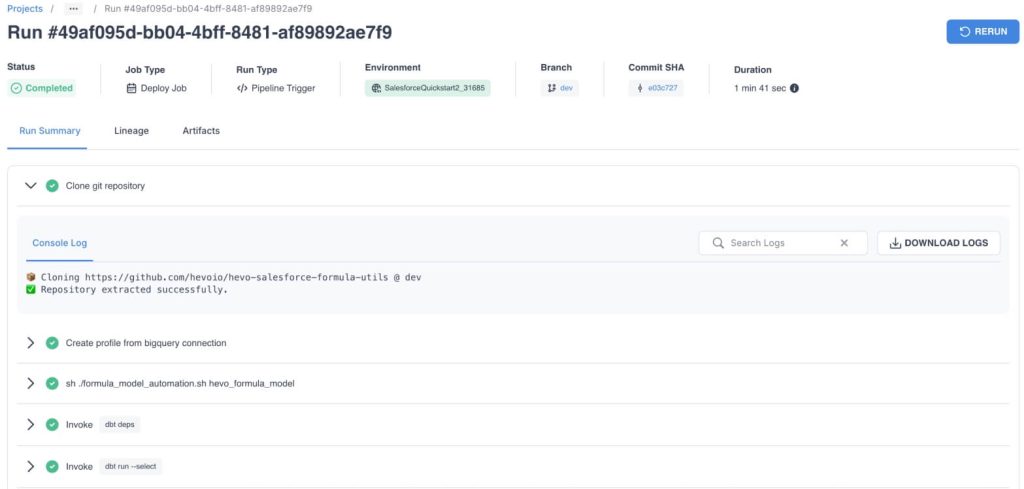
It supports both ETL and ELT models and is ideal for teams needing real-time insights from diverse SaaS tools, databases, and event streams without building infrastructure or writing code.
| Extract | Connects to 150+ data sources, including: – SaaS platforms like Salesforce, Shopify, and Google Ads – Databases such as PostgreSQL, MySQL, and MongoDB – Streaming and event-based systems like Kafka |
| Transform | Offers both no-code and SQL-based transformation capabilities. Users can filter, join, aggregate, and clean data using pre-built logic or custom SQL. Supports transformation at both ETL (during ingestion) and ELT (post-load) stages. |
| Load | Loads into major cloud data warehouses and analytics platforms, including Snowflake, BigQuery, Redshift, PostgreSQL, Databricks, Azure Synapse, and Amazon RDS |
Key features:
- Real-time data sync and low-latency pipelines
- Built-in monitoring, logging, and alerting
- Automatic schema detection and mapping
- ELT/ETL flexibility with support for dbt
Limitations:
- No on-premise deployment option
- Advanced users may find transformation customization limited without dbt
- Pricing can become high with scale or large volumes
Ideal use case:
Best for fast-growing businesses that need real-time reporting and analytics from SaaS tools and databases. Ideal for marketing, product, and ops teams who want to enable live dashboards without engineering support.
Pricing:
Plans start with a Free tier, which includes up to 1 million events per month, 50+ data sources, and 1 destination. This is good for testing or small workloads.
The most popular option for growing teams is the Starter plan, starting at $399/month, which supports up to 20 million events and 10 users. For example, a data team syncing customer and finance data from Shopify, Stripe, and PostgreSQL to BigQuery in near real-time can manage their entire pipeline within this plan. Check out the pricing page for more plans.
Matillion
Type: Cloud-native ELT platform
Matillion is an ELT platform built for modern cloud data warehouses like Snowflake, BigQuery, Redshift, and Azure Synapse. It allows data teams to design and run complex transformation workflows directly inside the warehouse, using an intuitive visual interface or code-based customization when needed. Built for scalability and performance, Matillion is ideal for high-volume, analytics-driven organizations.

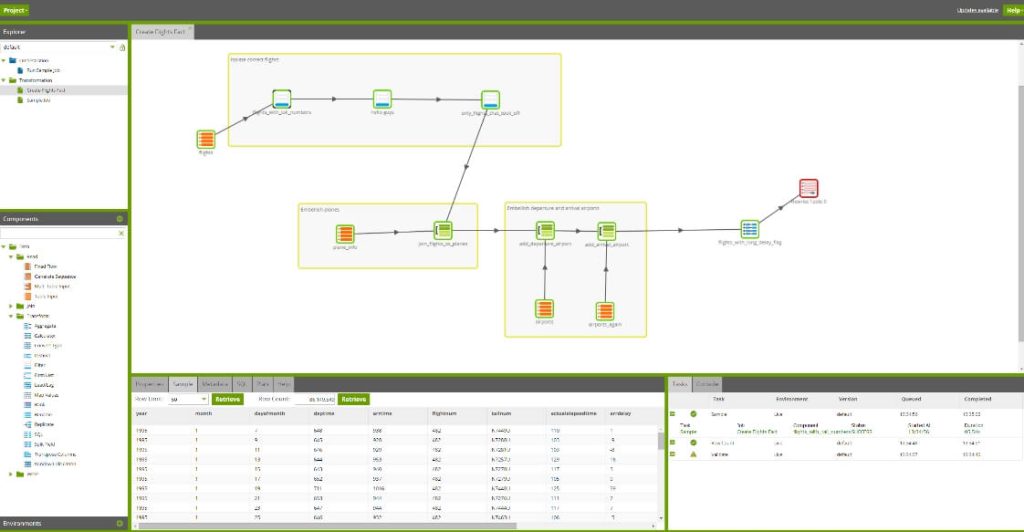
| Extract | Supports 100+ connectors across: – Cloud applications like Salesforce, Marketo, and NetSuite – Databases such as Oracle, SQL Server, MySQL |
| Transform | Follows an ELT model by transforming data directly in the destination warehouse. Includes drag-and-drop transformation components, SQL scripting, Python integration, and support for reusable, version-controlled job components. |
| Load | Loads data into cloud data platforms, including Snowflake, Databricks, Redshift |
Key features:
- Native support for major cloud data platforms
- ELT architecture for in-warehouse scalability
- Visual job builder with 80+ transformation components
- Python and SQL scripting support
- Role-based access and version control
- REST API, webhook, and Git integration for CI/CD
Limitations:
- Not suitable for teams without cloud warehouse infrastructure
- Lacks support for on-premise data destinations
- Pricing may be high for smaller teams or low-volume use cases
Ideal use case:
Best for data engineering teams working inside Snowflake, Redshift, BigQuery, or Synapse who need to build scalable, complex transformation workflows with full control and warehouse-native performance.
Pricing:
Matillion offers three plans: Starter, Team, and Scale. The Starter plan includes one environment and unlimited projects with pre-built connectors. Team and Scale plans add advanced features like usage-based compute billing, hybrid deployment, data lineage, and real-time CDC. Matillion does not publicly list pricing. Contact sales for a quotation.
Portable
Type: Cloud-based ELT tool with on-demand connectors
Portable is a no-code ELT platform focused on long-tail connector coverage. It’s designed for teams that need to extract data from hard-to-find or niche SaaS tools. Unlike platforms with a fixed library, Portable builds new connectors on request, delivering them in 48 hours without engineering effort. It supports data replication into cloud warehouses like Snowflake, BigQuery, Redshift, and others.

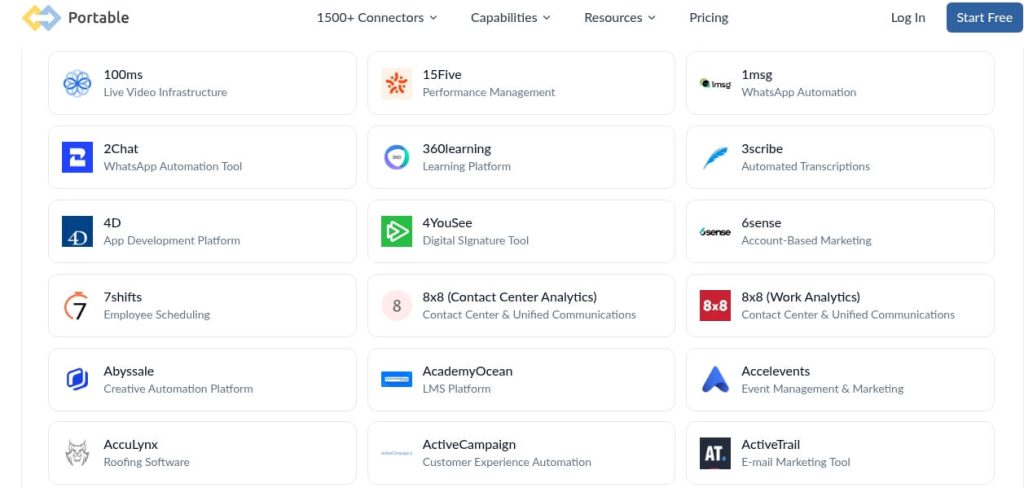
| Extract | Collects data from 1,500+ long-tail SaaS sources, including: – Advertising platforms like Google Ads, Facebook Ads, TikTok Ads, Amazon Ads, LinkedIn Ads – Enterprise tools like Salesforce, NetSuite, Microsoft Dynamics, Intercom, HubSpot – Analytics and product tools like Mixpanel, Klaviyo, Iterable, Outreach |
| Transform | Portable does not support native transformations. Users transform data within the destination using tools like dbt, SQL, or business intelligence layers. |
| Load | Loads data into cloud destinations: – Data warehouses like Snowflake, BigQuery, and Redshift – Databases such as PostgreSQL and MySQL – Cloud storage platforms like Amazon S3 |
Key features:
- On-demand connector development in 48 hours
- Fully managed, no-code platform
- Incremental syncs and historical data loads
- Usage-based API and CLI available
- No custom code or infrastructure required
Limitations:
- No built-in transformation layer
- Not suited for teams needing advanced orchestration or in-warehouse logic
- Limited control for highly customized or multi-step workflows
- Only available for US-based users
Ideal use case:
Best for teams needing to extract data from niche tools not supported by other ELT providers, especially when fast integration is required without developer involvement.
Pricing:
Portable uses a data flow-based pricing model, where you pay based on the number of enabled data flows, not on data volume, users, or connectors. A data flow in Portable means syncing data from one source (like TikTok Ads or Salesforce) into one destination (like BigQuery or Snowflake).
Starts at $1,800/month for the Standard plan, which includes 6 enabled data flows, access to standard sources, and 15-minute syncs.
The most popular plan is Pro, priced at $2,800/month, with 15 data flows, access to Pro sources and all destinations, 24/7 support, and integration services.
A mid-sized marketing agency managing multiple long-tail SaaS tools across 10-15 clients can use the Pro plan to centralize data from niche platforms like Klaviyo, Mixpanel, and TikTok Ads into BigQuery or Redshift. Check their pricing plans for more details.
Airbyte
Type: Open-source ELT platform
Airbyte is an open-source ELT tool built to support flexibility and extensibility at scale. It offers a large catalog of connectors and users can easily build new ones using a no-code UI or by editing existing code. Airbyte is designed for teams that want full control over their data pipelines while benefiting from an active developer community and a rapidly evolving ecosystem.

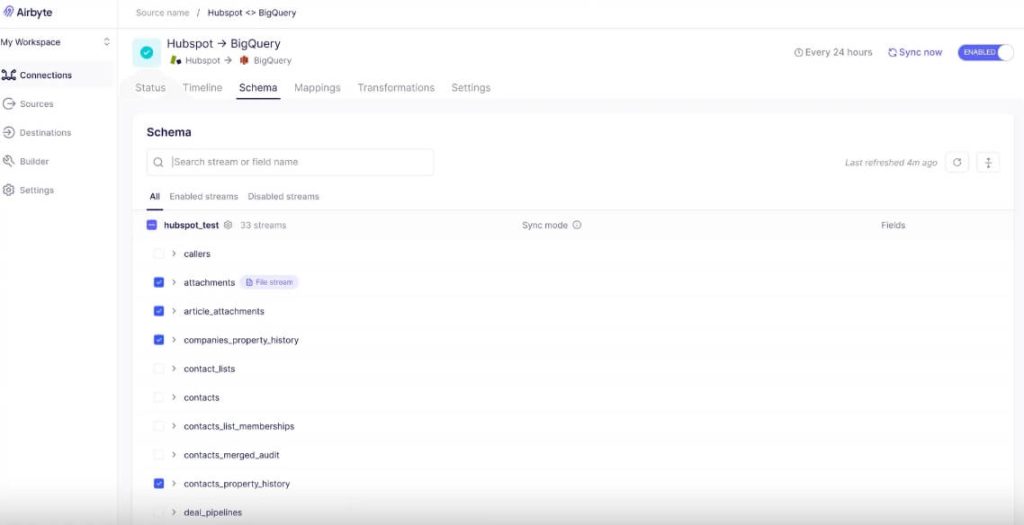
| Extract | Connects to over 600 data sources, including: – Databases like PostgreSQL and MySQL – Payment systems like Stripe – Analytics platforms such as Google Analytics – CRM tools like Salesforce |
| Transform | Supports in-warehouse transformations using dbt (built-in), SQL, or external orchestration tools like Dagster and Prefect. Does not offer a native UI for transformation. |
| Load | Loads data into: – Cloud data warehouses like Snowflake, BigQuery, Redshift, and Databricks – Databases like DynamoDB |
Key features:
- Integration with dbt for transformations
- Supports batch and near real-time data loading
- Active open-source community and frequent updates
- Available as self-hosted (free) or Airbyte Cloud (paid)
Limitations:
- Transformations and orchestration require external tools
- Airbyte Cloud is still maturing in terms of enterprise features
- Some connectors require maintenance or contributions from users
- Self-hosting requires DevOps experience
Ideal use case:
Ideal for data teams that want control and flexibility over their data integration stack, especially when building or customizing connectors is important. A great fit for tech-savvy teams and data engineers working in fast-scaling environments.
Pricing:
The Standard plan (starting at $10/month) is fully hosted by Airbyte and includes monitoring, auto-scaling, and connector updates. Pricing is based on data volume synced, not users or data flows.
The Core plan is self-managed, always free, and open source and is ideal for engineering teams comfortable running infrastructure themselves.
There are also enterprise options available. Pricing is custom and available through sales.
A small data team without infrastructure support can choose the Standard plan at $10/month to run managed pipelines across 10-15 data sources like Stripe, PostgreSQL, and GA4, loading into Redshift or BigQuery.
Pentaho
Type: Open-source and enterprise ETL/ELT platform
Pentaho Data Integration (PDI), developed by Hitachi Vantara, is a visual data orchestration tool that goes beyond traditional ETL. It’s designed for complex hybrid environments and enables organizations to blend, migrate, and prepare data across cloud, on-premises, and edge systems with a drag-and-drop interface. PDI supports AI/ML operationalization, containerized deployments, and flexible data integration for analytics, reporting, and intelligent data migration.

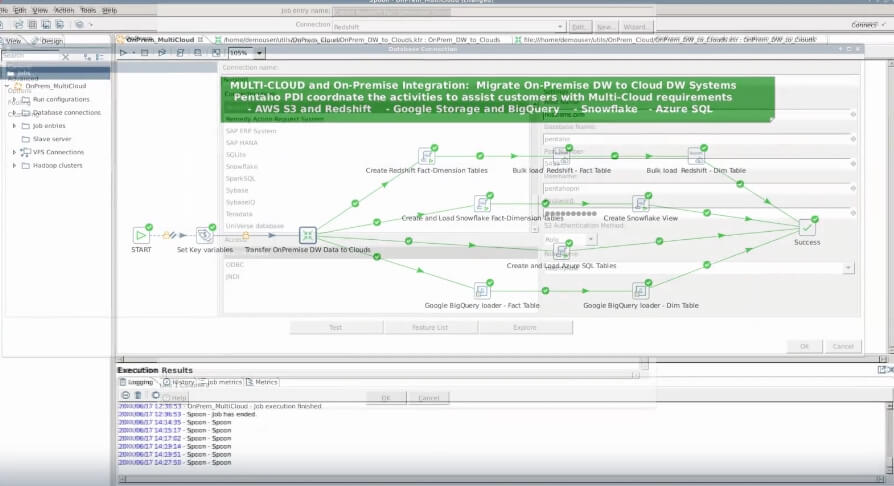
| Extract | Connects to a wide range of structured, semi-structured, and unstructured sources, including: – CRM platforms like Salesforce – ERP systems like SAP – Files like Excel, CSV, XML – Web analytics tools like Google Analytics |
| Transform | The transformation steps available include filtering, joining, metadata injection, scripting (Python, R, JavaScript), and operationalizing ML models using Spark, Weka, or Dockerized services. |
| Load | Loads processed data into: – Cloud data warehouses (BigQuery, Snowflake, Redshift) – Relational databases (PostgreSQL, Oracle, SQL Server) – Data lakes and file systems |
Key features:
- Drag-and-drop UI for low-code/no-code development
- Execution on-prem, cloud, or containers (Docker/K8s)
- Plugin support for GenAI, streaming, and SAP data extraction
- Real-time and batch orchestration from edge to cloud
Limitations:
- UI may feel dated compared to modern cloud-native tools
- Higher learning curve for advanced orchestration setups
- Some features depend on external plugin availability
Ideal use case:
Best for large enterprises managing complex hybrid data environments. Ideal for teams needing flexible, scalable ETL with low-code capabilities and plugin-driven expansion for advanced analytics, AI, or multi-cloud data strategies.
Pricing:
Licensing is usage- and deployment-based, meaning price depends on workload size, number of cores, users, and environment (on-prem, cloud, or hybrid). You also pay more for support levels, advanced connectors, and ML model integration. You can customize the license to include only the tools and capacities you need.
Pentaho offers four tiers, Starter, Standard, Premium, and Enterprise, tailored to different data integration needs. Pricing is not public. The Standard plan is the most popular, supporting containerized workloads, unlimited support, and scalable integration.
Contact sales for a price quotation.
AWS Glue
Type: Serverless cloud-native ETL/ELT and data catalog platform
AWS Glue is Amazon’s fully managed data integration service designed to simplify the discovery, preparation, and combination of data for analytics, ML, and application development. It offers both code-based (PySpark, Scala) and visual interfaces (Glue Studio, DataBrew) to accommodate different technical skill levels. Glue automates schema discovery, job execution, and resource scaling.

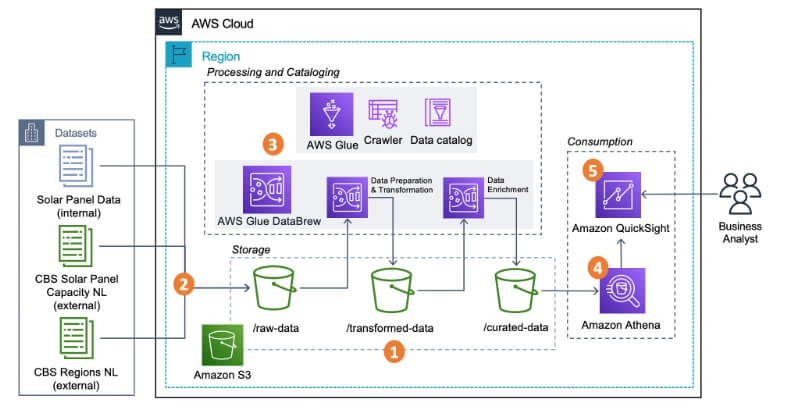
It supports ETL and ELT patterns, batch and streaming jobs, and integrates tightly with services like S3, Redshift, Athena, DynamoDB, and SageMaker.
| Extract | Connects to: – AWS-native sources like S3, RDS, DynamoDB, Redshift – JDBC-accessible databases – On-premises sources via Glue connectors – Event streams such as Kafka, Kinesis |
| Transform | Offers serverless ETL using Apache Spark, with support for custom transformations in PySpark or Scala. Glue Studio provides a visual editor for designing jobs. |
| Load | Loads data into Redshift, S3, RDS, Snowflake, and other cloud targets. |
Key features:
- Serverless Spark-based architecture
- Visual (Glue Studio) and no-code (DataBrew) interfaces
- Built-in data catalog and schema crawler
- Real-time and batch processing
- Native AWS integration across storage, analytics, and ML tools
- Job bookmarking and automatic retry logic
Limitations:
- Best suited for AWS-centric environments
- It can become complex to manage for teams new to Spark or AWS IAM
- Cold start latency in serverless jobs
- UI and job monitoring are less intuitive than some newer platforms
Ideal use case:
Ideal for data engineering teams operating within AWS, who need to automate large-scale, Spark-based transformations, real-time pipelines, or metadata cataloging.
Pricing:
AWS Glue uses a usage‑based pricing model where you pay for the compute resources consumed during ETL jobs, crawler runs, and data catalog storage. There is no upfront subscription fee or per‑connector charge. Costs scale with how much you use the service. Contact sales for a quotation.
How to choose the best ETL tool
Choosing the right ETL tool depends on your company’s size, technical skill set, data requirements, and infrastructure. The wrong fit can lead to hidden costs, slow performance, or even failed projects. Here’s how to evaluate tools across 7 critical dimensions:
Business size: Startup vs Enterprise
Smaller teams need simple, low-maintenance solutions that work out of the box. Cloud-based, no-code tools like Coupler.io or Hevo are ideal for startups that need to automate reports or sync SaaS data with minimal setup.
Enterprises need scalable tools with advanced configuration, role-based access, and integration with internal systems. Platforms like Informatica, Oracle Data Integrator, and AWS Glue support high-volume workflows, strict governance, and custom deployments.
Technical expertise: No-code vs DevOps team
If your team lacks engineers, a no-code ETL tool with visual interfaces and prebuilt connectors will reduce onboarding time and dependency on developers. Tools like Matillion, Coupler.io, and Portable let business teams run pipelines with little to no code.
For teams with in-house data engineers or DevOps, open platforms like Airbyte, Apache Airflow, or Pentaho offer flexibility, customization, and infrastructure control. These tools allow scripting, self-hosting, and advanced orchestration.
Data freshness: Batch vs Real-time
For hourly or daily syncs, batch ETL is cost-effective and easier to manage. Most tools support scheduled loads by default.
If your use case involves streaming data, live dashboards, or event-driven actions, choose a tool with real-time capabilities. Fivetran, Hevo, or AWS Glue support real-time replication and CDC (change data capture).
Budget: Free, low-cost, usage-based, enterprise
For predictable usage and lower maintenance, cloud-based tools like Coupler.io or Hevo provide transparent pricing models.
Enterprise-grade tools like Informatica, Oracle, or Talend come with licensing fees and support contracts but deliver comprehensive support and scalability.
Compliance and governance
If your organization operates in regulated industries ( finance, healthcare), choose ETL platforms that support:
- SOC 2, HIPAA, GDPR compliance
- Role-based access control
- Audit logs and data lineage
AWS Glue, Coupler.io, and Informatica all support compliance requirements. Open-source ETL tools may require manual configuration to meet standards.
Deployment needs: SaaS vs on-prem vs hybrid
SaaS tools like Coupler.io, Fivetran, and Portable simplify setup and scale automatically.
For sensitive environments or restricted data movement, tools like Pentaho, Talend, or Airbyte allow on-prem or hybrid deployments.
Hybrid tools provide flexibility to mix cloud and on-prem data flows without compromising control.
Connector coverage
Before choosing a platform, review the source and destination connectors available.
- For SaaS apps: Coupler, Hevo, Fivetran, and Portable cover a wide range.
- For databases and data lakes: AWS Glue, Matillion, Airbyte, and Informatica offer broad support.
- If a connector is missing, Airbyte and Coupler allow users to build or request custom connectors fast.
Automate ETL data flows with Coupler.io
Get started for freeFAQ
What are ETL tools?
ETL stands for Extract, Transform, Load. It is a data integration process that moves information from multiple sources into a single destination, typically a data warehouse.
- Extract: pulls data from sources like databases, SaaS platforms, APIs, or files.
- Transform: cleans, enriches, and formats the data according to business rules or analytics needs.
- Load: delivers the transformed data into a target system such as BigQuery, Looker Studio, Snowflake, or ChatGPT.
ETL tools automate this full workflow. Some platforms support ELT (Extract, Load, Transform) instead, which loads raw data first and transforms it directly in the destination system.
ETL tools often include scheduling, orchestration, schema change detection, data validation, and monitoring. They integrate with other components of the modern data stack, such as BI tools, reverse ETL platforms, or machine learning pipelines.
What are the types of ETL tools
ETL tools fall into different categories based on deployment model, licensing, and architectural design. Choosing the right type depends on your technical environment, data volume, team expertise, and budget.
Open-source ETL tools
Open-source ETL tools offer flexibility, customization, and community support. These tools are ideal for teams with engineering resources that need full control over data workflows.
Pros:
- No licensing fees
- Highly customizable
- Supported by active communities
Cons:
- Requires technical expertise for setup and maintenance
- Limited customer support
- May lack advanced monitoring or automation out-of-the-box
Examples:
- Airbyte: Open-source ELT platform, suitable for companies needing customizable, self-hosted pipelines.
Cloud-based ETL tools
Cloud-native ETL tools are hosted, fully managed platforms designed to simplify data integration at scale. They eliminate the need for infrastructure setup and focus on usability and fast deployment. Cloud-based ETL tools are best for teams and organizations that want to automate and scale their data integration without managing infrastructure or custom code.
Pros:
- Easy to set up and scale
- No infrastructure management
- Often includes prebuilt connectors and automation
Cons:
- Subscription or usage-based pricing
- Limited customization compared to open-source
Examples:
- Coupler.io: No-code data integration platform for automating data flows from business data sources into spreadsheets, data warehouses, BI, and AI tools. Ideal for business users and marketing teams.
- Fivetran: Cloud-native ELT tool with auto-managed connectors and schema evolution. Good for centralizing data in data warehouses (BigQuery, Snowflake, Redshift).
Enterprise/commercial ETL tools
Enterprise ETL tools are designed for complex, high-volume data environments with advanced compliance, governance, and support needs. These tools are ideal for large organizations or teams with large‑scale, multi‑system data environments and strict governance requirements.
Pros:
- Scalable and secure
- Advanced features such as data lineage, metadata management
- Dedicated enterprise support
Cons:
- High licensing and infrastructure costs
- Complex deployment
- Steep learning curve
Examples:
- Informatica PowerCenter: Widely used enterprise ETL solution with broad support for cloud and on-prem data integration.
- Talend Data Management Platform: Offers both open-source and commercial versions with robust transformation, data quality, and governance tools.
Data pipeline and workflow orchestration tools
These tools focus on orchestrating complex data workflows rather than pure ETL. They are essential for scheduling, retry logic, and dependency management in modern data stacks. They are great for technical teams managing multi-step data workflows across complex environments.
Pros:
- Excellent for managing multi-step data flows
- Supports custom Python or SQL logic
- Easily integrates with cloud data warehouses
Cons:
- Require engineering expertise
- Not ideal for simple data syncing tasks
Example:
- Databricks Lakeflow Spark Declarative Pipelines: A declarative pipeline tool built on Apache Spark. Handles job orchestration, error recovery, and data quality checks with minimal coding. Best for teams using the Databricks Lakehouse.
Real-time ETL tools
Real-time ETL tools support streaming data ingestion and transformation with minimal delay, making them ideal for operational analytics or alerting systems. They are best for teams and companies that need continuous, low-latency data flow for operational decision-making
Pros:
- Enables real-time dashboards and alerts
- Reduces latency between data events and insights
- Supports both batch and stream processing
Cons:
- More complex to manage
- Higher infrastructure costs
- Requires careful schema and job design
Examples:
- Hevo Data: Supports real-time sync with over 150 data sources and cloud destinations.
- AWS Glue: Serverless ETL platform that supports both batch and real-time streaming jobs using Python or Scala. Best for teams operating within the AWS ecosystem.
What’s the difference between ETL and ELT?
ETL (Extract, Transform, Load) transforms data before loading it into the destination. ELT (Extract, Load, Transform) loads raw data first, then transforms it inside the destination system ( a cloud data warehouse).
ETL is better for on-prem or structured pipelines. ELT is optimized for cloud environments that separate storage and compute like BigQuery, Snowflake, and Redshift.
Are there free ETL tools?
Yes. Open-source tools like Apache Airflow are free to use but require engineering effort to deploy and maintain.
Coupler.io also offers freemium plans with limited syncs and data volumes.
What is the easiest ETL tool to use?
Coupler.io offers no-code interfaces with fast setup, prebuilt connectors, and intuitive workflows. It’s ideal for non-technical teams that want to automate reporting or sync SaaS data without writing scripts.
Is SQL an ETL tool?
No. SQL is a language used within ETL workflows to transform and query data, especially in ELT pipelines. ETL tools often support SQL-based transformations, but SQL alone doesn’t manage extraction, loading, or orchestration.
What is ETL vs API?
ETL is a full data pipeline process, extracting, transforming, and loading data from various sources into a destination system. An API (Application Programming Interface) is a method for accessing data from a service. ETL tools often use APIs to extract data from platforms like Salesforce, HubSpot, or Shopify.