In 2026, CEOs, CMOs, and CFOs will adopt new digital solutions to streamline operations, minimize costs, and make data-driven decisions. Financial management is crucial for individuals and businesses seeking financial stability. This article provides a comprehensive overview of financial management apps for SaaS companies, business owners, and financial teams.
What are financial management tools
Small and mid-sized businesses often struggle with financial management as they grow. Without proper systems, companies frequently find themselves drowning in spreadsheets, struggling to track cash flow, and spending hours on manual bookkeeping. Finance teams become overwhelmed trying to manage accounts while simultaneously handling payroll, expense tracking, and reporting. This strain becomes particularly acute during tax season or when seeking funding.
Financial management aims to organize businesses’ finances and acquire the capital necessary to run their operations. Financial management tools can be extremely helpful, from automating routine tasks to delivering data for strategic decision-making.
The tool types might be different:
| Tool type | Description | Average price/month | Example |
|---|---|---|---|
| Budgeting tools | Help create and manage budgets, track spending goals, and plan future expenses | $0-15 | EveryDollar PocketGuard |
| Expense tracking tools | Automate receipt capture, expense reports, and reimbursement processes | $5-20 | Paymo Expensify |
| Tax planning tools | Assist with tax preparation and ensure compliance with tax regulations | $5-10 | TurboTax |
| Billing tools | Manage bill payments, track due dates, and organize financial obligations | $0-10 | CreditKarma |
| Cash flow management tools | Monitor incoming and outgoing cash, manage working capital | $17-150 | QuickBooks Pulse |
| Financial analytics tools | Provide data integration and visualization for financial metrics and tracking via BI features | $0-100 | Coupler.io |
| Accounting tools | Manage bookkeeping, financial statements, and other business activities | $0-20 | Xero |
| Financial comparison tools | Help users evaluate, compare, and choose financial products | $0-10 | SuperMoney |
| Payroll management tools | Automate employee payment processes and generate pay stubs | $0-40 | Gusto |
12 financial management tools to consider in 2026
These tools are specialized solutions that automate and streamline various aspects of business finance. They can range from basic accounting software to comprehensive enterprise resource planning (ERP) systems.
Here’s a curated list of professional solutions for you.
Budgeting financial management tools
An important function of financial planning tools is the generation of relevant and realistic budgets. It shows what a business expects to spend and earn over a specific period.
EveryDollar


EveryDollar app guides you through the budgeting process step-by-step. Users can create custom expense categories and, with its flexible budget templates, tailor their financial planning to match their specific needs and goals. EveryDollar combines practical budgeting tools with educational resources, ensuring users not only manage their money but also improve their financial literacy over time.
Features
- Smart bill management: Implements a reminder system to help users track payment deadlines
- Reporting: Generates custom budget reports for budget adherence
- Educational resources: Monthly newsletter with budgeting articles and tips; coaching calls with finance experts for premium members
Pricing
The application offers two versions: free and paid — $17.99/month, or $79.99/year. A 14-day free trial is available.
PocketGuard


PocketGuard is a budgeting and personal finance management app designed to help users understand how much money they can safely spend after accounting for bills, savings goals, and recurring expenses. By connecting bank accounts, credit cards, and loans in one dashboard, the platform automatically categorizes transactions and highlights areas where users may overspend. Its “In My Pocket” making day-to-day financial planning easier.
Features
- Automatic expense categorization: Syncs bank accounts and credit cards to automatically categorize transactions and provide spending insights.
- “In My Pocket” spending tracker: Calculates the amount of money left after bills, goals, and necessities.
- Bill and subscription monitoring: Identifies recurring payments and subscriptions to help users control ongoing expenses.
- Savings goals: Allows users to set and track progress toward financial goals.
Pricing
PocketGuard offers a 7-day free trial. After that, the PocketGuard Premium plan costs $6.25/month when billed annually ($74.99/year) and includes advanced budgeting tools, unlimited bank account connections, subscription tracking, and financial insights.
Expense tracking tools used in financial management
Expense management tools speed up claim validation, approval, and payment, helping businesses control costs. They also provide real-time visibility into spending patterns, making it easier to identify inefficiencies and optimize budgets.
Paymo


Paymo is a work and financial management platform that combines time tracking, invoicing, and project-based financial insights in one system. It’s particularly useful for small businesses and service-based teams that need to connect daily work with financial outcomes. By turning tracked time and completed tasks into invoices, reports, quotes, and estimates, Paymo helps businesses monitor profitability and maintain better control over cash flow.
Features
- Time tracking and invoicing: Converts billable hours into professional invoices
- Project financial insights: Tracks budgets, costs, and profitability in real time
- Expense and cash flow tracking: Provides visibility into spending and incoming payments
Pricing
Depending on your size and needs, Paymo offers plans ranging from free to paid (starting at around $5.9 per user/month), with features and pricing that scale with team size.
Expensify


Expensify is an expense management solution for tracking receipts, generating reports, and monitoring business expenses. It helps to build a fully functioning and automated process. This tool can automatically categorize transactions, reconcile accounts, and generate real-time financial reports. It stands out by offering an all-inclusive approach that covers everything from travel booking to corporate card management.
Features
- Receipt and expense automation: Scanning technology to extract and categorize receipt information instantly
- Mobile financial apps features: Support for on-the-go expense tracking and real-time synchronization across devices
- Categories and tags: Customizable categories and tags for detailed expense tracking
- Corporate card integration: Offers a built-in corporate card program with cash-back rewards on US purchases
Pricing
Free for individual users, paid plans for larger finance teams. Corporate plans are customized based on team size with varying levels of automation and control (from $5 per user/month).
Tax preparation tools
Business tax software imports data from different systems and provides the needed information to accountants for tax preparation.
TurboTax


TurboTax is a tax preparation software that simplifies the filing of personal and business taxes. The platform has tax calculation algorithms that guide users through every step of tax filing. With AI-powered assistance through Intuit Assist, users receive answers to tax-related questions. TurboTax offers multiple filing options, from self-service to full-service tax expert assistance.
Features
- AI-powered tax guidance: Intuit Assist offers personalized recommendations
- Document import flexibility: Streamlines data entry by allowing users to import W-2s and other tax documents through photo capture, direct upload, etc.
- Expert support: Provides access to certified tax experts, offering tax preparation services
Pricing
TurboTax offers tiered pricing based on filing complexity and the level of expert assistance needed. Self-preparation options range from $0 to $99, while expert-assisted services start at $89. All versions include a “pay only when you file” policy and come with a refund guarantee.
Billing and payment processing tools
These tools are financial management solutions that manage the invoice lifecycle. They help businesses create and send invoices, monitor payment statuses, automate customer reminders, and maintain comprehensive billing history for accounting purposes.
Credit Karma (ex Mint)


Intuits’ tools are among today’s most popular financial apps. Mint, now reimagined on Credit Karma, is an Intuit-owned personal finance management platform that combines Mint’s comprehensive financial tracking capabilities with Credit Karma’s robust credit monitoring services. The platform serves as a centralized financial hub and maintains its core focus on helping users track spending, manage budgets, and improve their overall financial health.
Features
- Unified financial management: Integrates all financial accounts in real time.
- Enhanced credit monitoring: Provides credit score tracking and monitoring services.
- Smart financial alerts: Delivers customized notifications for unusual spending and credit score changes.
Pricing
The platform maintains accessibility through a free model. Additional premium features may be available through Credit Karma’s Money platform.
Cash flow financial management tools
These management tools produce cash flow statements automatically. By managing them, the business ensures that current bills are paid.
QuickBooks


QuickBooks helps you manage your accounting, expense management, payments, and payroll on a connected platform. This tool is particularly easy to use and set up, which makes it a good fit for non-accountants. In addition, QuickBooks supports invoicing, inventory management, tax preparation, and financial reporting.
Features
- Strong reporting capabilities: Offers detailed insights into financial performance
- Extended functionality: Includes support for invoicing, inventory tracking, and tax preparation
- Automated bank reconciliation: Connects directly to your bank accounts and credit cards to automatically match transactions, reducing manual data entry and errors.
Pricing
The lower-tier plan offers core financial management features but does not include automated tax filing. This option may suit smaller businesses or those with simpler tax needs, while paid plans provide additional automation and advanced functionalities (from $17.50/mo).
Pulse


Pulse is a cash flow management tool designed to give businesses a clear, real-time view of their financial health. Built with simplicity in mind, Pulse helps teams forecast cash flow, track incoming and outgoing funds, and plan for future financial scenarios without relying on complex spreadsheets. It’s particularly valuable for SaaS companies and startups that need to stay on top of liquidity as they scale operations.
Features
- Cash flow forecasting: Visual projections based on expected income and expenses
- Scenario planning: Model different financial outcomes to support decision-making
- Real-time tracking: Monitor cash position and upcoming transactions in one dashboard
- Collaboration tools: Share financial insights across teams for better alignment
Pricing
Pulse offers a subscription-based model with tiered plans depending on business size and feature needs. A free trial is available, allowing teams to explore its forecasting and reporting capabilities before committing.
Financial analytics tools
While most financial management software includes built-in analytics, its capabilities are often limited. Analytics tools allow you to centralize financial data, offering insights into spending patterns and providing real-time visibility into financial health.
Coupler.io


Coupler.io is a no-code automation tool that creates data connections between apps like financial management software and BI tools. The platform streamlines financial data integration by enabling automated data syncing across multiple sources, eliminating manual data entry, and reducing potential errors. Using connections between financial platforms, spreadsheets, and analytics tools, Coupler.io helps maintain real-time financial visibility. The tool is particularly valuable for teams looking to automate their financial reporting processes without requiring technical expertise.
Features
- Automated data integration: Data pipelines between financial management software and analytics platforms, with customizable scheduling
- No-code configuration: Pre-built connectors for popular financial and BI tools
- Data transformation capabilities: Users can clean, filter, and transform financial data during the integration process
- AI Agent: Chat with your business data across all financial sources to get instant answers and insights
Pricing
Coupler.io offers a tiered pricing structure starting from $24 per month. The higher tiers are available for advanced features and increased data volume requirements. All plans include core automation capabilities, with pricing primarily based on the number of data syncs and connected sources.
Accounting tools
Accounting software ensures that businesses don’t spend more than they need to. Accounting software handles the basics: tracking income and expenses, creating invoices, and paying bills. But modern solutions go further, automatically importing bank transactions, categorizing expenses, and flagging unusual spending patterns.
Xero


Xero is a cloud-based accounting software with powerful features. Its tools cover invoicing, payroll (limited to the US, UK, and Australia), and expense tracking. Xero offers access to real-time financial data on multiple devices, making it a great choice for business owners.
Features
- Real-time cash flow tracking: Tracks your money movement as it happens with instant updates on income and expenses
- Multiple users: Customizable permissions for different team members and syncing across devices
- App integrations: The platform integrates with a large library of third-party apps.
Pricing
A free trial is available; requires a subscription. The pricing might become expensive for larger teams with complex needs (from $20/mo).
Financial comparison tools
Choosing the right financial products is just as important as managing money, which is where comparison platforms come in. These platforms help users quickly evaluate options like loans, credit cards, and investment services, saving time and reducing the risk of costly mistakes.
SuperMoney


SuperMoney is a financial marketplace and comparison platform that helps users evaluate financial products such as loans, credit cards, banking services, and investment tools. It simplifies decision-making by aggregating verified user reviews, expert insights, and side-by-side comparisons. The platform is especially useful for individuals and businesses looking to optimize financial choices without spending hours researching multiple providers.
Features
- Product comparison engine: Enables side-by-side analysis of financial products based on rates, fees, and user reviews
- Verified user reviews: Provides insights from real customers to support informed decisions
- Personalized recommendations: Matches users with financial products tailored to their needs
- Personal finance app: a web and mobile (iOS & Android) app featuring AI-powered budgeting, account aggregation, credit monitoring, and an automated loan refinancing tool.
Pricing
SuperMoney is free to use for consumers, with revenue generated through partnerships with financial service providers.
Payroll management tools
Payroll tools used in financial management are essential for handling employee wages, taxes, and benefits accurately. They should ensure consistency, automate calculations, and comply with regulations.
Gusto


Gusto is crafted especially for small and mid-sized businesses, giving smaller finance teams a cost-effective way to streamline financial management. Gusto’s premium options unlock powerful features like tax filings and compliance support. With automation at its core, Gusto also simplifies payroll processing and benefits administration, reducing manual work and minimizing errors.
Features:
- Automatic tax management: Calculations, payments, and filing with state and federal agencies
- Direct deposit and tax form generation: Automatically generated tax forms like W-2s and 1099s
- Additional HR features: Manages employee documents, onboarding, benefits, and time-off requests in one dashboard
Pricing:
Its free tier offers essential payroll processing; premium HR features require payment. Add-ons can drive up costs for larger teams or businesses with advanced functionality needs (from $40/mo).
How to choose the best financial management tools
Modern financial management tools typically include features for automated bookkeeping, invoice processing, expense tracking, reporting, and cash flow management. Many also offer integration with banking systems, payroll processing, and tax preparation capabilities.
Consider the following when making your decision:
- Cost: Ensure the features you need fit the budget
- Ease of use: User-friendliness is crucial for every team
- Scalability: For growing businesses, these tools should scale alongside them, handling increased transaction volumes while maintaining accuracy
- Automation: It not only saves time but also reduces human error
- Integration: Compatibility with your existing systems like CRM, banking systems, or ERP
- Security: Transaction transparency and security are critical for financial operations
- Customer support: It should be accessible for every tier
Trends such as blockchain or real-time AI data analytics are shaping the future of fintech. So keep an eye on tools that incorporate advanced trending features.
The best way to choose financial planning tools is to customize them to your needs. Start by assessing your current financial situation, future goals, technical skills, available time, and budget. This structured approach helps you select the right tools for long-term success and easy use.
Once you’ve selected the right financial management tools, the next step is to maximize their value. Leveraging dashboards and reporting templates can transform raw financial data into actionable insights, helping your team make smarter, faster decisions.
Visualizing your financial data
Modern financial management tools do more than track numbers, they turn data into actionable insights. Financial dashboards provide a real-time snapshot of your company’s financial health, displaying metrics like cash flow, expenses, revenue, and outstanding invoices at a glance. Using financial dashboard examples, businesses can see how key performance indicators (KPIs) are tracked and presented, helping teams understand trends and make data-driven decisions quickly.

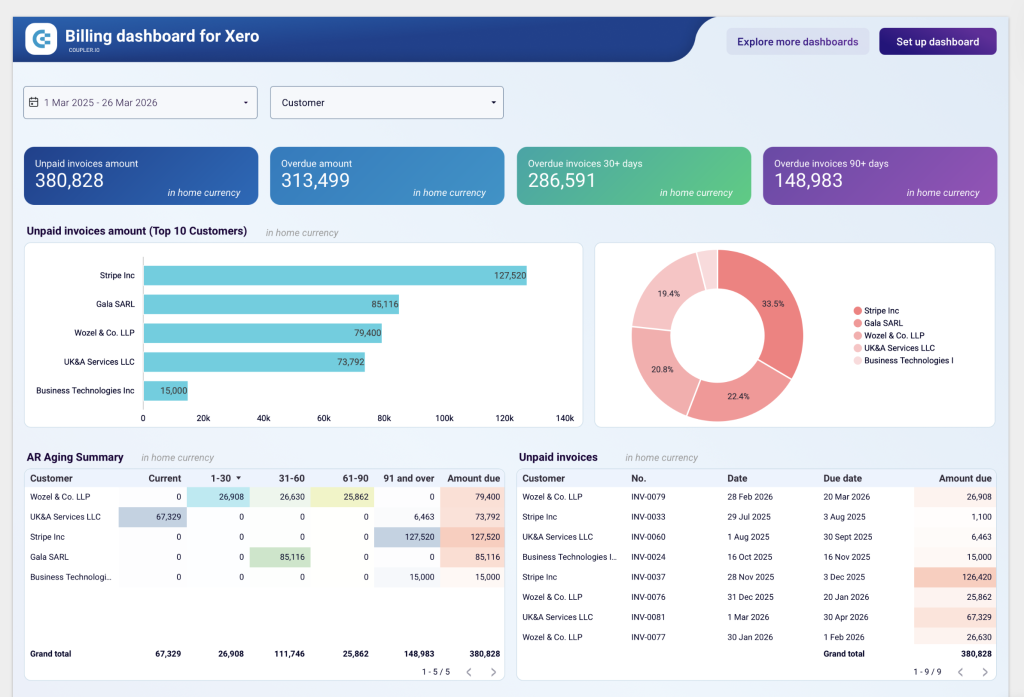
Reporting templates simplify the creation of standard reports, saving hours of manual work and ensuring consistency across your team. By leveraging dashboards and templates, finance teams can:
- Monitor key metrics in real time for proactive decision-making
- Quickly identify inefficiencies or unusual spending patterns
- Generate standardized reports for monthly, quarterly, or annual reviews
- Share insights across teams to align business strategy with financial reality
Together, dashboards and reporting templates make financial management more strategic, actionable, and transparent—helping your business stay agile in 2026 and beyond.
Final thoughts
Financial management helps businesses acquire the necessary capital to keep business operations running. By implementing some of these tools, managers can shift their focus from manual financial tasks to strategic financial planning.
Remember, financial management tools are not “set it and forget it” solutions. Users should intentionally engage with them. That’s why the right toolset is so important.