Google Ads gives you detailed campaign performance data, but analyzing it alongside CRM, sales, or other marketing data can be difficult when everything lives in separate platforms.
Moving Google Ads data to PostgreSQL gives you a centralized relational database where you can query and combine campaign data for reporting and analysis. A reliable Google Ads to PostgreSQL integration is especially useful when you need the same data available for recurring SQL queries, dashboards, or broader marketing analysis.
With Coupler.io, you can automate this process without building and maintaining a custom ETL pipeline. It lets you extract Google Ads data, prepare it before loading, send it to PostgreSQL, and keep it updated on a schedule.
This makes it easier to maintain an automation workflow while keeping the same data available for other destinations and AI-assisted analysis.
How to connect Google Ads to PostgreSQL with Coupler.io
Coupler.io is a data integration platform and AI analytics solution with connectors to over 400 data sources, including Google Ads. With it, you don’t need to build your own API integration to connect Google Ads to PostgreSQL. Just choose the Google Ads data, organize your dataset before loading, and schedule automatic refreshes so the PostgreSQL table stays up to date. Or simply ask Coupler AI agent to do this for you.
Let Coupler AI do the data work for you
Tell Coupler AI what you need to know, from which source, and how often. It connects your account, sets up the data flow, keeps it refreshed, and lets you analyze the results inside Coupler.io or another AI tool.
Try for free

If you’re interested in what the setup flow looks like, check out how to load data from Google Ads to PostgreSQL using Coupler.io UI. Click Proceed in the form below to get started for free with no credit card required.

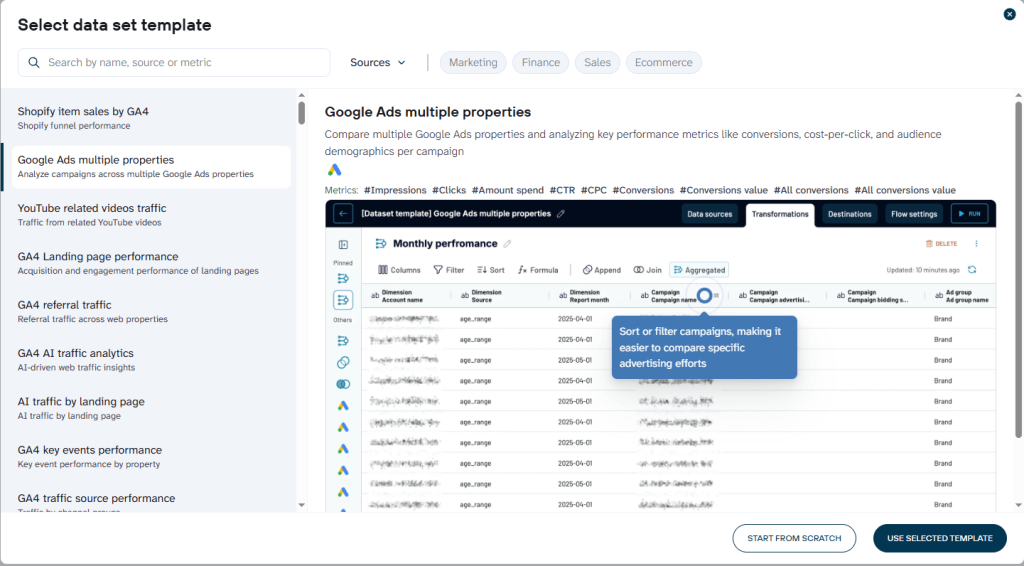
Alternatively, you can create a new data flow in Coupler.io from one of Coupler.io’s existing Google Ads templates.

Step 1. Connect Google Ads
Connect your Google Ads account, then choose the ad account and report you want to export. Coupler.io supports common report types such as campaign performance, keyword performance, ad group performance, ad performance, asset group performance, and account performance.

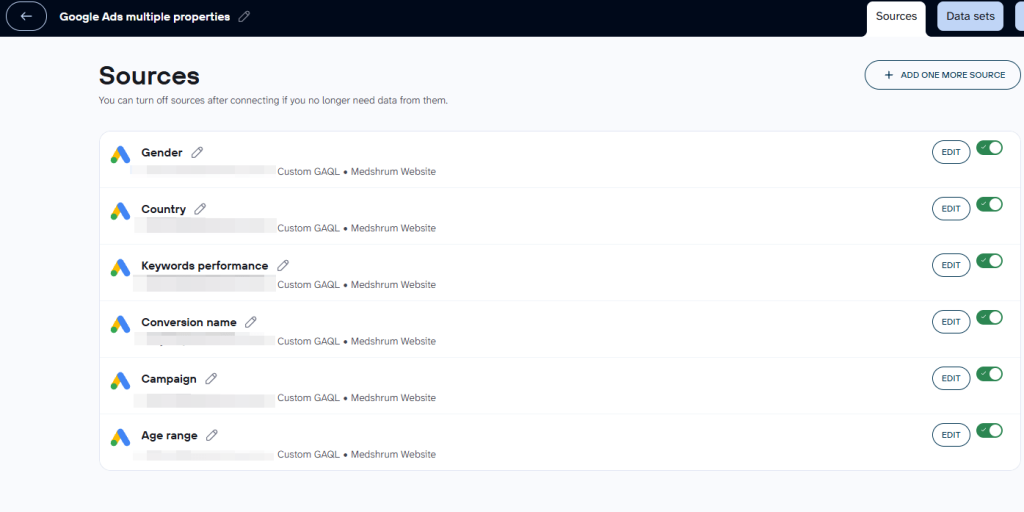
Next, set the reporting period. You can use fixed dates or dynamic date ranges if you want the flow to always pull a recent period of data.
If the standard reports do not contain the exact combination of dimensions and metrics you need, select Custom GAQL. Coupler.io Google Ads data connector lets you use a Google Ads Query Language query to retrieve a more specific dataset.
You can also connect Google Ads data from another account or add other data sources to the same flow if you plan to combine several datasets before loading them into PostgreSQL.
Step 2. Prepare the dataset
Before sending the data to PostgreSQL, Coupler.io gives you a preview of the extracted records and lets you transform them.
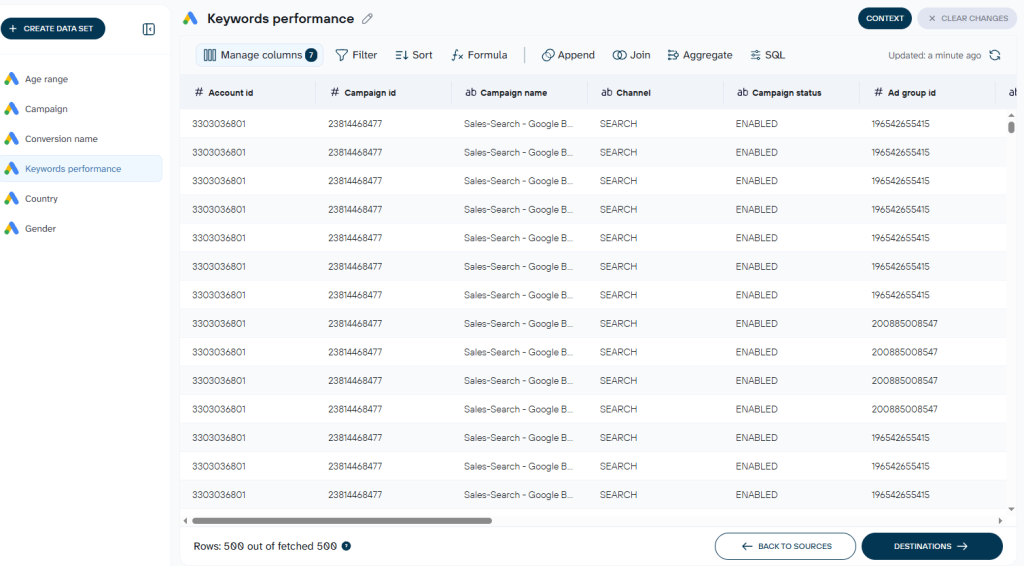
For example, you can:
- Rename, rearrange, or hide columns
- Sort and filter rows
- Add calculated columns
- Aggregate metrics such as sums or averages
- Join data from different sources into one dataset
This is useful when you do not want to import a raw Google Ads export and clean it later with SQL. Instead, you can structure the dataset first and only load the fields and records your reporting workflow actually needs.
Once the dataset looks right, proceed to the destination setup.
Step 3. Load the data into PostgreSQL and schedule data refreshes
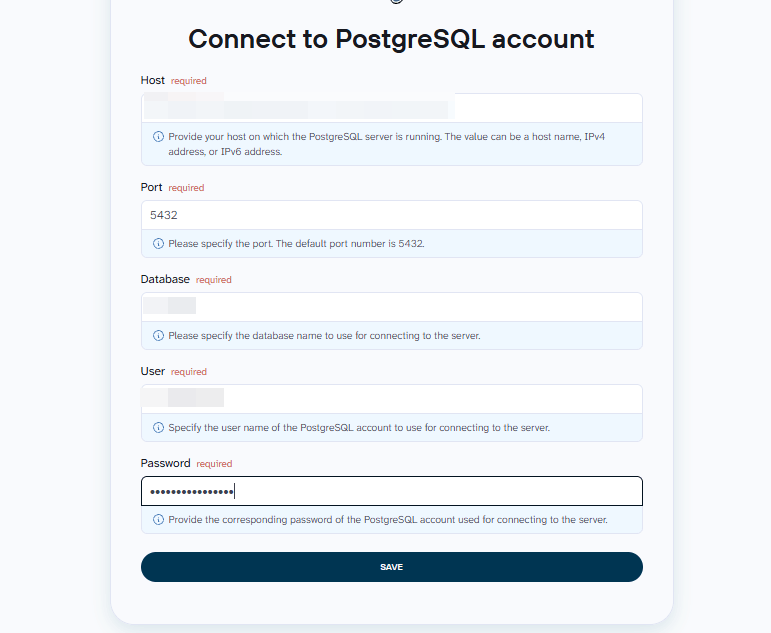
The last step is to integrate data with PostgreSQL. Select it as the destination if you haven’t done this already, and connect your database. Enter the connection details for your PostgreSQL instance:
- Host
- Port
- Database name
- Username
- Password
Coupler.io encrypts login credentials, passwords, and tokens using AES-256 and is SOC 2 Type II certified as well as compliant with DORA, GDPR, and HIPAA.

Next, choose the schema and table where Coupler.io should load the data. You can select an existing table or create a new table by entering a table name.
In my example, I used the public schema and created the google_ads_campaign table.
Coupler.io also lets you choose the import mode:
- Replace – overwrite the existing table contents with the latest imported dataset.
- Append – add new rows to the existing table.

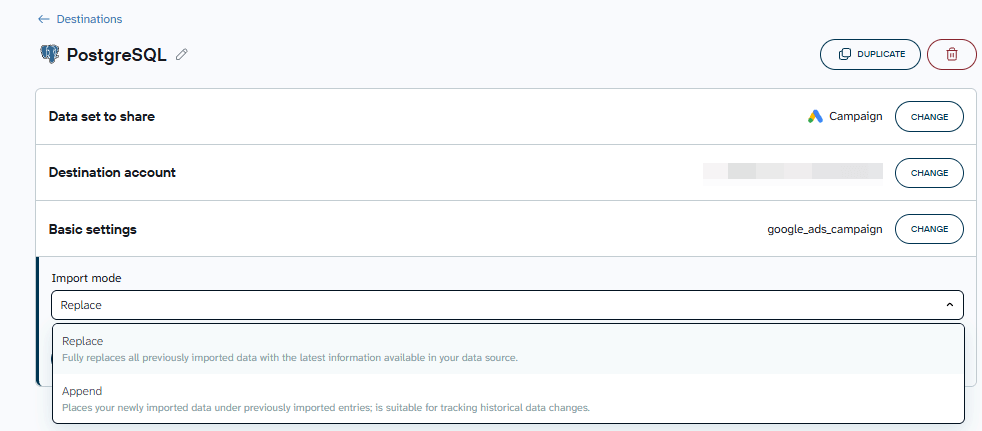
For recurring Google Ads reports with overlapping date ranges, Replace can be the safer option because it avoids creating duplicate rows. Append is more suitable when you are intentionally building a historical table from non-overlapping imports.
Save and run the flow. Once the import is complete, Coupler.io will create or update the selected PostgreSQL table with your Google Ads data. This is the point where you effectively import Google Ads data into Postgres and make it available for downstream analysis.


Load Google Ads data into PostgreSQL with Coupler.io
Get started for freeYou can verify the result directly in PostgreSQL. In my example, the google_ads_campaign table contained campaign-level fields such as impressions, clicks, spend, conversions, and reporting dates.

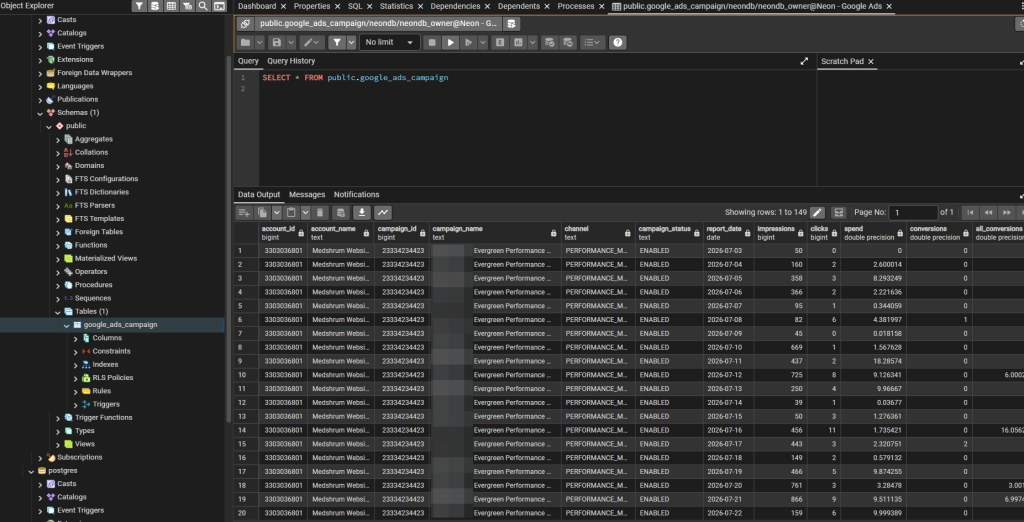
You can then query the imported data normally with SQL. For example:
SELECT
    campaign_name,
    SUM(impressions) AS impressions,
    SUM(clicks) AS clicks,
    ROUND(SUM(spend)::numeric, 2) AS spend,
    SUM(conversions) AS conversions
FROM public.google_ads_campaign
GROUP BY campaign_name
ORDER BY spend DESC;

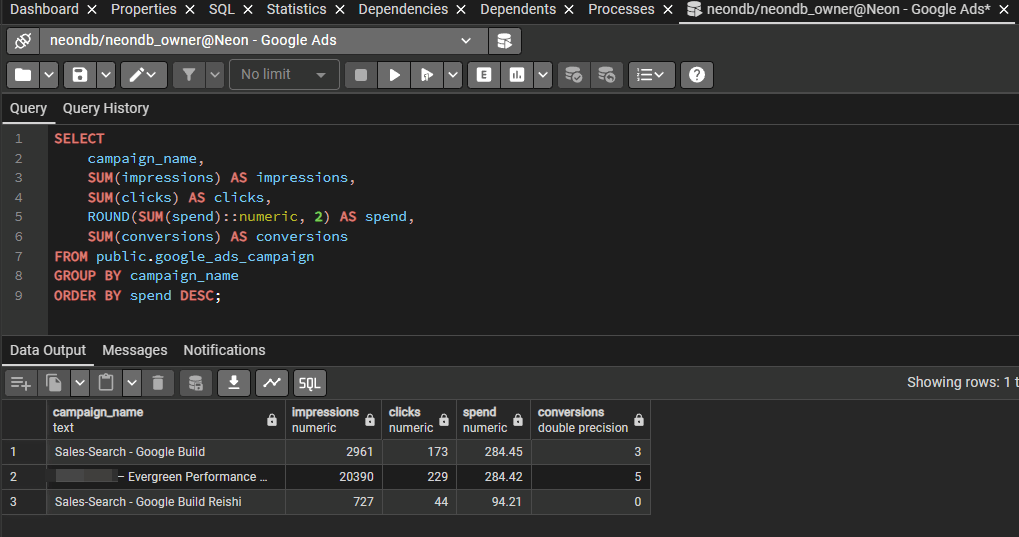
This gives you a simple campaign-level summary directly from the data Coupler.io loaded into PostgreSQL.
Finally, enable Automatic data refresh and choose how often the flow should run. You can control the interval, days of the week, time, and timezone.

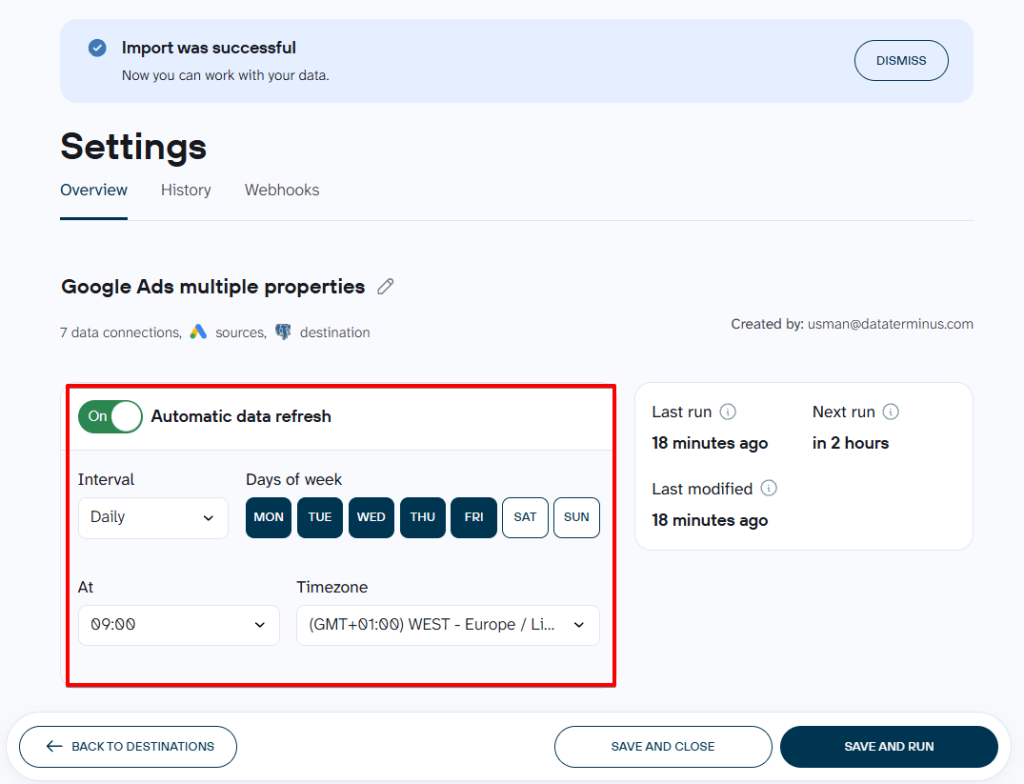
After that, Coupler.io will continue syncing Google Ads data with PostgreSQL according to the schedule you configured. This means you can export Google Ads reports to Postgres database automatically instead of repeating the transfer manually.
Why you should integrate Google Ads with PostgreSQL using Coupler.io
Building the API-based connection yourself is possible, but it also means maintaining authentication, API requests, schema changes, transformations, and recurring jobs.
Coupler.io handles that ETL layer for you, so you can connect Google Ads to PostgreSQL without turning the workflow into another engineering project.
The main benefits include:
- Automated extraction and refreshes. Once the flow is configured, Coupler.io can sync Google Ads campaign data with PostgreSQL on a schedule instead of requiring repeated exports. This is useful for recurring reporting because your database stays updated without someone manually downloading and reloading reports.
- Data preparation before loading. You can filter rows, remove unnecessary columns, rename fields, create calculations, and combine datasets before they reach PostgreSQL. This makes it easier to store analysis-ready data and reduces the amount of cleanup you need to do later with SQL.
- Multiple data sources in one flow. Google Ads does not have to be analyzed in isolation. You can export data from Google Ads and combine it with information from over 420 sources. For instance, the combination of Google Ads with Google Analytics 4 or Facebook Ads is useful to compare advertising activity with website engagement and cross-channel performance. Coupler.io also lets you blend campaign spend with CRM revenue to evaluate metrics beyond clicks, CTR, and CPC.
- Multiple destinations from the same prepared data. PostgreSQL can be one destination in a broader reporting workflow. The same prepared dataset can also be sent to destinations such as BigQuery, Amazon Redshift, Google Sheets, dashboards and AI tools and agents. This is useful when analysts need relational database access while other teams work with dashboards or spreadsheets. Here are some guides for different destinations covered on our blog:
- Less dependency on engineering resources. Marketing and analytics teams can manage routine data flows without relying on developers to build connectors, schedulers, and transformation logic from scratch. Engineering resources can then be reserved for workflows that genuinely require custom infrastructure.
- A reusable reporting structure. Once the data transformation logic is defined, the same cleaned dataset can support SQL analysis, dashboards, spreadsheets, and other downstream workflows. This helps avoid recreating similar metric definitions in several tools.
Build a reliable Google Ads to PostgreSQL workflow
Get started for freeCoupler.io also provides ready-made PPC dashboards and dataset templates. These can shorten the path from raw advertising data to reporting by providing predefined structures for common campaign metrics and views.
For example, its PPC dashboard templates can consolidate data from platforms such as Google Ads, Meta Ads, and LinkedIn Ads, while the Google Ads connector also links directly to ready-to-use dashboard templates.
Analyze Google Ads data with Coupler AI
Coupler AI is the umbrella for Coupler.io’s AI capabilities, including AI Agent, AI integrations, MCP, the Analytical Engine, and reusable Skills. Together, they let you move from setting up a data flow to analyzing the resulting data using natural language.
The AI Agent can set up the data flow for you. Instead of configuring every step manually, you can describe what data you need, where it should go, and how often it should refresh. The AI Agent will create a new data flow or extend an existing one based on that request.
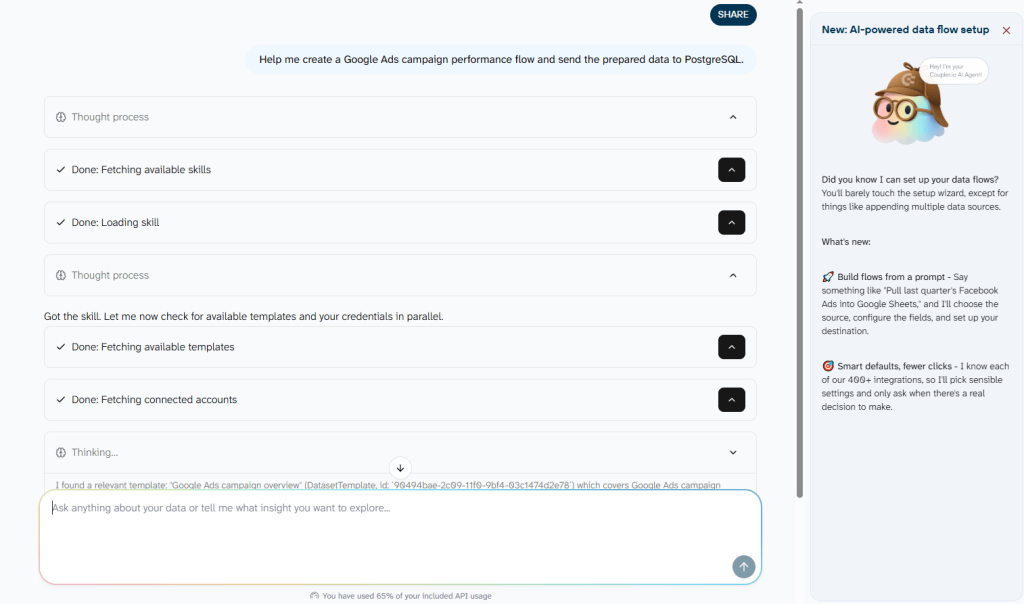
For example, you could ask it to create a Google Ads campaign performance flow and send the prepared data to PostgreSQL. You would still connect the required accounts and confirm the setup, but the agent can handle much of the flow configuration through conversation.

Once the data flow is running, the same AI Agent can analyze Google Ads campaigns regardless of PostgreSQL being the destination. For example, I asked:
Where should we consider reallocating the budget based on recent performance?

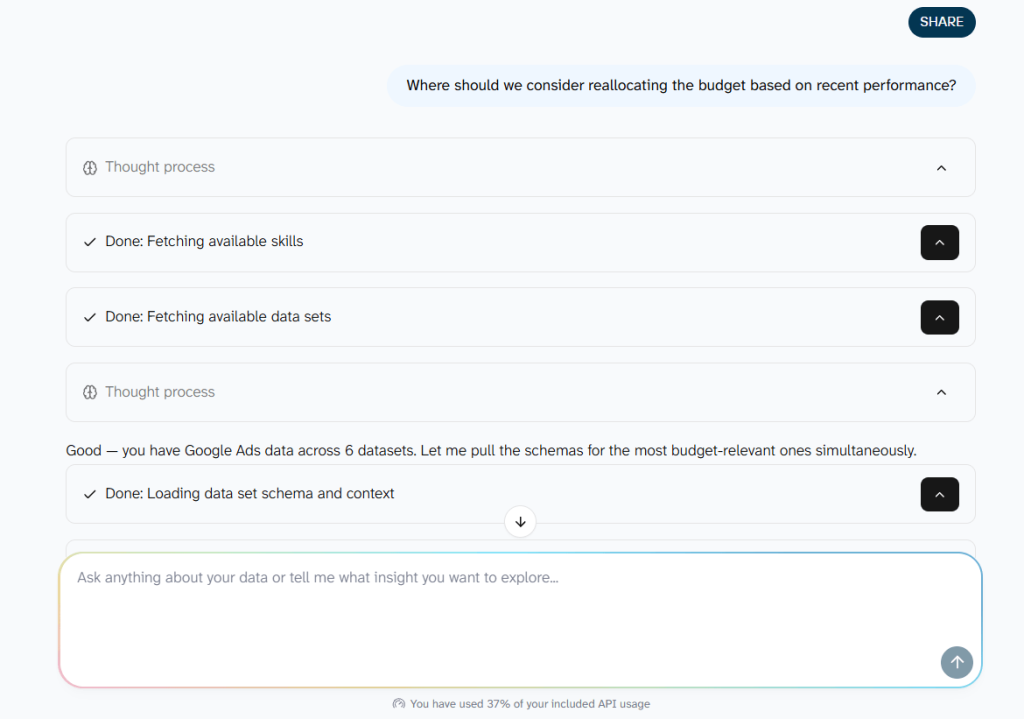
The AI Agent returned a detailed analysis of the campaign data along with a summary of the main findings and suggested areas to investigate.

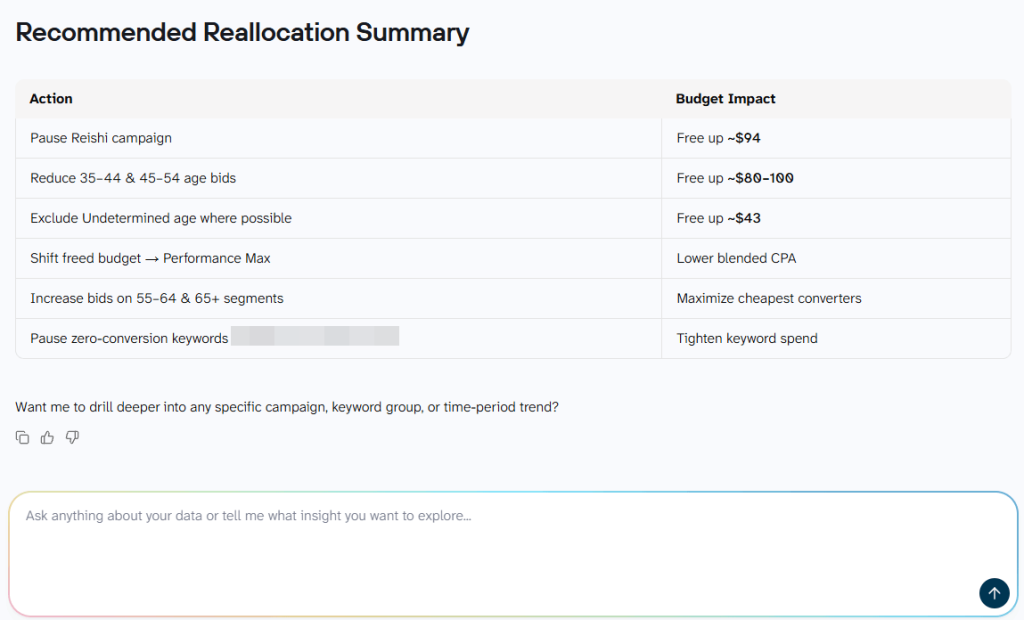
Behind the scenes, Coupler.io’s Analytical Engine handles the querying, calculations, and validation before the AI explains the result. This means the language model is working from calculated results rather than being asked to calculate advertising metrics itself.
If you prefer to work in an external AI tool, Coupler.io’s AI integrations and MCP can make your prepared datasets available in tools such as ChatGPT, Claude, Gemini, Cursor, and Perplexity. The same structured data can therefore be analyzed in the AI environment your team already uses.
For repeatable tasks, Coupler.io also provides AI Agent Skills. These are reusable instruction sets for analyses such as marketing performance reviews, ecommerce analysis, or dataset profiling. Instead of rebuilding the same prompt each time, you can use a Skill inside Coupler.io or a supported external AI client and run it against refreshed data.
Analyze Google Ads performance with Coupler AI
Get started for freeWhen another Google Ads to PostgreSQL method makes sense
There are several methods to connect Google Ads to PostgreSQL, but the right one depends on how much control you need and whether the workflow is recurring.
Coupler.io is a strong fit when you want an automated pipeline without maintaining the extraction infrastructure yourself. A more manual or developer-led approach can make sense in other situations.
Google Ads API + custom code
A custom integration is usually the better option when your engineering team needs full control over how data is extracted, transformed, and loaded.
This approach may suit companies that already maintain their own pipelines or need highly specific logic around incremental loads, schema design, error handling, or orchestration. It also gives developers direct control over Google Ads API requests, GAQL queries, and the API endpoints used to move data into PostgreSQL
The trade-off is maintenance. Your team is responsible for authentication, API version changes, rate limits, scheduling, retries, and monitoring. For teams that do not already have this infrastructure in place, that can add unnecessary development overhead.
A custom API setup can also make more sense when the goal goes beyond reporting and includes specialized first-party data workflows. For example, Google Ads Data Manager is designed to bring customer data into Google Ads for use cases such as Customer Match, offline conversions, customer lists, and audience activation.
Manual CSV exports
CSV exports work well when you only need a one-time snapshot of Google Ads data.
For example, you might export a campaign report for an ad hoc analysis, import Google Ads data into Postgres, and never need to update that dataset again. In this case, setting up an automated pipeline may be unnecessary.
The limitation becomes clear when reporting is recurring. Every new period requires another export and database upload, increasing the risk of outdated files, inconsistent columns, or missed updates.
So, CSV is practical for occasional transfers, while an automated connection is generally more suitable when PostgreSQL needs to stay synchronized with Google Ads over time.
Other automation and data tools
You may also come across tools such as Zapier or RudderStack when evaluating adjacent Google Ads workflows.
Zapier can connect Google Ads and PostgreSQL through trigger-and-action automations, such as adding a PostgreSQL row when a Google Ads event occurs. That can be useful for event-driven workflows, but it is a different use case from regularly exporting full campaign-performance datasets for analytics.
RudderStack is more relevant when your wider data stack is centered on customer-event pipelines, warehouse data, or sending behavioral and audience data between systems. It supports Google Ads as both a source and destination in different workflows, including campaign-performance imports and audience activation.
Note: You may still see Google AdWords in older documentation or search results. That is the former name of Google Ads, not a separate platform.
Build a reliable Google Ads to PostgreSQL workflow
A reliable Google Ads to PostgreSQL integration is not just about getting the first import to work. The bigger challenge is making sure the data stays complete, consistent, and useful as campaigns, attribution, and reporting requirements change.
A few practices help:
- Keep the schema stable. Only load the fields you actually need, and avoid changing column names or data types unless downstream queries and dashboards are updated too.
- Plan for conversion lag. Google Ads conversions can be attributed after the initial click, so refreshing a rolling date range is often safer than importing only the latest day once and never revisiting it.
- Choose Append or Replace intentionally. Append works well when you are adding non-overlapping historical data. Replace is usually safer for rolling reporting windows where recent campaign results can still change.
- Validate scheduled runs. Check row counts, date coverage, and key metrics such as spend, clicks, conversions, CTR, and CPC, especially after changing the source report or transformation logic.
- Separate storage from reporting logic where needed. Keeping a clean base table and building reporting-ready views on top makes it easier to adjust calculations later without changing the raw imported data.
- Monitor the data flow, not just the database. If a source account, report configuration, or field selection changes, confirm that the next scheduled refresh still returns the expected structure and date range.
Coupler.io handles much of the extraction, scheduling, and data transformation work, but the quality of the PostgreSQL dataset still depends on how the flow is designed. Once the structure is stable, the same prepared Google Ads data can support SQL analysis, dashboards, additional destinations, and Coupler AI without rebuilding the pipeline for each use case.
That is the real benefit of treating the connection as a reusable data workflow rather than a one-time export: the data stays available in PostgreSQL while the same flow can continue supporting reporting, automation, and AI-assisted analysis as your needs evolve.