A Postgres database holds the answers to questions like which customers are about to churn or which orders never shipped. Getting an AI assistant to read those tables reliably is the part that breaks, and the first result most searches return is Anthropic’s own reference Postgres MCP server, archived in mid-2025 after a security research team found a SQL injection flaw in it. So this is a safety question before it is a setup question.
There are four realistic ways to connect AI to PostgreSQL, and they are not interchangeable. Which of those features actually gets used, and how safely, depends entirely on the method you pick, not on which one looks the most familiar. I compared all four: what each requires, what each is safe for, and where the gaps are. Coupler.io is the no-code path that keeps credentials away from the model entirely, and for most teams, it is where to start.
Ways to integrate PostgreSQL with AI
Connecting AI to a PostgreSQL database is not one task wearing different outfits. One team may want plain-language answers from tables that already exist. Another may want an AI assistant to run live SQL queries against a running database. A third may want to search unstructured text by meaning instead of exact wording.
That distinction matters because the safest or easiest method depends on the job. A reporting workflow, a live database-tuning workflow, and a semantic search workflow should not use the same setup.
| Method | What it’s for | Setup time | Skills required | Watch out for |
| Coupler.io | Recurring plain-language reporting on your Postgres tables, in Claude, ChatGPT, or Gemini, or through the built-in AI Agent inside Coupler.io | Up to 5 minutes | None | Automated refresh on a schedule needs a paid plan |
| Anthropic’s reference Postgres MCP server | Archived, not recommended | Not applicable | Not applicable | Documented SQL injection vulnerability, never patched in the published package |
| Postgres MCP Pro | Live conversational SQL queries, schema inspection, and index tuning against your own database | High, local install | Comfortable with a terminal, connection strings, and security configuration | You configure and own the read and write boundary yourself |
| pgvector with OpenAI embeddings | Semantic search over unstructured text stored in Postgres | High, build and maintain | SQL and Python | Solves a different problem than business reporting |


Get safe PostgreSQL analysis in Claude with Coupler.io
Get started for freeHow to use AI for PostgreSQL with Coupler.io
Coupler.io is a no-code data integration platform and AI analytics solution, and its PostgreSQL AI integration is one of more than 400 source connections it supports. What makes it worth a second look here is that the connection runs both ways. You can pull Postgres tables out for Claude, ChatGPT, or Gemini to analyze through the Coupler.io MCP connector, or send a blended dataset from other apps back into Postgres for storage. There’s no MCP involved on that side since there’s no AI tool to connect to. Either way, the data flow is structured and runs on a schedule you set.
Here’s the part that actually matters for this article: Coupler.io never lets the AI touch your database directly. Its Analytical Engine sits in between, runs the SQL, does the math, and hands the model a verified answer instead of a live connection string. That single decision is the difference between this and the entire mess that got Anthropic’s own reference server archived. The model is basically reading a result someone already checked instead of reading your tables.
Step 1: Create a data flow for your PostgreSQL data
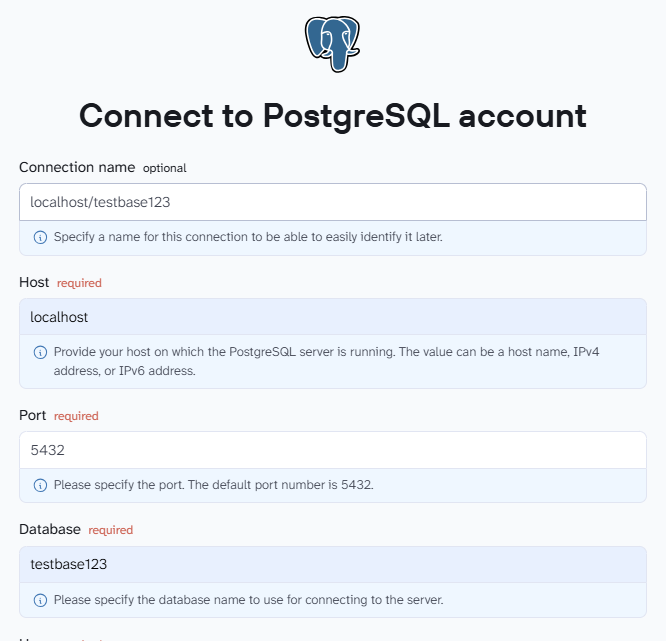
Create a new data flow in Coupler.io with PostgreSQL as the source. Use the form below, then click Proceed to sign up for Coupler.io for free.

Connect using the host, port, database name, and credentials. Select the tables you need, or write a custom SQL query to define the dataset precisely.

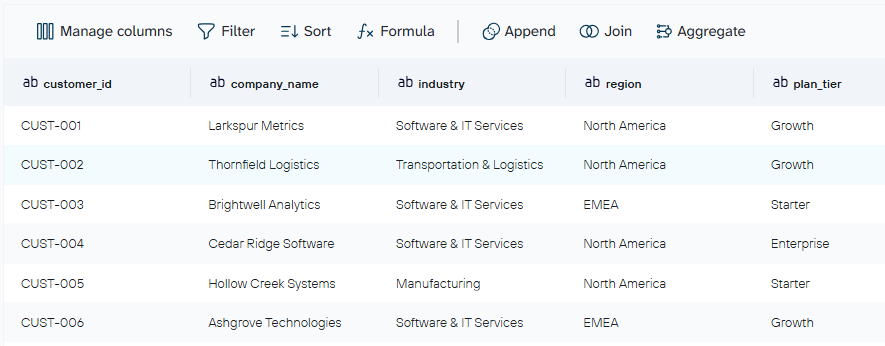
In the preview step, rename fields, hide sensitive columns, aggregate or append data from multiple tables, and attach business context, such as what a status code or a custom column actually means. This is also where PostgreSQL can be set as the destination instead, for teams that want a blended dataset from other sources appended back into a database.

Step 2: Connect your AI assistant
Choose Claude, ChatGPT, or Gemini as the destination. Click Get connector to open that tool’s connector page, then connect and authorize.

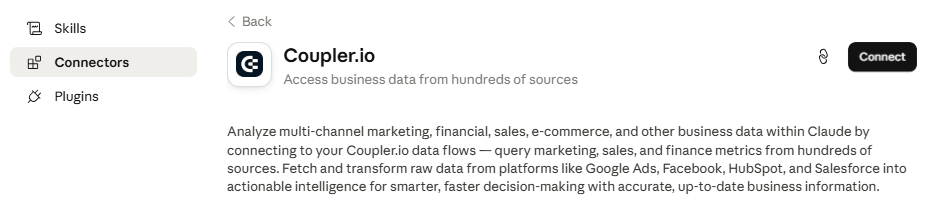
Here is a detailed guide on how to connect data to Claude.
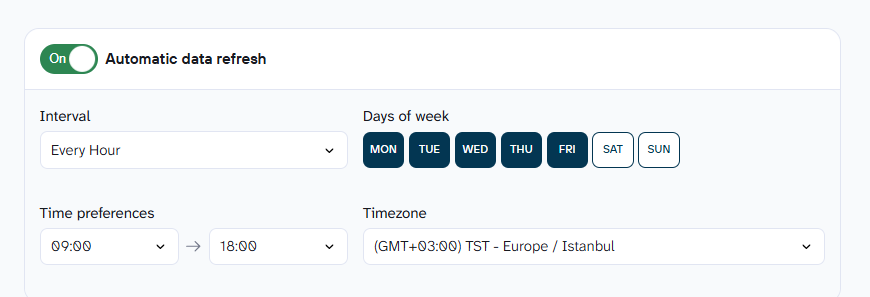
Back in Coupler.io, set a refresh schedule, then click Save and Run to push the first load.

Step 3: Start a conversation with your AI assistant about your PostgreSQL data
Open Claude at claude.ai or in Claude Desktop. Approve the request to connect to the Coupler.io MCP server.
Flag customers with no order in the last 90 days but an active subscription, ranked by monthly value.

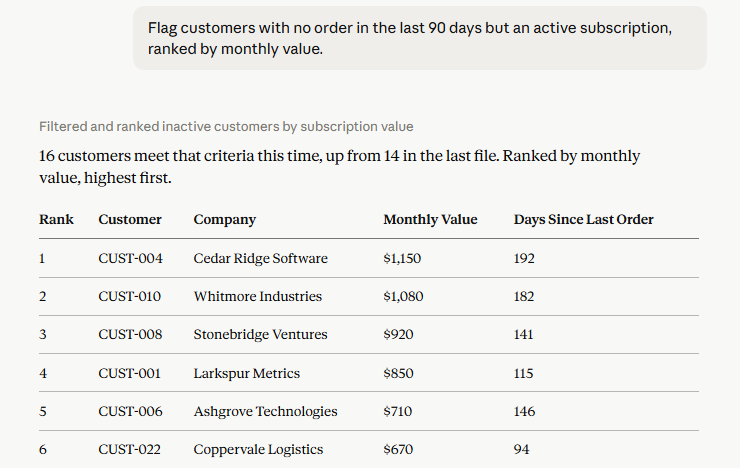
On a sample SaaS dataset connected through Coupler.io, that prompt returned 14 accounts matching the pattern, worth a combined $9,400 in monthly recurring revenue, 3 of which have been inactive for over 5 months despite a card still on file. That is the kind of finding a dashboard usually buries across three different views and a SQL query nobody had time to write.
Learn more on how to use Claude for data analytics.
If there is no real need to leave Coupler.io at all, the same synced Postgres flow can be queried directly through the built-in AI Agent, no external AI subscription required. It is the faster route to a quick answer, though it will not generate the kind of dashboard or artifact Claude can.

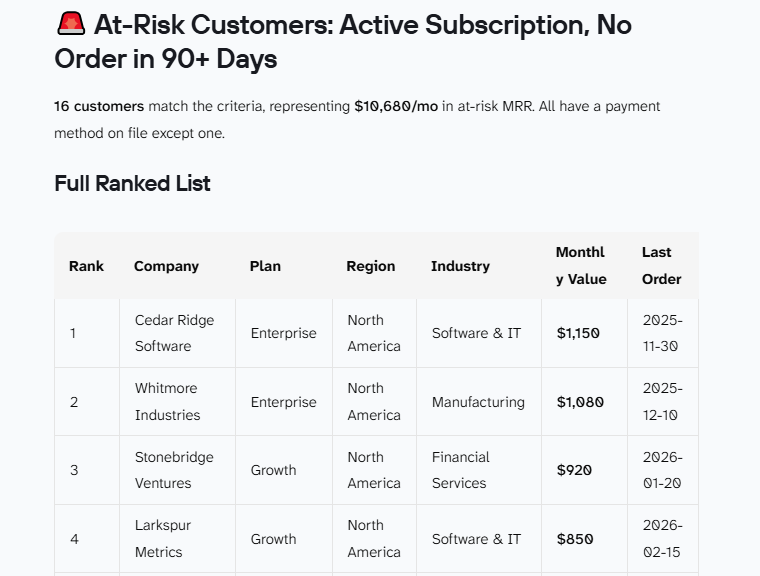
Verdict on Coupler.io for PostgreSQL
Coupler.io is fast to set up, with no credentials or write access ever reaching the model, and calculations are validated before the model sees them. It works as a source and a destination, not just one direction. The real tradeoff is that automated refresh on a schedule sits behind a paid plan.
Ask your Postgres tables anything with Coupler.io
Get started for freeMCP-based approaches: the archived server and Postgres MCP Pro
This section is reported and sourced rather than tested live. Exploiting a documented vulnerability to produce a screenshot is not something worth doing, even for an article making this exact point.
Anthropic’s reference Postgres MCP server (archived)
Anthropic’s reference Postgres MCP server, published as @modelcontextprotocol/server-postgres, was the original official way to connect an AI assistant to a PostgreSQL database, and it is still the first real result most searches for this topic return.
Datadog Security Labs found a SQL injection vulnerability in it: the server wrapped every query in a read-only transaction, but it accepted semicolon-delimited statements, so a prompt that smuggled in a COMMIT followed by a destructive statement could end the read-only transaction early and run with full database privileges. A security researcher had already reported the same flaw independently, months before Datadog found it on its own.

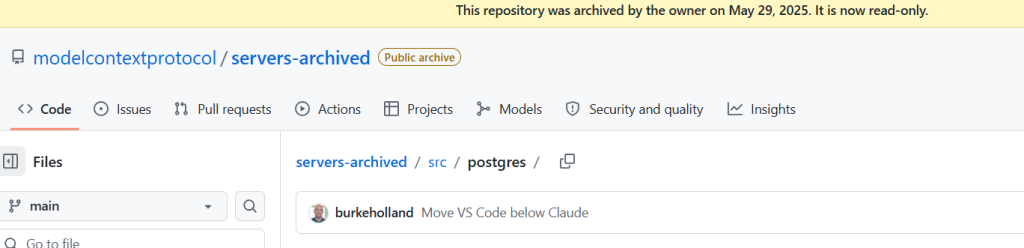
A fix exists, just not where most people would look for it. Zed Industries patched the issue in its own fork within days of receiving the report, published as @zeddotdev/postgres-context-server.
Anthropic fixed the same issue in its own git repository, but on that same day archived the reference server entirely, as part of a wider cleanup of MCP servers it no longer considered production ready. The patch never made it into a published npm release. The package itself was not formally marked deprecated on npm until six weeks later, on July 10, 2025.

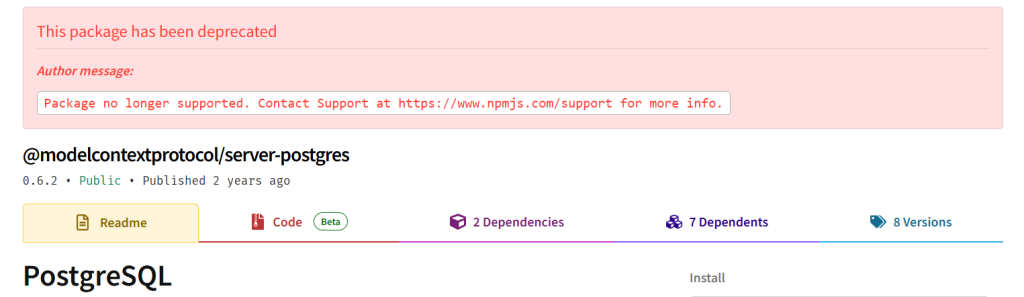
None of that has slowed it down much. The package was still logging more than 20,000 weekly downloads as of the most recent check, a figure that has held steady for well over a year after the vulnerability became public. Do not connect this server to any database where a write operation should be impossible, and do not run it in production.
Those two screens are the only firsthand documentation this section needs. Demonstrating the injection itself, even to illustrate the exact point this article is making, is not something worth doing.
Postgres MCP Pro for live database queries
Where the reference server left a gap, Postgres MCP Pro by Crystal DBA has become the option the community has actually moved toward. It adds configurable read and write access, index tuning recommendations, EXPLAIN plan analysis, and database health checks, none of which the archived reference server ever had.
Step 1: Install Postgres MCP Pro


Install with pip install postgres-mcp, or pull the Docker image, the two supported deployment paths. Create a dedicated database user scoped to read-only, or to the narrowest write access the use case actually needs, rather than reusing an admin account.
Step 2: Configure the connection and register the server

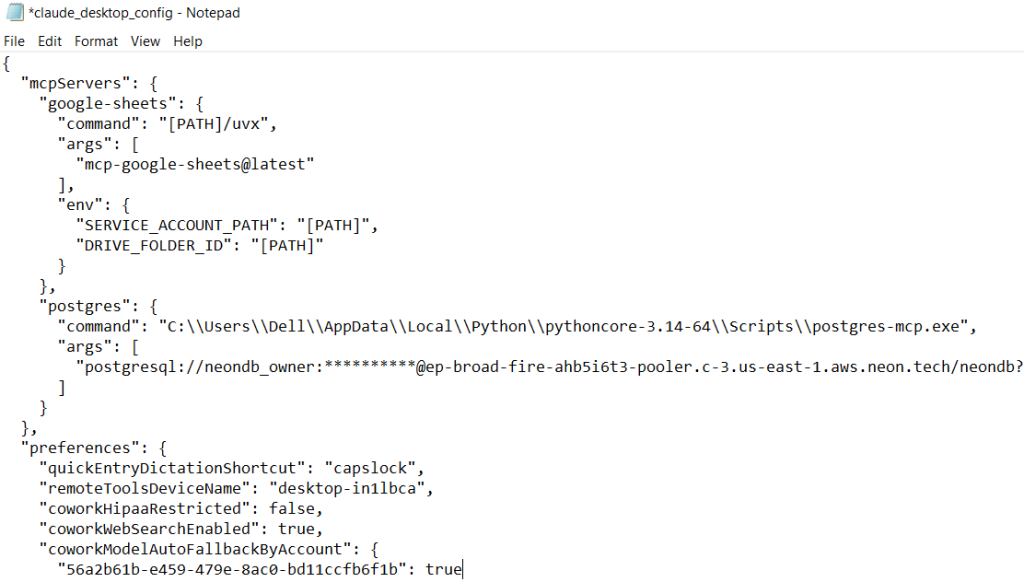
Add the connection string, with SSL enabled for anything beyond local testing. Register the server in an MCP-compatible client’s config, such as Claude Desktop or Cursor. Restart the client so it picks up the new server.
Step 3: Run a real query

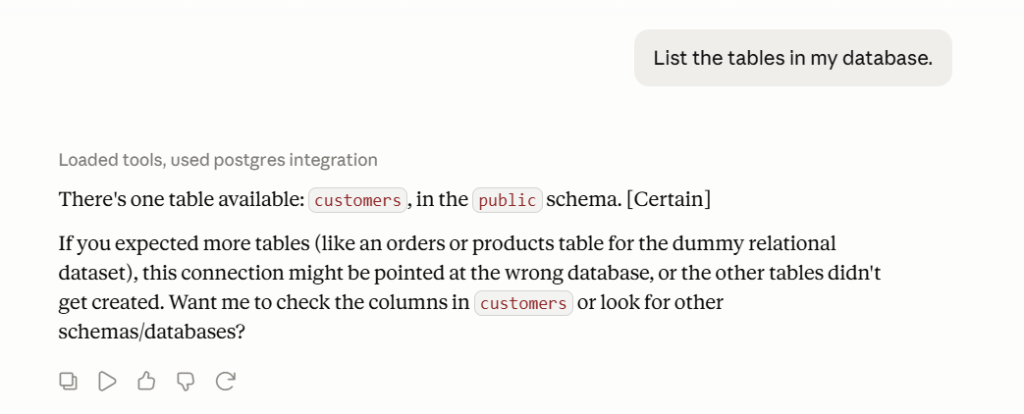
Ask it to list tables, inspect a schema, or flag a slow query. Ask for an index recommendation, or walk through an EXPLAIN plan on a query that has been dragging.

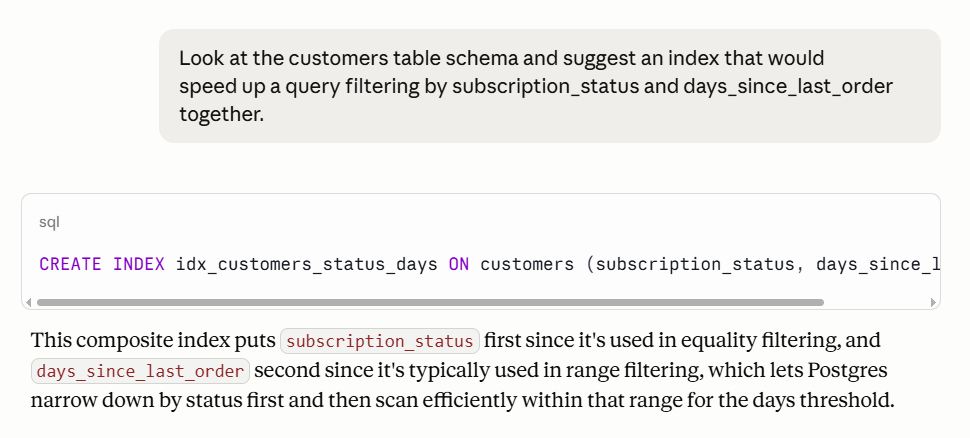
It handles live conversational SQL queries, schema inspection, and performance tuning against a database that is actually running. It does not handle scheduling, joining Postgres with other sources, or remembering business context from one session to the next. And it asks something of you that Coupler.io does not: the local install above, plus a real decision about how much write access to allow, since that boundary is yours to set and yours to enforce.
This is the right tool for a team with engineering time that specifically needs an assistant with live access to a running database, for something like a performance tuning conversation or an ad hoc schema check. It was never built for recurring business reporting, and bending it into that shape costs more than the job needs.
Verdict on MCP-based approaches
The archived server is not a viable option no matter how it gets configured. Postgres MCP Pro is genuinely capable, but it asks for real setup, ongoing maintenance, and a security decision a non-technical team is not really positioned to make on its own. Coupler.io’s PostgreSQL data connector is also MCP-based, but it ships ready to use inside Claude’s, ChatGPT’s, or Gemini’s connector directory, with no server to install or patch and no write access ever handed to the model in the first place.
pgvector and OpenAI embeddings for semantic search
This solves a different problem than everything above it, worth saying plainly so nobody ends up in the wrong section. pgvector is a native Postgres extension that lets you store and query vector embeddings inside the same PostgreSQL AI database your application already runs on, mature enough to be supported directly by AWS RDS, Google Cloud SQL, Azure, Supabase, Neon, and DigitalOcean.
An AI assistant can run a similarity search over something like support tickets or contracts, finding everything that means the same thing rather than everything that happens to contain the same words. This pairing of PostgreSQL and AI through embeddings is one of the more mature patterns covered here, mainly because pgvector has had years to mature alongside OpenAI’s embedding models.
Even this corner of Postgres needs the same patching discipline as the rest of it. pgvector 0.8.2 fixed CVE-2026-3172, a buffer overflow during parallel HNSW index builds that could leak data from other tables or crash the server outright, affecting versions 0.6.0 through 0.8.1.
Being native to Postgres does not exempt an extension from the same security hygiene as anything else connected to a production database.
Step 1: Enable the extension and add a vector column
Run CREATE EXTENSION IF NOT EXISTS vector; on the database. Add a vector column sized to the embedding model in use, for example embedding vector(1536) for OpenAI’s common embedding size.
Step 2: Generate and store embeddings
Call the OpenAI API to generate an embedding for each row of text. Write the result into the vector column, alongside the row it describes. Plan for how embeddings get refreshed as the underlying text changes, since a stale embedding searches against text that no longer exists.
Step 3: Query by similarity
Generate an embedding for the search query itself using the same OpenAI model used to build the column, since mixing embedding models produces meaningless distances. Order existing rows by vector distance to that embedding using ordinary SQL queries, for example ORDER BY embedding <-> '[...]' LIMIT 10. Hand the same query to Claude or another AI assistant once the column exists, so it can phrase the search and read the results back in plain language.
That is the full pipeline, and all of it needs building and maintaining: OpenAI API keys, response parsing, and the refresh logic above. It is the right tool for retrieval-augmented generation and semantic search. It is not a substitute for the business reporting covered above, which is a different problem with a different answer.
Choosing OpenAI for PostgreSQL embeddings specifically, rather than another provider, mainly comes down to how widely supported its embedding dimensions are across pgvector tutorials and tooling, not because it is the only option.
PostgreSQL AI features that matter for your connection method
PostgreSQL has plenty of AI-adjacent features, but only a few change which connection method you should trust: read replicas, row-level security, and pgvector.
- Read replicas let you point an AI workflow at a copy of the database instead of the production instance. Coupler.io avoids direct model access altogether by routing data through its own data layer first. Postgres MCP Pro can use a replica if you configure it that way. The archived reference server offered no useful safeguard here.
- Row-level security controls which rows a connection can see. With Coupler.io, you scope the dataset before it reaches the AI by filtering rows, hiding columns, and defining the exact table view or query. Postgres MCP Pro inherits whatever permissions the database user has. With the archived server, the SQL injection issue made those boundaries unreliable.
- pgvector stores embeddings inside PostgreSQL, so semantic search does not require a separate vector database. This only applies to the pgvector method. The other methods are mainly for querying and analyzing structured Postgres data.
This is where the connection method matters more than the database itself. Using PostgreSQL for AI workflows can mean scheduled reporting, live database access, or semantic search, and each one depends on a different set of protections.
PostgreSQL with AI: side-by-side comparison
The real head-to-head here is between two genuine contenders for the same job. The archived server is excluded because it was already ruled out above, not because it lost a close contest. pgvector is excluded because it solves semantic search, not reporting or live querying, so putting it in this table would mean comparing it on questions it was never built to answer.
| Category | Coupler.io | Postgres MCP Pro |
| Setup time | 5 to 10 minutes | 30 minutes or more, plus configuration |
| Skills required | None | Terminal use, connection strings, security configuration |
| Write access to production | Never granted to the model | Configurable, and yours to restrict |
| Accuracy on calculations | Validated by the Analytical Engine before the AI sees results | Whatever the model computes on its own |
| Scheduled refresh | Yes, on a set schedule | No |
| Cross-source joins | Yes, in the same flow | No |
| Persistent business context | Attached once, reused on every query | No |
| Hosting | Fully managed | Self-hosted, local install |
| Best for | Recurring reporting and dashboards | Live tuning and ad hoc schema work |
Build a multi-source Postgres pipeline for AI
Book a demo with Coupler.ioWhich method fits for your PostgreSQL AI use cases
Three teams, three completely different Tuesday afternoons.
A SaaS team’s RevOps lead wants one standing answer: which accounts are quietly drifting toward churn. Customers, subscriptions, usage, three tables, none of which talk to each other without someone writing a SQL query first. That’s Coupler.io’s job. Set the data flow up once, and the question moves from a recurring Tuesday-afternoon task to something you just ask Claude, ChatGPT, or Gemini in plain English, or skip the AI subscription entirely and ask the built-in AI Agent directly.
An engineer staring at a query that’s been crawling for the last twenty minutes wants something closer and more hands-on: live access to the actual running database, right now, to inspect the schema, get an index suggestion, or read through an EXPLAIN plan without leaving the conversation. That’s Postgres MCP Pro’s whole reason for existing, conversational, immediate, and scoped exactly as tightly as that one debugging session needs.
A support team drowning in tickets wants something else entirely: find every ticket about the same underlying problem, even when three different customers described it three different ways. That’s not a reporting question or a tuning question, it’s a meaning question, and that’s pgvector’s job. Generate embeddings through the OpenAI API, drop them in a vector column, and let similarity search do what keyword search never could.
All three sit on top of the same database. What is different is the job, and trying to force one tool into another’s role is usually how teams end up over-provisioned, over-permissioned, or just stuck.
For more on PostgreSQL and AI data connections in general, see how to connect data to Claude.
FAQs
Is it safe to connect AI directly to my PostgreSQL database?
It depends entirely on the method. Coupler.io’s path runs through a read-only data layer, is SOC 2 Type II certified, GDPR compliant, and HIPAA compliant, and database credentials never reach the AI model. A direct MCP connection carries a different risk profile, which is exactly why the archived reference server’s history is worth knowing before picking one.
Can I use PostgreSQL as both a source and a destination in Coupler.io?
Yes. Pull tables out for AI analysis, or write a blended dataset back into a Postgres database, in the same flow.
Is pgvector enough, or do I need a dedicated vector database?
For most teams, pgvector handles the embedding workload fine inside a database they already run. A dedicated vector database starts to matter mainly at a scale most companies never reach.
Is the official Anthropic Postgres MCP server still usable?
Technically the package still installs. It should not be used. It is archived, the published version was never patched, and it carries a documented SQL injection vulnerability. Use Postgres MCP Pro or Coupler.io instead.
Can I combine PostgreSQL with other data sources in the same analysis?
Yes, multiple sources can connect in one flow when you connect AI to PostgreSQL through Coupler.io.