Supabase is very good at storing your data. It’s a full PostgreSQL database with almost no setup, and teams that were never going to run a server now have one that just works. But it only holds your app’s data. The numbers you report on live in other tools: revenue in Stripe, spend in Google Ads, deals in your CRM. None of those tools talk to Supabase on their own, so getting the data in (and keeping it fresh) is the real job. Once it’s there, a single query can finally cover it all.
Getting the data in is only half the work. You also need it back out: last month’s revenue next to your ad spend, or which signups actually became orders. You’re staring at a database that holds every answer and hands you none of them. The Supabase threads on Reddit and GitHub keep asking the same thing: “I have all this data in Supabase. How do I actually analyze it?”
That’s the problem this post solves, without SQL: getting your business data into Supabase, then back out to dashboards and AI (the part most guides skip). I’ll show you how simple it is with Coupler.io.
How to connect data to Supabase with Coupler.io
With Coupler.io, you connect data to Supabase in three steps and never touch code, even when an upstream API changes.
Step 1: Choose the tool (or tools) your data already lives in
Use the iframe below (you’ll be offered to create a free Coupler.io account with no credit card required):

Pick your data source from 400+ options: Shopify, HubSpot, Google Ads, QuickBooks, whatever you’re using.

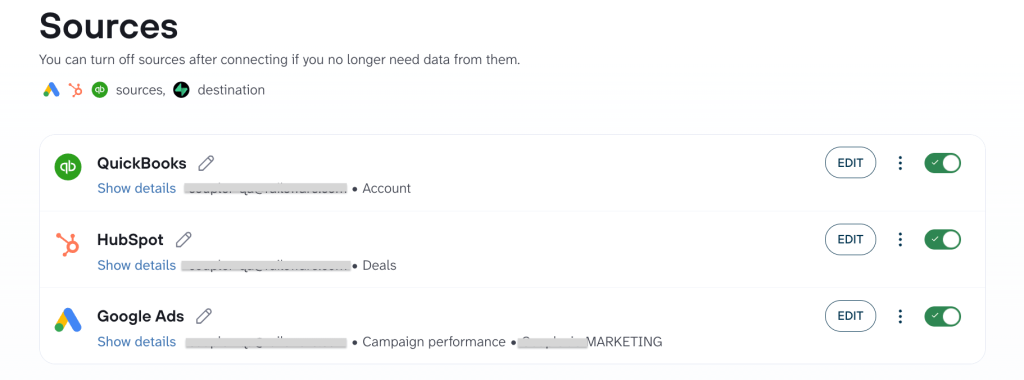
Step 2: Clean up the data before it reaches Supabase
Before anything lands in Supabase, you see it. Filter out rows you don’t need, rename columns to something meaningful, combine multiple sources into one table, and add context to your data (which is especially useful if you plan to analyze your data with AI).

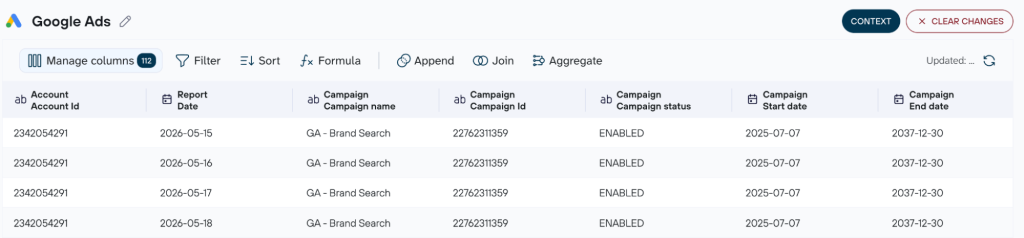
Step 3: Connect your Supabase account and keep the data auto-refreshed
Though the iframe above already has Supabase selected as your data destination, you still need to link your Supabase account. Grab the database connection details (host, port, database, user, and database password) from your Supabase project settings, add your target table, and Coupler.io handles authentication to your project from there.

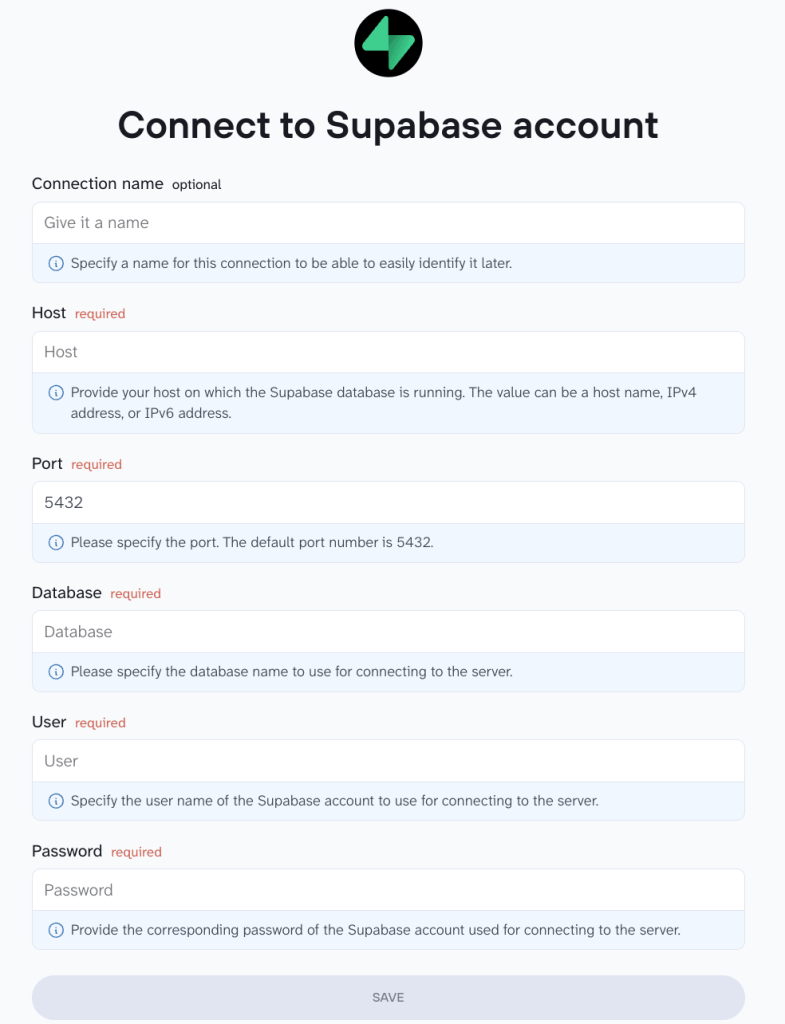
Once done, choose how often your data needs to be refreshed (hourly, daily, etc.); that’s your call. From then on, Coupler.io keeps the sync running, so you never have to manually sync data to Supabase again.

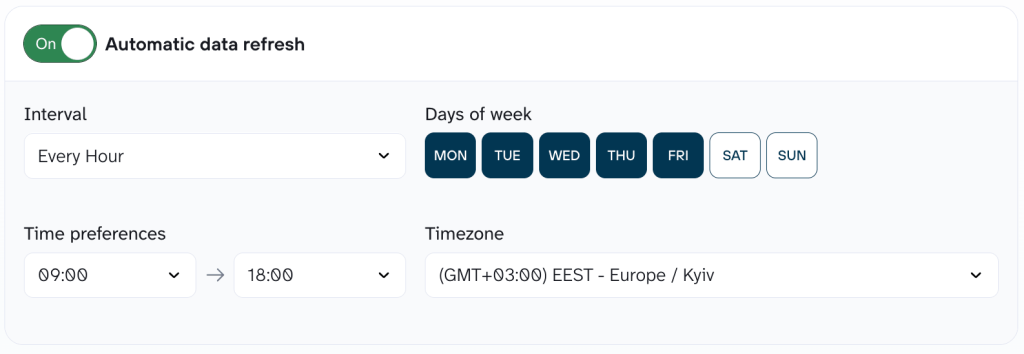
This is what workflow automation for your data looks like. Set the cadence once, and the syncs run on their own. That’s all it takes to get data flowing.


Pipe 400+ sources into Supabase with Coupler.io
Start for freeWhat your reporting looks like with everything in Supabase
With your scattered data landing in one database, the questions that used to take a data analyst and a week become something you answer yourself. Here’s what teams build once everything’s in one place.
Marketing attribution that ends the argument. A growth lead uses Coupler.io to bring ad platforms and the CRM into Supabase alongside product data, so spend, signups, and revenue live in one table. When finance and marketing disagree about the number, there’s now one number, and no one wrote an ETL script to get it. Coupler.io refreshes the data on its own, so the answer is current every time someone asks.
A single customer view, without buying a CDP. Product and marketing use Coupler.io to combine web, app, CRM, transaction, and email data into one customer profile on the database they already run. It’s the core of a customer data platform, built on Supabase instead of a separate tool they’d pay for and maintain, and Coupler.io keeps the profile current as new data comes in.
Revenue and behavior in the same query. Finance connects Stripe and QuickBooks through Coupler.io to the product usage already sitting in Supabase, so they can see which paying customers actually use the product, and which churn risks are quietly still paying. Coupler.io keeps it in sync, so there’s no month-end export-and-stitch.
Those scenarios come down to which sources you bring together. The tools you already use are sure to be among the 400+ sources Coupler.io connects to Supabase. Here are the most popular types of data you can link to Supabase with Coupler.io, and what it lets your team do once it’s there:
| Data | Source examples | What it lets you do |
| Paid ads | Meta, Google Ads, TikTok, LinkedIn | See spend and conversions from every channel in one table, and connect the money you spent to the customers you actually got. |
| CRM | HubSpot, Salesforce, Pipedrive | Query deal stages, amounts, and close dates for pipeline and revenue reporting, instead of exporting a CRM report by hand every Friday. |
| Ecommerce | Shopify, WooCommerce | Keep orders and inventory fresh as of the last sync, with no report to re-pull every time someone asks how the week went. |
| Finance | QuickBooks, Stripe, Xero | Put your money data beside your product data in one query, instead of stitching together exports from tools that don’t talk to each other. |
| Files & spreadsheets | CSV, Google Sheets, Excel, Airtable | Turn a working spreadsheet into a live table that refreshes on a schedule you set. |
Getting value out of your Supabase data
If all the data you need is already in Supabase, a database alone still isn’t where most people go to answer a question. Your team can’t query it, and you don’t want to loosen access control on your production database just so someone can check last month’s revenue. This is where Coupler.io takes Supabase in the other direction: it pushes that same data out to the places people actually work, whether that’s a live dashboard or a chat with AI.
Use Supabase as a source for dashboards and BI
The most common thing teams want is a dashboard that’s just there: live numbers they can glance at without touching the database.
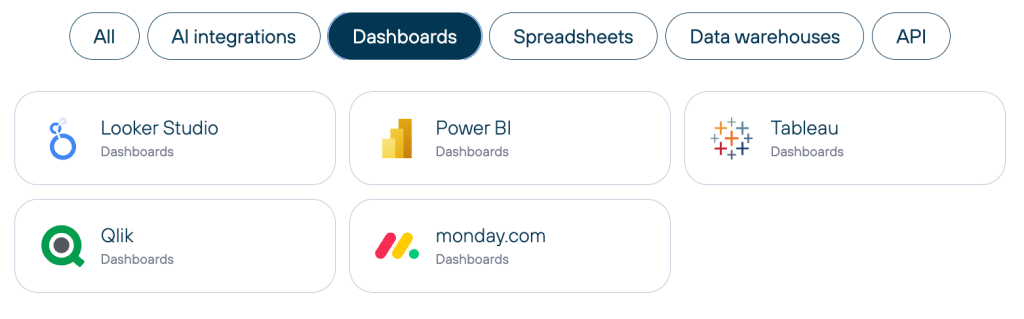
Coupler.io connects Supabase to multiple tools, such as Google Data Studio, Google Sheets, and Power BI. It also provides BigQuery integrations, Snowflake integrations, Redshift integrations, PostgreSQL integrations, and more. This way, the same tables your team queries directly can also feed data visualization in live dashboards, with real-time updates on the schedule you set.

Ask questions about your Supabase data with AI
Once your data is in Supabase, Coupler.io can connect it to the AI tools your team already uses, Claude, ChatGPT (OpenAI), Gemini, Perplexity, and others, so you can ask questions about your business in plain language and get real answers back. And if you’d rather not set up an external tool at all, Coupler.io has a built-in AI agent that answers questions right inside the platform, on the same data.
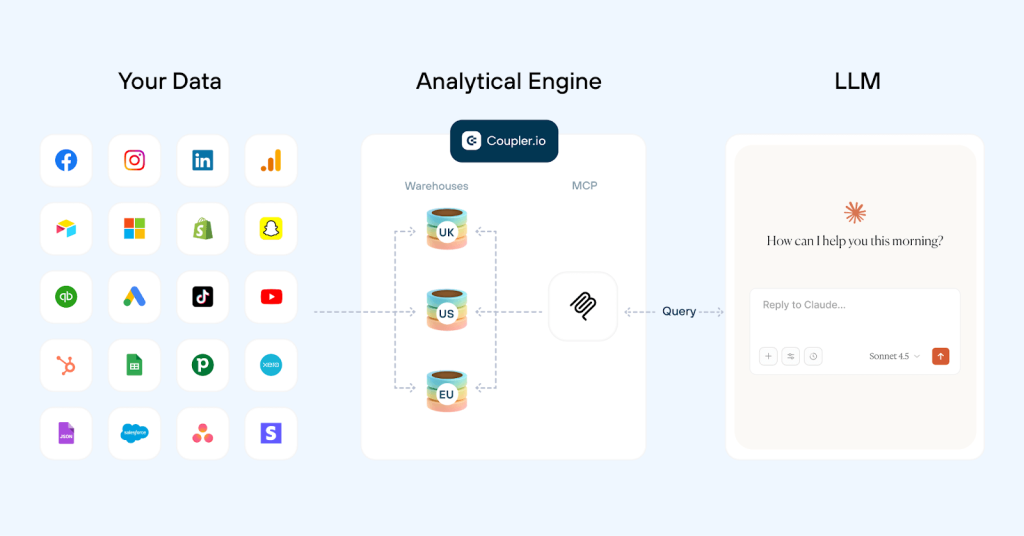
Claude is a good one to walk through because it shows what this looks like end-to-end. Coupler.io connects your Supabase data to Claude through its MCP server, a secure, read-only channel between Coupler.io and the AI tool. Once it’s set up, asking a question in plain language works like this. No SQL, no pivot table, and no waiting on an analyst to free up.
Ask things like:
- What were my top five products by revenue last month, and how do they compare to the month before?
- Which users who signed up in the last 30 days haven’t placed an order yet?
- Which Facebook campaigns last month brought in users who actually converted to paid?


Here’s what makes this better than wiring Claude straight to your database. Coupler.io blends Supabase with your other tools (Google Ads, Stripe, HubSpot, whatever you’ve connected), so Claude sees the full picture, not one lonely table. “Which campaigns produced customers who actually pay?” used to be a question that cost you a data analyst and a week. Now it’s a sentence.
A note on how it works, because it matters: Claude doesn’t do the math. When you ask a question, Claude turns it into a query and hands it to Coupler.io’s Analytical Engine, which runs the calculation against your full dataset and returns a verified result. Claude then interprets that result in plain language. The model does what it’s good at (reading patterns, explaining them); the Analytical Engine does what models are bad at (arithmetic on real data). That’s why the numbers hold up. The connection is token-based, encrypted, and read-only, and the data isn’t retained by Anthropic for training.

No SQL, no read-only credentials to hand out, no exposing your production database to a chatbot. Your engineers keep their weekends, and you keep your answers.
Not sure how this maps to your stack? See it on your own data.
Book a demoWhy not just use Supabase’s own AI connector?
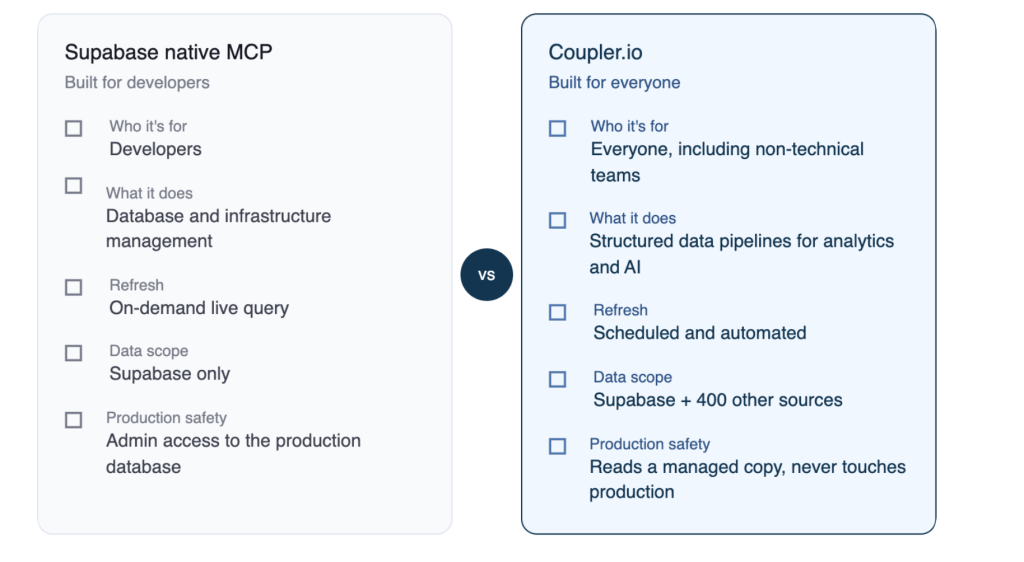
Fair question: Supabase has its own MCP connector. But it’s built for a different person doing a different job. Supabase’s connector points Claude at your Supabase database, and that’s all it sees (one Postgres instance). It’s aimed at developers who want to query and manage the database itself. Coupler.io is aimed at the person who wants business answers: it sits between Claude and all your sources at once, so Claude can join your Supabase product data against Google Ads, Stripe, and HubSpot in a single question. And because the Analytical Engine handles the calculations, the numbers are processed rather than estimated by the model. The native connector gives Claude a table. Coupler.io gives it the whole business.

How to see your Supabase data without opening the database
Whether you’re feeding data to a dashboard or an AI chat, the setup with Supabase integrations is the same. The only choice that changes is where the data lands.
Step 1: Connect Supabase as your source
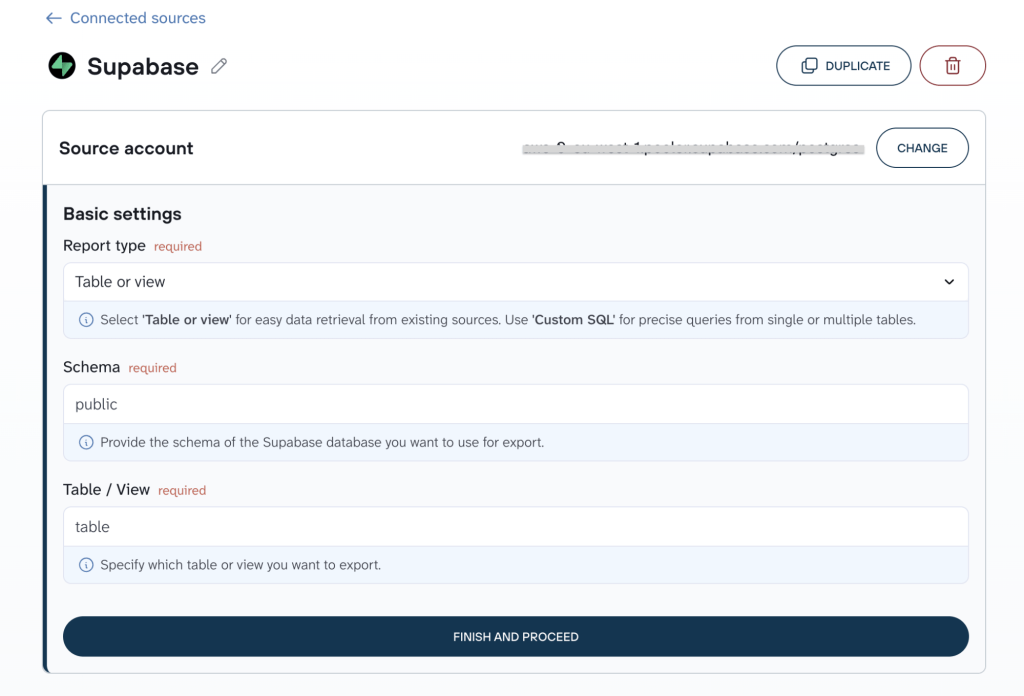
Point Coupler.io at your Supabase project (host, port, database, user, password), then pick what to pull: a specific table or view, or a custom SQL query if you only need certain columns.

Step 2: Choose where it goes and schedule a refresh
Send it to a BI tool or spreadsheet (Google Data Studio, Google Sheets, BigQuery, Power BI) or to an AI solution like Claude. The destination automatically stays in sync with Supabase and updates on the schedule you set.
Other Supabase integration methods, from no-code to code
For completeness, here are the other ways to handle Supabase data integration. Each one works, but each comes with a catch Coupler.io doesn’t: you either re-do it by hand every time, or you write and maintain the code yourself. The more code you’re willing to own, the more control you get, and the more upkeep you’re signing up for.
No-code options
Table editor (CSV upload). Upload a CSV, TSV, or XLSX straight into a table from the Supabase dashboard. Fine for a single file under 100MB. But there’s no schedule behind it, so every time the data changes, you’re back in the dashboard, uploading it by hand again.
Chatting with AI (Claude + Supabase’s own connector). Point Claude at a folder of files, describe the table you want in plain language, and it writes the SQL and loads the data. A real way to import business data into Supabase without touching a query, and genuinely good for turning a messy spreadsheet or PDF into a structured table. The catch: it’s a one-time action per request, not a connection you can leave running.
Options for developers
SQL Editor and COPY. Run COPY or \copy for bulk one-time loads and migrations. Fast for a big initial dump, but the table has to already exist, and there’s no live link to the source; the moment the data changes upstream, your copy is stale.
API and client libraries. Supabase auto-generates a REST and GraphQL API for every table that returns JSON, so you can connect company data to Supabase from your own internal tools or a backend job. Full control over exactly what syncs and when. You’re also now the one building it, testing it, and fixing it every time an upstream API changes.
Foreign Data Wrappers. Since Supabase is Postgres, postgres_fdw lets you integrate data with Supabase by querying another Postgres database live. Clean when it fits, but it only fits Postgres-to-Postgres. Your SaaS tools (Stripe, HubSpot, Google Ads) have no equivalent here.
Webhooks and Edge Functions. For real-time syncs, a webhook or Edge Function can push data into Supabase the moment something changes elsewhere, effectively a custom Supabase business data connector you build yourself. It’s the most powerful option, but also the highest-maintenance: you’re writing the code for every source, updating it whenever a schema changes, and debugging it yourself whenever a sync breaks.
All of these move data. None of them keep it moving on their own: that’s the line between a one-time import and a pipeline.
Get data in and answers out of Supabase, with Coupler.io
Start your free trial