In Google Search Console, you can see which queries get clicks but not which ones turned into a lead or a sale. At least, not without pulling that data into something you can query with SQL and compare it against your own numbers. That’s because the interface caps out at 1,000 rows and 16 months back, and once that window closes, it’s gone, nothing archives it. There’s no native way to connect Search Console to PostgreSQL either.
Coupler.io comes in as the starting point for most people. It handles two jobs for you: rescuing what’s about to age out, and keeping new data flowing in. If you’d rather run this yourself, maybe Search Console is just one more piece feeding a pipeline you already have. That’s a real option too, and you’ll see what it actually takes to make that happen.
What is Search Console to PostgreSQL integration by Coupler.io?
A Search Console to PostgreSQL integration is a no-code data connector that moves Search Console data into a PostgreSQL database you control, on a schedule, without an API to build or a Google Cloud project to configure. Here are a few things that set this Search Console connector apart from just moving data somewhere.
First up is incremental fetching, which means each refresh only pulls new or changed records instead of starting over every time. Then you can send data to multiple destinations at once, so the same flow can land in PostgreSQL and a dashboard or spreadsheet simultaneously.
Coupler AI capabilities let you ask a plain-language question about your data instead of building a report to answer it. And with over 420+ PostgreSQL integrations supported, Search Console never has to be the only thing feeding this pipeline if the reporting needs to grow.
How to connect Search Console to PostgreSQL with Coupler.io
The fast way is to skip the clicking entirely. Tell Coupler AI Agent, or Claude, ChatGPT, Cursor, or Perplexity directly, what you want to happen. For example: “Connect Search Console, blend it with GA4, load it into PostgreSQL, and refresh daily.” From that one instruction, it builds the data flow for your Search Console PostgreSQL integration, sets up the transformations, and schedules the refresh.
Let Coupler AI do the data work for you
Tell Coupler AI what you need to know, from which source, and how often. It connects your account, sets up the data flow, keeps it refreshed, and lets you analyze the results inside Coupler.io or another AI tool.
Try for free

For anyone who’d rather see exactly what’s happening, or wants more control over the details, here’s the manual setup underneath it.
You can get started right away with our preset form, which will create the data flow for free with no credit card required. Just click Proceed and follow the instructions:

Step 1: Connect your account and choose a data entity
Start by authorizing the Search Console property, no Google Cloud project or service account needed on your end, Coupler.io’s own registered app handles authentication. From there, choose a report type: Search results performance, Search results performance by appearance, Discover performance, Google News performance, or URLs index performance, five entities, confirmed directly from the product.

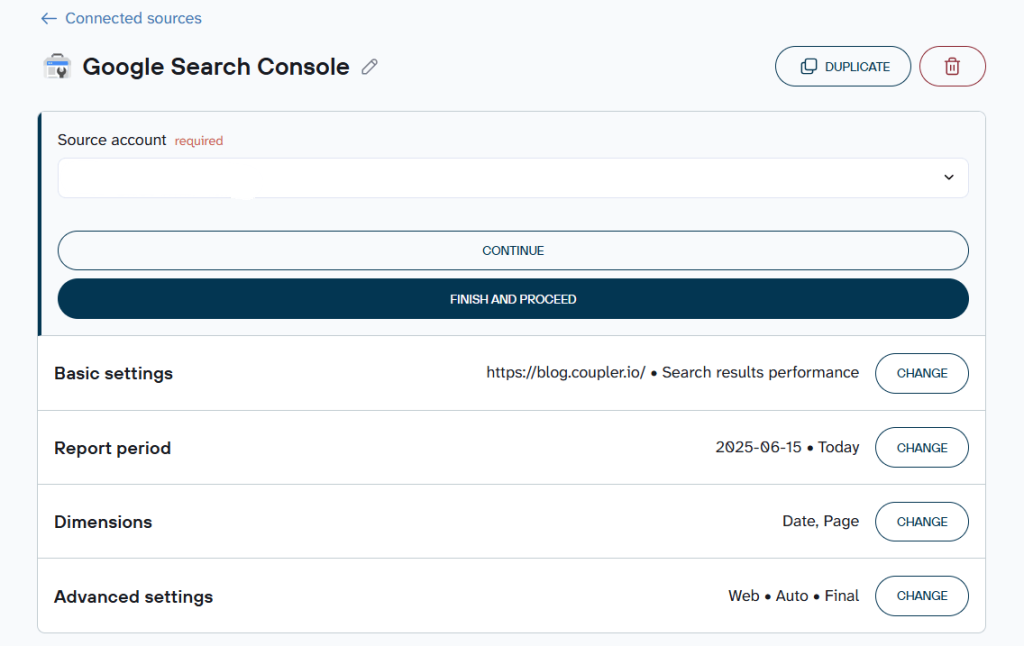
This is also where multiple sources come in. You can combine several Search Console properties, or blend in Google Analytics 4 (GA4) or another platform, in the same flow rather than stitching reports together afterward.
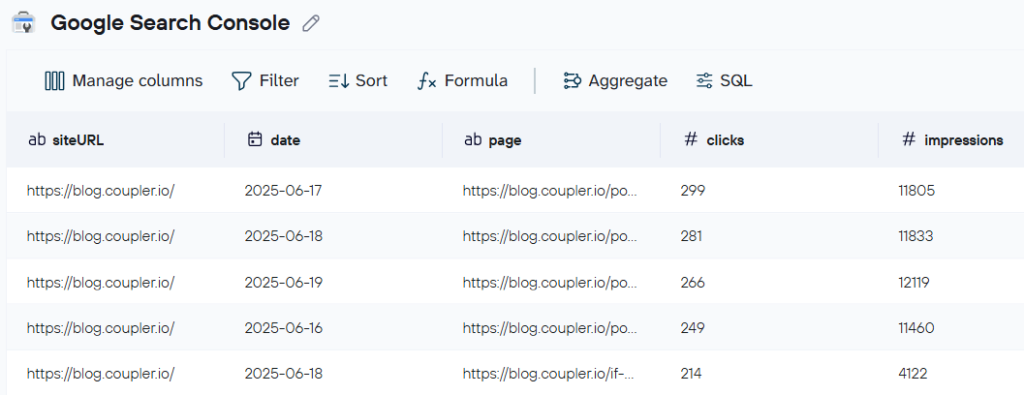
Step 2: Pick your dimensions
Here’s where the transformations happen, and where Search Console queries to PostgreSQL get their real shape. You can pick dimensions, date, country, device, page, query, filter the data, rename columns, and set attribution windows if relevant. Rather than building this from scratch, pre-built data set templates cover common cases already configured, Top pages performance and Landing Page Performance among them, so the transformation work is often already done before it’s touched.

AI Overview and AI Mode impressions are already included in the overall performance report. Google separately launched a dedicated report that isolates just that AI data into its own view. However, this Google Search Console connector doesn’t support that yet.
Step 3: Connect PostgreSQL and load to more than one place if you want
Here you’ll enter the standard connection details for your PostgreSQL data warehouse, host, port, database, credentials, and table. From there, you’ll choose an import mode: append adds new rows with each refresh, replace clears the table and reloads it fresh. The same flow can also connect your Search Console data set to a dashboard or a spreadsheet, or straight into a BI tool your team already uses.
For your first run, set a wide date range so you pull everything still available within Google’s 16-month window in a single pass, before any of it ages out.

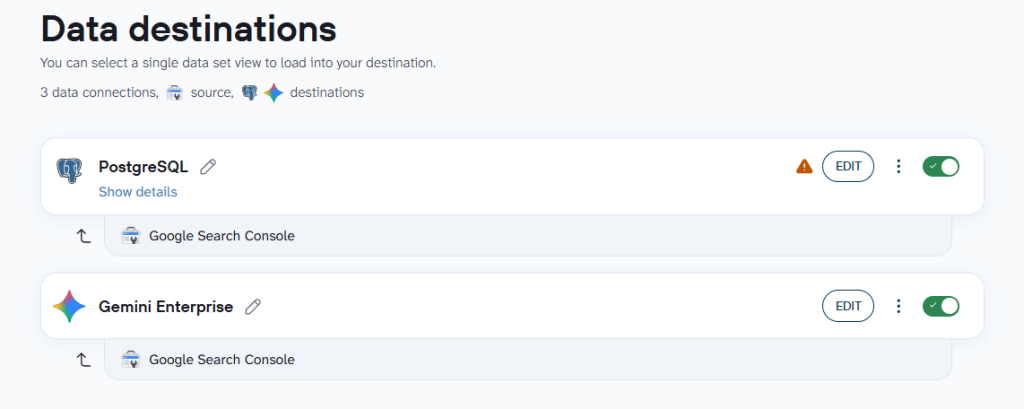
From there, you can set a refresh schedule for ongoing sync, or use webhooks for event-driven runs instead of a fixed interval.
Check out other destinations for the Google Search Console connector
Optional: Query your Search Console data with AI Agent
Once your data’s flowing, you can ask a plain-language question and get an answer backed by the Analytical Engine. Here’s what I got when I queried the AI agent with my prompt: “Using my Search Console data connected through Coupler.io, compare impressions and average position by page for August 1–18, 2026 versus July 1–18, 2026. Which pages lost the most impressions, and for those, did position get better, worse, or stay about the same?”

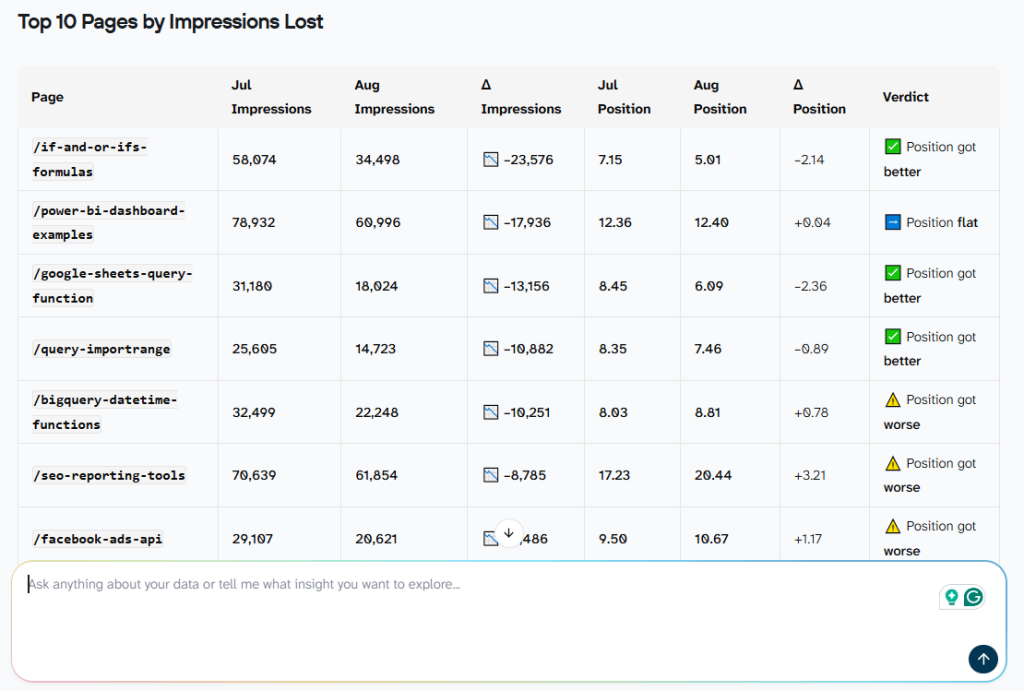
Based on the response from Coupler AI agent, the two problems need different fixes: SERP displacement calls for featured-snippet optimization (concise answer blocks at the top of the page), while genuine ranking drops call for content quality review and competitive gap analysis.
How do you automate Search Console to PostgreSQL?
This is where Search Console data sync to PostgreSQL stops being a manual task. Once the historical backfill is done, automation is what keeps new data arriving without repeating that manual pull. Refresh frequency depends on your plan, ranging from daily up to as often as every 15 minutes on faster plans.

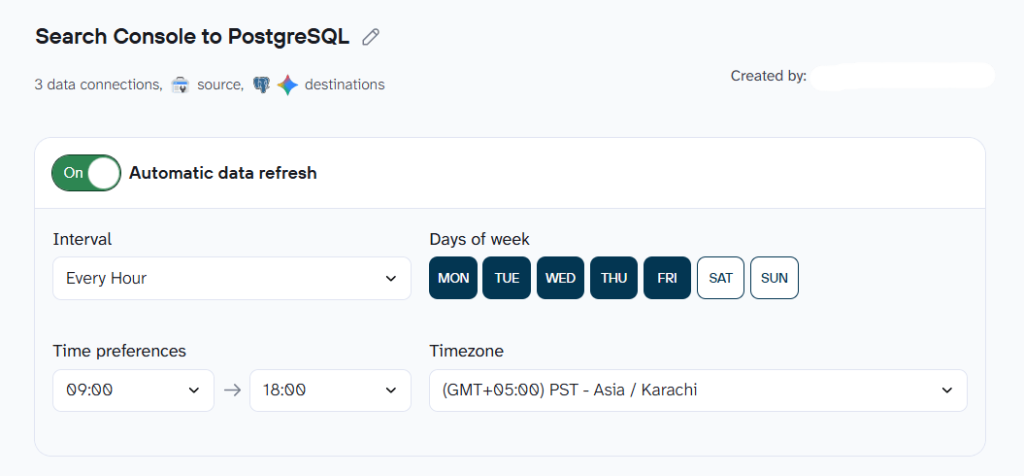
If you want something more event-driven than a fixed interval, incoming and outgoing webhooks are available too, an incoming webhook can trigger a data flow to run the moment something else in your stack fires an event, and an outgoing webhook can notify another system once a run completes.

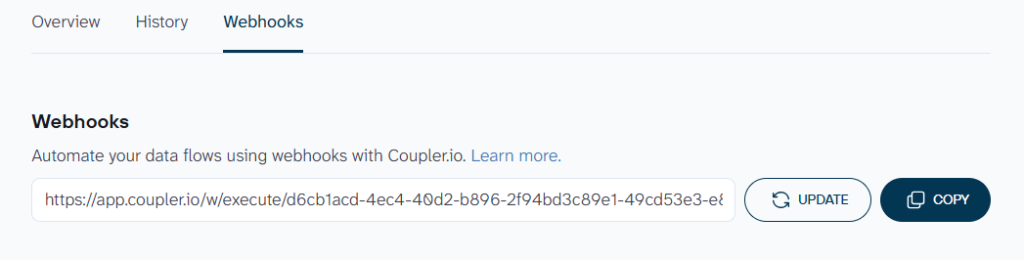
Between incremental fetching keeping each run fast and a schedule or webhook keeping it running, this is the part of the setup that turns a one-time rescue into something that just keeps working.


Connect your Search Console data to PostgreSQL
Get started for freeWhat you can do once your data’s in PostgreSQL
Getting Search Console data in PostgreSQL is only half the job. Here’s what it actually opens up, and why each of these is easier with Coupler.io behind it than without.
- Track your search performance without building a dashboard from scratch. Instead of exporting rows and building charts yourself, the SEO dashboard for Search Console and Technical SEO dashboard give you the standard view already built, clicks, impressions, position, and CTR trends over time. The SEO cannibalization checker goes further and catches pages that are quietly competing against each other for the same query. This is something most tools don’t flag at all, let alone in a ready-made dashboard.
SEO dashboard for Search Console

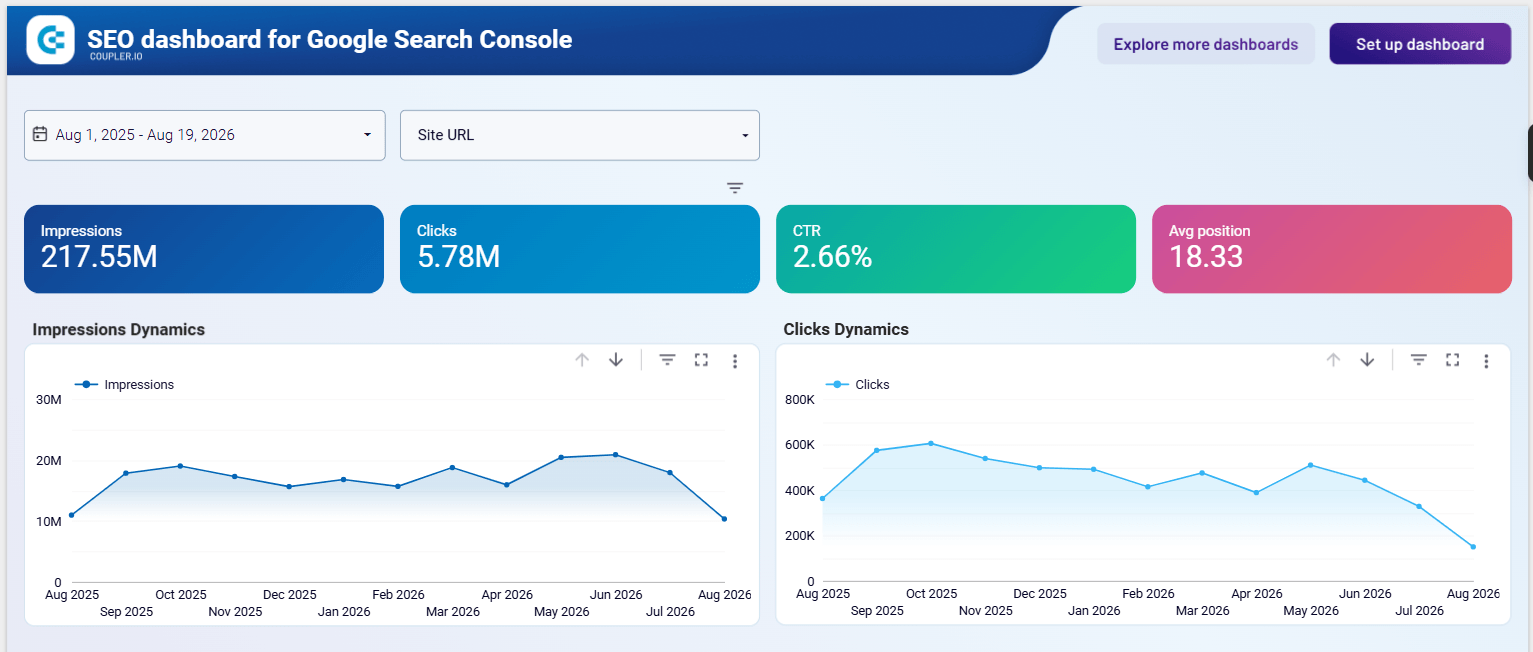
SEO dashboard for Search Console
Preview dashboard- Get a straight answer to a performance question instead of building the report yourself. The Top pages performance template shows clicks, impressions, position, and CTR in one place, no configuration needed. And for the deeper question, does this traffic actually convert, the Landing Page Performance template blends Search Console with GA4, joined on the page itself, since GSC tracks full URLs and GA4 tracks page paths, tracing a query all the way through to an actual conversion. That’s the kind of join a data analyst would normally build by hand, here it’s already a template.
Landing page performance dashboard

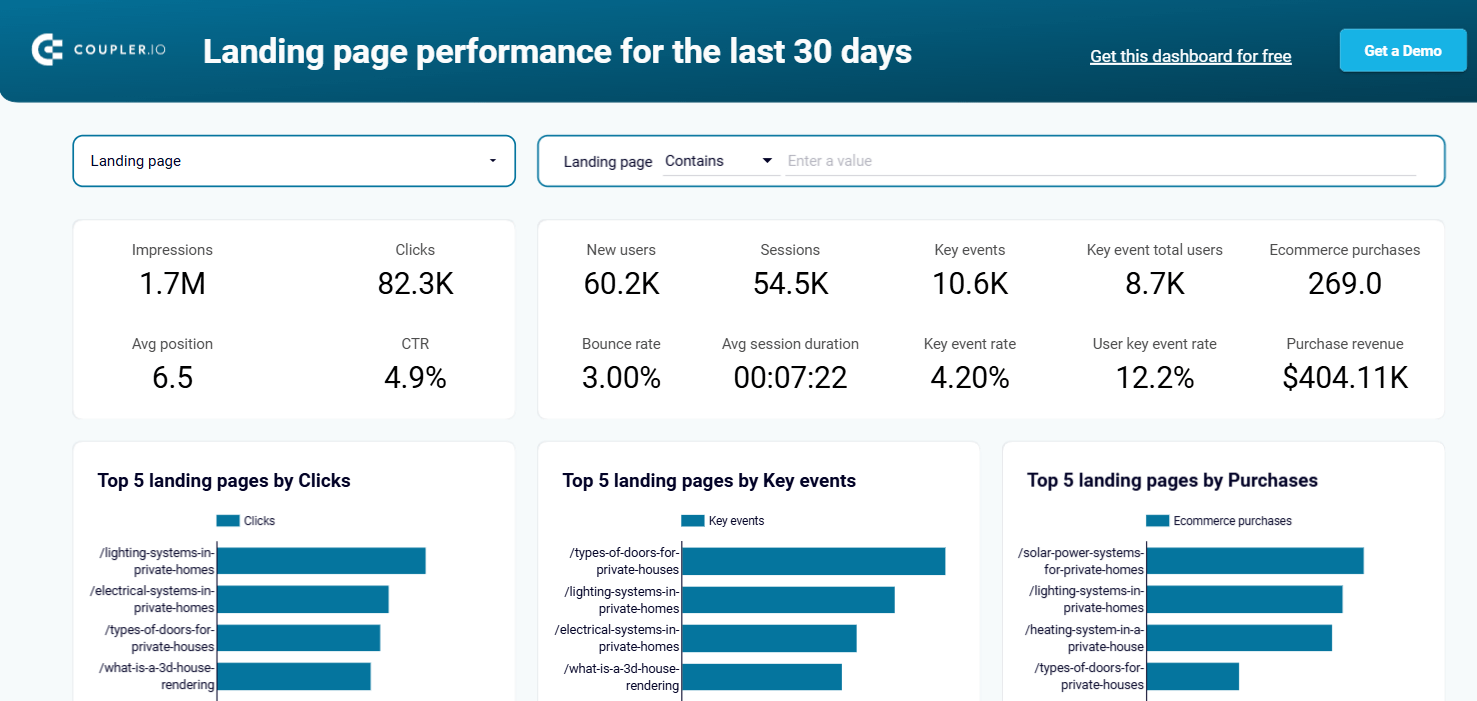
Landing page performance dashboard
Preview dashboard- Blend more than one property or platform into a single flow, and send the result to more than one place at once. Combine several Search Console properties, or bring in another platform beyond GA4, and PostgreSQL doesn’t have to be the only place any of it lands either, the same flow can push to a dashboard or spreadsheet at the same time, so a team gets both a database and a reporting layer from one setup.
- Ask which pages are losing visibility this month and get a plain answer back, no pivot table required. Once your data’s flowing, Coupler AI Agent answers directly, or use AI Integrations to work from Claude, ChatGPT, Cursor, or Perplexity instead. The content decay detector skill does exactly this: it finds pages that are losing clicks and checks whether a ranking slip is behind it.
Build a multi-source SEO pipeline with Coupler.io
Book a demoOther ways to import Search Console data into PostgreSQL
If you’d rather replicate Search Console data to PostgreSQL without a connector, there are two real paths worth knowing about, and each one makes sense for a specific kind of team.
The Search Console API, built by hand
This is the right call if you already have engineering time set aside and want full control over exactly how the data’s transformed before it lands in PostgreSQL, or if Search Console just needs to slot into a data pipeline you’ve already built for other sources. This is a classic ETL pipeline, extract from the API, transform it, load it into PostgreSQL, or an ELT approach if you’d rather transform after loading. It’s the same Search Analytics API endpoint that powers the Performance report inside Search Console itself.
- If you are going to let this flow run unattended, a service account is the better choice than a personal login, since a personal login breaks the moment that person changes their password or loses access
- The API caps out at 25,000 rows per request and 50,000 rows per search type per site per day, so higher-volume sites need pagination built in
Build it yourself, and you’re not limited to PostgreSQL either, the same script could just as easily write to MySQL or Microsoft SQL Server instead
What this path doesn’t include: the authentication, pagination, and retry logic if a request fails all sit on whoever builds it, and stay there for as long as the pipeline runs. This is where a connector’s value becomes concrete rather than abstract. It’s the same setup work, just already done and already maintained.
BigQuery bulk export
This is a real option if your team already lives in BigQuery and doesn’t need this data anywhere else. It’s free, and it requires no API code at all.
- It only starts counting from the day it’s switched on, so it can’t backfill anything already sitting in Search Console
- It delivers Search Console data on its own, no blending against GA4 or CRM data
- No dashboard layer on top
If PostgreSQL is where this data needs to live, or if the point is joining it against something else, bulk export doesn’t solve either of those on its own.
Remember these two things that apply no matter which path you pick:
- The same 16-month retention limit applies to both. It’s enforced by Google, so no API workaround or export method changes it.
- This API can change without much warning. In January 2026, for example, Google quietly removed support for several lesser-used structured data types, a reminder that whatever gets built here, by anyone, needs someone watching for the next one.
Common Search Console to PostgreSQL sync issues
The 16-month wall is unavoidable regardless of method, but a historical import through Coupler.io before that window closes catches it ahead of time, rather than after the data’s already gone.
Duplicate rows from aggregation settings happen when the same row gets counted twice across overlapping date ranges, and the connector’s aggregation settings are built specifically to prevent it.
The expectation of real-time sync trips people up too. Search Console data is always 2-3 days behind on Google’s end, and this is true for every method, Coupler.io’s fastest refresh interval doesn’t change what Google itself hasn’t processed yet.
And the ongoing maintenance of a self-built pipeline, credential rotation, quota tracking, and unannounced API changes, is something a connector already absorbs on its own schedule instead of landing on whoever built the pipeline.
None of this has to be something you manage by hand. Set up your Search Console to PostgreSQL flow for free, no credit card required, and see your first data land in minutes instead of after a week of building it yourself.
Track search performance in PostgreSQL with Coupler.io
Get started for freeFAQs
How do I connect Search Console to PostgreSQL without coding?
Use Coupler.io. Authenticate your Search Console account, choose a data entity, connect PostgreSQL as the destination, and set a refresh schedule.
Is real-time Search Console PostgreSQL sync possible?
No, Google’s own data runs 2-3 days behind no matter which tool sits on top of it.
Do I need a Google Cloud project to use Coupler.io?
No, one less thing to deal with. Coupler.io authenticates through its own already-reviewed app.
Is my Search Console data secure with Coupler.io?
Coupler.io is SOC 2 Type II certified, GDPR , DORA, and HIPAA compliant.
Can I set up a Search Console PostgreSQL pipeline without maintaining any infrastructure myself?
Yes. Coupler.io handles authentication, scheduling, and API changes on its own, so there’s no server or script to maintain on your end.
What’s the difference between a Search Console PostgreSQL connector and just building against the API yourself?
A connector handles authentication, pagination, and Google’s own API changes for you. Building against the API directly means owning all of that, plus the same 16-month retention limit either way.