Most analytics tools want you to believe that looking at your data is the same as understanding it. Stripe has a dashboard with charts and filters, and for a one-off check, it works fine. Where it falls apart is the moment you ask a question without a tab: which plan tier has the highest churn rate, which payment methods are failing most often on annual subscriptions, or which customers have been on Starter for over a year without upgrading. Each of those requires exporting and aligning multiple reports and doing the math yourself.
Coupler.io lets you connect Stripe to Claude directly, so you can ask those questions and get answers from current, structured data instead of building the comparison by hand. Developers who need live Stripe access mid-session, or anyone who wants to query a specific customer record without setting up a data pipeline, will find the Stripe MCP paths further down built exactly for that.
Connect Claude to Stripe with Coupler.io
Coupler.io is a no-code data integration platform and AI analytics solution. It connects 400+ business sources to Claude, ChatGPT, Gemini, and other AI tools through the Coupler.io MCP server. Its Stripe data connector pulls payment history, subscription records, customer data, invoices, and charges into a structured dataset Claude can query in natural language. The Analytical Engine handles the math before Claude sees any numbers, so what comes back is interpreted output rather than the AI computing across raw rows.
The reason Coupler.io fits Stripe analytics well is that Stripe was not built for cross-object reporting. Getting MRR by plan tier, or churn rate by acquisition channel, or failed payment frequency by billing cycle means pulling from several views and joining them yourself. Coupler.io handles those joins, runs calculations through the Analytical Engine, and delivers the output to Claude ready to interpret. You don’t have to worry about exports or manual alignments. No Stripe credentials will be shared with Coupler.io either.
Step 1: Create a data flow for your Stripe data
Use the form below to create a new data flow with Stripe as the source and Claude as the destination, then click Proceed to sign up for Coupler.io for free.

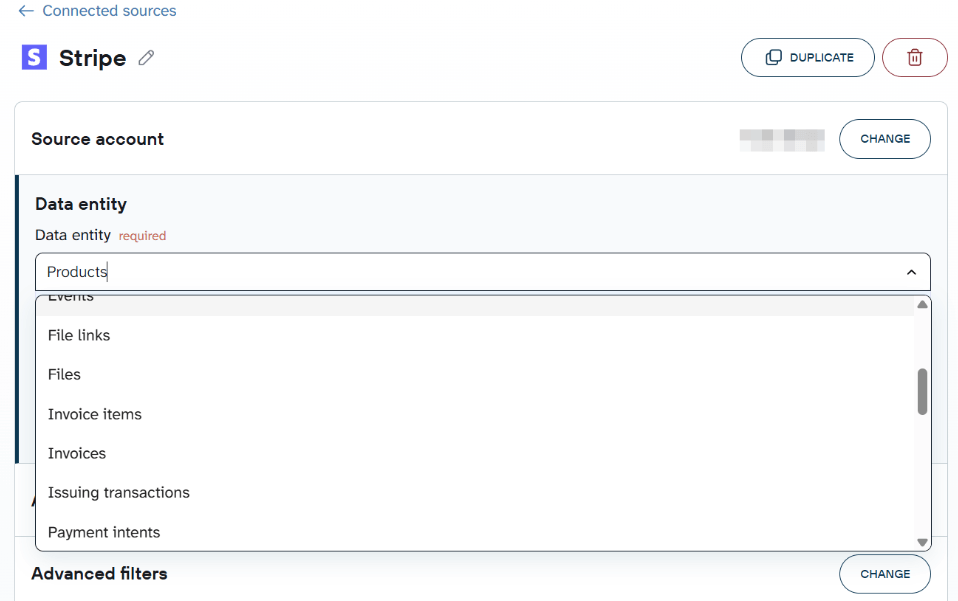
Connect your Stripe account and select the data entities you need: payments, payment intents, subscriptions, customers, invoices, charges, refunds, and more.

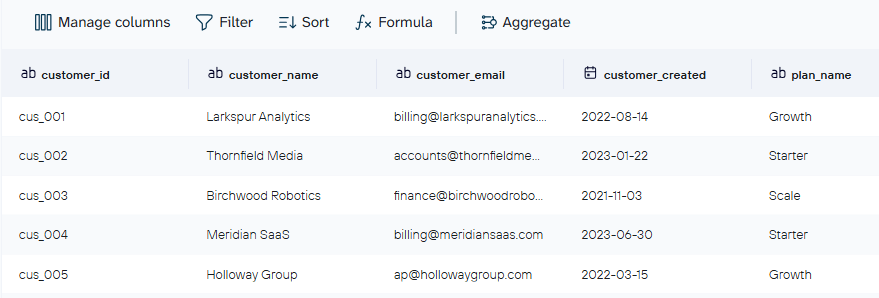
In the preview step, you can rename fields, hide columns, aggregate or append data, and attach business context. Two things worth doing here specifically for Stripe: note that amounts are stored in the smallest currency unit (so $14.99 is 1499), and define your subscription status values. Without those, Claude treats them as generic strings rather than billing state transitions.

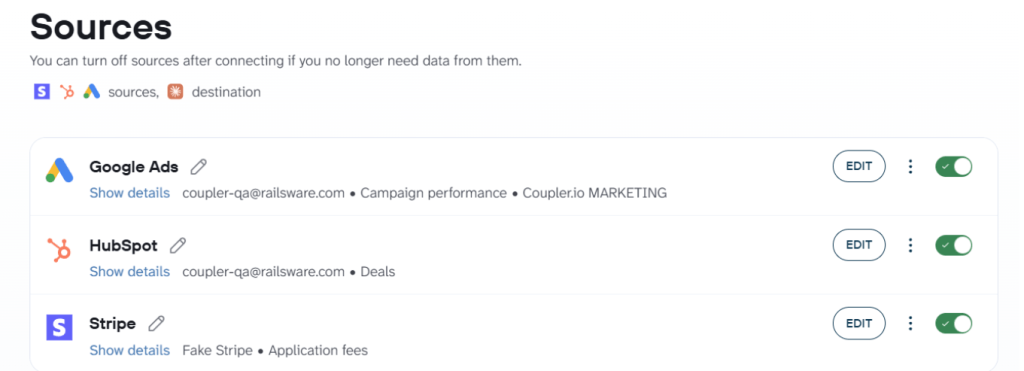
In addition to Stripe, Coupler.io lets you connect business apps to Claude and combine Stripe data with other sources in the same flow. Adding HubSpot gives Claude access to acquisition data alongside revenue data. Adding Google Ads lets you compare ad spend against subscription conversions in one conversation.

Other useful data sources that are worth your attention
Step 2: Connect Claude
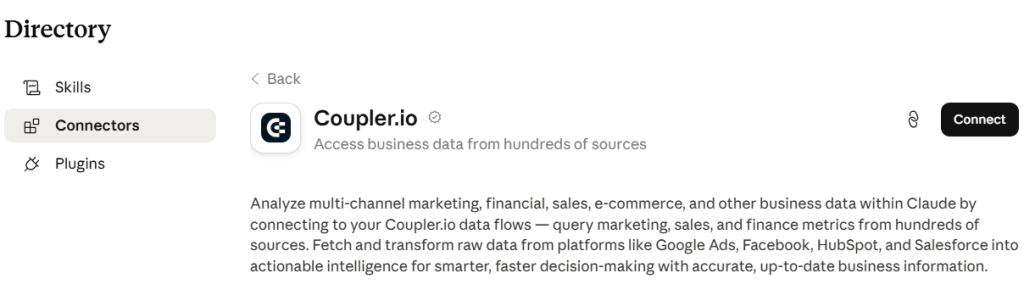
To integrate data with Claude, follow the in-app instructions to install the Claude connector and authorize it to grant Claude permission to access your Coupler.io data flow.

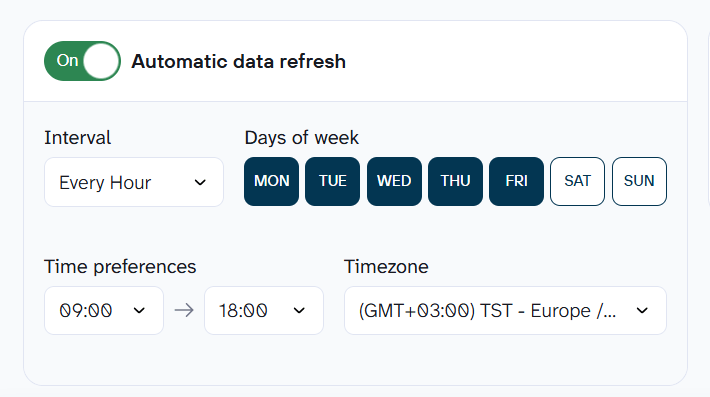
Back in Coupler.io, set a refresh schedule and click Save and Run. The schedule matters because it’s what keeps Claude’s answers up-to-date. Without it, you’d be re-running this setup every time you want fresh Stripe data instead of just asking a question and getting today’s numbers.

In addition to Claude, Coupler.io provides other AI integrations with ChatGPT, Gemini, Copilot, and other tools and custom AI agents.
Step 3: Start a conversation with Claude about your Stripe data
Open Claude at claude.ai or in Claude Desktop and start asking about your Stripe data. Claude will prompt you to approve the Coupler.io MCP connection the first time it needs to pull from your data flow.
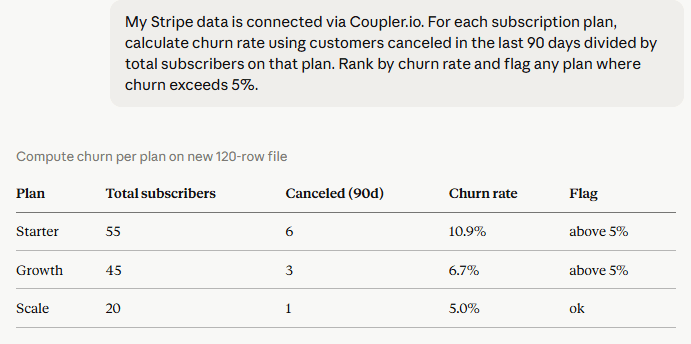
My Stripe data is connected via Coupler.io. For each subscription plan, calculate churn rate using customers canceled in the last 90 days divided by total subscribers on that plan. Rank by churn rate and flag any plan where churn exceeds 5%. |

For a quicker answer without leaving Coupler.io, the built-in AI Agent can query Stripe data from the flow directly.


Track Stripe MRR and churn in Claude with Coupler.io
Get started for freeUse cases for Stripe analysis in Claude
Check out a few examples of how you can use Claude for data analytics of the Stripe data once it’s connected.
Track MRR and churn
Every monthly review lands on the same question: is revenue growing, or is new business just replacing what churned? Stripe answers each half separately, and the reconciliation ends up in a spreadsheet. Coupler.io joins the subscription event history and the Analytical Engine runs the weighted math, so Claude sees clean numbers.
Ask Claude:
My Stripe data is connected via Coupler.io. Calculate current MRR by plan tier. Show total MRR per plan, number of active subscribers, average MRR per subscriber, and the MRR currently at risk from past_due accounts. Which plan contributes the most to total revenue and which has the highest share of MRR at risk? |

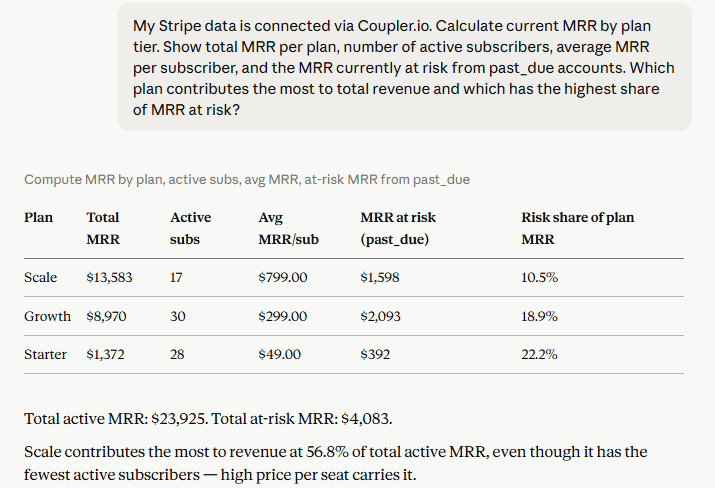
Two things stand out in the response. Scale contributes 56.8% of total active MRR despite having the fewest subscribers, so its price per seat is carrying the business more than headcount is. And risk share tells a different story than absolute dollars: Starter has the smallest MRR at risk in raw terms ($392) but the highest share of its own plan revenue at risk (22.2%), which means past-due accounts are hitting entry-tier customers disproportionately hard relative to what that tier is worth.
If risk share on any plan climbs past 20%, that tier’s dunning process needs attention before the next renewal cycle, not after.
Diagnose failed payments
Whoever owns billing recovery asks this weekly: which failures will fix themselves, and which need a person to step in. Stripe lists every failed attempt, but nothing in the dashboard sorts them into recoverable and not.
Ask Claude:
Using my Coupler.io Stripe data, show failed payment attempts over the last 90 days grouped by decline code. For each code, show the number of affected customers, total MRR at risk, and which subscription plans are most affected. Rank by count descending. |

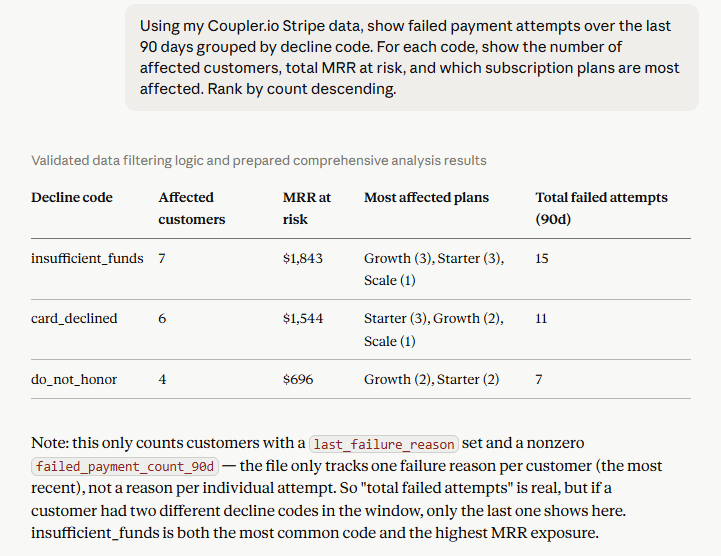
insufficient_funds is both the most common code and the highest MRR exposure at $1,843 across 7 customers, and this one usually clears on its own with smart retry timing rather than outreach. card_declined and do_not_honor together account for $2,240 at risk across 10 customers, and neither resolves with a retry. These need a direct email or a payment method update request, since the card itself is the problem, not the timing.
That’s where automated dunning should stop and a human touch should start: let retry logic handle insufficient_funds, and route card_declined and do_not_honor straight to outreach.
Customer subscription analysis
Revenue and customer success teams ask two versions of the same question every cycle: who’s overdue and worth saving, and who’s been sitting on the entry plan long enough to be ready for more. Stripe’s Dashboard surfaces both individually, never as a ranked list.
Ask Claude:
Pull my Stripe data from Coupler.io. Identify customers whose subscription status is past_due and whose subscription was created more than 6 months ago. Include plan, MRR, days since last payment, failed payment count in the last 90 days, and last failure reason. Rank by MRR at risk descending. |

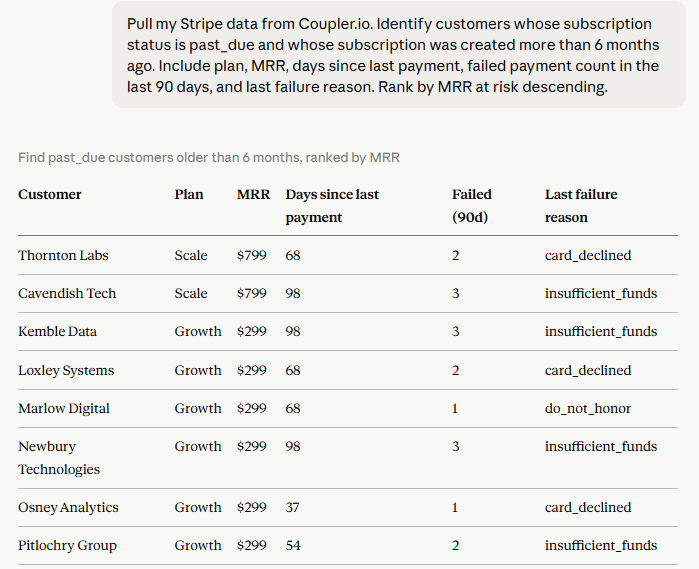
The top of the list is where the save queue lives: Thornton Labs and Cavendish Tech are both on Scale at $799/month, and Cavendish is 98 days past due with 3 failed attempts on insufficient_funds, close to unrecoverable without direct contact. Further down, Osney Analytics and Pitlochry Group are only 37 and 54 days out with a single failed attempt each, still well inside the window where a retry or reminder resolves it without escalation.
The same dataset flips the question around for expansion:
Identify customers who signed up more than 12 months ago and have never upgraded from their initial plan. Show total lifetime spend and current monthly value. |

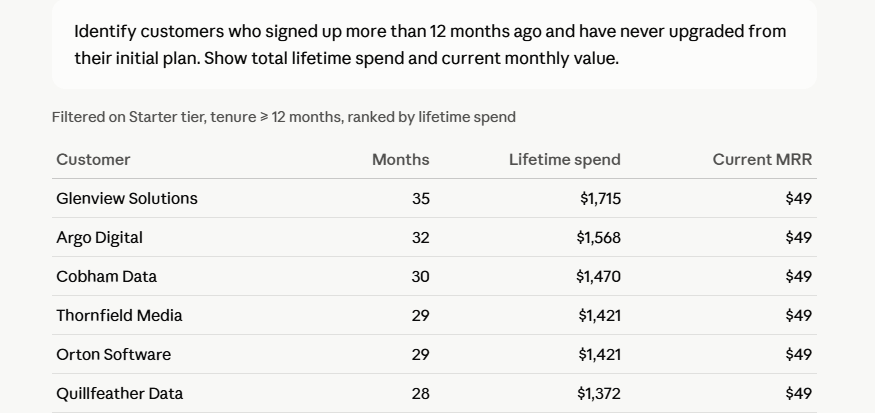
29 customers fit that description, all still on Starter at $49/month, with an average tenure of nearly 22 months. Glenview Solutions tops the list at 35 months and $1,715 in lifetime spend, more than double their annual plan value paid out one month at a time. Long-tenure customers still on Starter after a year have already proven they’ll stick around. They’re not a churn risk; they’re an upsell conversation that the team needs to have.
The past-due list and the non-upgrader list point to two different conversations. One is a sales call about growth. The other is a collections call about survival. The customers at the top of each, by MRR, are the ones worth having that conversation with first.
Start analyzing your Stripe revenue in Claude
Get started for freeClaude prompts for Stripe analysis
The prompts below cover the questions revenue and finance teams ask most often, so you get straight to an answer instead of figuring out how to phrase the query. Copy any of them directly into Claude once your Stripe data is connected through Coupler.io.
For each subscription plan, show total active subscribers, total MRR, average MRR per subscriber, and the number of accounts currently past_due. Rank plans by total MRR contribution. |
Show all customers with subscription status past_due. Include plan, amount outstanding, and days since the last invoice was issued. Rank by amount descending. |
Identify customers who signed up more than 12 months ago and have never upgraded from their initial plan. Show total lifetime spend and current monthly value. |
Compare churn rate by plan tier over the last 6 months. Which tier is losing the highest proportion of subscribers and what is the average tenure before cancellation on that tier? |
I have Stripe and HubSpot connected through Coupler.io. For customers who churned in the last quarter, show their last recorded CRM activity before cancellation. |
What matters when you connect Stripe to Claude
A few things determine whether this setup holds up once you’re relying on it day to day.
Use sandbox before touching live mode
Stripe manages MCP access separately for sandbox and live environments from dashboard.stripe.com/settings/mcp. Validate everything in test mode using a sk_test_... key before pointing anything at your production account, particularly for paths with write access.
Write access requires human confirmation and restricted keys
The Stripe MCP gives Claude write access to a live payments account. Stripe’s official documentation recommends enabling human confirmation before any tool executes and using restricted keys scoped to only the methods the session actually needs. The create_refund tool and subscription cancellation are available by default without additional restrictions unless you configure them.
Attach Stripe-specific definitions for Coupler.io analysis
Without context attached, Claude interprets Stripe field values generically. Amounts are in the smallest currency unit. Subscription statuses like past_due and unpaid have specific behavioral meanings in Stripe’s billing lifecycle. Attach those definitions once in Coupler.io’s context feature and Claude carries them into every query.
Also, consider using AI skills from Coupler.io’s skills library:
- The finance-analytics skill covers revenue pattern analysis and anomaly detection
- The report-generation skill formats output into a validated report with a TL;DR, key metrics, and recommendations.
Send the same data to multiple destinations
The same Coupler.io flow that connects Stripe to Claude can push to Looker Studio, Google Sheets, or BigQuery simultaneously. One flow, one refresh schedule, dashboards and Claude conversation both current. For more, see the AI integrations overview.
With those in place, Stripe data in Claude moves from a one-off experiment to something worth reaching for every week.
Build a multi-source revenue pipeline for Claude
Book a demo with Coupler.ioOther methods to connect Claude to Stripe
You’ve discovered how to connect Stripe to Clau with Coupler.io for recurring analysis. These three paths give Claude live access to the Stripe API itself, which matters when the task is a one-off lookup or something a developer needs mid-session rather than a standing report.
| Method | What it does | Best for | Write access |
| Stripe MCP on Claude (connector directory) | Live read/write access to the Stripe API from a Claude conversation | Ad hoc lookups, pulling a specific customer record | Yes, full API access |
| Add Stripe MCP to Claude Code | Live Stripe access during a coding session via remote OAuth | Debugging payment logic, checking subscription state mid-build | Yes, configurable via restricted keys |
| Connect Stripe to Claude Desktop | Local Stripe MCP via claude_desktop_config.json and an API key | Persistent local Stripe access without the connector directory | Yes, scoped to your API key’s permissions |
All three of these methods to connect Claude to Stripe use the Model Context Protocol (MCP) as the connection standard, and all three give Claude live interaction with your Stripe account in the moment, rather than a scheduled data flow. A payments account with write access handed to an AI tool deserves real attention before you connect anything.
Use Stripe MCP to connect to Claude
Beyond scheduled analytics, there are moments where you need Claude talking to your live Stripe account directly, whether that’s a developer debugging in real time or a quick lookup that doesn’t need a data flow. Here’s how each of those paths works.
Remote Stripe MCP
This is the developer path. When you are writing billing logic, debugging a payment integration, or testing subscription flows, live access to your actual Stripe account state during the session changes how that work goes.
Stripe’s official MCP server runs at mcp.stripe.com and authenticates via OAuth. Setup is one command:
claude mcp add --transport http stripe https://mcp.stripe.com/ |
Then open the MCP panel with claude /mcp and complete the OAuth authentication consent flow in the browser. Available tools include payment intent lookup, customer record retrieval, webhook inspection, create_refund, and search_stripe_documentation, which lets Claude search Stripe docs mid-session.
Write tools, including stripe_api_write, require human confirmation before executing, and Stripe’s own docs specifically recommend this. Sandbox and live mode access are managed separately from dashboard.stripe.com/settings/mcp, so validate the full tool set in sandbox before enabling live mode.
This method does not cover scheduled analytics, historical aggregation, or cross-source joins with other business data. That’s what the Coupler.io path above is for.
Stripe MCP on Claude (connector directory)
This is also a remote connection, but accessed entirely through Claude’s interface instead of the terminal. For non-technical users, Claude’s connector directory (Settings → Connectors → Browse connectors → search Stripe → Connect) is the simplest path.

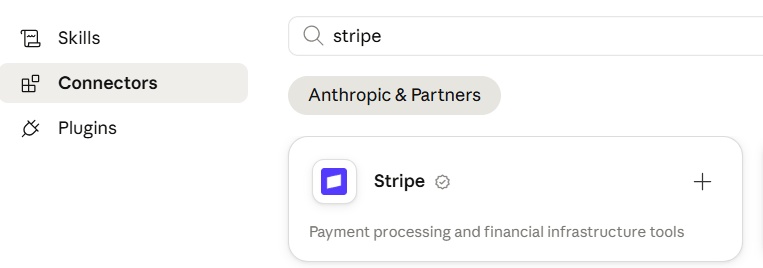
Anthropic added Stripe as an official first-party integration, so no config file editing is required. This uses the same remote Stripe MCP server as the developer path above, just with a point-and-click setup. It’s available on paid Claude plans.
Connect Stripe to Claude Desktop
This one runs locally on your own machine, rather than connecting to Stripe’s remote server. Add the following to claude_desktop_config.json (or mcp.json in Claude Code projects) with a stripe_secret_key:
{
  "mcpServers": {
    "stripe": {
      "command": "npx",
      "args": ["-y", "@stripe/mcp@latest"],
      "env": {
        "STRIPE_SECRET_KEY": "your_restricted_key_here"
      }
    }
  }
}
Use a restricted Stripe API key scoped to only what the session needs, not a full secret key. Use sk_test_... for sandbox first, then switch to a restricted live key once the setup is confirmed.
All three paths above give live read/write access inside a Claude conversation, and none of them run outside a session you start. If you need Stripe workflows that fire on events or run on a schedule, Claude Cowork supports more persistent automation beyond single-session conversations.
Connect 400+ data sources to Claude with Coupler.io
Get started for freeFAQs
Is it safe to connect Claude to Stripe?
It depends on which path you use. Coupler.io operates as a read-only layer: your Stripe credentials stay in Coupler.io, never in the Claude conversation, and Claude only analyzes what the data flow contains. The connection to Claude is token-based and encrypted, and Anthropic does not retain data transmitted for analysis for model training. Coupler.io is SOC 2 Type II certified, GDPR-compliant, and HIPAA-compliant. The Stripe MCP paths grant Claude write access to your Stripe account, which requires human confirmation of tools and the use of restricted API keys to use responsibly.
Can Claude actually issue refunds or cancel subscriptions?
Yes, through the Stripe MCP paths. The create_refund tool and subscription management tools are available. Stripe recommends enabling human confirmation before any write tool executes. Coupler.io exposes no write tools at all.
Can I combine Stripe with HubSpot or Google Ads in the same analysis?
Yes, through Coupler.io. Multiple sources can connect in the same data flow. Stripe with HubSpot lets you cross-reference payment data against CRM records. Stripe with Google Ads lets you compare ad spend against subscription conversion rates in one Claude conversation.
Does this work in both sandbox and live mode?
Yes. Stripe manages sandbox and live mode MCP access separately from your Dashboard settings. For Coupler.io, the mode is determined by which Stripe account you connect during setup.
How do I add Stripe MCP to Claude Code or Cowork?
For Claude Code, run claude mcp add --transport http stripe https://mcp.stripe.com/ in the terminal, then authenticate with claude /mcp to complete the OAuth flow. For Claude Cowork, the same remote Stripe MCP server can be added as a persistent connection, which is useful if you need Stripe workflows that fire on events or run on a schedule rather than only inside a single conversation.
Does this work on both Claude.ai and Claude Desktop?
Yes. Coupler.io connects to Claude regardless of which interface you use, since the connection runs through the same MCP server either way. The Stripe MCP connector directory path works on Claude.ai, and the local config file path works specifically in Claude Desktop.