AI is affordable, but the way most teams use it usually isn’t. Hand a model a messy export with no context and a question like “analyze this,” and you’ve just paid it to be confused on your behalf. Every clarifying question and every do-over costs tokens. In this guide, I’ll show you how to use Coupler.io to cut unnecessary AI spend and get better analysis in return.
Why AI analytics costs get out of control
As a rule, the bill climbs because of how AI gets used day to day. And here’s what these mistakes look like in practice.
Mistake #1: You’re sending AI more data than it needs
Someone exports the full CRM dump (every column, every row, going back two years) and pastes it into Claude or ChatGPT. The model has to wade through irrelevant fields, inconsistent formatting, and data that has nothing to do with the actual question. You’re paying for all of that processing, even the parts that contribute nothing to the answer.
Mistake #2: Your questions are too vague
“Analyze the data in this chart” is an open invitation for the model to write at length. A broad question will give you a broad answer, and long outputs cost more. Specific questions (e.g., “Which campaigns had ROAS above 3x last month?”) get shorter, more useful answers.
Mistake #3: The wrong model is doing the job
A weekly summary of campaign metrics doesn’t need GPT-5 or Claude Opus. It needs something fast and cheap. Most teams default to the most capable model because it feels safer, and end up paying a 5–10x premium for tasks that a smaller model handles just as well.
Mistake #4: The same context gets retyped every single session
“We define MQL as…” or “Our fiscal year starts in…”, etc. If your team is explaining the business from scratch every time they open a new chat, those setup tokens add up fast. Multiply that across a team running daily analysis.
Mistake #5: Output length isn’t controlled
If you don’t specify what you want, AI will give you what it thinks is thorough. That often means three paragraphs where one sentence would do. Length is cost.
Mistake #6: AI is being used as a data cleaner
This is the expensive one. Asking a language model to fix messy column names, reconcile inconsistent date formats, or merge data from two different sources isn’t what these models are built for. You’ll pay full price for output that’s slow, error-prone, and often needs to be redone.
Mistake #7: Nobody’s tracking what things actually cost
Total monthly spend is visible. Cost per report, cost per client, or cost per workflow are usually not. Without that breakdown, there’s no way to tell which workflows are efficient and which ones are burning budget.
Mistake #8: When AI does the math, wrong answers are expensive
Language models aren’t calculators. They can misread formulas, hallucinate figures, or apply logic inconsistently, especially on complex calculations with multiple steps. If a team acts on a forecast or attribution model that’s quietly wrong, the downstream cost can be far larger than the original AI spend. A bad budget decision made with confidence because “the AI said so” is a real risk.
The main rule of LLM cost optimization: don’t make AI do your data prep
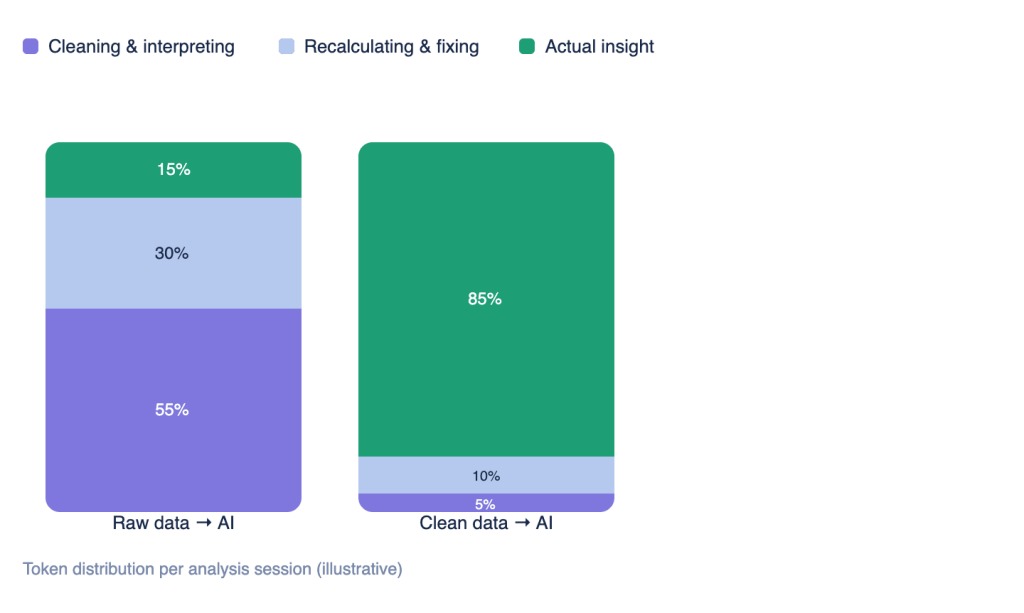
The most cost-efficient AI analytics workflow starts before the prompt. When you send a raw export to an AI tool, you’re paying the model to figure out what your data even is. It reads through column names like utm_source_v2_final_FINAL, reconciles inconsistencies between two files that use different date formats, and tries to guess which fields are actually relevant to your question. That work costs tokens. And it happens before the model writes a single word of analysis.
A token is a chunk of text the model reads or writes, usually a short word or piece of one (1 token ≈ ¾ of an English word). You pay for tokens twice in every request: input tokens (your prompt, data, and context) and output tokens (the model’s reply), and output tokens typically cost 3–5x more than input.
To compare:
• A messy 10,000-row CSV pasted into a prompt is often 50,000–150,000 input tokens
• A clean, pre-aggregated summary of the same data is usually 500–2,000.
To reduce LLM costs, send a clean, focused dataset instead, and you skip all of that preparation. Less noise for the model to sort through means more accurate output and fewer follow-up prompts.
Raw exports have another problem beyond cost: inaccurate calculations. Ask an AI model to compute ROAS across 50 campaigns from raw rows, and you’ll likely get a number that’s close but off, or one that’s confidently wrong. Every calculation error means another prompt to check it, correct it, or explain it to a stakeholder. That’s the expensive kind of AI usage: cheap to generate, costly to fix.
The cleanest version of an AI analytics workflow keeps a clear division of labor. Data preparation and transformation occur before the prompt, and calculations are performed by a dedicated engine, not within the LLM. AI handles interpretation, summary, and recommendations. This approach keeps costs predictable and output trustworthy, and that’s exactly what a setup with Coupler.io makes possible.

How Coupler.io reduces your AI bill
That division of labor is exactly what Coupler.io, the data integration platform and AI analytics, is built for. It sits between your data sources and your AI tool to handle cleanup, calculations, and context rebuilding, so the model can spend its tokens specifically on analysis.

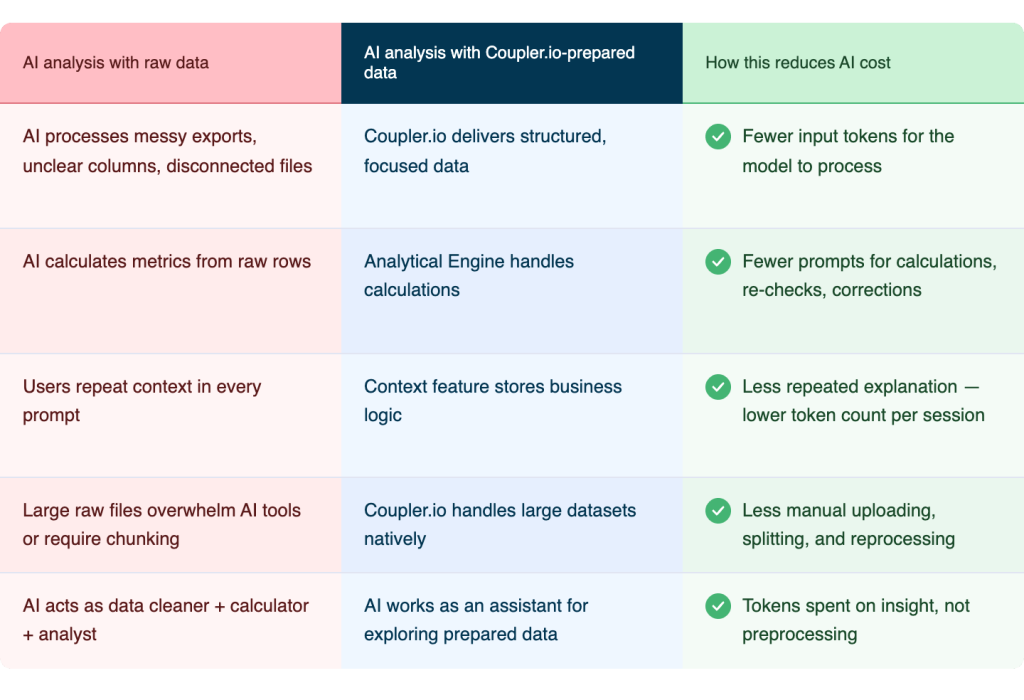
With Coupler.io’s AI integrations, prepared data flows directly to Claude, ChatGPT, or whichever model your team uses; there’s no need to copy-paste anything by hand.
Coupler.io allows you to:
- Send less data to the model
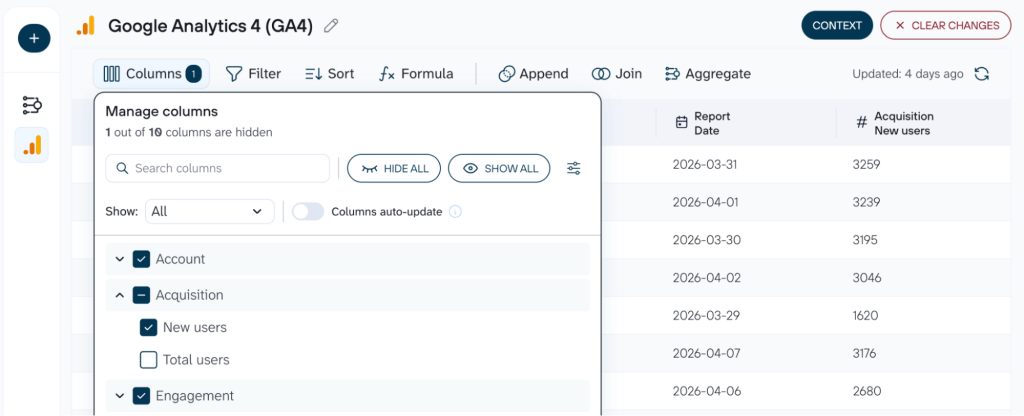
Coupler.io refreshes, structures, and aggregates your data before it reaches the AI tool. What arrives is a focused, analysis-ready dataset with a fraction of the original volume. Fewer data means fewer input tokens, and fewer tokens mean lower cost per query.

- Stale data drives up costs
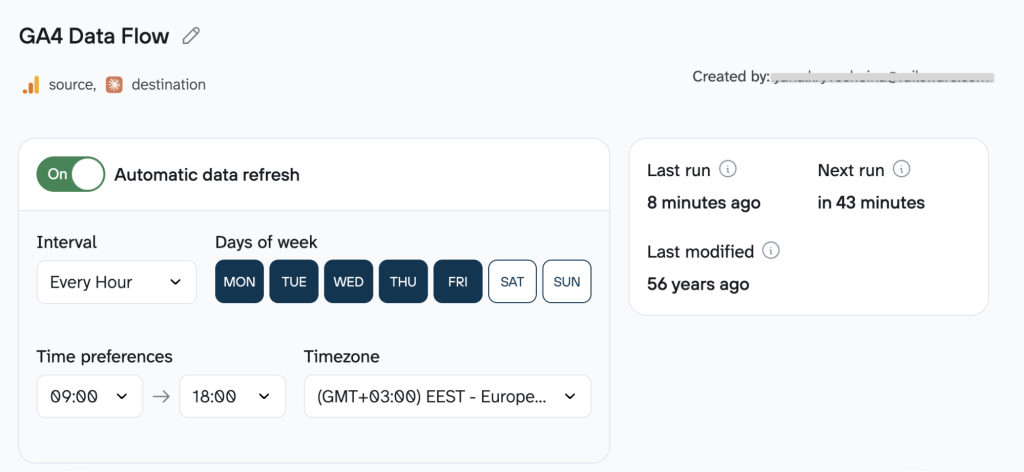
When the AI works with outdated numbers, it second-guesses itself, asks clarifying questions, and often needs correction. Coupler.io refreshes data at up to 15-minute intervals, so the model works with fresh data and skips the back-and-forth.

- Stop re-explaining your business in every prompt
If you’ve ever typed “CAC means customer acquisition cost, and we calculate it as…” into a prompt, you know the problem. Every session starts from zero. The model doesn’t know your metrics, your naming conventions, or how your funnel is structured. So you explain it again and again.
As Peter, the Product Lead at Coupler.io, put it:
Context is key, otherwise AI needs to go through the data, ask you, make mistakes, start over, and so on; a lot of iterations equals a lot of tokens.
Coupler.io’s Context stores that business logic once. It tells the AI which metrics matter, how they’re defined, and how to interpret your data correctly. Your team doesn’t repeat the setup on every query, and the model doesn’t ask clarifying questions that cost tokens to answer. Once you connect data sources and add context, the model already knows your metrics and how to read them.

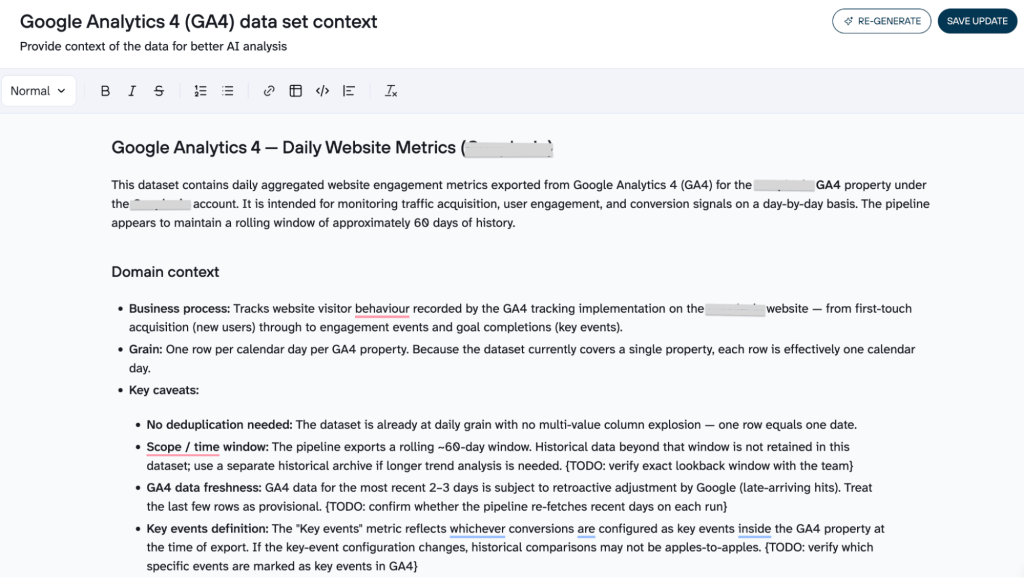
And if you run the same report repeatedly, Coupler.io’s AI Agent skills let you save a full analysis as a reusable workflow, so the model runs it the same way every time, without re-prompting or paying to regenerate the logic from scratch.
A Skill is a pre-built analytical workflow for a specific task (auditing campaign performance, investigating a traffic drop, reviewing pipeline health), so instead of writing a prompt from scratch, you pick the skill, connect your data, and ask in plain language.


Cut costs before the first prompt
Try Coupler.io for free- Get accurate, verified calculations
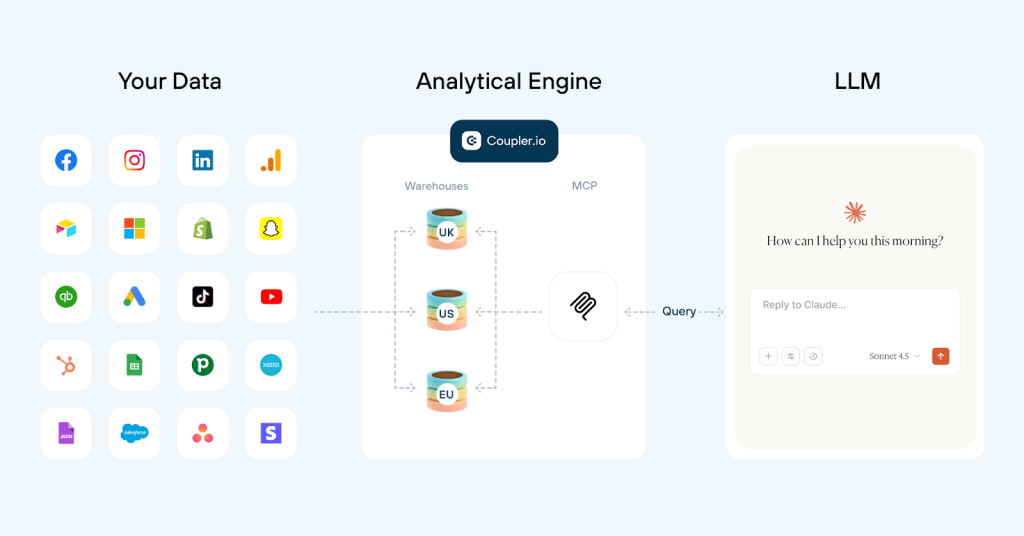
Coupler.io’s Analytical Engine handles calculations before the data reaches the model. Metrics are computed from your raw data, and what AI receives is already correct, so the analysis it produces builds on verified numbers. The model interprets trends and surfaces insights. The math is already done.
There’s a compounding efficiency here. When the AI doesn’t need to run calculations, it doesn’t need multiple prompts to check its own work. Fewer verification loops mean fewer tokens and faster output.
The same principle applies if you use Coupler.io MCP. Source-by-source MCP setups require the model to re-fetch data and blend it on the fly for every question, which means repeated calls, repeated schema context, and the model doing math on blended data. Coupler.io MCP pulls pre-aggregated data in a single call. The model gets what it needs in one pass.

- Visualize your reports with pre-built dashboard templates
Not every output needs to be generated by AI. If you want a dashboard that shows the same metrics every week, having the model build it from scratch each time is an expensive way to get something you could have templated once.
Coupler.io provides free pre-built dashboard templates for common reporting use cases. You connect your data; the dashboard populates and refreshes automatically. Moreover, with multiple destinations, the same dataset can feed both your dashboard and your AI model simultaneously. The visualization layer runs on infrastructure that doesn’t charge per token, and AI stays in the loop for the analysis layer, where it actually adds value (summarizes trends, flags anomalies, and generates recommendations from the same structured data).No need to write prompts, no generation cost, and no variance in the output. This is another way to cut AI costs.
Setting up the data analytics flow in Coupler.io takes minutes.
- Build a data flow: Connect your data sources, conduct the necessary aggregations, and add the context that tells the model how to read your data.
- Hook up your AI: Use whatever AI solution you prefer (Claude, ChatGPT, Gemini, or another model) and proceed with analysis. Now the model works with data it already knows how to interpret.
Get cost-efficient AI analysis
Try Coupler.io for freeTips on how to cut AI usage costs
Most teams focus on what they ask AI: the question, the dataset, the expected output. Far fewer think about how the AI layer itself is configured: which model handles which task, whether caching is enabled, how prompts are structured, and whether anyone is actually tracking what each analysis costs.
To reduce LLM costs, implement these optimizations for any team using AI for analytics, regardless of the tools in their stack. Besides, most of these adjustments are low-effort, so your team can start using them right away.
Write better prompts, pay less
One of the best ways to cut costs on AI is to create better prompts. Vague questions produce long, meandering answers. Specific prompts produce short, useful ones.
A few changes that make an immediate difference:
- Ask for structured output. Tables and JSON are shorter than prose and easier to scan. If you ask for a paragraph, you’ll get one. Ask for a table, and you get the same information in a third of the tokens.
- Specify the length. “
Summarize in three sentences” costs a fraction of “give me a detailed analysis.” The model will write as much as you let it. - Front-load the actual question. “
What was our top-performing campaign last week by ROAS?” is cheaper than “Look at this data and tell me what's interesting.” The first prompt has a clear answer. The second one invites the model to explore, which takes more tokens and often produces less useful output. - Use system prompts. If your team asks the same type of question every week, write the setup once. A system prompt that defines your metrics, your reporting format, and your business context means you don’t re-explain everything in every conversation.
Coupler.io’s Context does exactly this at the data layer. It stores your business definitions and metric logic so the AI already understands your data before you ask the first question.
Set context once, analyze endlessly
Start your free trialUse the right model for the job
A weekly summary of campaign metrics doesn’t need the same model as a multi-quarter trend analysis. Using a flagship model for routine work is the AI equivalent of hiring a specialist consultant to write meeting notes.
Most platforms offer a tiered lineup. On Anthropic, Haiku handles routine summaries and formatting, Sonnet covers most analytical work, and Opus is for complex multi-step reasoning. On OpenAI, GPT-4.1 mini and nano cover simple tasks, GPT-4.1 handles standard analysis, and the o-series (o3, o4) is for frontier reasoning. On Google, Gemini Flash covers lightweight queries, and Gemini Pro handles deeper analysis.
The cost difference between tiers is significant. Running a 10,000-token summary through Haiku versus Opus can result in a 5- to 10x price difference with comparable output quality for routine work.
The practical rule: start with the smallest model that gives acceptable output. Move up only when quality actually drops.
Cache, batch, and reuse
A quick note: prompt caching and batch processing are API features. If your team uses AI through a chat interface (Claude.ai, ChatGPT, Gemini), these savings aren’t directly available to you. They apply when you or a tool in your stack is calling the model’s API, which is how most automated reporting workflows run. If that’s not your setup, skip to the next section.
- Prompt caching kicks in when you send the same system prompt and context across multiple queries. Anthropic caches repeated input at roughly 10% of standard pricing (a 90% discount). OpenAI applies automatic caching at around a 50% discount on repeated prefixes. Google offers implicit caching on Gemini 2.5 and newer models, plus explicit caching with configurable TTL for large document sets. Caching applies only to the repeated portion of your input, so the savings are greatest when most of what you send is stable and only a small piece changes per query.
- Batch processing helps cut AI costs by about half across all three major providers for non-urgent work. Weekly performance summaries, monthly trend reports, client roll-ups: any recurring task that doesn’t need an answer in the next five minutes is a candidate for batching. A team running 500,000 tokens of weekly reports through a batch API saves around 50% on those runs with no difference in output quality.
Set budgets and track cost per insight
Total monthly spend is a nearly useless metric. It tells you how much you spent, but nothing about whether it was worth it. To reduce LLM costs, track them at a more granular level: per report, per dashboard, per team, per workflow. That’s the number that tells you whether a particular use case is worth running through AI or should be handled differently.
Set budget limits by team or workflow. A single heavy user running exploratory analysis can burn through a month’s budget in a week if there are no guardrails. Most AI platforms expose usage APIs and spending dashboards. Use them.
Important check: review whether your AI-generated outputs are actually used. A report nobody reads costs the same to generate as one that changes a decision.
Keep humans in the loop
AI-generated analysis is cheap to produce. However, it can be expensive to act on if it’s wrong. Bad forecasts, misattributed trends, incorrect metric calculations: all of these are easy to generate and costly to correct, especially when they’ve already influenced a client deliverable or a budget decision. A human review step is what keeps cheap output from becoming an expensive problem.
Coupler.io’s Analytical Engine handles the data preparation and calculation layer, which removes one of the more common sources of AI costs and errors. But business judgment still needs a person. Build a review step into any workflow where AI output feeds into a decision that matters.
Reduce errors and tokens, increase insight quality
Try Coupler.io for free