AI is quickly becoming part of everyday analytics work. Business teams are already using tools like ChatGPT and Claude to explore data without writing SQL or building new dashboards. In many cases, this works surprisingly well.
But it also raises an important question: how much data analysis can AI really handle on its own?
The answer determines whether AI becomes a trusted analytics partner or an expensive liability. This article shows what AI can and cannot do reliably, and why accuracy requires infrastructure beyond a chat interface. Through examples from marketing, analytics, and ecommerce teams, you’ll see how Coupler.io handles calculations for AI to deliver fast insights you can actually trust.
Can AI do data analysis?
Yes, AI can do data analysis, but there are some caveats. Modern AI models don’t run queries against databases, validate calculations, or control how metrics are defined. Instead, they operate on inputs they’re given and generate interpretations based on patterns in language and data structure.
That said, we think it’s still too soon to think that an AI model can entirely replace a data analyst. Its usefulness depends heavily on how data is prepared, structured, and validated before the AI ever sees it. To use AI responsibly in business analytics, it’s important to understand both its strengths and its limits, which we will explore next.
What AI can do today
The quality and accuracy of any AI-driven analysis depend entirely on the quality of the data it works with. When that foundation is weak or incomplete, AI outputs become unreliable, regardless of how advanced the model is.
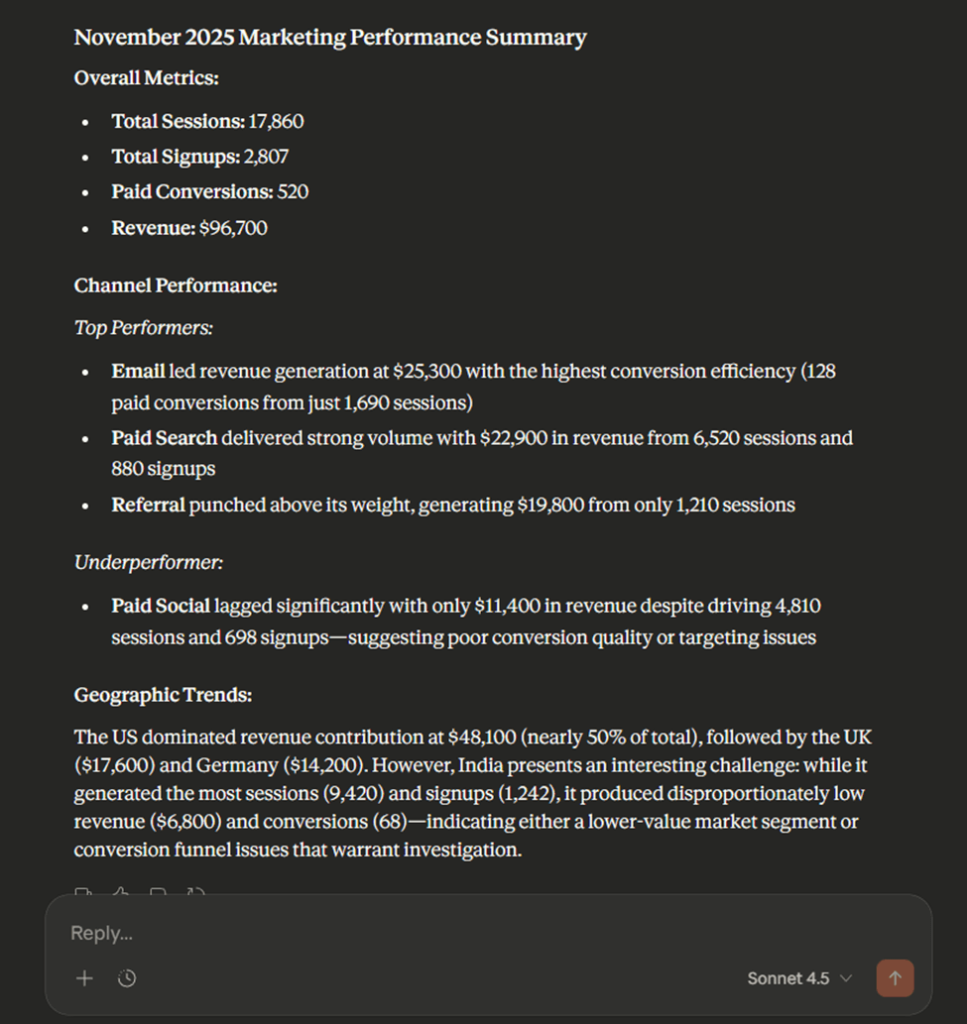
But if the data is reliable, then here are some things AI can do to make your work significantly easier:
- Summaries and descriptive analysis: AI can quickly summarize datasets, reports, and dashboards, helping teams understand what happened without manually scanning rows of data.

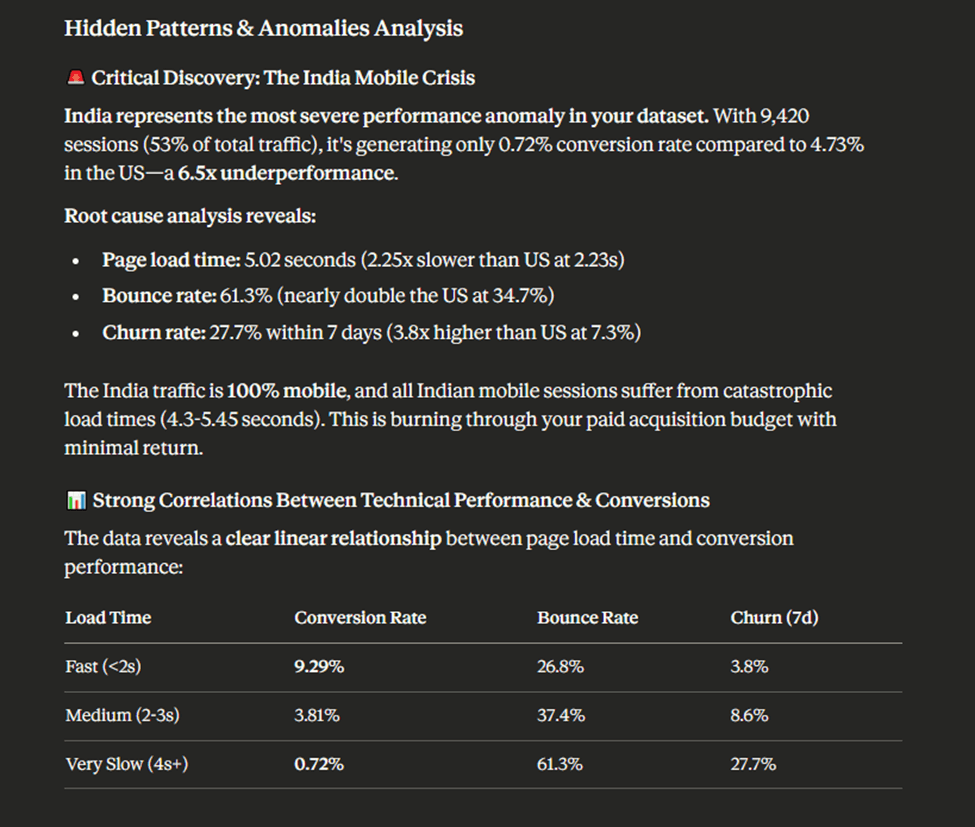
- Diagnostic insights: AI for data analysis is effective at identifying patterns, correlations, anomalies, and trends, surfacing relationships that may not be immediately obvious.

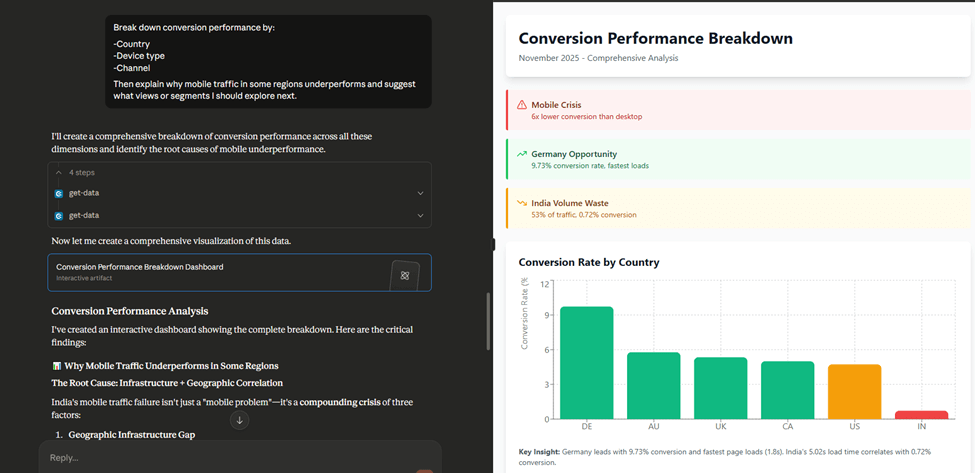
- Exploratory analysis and visual guidance: Through follow-up questions, AI enables interactive exploration. Users can ask “why” questions, segment results, or request visual explanations without rebuilding reports.

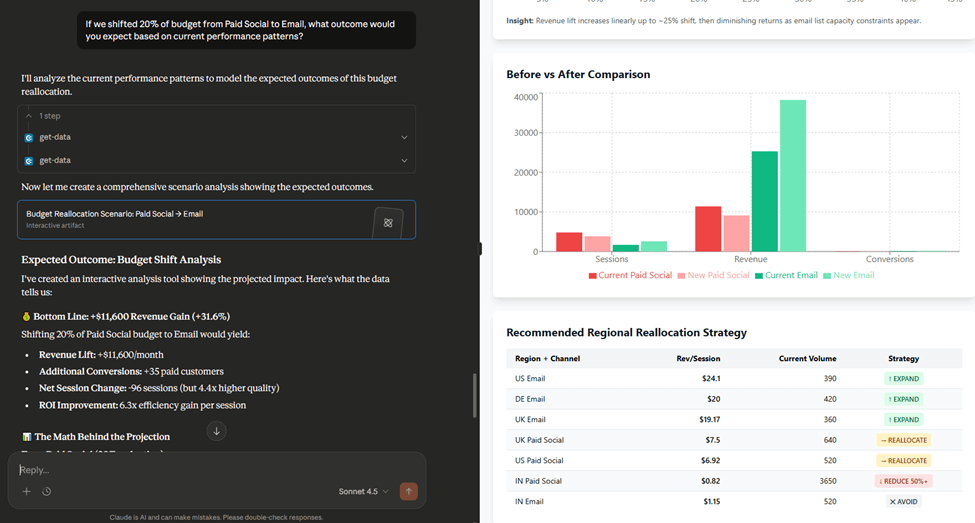
- Multi-step reasoning (when grounded in data): When calculations and aggregations are handled outside the model, AI can reason across results, compare scenarios, and explain outcomes in plain language.

What AI still cannot do
AI models are designed to generate language, not to verify data, enforce logic, or control how metrics are calculated. Because of that, there are several things AI cannot reliably do in data analysis:
- Replace analysts or business judgment: AI cannot define business goals, prioritize what matters, or understand strategic trade-offs. Human context is still essential. Only skilled professionals with hands-on experience, certifications from courses, data analyst bootcamps, training sessions can provide that context qualitatively.
- Guarantee accuracy without structured data: Large language models do not verify numbers. Without structured datasets and validated calculations, AI can produce confident but incorrect answers.
- Operate reliably without grounding in real datasets: AI models generate text based on patterns, not truth. When asked to analyze raw or incomplete data, they may hallucinate metrics or fabricate results.
- Perform dependable predictive modeling on their own: While AI can suggest hypotheses or scenarios, it does not reliably run statistical models, simulations, or forecasts without external computation.
These limitations reflect what AI is fundamentally designed to do. The key is building systems that leverage AI’s strengths while handling its weaknesses through proper infrastructure.
How to use AI for data analysis in business
Using AI for data analysis in business requires a clear separation between how data is calculated and how insights are explained. And with Coupler.io, you’ll see in practice how to use Gemini for data analysis (same as Claude or ChatGPT) to get valuable insights in minutes.
AI models are excellent at interpreting results, spotting patterns, and communicating insights in natural language. They are not designed to verify numbers, enforce calculation logic, or safely operate on large, complex datasets. When those responsibilities are blurred, accuracy suffers.
Coupler.io addresses this by introducing a dedicated Analytical Engine that sits between your data and the AI. It handles all data processing and validation, while the AI focuses purely on interpretation and explanation.
This division of responsibility is what makes AI-driven analytics fast and trustworthy.
How Coupler.io’s Analytical Engine works

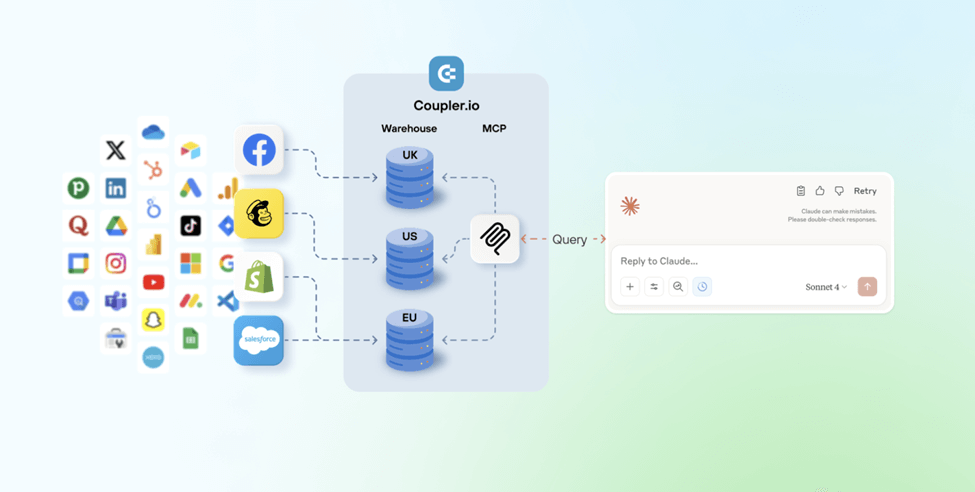
Coupler.io’s approach follows four distinct stages, each designed to prevent AI from guessing, fabricating data, or operating outside its strengths.
Stage 1: Context without overload
Instead of sending entire datasets to an AI model, Coupler.io provides only what’s necessary for understanding context:
- The data schema (column names and data types)
- A small representative sample (for example, the first 20 rows)
This gives the AI enough information to understand what can be queried, without overwhelming it or exposing sensitive data unnecessarily.
Stage 2: Translation to executable query
When a user asks a question in natural language, such as “Which campaigns drove the most revenue last month?”, AI translates that request into a structured query.
Importantly, the AI does not execute this query itself. It passes the structured request to Coupler.io’s Analytical Engine.
Stage 3: Verified computation
This is where accuracy is enforced. Coupler.io’s Analytical Engine:
- Executes the query against the full dataset
- Performs all calculations, aggregations, and joins
- Validates the results for consistency
- Returns only the precise, aggregated output
The AI never receives raw data and never performs calculations. It receives verified results, facts, not estimates. This eliminates hallucinated metrics and unreliable answers.
Stage 4: Human-readable insight
With validated results in hand, the AI does what it does best:
- Interprets the numbers
- Identifies what’s meaningful
- Explains trends and patterns in context
- Delivers insights in clear, conversational language
The outcome is an analysis that’s both fast and dependable, combining AI’s natural language interface with the computational reliability businesses need to make decisions.
Coupler.io supports this architecture in two ways, depending on how teams prefer to explore their data: AI integrations with external tools like ChatGPT or Claude, and a built-in AI agent directly inside the Coupler.io interface.
Integrate your business data fir analysis with AI
Try Coupler.io for freeAI Integrations
AI Integrations let teams analyze their business data directly inside AI tools like ChatGPT or Claude, without leaving the interface they already use.
Instead of exporting spreadsheets or switching between analytics platforms, teams connect their data sources to Coupler.io and make them available inside their AI conversations.
Marketing, sales, and product data from tools like Google Analytics, ad platforms, CRMs, or ecommerce systems can all be queried through natural language.
The setup is lightweight:
- Create a data flow in Coupler.io with the data sources you want to analyze
- Select an AI tool such as ChatGPT or Claude as the destination and authorize the connection
- Open your AI tool and start asking questions

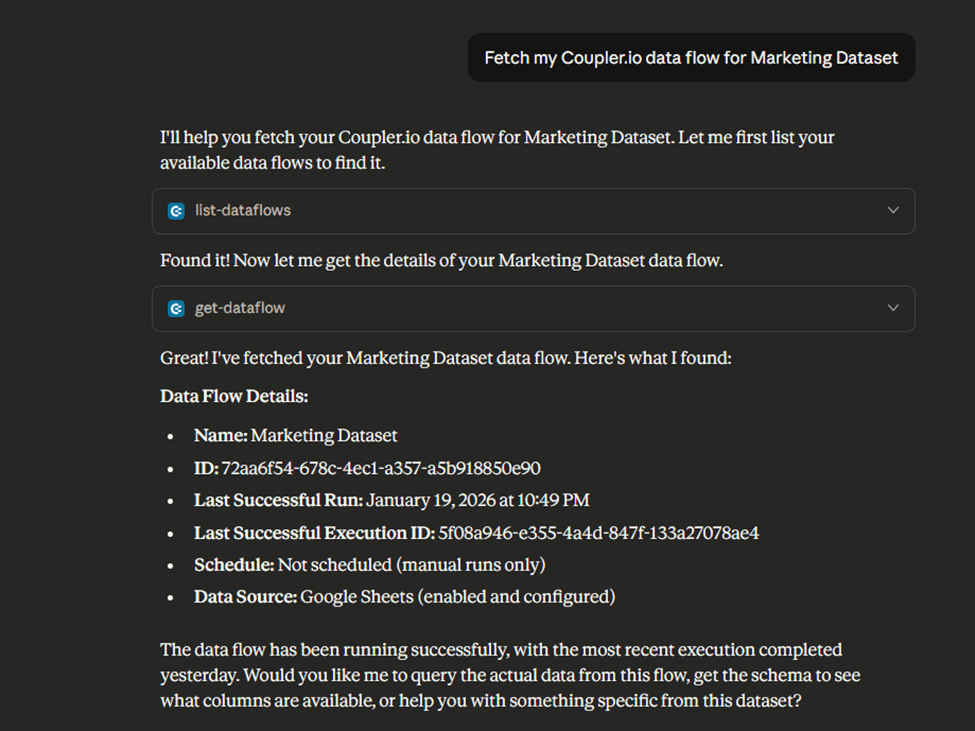
From there, analysis becomes conversational. Users can ask questions like “Which campaigns performed best last month?”, “How does revenue break down by product category?”, or “Where are we seeing the biggest drop-offs?” and follow up in real time.
Behind the scenes, the AI does not calculate anything itself. It translates questions into structured queries, while Coupler.io’s analytical engine handles querying, aggregation, and validation.
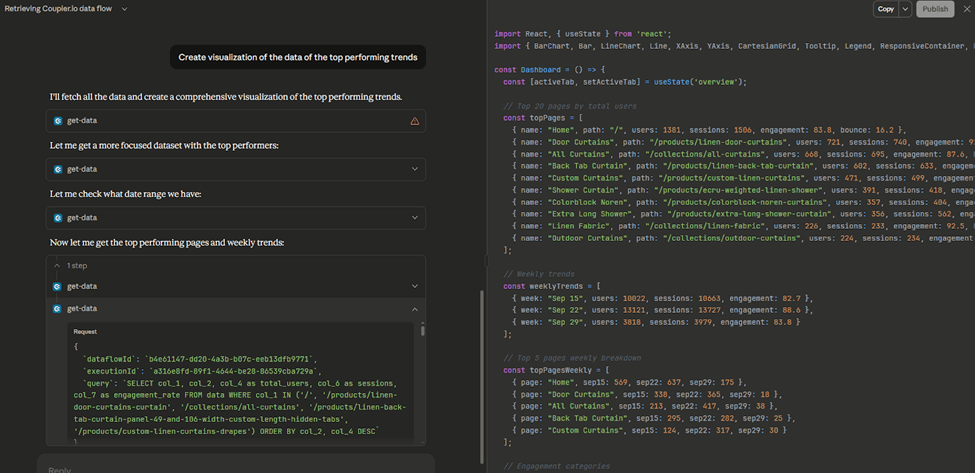
The AI then receives verified results and explains them in plain language. This keeps insights accurate while preserving the flexibility of a conversational workflow.
AI Integrations work best for teams that already rely on ChatGPT or Claude and want their live business data available in the same environment, without learning a new tool or sacrificing data reliability.
Coupler.io provides:
Coupler.io AI Agent
The AI Agent provides a built-in conversational experience directly inside Coupler.io.
Instead of connecting an external AI tool, users can simply click “Ask AI” next to a data flow and start exploring their data immediately. There’s no additional setup and no separate subscription required.

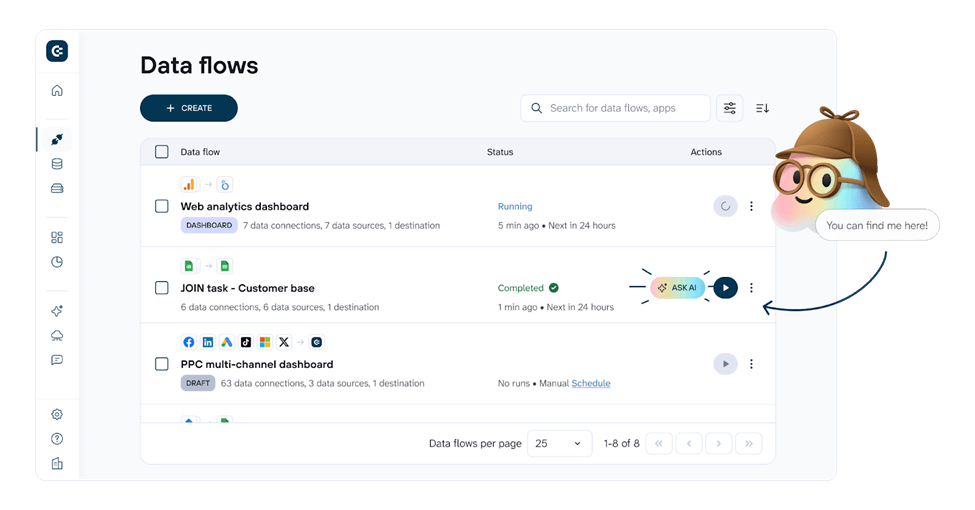
The AI Agent uses the same analytical engine under the hood. However, you don’t need to connect your data flows to external AI tools. Your data may flow to spreadsheets, dashboards, or data warehouses, and you can still chat with your data using AI inside the Coupler.io interface.
In both cases, the principle remains the same: AI interacts only with structured queries and validated results, never raw or sensitive data.
Examples of using AI for data analysis in business
So far, we’ve covered what AI can and cannot do in data analysis, and why reliable results depend on structured data and an analytical layer beneath the AI. The following examples show how this works in practice, demonstrating the conversational flow, non-obvious insights, and concrete business outcomes. All that becomes possible when AI is properly grounded in validated data.
Paid Ads (PPC) analysis with the Coupler.io AI Agent
A performance marketing team manages roughly $50,000 per month across Google Ads, Meta, Microsoft, and LinkedIn. Every week, they need to decide where to reallocate the budget. Traditionally, this means exporting reports from each platform, normalizing metrics, and manually comparing performance, often taking hours and still leaving room for interpretation errors.
With the Coupler.io AI Agent, the team connects their data from Google Ads, Meta Ads, Bing Ads, and LinkedIn into a single data flow and starts the analysis directly inside Coupler.io.
They begin with a broad question:
“Which platforms and campaigns deliver the strongest performance relative to spend?”
The AI Agent runs the necessary queries across all platforms

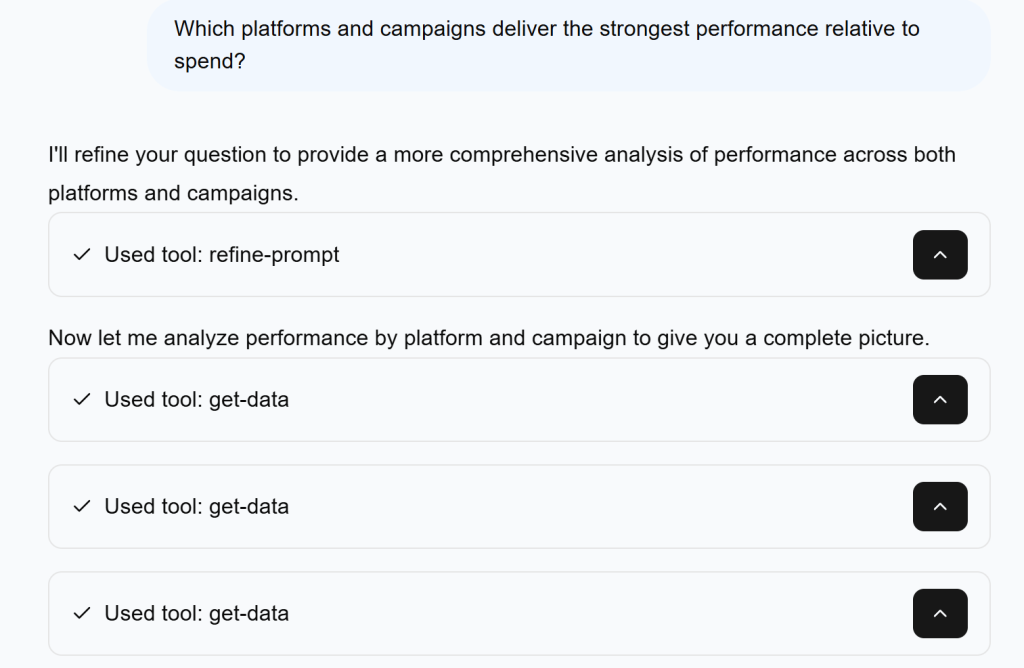
and returns a ranked view of performance:

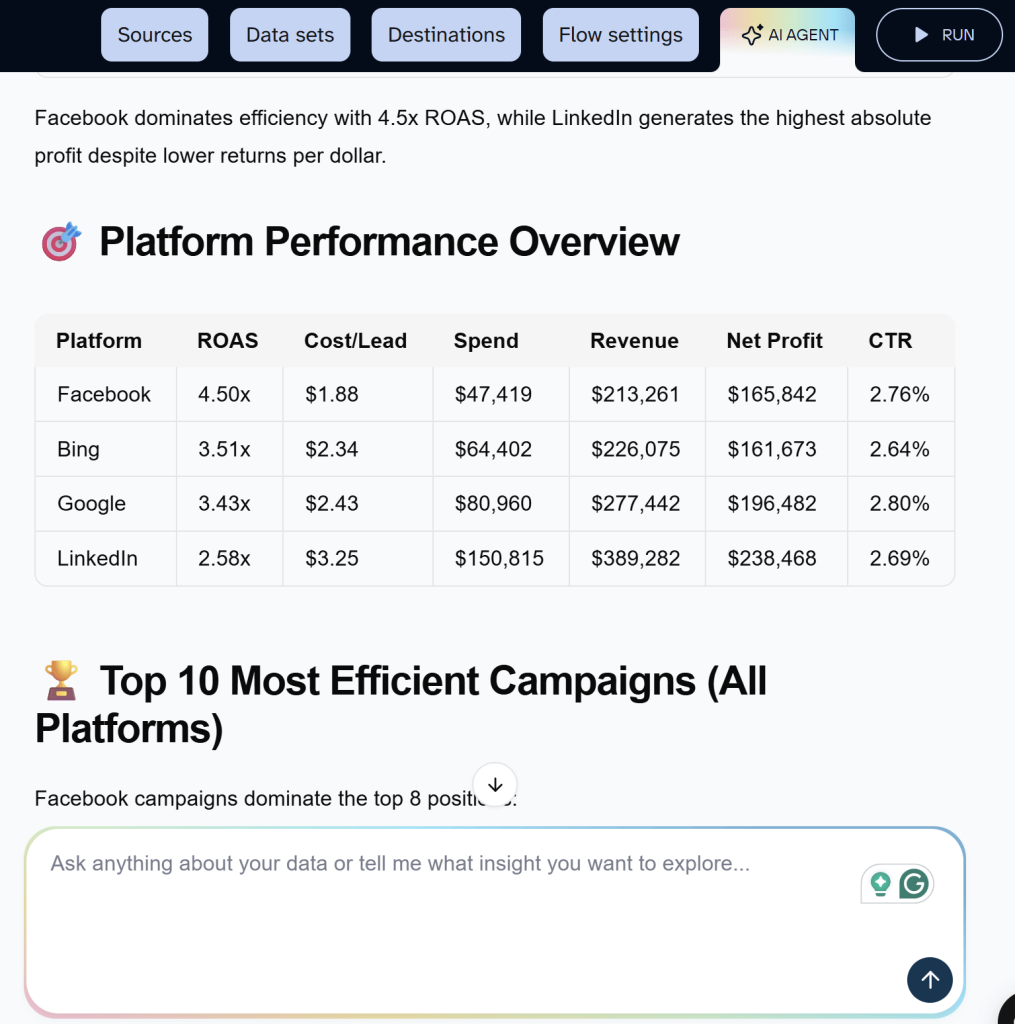
At this point, the insight is yet non-obvious. Then you can ask a follow-up question:
“Based on current performance, where should we reallocate budget to improve overall returns?”
The AI Agent recommends a clear action plan:

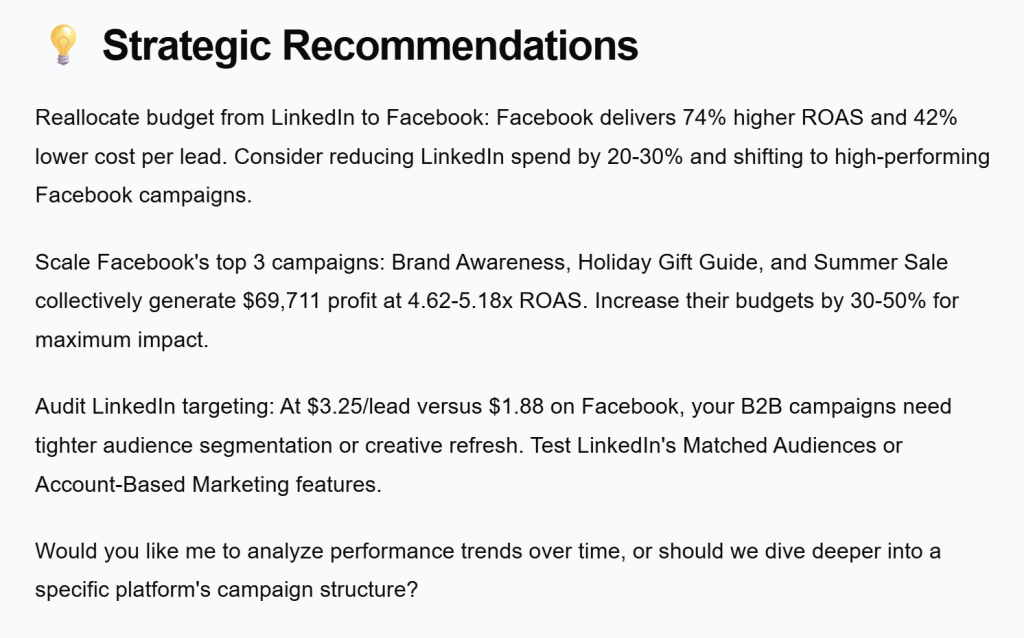
Business outcome
Instead of a static report, the team gets:
- A cross-platform performance comparison
- A quantified efficiency gap between channels
- A concrete budget reallocation strategy they can act on immediately
Because all calculations are executed by Coupler.io’s analytical engine, the numbers are consistent and verifiable. The AI Agent focuses on interpretation and recommendations, not guesswork.
Curious about using AI for analyzing ad campaign performance? Check out how you can use AI for Facebook Ads or a more focused material about ChatGPT for Facebook Ads analysis and optimization.
Google Analytics data analysis with AI integrations (ChatGPT)
Depending on the size of the business, Google Analytics can contain millions of event-level rows, which makes finding the right insights difficult.
When traffic grows, but revenue doesn’t, answering simple questions like where users are dropping off can mean jumping between reports, segments, and custom explorations.
This is the situation a SaaS growth team found themselves in:
- Traffic increasing month over month
- Revenue growth slowing
- No clear answer to where performance was leaking
They needed clarity without digging through dozens of GA views.
After connecting GA4 to Coupler.io and choosing ChatGPT as their AI integration, they started with a simple question:
“Which landing pages get the most traffic but convert the worst, and how does this differ between mobile and desktop?”

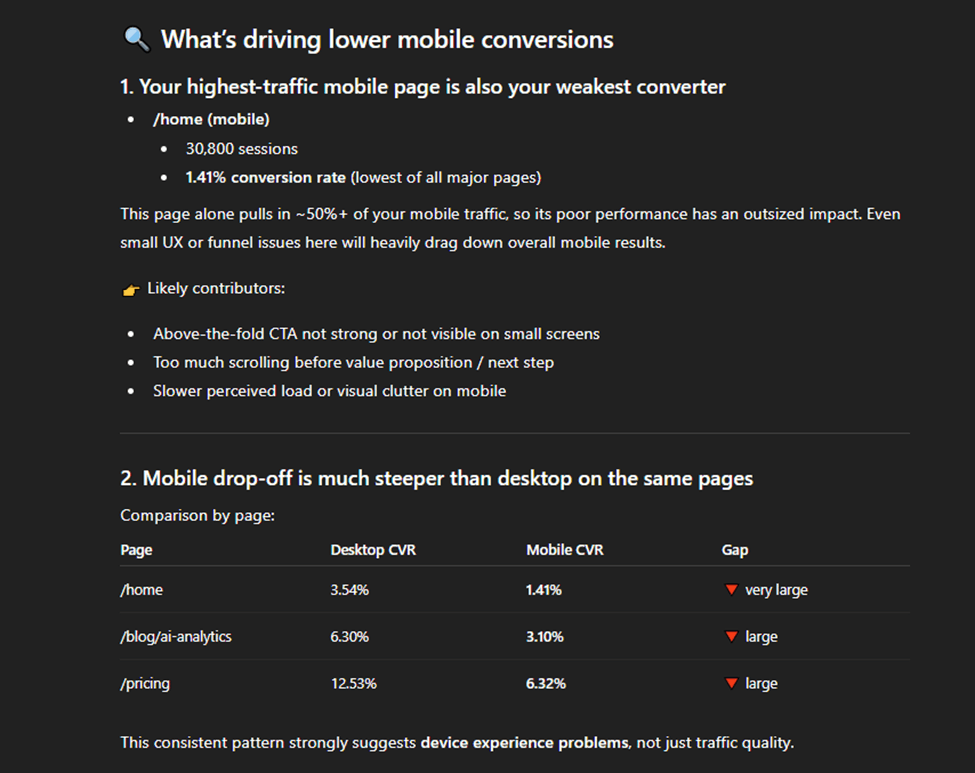
ChatGPT, working with GA data processed by Coupler.io’s analytical engine, aggregated sessions and conversions by landing page and device and calculated conversion rates.
Explore more cases of using ChatGPT for data analytics.
What stood out:
The homepage wasn’t just underperforming but was the single biggest conversion leak across both devices, and the issue was much worse on mobile.
That pattern wasn’t obvious from standard GA dashboards, where growing traffic masked conversion inefficiency.
To decide what to do next, the team followed up with another question:
“What’s likely driving the lower mobile conversion performance, and where should we focus first?”

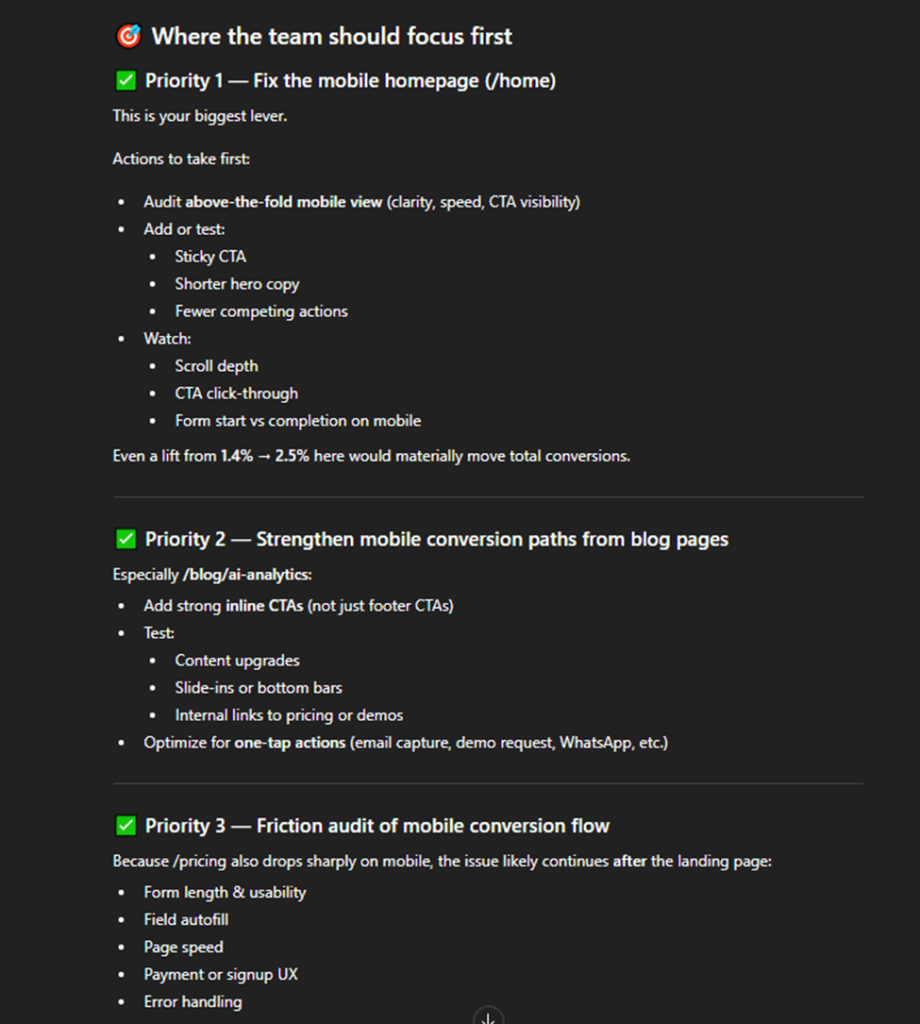
And as you can see in the screenshot above, the team then received a complete plan on how to improve mobile conversion performance and the key areas to focus such as:
- Priority 1 – Fix the mobile homepage
- Priority 2 – Strengthen mobile conversion paths from blog pages
- Priority 3 – Audit the mobile conversion flow
Business outcome:
Instead of exporting data or navigating multiple GA reports, the team moved from:
Question → insight → action in a single conversation.
Anallyze marketing data with AI using Coupler.io
Get started for freeEcommerce data analysis with AI integrations (Claude.ai)
Ecommerce teams usually rely on dashboards to track revenue, orders, and top products. While useful, dashboards are static, they show what is happening, but make it harder to explore why or ask follow-up questions.
Let’s try Claude.ai for data analytics this time. Using Coupler.io with Claude as the AI destination, teams can explore ecommerce data conversationally instead of building new reports.
The team starts by asking:
“Which products generate the most revenue, and what percentage of total sales do the top products account for?”

Claude returns a ranked breakdown of product revenue.
The results show that one product alone drives nearly 40% of total revenue, while the top three products account for over 80% of sales. Lower-priced products generate more orders, but contribute far less to overall revenue.
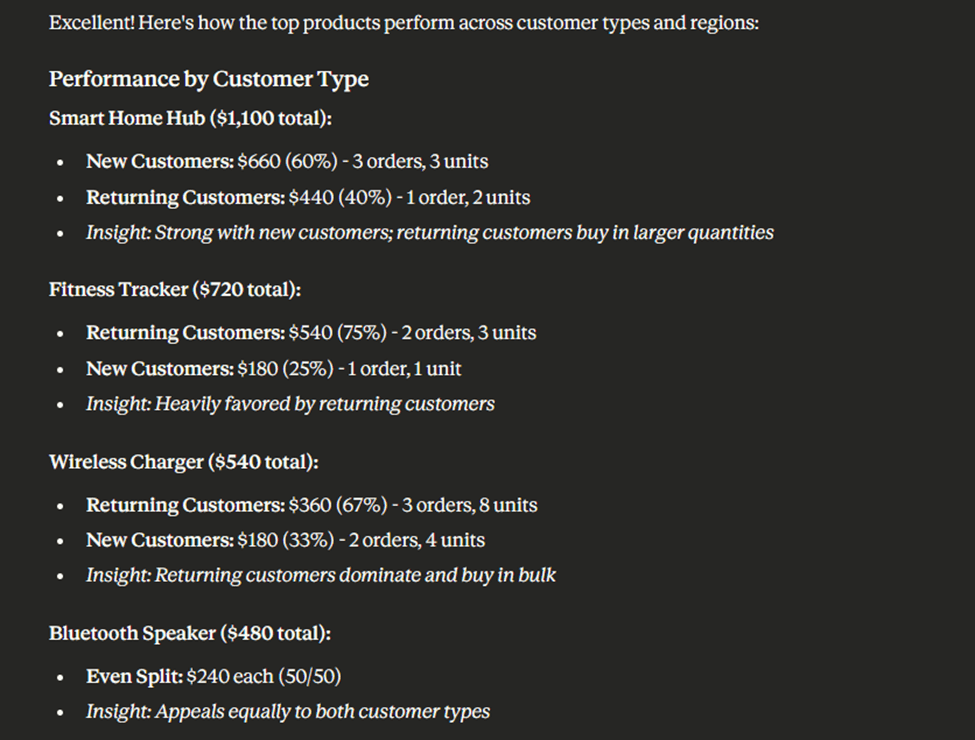
To dig deeper, the team follows up with:
“How do those top products perform across new vs. returning customers and by region?”

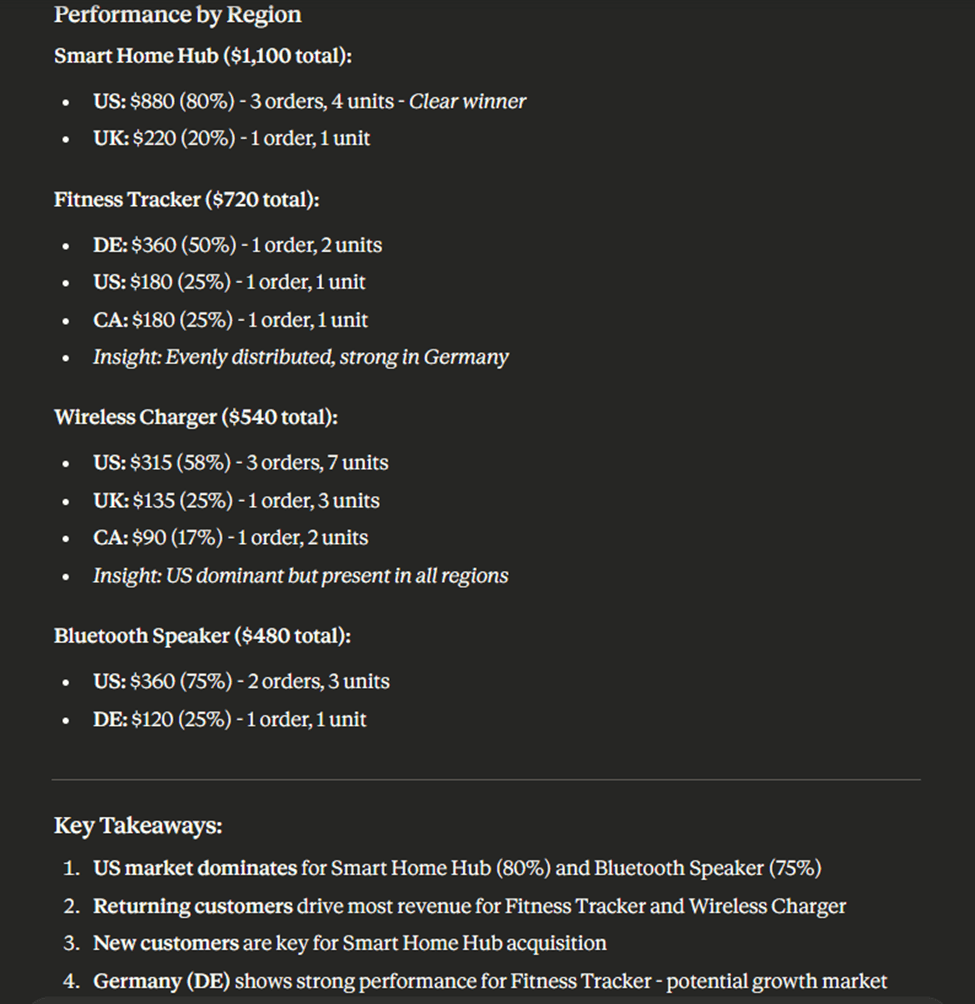
This reveals that high-revenue products depend heavily on the US market, while some mid-tier products perform unusually well in specific regions.
It also becomes clear that the top product relies mostly on new customer acquisition, while accessories perform better with returning customers.
What starts as a simple revenue question quickly turns into a clearer picture of regional dependency and growth opportunity.
Anallyze ecommerce data with AI using Coupler.io
Get started for freeWhat AI tools for data analysis you can use
There’s no shortage of AI tools that claim to support data analysis. In practice, most teams rely on a small set of general-purpose AI models alongside specialized analytics platforms that embed AI into existing BI workflows.
The key difference between these tools is not intelligence, but how they access data, handle calculations, and support follow-up analysis.
General-purpose AI tools (ChatGPT, Claude)
ChatGPT and Claude are the most commonly used AI tools for business data analysis. They are flexible, conversational, and well-suited for exploratory questions such as explaining metrics, comparing segments, or summarizing trends.
- ChatGPT is often preferred for structured reasoning, step-by-step explanations, and working with smaller to medium-sized datasets. It’s familiar to most teams and integrates easily into existing workflows.
- Claude is particularly strong when working with large contexts or long analytical conversations, making it useful for deeper exploratory analysis across broader datasets.
On their own, however, these tools do not perform calculations reliably and cannot safely work with raw datasets. They require a data layer that handles querying, aggregation, and validation before results are passed to the model.
When paired with Coupler.io, general-purpose AI becomes far more effective: the AI focuses on interpretation and reasoning, while the analytics engine ensures accuracy.
Specialized analytics and BI tools with AI features
Many analytics platforms now include AI-powered features. Examples include anomaly detection in Google Analytics, natural-language queries in Looker, or AI assistants in tools like Tableau, Domo, or ThoughtSpot.

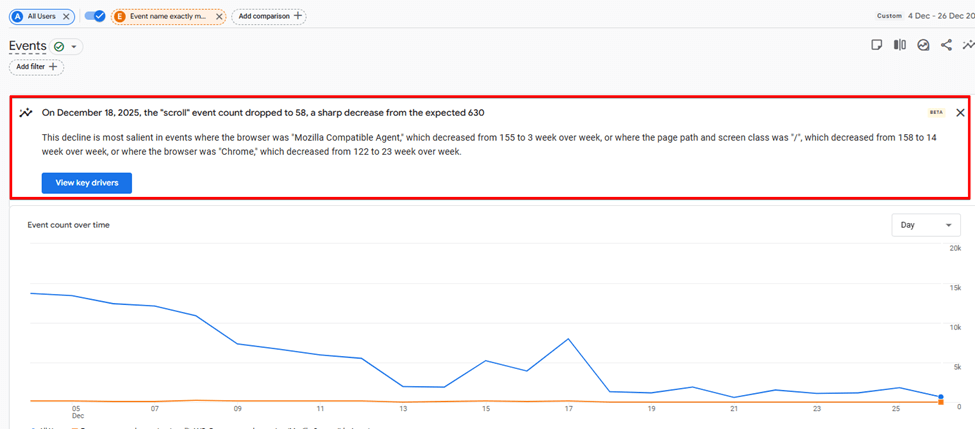
These tools work well for:
- Predefined use cases
- Monitoring known KPIs
- Structured, governed reporting
However, they are often less flexible when teams want to:
- Ask unstructured or ad-hoc questions
- Explore data beyond predefined dashboards
- Combine data across multiple platforms quickly
As a result, they tend to complement rather than replace conversational AI workflows.
Which approach works best?
For most teams, the practical setup is not choosing one AI tool, but combining:
- A general-purpose AI interface (ChatGPT or Claude) for exploration and explanation
- A data integration and analytics layer that ensures calculations and results are correct
In this setup, Coupler.io acts as the integration and analytics layer: it connects to your data sources, executes queries and calculations, and returns results that AI tools like ChatGPT or Claude can safely interpret.
This approach allows teams to move quickly, ask follow-up questions freely, and still trust the answers they receive.
Which is the best generative AI for data analysis?
When it comes to using AI for data analysis, the question isn’t which model is “best.” It’s whether AI is being used in the right role.
Tools like ChatGPT and Claude can both support meaningful analysis, summarizing results, explaining trends, and helping teams explore data through natural language.
Some teams prefer ChatGPT for concise, structured answers; others lean toward Claude for more exploratory or long-form analysis. Those differences matter, but they’re secondary.
What matters more is how AI is applied within the analytics workflow.
AI performs well when it interprets results that have already been computed, validated, and structured. It struggles when it’s asked to work directly with raw data, perform calculations, or infer business context on its own.
That’s why effective AI-powered analytics requires a clear separation of responsibilities: systems that handle data processing, and AI that focuses on insight and explanation.
This is where Coupler.io comes in. By sitting between your data sources and AI models, Coupler.io ensures that AI works with accurate, up-to-date results, whether you access it through external AI tools using AI Integrations or through the built-in AI Agent. The experience may differ, but the foundation remains the same.
In practice, using AI for data analysis is about building a setup where AI can safely accelerate insight, reduce manual work, and help teams ask better questions, without compromising accuracy, governance, or trust.
That’s when AI becomes genuinely useful in analytics: not as a replacement for analysts, but as a reliable partner in everyday decision-making.