Porter Metrics pricing looks simple: $15 a month for one data source account, or $12.50 with annual billing. But every account gets repriced as you add more, and at a few points, one more account cuts your total bill.
Then there’s Automation, Porter’s AI product, billed in credits. Here’s how Reporting is priced and what an agency pays as its client list grows. You’ll also see which apps Porter leaves out, where Coupler.io fits, and what Automation adds to the bill.
TL;DR: the key numbers
- Every connector and unlimited users come with your first paid account, and the rate falls to $2 per account at 200+
- Each price band reprices every account, so 40 accounts cost less than 39
- For an agency with three accounts per client, that’s $40 per client at one client and $9 at 24 to 33 (monthly billing)
- Automation is a separate credit-based plan from $28 a month, plus your own Claude or ChatGPT subscription
- Porter doesn’t connect sales and finance tools like Salesforce, Stripe or QuickBooks. Coupler.io does, from $24 a month
Porter Metrics pricing plans: one price ladder for every account
Porter’s main product, Reporting, pulls data from your marketing accounts into Data Studio, Google Sheets, Power BI and AI tools like Claude. It has no named tiers, just one sliding scale: the more accounts you connect, the less each one costs, and the new rate applies to all of them, not only the latest additions.
Porter bills whatever a platform calls an account: each Meta ad account, GA4 property, Shopify store or Facebook page is one. A few exceptions apply:
- A Google Ads manager account (MCC) is free, but each ad account under it is billed
- Every 10 Google Business Profile locations bill as one
- Users, reports and destinations add nothing to the bill
One rule catches agencies out: An account counts once it’s connected and returns data, whether or not it spent anything that month. A paused client keeps costing money until you disconnect it.
Here’s what those accounts cost each month, from Porter’s pricing page:
| Data source accounts | Monthly billing |
|---|---|
| 1 | $15 |
| 2 | $30 total |
| 3 | $39.99 total |
| 4 | $40 total |
| 5–12 | $8 per account |
| 13–20 | $100 total, flat |
| 21–39 | $5 per account |
| 40–49 | $4.50 per account |
| 50–69 | $4 per account |
| 70–99 | $3 per account |
| 100–199 | $2.70 to $2.10 per account, in four steps |
| 200+ | $2 per account |
Checked October 2026
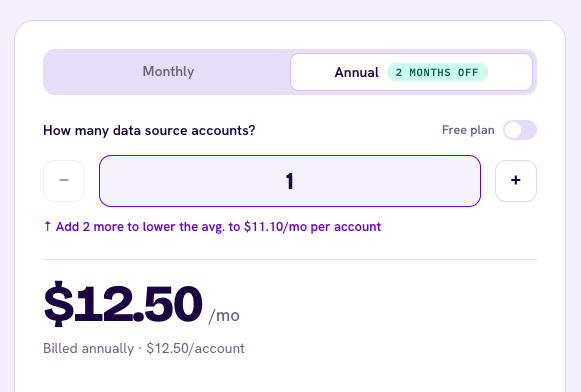
Paying annually takes about 17% off every band (one account drops to $12.50), but you pay for the year upfront. Upgrades apply right away, while downgrades wait for renewal, so clients you drop mid-year stay on an annual bill. Porter refunds within 14 days of purchase.

Whether you pay for one account or 200, you get the same Reporting features.
Every connector, unlimited users, data blending and custom fields come with your first paid account, plus white-labeled dashboards without the Porter badge. History goes back as far as each platform’s API allows. Paid plans can also export to Google Sheets or BigQuery, while a BigQuery warehouse built and run by Porter’s team is a separate service, quoted on a call.
Why 40 accounts can cost less than 39
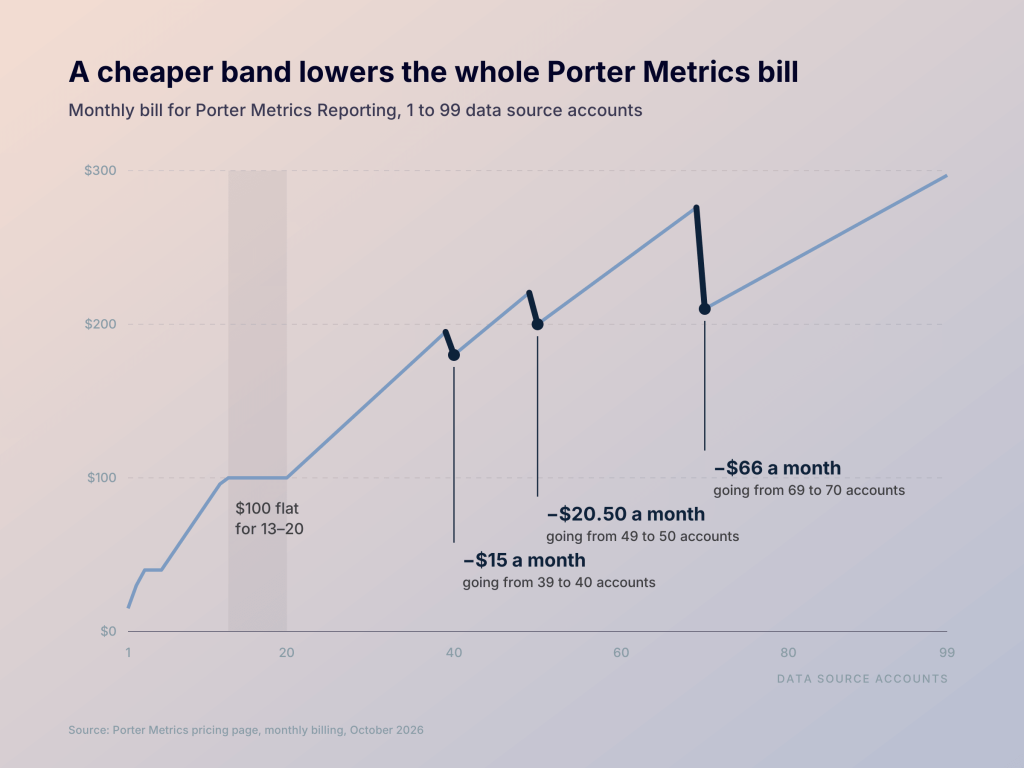
When you cross into a cheaper band, all your accounts get the lower rate at once. So one extra account can lower your whole bill:
| Accounts | Monthly bill | One account more | Monthly bill |
|---|---|---|---|
| 4 | $40 | 5 | $40 |
| 39 | $195 | 40 | $180 |
| 49 | $220.50 | 50 | $200 |
| 69 | $276 | 70 | $210 |
The flat band is a related quirk. Anywhere from 13 to 20 accounts costs $100, so accounts 14 to 20 add nothing to your bill.
This cuts both ways. Sitting at 40 accounts, disconnecting a paused client raises your bill by $15. Check which band you’re in before you add or remove an account.

What’s left on the free plan when your trial ends
New users get a 14-day free trial with full access. Then the account moves to the free forever plan, which has no time limit:
- Unlimited data source accounts
- Up to 30-day history in reports, and 15 days in AI chats
- A Porter badge on dashboards, and no BigQuery as a destination or for exports
- 100 Automation credits a month
The free plan’s real limit is history, not accounts. With 30 days of data at most, you can build a monthly report, but you can’t compare this quarter with the last one.
How much Porter costs as your account list grows
Here’s what four common setups pay for Reporting on monthly billing.
- An in-house marketer with Meta Ads, Google Ads, GA4, Search Console and Instagram (5 accounts) pays $40 a month
- A freelancer with 3 clients at 3 accounts each (9 accounts) pays $72
- A small agency with 8 clients (24 accounts) pays $120
- A growing agency with 24 clients (72 accounts) pays $216
One subscription covers every client, so for agencies the key figure is the cost per client. With three connected accounts per client (Meta Ads, Google Ads and GA4), here’s how it falls as you add clients:
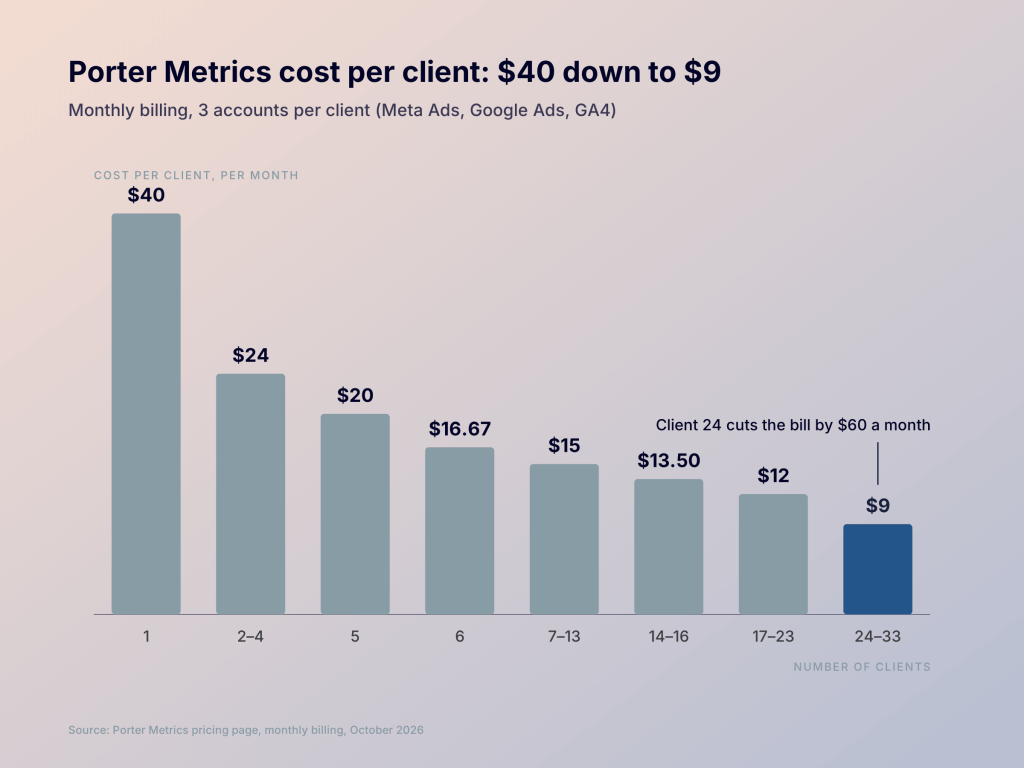
Your cost per client falls fast as you grow, from $40 with one client to $9 at 24 to 33 clients. But the bill doesn’t always follow your client list. Winning client 24 cuts the bill by $60 a month, and losing that client adds the $60 back.
Tip: Price your retainers on the band you expect to sit in for most of the year. If your client count often moves around a band edge, I’d pay monthly so you can adjust without waiting for renewal.
What Porter’s connectors cover, and what they leave out
Porter lists 31 connectors on its site, focused on marketing reporting. Before you work out your bill, check that every app in your report is on the list:
| Area | ✅ Integrations offered by Porter | ❌ Popular business apps not covered by Porter |
|---|---|---|
| Paid ads | Meta, Google, TikTok Ads, LinkedIn Ads, Microsoft, Pinterest, Reddit, Snapchat, X, Apple, DV360, StackAdapt | Amazon Ads (Porter covers Amazon Seller only) |
| Organic social | Facebook, Instagram, TikTok and LinkedIn pages, plus public Facebook and Instagram data | YouTube channel analytics (YouTube ads come through Google Ads) |
| Analytics and SEO | GA4, Google Search Console, Google Business Profile | Adobe Analytics, Mixpanel |
| E-commerce | Shopify, Amazon Seller, VTEX, Triple Whale, Northbeam | WooCommerce |
| CRM and email | HubSpot, Klaviyo, Mailchimp, ActiveCampaign | Salesforce, Pipedrive, Zoho CRM |
| Payments and accounting | None | Stripe, QuickBooks, Xero |
| Spreadsheets | Google Sheets | Excel, Airtable |
Google Sheets works as a catch-all for anything else, but a sheet you update by hand brings the manual work back. Coupler.io covers those gaps, from Salesforce to QuickBooks, plus tools like Zendesk, Jira, Airtable and NetSuite, among 400+ apps.


See how Coupler.io handles your ads, CRM, and accounting data
Book a demoHow Automation completes the Porter Metrics pricing model
With a Reporting plan, you can already ask Claude or ChatGPT about your marketing data in plain English. Automation lets an AI act on it. Connect it to Claude, ChatGPT, Gemini, or n8n, and the AI can launch a campaign or schedule a post for you. It asks for approval before it changes anything.
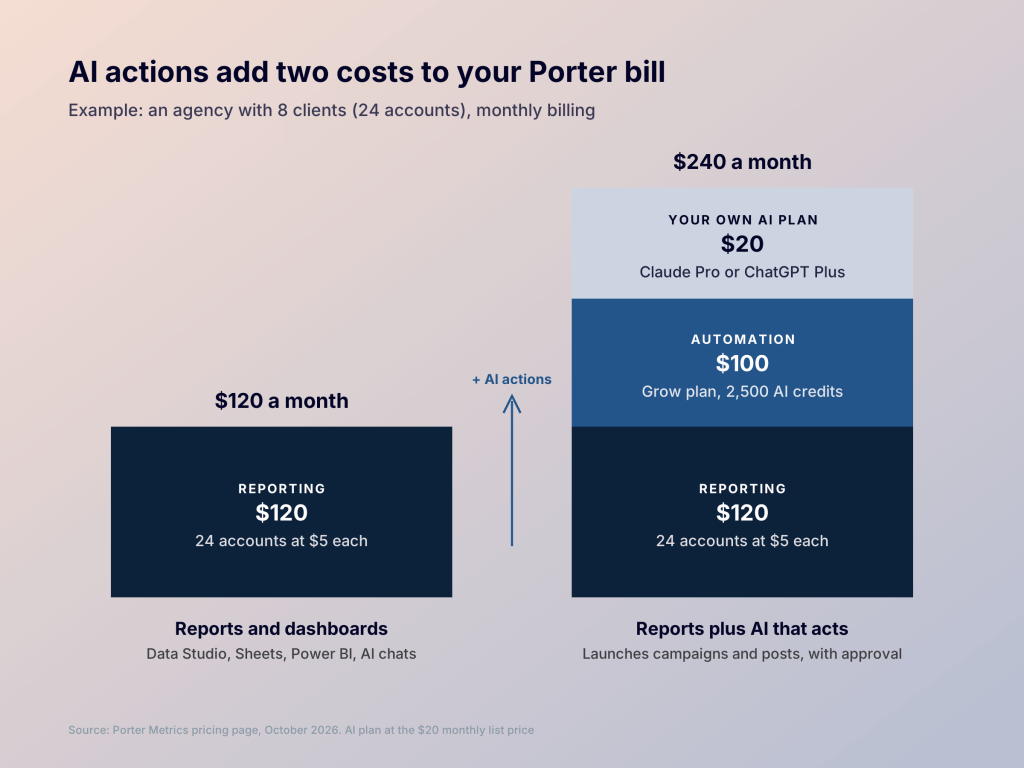
Automation is billed in AI credits, separately from Reporting, across four plans:
| Plan | Monthly billing | Annual billing (per month) | AI credits per month | What the plan adds |
|---|---|---|---|---|
| Free | $0 | $0 | 100 | Ad and social management, research |
| Build | $28 | $23 | 500 | Extra credits on demand |
| Grow | $100 | $83 | 2,500 | Image, video and audio generation |
| Scale | $250 | $208 | 10,000 | Advanced skills, workflows and agents |
Credits reset every month and don’t roll over. When they run out, automations simply pause, with no overage fees. The harder part is estimating use: one request can trigger several billable actions, and launching a single ad from scratch takes about five credits.

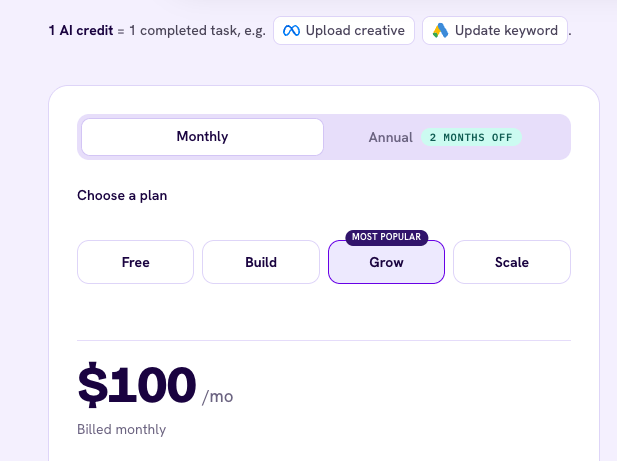
Two costs sit outside the plan: your own paid Claude or ChatGPT subscription, and Porter’s AI audits, which only come with subscriptions from $83 a month. For an agency with 8 clients, adding Grow takes the monthly bill from $120 to $220.
Coupler.io: ads, CRM and finance data in one report
Take an online store that wants profit next to ad spend. Porter brings in the Shopify orders and the Meta and Google costs, but the QuickBooks expenses stay a monthly export. Coupler.io puts all three in one report.
Coupler.io is a reporting automation platform for business teams. It collects data from 400+ apps, like Google Ads, Meta Ads, HubSpot, Shopify and QuickBooks, blends it, and keeps reports in Google Sheets, Data Studio, Power BI, Claude, and Google BigQuery updated automatically.
In practice, that means:
- The full picture in one place: orders, ad spend and costs together, refreshed on a schedule with no manual exports.
- Every source on every plan: pricing sets your accounts, destinations and refresh speed, not which apps you can use.
- One setup per client for agencies: each report goes to the tool that client already uses, from Data Studio to Excel or Claude.
- Coupler AI included: it helps set up your data flows and answers questions like which campaign made the most profit last month. It costs nothing extra, and you can see how each answer was worked out.
Here’s what each plan includes, from Starter at 3 accounts to Pro at 50:
| Plan | Price per month (annual/monthly billing) | Accounts | Destinations | Data volume | Refresh |
|---|---|---|---|---|---|
| Starter | $24 / $32 | 3 | 1 | 5,000 rows per run | Daily |
| Active | $99 / $132 | 15 | 3 | Unlimited | Daily |
| Pro | $199 / $259 | 50 | Unlimited | Unlimited | Hourly |
| Custom | Custom | Custom | Custom | Unlimited | Every 15 minutes |
Extra accounts cost $4.49 each on annual billing, or $5.99 monthly. Agencies past 50 accounts move to the Agency & Enterprise plans, priced through sales. These add unlimited client workspaces, separate billing for each client organization, and a personal account manager.
Side by side, the difference is scope rather than price per account:
| What you need | Porter Metrics | Coupler.io |
|---|---|---|
| Apps to report on | Ads, social, analytics, e-commerce, HubSpot and email tools (30+) | Google Ads, HubSpot, QuickBooks, Stripe and 400+ other apps, including accounting and CRM |
| Blending | Matches dates, campaigns and spend across marketing sources | Blends ads, CRM, accounting and e-commerce data in one dataset |
| Keeping reports updated | Queries source APIs directly, with storage as an option | Scheduled refresh with stored history, from daily to every 15 minutes |
| Destinations | Data Studio, Google Sheets, Power BI, AI tools; BigQuery exports on paid plans | Also Excel, Snowflake, Redshift, PostgreSQL, Tableau and more |
| AI | Chat with your data on every plan; a separate Automation product edits ad accounts, paid in credits | Coupler AI on every paid plan; works only with the data you share |
| How the bill grows | Per account on a sliding scale, plus credits for Automation | By plan, plus $4.49 per extra account |
| Dashboard templates | Data Studio and Google Sheets templates | 250+ dashboard templates for Data Studio, Google Sheets, Power BI, and more |
For a feature-by-feature breakdown of the two, see Coupler.io vs Porter Metrics. For wider options, see Porter Metrics alternatives.
Get self-updating client reports with Coupler.io
Book a demoPorter Metrics or Coupler.io for your reporting setup
Both tools bring your marketing data into reports. The choice comes down to what else those reports need to show.
Choose Porter when:
- Your reports are ad-only dashboards in Data Studio or Sheets, and you want setup kept simple
- You run an agency with lots of clients and want unlimited users and white-labeled dashboards, with the lower bands keeping the cost per client down
Choose Coupler.io when:
- Someone will ask whether the ad spend paid off, and the answer needs sales or finance data
- You’d rather describe the report than build it: tell Coupler AI what you need, and it helps set up the data flows behind it
- You want one set of numbers across tools: one data flow feeds Sheets, dashboards and Claude, so every figure matches
Not sure yet? List every number your next report needs and where it comes from. If any sit outside Porter’s 31 connectors, start with Coupler.io’s 7-day free trial. Already running reports in Porter? Migrate from Porter Metrics covers rebuilding them without losing your history.
FAQ
Which Porter prices online are out of date?
Some comparison sites list a $49 “Professional” plan, a flat $4 per account, or paid data blending. None of these are on Porter’s pricing page as of October 2026.
Is Porter cheaper than Supermetrics, Funnel.io or Adverity?
For small setups, usually. Supermetrics pricing starts at $44 a month (annual billing) for 3 sources, and Porter comes in lower up to about six accounts. The other two bill on a different axis. Funnel charges on data volume rather than accounts (coupler.io vs funnel.io), and Adverity pricing is quote-only, aimed at larger data teams.
Do I need a paid Claude or ChatGPT plan to chat with Porter data?
Not for Claude: Porter’s connector works on its free tier. ChatGPT needs a paid plan (Plus or higher) to add connectors, and Porter charges nothing extra for either.
How do users rate Porter’s value for money?
Fairly well. Porter scores 4.0 out of 5 for value for money on Capterra and 4.6 overall on G2, where users praise its support. The main complaint is connections that drop and need resetting.