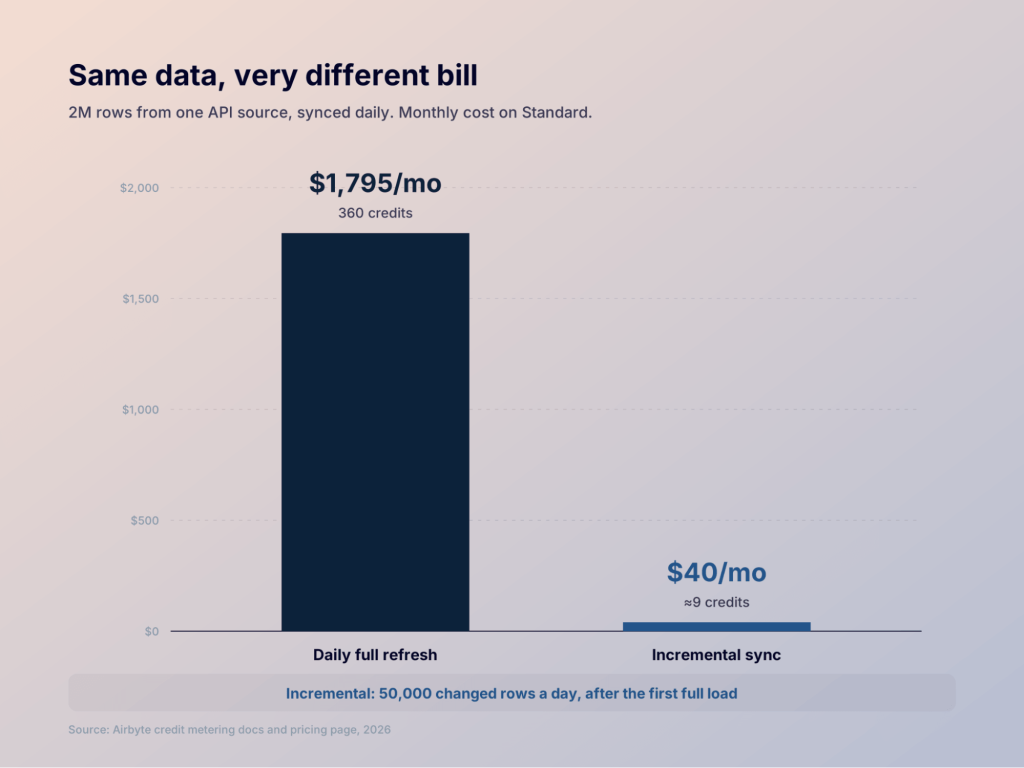
Two teams sync the same 2-million-row API source on Airbyte’s Standard plan every day. One pays $1,795 a month, and the other pays $40. The gap comes down to sync mode, because Standard and Plus bill for the data you move. Pro and Enterprise Flex price the same work by pipeline capacity instead. Then there’s Core, the open-source version. It costs nothing to download, but your team runs the servers.
So Airbyte pricing is really a question about architecture. Who runs the pipelines, and should your bill follow data volume or capacity?

I’ll walk through each cost model and run real credit math with Airbyte’s own metering rates. Maybe you mainly need business data in dashboards or AI tools. If so, I’ll also show where Coupler.io, a data integration and AI analytics platform, can be the simpler route.
TL;DR: What will Airbyte cost you?
- The $20 plan runs out fast. Standard includes 5 credits, which is about 830,000 changed API rows. Each extra credit costs $5.
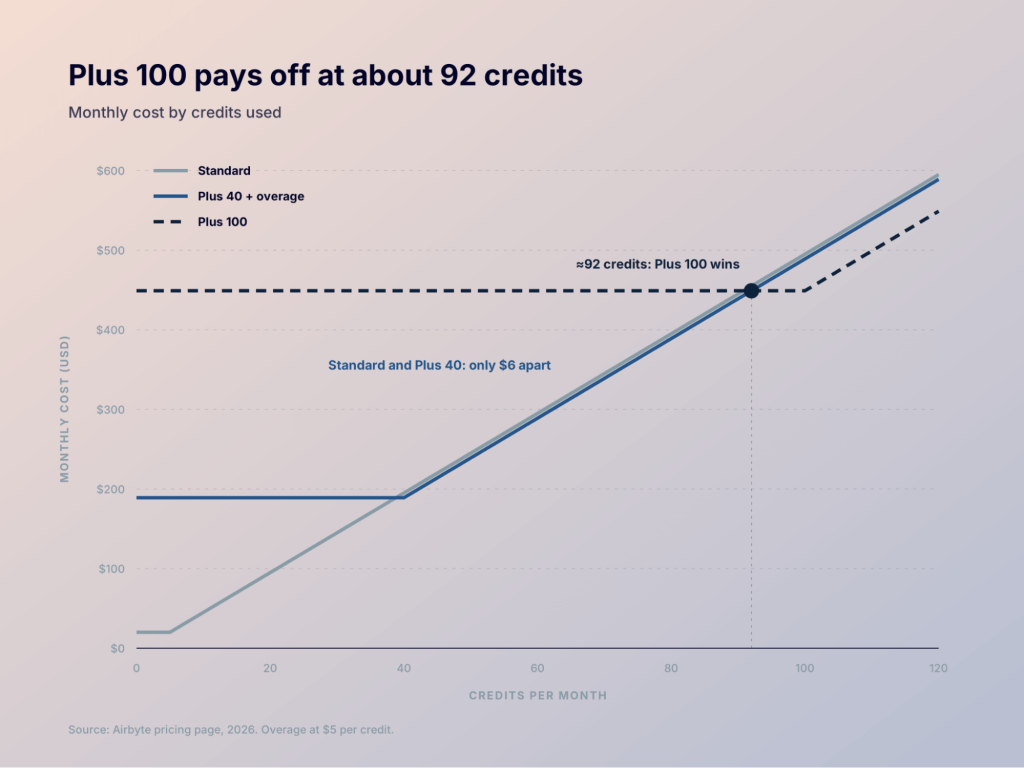
- Plus saves less than you’d think. At 40 credits or more, the $189 package is only $6 a month cheaper than Standard. Real savings start with the 100-credit package, at around 92 credits a month.
- Sync mode can matter more than your plan. A 2M-row API source synced daily costs $1,795 a month on full refresh. On incremental, with 50,000 changed rows a day, it’s about $40.
- Enterprise has no price tag. Pro and Enterprise Flex bill for capacity in Data Workers, and only sales can quote it.
- Free Core still costs you. The software is free to use, but you pay for the servers and the engineers who keep it running.
- Coupler.io shows its prices upfront. It bills by connected accounts and publishes prices for every plan up to Pro. Paid plans start at $24 a month, billed annually.
Airbyte cloud pricing vs self-hosted: choose the cost model first
Before you compare plans, decide who should run the pipelines. That choice sets how your bill grows.
| How the software is priced | Infrastructure | Operations | Best for | |
|---|---|---|---|---|
| Standard | Pay as you go, credits by volume | Included | Airbyte runs it | Small or spiky workloads |
| Plus | Fixed monthly credit package | Included | Airbyte runs it | Steady workloads above about 40 credits |
| Pro / Enterprise Flex | Capacity, measured in Data Workers | Included (Pro) or in your own boundary (Flex) | Airbyte, or shared on hybrid setups | Large scale and regulated data |
| Core | Open source, no license fee | You pay for it | Your team runs it | Engineering teams that want full control |
With Airbyte pricing self-hosted, you get no invoice from Airbyte. You still pay for compute and storage, plus the people who keep it running. I’ll cost that out further down.
The Airbyte pricing model changes at enterprise scale
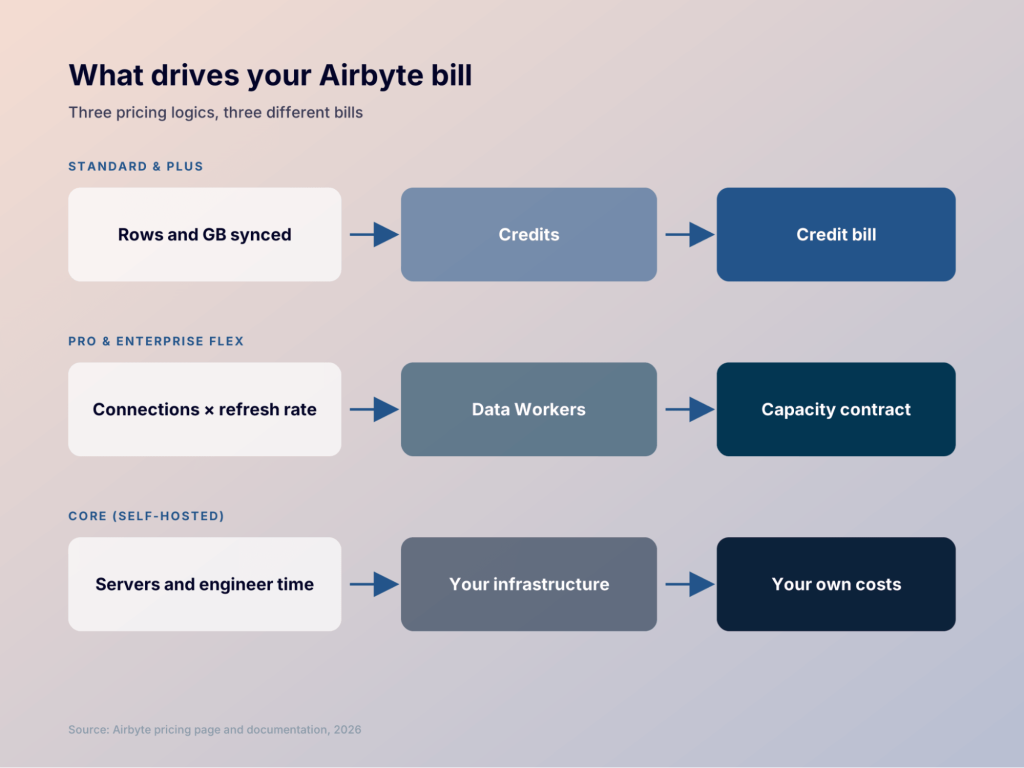
Airbyte runs two pricing logics side by side.
Standard and Plus use credits. Airbyte describes a credit as the unit that pays “for Airbyte resources when you run a sync.” Airbyte Cloud pricing credits are metered by source type. So your bill moves with the rows and gigabytes you sync each month.
Pro and Enterprise Flex use capacity. Here, Airbyte capacity-based pricing replaces credits with Data Workers. A Data Worker is a unit of processing capacity. Airbyte says each one typically runs about three syncs at once.
Why the split? Airbyte explained it when it launched capacity pricing in February 2025. Its blog says volume-based pricing “is unpredictable, fluctuates month to month.” It adds that “a sudden spike in upstream data volume could drive up costs.” With capacity, the company says customers “pay for processing capacity and not for fluctuating data usage.”
That logic makes sense for big teams. A noisy log table can outweigh a small, high-value connector on a volume bill. On a capacity bill, both just need a slot to run.
If you’re small, Airbyte pricing credits are the easier start. You pay only for what moves. The trade-off shows up as volume grows.


Price your data by accounts, not rows, with Coupler.io
Book a demoHow many credits does a managed Airbyte workload use?
Airbyte’s docs list the metering rates for Standard and Plus:
| Source type | Credits | Cost at $5 per credit |
|---|---|---|
| APIs (Salesforce, HubSpot, Stripe, and similar) | 6 per million rows | $30 per million rows |
| Databases | 4 per GB | $20 per GB |
| Files | 4 per GB | $20 per GB |
| Custom sources | 6 per million rows | $30 per million rows |
Two details change the math a lot.
Incremental vs full refresh. On incremental syncs, only new or changed API rows count. A full refresh charges for every row, every time.
Database GB isn’t your table size. Airbyte meters the data it observes during the sync. Its docs warn that serialized data is often larger than the raw data in your database.
This also answers the Airbyte Cloud pricing connectors question. On Standard and Plus, a connector affects your bill through its source type. API sources are metered by rows, while database and file sources are metered by GB. Enterprise connectors are a separate story. The pricing table lists them as an add-on on the higher tiers.
Four workloads, priced on Standard and Plus
On Standard, your monthly cost is $20 plus $5 for each credit above 5. On Plus, you pick a package and pay $5 per credit in overage. I’ve picked the cheapest Plus option for each case.
| Workload | Credits per month | Standard | Plus (cheapest option) |
|---|---|---|---|
| CRM and billing APIs, 600,000 changed rows | 3.6 | $20 | Not worth it |
| 5M API rows plus 3 GB from Postgres | 42 | $205 | $199 (40 credits + 2 overage) |
| Airbyte’s calculator example: 6.64M API rows plus 10 GB | About 80 | $395 | $389 (40 credits + 40 overage) |
| One 2M-row table on daily full refresh | 360 | $1,795 | $1,549 (250 credits + 110 overage) |
Look at the gap between Standard and the 40-credit Plus package. Above 40 credits, it’s only $6 a month. The real discount sits in the larger packages:
- 100 credits for $449 works out to $4.49 per credit
- 250 credits for $999 comes to $4.00 per credit
- 500 credits for $1,799 drops to $3.60 per credit
- 2,000 credits for $4,999 hits $2.50 per credit
Airbyte’s FAQ says Plus “will typically be more affordable than Standard” from 40 credits a month. By my math, the 100-credit package only beats the 40-credit plan with overage at around 92 credits. Below that, I’d pick Plus for its features (single sign-on and 15-minute syncs) more than for savings.
The last row is the warning sign. Switch that same table to incremental sync with 50,000 changed rows a day, and it drops to about 9 credits a month. Sync mode can matter more than plan choice.
If you go over, Airbyte doesn’t pause your syncs. It bills the extra usage in arrears. Once overage in a billing period passes $10,000, it charges your saved card right away.
Airbyte pricing plans: Standard, Plus, Pro, and Enterprise Flex
Now that both models are clear, here’s the plan reference. Every plan lists 700+ connectors.
| Standard | Plus | Pro | Enterprise Flex | |
|---|---|---|---|---|
| Price | From $20/month | From $189/month | Custom | Custom |
| Pricing model | Credits, pay as you go | Fixed credit package | Capacity (Data Workers) | Capacity (Data Workers) |
| Fastest sync | 1 hour | 15 minutes | 5 minutes | 5 minutes |
| Workspaces | Not listed | 2 | Multiple | Multiple |
| SSO / RBAC | No | SSO | SSO and RBAC | SSO and RBAC |
| Mappings | Not listed | Field renaming | Custom mappings | Custom mappings |
| Support | Portal, no SLA, 7am–7pm EST | 24-hour response SLA | 12h critical, 24h general | 12h critical, 24h general |
| Deployment | Airbyte cloud | Airbyte cloud | Airbyte cloud | Hybrid, inside your own boundary |
You can test it all first. The 14-day trial includes 400 credits, which Airbyte values at $2,000 of usage. The trial starts after your first successful sync and ends when either limit runs out.
Pick your plan in one call, not after a 14-day credit test
Book a demoAirbyte cloud pricing and features that matter beyond the bill
This is where many teams get surprised. Your usage might fit Standard just fine, but a feature requirement pushes you up anyway. Think of these as the feature floor when you weigh Airbyte cloud pricing and features.
Sync frequency. Standard tops out at hourly. Need 15 minutes? That’s Plus. Five minutes means Pro.
SSO and RBAC. Your security team may require SSO, which starts on Plus. Role-based access control starts on Pro.
Workspaces. Plus gives you 2. Separate workspaces for many teams or clients point to Pro.
Data shaping. Plus covers field renaming. Pro adds custom mappings, with row filtering plus hashing and encryption.
Networking and regions. AWS PrivateLink shows up as an add-on in the plan table. Multiple data regions come with Pro, and Enterprise Flex adds on-premises and multi-region deployment.
Support SLA. Standard has no SLA. If a broken pipeline blocks finance close, that alone may justify Plus.
Enterprise connectors. These are listed as an add-on, so budget for them separately.
I’d list your must-haves before you open the calculator. If SSO plus 15-minute syncs are non-negotiable, Plus is your floor. If you need RBAC or hashing, Pro is the floor, whatever your volume.
Airbyte enterprise edition features pricing and security
Pro and Enterprise Flex are Airbyte’s enterprise products. They share the capacity model and premium support with a 12-hour critical response. An enterprise support add-on cuts that to 6 hours.
Pro runs in Airbyte’s managed cloud. It covers SSO, RBAC, multiple workspaces, custom mappings, and multiple data regions.
Enterprise Flex keeps all of that and moves the data plane into your environment. Airbyte calls it “sovereign data movement inside your own boundary.” Airbyte still manages the control plane, so you get a hybrid setup. Teams in regulated industries pick it when data can’t leave their network.
On Airbyte enterprise features pricing security, the site shows ISO 27001, SOC, GDPR, and HIPAA conduit exception badges. They appear site-wide, so ask sales which controls and documents apply to your contract.
Airbyte enterprise pricing is a capacity decision
Airbyte enterprise pricing has no public number. You get a base package of Data Workers and add more as your workloads grow.
According to Airbyte, two inputs drive the estimate. One is how many connections you run. The other is how often each needs to refresh. Data volume isn’t on that list.
Bring this to the sales call:
- Your number of connections today and in a year
- The refresh frequency each connection needs
- How many syncs might run at the same time (one Data Worker handles about three)
- Whether you need managed cloud or deployment inside your own boundary
- Security must-haves such as RBAC or PrivateLink
- Any enterprise connectors you plan to add
The real cost of Airbyte Core is not $0
Airbyte Core is the open-source version you host yourself. The platform is under the Elastic License 2.0. Internal use is fine. According to Airbyte’s summary, the limits apply if you sell it as an ELT tool or expose its UI or API in your product.
You pay no license fee, but hosting still costs money. Airbyte runs on Kubernetes. The quickstart recommends at least 4 CPUs and 8 GB of memory, and it offers a low-resource mode that runs on 2 CPUs.
Here’s what I’d put in the TCO estimate:
- Cloud compute. At least one VM or Kubernetes node, more as syncs grow
- Storage and network. Disks and logs, plus data egress between clouds
- Orchestration and monitoring. Alerts on failed syncs, plus dashboards to watch them
- Upgrades. Platform and connector versions move often
- Connector maintenance. Fixing or customizing connectors when source APIs change
- Incident response. Someone on call when a pipeline breaks at 2am
- Engineer time. Usually the largest line on the list
None of this makes Core a bad deal. If you already run Kubernetes and have data engineers, Core can cost far less than a managed plan at high volume. You also get full control and the freedom to build your own connectors. Just count the people cost before you call it free.
Get your business data flowing without running a pipeline platform
Try Coupler.io for freeWhere Coupler.io fits and where it doesn’t
Coupler.io is built for a different buyer. It suits marketing and finance teams who need data from business apps in reports, without managing an ELT platform. It doesn’t replace Core’s open-source extensibility or Enterprise Flex’s in-boundary deployment.
With Coupler.io, you connect 400+ sources without code. You can transform and blend the data, then send it to Google Sheets, Excel, Data Studio, Power BI, BigQuery, Snowflake, and other destinations. You can also bring it into AI tools like Claude, ChatGPT, Gemini, and Perplexity.
The pricing logic is simple. You pay for connected accounts and destinations. Refresh frequency also shapes which plan you need. A Google Ads account or a HubSpot portal takes one slot in your plan. You can use it in as many dashboards as you like at no extra cost. From the Active plan up, there’s no cap on data volume, so a full refresh won’t change your bill.
Every plan price is on the Coupler.io pricing page. Paid plans start at $24 a month, billed annually, and you can try the full product for 7 days. Coupler.io is SOC 2 Type II certified and GDPR compliant.
Here’s where I’d draw the line:
| If you need… | Better fit |
|---|---|
| Custom connectors or open-source extensibility | Airbyte |
| In-boundary or hybrid deployment | Airbyte Enterprise Flex |
| Engineering-owned ELT into a data warehouse | Airbyte |
| SaaS data in dashboards or AI tools for business teams | Compare Coupler.io |
| A published price and no infrastructure to manage | Coupler.io is likely simpler |
For a full feature breakdown, see Coupler.io vs Airbyte or our list of Airbyte alternatives. If you’re moving over, the migration page for Airbyte users explains how it works.
Which Airbyte cost model should you choose?
Match your situation to a model:
| Your situation | Best choice |
|---|---|
| Small or irregular volume, under about 40 credits | Standard |
| Steady volume or a need for SSO and 15-minute syncs | Plus |
| Large volume, RBAC, governance, or 5-minute syncs | Pro |
| Data that must stay inside your own network | Enterprise Flex |
| An engineering team that wants full control and owns the infrastructure | Core |
| Business teams that need app data in reports and AI tools | Coupler.io |
My advice is to start from your constraints. Security and deployment rules often decide the tier before volume does. So does sync frequency. Then run your expected rows and gigabytes through the credit rates above.
See your data in a live dashboard in minutes
Start free with Coupler.ioFAQ
Does Airbyte have a free trial?
Yes. Airbyte Cloud has a 14-day trial with 400 credits, worth $2,000 of usage. It starts after your first successful sync and ends at 14 days or 400 credits, whichever comes first.
Is Airbyte Core free?
The software is free to use under the Elastic License 2.0. You still pay for hosting, monitoring, upgrades, and the engineers who run it.
How much is one Airbyte credit?
Extra credits on Standard cost $5 each, and Plus overage is $5 per credit. Larger Plus packages bring the effective price down to $2.50 per credit at 2,000 credits.
What happens if I run out of credits?
Your syncs keep running. Airbyte bills the extra usage in arrears. It charges your card automatically once overage passes $10,000 in a billing period.
What is a Data Worker?
It’s the capacity unit behind Pro and Enterprise Flex pricing. One Data Worker typically runs about three syncs at once. Airbyte sales sizes your package by connection count and refresh frequency.