Windsor.ai pricing looks friendly. Paid plans start at $19 a month, billed annually, and every plan gets every connector. There are no premium add-ons to unlock.
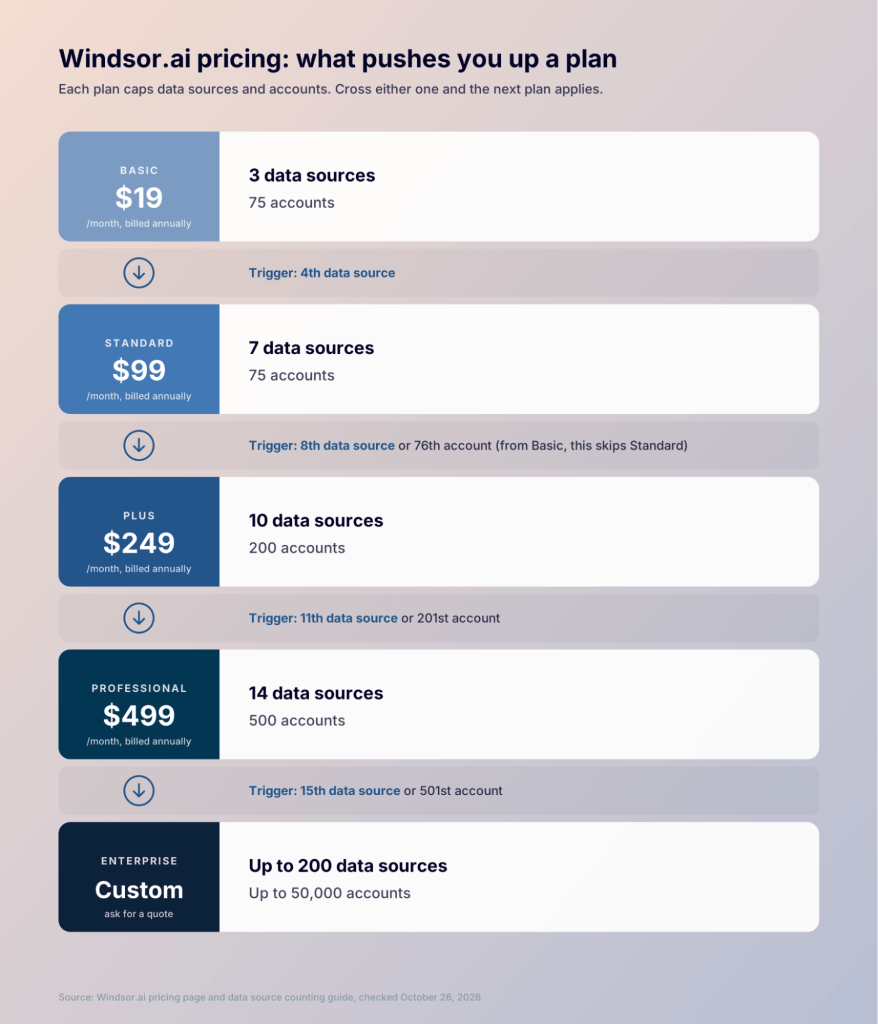
The catch is in two limits on each plan: data sources and accounts. Cross either one and you move up a tier. A fourth platform takes you from $19 to $99 a month. A 76th account takes you to $249.
I’ll show you how both limits work and price out four common setups. Then I’ll compare it with Coupler.io, a data integration and AI analytics platform that prices by connected accounts.
All prices and limits below come from Windsor.ai’s and Coupler.io’s official pages, checked in October 2026.
TL;DR: How much does Windsor.ai cost?
- Start small for $19. Basic costs $19 a month, billed annually, or $23 billed monthly. It covers 3 data sources and 75 accounts.
- Your fourth platform costs $80 more. Standard is $99 a month and allows 7 data sources.
- Account 76 is the expensive one. Basic and Standard both stop at 75 accounts. The next step is Plus at $249 a month.
- Every connector is on every plan. The plan only limits how many platforms you use.
- Try it two ways. There’s a 30-day free trial and a forever free plan with 1 data source.
- Coupler.io counts accounts only. Add as many platforms as you like. Paid plans start at $24 a month, billed annually.
Build your Windsor.ai price from your setup
Windsor.ai checks two numbers against your plan:
- Data sources: how many platforms you pull data from, such as Google Ads or Shopify.
- Accounts: how many account IDs you connect across all of those platforms.
Take an ecommerce brand. It connects:
- Shopify
- Google Ads
- Facebook Ads
- GA4
- Klaviyo
Each platform has one account, so the brand uses 5 data sources and 5 accounts. That’s over Basic’s 3 data sources, so it needs Standard at $99 a month, billed annually. This is one of Windsor.ai’s own worked examples.
Windsor.ai’s counting page sums up the rule: if either number goes over a plan’s limit, the higher plan applies. Your bill follows whichever limit you hit first. For example, Supermetrics pricing works differently. It starts from the destination you send data to and adds fees for extra users, sources, and accounts.
How the Windsor.ai pricing model works
What counts as a data source
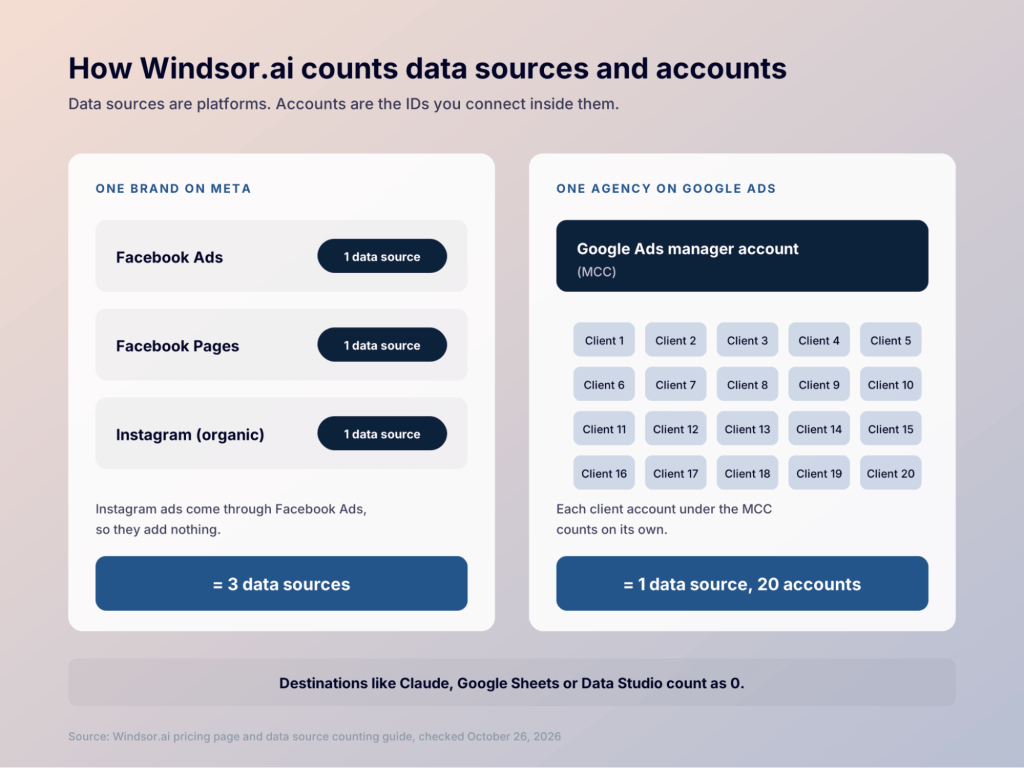
A data source is one platform connector. Windsor.ai’s counting guide says each connector counts once, however many accounts, clients, queries or reports use it.
Two details catch people out:
- Ads and organic data are separate connectors. Facebook Ads and Facebook Pages count as two data sources. Instagram organic counts as a third.
- Instagram ads are free riders. They come through the Facebook Ads connector, so they don’t add a data source.
Destinations don’t count. Claude, ChatGPT, Google Sheets, and Data Studio are all destinations, and every plan includes them.
What counts as an account
An account is one account ID inside a data source. Windsor.ai counts each of these as one account:
- A Google Ads or Facebook Ads ad account
- A GA4 property or Search Console site
- A Shopify store or an Amazon marketplace
- A Facebook page or Instagram profile
- A selected Google Sheets tab
A Google Ads manager account (MCC) doesn’t count as one. Each client account you select under it counts separately, so 20 clients under one MCC equal 20 accounts. Google Business Profile locations count in blocks of 10.
What doesn’t count
Campaigns, fields, rows, and reports are free. Windsor.ai doesn’t meter monthly active rows (MAR), so a busy ad account costs the same as a quiet one. That’s simpler than Funnel.io pricing, which charges Flexpoints for every connector and account.
There are no setup fees either. Windsor.ai’s pricing page promises “no premium connectors or hidden fees.”

Pay for accounts only, however many platforms you add
Book a demoWindsor.ai pricing plans compared
Windsor.ai has six plans. Prices below are per month. Annual billing is paid upfront for the year.
| Plan | Annual billing | Monthly billing | Data sources | Accounts | Destination tasks |
|---|---|---|---|---|---|
| Free | $0 | $0 | 1 | 1 | 5 |
| Basic | $19 | $23 | 3 | 75 | 5, daily sync |
| Standard | $99 | $118 | 7 | 75 | Unlimited, daily or hourly |
| Plus | $249 | $299 | 10 | 200 | Unlimited, daily or hourly |
| Professional | $499 | $598 | 14 | 500 | Unlimited, down to every 15 minutes |
| Enterprise | Custom | Custom | Up to 200 | Up to 50,000 | Unlimited |
Here’s what changes as you move up:
- Free plan: 1 user, 1 data source, 1 account, and 5 destination tasks. Backfills for scheduled syncs aren’t available.
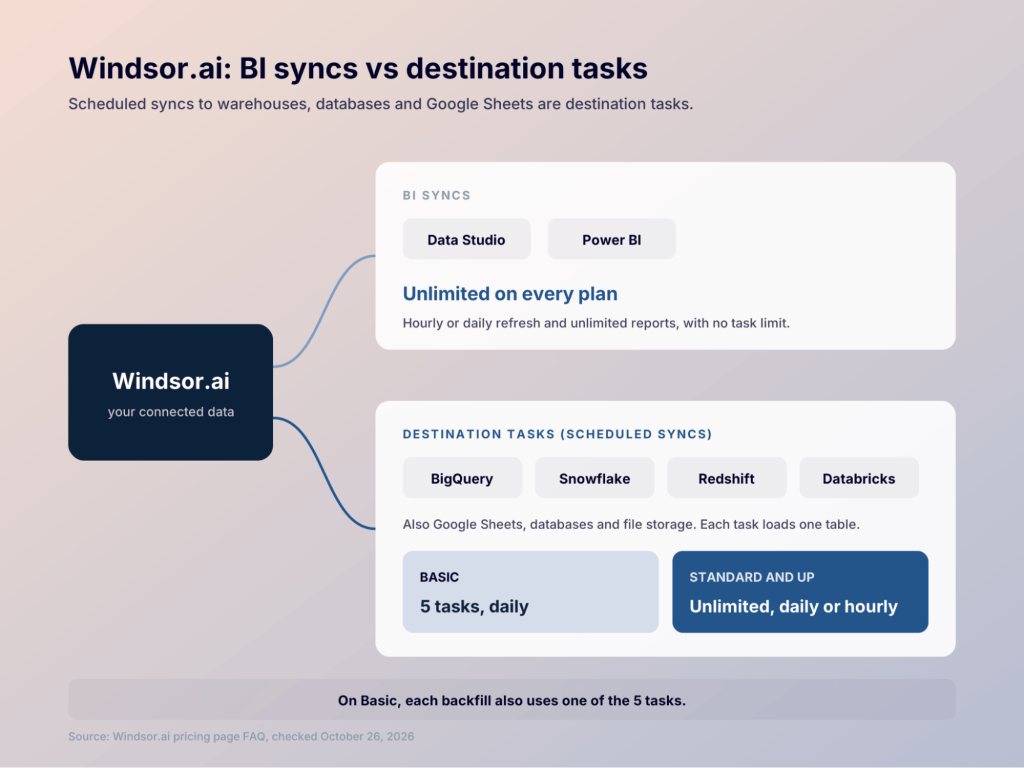
- Basic plan: unlimited users and unlimited BI syncs. Scheduled syncs to warehouses are capped at 5 daily destination tasks, and each backfill counts as one.
- Standard plan: unlimited destination tasks and hourly sync.
- Plus plan: more room, with 10 data sources and 200 accounts.
- Professional plan: 15-minute syncs, and all accounts can be added automatically.
- Enterprise plan: SSO, white-labeling, a dedicated account manager, and custom connector development. It also adds enterprise onboarding and the option to pay by invoice. It has custom pricing, and you get a quote after you book a demo. For example, Adverity pricing works this way on every plan.
What a destination task is
A destination task is a scheduled sync that loads one table into a destination like BigQuery or Google Sheets. Supported targets include BigQuery, Snowflake, Redshift, and Databricks.
BI tools work differently. Data Studio and Power BI pull data through BI syncs, which are unlimited on every plan. So if all your reports live in Data Studio, the 5-task cap on Basic won’t affect you.
Upgrades, downgrades and canceling
You can change plans at any time, and Windsor.ai prorates the difference. A downgrade takes effect right away, and the unused time becomes account credit.
There’s no pause option. On annual billing, canceling stops the next renewal but doesn’t refund the rest of the year. If you plan to switch tools, time it to your renewal date and migrate from Windsor.ai before it.
Windsor.ai pricing features: what every plan includes
A common question about Windsor.ai pricing connectors is whether some cost extra. None do. Every plan, including Free, gets all 350+ connectors and every destination.
Every plan also includes:
- Windsor MCP, for analyzing your data in AI tools like Claude and ChatGPT
- Up to 10 years of data history on paid plans (the free plan keeps the last 30 days)
- External authentication, so clients can connect their accounts through a shared link
- Read and write actions, such as pausing campaigns or changing budgets
- Live chat support
On security, Windsor.ai says it’s GDPR compliant and SOC 2 Type II audited, with servers in Germany.
Hidden costs to watch
Windsor.ai has no hidden fees in the usual sense. If you’re budgeting with Windsor.ai pricing 2026 numbers, plan around these steps instead:
- The fourth platform. Basic to Standard is a jump from $19 to $99 a month.
- The 76th account. Basic and Standard share the same 75-account cap. Going over means Plus at $249, even with only 3 platforms.
- Organic social. Facebook Pages and Instagram each use a data source on top of Facebook Ads.
- Google Sheets tabs. Each selected tab counts as an account.
- Warehouse syncs on Basic. Five daily destination tasks go fast if you load several tables into BigQuery.
Four setups priced out
The first three setups come from Windsor.ai’s own counting examples. Prices are per month, billed annually.
The business has one account on each of these platforms:
- Google Ads
- Facebook Ads
- GA4
Here’s what it uses:
- Usage: 3 data sources, 3 accounts
- Plan: Basic, $19/month
#2. Ecommerce brand
The brand adds Shopify and Klaviyo to the same platforms as #1.
- Usage: 5 data sources, 5 accounts
- Plan: Standard, $99/month
#3. Agency with 25 clients
Every client uses the same platforms as #1. Five of them also run LinkedIn Ads.
- Usage: 4 data sources, 80 accounts
- Plan: Plus, $249/month
The 80 accounts push this agency past Standard’s 75, so it pays for Plus. That still works out to about $10 per client.
#4. Ecommerce brand that adds new channels
The brand from #2 starts testing new ad platforms:
- TikTok Ads
- LinkedIn Ads
- Pinterest Ads
Here’s what it uses now:
- Usage: 8 data sources, 8 accounts
- Plan: Plus, $249/month
Standard stops at 7 data sources. Three small test channels take the bill from $99 to $249, though the brand only has 8 accounts.
Windsor.ai pricing: pros and cons
| Pros | Cons |
|---|---|
| Low entry price and a forever free plan | Each new platform can push you up a tier |
| All connectors and destinations on every plan | Basic and Standard share a 75-account cap |
| Unlimited users from Basic up | Basic caps warehouse syncs at 5 daily tasks |
| No row-based metering | Annual plans aren’t refunded if you cancel mid-term |
Add a new channel without changing your plan
Try Coupler.io for freeWhen Coupler.io is the better fit
Coupler.io prices by connected accounts. It doesn’t limit how many platforms you use. All 400+ sources come with every plan, so testing a new channel only uses one more account.
Each ad account or GA4 property counts as one account. You can use it in as many data flows and dashboards as you need. Paid plans start at $24 a month, billed annually. You get 7 free days with Pro limits after sign-up, then you pick a plan or stay on the free plan. See the Coupler.io pricing page for every limit.
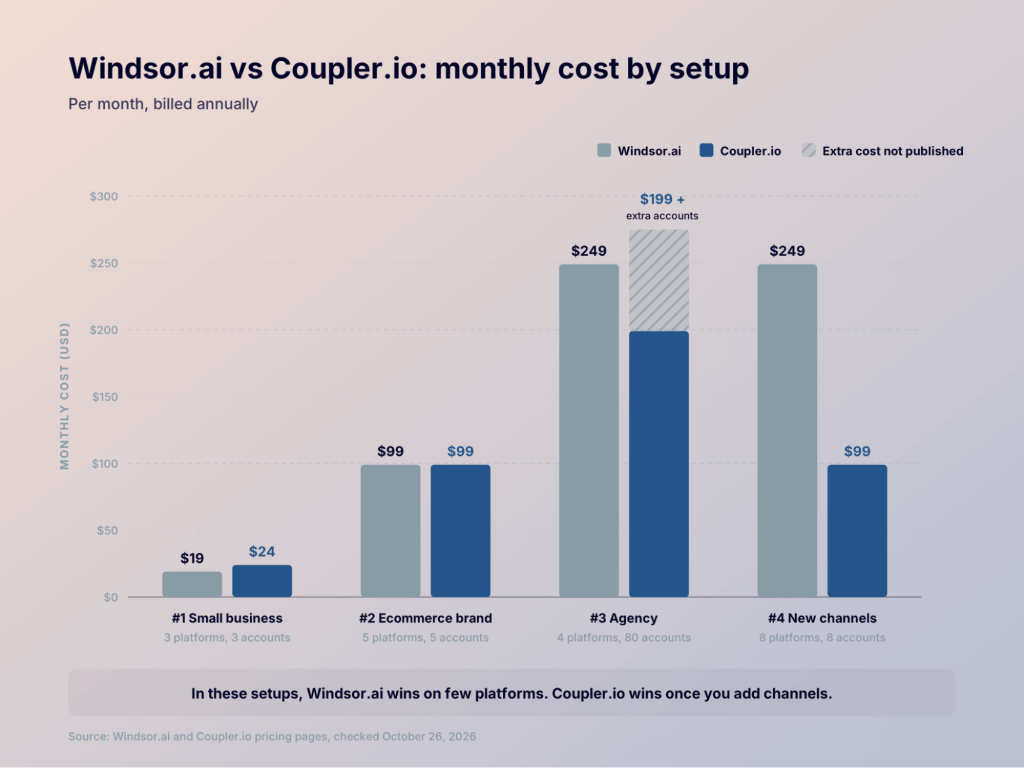
Here’s a pricing comparison for the four setups. Prices are per month, billed annually.
| Setup | Windsor.ai | Coupler.io |
|---|---|---|
| #1. Small business (3 platforms, 3 accounts) | Basic: $19 | Starter: $24, 3 accounts, 1 destination, 1 user, daily refresh |
| #2. Ecommerce brand (5 platforms, 5 accounts) | Standard: $99 | Active: $99, 15 accounts, 3 destinations, unlimited users, daily refresh |
| #3. Agency (4 platforms, 80 accounts) | Plus: $249 | Past Pro’s 50 accounts; buy extra accounts through support or move to an Agency plan |
| #4. Brand with new channels (8 platforms, 8 accounts) | Plus: $249 | Active: $99. 7 accounts to spare |
In the first three setups, Windsor.ai is either cheaper or the same price. It’s the better deal for small setups and for agencies with many clients on a few platforms, and I’d pick it for those cases. In setup #2, Windsor.ai’s Standard plan also includes hourly syncs at $99, while Coupler.io’s Active plan refreshes daily.
Setup #4 is where Coupler.io pulls ahead. The brand pays $99 a month instead of $249, and it can add 7 more accounts before it needs a bigger plan. If your team keeps trying new channels, that’s the pricing model I’d want.
Coupler.io loads data into Google Sheets, Excel, Data Studio, Power BI, BigQuery, and other destinations. It also has built-in dashboards and hundreds of templates. Coupler.io connects your data to AI tools like Claude and ChatGPT through its MCP server. It’s also listed as a ChatGPT App.
For a full feature comparison, see Coupler.io vs Windsor.ai or our list of Windsor.ai alternatives.
Test account-based pricing on your own data
Start free with Coupler.ioChoose Windsor.ai or Coupler.io based on your setup
Here’s how I’d decide:
| If you need… | Better fit |
|---|---|
| The lowest price for 3 platforms or fewer | ➡ Windsor.ai |
| Many client accounts on a few platforms | ➡ Windsor.ai |
| Room to add new platforms without changing plans | ➡ Coupler.io |
| Data in AI tools like Claude or ChatGPT | ➡ Both |
| Unlimited users | ➡ Windsor.ai (Basic and up), Coupler.io (Active and up) |
FAQ
Does Windsor.ai have a free plan?
Yes. The forever free plan includes 1 user, 1 data source, 1 account, and 5 destination tasks. Backfills for scheduled syncs aren’t included.
Is there a 30-day free trial?
Yes. Windsor.ai’s 30-day free trial gives you 1 user, 10 data sources, 15 accounts and 5 destination tasks. Data history is limited to 30 days during the trial.
How much cheaper is annual billing?
On Basic, you pay $19 a month on annual billing and $23 on monthly billing. Standard is $99 against $118. Annual billing is paid upfront for the full year.
Do AI tools count as data sources?
No. Claude, ChatGPT, and other AI chats connect through Windsor MCP as destinations, and destinations never count toward your limits. Only the platforms you pull data from do.