Your data warehouse has AI built in. So why are you still making decisions based on a spreadsheet someone emailed on Friday? BigQuery AI features are real, and they work. The problem isn’t BigQuery. It’s that most teams are pointing it at an incomplete warehouse: CRM data that’s days old or ad spend that never made it in. The AI works with what’s there and has no way to tell you what’s missing.
BigQuery AI is only as useful as the data quality feeding it. Read on to see what BigQuery AI can do, and how Couplerio handles the data preparation it needs to deliver.
What BigQuery AI actually means
Let’s eliminate any possible confusion from the start: BigQuery hasn’t become an AI platform. What’s actually happened is that three specific things got added on top of the warehouse you already use, and each one upgrades something you already do.
- Gemini models in BigQuery allow you to skip manual sql queries, ask questions like “
Why did signups drop in March?” in natural language, and get answers instantly. - Built-in AI functions (like
AI.GENERATEandAI.SIMILARITY) let you classify and score unstructured data based on meaning rather than just exact keyword matches through semantic search. - BigQuery ML allows you to build machine learning models (like churn or demand) directly in SQLand feed predictions straight back into your existing dashboards.
All three generative AI capabilities are real, and they work. However, the catch is that their output is only as good as the structured data feeding them. That’s the problem worth solving, and it’s what the rest of this article is about. Now, let’s go over each of these features in detail.
The fastest win: analyze BigQuery data with AI in plain language
If you want to see what BigQuery AI can actually do before committing to anything, Data Canvas is where to start. Enable Gemini in the Google Cloud Console, open a canvas, add a table, and ask a question. That’s the full setup. Gemini reads your schema and turns conversational analytics into something you can actually use without writing SQL.
Gemini also works as a Google Cloud Assist chat. Open the chat on the right side and ask questions about your data set:
- “
Which customers have the highest lifetime value?” — on an orders table. - “
Why did signups drop in March?” — on a GA4 events table.
Once Gemini returns the result, ask a follow-up. Narrow the time range. Break it out by segment. The LLM reads your table metadata, so each follow-up question builds on the last until you have what you need.

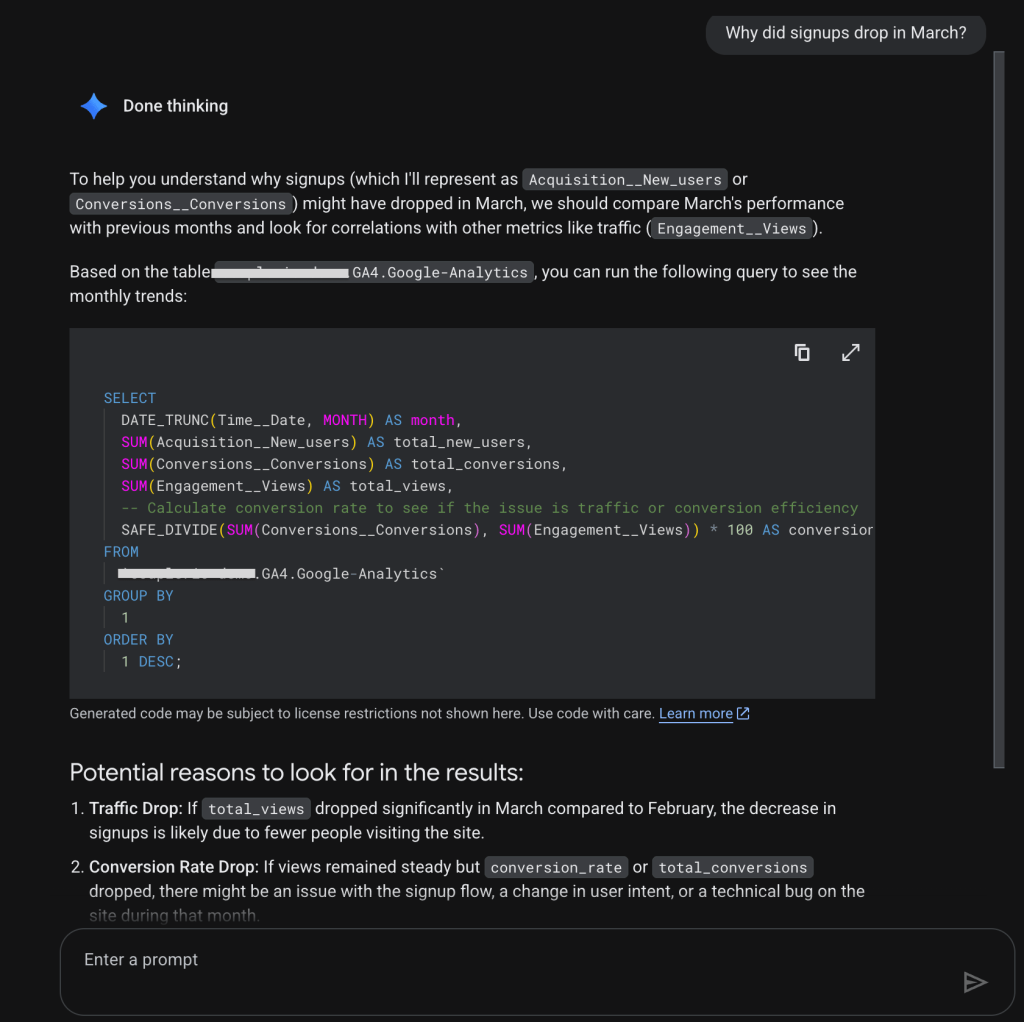
For anyone who’s spent time in the old workflow, the difference is hard to overstate:
| Before | After |
| Write SQL → check the wrong-looking numbers → fix and rerun query → export results | Ask a business question → get an answer instantly → explore follow-up questions |
BigQuery AI functions and ML: what becomes possible on your existing data
Once your data is centralized, BigQuery AI moves from descriptive reporting to automated data analytics.
Learn more about how to use BigQuery for data analytics.
AI functions let you perform tasks inside SQL that previously required exporting data to cloud storage or waiting for a data engineering team. A few things that are now a single query:
- Summarize reviews: Use
AI.GENERATEto read through thousands of rows of text. - Semantic filtering:
AI.SIMILARITYfinds conceptually relevant records by comparing embeddings at runtime. - Vector search: For larger datasets, you can perform a vector search to find the top closest matches across millions of rows.
SQL example:
SELECT
  ticket_id,
  AI.GENERATE(
    ('Classify this support ticket into one category: billing, technical, or other. Ticket: ', ticket_text),
    endpoint => 'gemini-2.0-flash').result
FROM support_tickets;
This query demonstrates how to invoke foundation AI models directly from your SELECT statement to process text without external pipelines.
BigQuery ML is for prediction. Your dashboards show what happened (revenue last month, signups last week, churn last quarter). BigQuery ML lets you build models on that same historical data to answer what’s likely to happen next. The model trains in SQL, on tables already in your warehouse, and predictions land back in BigQuery as a regular table that flows into whatever dashboards and automations you already have running.
The use cases where this pays off most:
- Churn: Which customers will leave in the next 30 days? Score your entire active customer base weekly, and send the high-risk segment to your retention team before they cancel.
- Forecasting: How much stock do you need next month?
AI.FORECASTwith TimesFM (Google Research’s pre-trained model, trained on over 100 billion real-world time-points) generates time series forecasts in a single query with no model training required. - Lead scoring: Which leads are worth calling first? Train a model on your past closed deals, automatically score incoming leads, and let sales prioritize based on probability rather than gut feel.
Where teams get stuck on the path from BigQuery to AI
Here’s a common scenario for companies of every size.
Someone sets up a BigQuery connection to their CRM. It works. A dashboard gets built. People use it for a few months. Then someone notices the numbers look off. Turns out the sync was running, but the table it fed stopped updating three weeks ago when an API credential expired. Nobody got an alert. The dashboard kept looking like a dashboard. The data inside it was three weeks stale.
Now add AI to that picture. Ask Gemini why churn spiked last month. It tells you, confidently, with a chart, based on the data it has access to. Which is wrong. And that’s not an AI problem. That’s a plumbing problem, such as stale tables, mismatched data types, sources that never got connected, etc.
The specific ways it breaks down:
| Manual CSV exports | Someone set up the pipeline the way they knew how: download from the source, upload to BigQuery, repeat on Fridays when they remember. The report is always a week behind. When AI runs on it, the answers reflect last week’s reality. |
| Stale tables | Even automated syncs fail silently. A credential rotates. An API endpoint has changed. The job runs, reports success, and loads zero rows. Nobody notices until someone asks a question, and the answer doesn’t feel right. |
| Numbers that don’t match | Your CRM says 142 deals closed last quarter. Your warehouse says 138. Finance says 151. All three are pulling from different definitions of “closed,” different cutoff logic, and different handling of edge cases. Before AI, this was an annoying recurring meeting. With AI, it’s a model that trains on whichever definition happened to be in the training table and produces predictions nobody trusts, because they’ve seen the underlying numbers disagree too many times. |
| Waiting for engineering | The marketing team wants Meta Ads data in BigQuery. The request goes in. Six weeks later, a quarter of the data is there, formatted slightly differently than expected. By the time it’s actually usable for anything, the campaign it was supposed to inform is already over. Simple questions wait weeks because every new data source is a project. Manual exports seem free but the hidden pricing of stale data and engineering hours quickly outweighs the cost of automation. |
| Missing sources that nobody realizes are missing | This is the quietest failure. The churn model runs. It produces scores. The retention team works the list. Churn doesn’t improve. What the team eventually discovers is that payment failure data, the single strongest predictor, was never connected to BigQuery. Same for the support queue: someone was supposed to load Gorgias data into BigQuery before launch, but no one did. The model wasn’t wrong about the data it had. It just didn’t have the data that mattered. |
Most AI projects don’t announce their failure. They just quietly produce outputs that are slightly off, or totally wrong until the team stops trusting them and goes back to spreadsheets.
The question has shifted. It used to be “how do we run AI on our BigQuery data?” and Google has largely answered that. The question now is “how do we keep BigQuery fed with the right data, from all the right sources, refreshing often enough that the AI outputs are actually reliable?“
Coupler.io fills that gap. It’s a data integration platform for AI analytics that keeps the warehouse continuously up to date, connecting CRM, ad platforms, revenue data, product usage metrics, and over 400 sources. Its BigQuery integrations refresh automatically on a schedule with alerts when something breaks.
Companies with data scattered across operational, financial, and commercial systems tend to see the biggest gain, since a single reliable pipeline replaces the manual work of stitching them together. A successful BigQuery to AI strategy requires a pipeline that refreshes as fast as your business moves, so when Gemini answers a question, it’s working with today’s data, not last Tuesday’s export.

Fable Food built one source of truth across 6 time zones
A global mushroom-ingredient manufacturer consolidated six source systems into a single BigQuery warehouse with Coupler.io, cutting wait times for basic operational questions from up to 24 hours to about a minute.
Read the case studyHow to get more from BigQuery AI features with clean and fresh data
Think about what a complete picture actually requires for businesses:
1. Your Google Ads and Meta campaigns tell you which spend drove which clicks.
2. Your HubSpot tells you which of those clicks became leads, which leads became opportunities, and which opportunities closed.
3. Your Shopify or Stripe account tells you which customers actually paid, how much they paid, and whether they came back.
Each of those systems knows something the others don’t. BigQuery AI, pointed at any one of them in isolation, is working with a fragment.
Coupler.io connects all of them, blends the data sets, and loads them into BigQuery automatically on a schedule you set. BigQuery runs the AI, and the outputs flow to wherever decisions get made: Gemini queries, Looker Studio dashboards, BigQuery ML predictions, or Claude and ChatGPT for plain-language summaries.

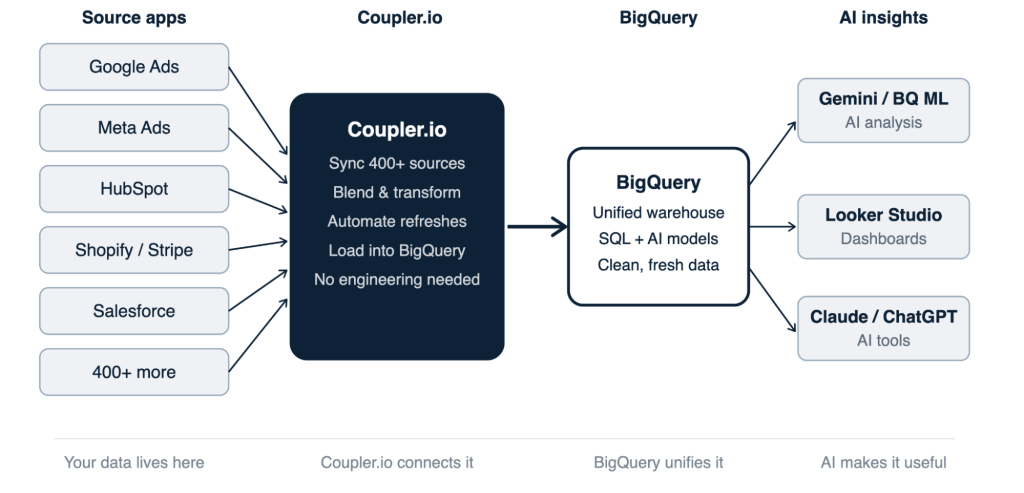
Connect your business tools to BigQuery with Coupler.io
The setup process of linking your business data sources to BigQuery via Coupler.io doesn’t require any technical expertise. To see what it looks like in practice, let’s take a concrete example.
Challenge
An e-commerce team runs paid acquisition across Google Ads, Facebook Ads, TikTok, and Pinterest. Their orders flow through Shopify. They have website traffic data in GA4.
The Conflict: Each system holds only one piece of the customer journey. Consequently, none of them can answer the question that actually matters for budget decisions: Which ad sources are bringing in returning customers, rather than just one-time buyers?
The Disconnect:
- Shopify has the answer: every order record includes a Customer: Category showing if the buyer is New or Returning.
- Ad Platforms have the spend: they track daily investment, impressions, and clicks.
- Neither system can see the other.
Solution
With Coupler.io, you connect Google Ads, Shopify, and GA4 in minutes:
- From Google Ads: campaign spend and clicks by date.
- From Shopify: order value, customer ID, and customer category (New or Returning).
- From GA4: daily user counts.
Coupler.io pulls all three automatically on the refresh schedule you set.

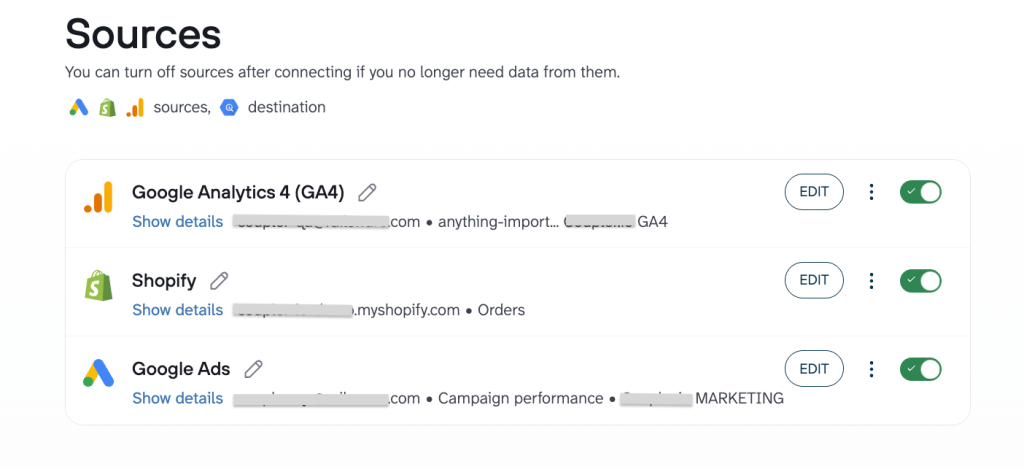
Then, you stack rows from all three sources into one flat table and align them on a shared date field (Report date from Google Ads, Order: Created at from Shopify, Report date from GA4). You also standardize the Ad source name field so platform names are consistent, and conduct any other necessary transformations (data filtering, sorting, hiding columns,etc.)

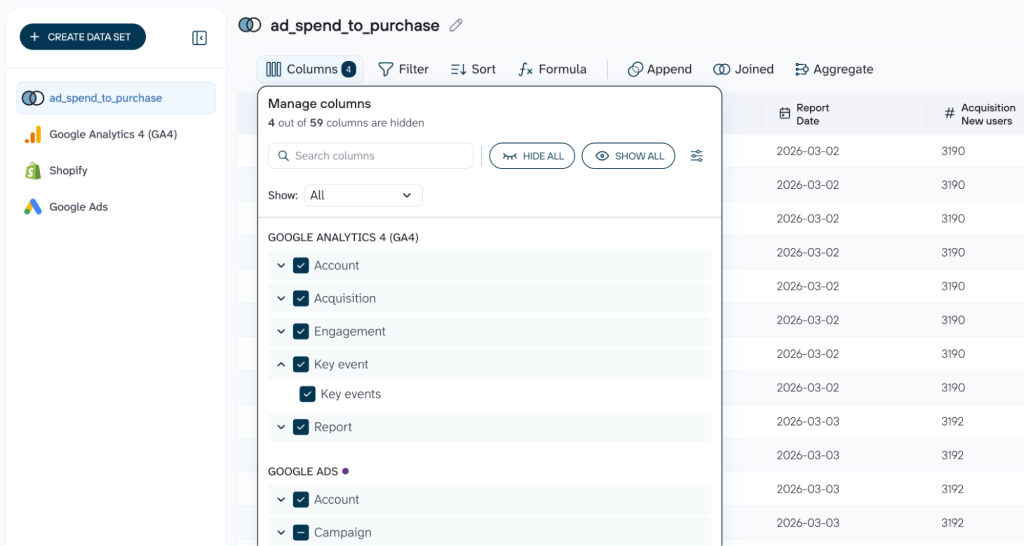
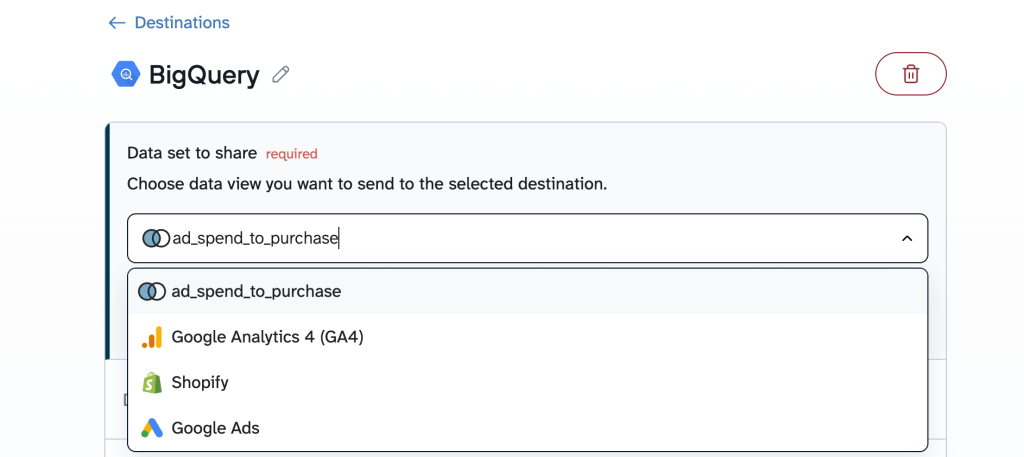
After that, you connect your BigQuery account within a few clicks. What lands in BigQuery is the appended dataset you’ve created: date, ad platform, spend, clicks, order value, customer category, and website users, all in the same table, ready to query.



The pipeline your BigQuery AI needs is one setup away
Try Coupler.io for freeNow you can ask questions about your blended data set in BigQuery. Use Gemini to create the necessary SQL for you. For example, a simple query groups orders by ad source and customer category:

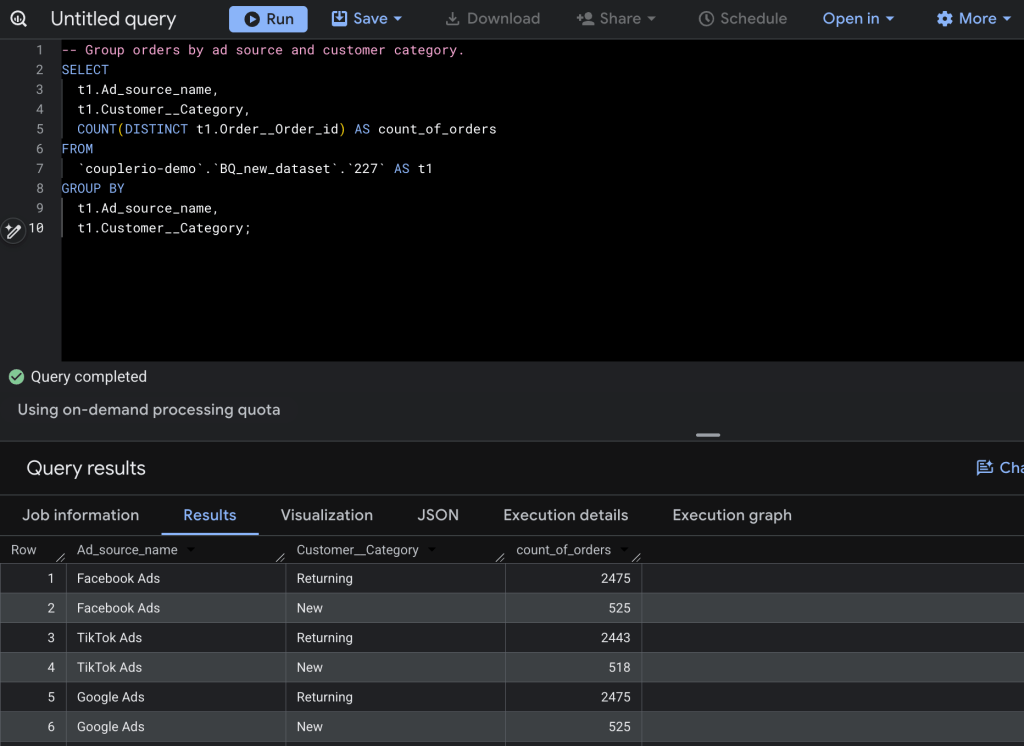
This is the query on which ad spend decisions should be based. Not just “which platform drives the most clicks,” but which platform drives customers who come back.
If you want to go deeper into BigQuery AI features:
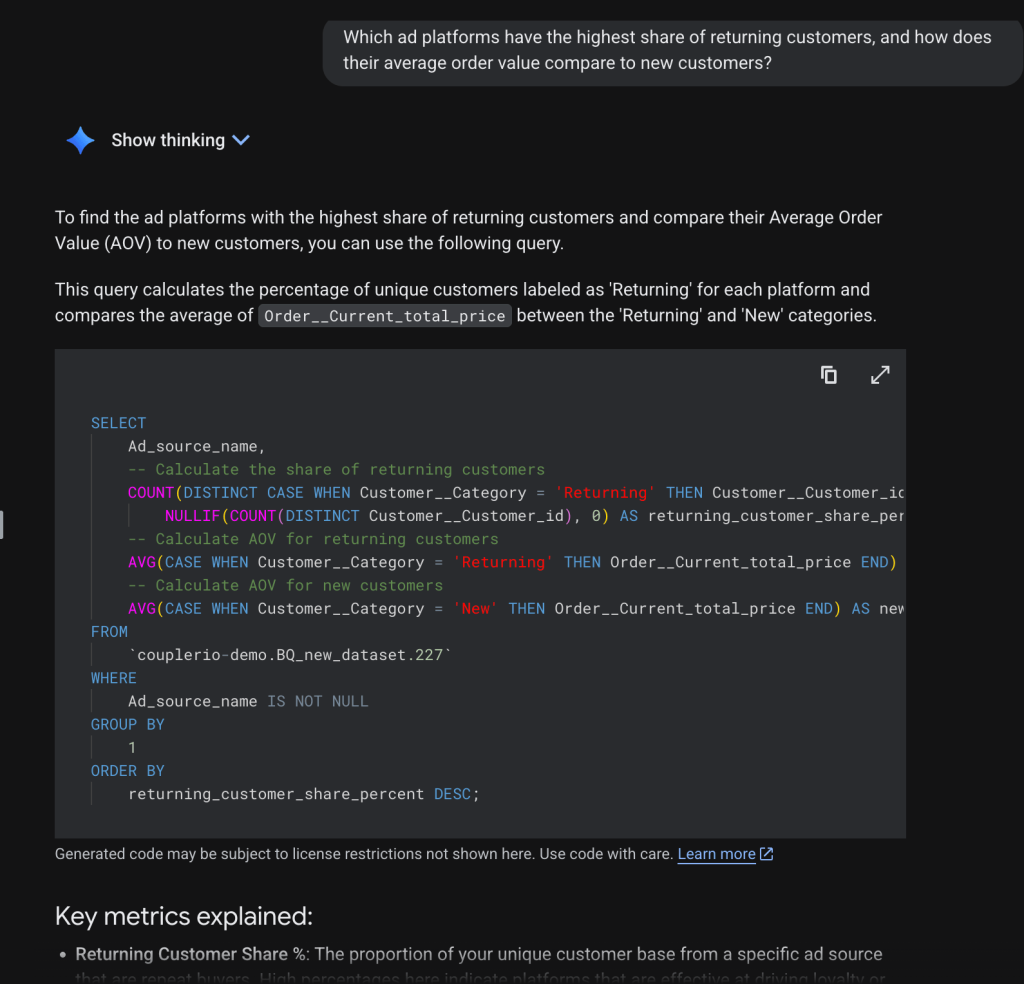
- Let Gemini surface what the numbers mean. For example, ask: “
Which ad platforms have the highest share of returning customers, and how does their average order value compare to new customers?“ Gemini reads the appended dataset, gives you a plain answer, suggests relevant SQL, provides metric explanations, etc.

- Use the
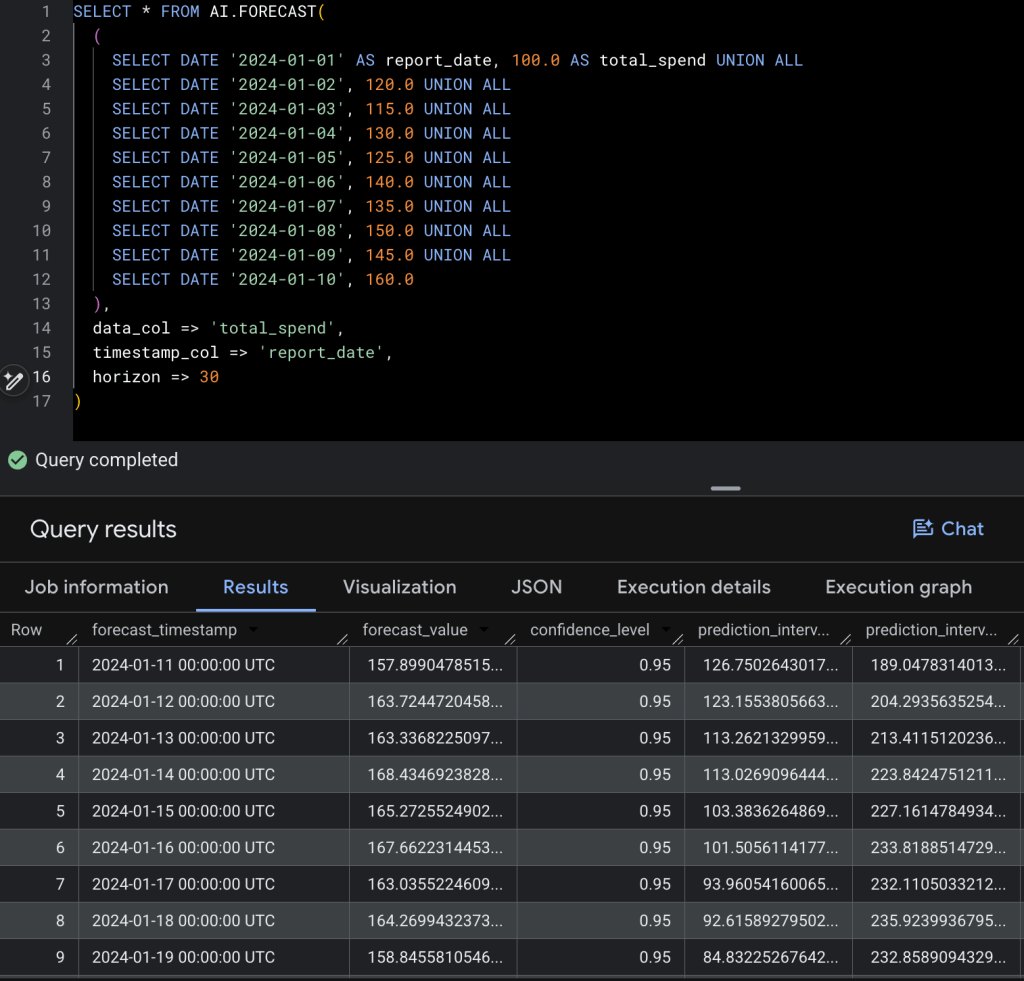
AI.FORECASTfeature. Once your ad spend data is in BigQuery, a single query can tell you what next week’s spend trajectory looks like across any channel. TheAI.FORECASTfunction reads your historical daily figures, detects the trend and pattern, and returns a day-by-day forecast with confidence intervals. No model to train, no data science background required. The output below shows seven days of forecasted spend:forecast_valuegives the expected number,prediction_interval_lower_boundandprediction_interval_upper_boundgive the 95% confidence range. Sethorizon => 30, and you have a monthly budget forecast that updates every time Coupler.io refreshes the table.

Take it further: connect your BigQuery data to Claude or ChatGPT
Gemini already gives you plain-language answers and summaries inside BigQuery. So when does it make sense to route data to an external AI tool?
When the output needs to leave the warehouse. Gemini is built for exploration: ask a question, get an answer, keep digging. Claude and ChatGPT are better for the moment when analysis is done, and something needs to be communicated: a formatted weekly report for the marketing team, a retention action plan that the sales team can open without any BigQuery context, campaign briefs for three customer segments that a copywriter can act on. The output is a document, not a data session.
Learn how to connect BigQuery to Claude in our dedicated blog post.
Coupler.io lets you connect BigQuery tables directly to Claude or ChatGPT without any coding. Export your weekly revenue table with a prompt like “write a performance summary highlighting what changed and where to adjust budget“, and what comes back is something you can paste into Slack or a Monday morning email.

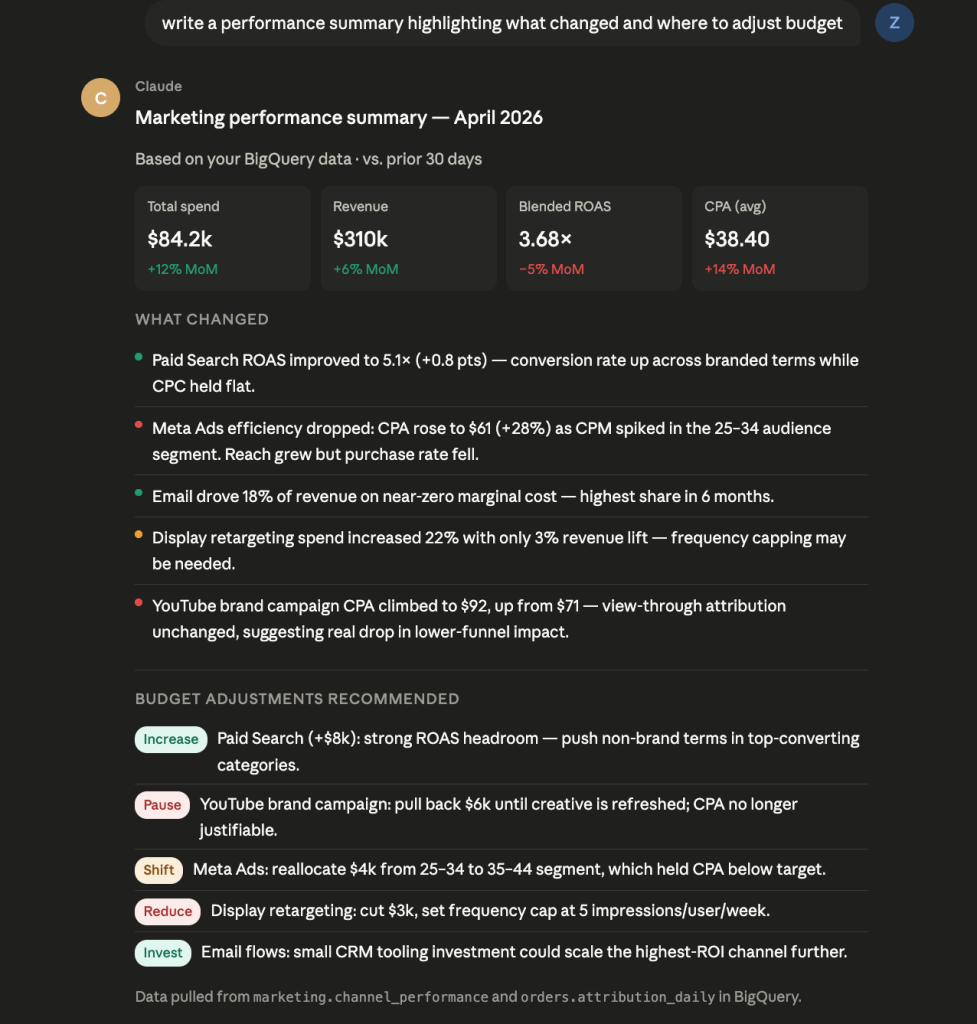
Gemini tells you what the data shows. Claude or ChatGPT turns that into something the rest of the business can act on. Both have their place, and Coupler.io connects them both to the same BigQuery source.
Use AI to turn your BigQuery output into decisions
Try Coupler.io for freeBigQuery and Coupler.io are complementary, not competing
BigQuery and Coupler.io aren’t competing for the same job. One stores and computes; the other connects and refreshes. The confusion usually comes from people who expect BigQuery to handle ingestion (it doesn’t, that’s not what it’s for) or who think a pipeline tool replaces the need for a warehouse, which it also doesn’t.
| BigQuery | Coupler.io | |
| What it does | Stores data, runs SQL, trains ML models | Connects business tools, refreshes data automatically |
| AI capabilities | Gemini, AI functions, BigQuery ML | AI agent, AI destinations |
| Who configures it | Data/engineering team | Anyone, no code required |
| What it depends on | Clean, current data | A BigQuery destination |
AI-powered BigQuery analytics: which tools cover what
At some point in this process, most teams ask the same question: do we need separate tools for the pipeline and the AI layer, or is there something that handles both? The market has a few categories worth knowing. Apart from Coupler.io, you may consider other data pipeline tools to move data from sources into your warehouse at scale. Zapier is an automation platform that can connect apps and push records between systems. Gemini in BigQuery is Google’s native AI assistant, built directly into the warehouse. Vertex AI is Google’s full ML platform for teams with dedicated data science resources. Each one does its job well. But Coupler.io provides the full workflow:
- Get the data in
- Keep it fresh
- Analyze BigQuery data with AI
- Connect the outputs to where decisions are actually made.
Best AI tools that connect to BigQuery
The table below maps those tools against the four things that matter for the BigQuery AI workflow: feeding the warehouse, querying it with AI, connecting it to external AI tools, and doing all of that without an engineering project every time you want to add a source.
| Tool | Data ingestion to BigQuery | Data transformation | AI querying & analysis | Routes to external AI tools | Setup complexity |
| Coupler.io | ✓ 400+ sources, no code | Basic (blending, filtering, formulas) | AI Agent to talk to your BigQuery data in plain language | ✓ Claude, ChatGPT, Gemini via MCP/App | Low (anyone can configure) |
| Airbyte | ✓ 300+ sources | Relies on dbt or external tools | Vector DB loading for RAG workflows | ✗ | Medium (some engineering for setup and maintenance) |
| Fivetran | ✓ 400+ sources | Relies on dbt or external tools | Vector DB loading for RAG workflows | ✗ | Medium (managed but needs data team for config) |
| Zapier | Limited — can push records, not designed for warehouse loading | Basic field mapping | ✗ | Can trigger AI tools in workflows | Low (no code) |
| Gemini in BigQuery | ✗ | ✗ | ✓ Native SQL generation, data exploration, and AI functions (AI.GENERATE) | ✗ | Low (enable in Cloud Console) |
| BigQuery ML | ✗ | ✗ | Predictive modeling (Churn, Forecasting) via SQL & Python) | ✗ | Medium (requires SQL knowledge) |
| Vertex AI | ✗ | ✗ | Custom ML models and pipelines | Connects to other GCP services | High (requires ML/data science team) |
Give BigQuery the complete picture it needs to make AI work
Start your free trial