Businesses increasingly rely on AI assistants (ChatGPT, Perplexity AI, Google Gemini, etc.) for workflow automation, content generation, coding assistance, and informed decision-making. To unlock ChatGPT’s full potential, you need seamless connections between your business tools and the AI. While OpenAI offers native solutions for this, some platforms provide ChatGPT connector alternatives that can enhance your data integration capabilities.
What are ChatGPT connectors?
OpenAI recently rebranded what were previously called connectors to Apps to present a more unified and user-friendly experience. ChatGPT Apps (formerly connectors) enable you to:
- AI Chat in natural language for asking questions about your data. This is useful for everyday quick questions on data, such as “What was our advertising budget for 2026?”
- Conduct AI-powered deep research to support cross-service analysis across multiple data sources. Deepseek is useful for competitive analysis and code reviews.
- Synchronize data sources with ChatGPT to index content in advance. This is necessary to ensure the most recent information is considered in answers and to improve the response quality.
You can browse apps from the ChatGPT app directory or from the Apps entry in the sidebar.


What are ChatGPT connector alternatives?
Alternatives to ChatGPT connectors are third-party all-in-one integration platforms that enable you to connect ChatGPT to your business data and applications. While OpenAI maintains an official App Directory with approved apps, many powerful integration tools exist outside this directory.
These platforms may offer advanced features that extend beyond what native ChatGPT Apps provide:
- Bidirectional data flow: Unlike read-only native Apps, many alternatives allow both reading from and writing to connected services
- Advanced data transformation: Prepare, clean, and structure data before it reaches ChatGPT
- Multi-source data blending: Combine information from multiple business applications into unified datasets
- Granular access control: Select specific data subsets to share with AI rather than entire data sources
- Complex workflow automation: Create sophisticated multi-step processes that involve ChatGPT alongside other business tools
At the same time, not all ChatGPT Apps lack the mentioned capabilities. For example, Coupler.io is listed among ChatGPT Apps yet provides advanced data transformation, multi-source data blending, and a powerful analytical engine to support your conversational analytics.
Can a ChatGPT connector alternative become a listed App?
Yes, and Coupler.io’s journey illustrates this evolution perfectly. As a data integration platform, Coupler.io offers connections to a number of destination apps, including spreadsheets, BI tools, and data warehouses. With the release of the MCP server, users got the capability to connect business data with AI tools.
Initially, Coupler.io operated outside OpenAI’s official ecosystem as one of the alternatives to ChatGPT workflow connectors. The platform’s first AI integration was with Claude AI, then expanded to support ChatGPT and other AI agents like Perplexity and Cursor.
Over time, Coupler.io worked to meet OpenAI’s requirements and submission guidelines for the official App Directory. This process involved:
- Building an MCP server that adheres to OpenAI’s technical specifications
- Ensuring compliance with security, scalability, privacy, and safety standards
- Demonstrating clear value and utility for ChatGPT users.
- Submitting the application for OpenAI’s review process
After successfully meeting these requirements, Coupler.io was approved and listed in ChatGPT’s official App Directory.
Connect your business data to ChatGPT


Connect your business data to ChatGPT
Try Coupler.ioThis validation demonstrates that third-party integration platforms can transition from being connector alternatives to becoming officially recognized Apps.
What Coupler.io ChatGPT APP/connector can provide
Coupler.io is a data integration & AI analytics platform that helps you create automated data flows. It supports over 400 business apps as data sources and connects them to a variety of destinations, including AI tools like Claude AI, Perplexity, Cursor, and ChatGPT.
Most of the supported business applications belong to these categories:
- CRM
- E-commerce
- Marketing
- Finance
- PPC
- Sales
- Social Media
Meanwhile, the list of destinations includes:
- AI tools
- Spreadsheets
- Data warehouses
- BI tools
- Other destinations
Key features
- Data blending from multiple sources. The platform allows you to blend data extracted from more than 400 business applications.
- Data organization and preparation for analysis. Whether you extract data from a single source or multiple services, fine-tune datasets for further processing with Coupler.io’s transformation capabilities. This includes data organization features such as column management (renaming, hiding, reordering), advanced filtering, and sorting. You can also apply both simple and complex calculations thanks to the custom formula creation feature.
- Analytics Engine for AI integrations. Coupler.io embeds a modern and comprehensive Analytics Engine that improves the quality of answers when the destination is ChatGPT or another AI tool. When you ask a question, the large language model (LLM) translates it into a structured SQL query and sends it to Coupler.io’s Analytical Engine, which queries your dataset, performs in-depth calculations, and returns only verified results.
- Scheduled data refresh. The auto-refresh feature delivers up-to-date data to the AI integration, be it ChatGPT, Gemini, Cursor, etc. Set up scheduled data refreshing that suits your business pace, with intervals as short as every 15 minutes.
Why choose Coupler.io?
Powerful data transformation toolkit: Native ChatGPT integrations struggle to process compound data. Coupler.io ChatGPT connector addresses your specific needs for data blending and transformation efficiently. You can combine data from multiple apps into a single data flow, preprocess it, and apply data management features to ensure clarity for ChatGPT analysis.
Granular data control: Unlike native Apps, with Coupler.io, you can control which specific datasets to share with ChatGPT. Not all data from the source will be accessible by the AI agent, giving you precise control over data privacy and relevance.
Advanced Analytics Engine: Coupler.io’s Analytical Engine diminishes data hallucination effects typical for most AI agents and ensures high-quality AI-generated answers through structured SQL queries and verified results.
Flexible pricing model: You can decide whether to choose a free tier or one of the available paid plans. Coupler.io offers various options suitable for businesses with various data workflows and AI search requirements.
Example: Analyze data in ChatGPT with the help of the Coupler.io connector
It takes only three steps to integrate your data with ChatGPT for conversational analysis using Coupler.io.
Step 1. Create a data flow
- Sign up for Coupler.io for free and create a new data flow. Choose a data source to load data from and configure the connection following the in-app instructions. You can connect multiple data sources within one data flow.
You can try the Coupler.io connector right away using this form, where you need to select a data source to integrate with ChatGPT.

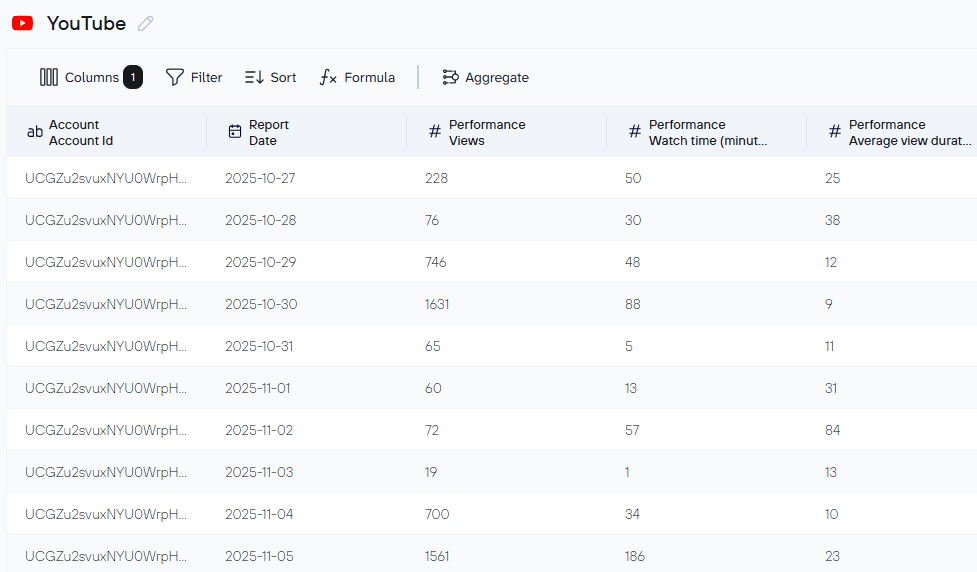
- Proceed to Data Sets, where you can prepare data for analysis by applying column management options, filtering, sorting, aggregation, data union from various sources, custom formulas, etc. For example, here is the YouTube data set I’ve prepared for analysis in ChatGPT.

Step 2. Integrate data set with ChatGPT
- Go to the Destinations tab and select ChatGPT as a destination app. Click Save and Run to activate your flow.
- Then go to ChatGPT Apps to set up the Coupler.io connector or use this direct link.

Step 3. Start your conversation in ChatGPT
First of all, make sure that ChatGPT recognizes the connection to Coupler.io, ask it to “List the data flows from my Coupler.io account” or ask about a specific data flow.
In ChatGPT, start making queries about your data.
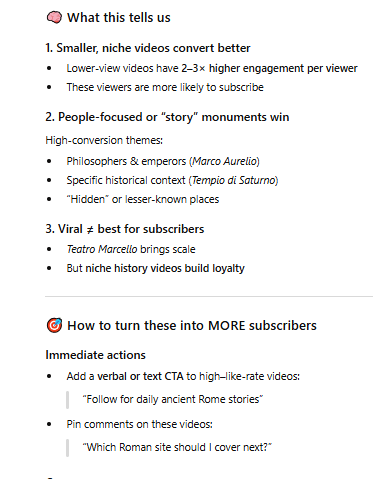
In our example, I asked about video performance on the YouTube channel with the following prompt: “Using the ChatGPT Data Flow in Coupler, please identify videos that convert best into subscribers”.
And here is the output:

Integrate your business data with ChatGPT
Try Coupler.io for freeOther examples of marketing-related prompts
Here are several question examples that will help you understand how your marketing and advertising campaigns are performing:
“From [your data flow name in Coupler], please tell me which campaigns have the highest CPM and the lowest conversions? What could be possible optimization opportunities?“
“Based on [your data flow name in Coupler], summarize the performance results of each advertising campaign that is currently running.“
“What advertising platform has shown the best results over the last 3 months?“
Feel free to write more detailed prompts for more precise results. Here’s an example prompt:
“Using {your Coupler data flow name}, provide a detailed performance of all currently running PPC campaigns from the perspective of CTR (Click-through rate), CPC (Cost per click), and ROAS (return on spend) metrics.
Provide answers to the following questions:
Which metrics and for which campaigns need improvement?Is there any way to optimize and improve those campaigns that underperform? If so, please provide suggestions on how to optimize underperforming campaigns.Which ad campaign shows the highest ROAS and why?"
Alternative integration platforms for ChatGPT
While some integration tools have joined ChatGPT’s App Directory, many powerful platforms operate independently, offering robust capabilities to integrate ChatGPT with other apps. Here are the leading alternatives:
Zapier ChatGPT integration
Zapier is a platform for building data workflows, known as “Zaps,” connecting various web applications. Zapier helps users automate repetitive tasks across two or more services.

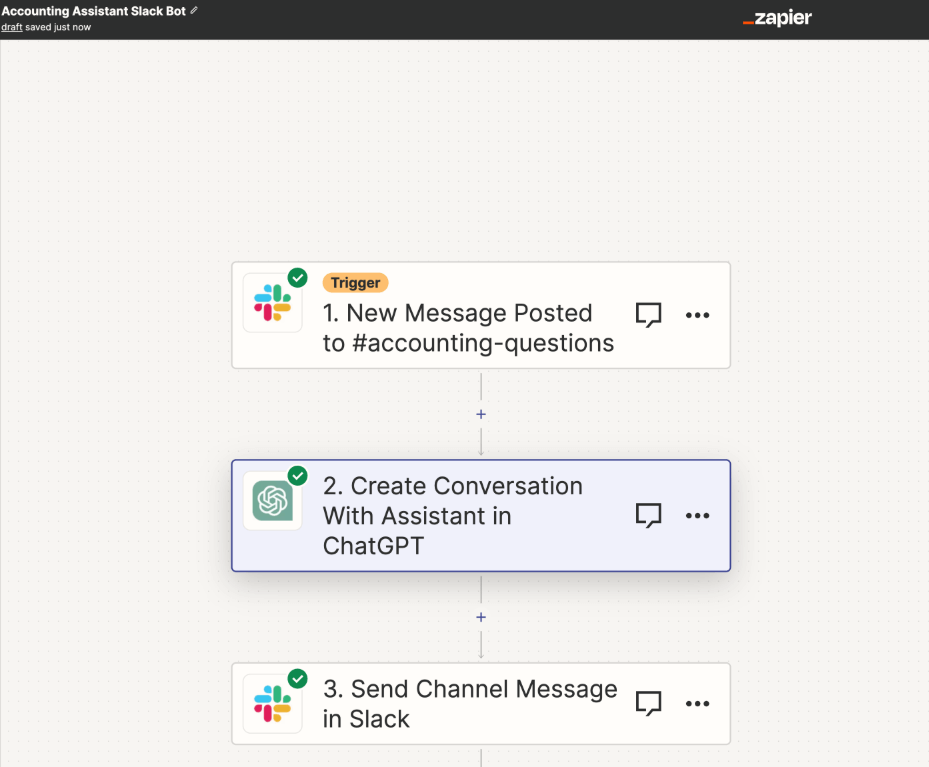
This platform supports 8000+ connections that mainly belong to these categories:
- AI
- BI
- Content Management
- E-commerce
- Human Resources
- Internet of Things
- IT Operations
- Productivity
- Sales
- Support
Key features
- Multi-step Zaps. Users can build workflows by chaining actions within a single data flow, for both simple and complex processes.
- No-code builder. Zaps can be constructed visually with drag-and-drop functionality and without coding.
- Data formatting. The platform offers a set of tools for cleaning, formatting, and batching data.
- Workflow templates. Pre-built workflows allow you to accelerate the automated process setup.
Use cases
Common scenarios that businesses automate with Zapier:
- Sending AI-generated email responses in Microsoft Outlook with ChatGPT (applicable to other email applications)
- Replying to Facebook messages using custom responses from ChatGPT
- Getting an AI-generated daily digest from emails in Slack—messages from Gmail are sent to ChatGPT for summaries, then transferred to the selected Slack channel
- Image generation with ChatGPT and their publishing directly on social media business pages.
Added value
Why select Zapier over native AI connectors for business tools?
Bidirectional data exchange: Zapier enables data to be both loaded to and sent from ChatGPT to other apps, unlike read-only native Apps. For example, summarized emails can be transferred from ChatGPT to Slack.
Near-real-time processing: Users can send and receive data as frequently as every minute, with shorter intervals than native ChatGPT Apps support for synced sources.
Extensive app ecosystem: With 8000+ integrations, Zapier far exceeds the ~50 native ChatGPT Apps, enabling connections to virtually any business tool.
Make.com ChatGPT integration
Make.com is an integration and automation platform for businesses that helps streamline and visualize processes while adding AI capabilities.

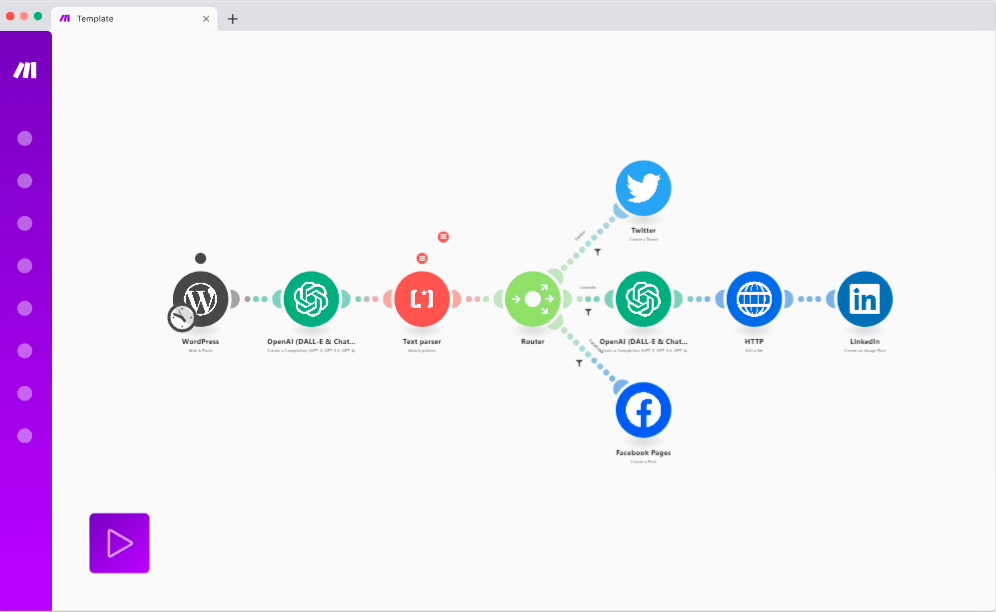
Make supports 3000+ business applications for building data flows. The most popular categories include:
- AI tools
- BI apps
- E-commerce platforms
- Internet-of-Things
- Education
- Marketing
- Productivity
- Travel
Key features
- Data flows of various complexity. Design automated workflows containing either simple elements or complex components such as routers, loops, and aggregators.
- Advanced visualization. Make.com shows how data moves through the workflow, making it easier to debug pipelines.
- Built-in functions. The platform includes multiple functions for math calculations, string manipulation, and data formatting.
- Scheduling. Set workflows to execute on repeat at preferred intervals.
Use cases
- Build Telegram AI chatbot based on custom replies generated by ChatGPT
- Summarize emails in ChatGPT and transfer them to Slack
- Strengthen your brand voice by generating posts in ChatGPT and send them to LinkedIn, Instagram, or other social media platforms
Added value
Why choose Make.com over native ChatGPT connectors?
Read and write capabilities: Unlike built-in integrations, Make.com’s ChatGPT connector can both read from source business apps and write to the same or another service.
Larger integration library: The number of available integrations in Make.com (3000+) is significantly greater than native OpenAI ChatGPT connectors (~50).
Visual workflow debugging: The platform’s advanced visualization capabilities help users understand data flow and troubleshoot issues more effectively than with native Apps.
n8n ChatGPT integration
n8n is an open-source, low-code platform that allows you to automate complex tasks by visually connecting over 400 different apps, services, and AI models. It’s designed to help you build sophisticated workflows with conditional logic, JavaScript, or advanced AI agents.

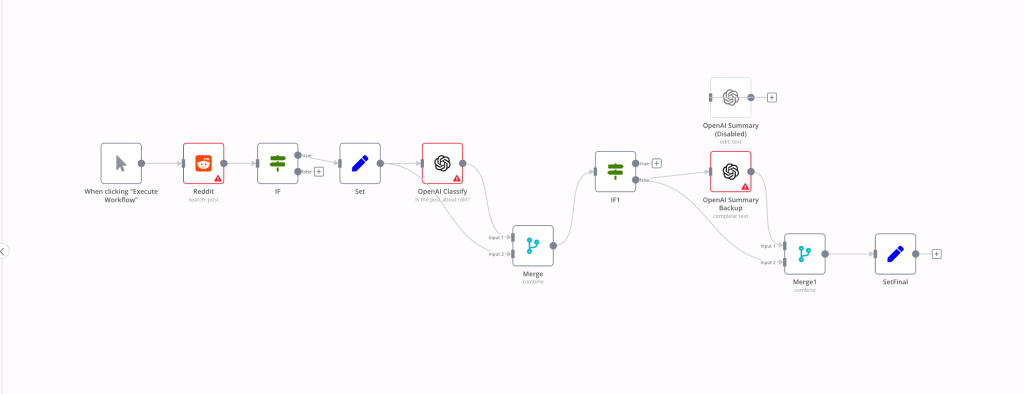
Most supported services and applications belong to these categories:
- AI
- Analytics
- Cybersecurity
- Developer tools
- Data and storage
- Finance and Accounting
- Sales
- Marketing
- Productivity
Key features
- High level of customization. Use the code node to create custom transformations in JavaScript or Python.
- Templates. n8n offers a library of over 400 pre-configured integrations that help avoid repetitive code.
- Scheduling. Decide when to run workflows using cron jobs.
- AI capabilities. With AI nodes, build workflows to summarize information or answer questions about documents.
Use cases
- Generate AI-powered auto-replies with ChatGPT for Gmail
- Check daily team progress with Google Sheets, Slack, and ChatGPT
- Perform automatic code review in GitLab MR and GitHub with ChatGPT
Added value
Why select n8n instead of native ChatGPT connectors?
Powerful transformation capabilities: n8n offers robust data transformation using pre-built templates or custom JavaScript/Python code, helping users prepare data before AI agent processing.
Event streaming option: Data can flow in real-time from the source to ChatGPT, providing more immediate responses than the periodic indexing of native ChatGPT connectors features.
Open-source flexibility: As an open-source platform, n8n provides complete control over deployment, customization, and integration with any API or service.
How to choose the right ChatGPT integration solution for your business needs
There are many platforms that connect your business apps to ChatGPT. However, each has a different purpose and scope of tasks you can perform with it. Therefore, it’s essential to choose the right tool among ChatGPT integration alternatives—one that perfectly matches your business scenarios.
For business data analysis and conversational AI: If you want to ask questions about your business data without needing to interpret analytics dashboards with AI assistant, then Coupler.io is a platform you should definitely consider in your application stack.
Why Coupler.io stands out for data analysis:
- Analytics Engine foundation: Coupler.io ensures AI tools have the proper foundation to generate accurate answers through structured SQL queries and verified results.
- Simplified dataset processing: It simplifies massive dataset processing by AI and logs every query, which is particularly important since LLMs often produce different answers for the same query.
- Data preparation first: The platform allows you to blend data from multiple sources for comprehensive analysis and apply multiple transformations to increase the quality of input data for ChatGPT and AI agents. This preparation step is crucial—well-structured data leads to better AI insights.
- Granular data control: Unlike native Apps where you share entire data sources, Coupler.io AI platform lets you select specific datasets to expose to ChatGPT, maintaining data privacy and relevance.
- Extensive connectivity: Coupler.io offers 400+ prebuilt, code-free connectors to popular business applications, compared with ~50 native ChatGPT integrations.
For trigger-based automation workflows: Make.com and Zapier excel at building event-driven automation. They’re often used by customer support teams and content creators to generate custom replies, perform email summaries, craft social media posts, and execute similar tasks. These platforms are ideal as daily task optimizers.
For technical teams and complex workflows: n8n can handle more sophisticated problems with ChatGPT, such as automatic code review. Given that it connects to various developer tools and offers a low-code interface for custom transformations, it’s a good solution for tech-savvy users.
The right choice depends on your specific use case: automation workflows, technical customization, or data-driven conversational AI analysis.