Coefficient.io pricing looks simple on the page with Free, Starter ($49/month billed annually, $59 monthly), and Pro ($99/user/month billed annually, $119 monthly) plans. But what you actually pay depends on three things.
- Headcount: Starter plan covers one person, and Pro charges for every user who builds or refreshes imports
- Activity: refresh and export allowances are shared across all imports each month, so the number of scheduled imports adds up soon
- Source type: BigQuery, Snowflake, and more are marked as premium sources and only available in the Enterprise plan
As more people join and more imports run, you hit these limits one by one, and costs go up each time. Coupler.io avoids this pattern by not charging per user. The plans scale with connected accounts instead, and Active and Pro include unlimited users.
Key takeaways
- Coefficient.io pricing is built in layers. The bill scales on three things at once: headcount (Pro charges per user, caps at 5), activity (refreshes and exports share a monthly quota), and source type (BigQuery, Snowflake, Looker, NetSuite, and Tableau are gated to Enterprise).
- Three specific triggers force an upgrade. Starter → Pro when a second person needs to build imports, when an import grows past 5,000 rows, or when the 500-refresh quota runs out. Pro → Enterprise when a sixth user joins, when a premium source is needed, or when SSO is required.
- At five users on Coefficient Pro, the bill reaches $495/month (billed annually). A sixth user has no published price — Pro caps at five.
- Coefficient fits best when the work starts and ends in Sheets or Excel, especially when writeback to a source system (Salesforce, HubSpot) is central.
- Coupler.io is the main Coefficient alternative for teams that outgrow spreadsheets: account-based pricing with unlimited users from Active upward, every source available on every plan, and destinations across BI tools, warehouses, and AI tools.
How the Coefficient.io model scales from one user to a team
Coefficient’s price grows in steps, and each has a clear trigger. Below are three common setups that show where the steps are.


One person automating a few imports on Starter
Say a single person pulls data from a couple of sources, such as Salesforce and HubSpot, into Google Sheets and refreshes it every day. Coefficient’s Starter plan is a good fit here. It’s built for a single user, and it comes with daily refresh and 500 import refreshes a month.
The thing to watch is that the 500 isn’t per import. It’s shared across every import you run, manual and scheduled, and it resets on the 1st. A daily schedule uses about 30 refreshes per import in a 30-day month. If you have 16 imports set for daily refresh, it uses 480, which leaves just 20 for manual refreshes. Add a 17th import, and you’re at 510, over the limit.
There are also row limits. They cap how big each import can be, not how many refreshes you get in a month. Free and Starter both cap each import at 5,000 rows, and Pro removes that cap.
Free and Starter cap each import at 5,000 rows. Pro removes that per-import row limit, but its monthly refresh quota still applies.
- Starting plan: Starter at $49 a month
- Limit reached: about 17 daily imports, an import larger than 5,000 rows, or a second person who needs to build imports
- Upgrade: Pro
- Resulting cost: $99 a month for one user, $50 more than Starter
When two more people join, and some sheets need hourly refresh, Starter can’t handle that. It covers one person only, and shared connections and hourly refresh start on Pro.
- Starting plan: Starter at $49 a month, one person
- Limit reached: two more people need to build and refresh imports
- Upgrade: Pro with three users
- Resulting cost: 3 × $99 = $297 a month, $248 more than Starter
Hourly refresh also uses the quota fast. One import refreshing every hour runs about 720 times in a 30-day month. Pro’s 5,000 refreshes cover 6 hourly imports, and a 7th takes the total to 5,040.
Larger teams run into one of two walls. Pro allows up to 5 users, so a sixth person means moving to Enterprise. A premium source does the same at any team size. Coefficient lists BigQuery, Snowflake, Looker, NetSuite, and other systems as premium sources, and they’re available only on Enterprise. Many readers assume Pro unlocks every connector, but it doesn’t.
Coefficient Pro supports up to five users. A sixth user, premium source, or SSO requirement takes the team to custom-priced Enterprise.
- Starting plan: Pro with five users, 5 × $99 = $495 a month
- Limit reached: a sixth user, a premium source, or a need for SSO and admin controls
- Upgrade: Enterprise
- Resulting cost: a custom quote depending on your needs
Three upgrade triggers, three jumps in cost. That’s how Coefficient.io pricing works. The next question is whether the spreadsheet-first model fits your workflow in the first place.
When the Coefficient workflow outgrows the spreadsheet
Coefficient.io pricing makes sense as long as the work ends at the spreadsheet. It starts to fit badly when the data has to go somewhere else, or when the people who need it aren’t the ones building imports.
A few signs you’ve reached that point:
- Reporting has to land in a warehouse like Redshift or PostgreSQL, or in a BI tool, not only in a sheet.
- Data needs to reach several destinations at once.
- Every person who builds or refreshes imports needs a paid seat on Pro. Coefficient’s AI Dashboards lets people view results through a shared link with no viewer licenses, but it’s a separate product, sold through a demo.
- The workflow needs a data layer before Sheets or Excel, so imports aren’t rebuilt sheet by sheet.
- AI and analytics need to work from centrally prepared data instead of many individual sheets.
Coupler.io is the main Coefficient alternative for that case, with destinations beyond spreadsheets, unlimited users from Active upward, and every source on every plan.
Coupler.io for teams that need destinations beyond spreadsheets
Coupler.io moves data from 400+ sources, including CRMs like HubSpot and Salesforce and project tools like Asana and ClickUp, into spreadsheets, BI tools, data warehouses, and AI tools such as Claude and ChatGPT. That list also covers Google Ads, Google Analytics, LinkedIn Ads, Jira, Pipedrive, Xero, and databases like MySQL and PostgreSQL. The bill follows connected accounts, destinations, and refresh frequency instead of headcount. More importantly, every source is available on every plan.

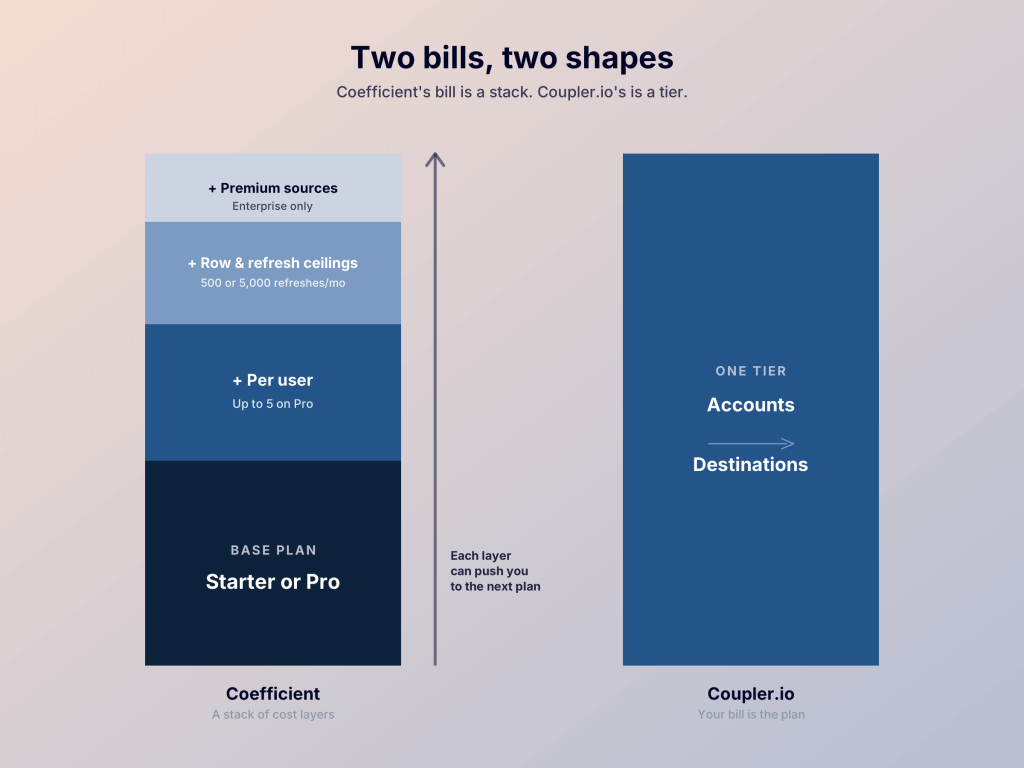
Here is how the two compare on the dimensions that drive cost:
| Dimension | Coefficient | Coupler.io |
|---|---|---|
| What scales the bill | Users on Pro, plus limits on sources, refreshes, and exports | Connected accounts, destinations, and refresh frequency |
| Where data lands | Google Sheets and Excel, with AI Dashboards sold separately | Spreadsheets, BI tools, data warehouses, and AI tools: 1 destination on Starter, 3 on Active, unlimited on Pro |
| Users | Per user on Pro, up to 5 | 1 on Starter, unlimited on Active and Pro |
| Sources | 3 to 6 standard sources, premium sources on Enterprise only | 400+ sources, all on every plan |
| Fastest published refresh | Hourly on Pro | Hourly on Pro, 15 minutes on Custom |
| Saving on annual billing | 17% | 25% |
Each tool suits a different setup. Coefficient is built around working inside Sheets or Excel, including sending edits back to a source system, which works well for teams whose work starts and ends in a spreadsheet. Coupler.io pricing is designed around moving data to several destinations, so its plans scale by accounts and destinations.


Get BI, warehouse, and AI destinations on one plan
Talk to Coupler.ioReal-world cost comparisons: Coefficient vs Coupler.io
Headline prices only tell part of the story, so here are four common setups mapped to the plan each tool would need.

Scenario 1: Solo analyst running daily reports to Sheets
| Requirements | Coefficient cost | Coupler.io cost | Verdict |
|---|---|---|---|
| 1 user, up to 3 sources, Google Sheets destination, daily refresh | Starter: $49/month ($588/year) | Starter: $24/month ($288/year) | Coupler.io saves $25/month ($300/year) |
Why Coupler.io: Both plans cover one person pulling daily reports into Sheets, so the difference here is price. Coefficient pulls ahead only if the workflow needs to write edits back to a source such as Salesforce, which is what its exports are built for.
Scenario 2: Three-person team with shared connections and hourly refresh
| Requirements | Coefficient cost | Coupler.io cost | Verdict |
|---|---|---|---|
| 3 users, shared connections, hourly refresh, Google Sheets destination | Pro: 3 users × $99 = $297/month ($3,564/year) | Pro: $199/month ($2,388/year), unlimited users | Coupler.io saves $98/month ($1,176/year) |
Why Coupler.io: Coefficient charges per user, so every extra seat adds $99 a month. Coupler.io’s Pro plan is one price for any number of users. Hourly refresh is included on Pro for both tools.
Scenario 3: Five-person team pulling BigQuery data into Sheets
| Requirements | Coefficient cost | Coupler.io cost | Verdict |
|---|---|---|---|
| 5 users, BigQuery as a source, Google Sheets destination, hourly refresh | Enterprise: the price is a custom quote (Pro alone would be 5 × $99 = $495/month) | Pro: $199/month ($2,388/year), BigQuery included | Coupler.io: published price, no sales call |
Why Coupler.io: BigQuery is an Enterprise-only source on Coefficient. Even without premium sources, Coefficient Pro costs $495 a month. On Coupler.io Pro, the same team pays $199 a month. The plan doesn’t charge per user, and all 400+ sources are available on every Coupler.io plan.
Scenario 4: Team of six, past Coefficient’s Pro cap
| Requirements | Coefficient cost | Coupler.io cost | Verdict |
|---|---|---|---|
| 6 users, Google Sheets destination, hourly refresh | Enterprise: Pro stops at 5 users, so the price is a custom quote | Pro: $199/month ($2,388/year), unlimited users | Coupler.io: published price, no user cap |
Why Coupler.io: Pro’s five-user cap sends a sixth user to Enterprise, even for a standard spreadsheet workflow. Coupler.io’s Active and Pro plans have no user cap. If daily refresh is enough, Active costs $99/month ($1,188/year) for the same six users.
For a solo analyst working only in Sheets, Coefficient is close to Coupler.io, with just $25 a month between them. The gap widens at three users, and at a premium source or a sixth user, Coefficient moves to a custom quote.
Which pricing model is better for you?
The answer depends on where your data needs to end up and how many people touch it.
- You’re one person or a team of up to five, working in Sheets or Excel: Coefficient is good enough. Starter at $49 a month or Pro at $99 per user covers daily or hourly refresh, and the cost stays easy to predict.
- You need to send edits from a sheet back to a source system: Coefficient is built for it, since exports are part of its plans.
- More than five people build or refresh imports: Coupler.io gets the vote here, because Active and Pro include unlimited users. Coefficient sends you to an Enterprise quote at the sixth user.
- Your data has to reach a BI tool, a warehouse, or an AI tool: Coupler.io, which supports those destinations alongside spreadsheets.
- You rely on a source Coefficient locks to Enterprise: Coupler.io doesn’t gate sources by plan, since all of them are available on every plan.
For a feature-by-feature comparison, see Coupler.io vs Coefficient.io. If you’re also looking at marketing data platforms, our breakdown of Funnel.io pricing shows how a capacity-based model compares with per-user plans, and Windsor.ai pricing shows how billing by data sources and accounts plays out as you add channels.
Price a team on Coupler.io without per-user math
Book a demoCoefficient.io pricing plans for Free, Starter, Pro, and Enterprise
Coefficient.io pricing is split across four plans. Free, Starter, and Pro have listed prices, while Enterprise is quoted on request.
| Plan | Price | Users | Standard sources | Import size | Import refreshes per month | Auto refresh | Export runs per month |
|---|---|---|---|---|---|---|---|
| Free | $0 | 1 | 3 | 5,000 rows | 50 | Manual only | 50 |
| Starter | $49 per month | 1 | 3 | 5,000 rows | 500 | daily | 500 |
| Pro | $99 per user per month | Up to 5 | 6 | unlimited | 5,000 | hourly | 5,000 |
| Enterprise | custom | custom | All sources, including premium | unlimited | unlimited | Not stated | unlimited |
Free
Free is for testing Coefficient on one report, not for running a workflow. You get one user, three standard sources with one account each, imports up to 5,000 rows, and 50 import refreshes a month. It has no scheduled refreshes, so every refresh is manual. Exports, which handle two-way sync, are capped at 100 rows and 50 runs, and they’re currently available on Salesforce and SQL connectors. Free also includes GPT Copilot, an AI Sheets assistant that speeds up workflows.
Teammates without a paid license can open your sheet through a share link, but they can’t edit your imports or schedule refreshes.
- Best for: trying one import before you pay
- Outgrows when: you need a schedule, since Free has none
Starter
Starter is the first of the paid plans, and it adds scheduled refreshes. You get daily refreshes, 500 import refreshes and 500 export runs a month, exports up to 500 rows, snapshots, and SQL, chart, and pivot builders. It’s still one user, three standard sources with one account each, and 5,000 rows per import.
- Best for: one person running a handful of daily reports
- Outgrown when: a second person needs to build imports, an import passes 5,000 rows, or the 500 monthly refreshes run out
Pro
Pro is where Coefficient starts to work as a team tool. Billing is per user, up to five users. You get hourly refreshes, 5,000 import refreshes and 5,000 export runs a month, and no row limit on imports or exports. Sources go up to six standard sources with three accounts each. Teams also get shared connections and templates, dynamic recipients, and priority customer support by chat and email.
Pro covers standard sources only. You’ll need the Enterprise plan to get premium sources (Snowflake, BigQuery, Tableau, and more). SSO and admin controls are Enterprise only too.
- Best for: a team of up to five people working in Sheets or Excel
- Outgrown when: you add a sixth user, connect a premium source, or need SSO and admin controls
Enterprise
Enterprise is quote-based, with custom pricing and volume discounts. Refreshes, exports, and alerts are unlimited, and the plan adds premium sources, admin controls, custom SSO, consolidated billing, a security review and MSA, and dedicated chat and email support. Coefficient doesn’t publish a price or a user limit for it.
- Best for: larger teams and anyone with a premium source or a governance requirement
- Watch for: custom pricing means there’s no number to plan around until you ask for a quote
FAQ
Is there a Coefficient free trial?
Yes. Coefficient offers a full-featured 30-day trial of the Pro plan. If you don’t choose one of the paid plans when it ends, your account moves to Free. For comparison, Coupler.io offers a 7-day free trial with full access, and its Free plan has no time limit, so you can get started free and upgrade later.
Can teammates without a paid license for Coefficient use my spreadsheets?
They can open a spreadsheet you share, but they can’t edit your imports or schedule automated refreshes. Anyone who builds or refreshes imports needs their own paid license. Coupler.io’s Active and Pro plans include unlimited users, so adding teammates doesn’t change the price.
Are there discounts for Coefficient plans?
Yes. Coefficient lists 17% off for paying annually upfront, up to 50% off the first year for qualifying startups, non-profit pricing, and volume discounts on Enterprise. You contact Coefficient’s sales team for the details. For comparison, Coupler.io lists 25% off for annual billing.
Can I change or cancel my Coefficient plan?
Yes, with some timing rules. Admins can request upgrades or downgrades through Change Plan, but Coefficient’s help center says changes requested mid-cycle take effect in the next billing cycle. To cancel, the help center tells you to contact support.
The terms of service add two details. Plans renew automatically at the then-current price, and canceling doesn’t refund fees you’ve already paid. You must pay any fees due for the rest of the current term immediately.
Explore more useful content about SaaS tool pricing