On May 21, we hosted a live webinar on turning AI analytics from a one-off experiment into a system you can trust with real numbers. The webinar tackled that topic from two angles.
Gabriel Solberg, a B2B growth performance marketer who manages six- to eight-figure monthly ad budgets, showed how he runs client reporting through Claude and Coupler.io every day.
Nika Tamaio Flores, Product Lead at Coupler.io, broke down the system architecture that makes it reliable: Coupler.io MCP connections, business data context, skills, and versioned reports. The recording is available on the Coupler.io Academy YouTube Channel.

Here are the key takeaways from it.
The five-minute version of the webinar
AI should never do math. LLMs are bad at math as their core capability is predicting the next token. Coupler.io’s Analytical Engine executes queries and returns computed results. The LLM only interprets them.
Context beats prompts. Metric definitions, data exclusions, naming conventions, and business calendar events are essential for the correct data analysis.
Skills turn good analysis into repeatable analysis. A structured set of instructions with steps, inputs, expected output, and guardrails is what separates a one-time insight from a proper Monday morning report.
Refinements keep it accurate over time. Edge cases surface during normal work. Capture them as they happen, feed them back into context or project instructions to make AI’s responses better.
There are three levels of automated reporting available with Claude: scheduled tasks, versioned reports, and live artifacts. You don’t need all three on day one.
Give AI tools, not spreadsheets
The most common way people try AI analytics is by pasting data into a chat window. It works for quick questions, but it falls apart for anything recurring or precise. LLMs are not good at math. They hallucinate numbers. And every time you paste a CSV, you lose context from the previous session.
Nika walked through how Coupler.io solves this with a different architecture. Instead of feeding raw data to the AI, Coupler.io gives AI tools to work with through MCP (Model Context Protocol). The flow works in four steps:
- AI reads the data schema (column names, types, structure) along with the data sample
- AI writes an SQL query based on your question
- The Coupler.io Analytical Engine executes the query, runs calculations, and aggregations
- Only the computed results go back to the AI for interpretation

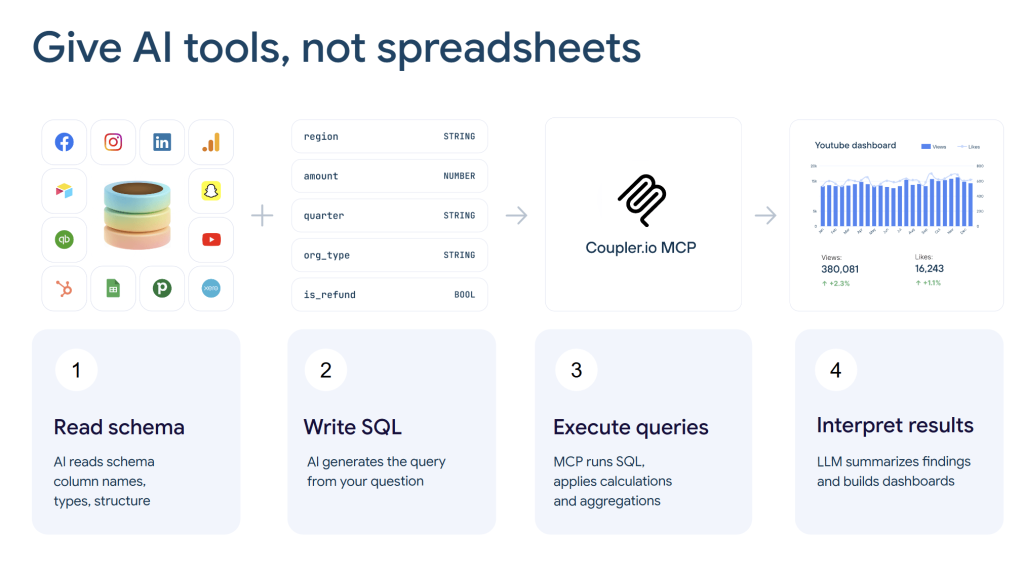
The AI never touches raw data directly. That is what keeps the numbers accurate. Gabe confirmed this from a practitioner’s perspective: after a year of daily use across multiple clients, he trusts the output because Coupler.io does the math, not the LLM.


Connect business data to AI with Coupler.io
Get started for freeContext is what separates a demo from a real workflow
A tool that can query your data is only half the problem. The other half is making sure the AI understands what the data means. Nika called this “business data context” and described it as everything an analyst would tell a new hire on day one:
- How metrics are calculated (and which definitions are custom to your business)
- What data to exclude and why (anomalies, system migrations, test accounts)
- Naming conventions so the AI knows what it is querying
- Known data gaps and instrumentation quirks
- Business calendar events: launches, pricing changes, seasonality, campaigns
- Attribution rules
Without this context, AI will give you technically correct analysis against the wrong assumptions. It might define “top product” by quantity sold when your team measures by profit margin.
Coupler.io now includes a context editor directly in the data set preview. You can generate an initial context using a built-in prompt, then edit and refine it over time or paste the context you already store elsewhere.

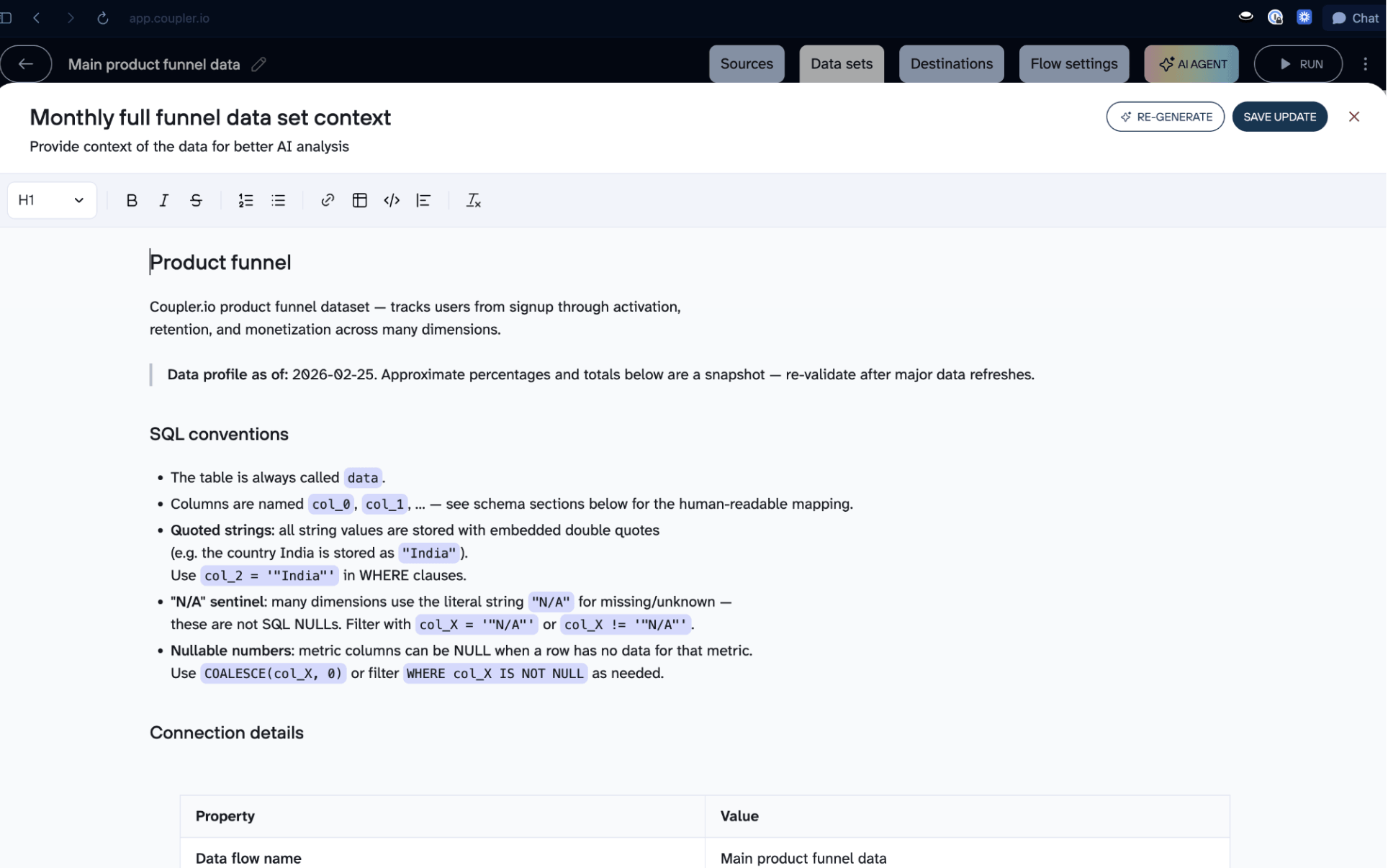
When you discover something new during analysis, you can tell the AI to update the context directly from chat, and it appends the new detail without overwriting what is already there.
Gabe takes a similar approach using Claude Projects. He builds detailed project instructions for each client that cover the business, the data structure, metrics taxonomy, guardrails, and output preferences. He described this as “engineering the context layer.”
Skills turn one-off analysis into repeatable workflows
Both speakers spent significant time on skills, and for good reason. A skill is a structured set of instructions that tells the AI how to perform a specific task: what role to adopt, what steps to follow, what tools to use, what output to produce, and what mistakes to avoid.
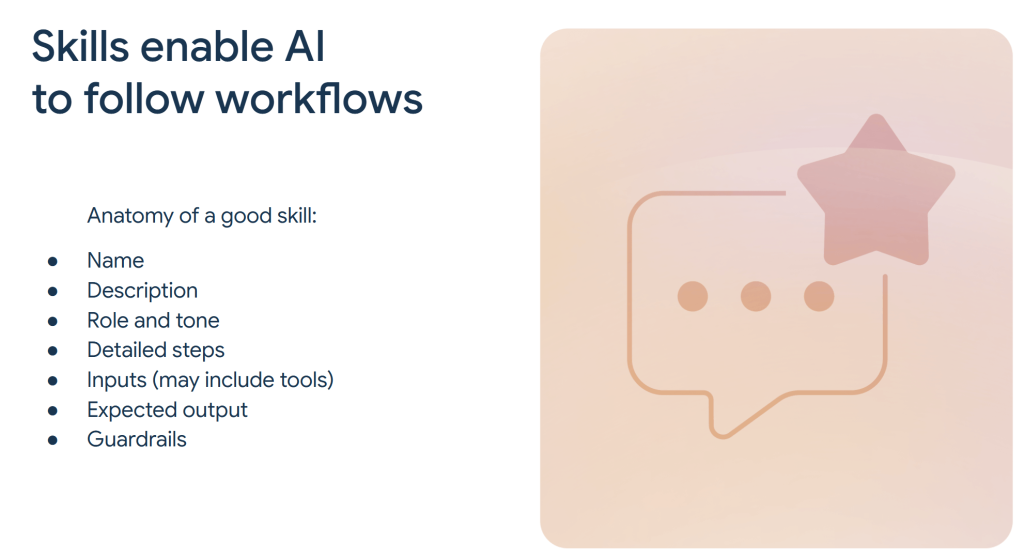
Nika outlined the anatomy of a good skill: a name (for you), a description (for the AI), optional role and tone settings, detailed steps, inputs (including tool references like data flow IDs), expected output format, and guardrails. She emphasized that the description should not duplicate everything in the skill body. If the AI can satisfy the request from the description alone, it might skip executing the actual steps.

She also showed a report generation skill that Coupler.io ships as an MCP tool. It runs in two phases: first it produces the report, then it validates the output by checking arithmetic, unit conversions, metric definitions, and internal consistency. That validation phase is what catches the errors that a single-pass report would miss.
Explore the Coupler.io AI skills for analytics, reporting, marketing, and more.
Gabe demonstrated this from the practitioner’s side. He showed three types of skills he uses daily:
- A project instruction builder that walks through setup questions and outputs the full markdown instructions for a new client project
- Report skills that generate recurring deliverables (like a weekly CPL trend) and can be updated directly from chat
- A creative fatigue detection skill that compares 3-day, 7-day, and 30-day performance windows against account baselines to flag which ads need to be paused in high-spend Meta accounts

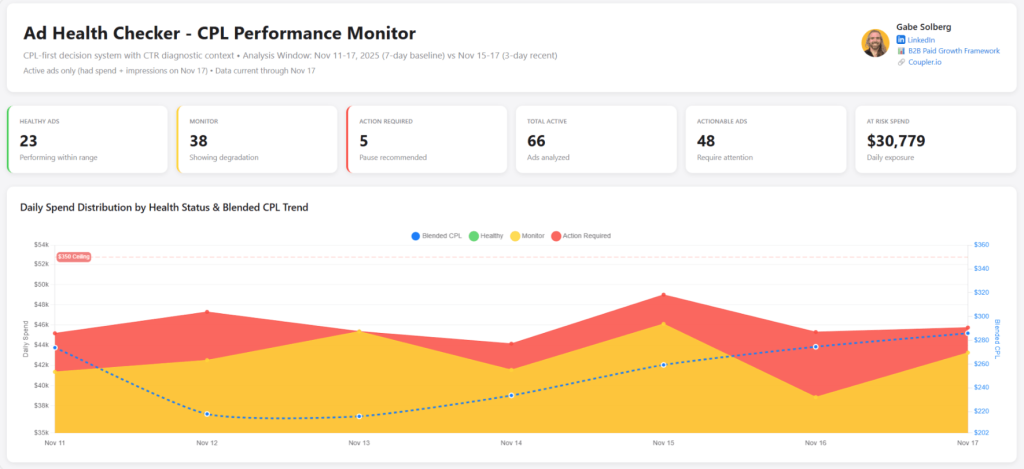
He described this as “vibe reporting”: building reports through conversation, refining them iteratively, and saving them as reusable skills.
For a deeper look at how Gabe applies these workflows to manage $1M+ in monthly ad spend, see his full case study.
Refinements keep the system accurate over time
One thing Gabe stressed is that the initial setup is not the hard part. The hard part is keeping the system accurate as edge cases surface. A client changes their week start day from Monday to Sunday. A tracking event misfires for three days, and you need to exclude that range from every future query. You want tables sorted descending instead of ascending.
His solution is a refinement workflow: a skill that captures these corrections as they come up during normal analysis, logs them to a markdown file, and feeds them back into the project instructions. It turns maintenance into something you do in the flow of work rather than a separate chore.

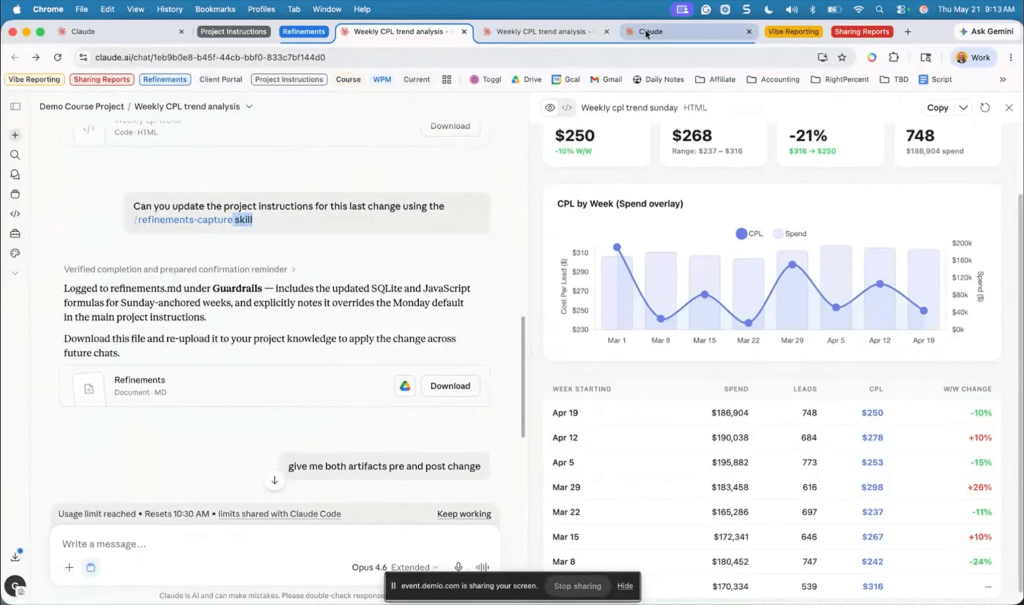
Nika made the same point from the product side. The context editor in Coupler.io supports the same pattern: you can update context from chat, and it adds the new information without overwriting what exists.
Efficient AI analysis of data with the proper business context
Try Coupler.io for freeThree levels of automated reporting with Claude
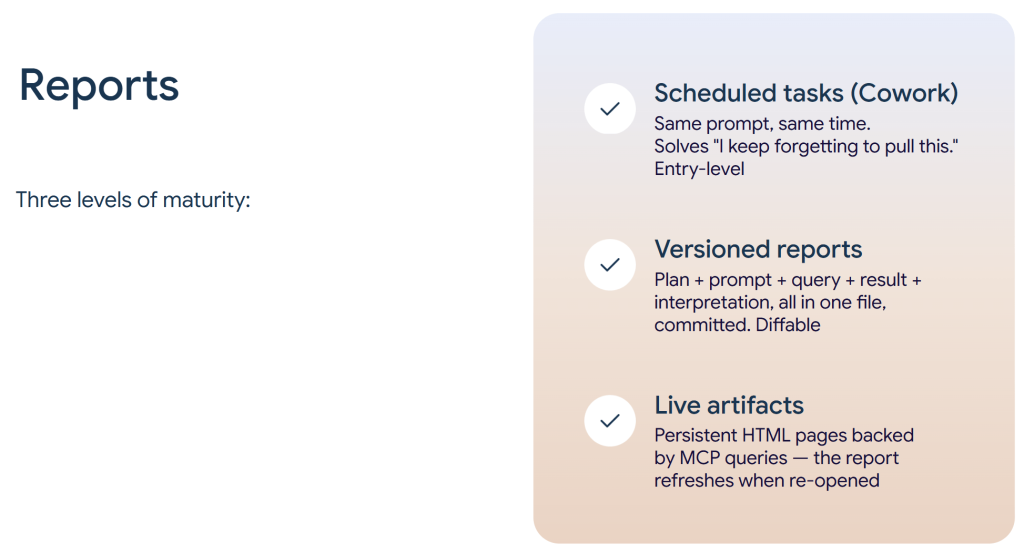
Nika framed AI reporting with Claude as a maturity curve with three levels:
Scheduled tasks run the same skill on a schedule through Claude Cowork. This is the entry point. It solves the “I keep forgetting to pull this” problem.
Versioned reports save the full analysis chain as a single file (usually markdown) that covers plan, prompt, query, result, and interpretation. You can compare versions side by side to see how a report evolves and trace any number back to the query that produced it.
Live artifacts are persistent HTML pages backed by MCP queries. When you open one, it pulls fresh data. Nika showed a Coupler.io internal template funnel dashboard running as a live artifact in Cowork, with KPI scorecards, conversion funnel charts, and destination breakdowns that refresh on demand.

If you are a Claude user, check out what artifacts you can build with this AI tool.
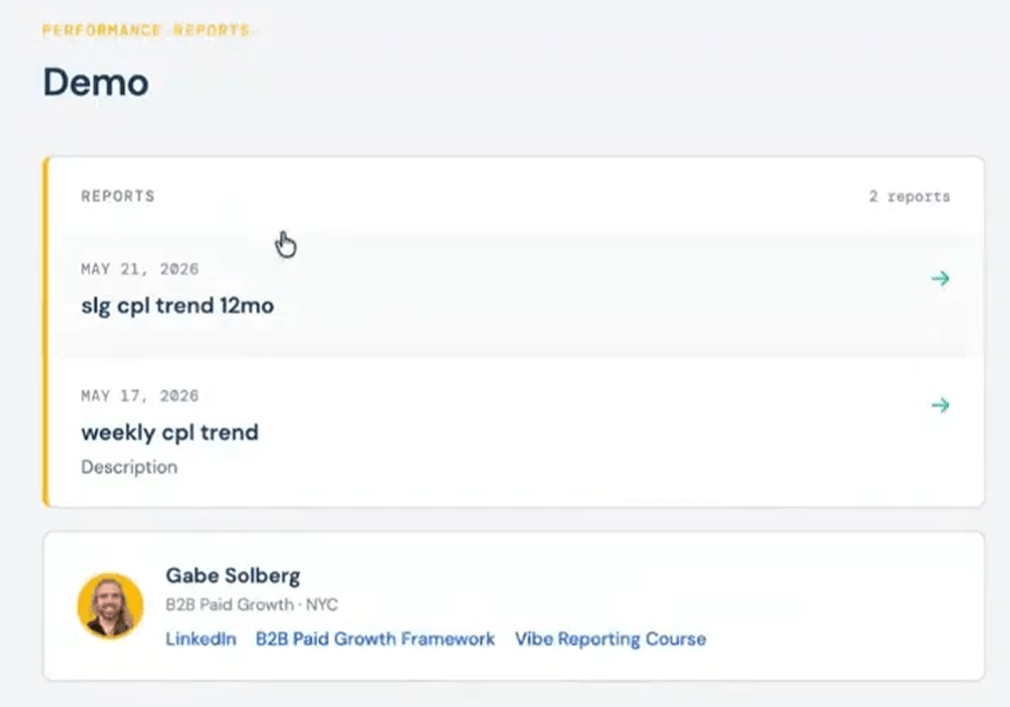
Gabe also showed how he shares reports with clients. He built a custom password-protected portal for each client. He downloads the artifact as HTML, uploads it to the portal, and the client gets an interactive view. They can filter by channel, switch between tabs, and explore the data. It is a static snapshot of a specific time frame, but it beats sending a screenshot.

What about accuracy?
The most direct question from the audience was about trust: how do you know the numbers are right?
Gabe’s answer was practical. When he started, he cross-checked every output against his Google Sheets data. Totals, weekly breakdowns, filtered views — all verified manually. Over time, he found the results were consistently accurate, and he attributes that to the architecture: Coupler.io’s Analytical Engine runs the math, not the LLM. He estimated his current workflow is about 60% Claude, 40% Google Sheets, with the manual portion shrinking.

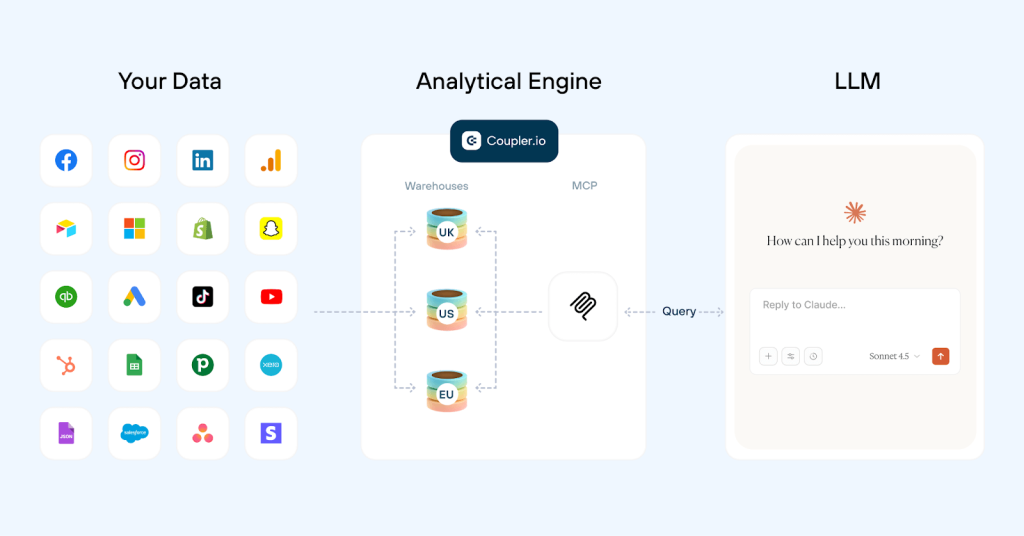
Nika reinforced this from the product side. LLMs are bad at math. That’s not a scary line but simply how they’re built. They predict the next token, not the right answer to an arithmetic problem. That’s why Coupler.io’s MCP approach doesn’t let the AI touch raw data. It can only read the schema and execute queries through the Analytical Engine. The engine runs the actual calculations. The AI interprets the results. That split is what prevents hallucinated numbers.
Connect data from 400+ data sources to AI with Coupler.io
Get started for freeStart with context, not prompts
If there is one thread that ran through the entire session, it is this: the quality of AI analytics depends on the context you provide, not on how clever your prompts are. Project instructions, business data context, refinements, skills — all these are all forms of structured context that make the difference between a demo that impresses and a system that works.
And while both speakers demonstrated Claude, the same setup works with ChatGPT, Gemini, Cursor, Perplexity, and OpenClaw. Skills are shared across all connected AI tools. Enterprise integrations with Microsoft Copilot and Gemini Enterprise are also on the way.
Connect your data to Claude or ChatGPT through Coupler.io’s AI integrations, add context, build your first skill, and see how far the results get before you need to open a spreadsheet.