Dashboards show you the story at a glance. Traffic is up. Conversions shifted. Revenue grew 15%. They’re essential for monitoring performance and spotting trends quickly. But when you’re preparing for a meeting, brainstorming an idea, or making a decision on the fly, you often need to go deeper and faster: Why did traffic spike on Tuesday? Which campaign drove those conversions? What changed compared to last month?
That’s when the clicking begins. You start filtering reports, comparing segments, cross-referencing date ranges, and jumping between views. What should take 30 seconds stretches into hours of manual exploration. Wouldn’t it be easier to just type a question and get an answer?
Exactly for this, Coupler.io introduced AI Agent that empowers chatting with your data using AI alongside your data integration and automation workflows.

What is AI Agent by Coupler.io?
AI Agent is a built-in conversational analytics assistant inside Coupler.io. It allows you to use the power of AI to analyze your business data. The main benefits of AI Agent are:
- Zero setup required. One button click to launch the AI Agent and start a conversation.
- Analyze data from 420+ sources. Work with business data from any applications Coupler.io supports: marketing platforms, CRMs, financial tools, and more.
- Get immediate answers. Skip dashboard building and report generation. Just ask questions about your data flows and receive insights in seconds.
- Always up-to-date data. Coupler.io’s AI Agent works with your latest business data, with updates as frequent as every 15 minutes.
- Built into your workflow. Your data analysis happens inside Coupler.io, right where your data automation workflows live.
- Accurate results. Powered by Coupler.io’s Analytical Engine, which calculates your data and validates the results.
Think of it as having a data analyst on standby, ready to answer questions the moment you have them.
When you ask a question, AI Agent does more than just respond. If your prompt is unclear, it automatically refines it to get better results. After answering, it suggests logical next steps—giving you ideas for follow-up questions without having to figure out what to explore next.

How AI Agent works
To check the AI Agent in action, you need an active Coupler.io data flow. The destination does not matter. AI Agent works with any data flow, regardless of where it sends data.
There are multiple ways to launch the AI Agent:
Option 1: From the sidebar menu
- Click AI Agent in the sidebar menu to launch it.

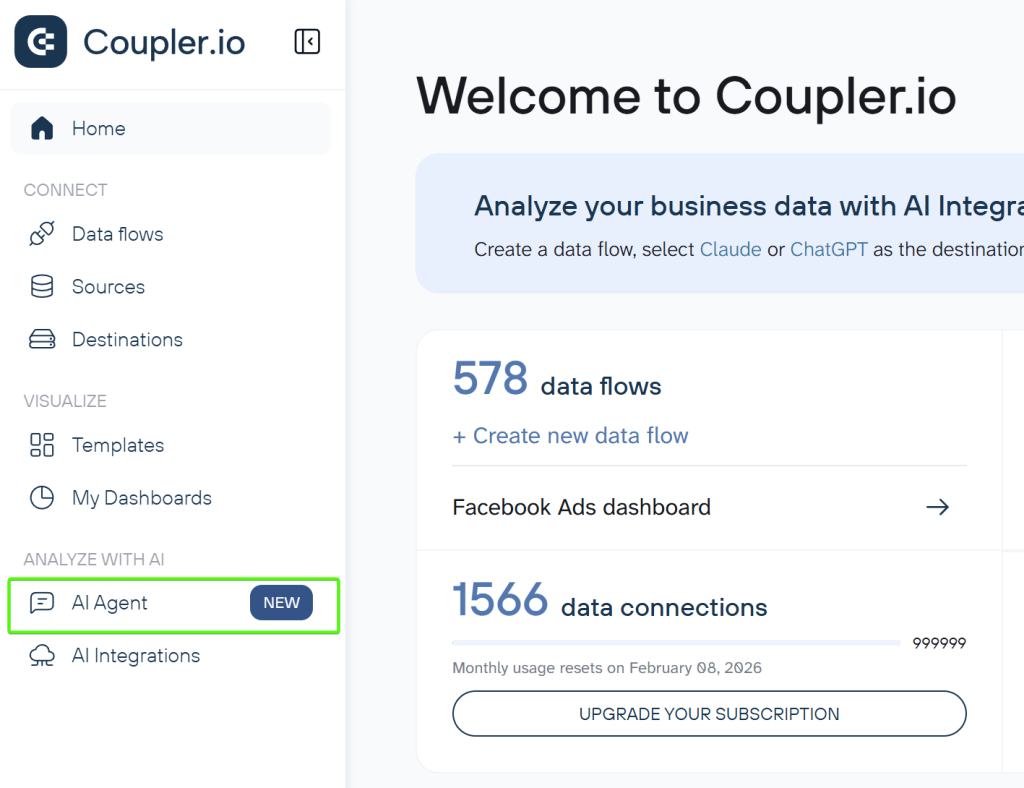
In this case, you access AI Agent without binding to a particular data flow. So, if you have multiple data flows with the same source, specify the name of the data flow you want to analyze.
To access AI Agent within a particular data flow, use one of the following options.
Option 2: From the data flows list
- Click ASK AI next to the needed data flow from the main page.

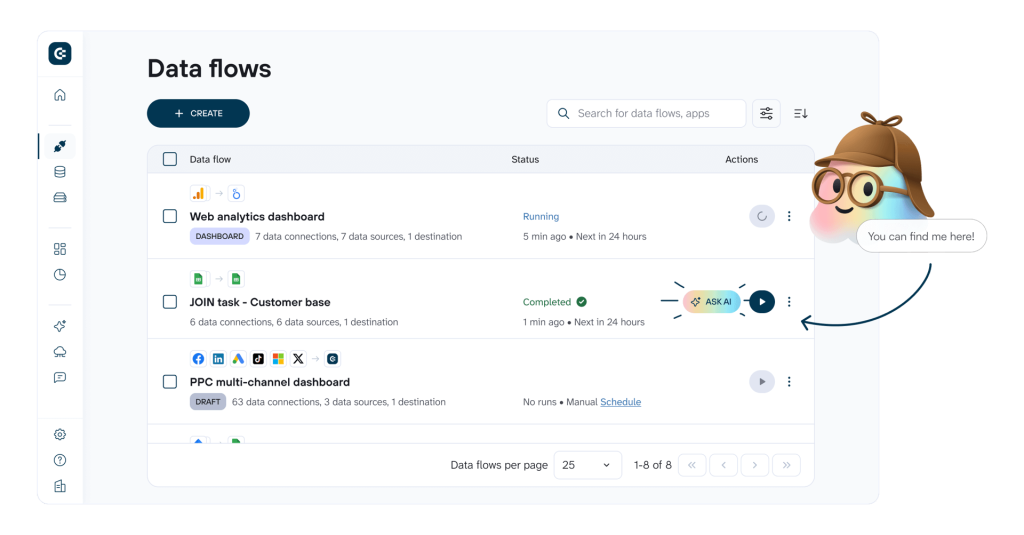
In the data flows with Completed status, AI Agent launches automatically.
Option 3: From a completed data flow
- Once you’ve set up and run your data flow, you will see AI AGENT tab, where you can chat with your data.

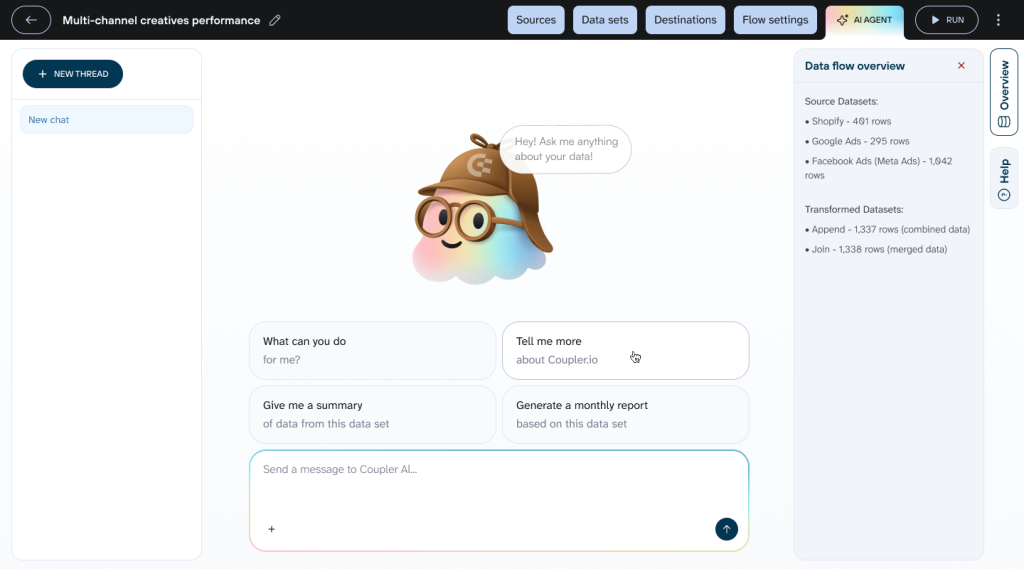
Whichever option you choose, you’ll find yourself face-to-face with the cute AI Agent mascot waiting for your questions. Keep in mind that it’s AI, so the more specific context you provide, the better results you get. It’s also efficient to specify which data you want to explore.
| Good question example | Not a good question example |
| Show me CTR and CPC trends for ‘Facebook Ads – Main Account’ in January 2026 | Show me ad performance |
The AI Agent will process your question and get back to you with an accurate answer. By process, I mean:
- The AI interprets what you’re asking and translates it into a structured query that can be executed on your data.
- Coupler.io’s Analytical Engine queries your dataset, performs calculations and aggregations, validates the results, and returns only verified, processed data.
- The AI receives the accurate results and formats them into a clear, readable answer with context and recommendations.
That’s it. No additional configuration or new data flows. Just a simple-to-use tool for data analysis accessible via one click.
Chat with AI Agent about your data
Try Coupler.io for freeFor what data analysis can you use AI Agent
It works across all types of business data in your data flows. Here are common analysis scenarios where it helps you get instant answers:
It works across all types of business data in your data flows. Here are common analysis scenarios where it helps you get instant answers:
Business analysis
Performance overview: “Show me customer acquisition cost trends from Google Analytics 4 for Q4 2025 compared to Q3 2025”
Cross-functional insights: “Compare revenue and profit margins for our top 5 products from Shopify for December 2025”
Growth opportunities: “Which customer segments in HubSpot CRM show retention rates above 80% in the last 6 months?”
Marketing analysis
Compare channel performance: “Compare Facebook Ads and Google Ads cost per conversion for the ‘Holiday Campaign’ in December 2025”
Track campaign metrics: “Show me click-through rates for all active campaigns in Google Ads this month”
Analyze attribution: “Calculate customer acquisition cost by traffic source from Google Analytics 4 for Q4 2025”
Sales analysis
Identify top customers: “Show me top 10 customers by lifetime value from Salesforce with their average deal cycle length”
Pipeline health: “How many deals in HubSpot are stuck in ‘Negotiation’ stage for more than 30 days?”
Team performance: “Compare win rates by sales rep from Pipedrive for Q4 2025”
Financial analysis
Cash flow monitoring: “Calculate monthly burn rate from QuickBooks for July through December 2025 and project runway”
Revenue tracking: “Show month-over-month revenue growth from Stripe for Q4 2025”
Expense analysis: “List top 5 expense categories from Xero and compare them to the same period last year”
Advanced data analysis
Pattern exploration: “Which user segments in Mixpanel show correlation between engagement score and conversion rate above 0.7?”
Hypothesis testing: “Analyze relationship between Zendesk support ticket volume and churn rate from Stripe for the last quarter”
Predictive insights: “What behavioral factors from Google Analytics 4 correlate with customers who spend over $1000?”
Technical and product analysis
Performance monitoring: “Show correlation between API response times from Datadog and user session drop-off in Google Analytics 4 for January 2026”
Feature usage: “Which features in Mixpanel have engagement rates above 50% among users with ‘Power User’ tag?”
Quality metrics: “Calculate average bug resolution time by severity level from Jira for December 2025”
The key is to ask questions naturally. AI Agent understands business context, so you don’t need to know technical details about your data structure.
Who can use AI Agent?
AI Agent is built for anyone who needs insights from their data without technical barriers:
- Business teams—Marketing, sales, finance
Enhance collaboration and make smarter decisions with fast, actionable insights.
- Business owners and C-level executives
Access results instantly and make data-driven decisions without waiting for a BI team.
- Data experts
Explore data quickly, uncover patterns, and generate insights beyond traditional reports.
- Tech and product managers
Optimize workflows and monitor performance to make informed product and tech decisions.
If you’re already using Coupler.io to integrate data from any of our 400+ supported sources, AI Agent works with that data immediately.
Start analyzing your data with AI Agent
Ready to try AI-powered conversational analytics? Open any of your existing data flows in Coupler.io and start exploring data with AI Agent.
Create your first data flow in minutes
Try Coupler.io for freeAI Agent is our latest AI feature, joining AI Integrations as part of our commitment to bringing AI throughout Coupler.io. We’re continuously improving based on your feedback and building new capabilities to make data analysis more accessible than ever.
Have questions or ideas? Our support team is here to help—just reach out at contact@coupler.io.