Most teams don’t struggle with finding ETL tools. They struggle with picking one that fits their stack, their budget, and the number of engineers they actually have (or don’t have). This article breaks down 20 top ETL tools by category so you can skip the ones that don’t match your setup and focus on the ones that do.
I grouped tools and organized this list by tool type because the “best” ETL tool depends entirely on your team profile. A no-code platform that works for a five-person marketing team is useless for a data engineering squad building Spark pipelines, and vice versa.
Types of ETL tools
Before you compare individual ETL software options, it helps to know what kind of tool you actually need. ETL tools for data integration fall into five broad categories:
Cloud-based / SaaS ETL tools are fully managed platforms where you set up pipelines through a browser. No servers, no infrastructure. You pay a subscription or usage fee and the vendor handles updates, scaling, and connector maintenance. Cloud-based ETL tools are the best fit for teams that want fast setup without engineering overhead, and most offer no-code ETL interfaces so business users can build pipelines without writing scripts. Examples in this article: Coupler.io, Fivetran, Hevo Data, Integrate.io, Portable, Stitch.
Open-source ETL/ELT tools give you full source code access and no licensing fees. The trade-off is operational responsibility: you host it, you maintain it, you fix it when it breaks. Open source ETL tools are best for engineering teams that want control and extensibility. Examples: Airbyte, Meltano.
Enterprise ETL platforms are built for organizations with complex data environments, strict governance requirements, and dedicated data teams. They handle high volumes, hybrid deployments, and regulatory compliance, but enterprise ETL tools come with steep learning curves and enterprise pricing. Examples: Informatica PowerCenter, Informatica IDMC, Talend, Oracle Data Integrator, SnapLogic.
Workflow orchestration tools coordinate multi-step data pipelines rather than handling extraction or loading directly. They manage dependencies, retries, scheduling, and execution order across different systems. Examples: Apache Airflow, Databricks Lakeflow.
Cloud-native ETL tools are built into a specific cloud provider’s ecosystem. They work best when your data already lives in that provider’s services. Examples: AWS Glue, Azure Data Factory, Google Cloud Data Fusion.
These categories overlap. Some tools span two or three categories. But knowing which lane you’re shopping in saves time.
How we selected these tools
This list covers tools that appeared consistently in practitioner discussions, vendor comparisons, and enterprise evaluations throughout 2025-2026. I prioritized tools with active development, public documentation, and real production use. The selection includes no-code platforms for business teams, open-source options for engineers, enterprise solutions for regulated industries, and cloud-native tools for teams locked into specific ecosystems. I excluded tools that are deprecated, have no public documentation, or serve only a narrow vertical.
ETL tools comparison table
| Tool | Category | Best for | Skill level | Pricing model | Key trade-off |
|---|---|---|---|---|---|
| Coupler.io | Cloud SaaS | Marketing, finance, ops teams automating SaaS reporting and live dashboards | Business user | Account-based, from $24/mo | No on-prem, not for engineering-scale pipelines |
| Fivetran | Cloud SaaS | Centralizing 700+ source types in cloud warehouses with zero pipeline maintenance | Analyst (SQL for dbt) | Usage-based (MAR) | No transformation without dbt, costs spike with row volume |
| Hevo Data | Cloud SaaS | Real-time SaaS-to-warehouse sync for product, marketing, and ops dashboards | Business user | Subscription, from $399/mo | No on-prem, transformation limited without dbt |
| Skyvia | Cloud SaaS | SMBs and teams without dedicated data engineers | Business user | Subscription, from $79/mo | No on-prem, advanced features unavailable in lower tiers |
| Integrate.io | Cloud SaaS | Mid-size teams syncing SaaS and database data with predictable flat-fee pricing | Analyst | Flat fee, $1,999/mo | No full streaming, price floor too high for simple use cases |
| Portable | Cloud SaaS | Extracting data from niche SaaS tools no other platform covers | Business user | Per-data-flow, from $1,800/mo | No transformation layer, US-only |
| Stitch | Cloud SaaS | Straightforward warehouse loading from SaaS apps and databases | Business user | From $1,500/mo (Advanced) | Certified vs Community connectors vary in support depth |
| Airbyte | Open-source | Self-hosted ELT with community connectors and fast custom builds | Data engineer | Free (self-hosted) or from $10/mo cloud | Some connectors need user maintenance, cloud still maturing |
| Meltano | Open-source | Code-first ELT with SDK for custom/niche connector development | Data engineer | Free (self-hosted) or usage-based cloud | Self-managed scaling adds maintenance cost, no GUI |
| Talend | Enterprise | Regulated enterprises integrating cloud, on-prem, and legacy systems with governance | Data engineer / IT | Quote-based | Steep learning curve, commercial licenses expensive for small teams |
| Informatica PowerCenter | Enterprise | On-prem ETL for finance, healthcare, telecom with strict regulatory needs | Data engineer / IT | License-based | End of standard support for 10.5.x in March 2026, high cost |
| Informatica IDMC | Enterprise | Cloud-scale data management with unified governance, quality, and MDM | Data engineer / IT | Consumption-based | Enterprise pricing and complexity, steep ramp-up |
| Oracle Data Integrator | Enterprise | High-performance ELT inside Oracle database and cloud infrastructure | Data engineer (Oracle) | License-based | Optimized for Oracle, less intuitive outside that ecosystem |
| SnapLogic | Enterprise / iPaaS | Organizations needing ETL, app integration, API management, and AI automation in one platform | Data engineer / IT | Package-based | Heavier than needed if you only want warehouse loading |
| Pentaho (PDI) | Enterprise | Hybrid on-prem/cloud orchestration with plugin-driven extensibility | Data engineer | Quote-based | UI feels dated, learning curve for advanced orchestration |
| Matillion | Cloud SaaS / ELT | In-warehouse transformation at scale on Snowflake, BigQuery, or Redshift | Analyst / Data engineer | Quote-based | Requires existing cloud warehouse, no on-prem destinations |
| Apache Airflow | Orchestration | Python-based orchestration of complex, multi-step data workflows | Data engineer (Python) | Free (self-hosted) or ~$300/mo managed | No built-in connectors, requires engineering to build and maintain |
| Databricks Lakeflow | Orchestration | Declarative ELT pipelines inside Databricks Lakehouse with built-in quality checks | Data engineer (Spark/SQL) | Usage-based (DBU), from $0.15/DBU | Locked to Databricks environment |
| AWS Glue | Cloud-native | Serverless ETL/ELT within the AWS ecosystem (S3, Redshift, Athena) | Data engineer (PySpark) | Usage-based (compute hours) | AWS-centric, complex for teams new to Spark |
| Azure Data Factory | Cloud-native | ETL/ELT for Azure-invested teams using Synapse, SQL, and Power BI | Analyst / Data engineer | Consumption-based (activity runs + runtime) | Pricing hard to estimate, Microsoft steering new users to Fabric |
| Google Cloud Data Fusion | Cloud-native | Visual ETL with built-in lineage for BigQuery-centric environments | Analyst | Hourly (from $0.35/hr dev, $1.80/hr basic) | Wrangler only works for batch, preview limited to 1,000 records |
Best cloud-based ETL tools
Coupler.io


Coupler.io is a no-code data integration platform that automates data flows from 400+ business apps into spreadsheets, BI tools, data warehouses, and AI tools.
The platform covers the full ETL cycle without requiring technical skills. It extracts data from marketing apps (HubSpot, Google Analytics, Mailchimp), sales tools (Salesflare, Pipedrive), finance software (Xero, Stripe, QuickBooks), time tracking (Jira, Clockify), and hundreds of other sources. Transformation happens through a visual editor: filter, sort, rename, format fields, join and append data from multiple sources, and aggregate. Loaded data goes to Google Sheets, Microsoft Excel, BigQuery, PostgreSQL, Amazon Redshift, Looker Studio, Power BI, Tableau, Qlik, and AI tools like ChatGPT, Claude, Perplexity, Cursor, and Gemini.

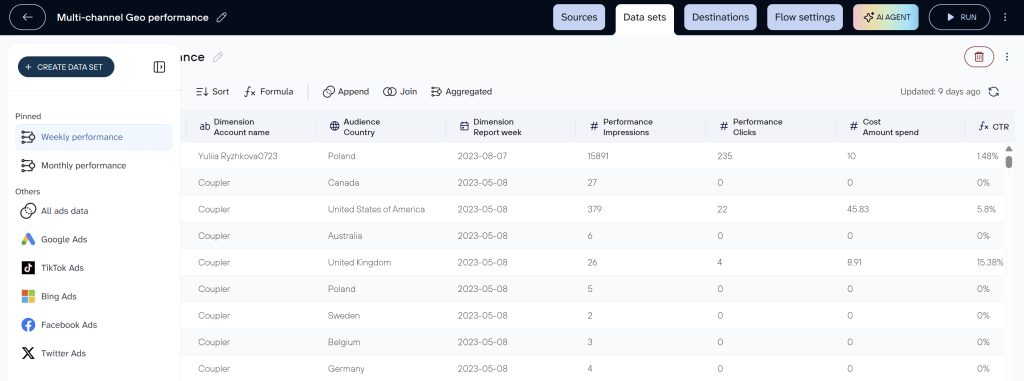
Beyond pipelines, Coupler.io provides 210+ dashboard templates and AI analytics capabilities (AI Agent for in-app data chat, plus AI Integrations that feed structured business data to external AI tools through its MCP server).
What stands out: Account-based pricing. Three things drive your bill: the number of connected source accounts, the number of destinations you load data into, and how often data refreshes. Everything else is unlimited. Data flows, dashboards, users, import size — none of these add to the cost. That makes pricing predictable: you know your bill before you build anything.
Limitations: No on-prem deployment. Not built for large-scale engineering workflows or advanced orchestration.
| ✅ Best for | ❌ Not the right fit |
| Marketing, finance, and ops teams that need automated reporting from SaaS apps | Data engineering teams building custom Spark jobs or real-time streaming pipelines |
| Non-technical users who want dashboards without writing code | Teams that require on-prem deployment or hybrid infrastructure |
| Agencies managing multiple client accounts across ad platforms and analytics tools | Organizations that need advanced orchestration or infrastructure-level pipeline control |
Pricing: Starts at $24/month (billed annually). A free plan exists with limited functionality, and a 7-day free trial on the full-featured plan is available.
To see how the pricing logic works in practice: a marketing team connects 10 source accounts (Facebook Ads, Google Ads, LinkedIn Ads, TikTok Ads, HubSpot, Google Analytics, and four client QuickBooks accounts). They build dozens of dashboards and data flows across three destinations (Google Sheets, Looker Studio, and ChatGPT), invite their entire team, and the cost stays flat because they’re paying for 10 accounts and 3 destinations — not for the volume of data, the number of reports, or the headcount.
Coupler.io is SOC 2 Type II certified, GDPR, HIPAA, and DORA compliant.


Create automated ETL pipelines with Coupler.io
Get started for freeFivetran

Fivetran automates data delivery from 700+ sources into cloud warehouses. It handles schema drift, API changes, and connector updates behind the scenes, so teams spend less time on pipeline maintenance and more on analysis.
The extraction layer covers marketing platforms (Google Ads, Facebook Ads, HubSpot), databases (MySQL, Oracle, PostgreSQL), and finance systems (NetSuite, QuickBooks). Fivetran does not transform data itself. Instead, it integrates natively with dbt for post-load SQL transformations, including prebuilt dbt packages, scheduling, and dependency management. Data lands in Snowflake, BigQuery, Redshift, Databricks, or Azure Synapse.
What stands out: Connector breadth (700+) and automatic schema mapping with CDC for real-time syncs. The connector library is one of the largest available.
Limitations: No transformation without dbt or another external tool. Limited flexibility for custom connectors. Pricing scales with row volume, which gets expensive at scale. Limited on-prem and hybrid support.
| ✅ Best for | ❌ Not the right fit |
| Teams centralizing data from 700+ sources into cloud warehouses with minimal engineering | Teams on a tight budget with high row volumes (MAR pricing scales fast) |
| Analytics teams that want automated schema mapping and CDC-based real-time syncs | Teams that need on-prem deployment or hybrid architectures |
| Organizations already using dbt for in-warehouse transformations | Teams that need heavy in-pipeline transformation logic inside the ETL tool itself |
Pricing: Usage-based (MAR). A free plan exists with a 500,000 MAR cap. The Standard plan (most popular) includes 15-minute syncs, REST API access, dbt Core integration, and role-based access. A mid-sized marketing team syncing 10 million rows/month from 6 sources starts around $160/month on Standard.
Hevo Data


If real-time sync matters more than anything else on your list, Hevo is worth a close look. It moves data from 150+ sources into warehouses with near-zero latency, and it automates schema mapping, consistency, and error tracking without manual work.
Sources include SaaS platforms (Salesforce, Shopify, Google Ads), databases (PostgreSQL, MySQL, MongoDB), and streaming systems like Kafka. Hevo supports both ETL and ELT patterns, with drag-and-drop and SQL-based transformations for filtering, joining, aggregating, and cleaning. Data loads into Snowflake, BigQuery, Redshift, PostgreSQL, Databricks, Azure Synapse, and Amazon RDS.

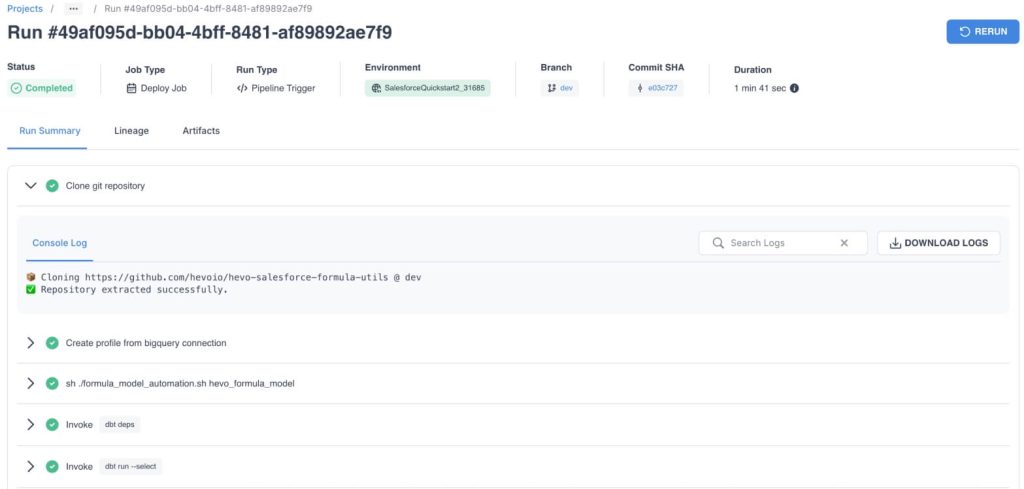
What stands out: Real-time data sync with low-latency pipelines. Built-in monitoring, logging, and alerting without extra configuration.
Limitations: No on-prem deployment. Transformation depth is limited unless you add dbt on the warehouse side. Pricing scales with event volume, so large datasets get expensive.
| ✅ Best for | ❌ Not the right fit |
| Fast-growing teams that need real-time SaaS-to-warehouse sync | Engineering teams that want deep pipeline control and custom orchestration |
| Product, marketing, and ops teams building live dashboards without engineering support | Organizations that need on-prem or hybrid deployment |
| Teams syncing from databases and streaming systems like Kafka alongside SaaS apps | Teams with large data volumes sensitive to event-based pricing |
Pricing: Free tier includes 1 million events/month, 50+ sources, and 1 destination. Starter starts at $399/month (20 million events, 10 users). A team syncing customer and finance data from Shopify, Stripe, and PostgreSQL to BigQuery in near real-time fits within Starter.
Skyvia

Skyvia is a cloud-based no-code ETL platform focused on simplifying data integration, synchronization, replication, and automation across SaaS apps, databases, and cloud warehouses. It is designed for teams that want fast onboarding, minimal infrastructure management, and a visual approach to building data pipelines.
The platform supports ETL, ELT, reverse ETL, backup, and automation scenarios through a drag-and-drop interface designed to keep the learning curve relatively low. It supports more than 200 connectors for cloud apps, databases, and warehouses, including Salesforce, BigQuery, Redshift, SQL Server, PostgreSQL, and many others. The platform also includes the Skyvia Agent for secure connectivity, supports OData and MCP Endpoints.
What stands out: No-code ETL, ELT, reverse ETL, sync, backup, and automation workflows combined in one platform with 200+ connectors and very fast onboarding.
Limitations: Free tier is limited to 10,000 rows per month. No self-hosted deployment option. Real-time streaming capabilities are more limited than CDC-focused platforms.
| ✅ Best for | ❌ Not the right fit |
| SMBs and teams without dedicated data engineers | Enterprises looking for highly customized engineering-heavy data platforms |
| Teams that need ETL, ELT, and reverse ETL in one place | Organizations requiring on-prem deployment |
| Fast setup without writing or maintaining code | Teams looking for deeply customizable orchestration or open-source flexibility |
Pricing: Skyvia offers Free, Basic, Standard, Professional, and Enterprise plans. The Free tier includes up to 10,000 processed rows per month, while paid plans start at $79/month with higher limits, more scheduled integrations, and advanced mapping functionality.
Integrate.io
Most ETL tools charge by data volume, rows, or connectors. Integrate.io charges a flat $1,999/month for unlimited pipelines, data volumes, and connectors. If your main concern is cost predictability at scale, that pricing model is the reason to look here.
The platform extracts from 140+ sources including Salesforce, Shopify, MySQL, MongoDB, and REST APIs. Transformations happen in a no-code visual builder that supports filtering, joining, aggregating, deduplicating, enriching, conditional logic, and optional Python-based custom logic. Data loads into Redshift, Snowflake, BigQuery, Azure Synapse, Amazon RDS, and PostgreSQL.

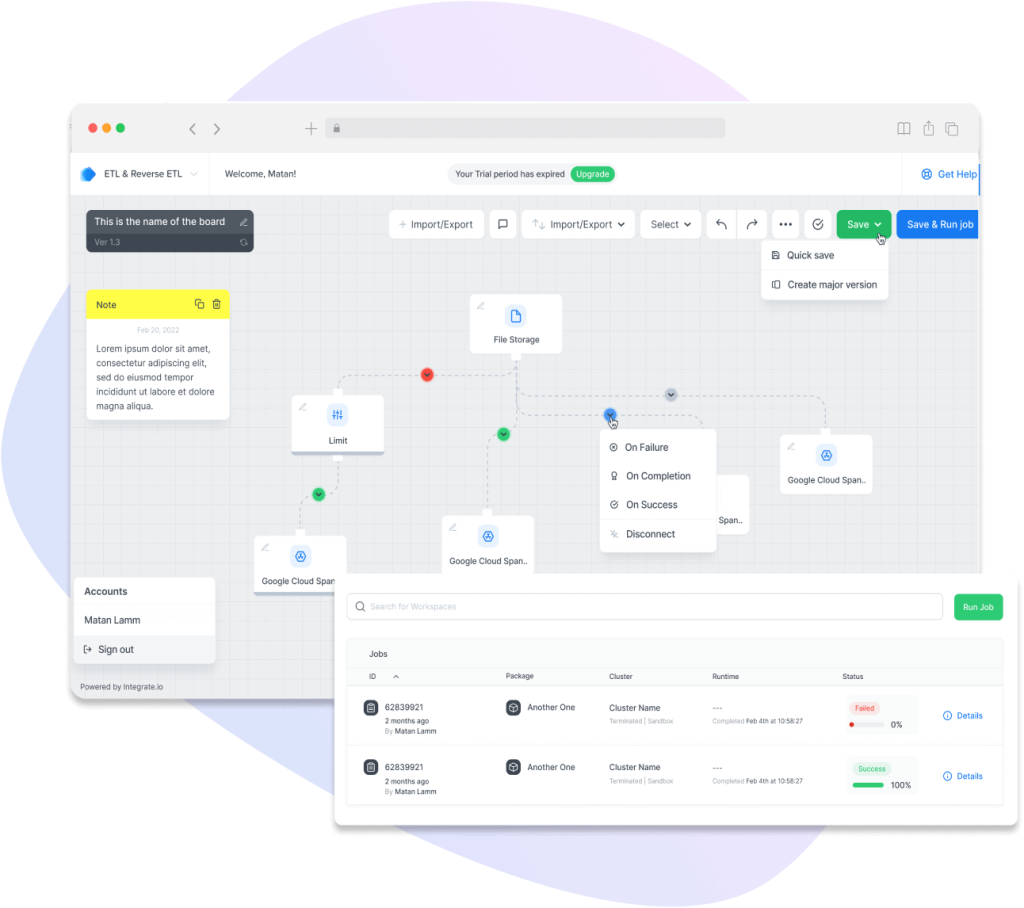
What stands out: Flat-fee pricing with unlimited pipelines, data volumes, and connectors. No overage charges.
Limitations: No full real-time streaming. Fewer customization options than open-source tools. The flat fee is expensive for teams with simple use cases, and there are no cheaper tiers for smaller workloads.
| ✅ Best for | ❌ Not the right fit |
| Mid-size teams that want predictable flat-fee pricing at scale | Small teams with basic sync needs (the $1,999/month floor is high) |
| Analysts syncing SaaS and database data into warehouses with visual pipelines | Teams that need full real-time streaming or event-driven processing |
| Organizations that value unlimited pipelines and connectors without overage charges | Engineering teams that need heavy custom orchestration or open-source flexibility |
Pricing: Flat rate of $1,999/month. All plans include full platform access, 60-second pipeline frequency, and 30-day onboarding. Higher tiers add GPU support for AI/ML workloads, HIPAA compliance, and enterprise services.
Portable


Portable focuses on a problem most ETL tools don’t solve well: extracting data from niche, long-tail SaaS tools. If your stack includes platforms that Fivetran or Airbyte don’t cover, Portable likely does.
The platform connects to 1,500+ sources, including advertising platforms (Google Ads, Facebook Ads, TikTok Ads, Amazon Ads), enterprise tools (Salesforce, NetSuite, HubSpot, Intercom), and analytics tools (Mixpanel, Klaviyo, Iterable, Outreach). For unsupported sources, Portable builds new connectors on request and delivers them in 48 hours. There is no built-in transformation layer. Users transform data in the destination using dbt, SQL, or BI tools. Data loads into Snowflake, BigQuery, Redshift, PostgreSQL, MySQL, and Amazon S3.

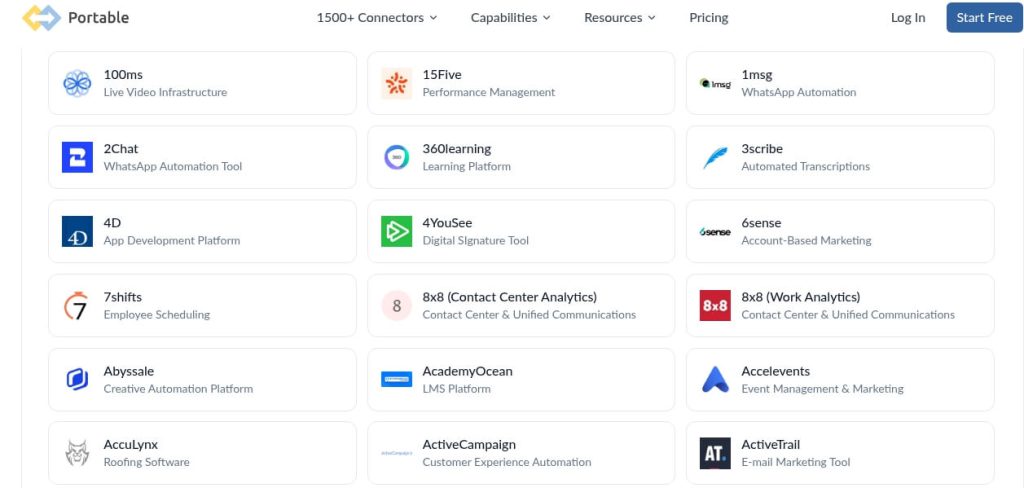
What stands out: On-demand connector development in 48 hours. No other platform in this list matches that speed for niche sources.
Limitations: No transformation layer. No advanced orchestration. Limited control for multi-step workflows. US-only availability.
| ✅ Best for | ❌ Not the right fit |
| Teams extracting data from niche SaaS tools that other platforms don’t cover | Teams that need in-pipeline transformations (Portable has no transformation layer) |
| Organizations that need custom connectors built fast (48-hour turnaround) | Anyone outside the US (US-only availability) |
| Agencies or analytics teams consolidating long-tail SaaS data into warehouses | Teams with straightforward source needs already covered by Fivetran or Coupler.io |
Pricing: Data flow-based (not volume or user-based). Standard starts at $1,800/month for 6 data flows. Pro is $2,800/month with 15 data flows, Pro sources, all destinations, and 24/7 support.
Stitch

The first thing to know about Stitch: not all of its 140+ connectors are equal. Stitch splits integrations into Certified (commercially supported by Stitch) and Community (maintained by the open-source Singer community). That distinction matters because “140+ connectors” sounds broad, but the support depth varies depending on which category your sources fall into.
For sources not covered by either tier, Stitch points users to the Singer ecosystem, Import API, or Incoming Webhooks. There is no native transformation layer; transformation happens in the destination. Data loads into cloud warehouses.
Stitch works well when you need reliable warehouse loading from common SaaS apps and databases without deep orchestration or in-pipeline transformation. It’s owned by Qlik (same parent company as Talend), which gives it some enterprise backing.
What stands out: The Certified/Community connector distinction. Certified connectors get vendor support and guaranteed maintenance. Community connectors depend on the Singer ecosystem, so support depth varies. That transparency is useful.
Limitations: Some integrations are only partially compatible with certain destinations. Mixed data types may be rejected. No built-in transformation or orchestration.
| ✅ Best for | ❌ Not the right fit |
| Teams that need straightforward warehouse loading from SaaS apps and databases | Teams that need in-pipeline transformations or full orchestration |
| Organizations comfortable with Singer ecosystem connectors for broader coverage | Teams that require guaranteed vendor support on every connector |
| Mid-market teams that want reliable cloud ETL without deep engineering | Organizations looking for a full enterprise integration platform |
Pricing: The Advanced plan starts at $1,500/month (billed annually). Advanced and Premium tiers add custom integrations, custom row volumes, priority support, API access, advanced scheduling, and VPN/AWS PrivateLink.
Matillion

Matillion is an ELT platform built for teams that do their heavy lifting inside cloud warehouses. Instead of transforming data before it lands, Matillion runs transformations directly in Snowflake, BigQuery, Redshift, or Azure Synapse, using the warehouse’s own compute.
The platform supports 100+ connectors across cloud applications (Salesforce, Marketo, NetSuite) and databases (Oracle, SQL Server, MySQL). The visual job builder includes 80+ transformation components, plus SQL scripting, Python integration, and support for reusable, version-controlled job components. Role-based access, REST API, webhook, and Git integration round out the CI/CD story.

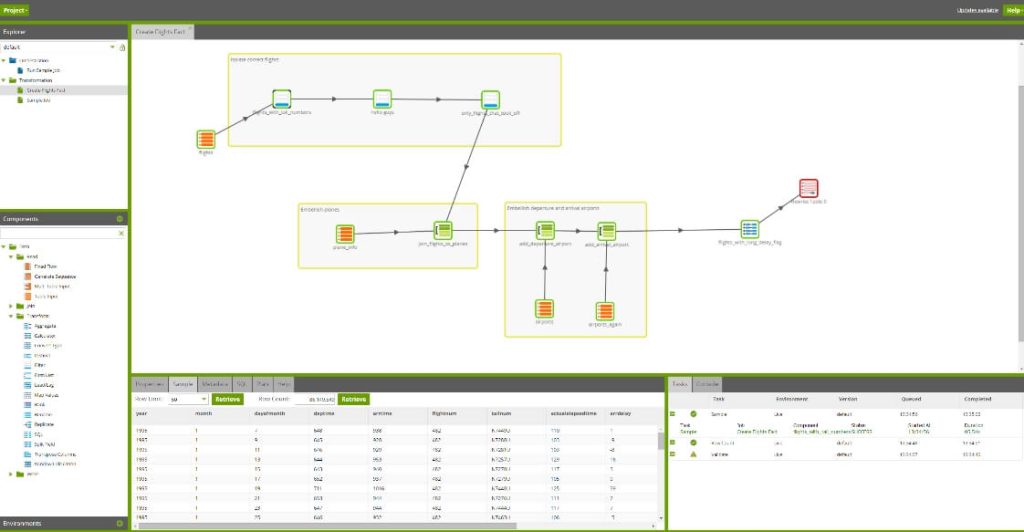
What stands out: Native ELT architecture that pushes transformation to the warehouse. Visual job builder with 80+ components plus Python and SQL scripting for full flexibility.
Limitations: Requires existing cloud warehouse infrastructure. No support for on-prem data destinations. Pricing may be high for smaller teams or low-volume use cases.
| ✅ Best for | ❌ Not the right fit |
| Data teams transforming data at scale inside Snowflake, BigQuery, or Redshift | Teams without existing cloud warehouse infrastructure |
| Organizations that need 80+ visual transformation components with SQL and Python | Teams that need on-prem destinations or simple no-code connector setup |
| Analytics and BI teams building complex ELT workflows in the warehouse | Small teams with low data volumes that don’t justify warehouse-native ELT |
Pricing: Three plans: Starter, Team, and Scale. Starter includes one environment and unlimited projects with pre-built connectors. Team and Scale add usage-based compute billing, hybrid deployment, data lineage, and real-time CDC. Contact sales for pricing.
Open-source ETL tools
Airbyte

The open-source option with the most momentum right now. Airbyte’s connector catalog covers 600+ sources, the community ships new connectors regularly, and building custom ones is straightforward through a no-code UI or code editing.
Extraction connects to databases (PostgreSQL, MySQL), payment systems (Stripe), analytics (Google Analytics), CRM (Salesforce), and more. Transformation happens in the warehouse through built-in dbt integration, SQL, or external orchestration tools like Dagster and Prefect. Data loads into Snowflake, BigQuery, Redshift, Databricks, and DynamoDB.

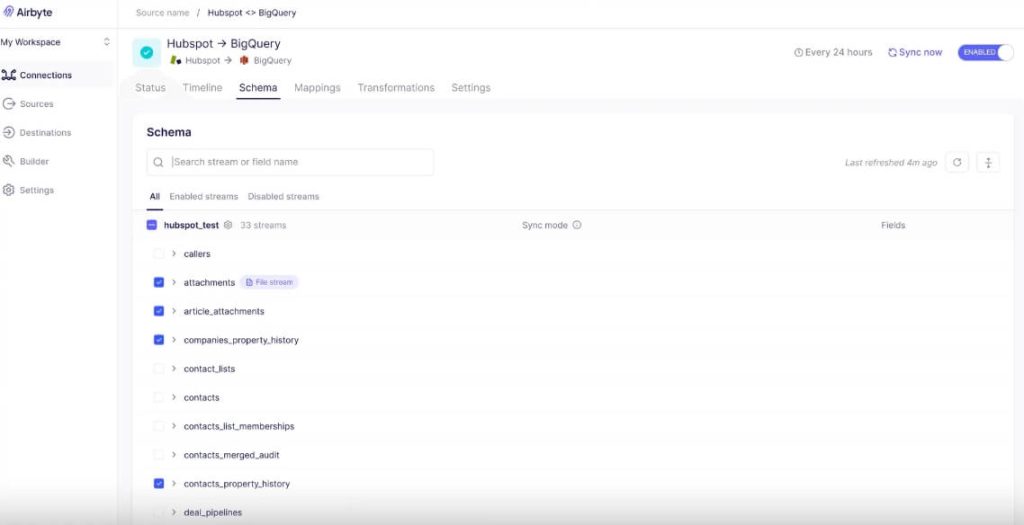
What stands out: The self-hosted Core version is completely free and open source. The connector ecosystem grows fast thanks to an active community.
Limitations: Transformations and orchestration require external tools. The cloud version is still maturing for enterprise use. Some connectors need maintenance or community contributions. Self-hosting requires DevOps experience.
| ✅ Best for | ❌ Not the right fit |
| Engineering teams that want full control over a self-hosted ELT stack | Business teams without engineering support |
| Teams that need to build or customize connectors quickly | Anyone who wants a managed, click-through experience with zero infrastructure work |
| Cost-conscious teams willing to trade ops effort for zero licensing fees | Organizations that need built-in transformation or orchestration inside the tool |
Pricing: Core (self-hosted) is free and open source. Standard (cloud-hosted) starts at $10/month, priced by data volume. Enterprise pricing is custom through sales.
Meltano

If your team thinks in YAML configs and Git repos rather than drag-and-drop interfaces, Meltano fits that workflow. It’s an open-source, code-first ETL/ELT platform built specifically for data engineers.
The platform connects to 600+ sources and destinations through the Singer ecosystem and Meltano SDK. Users configure full, incremental, or log-based replication in batch or near real-time, all in code. Connector quality is transparent: Meltano classifies connectors as Official, Partner, or Community and labels quality as Gold, Silver, Bronze, or No Data, so you know what you’re getting before you deploy.
What stands out: The Meltano SDK makes building custom connectors for niche, internal, or proprietary sources straightforward. The quality labeling system is unusually honest for an ETL platform.
Limitations: Requires engineering resources. Self-managed scaling increases maintenance cost (Meltano’s own pricing page says this directly). No GUI. Not for non-technical users.
| ✅ Best for | ❌ Not the right fit |
| Data engineers who want code-first ELT with full Git-based version control | Business analysts or marketing teams looking for a visual pipeline builder |
| Teams that need custom connectors for niche, internal, or proprietary sources | Non-technical users who need a point-and-click interface |
| Engineering-led organizations comfortable managing their own infrastructure | Teams that want fully managed infrastructure without DevOps involvement |
Pricing: Meltano Open is free to install and self-managed. Meltano Cloud adds support and services with usage-based pricing tied to workloads rather than data volume.
Enterprise ETL tools
Talend

Talend (by Qlik) covers both open-source and commercial ETL/ELT under one umbrella, with a drag-and-drop interface, custom transformations via Java and SQL, and built-in data governance, quality, and security features.
Extraction reaches enterprise systems (Salesforce, SAP, Oracle), databases (SQL Server, Amazon RDS), cloud storage (S3, Azure Blob), and legacy sources (FTP, mainframes). Transformations include data cleansing, validation, enrichment, schema mapping, and quality checks through both visual and code-based interfaces. Data loads into Redshift, BigQuery, Snowflake, PostgreSQL, SQL Server, APIs, and data lakes.

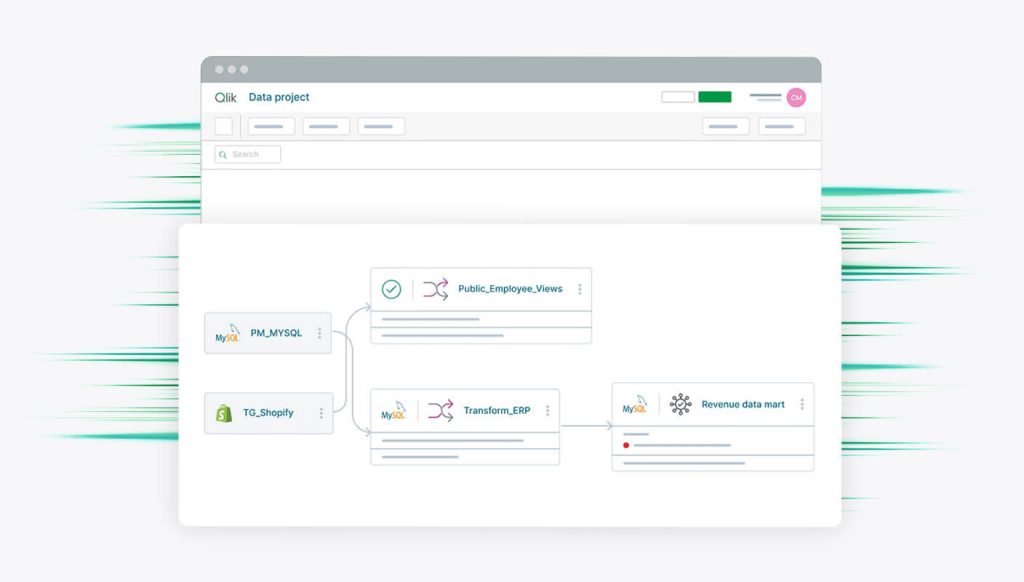
What stands out: Integrated data quality and deduplication components. Governance tools for data lineage and compliance. Hybrid, multi-cloud, and on-prem deployment options.
Limitations: Steep learning curve for advanced features. Open-source version lacks key enterprise capabilities. Commercial licenses are expensive for smaller teams.
| ✅ Best for | ❌ Not the right fit |
| Regulated enterprises integrating cloud, on-prem, and legacy systems with governance | Small teams with simple sync needs |
| Organizations that need data lineage, deduplication, and compliance tools | Teams without dedicated data engineering or IT resources |
| Mid-to-large teams with hybrid deployment requirements (multi-cloud + on-prem) | Budget-conscious teams (commercial licenses are expensive) |
Pricing: Tiered enterprise pricing. Starter includes managed cloud pipelines and prebuilt SaaS connectors. Standard (most popular) adds real-time CDC, hybrid deployment, lakehouse automation, and application integration. Contact sales for a quote.
Informatica (IDMC and PowerCenter)

Informatica offers two data integration platforms: IDMC (Intelligent Data Management Cloud), the modern cloud-native product, and PowerCenter, the legacy on-prem platform that’s been running in finance, healthcare, and telecom for decades. New buyers should evaluate IDMC. Existing PowerCenter customers should plan migration, since standard support for PowerCenter 10.5.x ends in March 2026.
IDMC is a serverless, cloud-native platform that unifies data integration, quality, governance, cataloging, API integration, and master data management. It extracts from enterprise databases (Oracle, SQL Server), SaaS apps (Salesforce, Workday), cloud storage (S3, Azure Blob), and message queues (Kafka). Transformation supports batch, ELT, and real-time patterns through low-code/no-code interfaces and scripting, with AI-powered automation for discovery, mapping, and optimization. Data loads into Snowflake, BigQuery, Redshift, Azure Synapse, Databricks, and Amazon RDS.

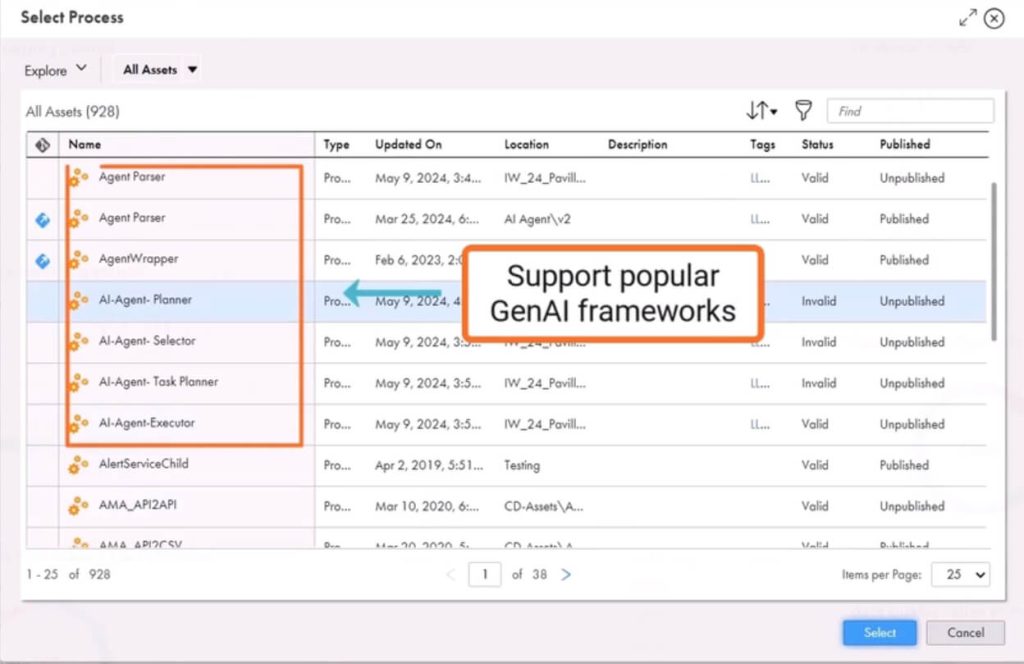
PowerCenter handles on-prem ETL with a graphical transformation environment, 100+ built-in functions, and connections to Oracle, SQL Server, DB2, flat files, XML, and ERP systems like SAP. It loads into traditional warehouses (Teradata, Netezza, Oracle, SQL Server) and mainframe systems. The platform is mature and battle-tested, with built-in data quality, profiling, and governance that newer tools are still catching up to. But the setup is complex, licensing is expensive, and it’s not optimized for real-time syncs.

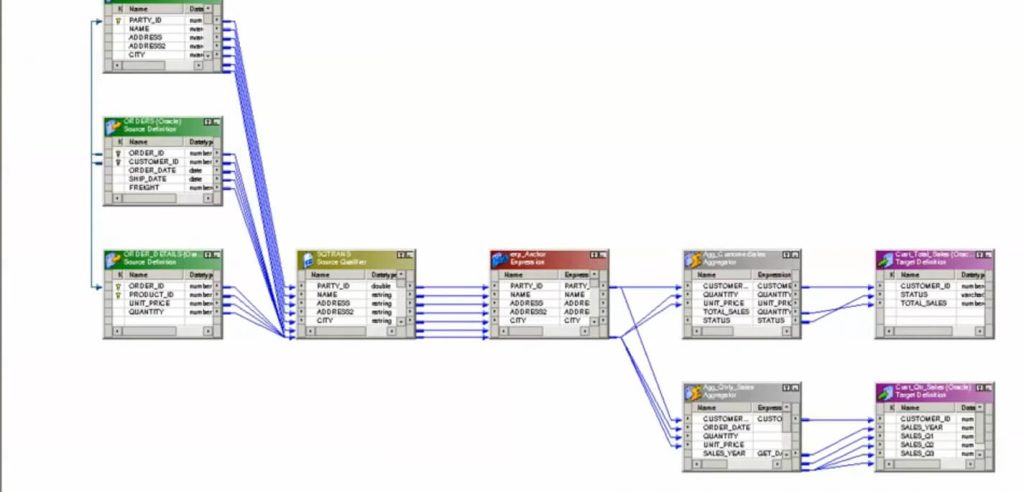
What stands out: IDMC’s AI-powered automation for data discovery and mapping, plus the unified platform covering integration, quality, governance, and MDM. PowerCenter’s depth for mission-critical on-prem ETL in regulated industries.
Limitations: Enterprise pricing and complexity on both products. IDMC has a steep learning curve without dedicated data engineering staff. PowerCenter requires dedicated IT, high licensing costs, and is approaching end of standard support.
| ✅ Best for | ❌ Not the right fit |
| Enterprises that need unified data integration, governance, quality, and MDM (IDMC) | Small teams, startups, or anyone with simple data sync needs |
| Organizations with mission-critical on-prem ETL in regulated industries (PowerCenter) | Teams that just need to move SaaS data into a spreadsheet or dashboard |
| Data teams modernizing from legacy ETL to cloud-scale workflows with AI automation | Organizations without dedicated data engineering staff or enterprise budgets |
Pricing: IDMC uses a volume-based consumption model (pay for what you use, contact Informatica for a quote). PowerCenter uses enterprise licensing that varies by deployment type, connector count, support levels, and data volumes, typically purchased as site licenses or bundled with other Informatica products.
Oracle Data Integrator

ODI takes a different architectural approach than most tools here: it’s ELT-first, pushing transformation workloads to the target database engine instead of processing data in a separate layer. If you’re on Oracle infrastructure, that means transformations run on Oracle’s own compute, which is fast and reduces data movement.
Extraction connects to Oracle DB, SQL Server, Teradata, SAP, and flat files. Transformations use native SQL and PL/SQL pushed to the target, including mappings, lookups, reusable procedures, variables, and user-defined functions. Data loads into Oracle databases, Oracle Cloud, Snowflake, and hybrid environments. Real-time replication runs through Oracle GoldenGate.

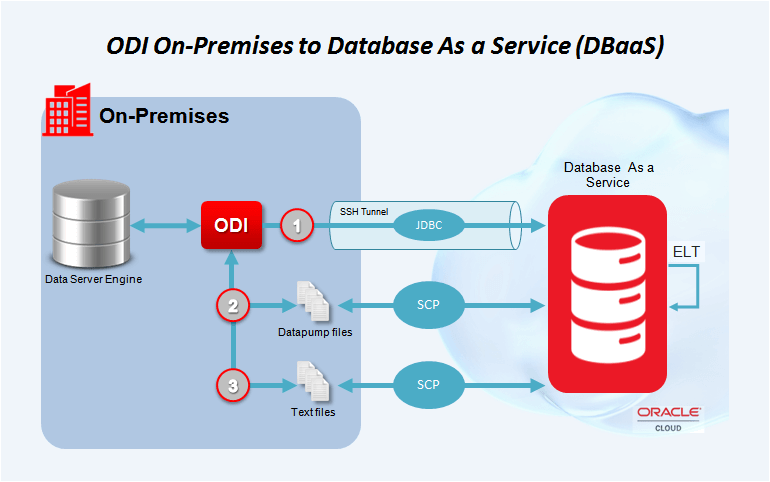
What stands out: ELT-first architecture that uses the target database’s own compute for transformations. Deep integration with Oracle Cloud, Autonomous DB, and Exadata.
Limitations: Optimized for Oracle and less intuitive outside that ecosystem. Steep learning curve. High total cost of ownership for small or mid-sized teams.
| ✅ Best for | ❌ Not the right fit |
| Large enterprises running Oracle databases and Oracle Cloud infrastructure | Teams not on Oracle infrastructure |
| Teams building high-performance ELT that pushes transformations to the database engine | Mid-sized companies looking for a simple, general-purpose ETL tool |
| Organizations using Oracle GoldenGate for real-time replication | Teams that want a multi-cloud or vendor-neutral integration platform |
Pricing: License-based. Costs depend on processor count, user count, deployment type, and bundling with other Oracle products. Contact Oracle for pricing.
SnapLogic


Most tools in this article do one thing: move data from A to B. SnapLogic does that, plus app integration, API management, and AI agent orchestration. It’s an enterprise integration platform that happens to include ETL, not an ETL tool that bolted on extras.
The platform connects to 1,000+ sources and destinations through pre-built “Snaps,” supporting batch, real-time, and streaming integration across SaaS and on-prem systems. It runs as a multi-tenant cloud service with visual pipeline design.
What stands out: Combines data integration, application integration, API management, and AI automation in a single platform. Predictable package-based pricing with unlimited data movement.
Limitations: Broader scope means it’s heavier than needed for teams that only want simple ETL into a warehouse. Enterprise-level setup and pricing.
| ✅ Best for | ❌ Not the right fit |
| Enterprises that want ETL, app integration, API management, and AI automation in one platform | Teams with a single use case like moving SaaS data to a warehouse |
| Organizations consolidating multiple integration tools into one vendor | Small organizations that don’t need app integration or API management alongside ETL |
| IT teams managing complex cross-system workflows across SaaS and on-prem | Budget-conscious teams that only need simple data pipelines |
Pricing: Package-based (Business and Enterprise tiers) with unlimited data movement. Contact sales for a quote.
Pentaho (PDI)

Pentaho Data Integration, developed by Hitachi Vantara, earns its spot on enterprise shortlists for one reason: it runs everywhere. On-prem, cloud, containers (Docker/Kubernetes), edge systems. If your data environment is hybrid and messy, Pentaho was built for that reality.
Extraction reaches CRM (Salesforce), ERP (SAP), files (Excel, CSV, XML), and web analytics (Google Analytics). Transformation steps include filtering, joining, metadata injection, scripting (Python, R, JavaScript), and ML model operationalization through Spark, Weka, or Docker. Data loads into BigQuery, Snowflake, Redshift, PostgreSQL, Oracle, SQL Server, data lakes, and file systems.

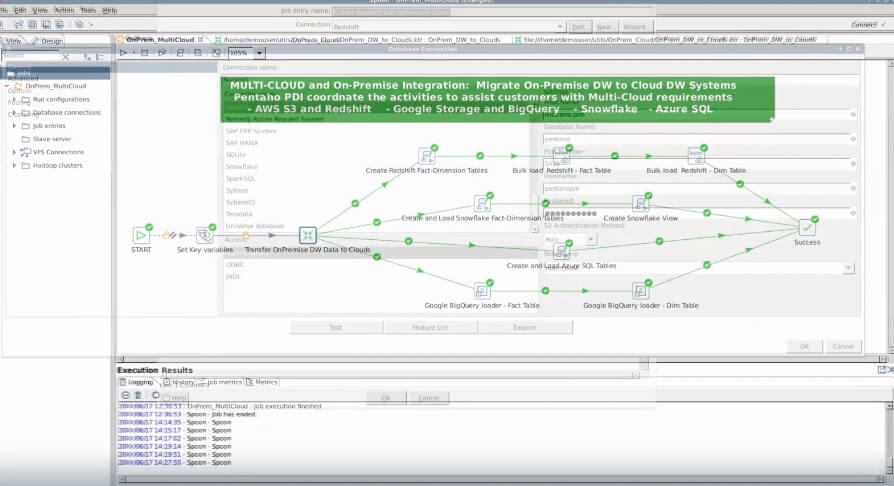
What stands out: Runs on-prem, cloud, or containers (Docker/Kubernetes). Plugin support for GenAI, streaming, and SAP extraction. Real-time and batch orchestration from edge to cloud.
Limitations: UI feels dated compared to modern cloud-native tools. Higher learning curve for advanced orchestration. Some features depend on plugin availability.
| ✅ Best for | ❌ Not the right fit |
| Enterprises managing complex hybrid environments (on-prem + cloud + edge) | Teams that want a modern, cloud-native UI |
| Teams that need containerized deployment (Docker/Kubernetes) with plugin extensibility | Small teams with simple cloud-only data flows |
| Organizations running ML model operationalization alongside ETL workflows | Non-technical users looking for a quick-to-deploy managed platform |
Pricing: Usage- and deployment-based licensing. Four tiers (Starter, Standard, Premium, Enterprise). Standard is the most popular, supporting containerized workloads, unlimited support, and scalable integration. Contact sales for pricing.
Workflow orchestration tools
Apache Airflow

Airflow does not extract, transform, or load data itself. It orchestrates other tools and systems that do. That distinction matters: Airflow is the conductor, not the orchestra.
Pipelines are defined as Python-based Directed Acyclic Graphs (DAGs), giving engineering teams fine-grained control over dependencies, retries, and execution logic across databases, APIs, warehouses, and processing engines. Extraction and loading happen through prebuilt or custom Python operators that connect to MySQL, PostgreSQL, Snowflake, S3, Google Cloud Storage, REST APIs, and more. Transformations are custom logic in Python, SQL, or dbt. Data flows into BigQuery, Redshift, Snowflake, S3, GCS, or external systems via API connectors.

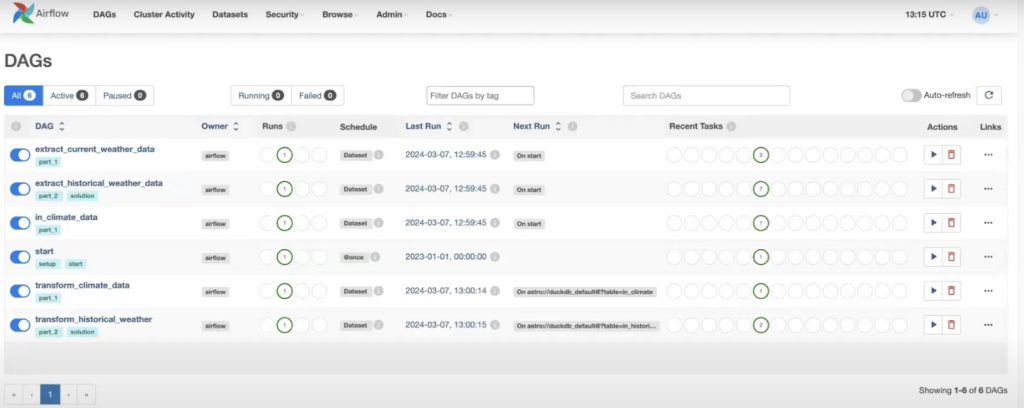
What stands out: Python-based DAGs give you complete control over workflow logic. Distributed execution via Celery or Kubernetes. Massive plugin ecosystem.
Limitations: Requires engineering expertise. No built-in connectors or no-code interface. Not suitable for simple data syncing. Real-time processing needs integration with streaming tools.
| ✅ Best for | ❌ Not the right fit |
| Engineering teams orchestrating complex, multi-step data workflows in Python | Business users, marketing teams, or anyone without Python experience |
| Data teams coordinating batch ETL, dbt models, ML workflows, and quality checks | Anyone looking for a visual, managed pipeline builder |
| Organizations that want full control over scheduling, retries, and dependency logic | Teams that need simple, no-code data syncing from SaaS apps |
Pricing: Open source and free. Managed versions (Astronomer, Google Cloud Composer) start around $300/month.
Databricks Lakeflow Spark Declarative Pipelines

Lakeflow (formerly Delta Live Tables) is a pipeline orchestration layer built on Apache Spark inside the Databricks Lakehouse. It automates dependency resolution, error recovery, and data quality checks using a declarative approach.
Ingestion handles structured, semi-structured, and streaming data from Delta Lake, S3, Azure Data Lake, Kafka, Auto Loader, PostgreSQL, and SQL Server. Transformations use declarative syntax in Python or SQL, supporting streaming and batch processing, materialized views, and automatic data quality enforcement with built-in expectations. Output goes to lakehouse tables, Delta Lake, Power BI, Tableau, S3, and ADLS.

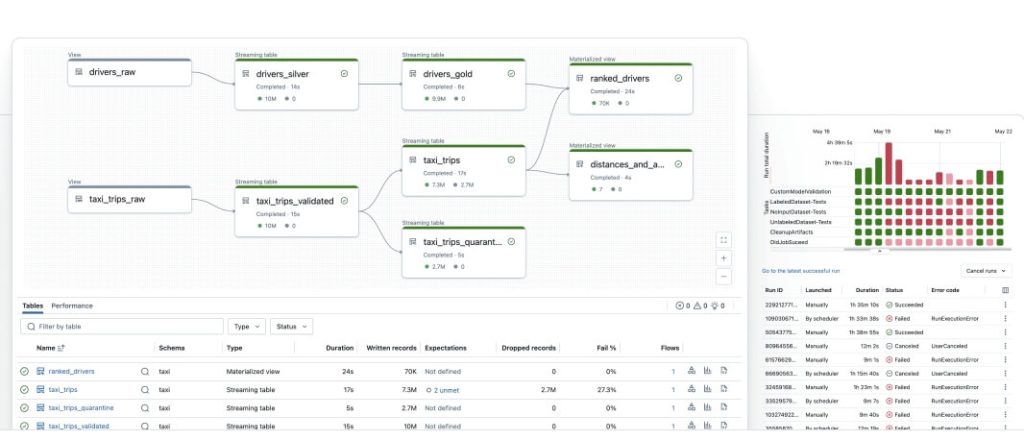
What stands out: Declarative pipeline authoring eliminates manual orchestration logic. Built-in data quality checks with expectations. Automatic lineage and monitoring.
Limitations: Requires a Databricks environment (not standalone). Limited connectors outside the Databricks ecosystem. Needs Spark or SQL experience.
| ✅ Best for | ❌ Not the right fit |
| Data engineering teams building production-grade ELT inside the Databricks Lakehouse | Teams not on Databricks (it’s not standalone) |
| Organizations running streaming and batch pipelines with built-in quality checks | Business users looking for no-code pipelines |
| Teams that want declarative pipeline authoring with automatic lineage and monitoring | Teams with small data volumes that don’t justify lakehouse infrastructure |
Pricing: Usage-based on DBUs (Databricks Units). Data engineering workloads start at $0.15/DBU. Pay-as-you-go or committed-use contracts for volume discounts.
Cloud-native ETL tools
AWS Glue
If your data already lives in AWS, Glue is the path of least resistance. It’s Amazon’s serverless ETL/ELT service, tightly integrated with S3, Redshift, Athena, DynamoDB, and SageMaker, and it scales automatically without provisioning servers.
Extraction connects to S3, RDS, DynamoDB, Redshift, JDBC databases, on-prem sources via Glue connectors, and event streams (Kafka, Kinesis). Transformation runs on serverless Apache Spark with PySpark or Scala, plus visual design through Glue Studio and no-code prep through DataBrew. Data loads into Redshift, S3, RDS, Snowflake, and other cloud targets.

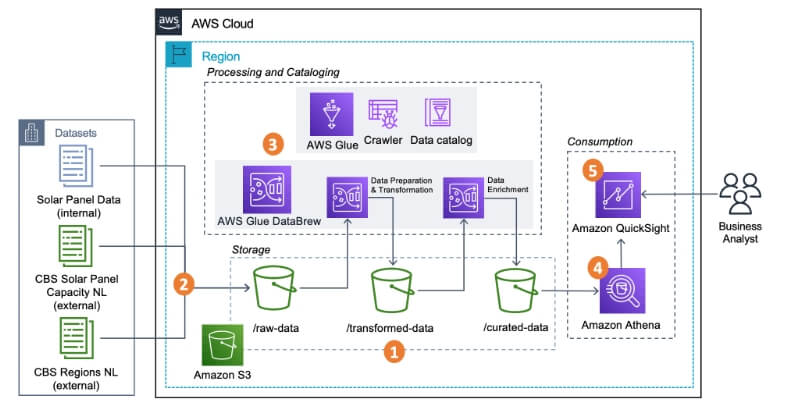
What stands out: Serverless architecture with automatic scaling. Built-in data catalog and schema crawler. Both code (PySpark/Scala) and visual (Glue Studio/DataBrew) interfaces.
Limitations: AWS-centric (less helpful outside that ecosystem). Complex for teams new to Spark or IAM. Cold start latency in serverless jobs. Monitoring UI lags behind newer platforms.
| ✅ Best for | ❌ Not the right fit |
| Data engineers operating within the AWS ecosystem (S3, Redshift, Athena, SageMaker) | Teams outside the AWS ecosystem |
| Teams that need serverless, auto-scaling ETL with a built-in data catalog | Non-technical users who want managed connectors and a visual-first experience |
| Organizations running Spark-based batch and streaming jobs at scale | Teams new to Spark or AWS IAM (steep learning curve) |
Pricing: Usage-based. Charges for compute during ETL jobs, crawler runs, and data catalog storage. No subscription fee or per-connector charge.
Azure Data Factory

For teams already invested in Azure, ADF fits the stack without friction. It’s a fully managed, serverless data integration service with 90+ built-in connectors and both visual and code-based pipeline authoring.
The visual transformation layer includes mapping data flows running on scaled-out Apache Spark clusters managed through ADF. For data prep, ADF also supports Power Query-based wrangling, which Microsoft positions for both engineers and business users. Data moves into and out of Azure SQL, Azure Synapse, Blob Storage, and a wide range of non-Azure sources and destinations.
What stands out: Deep integration with the Microsoft data stack (Azure Synapse, Power BI, Azure SQL). Power Query support for business-user data prep alongside engineering-grade Spark transforms.
Limitations: Pricing splits across orchestration, data movement, and activity execution, making cost estimation harder than fixed-package tools. Microsoft now recommends Data Factory in Microsoft Fabric for new data integration users, which means ADF’s long-term positioning is shifting.
| ✅ Best for | ❌ Not the right fit |
| Teams already invested in Azure (Synapse, Power BI, Azure SQL) | Teams outside the Azure ecosystem |
| Organizations that need both visual Power Query prep and engineering-grade Spark transforms | Teams that want simple, predictable pricing (ADF’s consumption model is hard to estimate) |
| Enterprises with hybrid data movement across Azure and non-Azure sources | Anyone starting new data integration projects (evaluate Fabric Data Factory first) |
Pricing: Consumption-based. Charges tied to activity runs, data movement volume, and integration runtime hours. Check the Azure pricing calculator for estimates.
Google Cloud Data Fusion

Google’s answer to ADF and Glue, but with a stronger visual-first approach. Cloud Data Fusion provides a fully managed pipeline builder with 150+ preconfigured connectors and transformations at no extra cost. The open-source CDAP core gives it some portability beyond GCP, though in practice it works best when your data already lives in BigQuery, Cloud Storage, and Dataproc.
What stands out: Wrangler for visual data prep (cleaning, reshaping before ETL). Built-in data lineage and metadata tracking. Open-source CDAP core for hybrid and multi-cloud portability.
Limitations: Wrangler only works for batch pipelines, and preview sampling is limited to the first 1,000 records. Best suited for Google Cloud environments; less compelling if your stack is elsewhere.
| ✅ Best for | ❌ Not the right fit |
| Google Cloud teams that want visual ETL with built-in lineage and BigQuery integration | Teams not on Google Cloud |
| Analysts who need Wrangler for visual data prep on batch pipelines | Anyone needing Wrangler for real-time or streaming use cases (batch only) |
| Organizations that value open-source portability through CDAP core | Teams looking for a platform that works equally well outside GCP |
Pricing: Hourly development and execution. Developer: $0.35/hour. Basic: $1.80/hour (first 120 hours free/month/account). Enterprise: $4.20/hour. New Google Cloud customers get $300 in credits.
Where Coupler.io fits in this list
This article lives on the Coupler.io blog, so I want to be direct about where the product is strong and where it’s not the right pick.
Coupler.io is the best fit for teams that work with SaaS data (ad platforms, CRMs, accounting tools, analytics), need automated reporting or live dashboards, and don’t have data engineers on staff. The no-code setup, 400+ connectors, 210+ dashboard templates, and account-based billing make it the fastest path from “data scattered across apps” to “one dashboard the team actually checks“. The AI integrations (MCP server, ChatGPT App, Claude, Gemini, Perplexity, OpenClaw and Cursor) add a layer that most tools in this list don’t cover at all.
Where Coupler.io is not the right choice:
- If you need on-prem deployment, real-time streaming, Spark-based transformations, or infrastructure-level pipeline control. For those needs, look at Airbyte, Airflow, AWS Glue, or Databricks.
- If you’re a large enterprise with hybrid data environments and strict governance requirements, Informatica, Talend, or SnapLogic are built for that scale.
How to choose the best ETL tool
The top ETL tools listed above are organized by category, but teams often think in terms of their own setup. Here’s how to shortlist based on who you are.
Best ETL tools by team type
Non-technical reporting teams (marketing, finance, ops without engineers): Start with Coupler.io or Hevo. Both offer no-code setup, prebuilt connectors for common SaaS apps, and dashboard or BI tool integration. Coupler.io’s account-based billing makes costs predictable when you’re connecting multiple ad platforms and analytics tools. Hevo is stronger if you need real-time sync. If you’re specifically looking for the best ETL tools for SaaS companies, Coupler.io, Fivetran, and Hevo cover the widest range of SaaS connectors with the least setup friction.
Data engineering teams building custom pipelines: Airflow for orchestration, Airbyte or Meltano for extraction and loading, dbt for transformation. This open-source stack gives you full control and zero licensing fees, but you own the infrastructure and maintenance. If your team is small, Airbyte Cloud at $10/month reduces the ops burden.
AWS-first teams: AWS Glue is the natural choice. Serverless, tightly integrated with S3, Redshift, Athena, and SageMaker. If you need visual design for less technical team members, Glue Studio and DataBrew help.
Azure-first teams: Azure Data Factory, with the caveat that Microsoft is steering new users toward Fabric Data Factory. If you’re starting fresh, evaluate Fabric first.
Google Cloud teams: Cloud Data Fusion for visual ETL with built-in lineage and BigQuery integration. Straightforward if your data already lives in GCP.
Teams needing hybrid or on-prem deployment: Pentaho, Talend, Airbyte (self-hosted), or Informatica PowerCenter. These support environments where data cannot leave specific networks or must meet strict residency requirements.
Enterprises with governance and compliance requirements: Informatica (IDMC or PowerCenter), Talend, or SnapLogic. All offer data lineage, audit logs, role-based access, and compliance certifications. AWS Glue and Coupler.io also meet SOC 2 and GDPR requirements.
Teams with niche or long-tail SaaS sources: Portable (1,500+ long-tail connectors with 48-hour custom builds) or Meltano (SDK for building custom connectors). Coupler.io also builds custom connectors on request.
ETL tool selection criteria
The comparison table and team-type recommendations narrow the field. These seven criteria help you make the final call.
Business size
Smaller teams need tools that work out of the box with minimal maintenance. Coupler.io and Hevo are built for that profile. Enterprise teams need scalable tools with advanced configuration, role-based access, and integration with internal systems. Informatica, Oracle Data Integrator, and AWS Glue handle high-volume workflows with strict governance.
Technical expertise
No engineers? Pick a no-code platform with prebuilt connectors. Coupler.io, Hevo, and Portable reduce onboarding time and dependency on developers. Have data engineers or DevOps? Airbyte, Airflow, Meltano, and Pentaho offer flexibility, scripting, self-hosting, and advanced orchestration.
Data freshness
For hourly or daily syncs, batch ETL is cost-effective and simpler to manage. Most tools support scheduled loads by default. If you need streaming data, live dashboards, or event-driven actions, look at real-time ETL tools with CDC support: Fivetran, Hevo, or AWS Glue.
Budget and pricing model
ETL pricing varies more than most software categories. Understanding the model matters as much as the sticker price.
- Subscription / flat fee: You pay a fixed monthly amount regardless of data volume. Integrate.io ($1,999/month flat) and Portable (per data flow) use this model. Predictable, but the floor is high for smaller use cases.
- Account-based: You pay per connected source account. Coupler.io uses this model. One account powers unlimited data flows and dashboards, so costs scale with how many source systems you connect, not with data volume or user count.
- Usage-based / MAR: You pay by data volume, rows synced, or events processed. Fivetran (Monthly Active Rows), Hevo (events), and Airbyte Cloud (volume) use variants of this model. Cost-effective at low volumes but can spike unpredictably as data grows.
- Compute-unit / consumption: You pay for the compute resources consumed. Databricks (DBU), AWS Glue (compute hours), Azure Data Factory (activity runs + runtime), and Cloud Data Fusion (hourly rates) use this approach. Flexible but harder to estimate in advance.
- Enterprise license: Fixed contracts negotiated with sales. Informatica, Oracle, Talend, SnapLogic, and Pentaho typically work this way. Includes dedicated support and SLAs but requires procurement cycles.
- Hidden costs to watch for: Self-hosting open-source tools means infrastructure and ops time. ELT tools push transformation compute to your warehouse, which adds warehouse costs. Some platforms charge extra for premium connectors, priority support, or compliance features.
Compliance and governance
Regulated industries (finance, healthcare) need SOC 2, HIPAA, GDPR compliance, role-based access, audit logs, and data lineage. AWS Glue, Coupler.io, Informatica, and Talend all support these requirements. Open-source tools may require manual configuration to meet compliance standards.
Deployment model
SaaS tools (Coupler.io, Fivetran, Skyvia, Hevo) simplify setup and scale automatically. For sensitive environments, Pentaho, Talend, Airbyte, and Meltano support on-prem or hybrid deployments. Cloud-native tools (AWS Glue, ADF, Cloud Data Fusion) work best within their provider’s ecosystem.
Connector coverage
Check connector availability before committing. For SaaS apps: Coupler.io, Skyvia, Fivetran, and Portable cover the widest range. For databases and data lakes: AWS Glue, Matillion, Airbyte, and Informatica. For niche sources: Portable builds custom connectors in 48 hours, Meltano’s SDK supports custom builds, and Coupler.io accepts connector requests.
Automate ETL data flows with Coupler.io
Get started for freeFAQ
What are ETL tools?
ETL stands for Extract, Transform, Load. It is a data integration process that moves data from multiple sources into a single destination, typically a data warehouse or BI tool.
Extract pulls data from databases, SaaS platforms, APIs, or files. Transform cleans, enriches, and formats the data. Load delivers the processed data into a target system like BigQuery, Snowflake, or PostgreSQL.
ETL tools automate this workflow and typically include scheduling, schema change detection, data validation, and monitoring. Some platforms use ELT (Extract, Load, Transform) instead, which loads raw data first and transforms it directly in the destination.
Once loaded, data is typically consumed by BI tools (Looker Studio, Power BI), AI tools (ChatGPT, Claude), or downstream applications and ML pipelines.
What’s the difference between ETL and ELT?
ETL transforms data before loading it into the destination. ELT loads raw data first, then transforms it inside the destination system. I’ve blogged about ETL vs ELT earlier.
ETL works better for on-prem environments or structured pipelines where you want clean data arriving at the destination. ELT is optimized for cloud warehouses (BigQuery, Snowflake, Redshift) that separate storage and compute, making it cheaper to transform large volumes after loading.
In practice, many modern tools support both patterns. Coupler.io follows an ETL model with in-pipeline transformations. Fivetran and Airbyte follow ELT and rely on dbt or SQL for post-load transformations. Some enterprise platforms (Informatica IDMC, Talend) support both.
Are there free ETL tools?
Open-source tools like Apache Airflow, Airbyte (Core), and Meltano (Open) are free to use but require engineering effort to deploy and maintain. Coupler.io and Hevo offer free plans with limited syncs and data volumes.
What is the easiest ETL tool to use?
Coupler.io offers a no-code interface with fast setup, prebuilt connectors, and visual transformation. It’s designed for non-technical teams that need to automate reporting or sync SaaS data without writing scripts. Hevo is another strong option for teams that want managed, no-code pipelines with real-time sync.
Is SQL an ETL tool?
No. SQL is a language used within ETL workflows to transform and query data, especially in ELT pipelines. ETL tools often support SQL-based transformations, but SQL alone does not manage extraction, loading, scheduling, or orchestration.
What is ETL vs API?
ETL is a full data pipeline process: extract, transform, and load data from sources into a destination. An API is a method for accessing data from a service. ETL tools often use APIs under the hood to extract data from platforms like Salesforce, HubSpot, or Shopify, but an API by itself is just an access method, not a pipeline.