Gemini Enterprise handles the systems Google connects for you well enough. The trouble starts when you ask an agent about last week’s ad spend or your Stripe revenue. If there’s no native connector, the agent can’t reach the data, so you fall back on exporting a CSV, cleaning it, and pasting it into the prompt. By the time it’s ready, the numbers have already moved.
That’s the job of the Model Context Protocol (MCP), the open standard for feeding outside data to AI agents. MCP is only the protocol, though. You still need a server that speaks it and actually reaches your tools, and that’s where the Coupler.io MCP server comes in. It’s one endpoint that already connects all your business data and delivers it to Gemini’s agents.
By the end, you’ll be able to connect MCP to Gemini Enterprise so anyone on your team can ask an agent a question and get a trustworthy answer from live data.
What is Gemini Enterprise (and how does MCP fit)?
Gemini Enterprise is Google Cloud’s platform that combines enterprise search with AI agents that research, plan, and act across business systems, with built-in governance and security. It runs on Vertex AI and is the platform Google renamed from Agentspace in late 2025. Teams manage their agents in a central agent registry, use prebuilt connectors for Google Workspace and large third-party apps such as Salesforce and ServiceNow. They can also spin up a custom agent on Google’s AI models for a specific job.
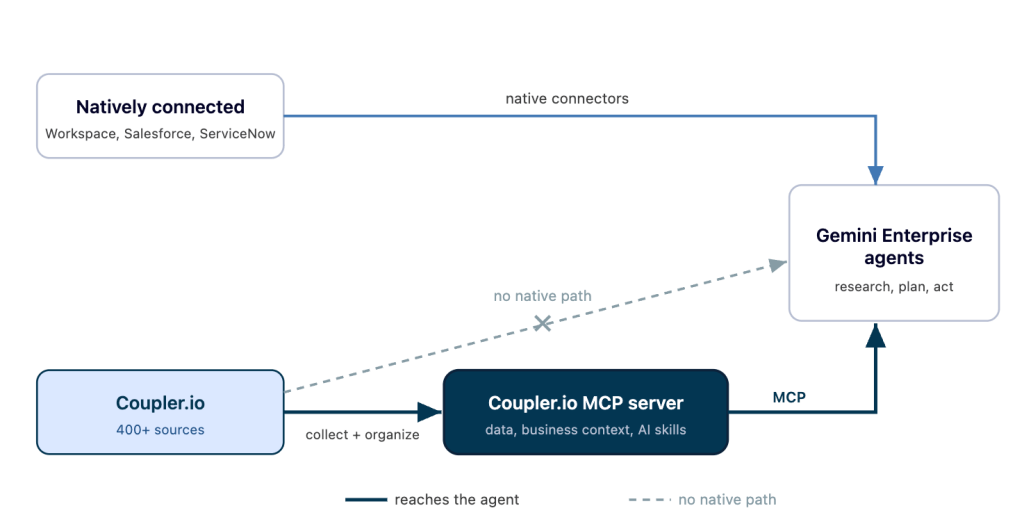
The limit is reach. An agent can only reason over data it can actually see, and most of the numbers a business runs on live outside Google. Ad platforms, payment processors, CRMs, help desks, and product analytics all hold pieces of the picture. When someone asks an agent about churn or cost per acquisition, the answer depends on data Gemini has no native path to.
MCP is how you close that gap. It’s an open standard for connecting AI agents to external tools and data, and Gemini acts as the MCP client that calls out to them. Instead of building a one-off integration for every tool, you expose your data through one protocol the agent already understands. It decides which enterprise data and tools Gemini’s agents can touch beyond the native connectors.
This is where the data layer matters. An agent handed a raw API feed still has to guess at field names, reconcile formats, and hope it read the numbers right. That’s the gap Coupler.io fills. As a data integration and analytics platform, it collects data from your sources, organizes it into clean tables, and serves it to the agent through MCP, so the agent works from structured, fresh data. The question shifts from “can the agent read this?” to “what do I want to know?”

Why connect an MCP server to Gemini Enterprise
The payoff is simple. Someone on your team asks a question in plain language, and the agent answers from live business data.
Picture the alternative most teams live with. A marketer wants to know which campaigns drove signups last week. They log into the ad platform, export a report, drop it into a sheet, fix the column headers, then paste the result into the agent. Twenty minutes later, they have an answer that’s already a day stale, and they repeat the whole thing next Monday. Multiply that by every team that needs numbers, and it adds up to hours lost every week.
The Gemini Enterprise MCP integration removes that routine. It gives agents a single, controlled path to the sources Google doesn’t connect on its own, so anyone can run natural language queries against them:
- Marketing can ask which channels beat their target ROAS this month.
- Sales can ask which deals slipped out of the current quarter’s pipeline.
- Finance can ask how recurring revenue compares to the same week last year.
Because it all runs through one place, you stay in control of the data. Access is scoped, read-only, and logged, so opening data to agents doesn’t mean spreading credentials across a dozen tools. That control matters more as more people start querying data directly instead of waiting on an analyst.
You can add an MCP server to Gemini Enterprise two ways: build and host your own, or point Gemini at the Coupler.io MCP server. The second is faster, so I’ll start there.


Get answers from live business data with Coupler.io
Start for freeHow to connect an MCP server to Gemini Enterprise the simplest way with Coupler.io
Setting up your Gemini integrations through Coupler.io takes minutes because most of the setup is already handled for you. You point Gemini at the ready-made Coupler.io server, which connects 400+ business sources. The data arrives structured and refreshes on the schedule you set, so agents answer from up-to-date numbers.
Two things make this more than a convenience.
First, the data is organized before the agent ever sees it. Coupler.io pulls from each source, standardizes the fields, and can blend several sources into one table. So when an agent queries “spend by channel,” it reads a clean, labeled dataset, not a raw output it has to decode.
Second, the numbers hold up. Coupler.io’s Analytical Engine runs the calculations and hands the agent computed results. The model interprets and explains those results; it doesn’t have to do arithmetic on a pasted CSV, which is exactly where AI tools tend to slip. Ask a chatbot to sum a filtered column across a few hundred rows, and it will often return a plausible number that’s quietly wrong. With Coupler.io, the total is computed first, then handed over for explanation, so you get an accurate, trustworthy answer you can act on.

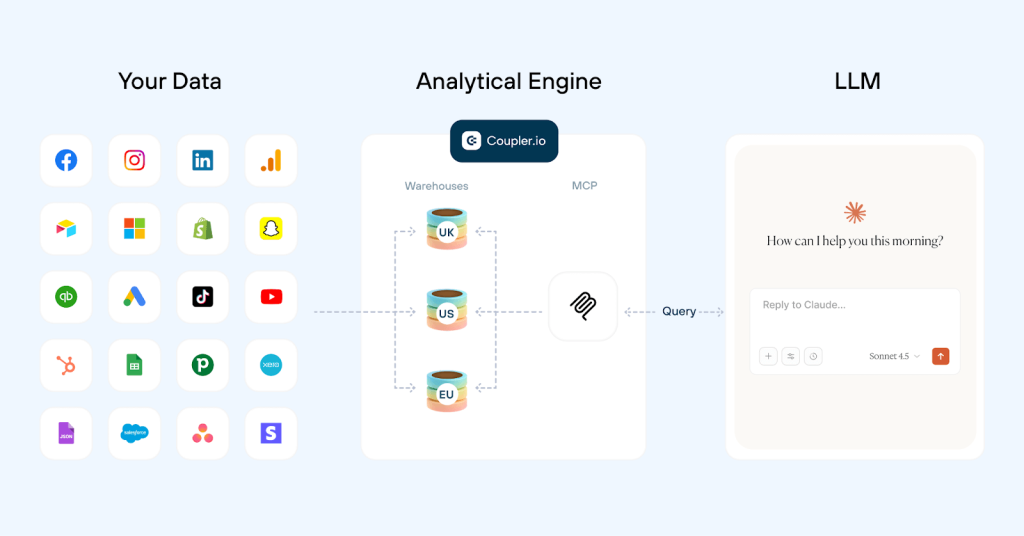
Here’s how to set up the MCP server in Gemini Enterprise with Coupler.io:
- Use the form below to select the app (or apps) whose data you want to connect to Gemini Enterprise. You’ll be offered to create a free Coupler.io account with no credit card required.

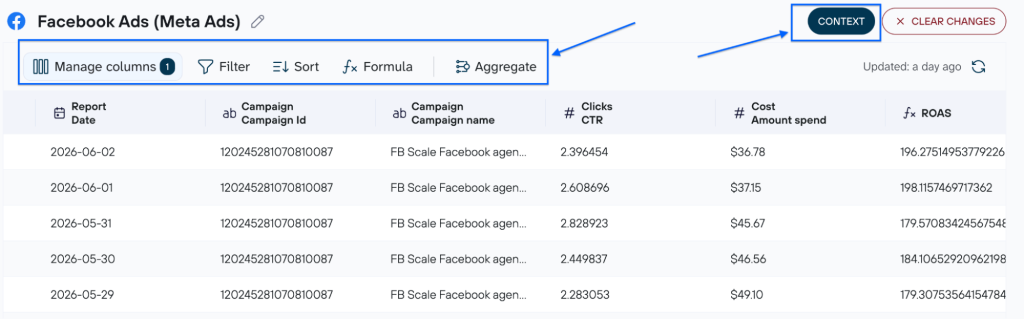
- Pick the exact data and organize it the way you need (rename/hide columns, add formulas, insert your business context details, etc.)

- Copy the indicated values from the data destination (Gemini Enterprise) setup.

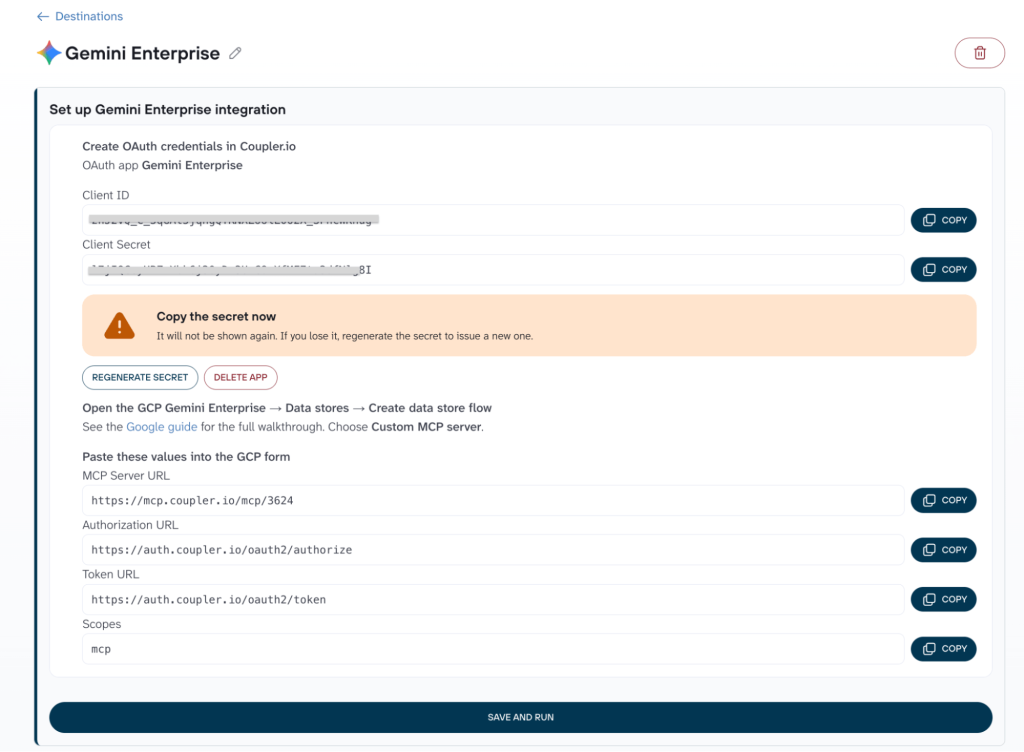
- In Gemini Enterprise, register the MCP server as a custom connector using that endpoint and token.

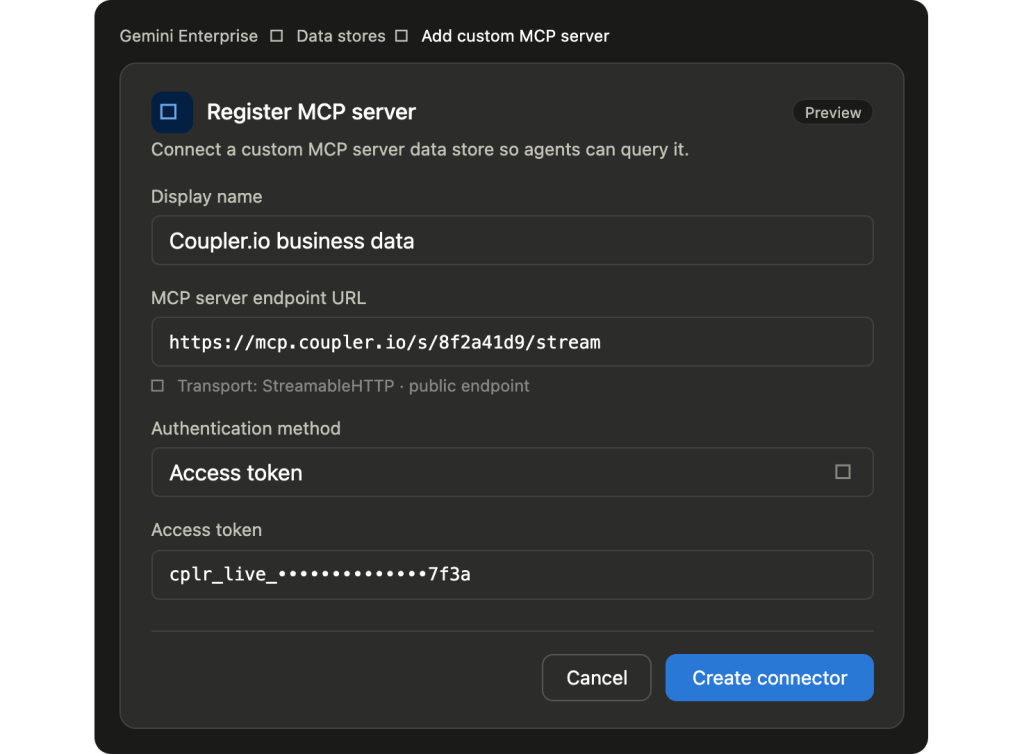
Once it’s live, anyone with access can ask the agent about that data in plain language. Set the refresh schedule, and your data will be kept up to date automatically.

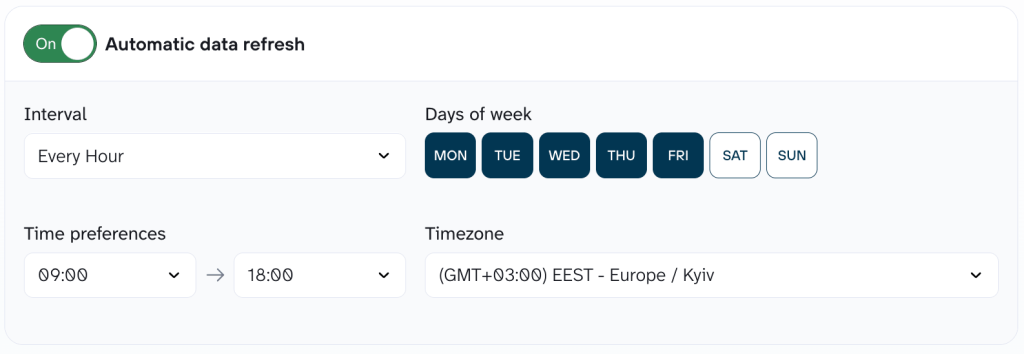
You don’t touch the pipeline again unless you want to add a source or make any other changes to the setup.
Security and governance you can point to
The connection is read-only, token-based, and encrypted. The agent can query and analyze the data; it can’t write back to or change your source systems. That distinction is worth stating out loud to a security team: giving an agent access to numbers is not the same as giving it the keys to the systems those numbers come from.
On compliance, Coupler.io is SOC 2 Type II certified, GDPR compliant, and HIPAA compliant. Access runs through a single token you can revoke, and reads are logged. It means the data your agents see stays inside a governed channel, not leaking out through ad-hoc exports sitting in someone’s downloads folder.
Trust the numbers in Gemini Enterprise with Coupler.io
Get started for freeWhat it costs to run
Coupler.io bills by connected account, not by data flow or by question asked. Connect one Google Ads account, and you can build as many flows, tables, and agent connections from it as you want for the same price. Plans start at $24/month with annual billing, and a free plan and a 7-day trial let you test the Gemini connection before committing. For a team losing hours to manual exports, it costs much less than the time it saves.
What your team can ask once the data is connected
The setup only matters because of what it unlocks. This is where using Gemini for data analysis actually becomes practical: with a Coupler.io data flow feeding Gemini, you can ask anything about your business (across the sources you’ve connected):
- “
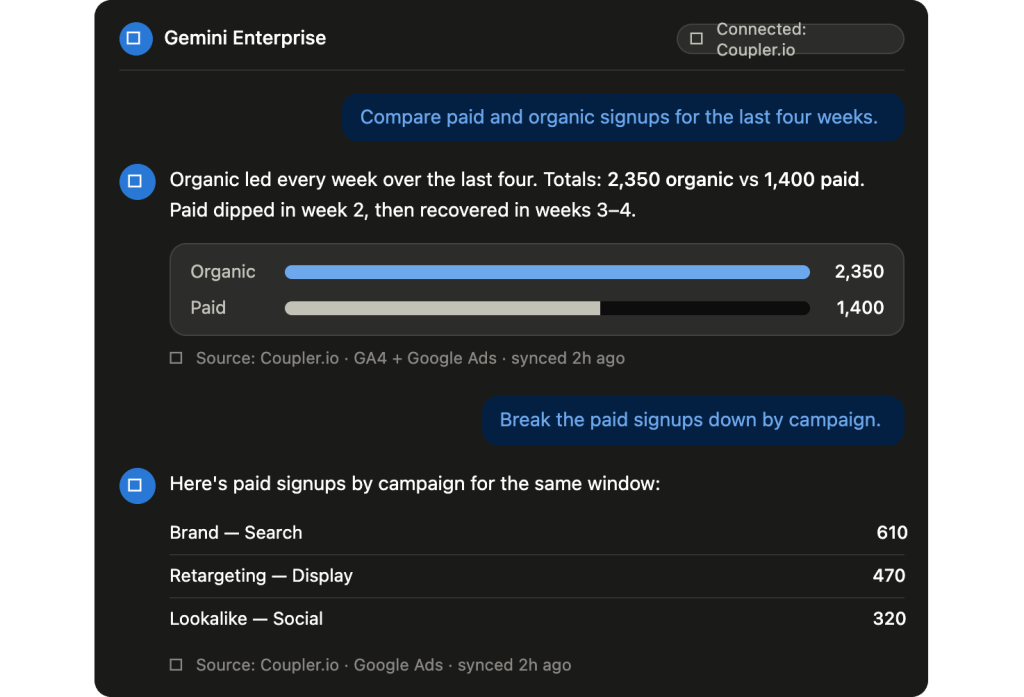
Compare paid and organic signups for the last four weeks.“ - “
Which subscription plan had the most cancellations this month?“ - “
Show me support ticket volume by category since the last release.“
Each of those would normally mean an export, a spreadsheet, and a manual paste. Through MCP, they’re one sentence, and the answer reflects the latest sync. Follow-up questions work the same way, so a marketer can drill from “which channel” to “which campaign” to “which creative” without leaving the conversation or rebuilding a report.

And the same data flows power more than Gemini: Coupler.io’s AI Agent lets you ask questions inside Coupler.io itself, drawing on built-in skills (ready-made procedures from a growing AI agent skill library), so your team gets reliable, accurate answers whether they’re in Gemini or in Coupler.io.
Should I build a Gemini Enterprise custom MCP server manually?
You can build your own server if you have a specific reason to, such as an internal system with no existing connector or a hard requirement to keep everything inside your own cloud. It’s a legitimate path. It’s also more work than it looks at first.
The setup happens in the Google Cloud console and lands on your engineering team:
- Set the right IAM roles under your Google credentials, then handle authentication. Your remote MCP server uses OAuth 2.0, so you generate a Client ID and Client Secret, define the OAuth scopes, and supply an authorization URL and token URL for the token exchange. Google’s connector also supports a service account access token.
- Register your endpoint as a custom MCP data store, which runs as remote MCP over HTTP. This is the Gemini Enterprise remote MCP setup Google documents in its own guide, and it comes with constraints: the MCP server URL must sit on a public IP, and the connector currently supports Google’s Streamable HTTP transport.
- Build and schedule the syncs that keep each source up to date, then maintain the server, the credentials, and the transforms going forward.
None of these steps is exotic on its own. The cost is that you own all of them, per source, indefinitely. Every new system you want an agent to reach is another connector to build and another sync to keep alive. For one internal source, that may be perfectly reasonable. For the ad platform, the CRM, the payment processor, and the help desk, it adds up to real engineering time before anyone asks a single question, and to ongoing maintenance every time an API changes underneath you.
Coupler.io MCP server vs. building your own
Unless you have a reason to run your own infrastructure, the Coupler.io MCP server gets you connected far faster. The side-by-side shows why.
| Building your own server | Using Coupler.io MCP server | |
|---|---|---|
| Setup | Configure IAM roles and OAuth 2.0 in the Google Cloud console, generate a Client ID and Client Secret, and choose how services authenticate | Paste one endpoint and access token into Gemini Enterprise |
| Hosting | You host and run the server as remote MCP over HTTP | Hosted for you |
| Data sources | One custom server to build per system | 400+ sources ready to connect |
| Keeping data fresh | You build and schedule the syncs | Refreshes on the schedule you choose |
| Maintenance | Ongoing, on your team | Handled for you |
| Time to first connection | Days of engineering | A few minutes |
The honest read: build your own when you have unusual systems and the engineering capacity to maintain them for the long haul. Use Coupler.io when you want your team asking questions this week, not next quarter.
Skip the build and connect 400+ sources with Coupler.io
Book a demo