Key takeaways
- This post has 15 free Google Sheets inventory templates, from retail, restaurant and raw materials to home, classroom and book collections.
- Fill a template in by hand, or, if your stock lives in Shopify, WooCommerce or Square, let Coupler.io load it into the sheet on a schedule.
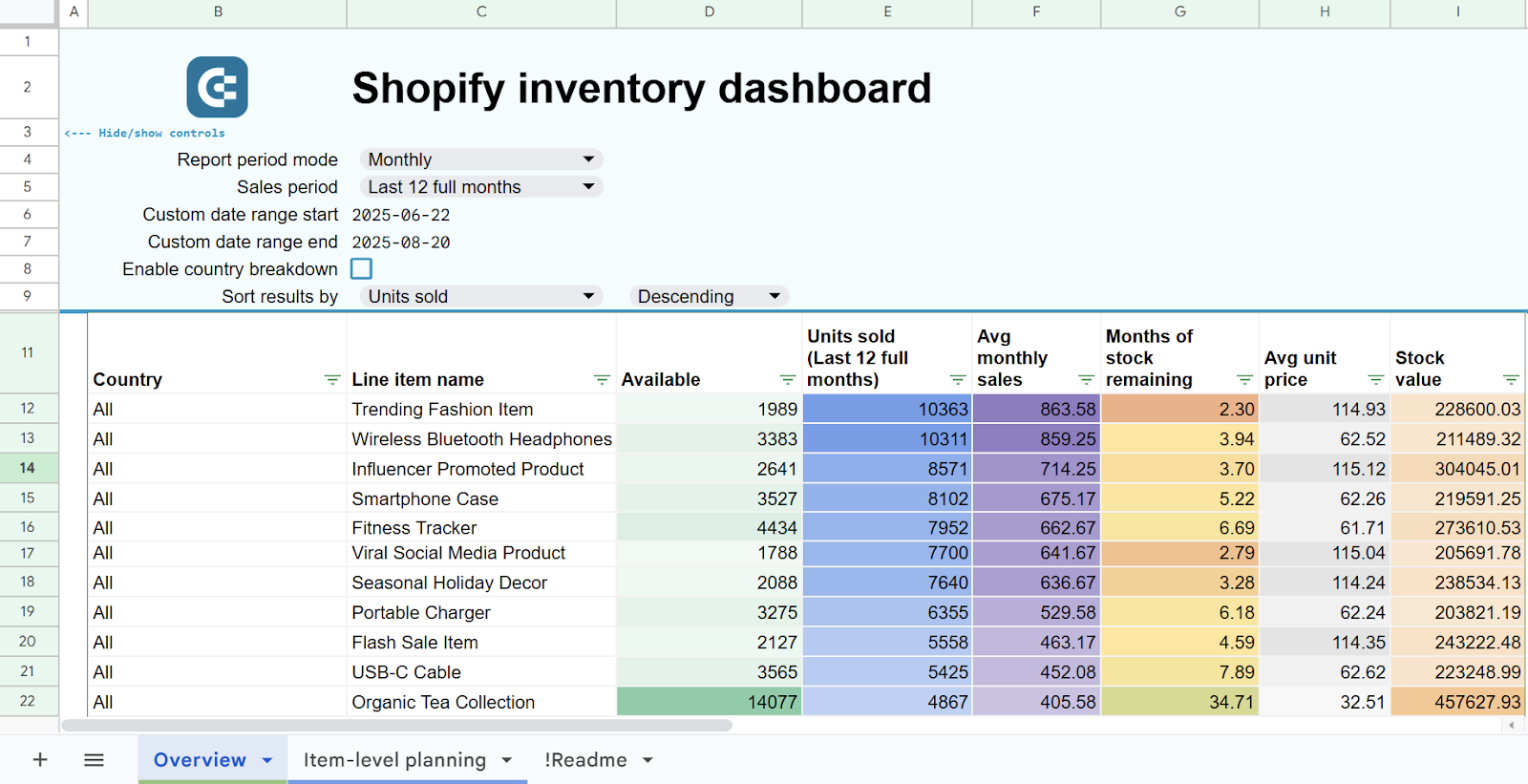
- Shopify sellers can start from a ready-made inventory dashboard in Google Sheets. It shows months of stock remaining, stock by location and sales velocity.
- To start with AI instead, ask Coupler AI Agent to connect and organize your store data, then have Claude or ChatGPT build the inventory report from it.
- AI skills, such as the Shopify inventory report and stockout forecast skill, keep the method the same every week, so this week’s reorder list compares with last week’s.
What is an inventory spreadsheet template?
An inventory template is a spreadsheet with an itemized list of every product your business has in stock. It is used to record inventory levels and track inventory turnover.
Products, in this case, can be anything – raw materials, work-in-progress, equipment or finished goods. It may not only be something your company sells but also stuff your company uses, such as laptops, software, or even work suits.
Inventory templates are especially valuable for e-commerce businesses. For example, with the Shopify inventory dashboard template by Coupler.io, you can track current stock levels, see how many months of stock each product has left, and monitor inventory across multiple locations.
Inventory dashboard template for Shopify

Inventory dashboard template for Shopify
Preview templateAccurate, real-time stock information tells you what you can sell, what to reorder and how much cash sits on your shelves. An inventory template gives those figures a fixed structure, so every count lands in the same place and the totals add up.

Free inventory templates in Google Sheets
I’ve prepared 15 free inventory management spreadsheet templates you can use. Pick the one that meets your needs and fill it in by hand, or load the data automatically with Coupler.io’s Google Sheets integration. If your stock already lives in Shopify, WooCommerce or Square, jump to the automation section to see how to keep a template up to date without typing.
1. Retail inventory Google Sheets template
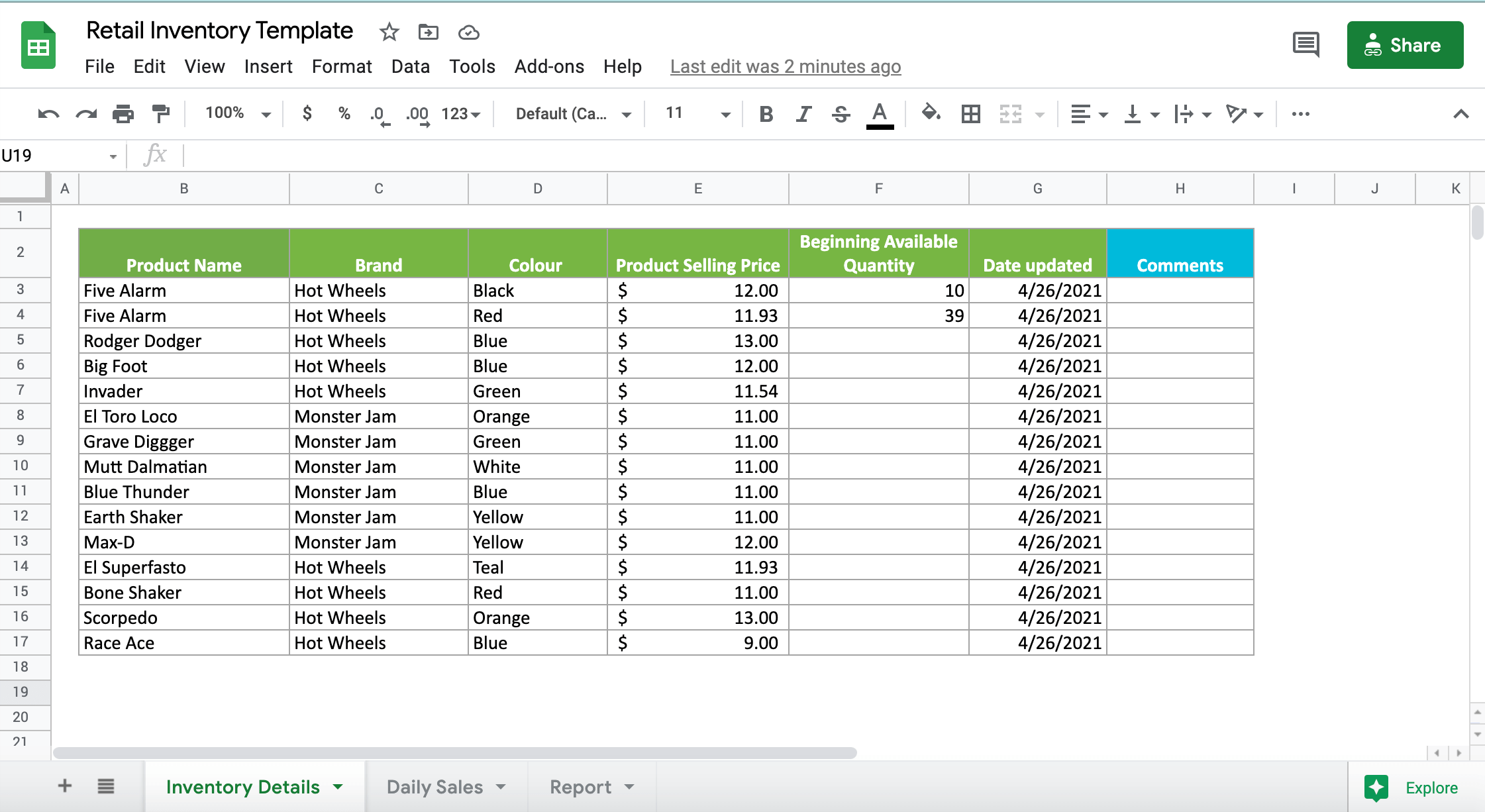
If you are in retail, whether offline or online, inventory management is at the heart of your business, one way or another. Without it, you won’t be able to provide sufficient customer experience, improve cash flow, and grow your company. Here is a simple Google Sheets inventory template with pre-filled information and some basic formulas to show the power of inventory tracking. It is done in the form of a workbook with three tabs.
Retail inventory Google Sheets template

Retail inventory Google Sheets template
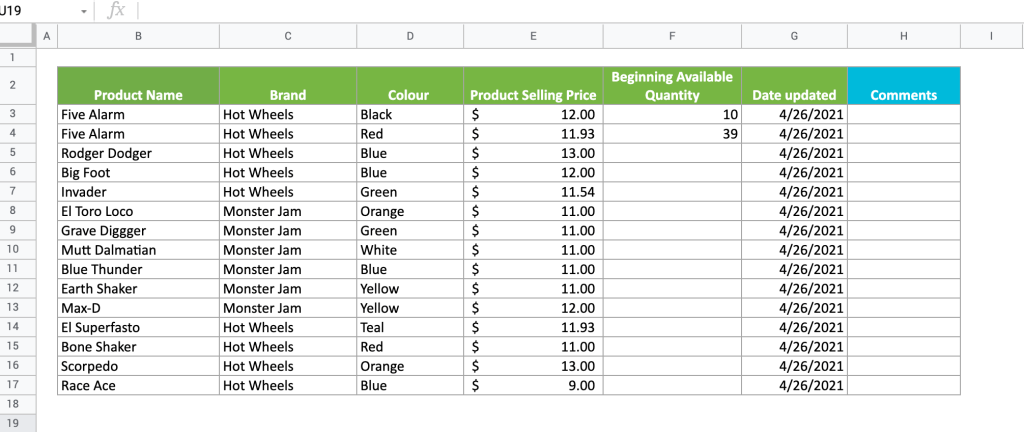
Get the templateThe first tab – Inventory Details – contains Product Name, Brand, Colour, Product Selling Price, Beginning Available Quantity, and Date Updated. You can also include comments as they help jog your memory of product details or your conclusions on some deals. The first tab serves more like a database of all inventory available.

The second tab should be used to track your daily sales. To simplify manual input, we included a drop-down list of all the products. Product Price pulls in automatically. This is made possible due to the formula:
=IFNA(INDEX('Inventory Details'!$B$3:$G$17,MATCH('Daily Sales'!$C4,'Inventory Details'!$B$3:$B$17,0),4),"")
Product Final Price is also calculated automatically.
=(D4*E4)-F4
The tab also contains Order Date, Quantity Sold, Discount (if any), and Comments.
The Report tab shows consolidated data on your sales and enables getting reports over a certain period.

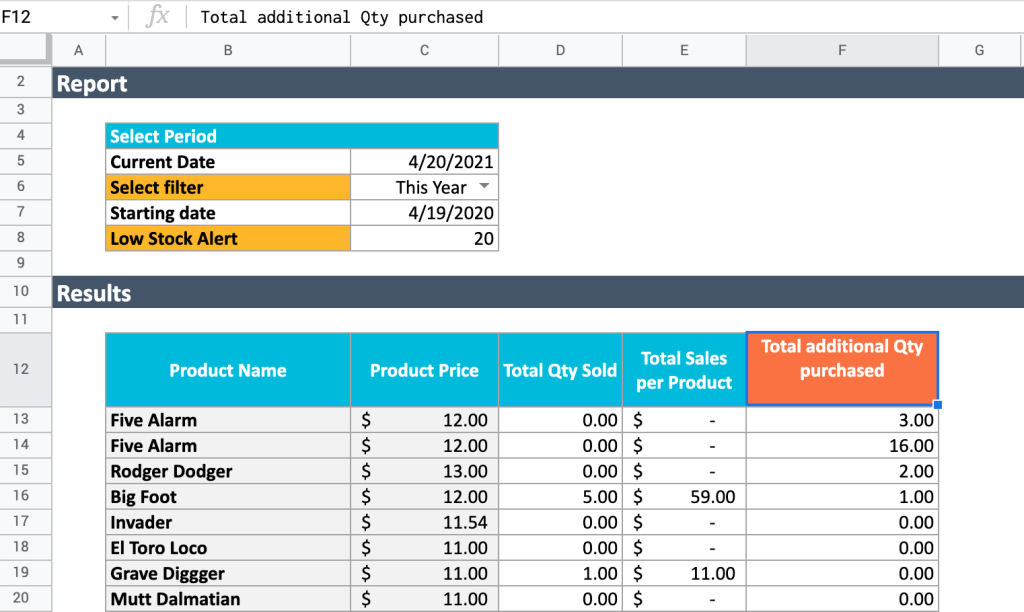
Again, to make life easier, we used some formulas like SUMIF function Google Sheets.
If you sell online, you don’t have to type the first two tabs by hand. Coupler.io can load your products and stock levels from Shopify, or your products and orders from WooCommerce, into the Inventory Details and Daily Sales tabs. It refreshes them on a schedule, so the formulas in the Report tab always work on current numbers. See how it works below.
2. Barcode inventory Google Sheets template
For some businesses, the ability to scan your barcode is a real helping hand. Google Sheets does not have it as a built-in feature, but some solutions can help you turn your Google Sheets into an inventory management app. For example, AppSheet will enable you to capture and scan your barcode to record your stock in and out. It can also calculate your current stock and even show all items that need restocking in a separate view. Another cool feature of the app is sending you email alerts, such as when the product expires or needs to be reordered soon.
To use the app, you need to:
- Get the AppSheet add-on.
- Structure your spreadsheet data and define column types so that the app presents it correctly and doesn’t turn everything upside down.
- Launch the add-on and press GO!
There you have it: a beautiful view in the app and real-time data sync with the backend spreadsheet. The only thing left is to customize the settings and view to get the most out of the app. To be able to add new products to your stock, you’ll need to use the camera on your mobile device to capture the barcode. You can find a more detailed description of this feature and its setup in this blog post.
And here is a simple template you can use to create your app if you choose to.
Barcode inventory Google Sheets template

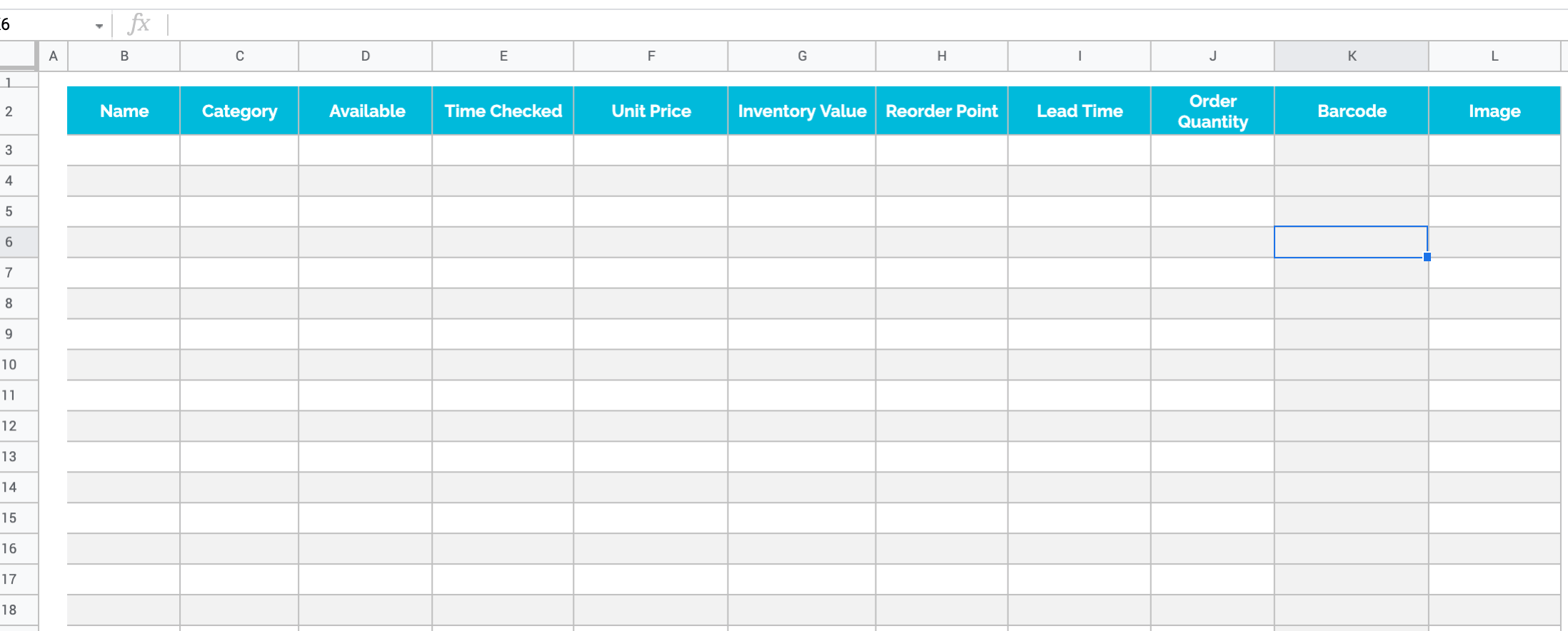
Barcode inventory Google Sheets template
Get the template3. Raw materials (manufacturing) inventory Google Sheets template
Raw materials inventory is the total cost of all the parts the business has in stock but has not used yet in production. The two types of raw materials are usually defined as Direct Materials (DM) and Indirect Materials (IM).
- Direct Materials are components that are part of your final product: leather, silk, wood, etc.
- Indirect Materials are components that are not part of your final product but are consumed during the manufacturing process: glue, oil, cleaning supplies, disposable tools, etc.
Our raw materials inventory template is designed for small manufacturers and can be used for both types of raw materials. You can use this manufacturing inventory template to automatically tell you if you need to order more material now or not with the help of the formula:
=IFERROR(IF('RAW MATERIALS'!$E2<='RAW MATERIALS'!$C2,"YES","NO"),"")
Raw materials (manufacturing) inventory Google Sheets template

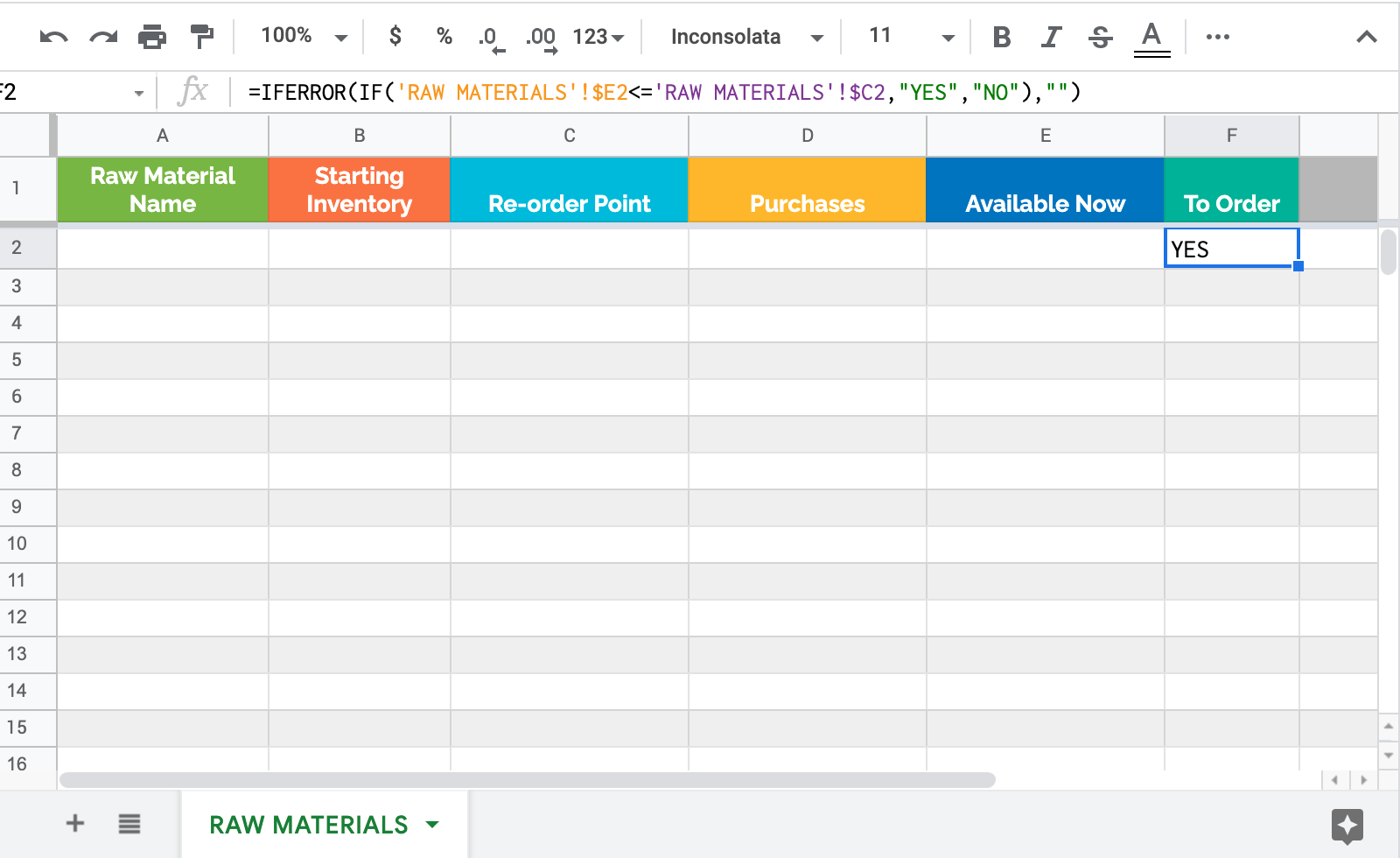
Raw materials (manufacturing) inventory Google Sheets template
Get the templateIn most of our templates, we use so-called “zebra lines”. They help increase the spreadsheet’s readability and give it a more professional look. Read our blog post about Conditional Formatting in Google Sheets to learn how to highlight alternate cells,
4. Restaurant inventory spreadsheet template in Google Sheets
When people open restaurants, they want to cook great food for great people and earn great money for doing so. They definitely do not want to sit at their laptops manipulating different spreadsheets around the clock. But no restaurant business can do without restaurant inventory. And though this is far from being the most glamorous part of managing a restaurant, restaurant managers need to ensure that they have the right ingredients for every dish on the menu, that those ingredients are fresh, and that no food is wasted. This will let you have your customers satisfied and the budget well managed.
With our Google Sheets restaurant template, you will:
- Know what food you have in stock.
- Identify what raw ingredients you need to buy.
- Estimate the number of ingredients you need to buy.
- Check the quality of the raw ingredients.
- Make a list and create a budget to buy the necessary items.
Restaurant inventory spreadsheet template in Google Sheets

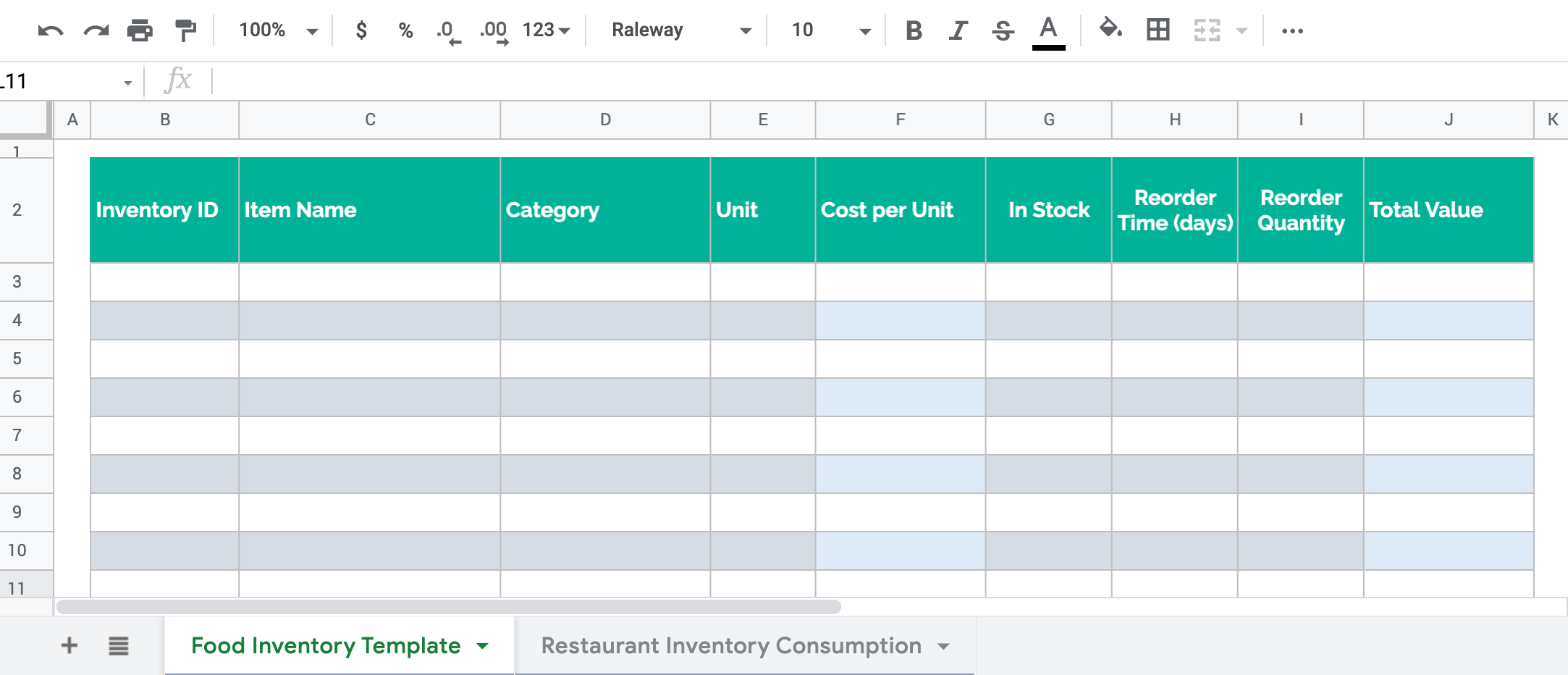
Restaurant inventory spreadsheet template in Google Sheets
Get the templateIf your restaurant runs on Square, its stock counts by location can go straight into this sheet. Coupler.io’s Square connector loads them on a schedule, so the “what to buy” column is based on this morning’s count, not last week’s.
I recommend always entering an inventory ID, even if it seems unnecessary at first glance. But in the future, it can prevent confusion in your reports. For example, if you have different types of cheese, using an inventory ID for each type will keep your data clean.
5. Restaurant inventory order template in Google Sheets
If you want to go further, you can easily create your restaurant inventory order template. This will eventually make you aware of how much food you’re wasting, how much of each product is used per day, and how much you’re spending on inventory.
Restaurant inventory order template in Google Sheets

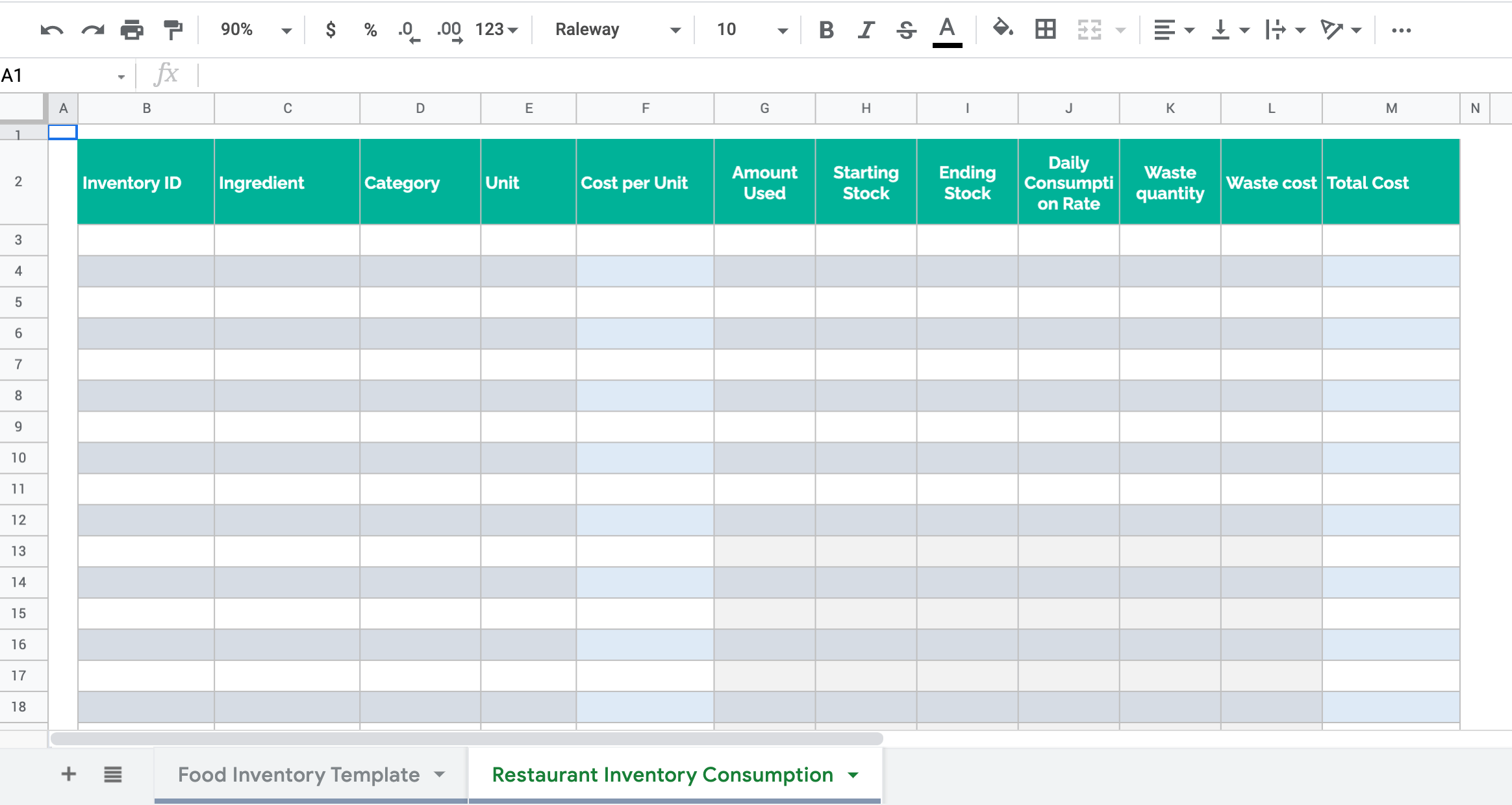
Restaurant inventory order template in Google Sheets
Get the template6. Simple food inventory template in Google Sheets
Following the restaurant inventory template pattern, you can create a template to manage your household food inventory. For faster input, it would be a great idea to create checkboxes and pre-filled drop-down lists for some columns. Check out our template to see how it works.
Simple food inventory template in Google Sheets

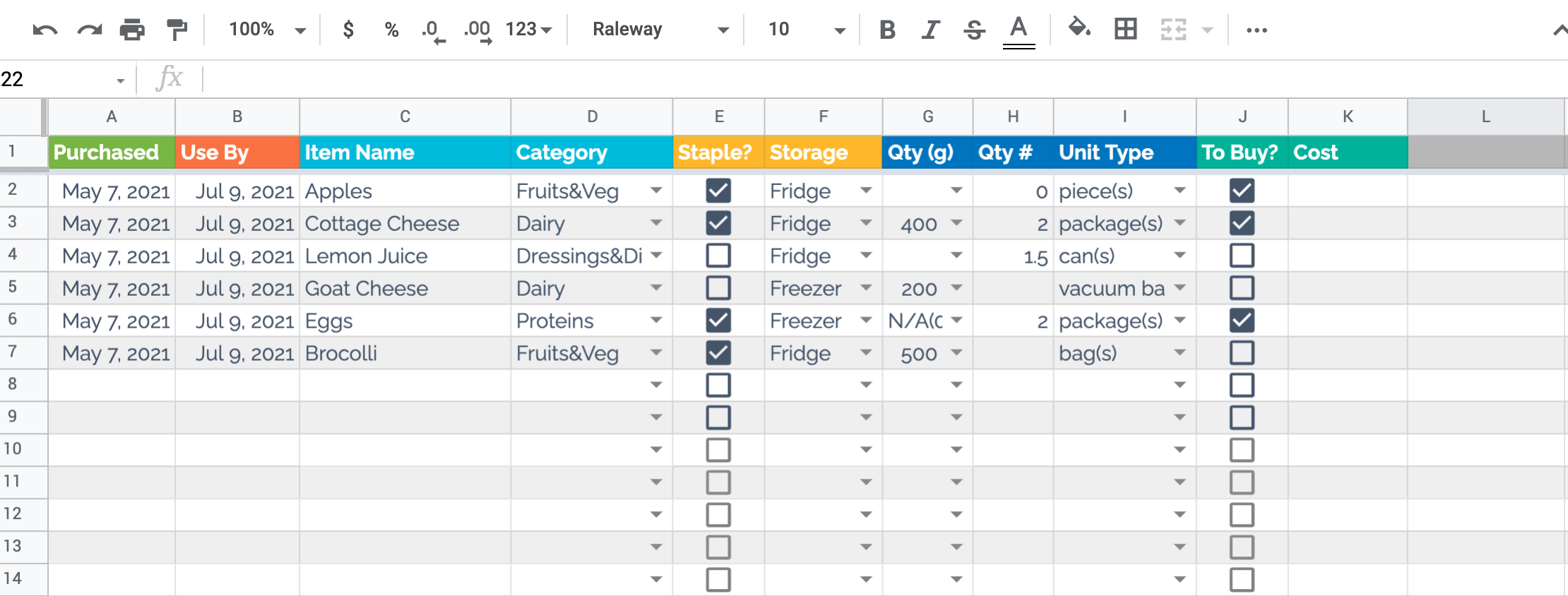
Simple food inventory template in Google Sheets
Get the template7. Home inventory Google Sheets template
Inventory management can become beneficial even for household management. Tracking your home inventory lets you stay organized and plan your expenses better. It may be applicable when you move house or relocate to a different country, arrange household items sales, need to list your home property in one place for insurance purposes, or simply want to jog your memory on warranties or have a database of user manuals.
The home inventory spreadsheet may include some of the common locations and items. Also, it may also be helpful to add the date, price of purchase, and current value. Taking photos or videos of your home property for your inventory list can make working with your insurance company a lot smoother and be a real time-saver if you want to sell something.
It also can’t hurt if you spend some time adding links to online user and repair manuals.
Home inventory Google Sheets template

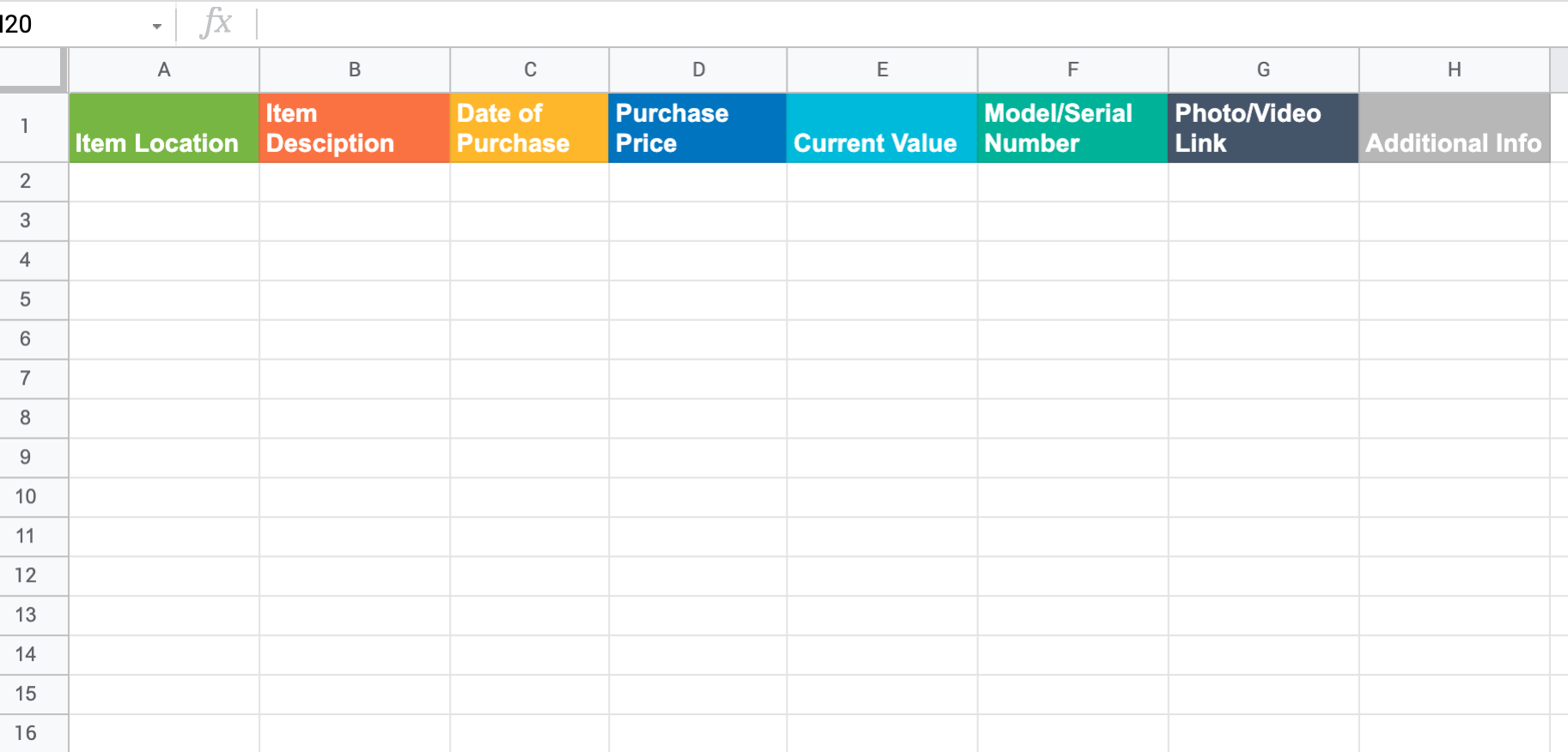
Home inventory Google Sheets template
Get the template8. Pantry Google Sheets inventory template
One more Google Sheets inventory template you can take advantage of is the pantry inventory list. It is more like a combination of home and food inventory and can be used for both commercial and household purposes.
Pantry Google Sheets inventory template

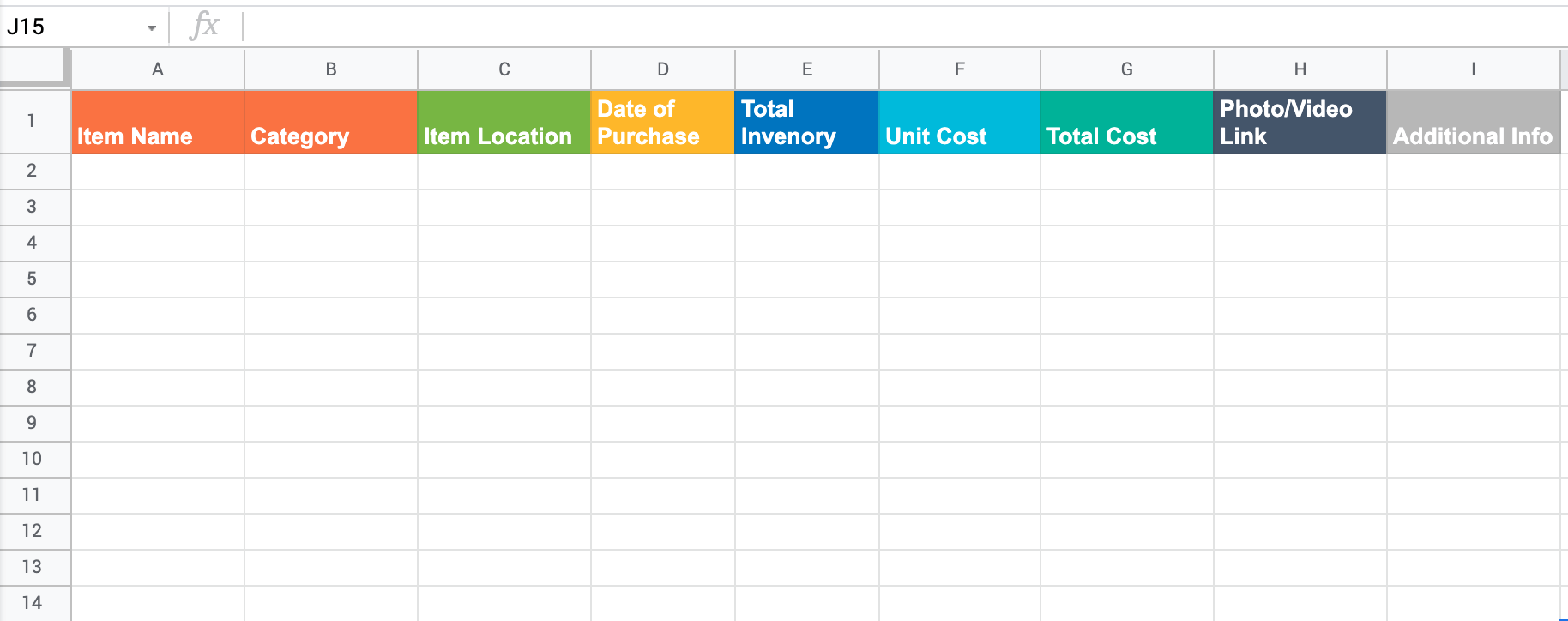
Pantry Google Sheets inventory template
Get the template9. Athletic equipment inventory template in Google Sheets
Just as hotels and restaurants keep food and pantry inventory lists, gyms, and sports clubs may want to track their equipment.
Athletic equipment inventory template in Google Sheets

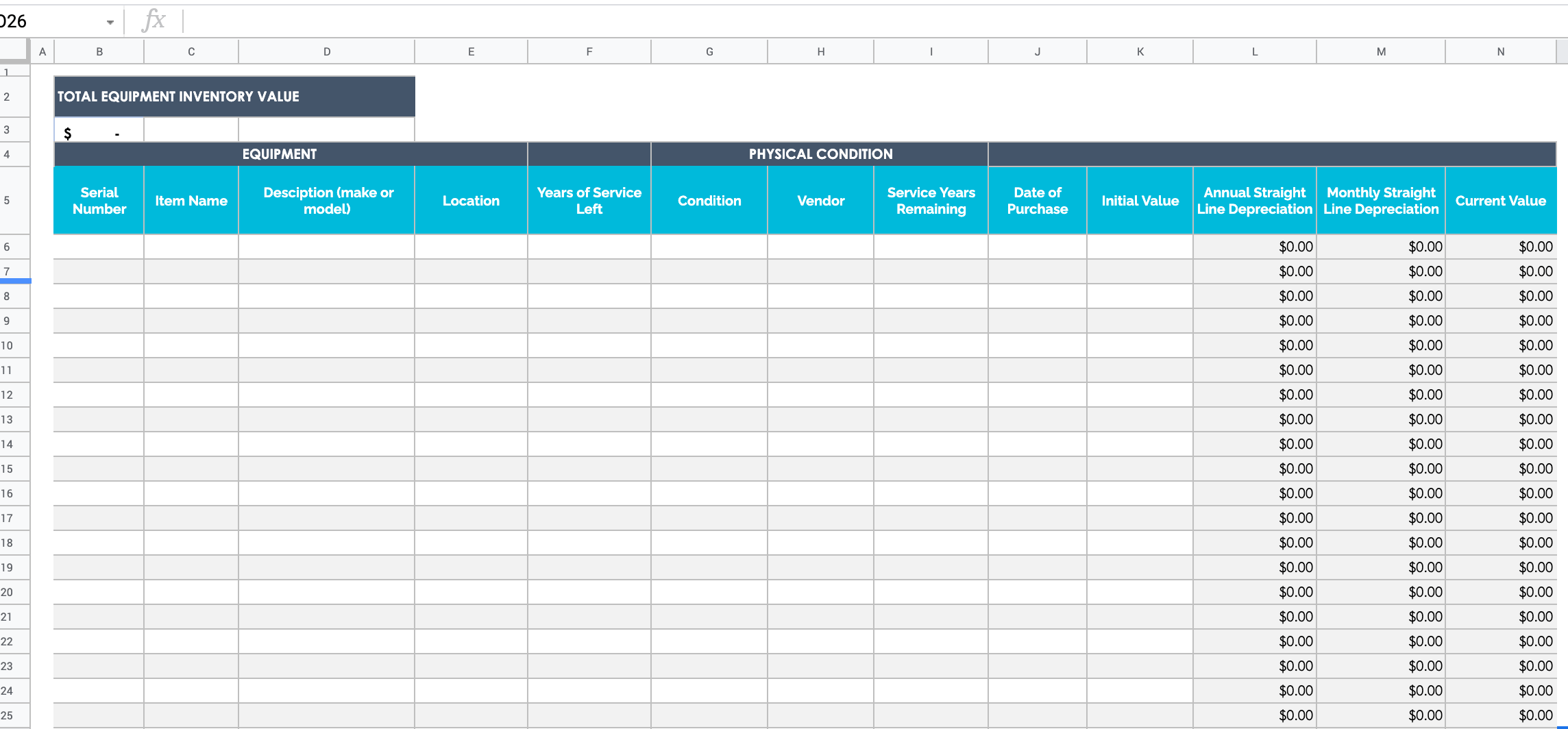
Athletic equipment inventory template in Google Sheets
Get the templateYou may also want to add some columns to this template if your athletic equipment is being leased.
10. Vehicle inventory Google Sheets template
Google Sheets vehicle inventory templates are often used by car dealership employees to document unit-specific data and later use it for reference purposes. Our template can be customized depending on what your potential buyer may want to see.
Vehicle inventory Google Sheets template

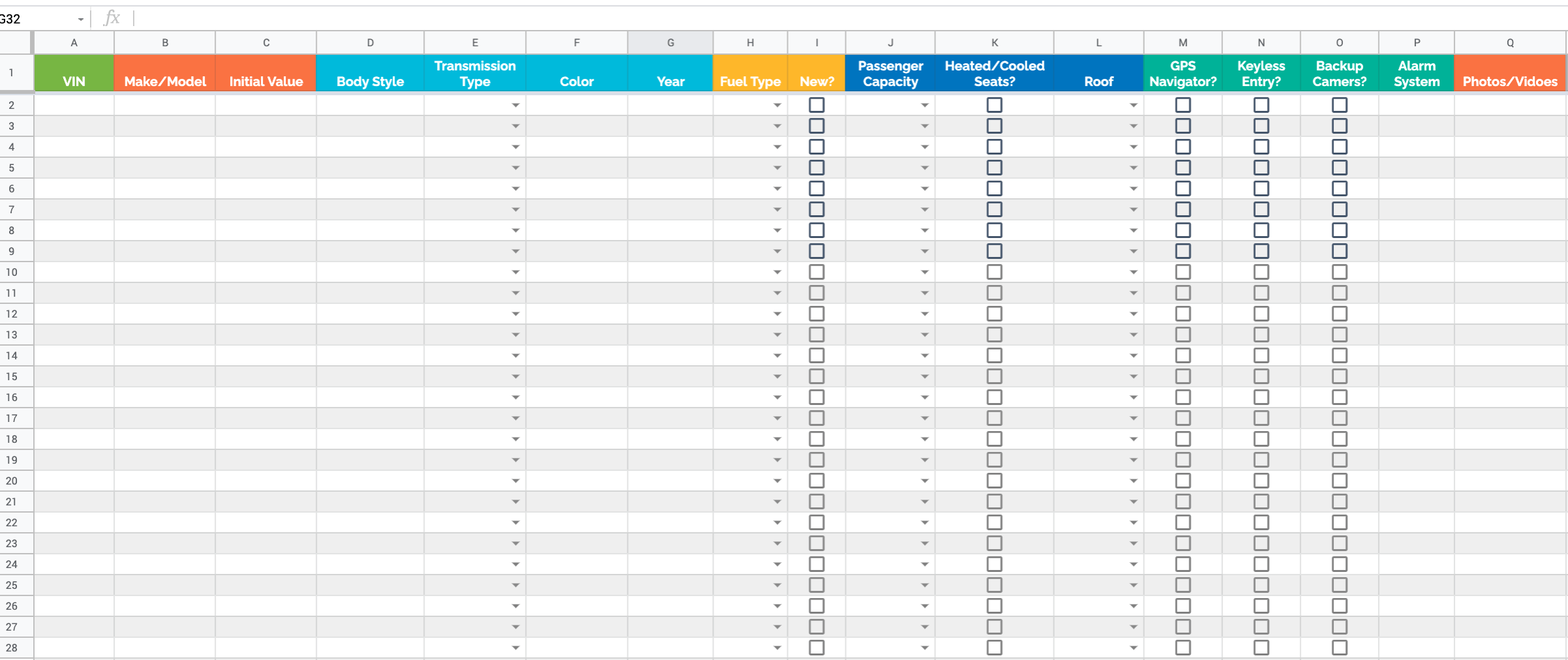
Vehicle inventory Google Sheets template
Get the template11. Chemical inventory template in Google Sheets
Many employers are required to create a chemical inventory list of all hazardous chemicals present in the workplace. Employees, in turn, should have easy access to this list and be able to find information on chemical hazards, properties, first aid, personal protective equipment, emergency procedures, and disposal methods.
In our template, we included some categories of chemicals, such as:
- Aerosol products
- Compressed gases
- Flammables and combustibles
- Oxidizers
- Organic peroxides
- Poisons not included in the above categories
- Corrosives
- Controlled substances
Chemical inventory template in Google Sheets

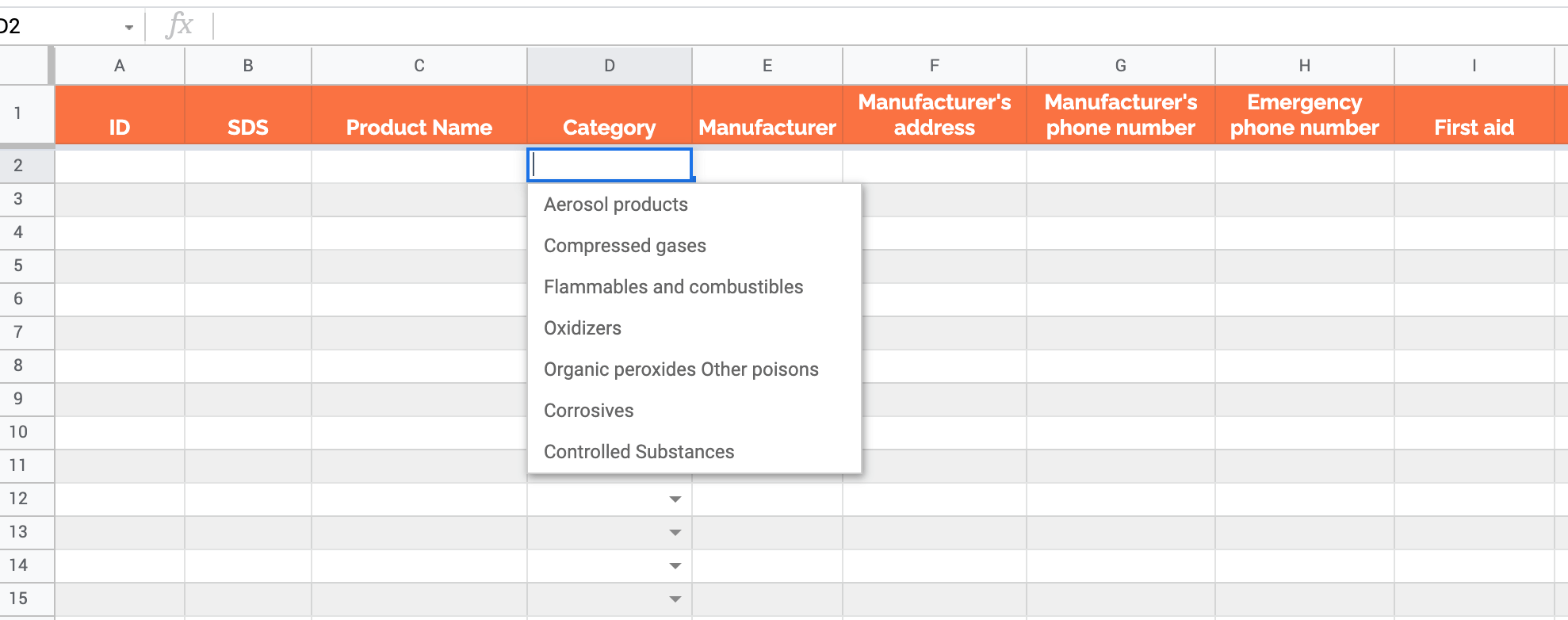
Chemical inventory template in Google Sheets
Get the template12. Music inventory template for Google Sheets
One more useful template (at least we think so) is a music inventory template. It can be beneficial for schools, churches, theatres, nightclubs, and just plain music fans.
Music inventory template for Google Sheets

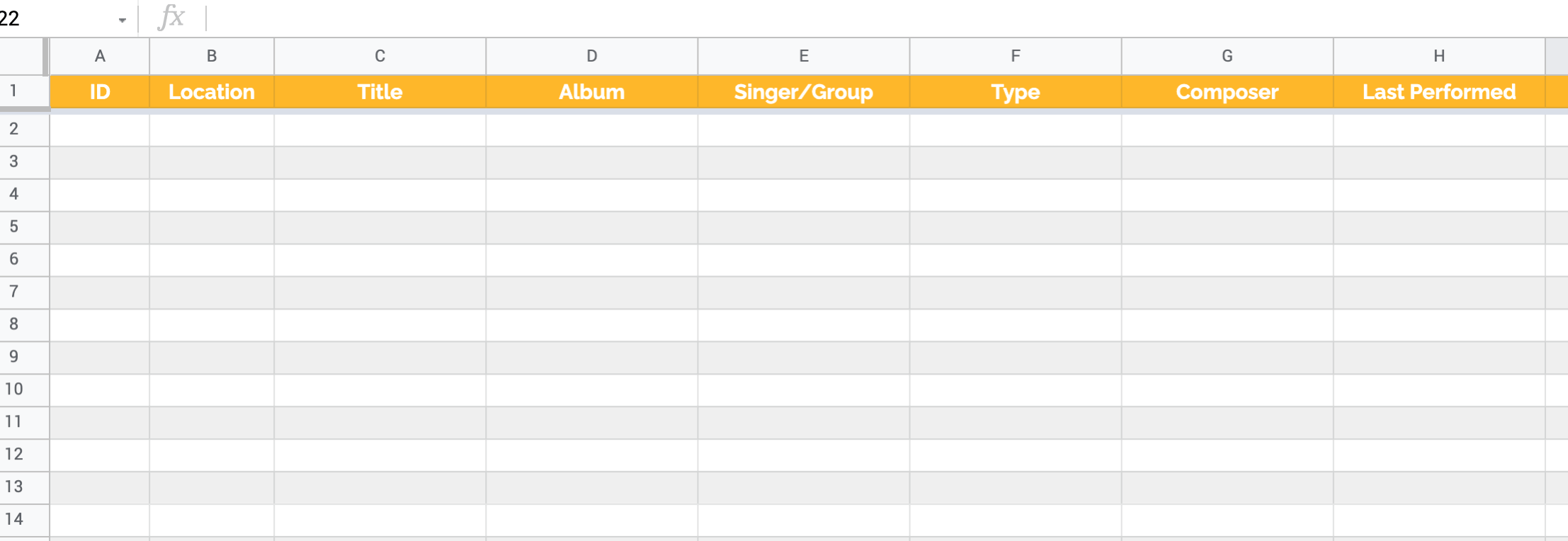
Music inventory template for Google Sheets
Get the template13. Photography inventory template in Google Sheets
With advanced cameras on smartphones and in the Instagram epoch, photography is so accessible that it has become a problem where and how to store the photos. To better understand your photo scope, you can use our inventory template. This will help you not only organize your digital photo collection but also declutter it (poor-quality photos and duplicates).
Photography inventory template in Google Sheets

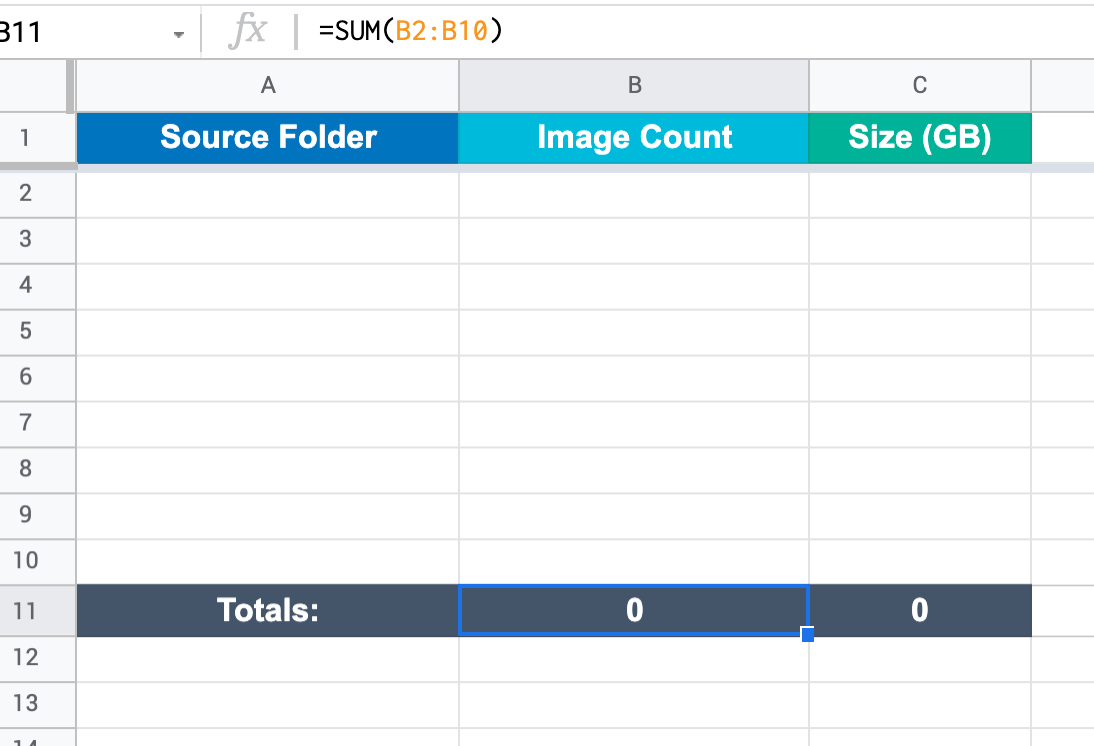
Photography inventory template in Google Sheets
Get the templateWe also included the SUM formulas to calculate Totals =SUM(B2:B10) and =SUM(C2:C10)
14. Classroom inventory template in Google Sheets
Classroom inventory management is one of the most valuable processes for organizing classroom activities and not getting lost in the myriad of materials and equipment.
An inventory can be used in education to monitor classrooms, books, equipment, materials, homework, and many other things. For example, it can be a classroom equipment inventory (computer units, chairs, desks, tables, etc.), books, or resources for indoor and outdoor activities.
Here is an example of an outdoor classroom resource inventory template with some of the predefined categories.
Classroom inventory template in Google Sheets

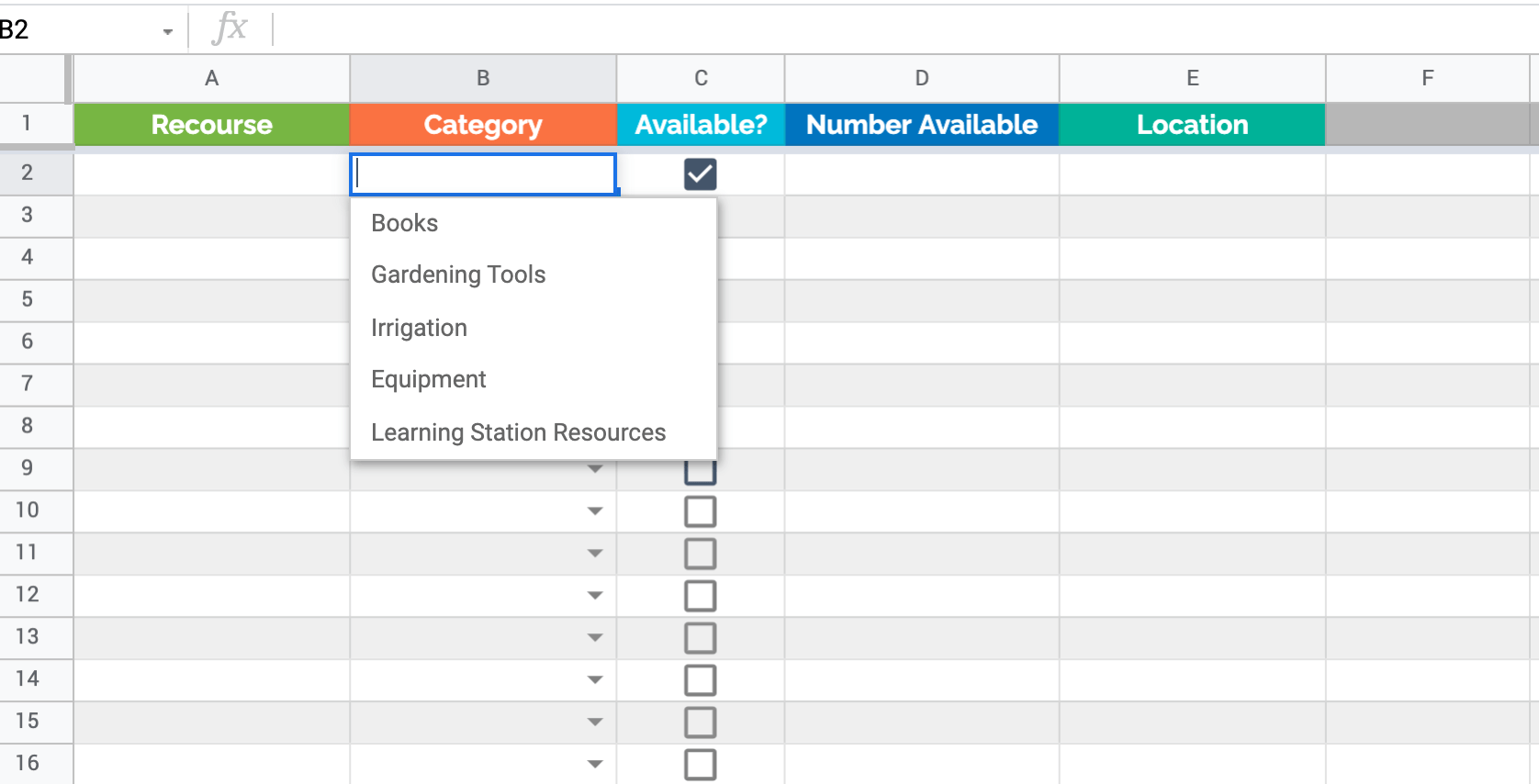
Classroom inventory template in Google Sheets
Get the template15. Books inventory tracker template in Google Sheets
One more template that can be used for multiple purposes (by libraries and bookstores or to organize home book collections, both digital and paper) is a book inventory template. We’ve already listed some popular book categories, but you can easily add some more if you need to. And, if you plan to use the template for personal purposes, it is simple to delete unnecessary columns.
Books inventory tracker template in Google Sheets

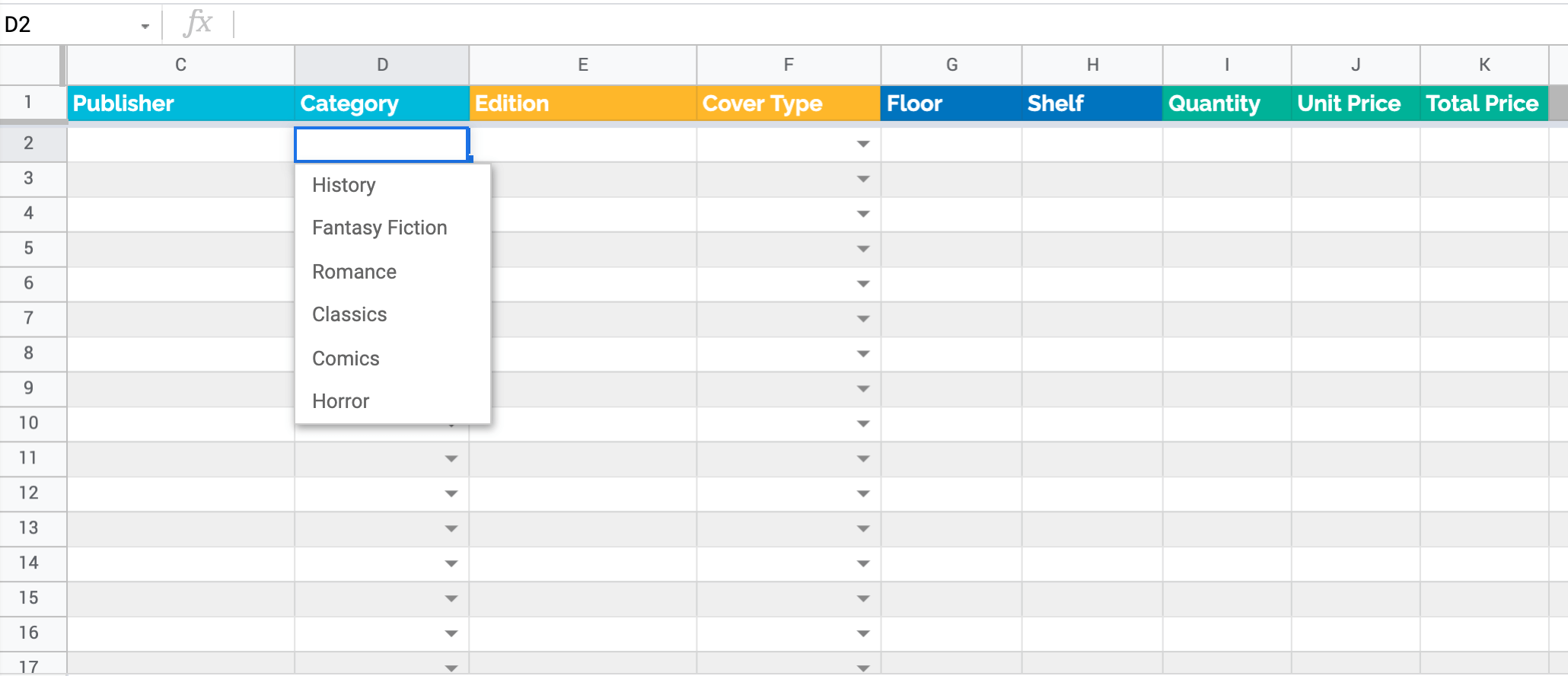
Books inventory tracker template in Google Sheets
Get the templateBonus: Create a small business inventory report for your ecommerce store
The templates above work until stock moves faster than you can type. If you sell through Shopify or WooCommerce, the numbers already exist in your store, and Coupler.io can load them into Google Sheets for you.
Coupler.io is a reporting automation platform for business teams. It automatically collects and blends data from 400+ apps and keeps it up to date for your reports and AI. For a store, that means Shopify or WooCommerce next to Google Ads, Meta Ads, GA4 and QuickBooks in one report. It has 200K+ users and is rated 4.9/5 on G2 and Capterra. Browse all connectors.


Get Shopify inventory in Google Sheets with Coupler.io
Book a demoShopify inventory dashboard template by Coupler.io
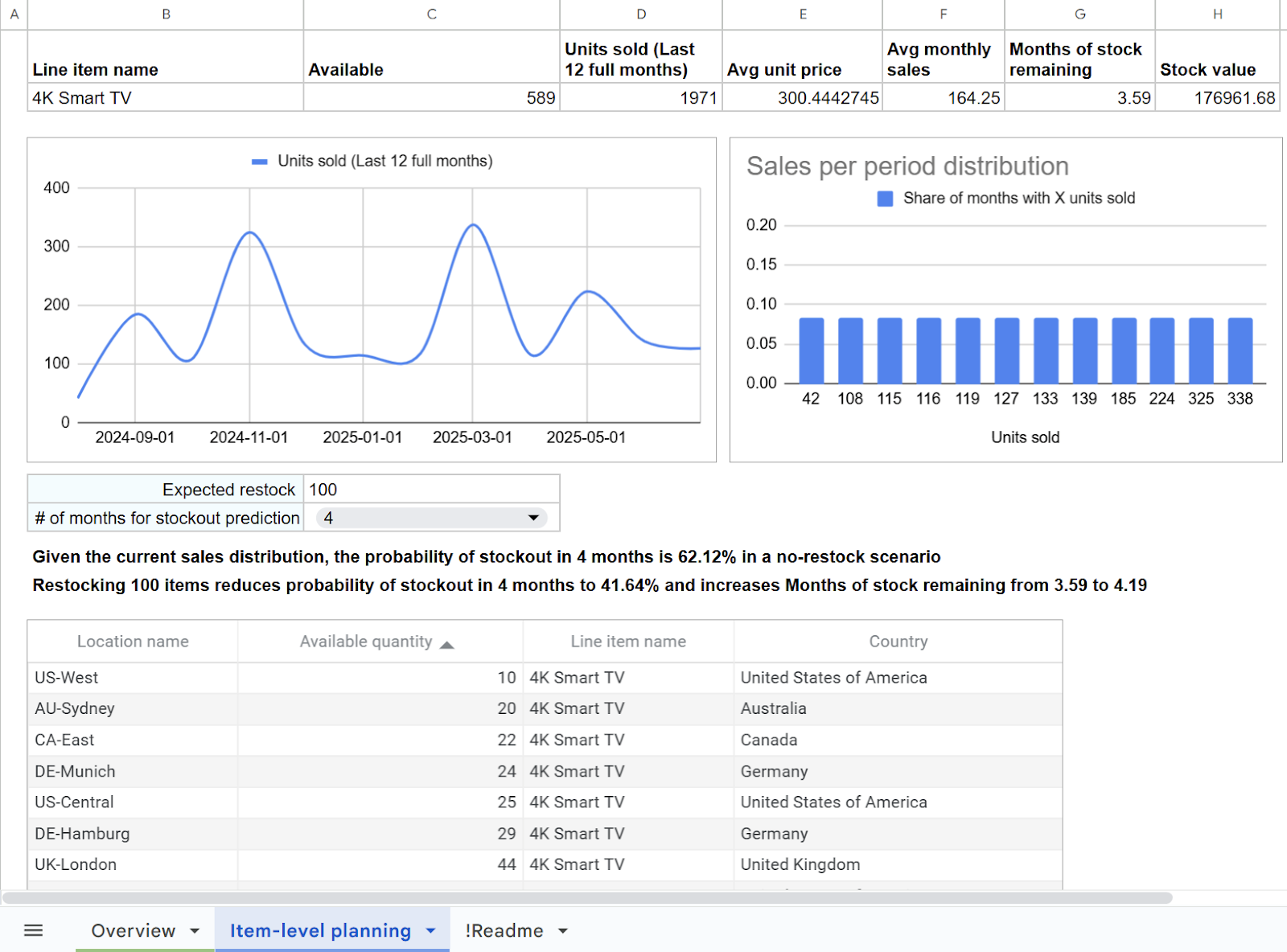
This pre-built dashboard template is designed to monitor inventory in your Shopify store. Unlike basic inventory templates that require manual updates, this dashboard connects directly to your Shopify store. It displays fresh product data, how many months of stock are remaining, sales velocity across time periods, and more. With this Shopify dashboard, you can identify which items need reordering and when, preventing costly stockouts while avoiding excess inventory that ties up your capital.
Shopify inventory dashboard template

Shopify inventory dashboard template
Preview dashboardWhat insights you can get:
- Predictive inventory planning – Calculate “months of stock remaining” for each product to plan procurement timing and prevent stockouts
- Multi-location inventory tracking – Monitor available stock quantities across all your warehouse locations (US-West, AU-Sydney, CA-East, etc.) to optimize distribution
- Sales velocity analysis – Track units sold over the last 12 months with trend charts to understand product performance patterns
- Inventory value optimization – See stock value by product and average unit prices to make informed investment decisions
- Advanced filtering and sorting – Sort by units sold, months of stock remaining, or stock value to quickly identify top and underperforming inventory
How to use this dashboard:
Connect your Shopify account through Coupler.io’s integration, and the dashboard automatically populates with your recent store data. Use the interactive filters to analyze specific products, time periods, or locations. The dashboard refreshes on a schedule, so the inventory figures stay up to date without manual data entry. The report is available as a template in Google Sheets.
Build your own Shopify inventory report from scratch
You don’t have to start with settings and columns. Start with the question. Open AI Agent in Coupler.io and describe the data you need, for example: “Connect my Shopify store and load inventory levels with product names and prices.” The agent walks you through connecting the store, sets up the data flow, blends the data and schedules the refresh. You confirm each step.
Let Coupler AI do the data work for you
Tell Coupler AI what you need to know, from which source, and how often. It connects your account, sets up the data flow, keeps it refreshed, and lets you analyze the results inside Coupler.io or another AI tool.
Try for free

Then ask Claude or ChatGPT for the report itself. AI Integrations bring the same data flow into either tool. Ask: “Build an inventory report that shows months of stock remaining for every product and flags what to reorder this month.” Claude writes the query, Coupler.io runs it on your data and returns the computed numbers, and Claude builds the report around them. Ask again next week: the data has refreshed in between, so the report uses current stock.
AI skills make that report repeatable. The Shopify inventory report and stockout forecast skill gives the AI one fixed method for stockouts, reorder dates and dead stock, so the numbers are calculated the same way every week. Before Black Friday, Cyber Monday or any store sale, the Black Friday ad spend on low-stock products skill blends your Shopify stock with Google Ads or Meta catalog ads. It finds the products you’re still advertising that will sell out within hours.
Shopify inventory report and stockout forecast skill
Shows what in your Shopify store will sell out, when you need to reorder, and how much cash is sitting in dead stock.
Black Friday ad spend on low-stock products skill
Finds the products you're still advertising that will sell out within hours, and how much ad spend to move off them before they do.
Prefer to set it up by hand? The three steps below give you the same data in Google Sheets in a few minutes.
1. Collect inventory data from Shopify
Use the form below to start the setup with a free 7-day trial of Coupler.io (no credit card required).

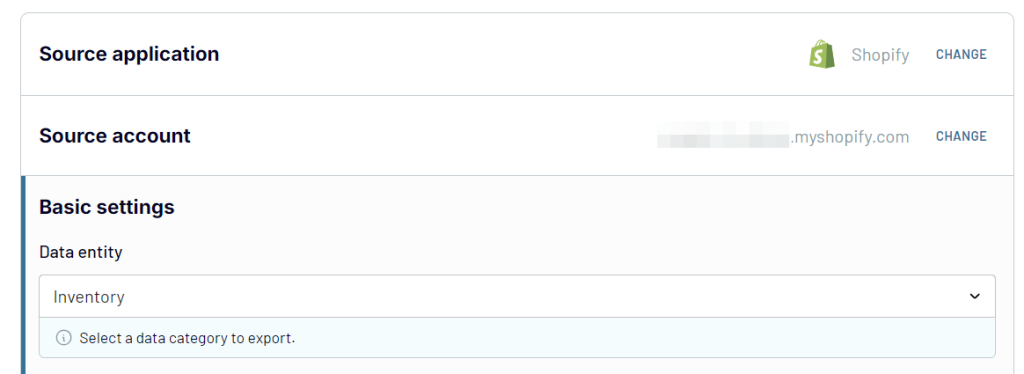
Connect your Shopify account and select the Inventory data entity. It returns current stock per product and location: available, committed and on hand. It doesn’t include incoming stock from open purchase orders, so track those separately if you need them (Help Center).

2. Organize your inventory data set from Shopify
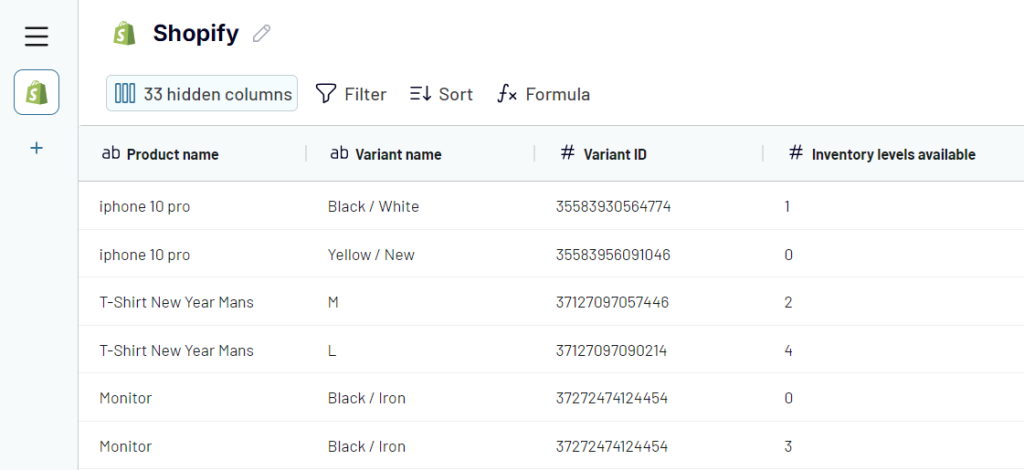
At this step, you’ll get your Shopify inventory data for preview and transformation. You can:
- Hide unnecessary columns
- Edit column names and order
- Filter and sort data
- Add custom columns
- Blend Inventory with another entity, such as Products or Orders, to see stock next to price or sales
Here is the simple inventory report that we’ve got.

3. Load data to Google Sheets and schedule refresh
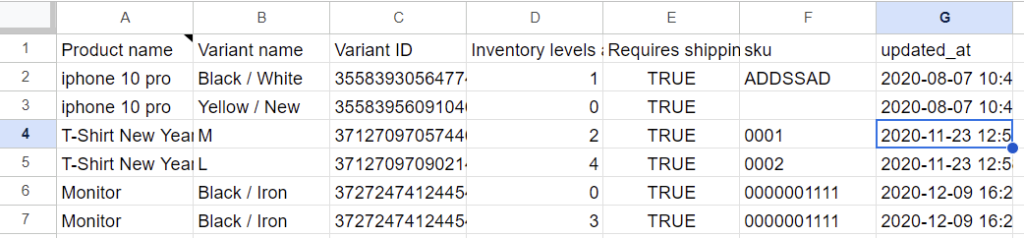
Follow the destination setup instructions to connect your Google account and specify the spreadsheet and a sheet to load inventory data.
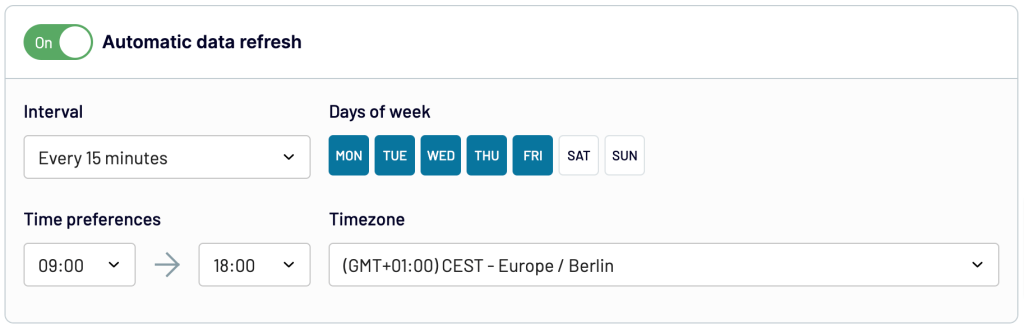
The last thing to do is to turn on automatic data refresh and configure the schedule.

Here is the result

Automate reporting across more than 400 sources with Coupler.io
Start your free 7-day trialWhat is the value of inventory management for your business health?
What is “inventory management”? Put simply, it means tracking your store’s inventory, listing all of your products and product-related info, and logging whenever anything’s added or taken out.
Inventory management aims to balance having enough inventory to satisfy customers while reducing costs. These two aspects often conflict. To keep customers satisfied and ensure fast delivery, you may need to hold extra inventory. No business wants to miss a sale because of a lack of inventory. However, inventory is an investment that requires substantial financial inflow and makes it impossible to keep costs down. Also, you not only spend money purchasing the materials, parts, and components but also storing and manage all that material.
Therefore, it’s important to keep your inventory organized and tracked.
Why use Google Sheets for inventory management templates?
Most big e-commerce operators and retailers use dedicated inventory management software to plan, coordinate, and control every aspect of their inventory. But, for a small business, it is actually an unnecessary luxury, and Google Sheets is a great starting point to start tracking your products, profits, and needs at little or no cost.
Google Sheets is a customizable and cloud-based tool that can be easily used by multiple team members. Of course, it has some limitations as well. For example, you need to make manual entries and can’t scan QR codes and barcodes, unlike more sophisticated inventory management software. Add-ons like AppSheet cover barcode scanning. Coupler.io covers the manual entry: if your stock and orders already live in Shopify, WooCommerce or Square, it loads them into your sheet on a schedule.
Updating your database every time a new product is added or an order is placed, and recording every transaction and shipment is a tedious task, let’s face it.
Well, ready-to-use inventory templates can’t make it fun for you (though there is some hidden beauty in all those tables and numbers), but they can definitely make your life easier. This will remove the need to Google how to create one on your own.
What data should an inventory template contain?
An inventory template usually includes the following items:
- SKU number
- Barcode
- Name
- Serial number
- Description
- Location
- Cost per unit
- Quantity in stock
- Sale price
- Minimum order quantity
- Order time
- Supplier
- Total cost
This list may vary depending on your business’s needs. Some of the headings may be excluded, and some may be added. For example, you may also want to track expiration dates, add customized notes, pictures, videos, links, etc.
If you wish, you can include formulas and calculations in your spreadsheet, or you can create a workbook with interdependent spreadsheets, or tabs, each displaying different calculations. You may want to know:
- Quantity in stock
- Purchase costs
- Inventory value
- Quantity to reorder
- etc.
Do inventory templates for Google Sheets make our lives easier?
If you ask us, our answer would definitely be yes. No matter what the type and size of your business is, there’s no reason to rely on manual methods anymore, and spreadsheets seem to be a simple and flexible tool for tracking and managing inventory. Google Sheets inventory templates in their turn can be a great starting point for that and a perfect source of ideas.
Commonly defined, inventory is an asset of a company. According to lean principles, inventory belongs to one of the seven wastes and should be eliminated. Contradictory? Well, Taiichi Ohno, the father of lean manufacturing, expressed this best when he said, “The more inventory a company has, the less likely it is they will have what they need.” He means that the only inventory of value is the inventory needed to meet demand, and the rest must be reduced so that you can manage the remaining inventory as an asset.
Hence, whatever you call inventory, one thing is clear: an inventory should be well managed. A strong grasp of inventory helps reduce headaches related to over- and under-stocking and ensures the financial and operational stability of your business.
Where to go from here
Pick the template that matches what you track and make a copy. If the numbers come from a store or a POS, connect it to Coupler.io once and let the sheet update itself. You can try it with a free 7-day trial, no credit card required.
For the Shopify side of stock control, read Shopify stock and inventory management and multi-location inventory management. To load other Shopify data into a spreadsheet, see how to connect Shopify to Google Sheets.