When I analyze Amazon Ads, I do not look at campaign performance alone. The complete picture comes from connecting high-level campaign trends with granular search terms, specific ASIN targeting, and purchased product reports.
The AI from Anthropic can help interpret all of that, but first, you need to connect Amazon Ads to Claude. The easiest workaround is to export a report, upload the file, and ask a question. That works for a snapshot. It becomes much harder when you need fresh data, consistent calculations for metrics like ACoS or ROAS, and a unified view across multiple datasets. The connector by Coupler.io provides all of that in one package.
Choose the right method to connect Amazon Ads to Claude
The best connection method depends on whether you need Amazon Ads campaign analysis in Claude on a recurring basis and whether your team can maintain a technical setup.
| Connection method | Setup effort | Who does the math | Best for | Watch out for |
|---|---|---|---|---|
| Coupler.io | 🟢Low | Coupler.io prepares the data and returns calculated results. Claude explains the output. | Recurring Amazon Ads analysis across campaigns, search terms, targeting, products, and ad types | You still need to choose the right Amazon Ads report types and provide business context |
| Manual export | 🟡Low once, repetitive later | You prepare the export, then Claude works with the uploaded file | One-off checks with a small Amazon Ads report | ⚠️No refresh schedule, easy to analyze stale data, and hard to combine several report types |
| Amazon Ads MCP server | 🟡Medium to high | The MCP server connects Claude or another AI client to Amazon Ads tools and APIs | Technical teams that want direct MCP-based access to Amazon Ads | ⚠️Requires setup, permissions, and ongoing maintenance |
| Custom MCP server | 🔴High | Your MCP layer controls data access and tool responses | Internal analytics setups with custom rules or proprietary data | ⚠️Requires development, hosting, authentication, security, and monitoring |
| API scripts and function calling | 🔴High | Your code extracts, prepares, and calculates the data before Claude receives it | Fixed workflows with engineering support | ⚠️Requires API maintenance, auth handling, error monitoring, and clear calculation logic |
One-off manual downloads work perfectly for casual checks. But if your team has the development capacity and wants full, unmediated ownership of the connection, a custom API or the Amazon Ads MCP delivers exactly that.
For most teams that want recurring Amazon Ads analysis in Claude without building a pipeline, Coupler.io is the practical option. It keeps the data flow refreshed, prepares the dataset before Claude sees it, and lets Claude focus on explaining the results.


Analyze your Amazon Ads data in Claude with Coupler.io
Get started for freeSet up a Claude Amazon Ads connector by Coupler.io
Without code, Coupler.io handles the data preparation before it ever reaches the AI. It is a data integration platform for AI analytics that connects 400+ business data sources to AI tools through its MCP server.
The Coupler.io Analytical Engine runs all calculations such as ACoS, ROAS, conversion rates, and more. Claude accesses computed results and interprets the numbers rather than guessing at the arithmetic. It is crucial since Amazon Ads performance questions often need calculated metrics and several data views. A campaign may look profitable at the campaign level but hide wasted spend in search terms.
Let Coupler AI do the data work for you
Tell Coupler AI what you need to know, from which source, and how often. It connects your account, sets up the data flow, keeps it refreshed, and lets you analyze the results inside Coupler.io or another AI tool.
Try for free

It only takes a few steps to connect Amazon Ads to Claude with the Coupler.io connector.
Step 1: Create a data flow for Amazon Ads data
Create a Coupler.io account and start a new data flow. Select Amazon Ads as the source and Claude as the destination.
Or, start right now for free using the form below. Just click Proceed. No credit card needed.

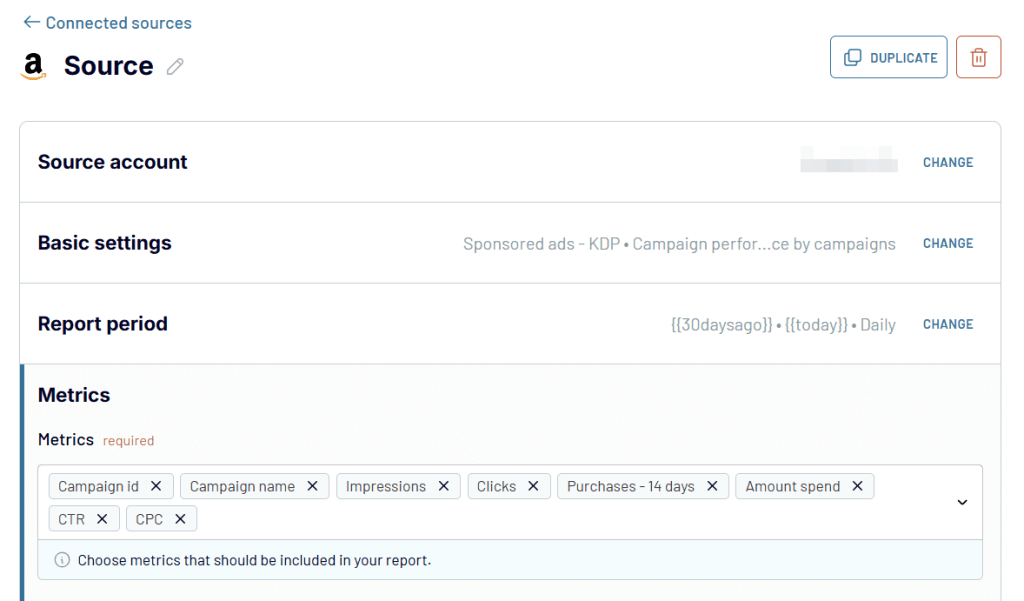
Connect your Amazon Ads account.
Once connected, you can fully customize your report. Select your data source, ad accounts, date ranges, breakdown intervals, and specific metrics.

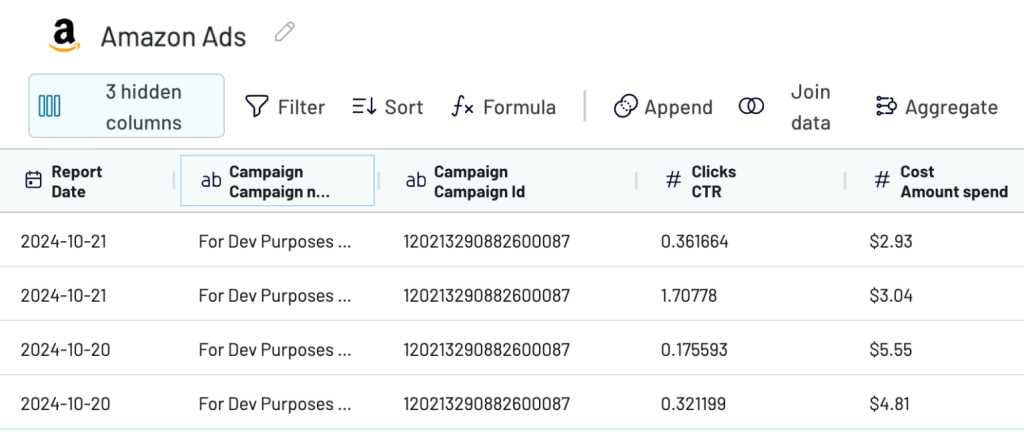
Before sending the data to Claude, review the preview and organize the dataset. You can remove columns Claude does not need, filter the data, reorder fields, aggregate rows, and prepare a cleaner view for analysis.
For Amazon Ads, this matters because the same metric can lead to different decisions depending on context. A high ACoS may be acceptable for a launch campaign but not for an always-on profitability campaign. A search term with no sales may be a negative keyword candidate in one campaign but still worth monitoring in another if it has very few clicks.

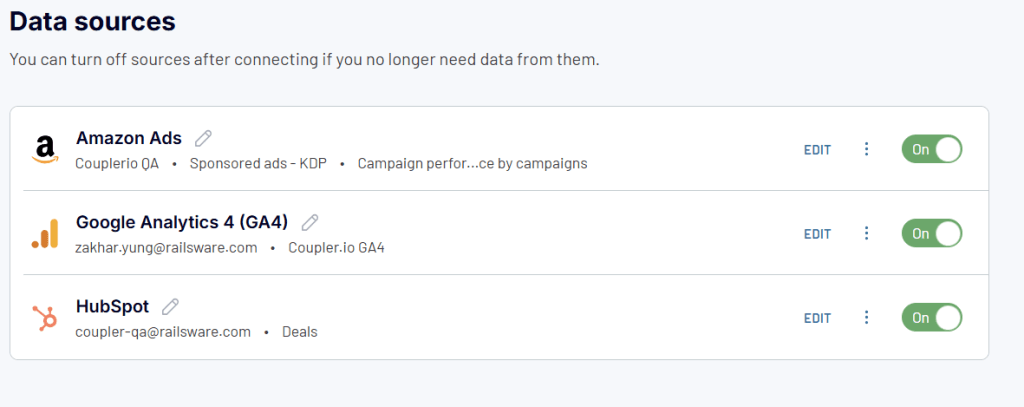
Coupler.io also lets you combine several sources in one data flow. For example, you can analyze Amazon Ads data next to Shopify, GA4, or another ecommerce source if you need to compare ad spend with store revenue or product inventory.

Step 2: Connect Claude
Once your Amazon Ads data flow is ready, you can choose Claude as your destination.
Click Get connector.

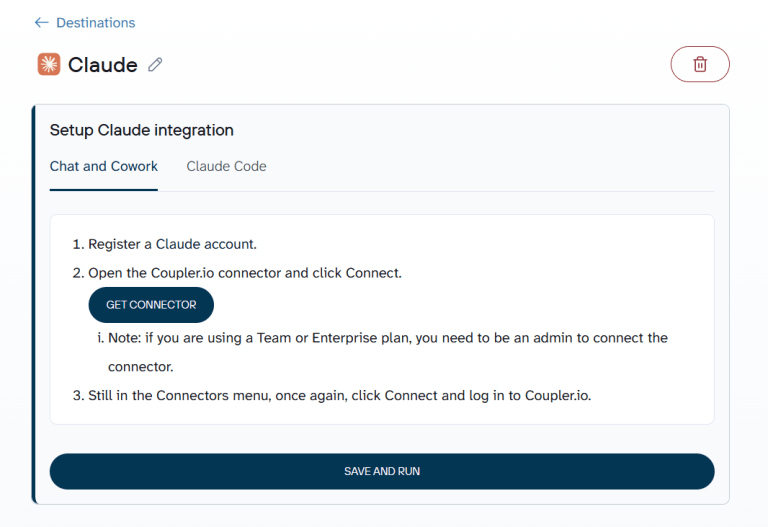
Coupler.io opens the connector page inside Claude. Click Connect and complete the authorization. This gives Claude access to the datasets you share through Coupler.io. It does not mean Claude can change your Amazon Ads campaigns.

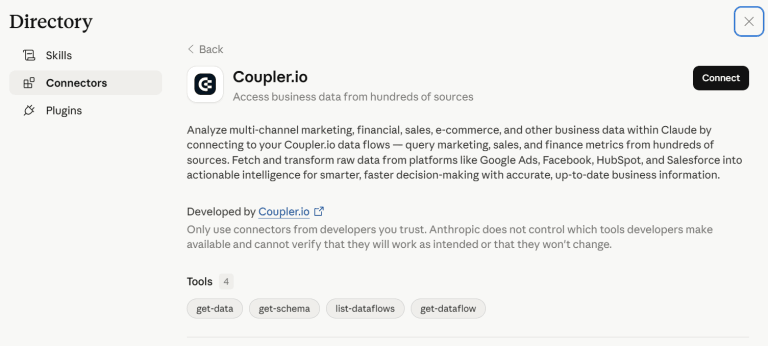
After authorization, go back to Coupler.io and set the refresh schedule. This is what makes the workflow useful for recurring work.
Instead of exporting Amazon Ads reports every week, Claude works from the refreshed data flow.
Click Save and Run to load the data.
Step 3: Start a conversation with Claude about Amazon Ads data
Stay in, or open Claude, and ask a question about your Amazon Ads data. Claude will detect that the question needs access to the Coupler.io connector and ask for permission to use it.

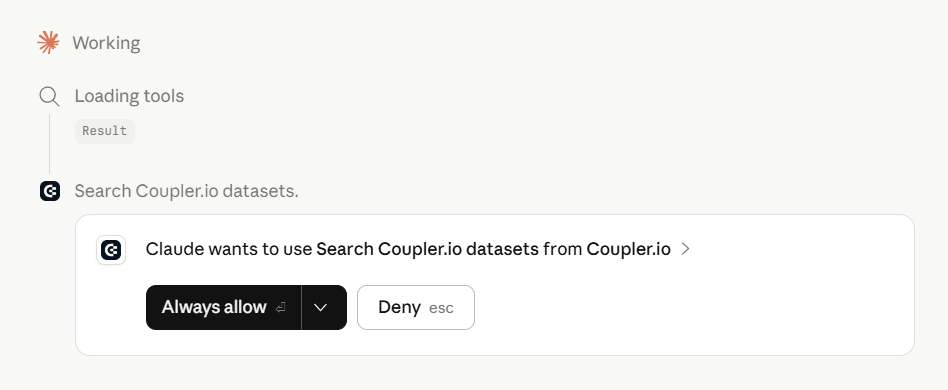
A best practice is to name the data flow directly if you have several Coupler.io flows connected to Claude.
Once approved, Claude queries the Amazon Ads data shared through Coupler.io and puts the results into clear perspective.
Connect your Amazon Ads data to Claude with Coupler.io
Get started for freeReal life examples of how to use Claude with Amazon Ads
The examples below show how to analyze Amazon Ads data with Claude once your data is connected through Coupler.io.
The useful prompts are tied to real campaign decisions: what to pause, what to promote, what to move into exact match, which campaign type deserves more budget, and whether ads are selling the products you intended to sell.
Find search terms that spend without sales
Search term analysis is one of the most practical Amazon Ads use cases for Claude. In Sponsored Products campaigns, broad and phrase targeting can pull in search terms that look relevant at first but do not convert. If you only look at campaign-level ACoS, this waste stays hidden.
The goal is not simply to find every term with zero sales. Some terms need more data before you make a decision. Others have enough clicks and spend to justify action.
This is also where Amazon Ads keyword analysis with Claude becomes useful. Instead of scanning search terms row by row, you can ask Claude to group wasted spend, monitor borderline queries, and flag terms that may need exact or phrase negatives.
Here’s the prompt I used:
Analyze my Amazon Ads search terms report for the last 30 days.
Find search terms with spend and clicks but zero attributed sales. Return campaign, ad group, search term, match type, spend, clicks, CPC, attributed sales, ACoS, and recommended action.
Separate the results into:
1. Negative keyword candidates
2. Terms to monitor
3. Terms that need more data before action
Claude’s response:

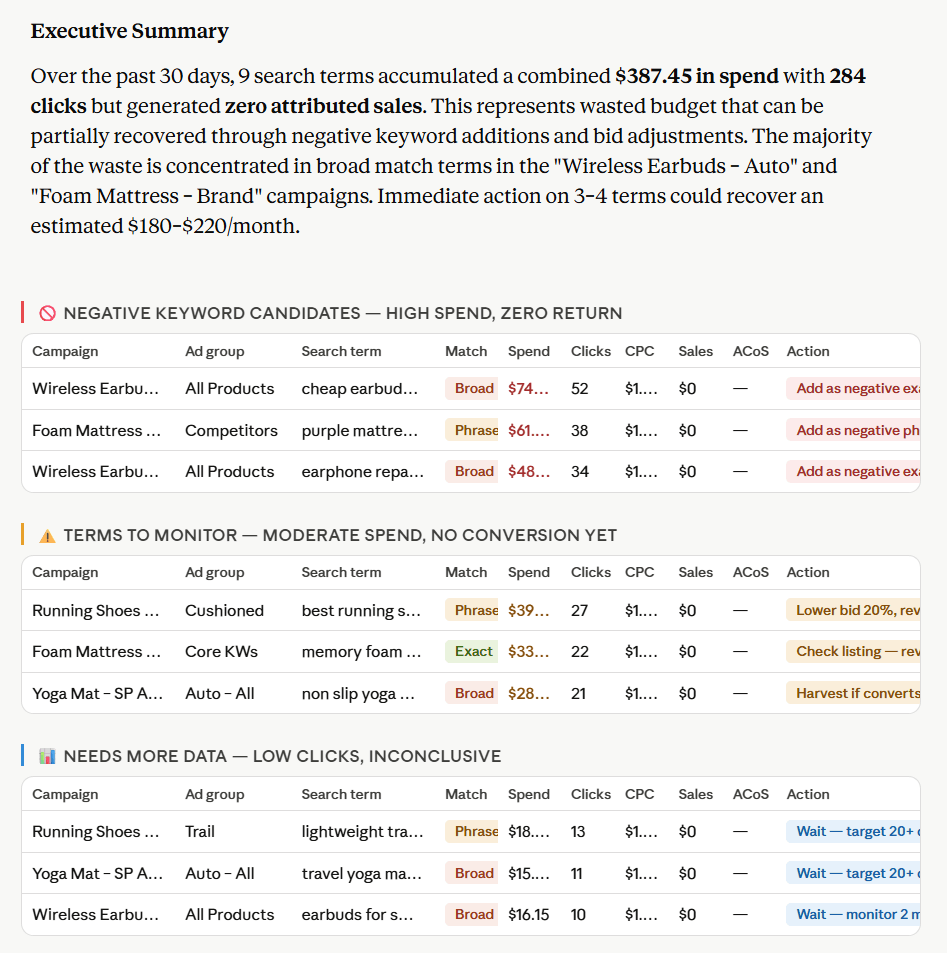
Claude turned the search terms report into a prioritized cleanup list. It grouped zero-sale terms by urgency, separating negative keyword candidates from terms to monitor and terms that need more data.
It also calculated total wasted spend, counted the zero-sale terms, and estimated recoverable spend.
This is Amazon Ads search term analysis in Claude at its most practical. The export turns into a clear action list, so the highest-priority terms are easier to spot.
Compare Sponsored Products and Sponsored Brands performance
For Amazon Ads performance analysis with Claude, comparing campaign types is more useful than judging every campaign by the same metric.
Amazon Ads campaigns do not all play the same role. Sponsored Products often capture shoppers closer to purchase. Sponsored Brands support visibility, product discovery, and upper-funnel traffic. Comparing them only by spend or sales can lead to the wrong budget decision.
Claude can summarize campaign type performance and turn the metrics into a budget recommendation. Coupler.io prepares the data, and Claude explains where to increase, reduce, or monitor spend.
I asked Claude:
Compare Sponsored Products and Sponsored Brands performance over the last 30 days.
Show spend, impressions, clicks, CTR, CPC, attributed sales, ROAS, ACoS, and conversion rate by campaign type.
Then explain:
1. Which campaign type is driving efficient sales
2. Which campaign type is supporting visibility
3. Where budget should be increased, reduced, or monitored
Claude’s response:

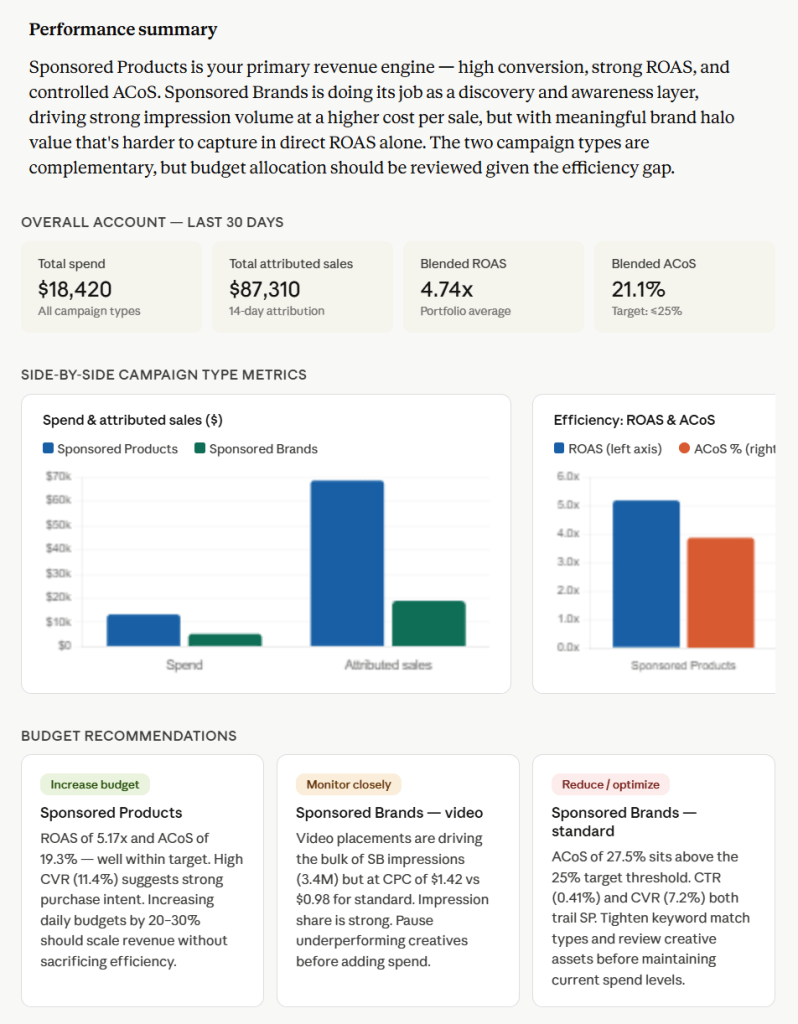
Claude compared Sponsored Products and Sponsored Brands by role instead of judging both by the same metric. Sponsored Products drove more efficient sales, while Sponsored Brands played more of a visibility role.
This makes the output useful for Amazon Sponsored Brands analysis with Claude because it separates awareness value from direct-response efficiency. You can protect visibility budgets without taking spend away from higher-ROAS campaigns.
Check whether ads are selling the intended products
This is one of the most Amazon-specific analyses you can run. In Amazon Ads, an ad promoting one ASIN can lead to the purchase of another ASIN. That can be useful when related products have strong margins. It can also be a problem if ad spend meant to promote one product is mainly selling another product with lower profit or weaker strategic value.
To analyze this, Claude needs more than campaign performance. It needs advertised product and purchased product data. Coupler.io helps by making those reports available for analysis instead of leaving you to compare exports manually.
I passed this data to Claude and asked:
Using my advertised products report and purchased products report, compare advertised ASINs with purchased ASINs.
Show campaign, advertised product, advertised ASIN, purchased product, purchased ASIN, spend, attributed sales, ROAS, ACoS, and share of sales coming from non-advertised products.
Then classify each campaign as:
1. Selling the promoted product
2. Driving useful cross-product sales
3. Creating a product mismatch that needs investigation
Claude returned:

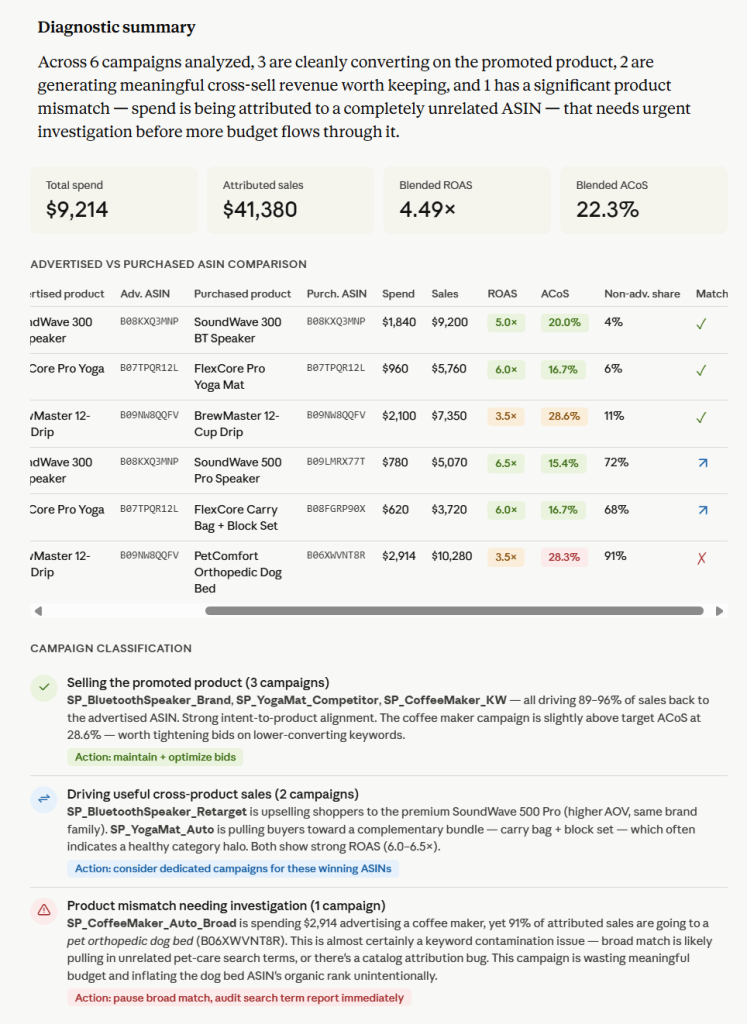
Claude compared advertised ASINs with purchased ASINs to show whether each campaign was selling the intended product. It separated clean product matches from useful cross-sells and clear mismatches.
It also flagged a case where most attributed sales came from an unrelated product. On the surface, the campaign generated revenue. In reality, it was moving budget away from the product it was supposed to promote.
Talk to Claude about your Amazon Ads performance
Try Coupler.io for freeReady to use Claude prompts for Amazon Ads
Use these prompts to summarize Amazon Ads results with Claude from your connected Coupler.io data flow.
30-Day Performance & Budget Audit
Analyze Amazon Ads campaign performance for the last 30 days. Show spend, clicks, attributed sales, ROAS, ACoS, CPC, CTR, and conversion rate by campaign in a markdown table. Flag campaigns that need budget changes based on efficiency. Identify high-performing campaigns hitting budget ceilings that should be scaled, and low-performing campaigns where budget should be capped. |
Search Term Waste & Categorization
Find Amazon Ads search terms with clicks and spend but no attributed sales. Group them into three distinct tables: negative keyword candidates (high spend/clicks, zero sales), terms to monitor (moderate spend, low clicks), and terms that need more data before taking action. Recommend exact or phrase match negatives for the worst offenders. |
Ad Type Strategic Comparison
Compare Sponsored Products and Sponsored Brands performance. Show which campaign type is driving efficient sales and which one is mostly supporting visibility. In your analysis, account for the differing intent of these formats, recognizing that Sponsored Brands often focus on top-of-search real estate, video creative, and brand awareness rather than pure direct-response efficiency. |
Targeting & Match Type Optimization
Analyze Amazon Ads targeting performance. Rank keywords, ASIN targets, or category targets by spend, sales, ROAS, ACoS, and conversion rate. Present this data in a structured markdown table sorted by spend. Provide clear recommendations on exactly what to scale, pause, or adjust (such as bidding down on low-CVR targets). |
High ACoS Diagnostic
Find campaigns with high ACoS but meaningful sales volumes. Analyze the underlying data metrics to diagnose the root cause. Explain whether the efficiency issue looks like poor targeting (low CTR), high market competition (high CPC), low landing page conversion (low CVR), or poor campaign structure (budget dilution). |
Halo Effect & Product Cannibalization Analysis
Compare advertised products with purchased products. Identify campaigns where ads are mostly selling products other than the promoted ASIN (halo effect). Determine if these alternative purchases represent a logical cross-sell opportunity or if the targeting is misaligned with the creative. |
7-Day Performance Pulse
Summarize Amazon Ads results for the last 7 days in plain English. Include major wins, immediate risks, budget concerns, and the top three actions to take next. When evaluating ROAS and ACoS trends, factor in standard Amazon attribution lag for the most recent 48 hours so that incomplete sales data does not skew your recommendations. |
Generate Amazon Ads insights with Claude AI
Generate Amazon Ads insights for weekly reporting. Focus on significant campaign changes, search term waste, week-over-week ACoS movement, ROAS changes, and specific products or ASINs that need immediate attention. Format the output with clear headers and data tables followed by a concise, humanized summary suitable for stakeholder review. |
Run the recurring prompts as skills
The prompts above work for one-off questions. For recurring reviews, Coupler AI skills library includes Amazon Ads skills that already know what to check. They run in Coupler AI Agent and in Claude through the connection you just set up. Here are the Amazon Ads analytics skills available:
- Amazon Ads performance review gives a baseline read of the account, with ACOS movement by ad product. It fits the 30-day audit and the 7-day pulse.
- Amazon Ads waste and scale finds unprofitable spend and moves budget to winners, the same job as the search term waste prompt.
- Amazon Ads targeting analysis reviews keyword and product targets with bidding recommendations.
- Amazon Ads attribution and metrics audit checks whether your sales and ACOS figures can be trusted. Use it before you diagnose a high ACoS.
- Amazon Ads new to brand and halo measures new customer acquisition and halo sales, which covers the halo prompt.
- Amazon Ads product and ASIN performance shows which advertised products earn their spend and which spend without selling.
For client work, Amazon Ads client report turns the analysis into a monthly report scored against targets.
Analyze Amazon Ads performance in Claude with Coupler AI skills
Get started for freeWhat matters when you analyze Amazon Ads data with Claude
Lock in your business context. Amazon Ads metrics don’t mean much without your specific guardrails. To give useful advice, Claude needs to know your target ACoS, profit margins, hero ASINs, and the split between branded and non-branded campaigns. Coupler.io lets you save these rules directly within your data flow configuration. Because these definitions load automatically, Claude evaluates your performance against your actual goals instead of guessing in a vacuum.
Let the Analytical Engine handle the math. Large language models are built to process language, not to run math across large spreadsheets. Since Amazon Ads optimization relies on absolute precision for ratios like ACoS, ROAS, and conversion rates, you cannot risk AI calculation errors. Coupler.io’s Analytical Engine handles this by acting as the computational layer. Claude translates your plain-English question into a SQL query, the engine runs the math on the backend, and Claude simply interprets the verified results.
Feed multiple destinations without extra work. Your marketing data shouldn’t be locked inside a single AI chat window. The exact same refreshed Amazon Ads pipeline you configure can simultaneously route data to Claude for a written analysis, a Google Sheets file for a quick pivot table, and a Looker Studio dashboard for client reporting. This keeps your entire stack synchronized, allowing you to grab a plain-English performance summary from Claude while your live dashboards refresh in the background.
Other ways to export Amazon Ads data to Claude
Coupler.io is the most practical option for recurring Amazon Ads analysis in Claude, but it is not the only way to move the data. The right method depends on whether you need a quick review, a technical integration, or a maintained reporting workflow.
Manual export
The simplest method is to export reports manually from Amazon Ads and upload the file to Claude. This works when you need a one-time answer from one report.

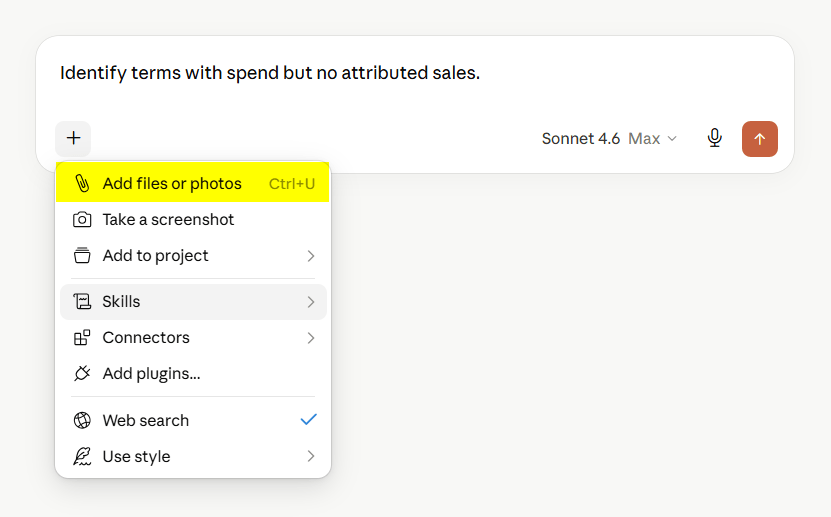
The problem is repetition. Every time the data changes, you need to export it again. If the analysis needs several reports, you also need to make sure date ranges, account selections, campaign filters, and metric definitions match. Manual exports are useful for quick checks, but they break down when you need recurring Amazon Ads analysis.
The developer alternative: Amazon’s native Ads MCP Server
For teams wanting absolute control over their infrastructure, Amazon provides a native Amazon Ads MCP Server. This is a highly technical, developer-first route compared to using plug-and-play middleware like Coupler.io.
While Coupler.io provides a structured, read-only analytics pipeline, Amazon’s native MCP server connects an AI agent directly to the Amazon Ads API. This allows custom-built AI agents to not only analyze data but also take live actions, like modifying budgets or building new campaigns from a text prompt. Because it grants direct access to your live advertising account, it is strictly suited for engineering teams capable of hosting the server, configuring authentication, and enforcing strict security permissions.
I look at it this way: if you have dedicated developers and need an AI agent to actively manage your bids and campaigns, building out Amazon’s MCP server is a powerful move. But if your primary goal is simply to use Claude for smart performance analysis and reporting without the engineering overhead, a ready-to-use connector eliminates that development burden completely.
Building a custom MCP server
A custom MCP server is the right choice when you need to merge Amazon Ads metrics with your proprietary internal data, such as real-time warehouse inventory, product launch calendars, or custom profitability models.
I always caution teams about the maintenance tail here. Going this route means your developers are entirely responsible for hosting the server, managing authentication, and fixing broken pipelines whenever APIs change. It is an engineering investment that only pays off if the custom workflow is strategic enough to justify the ongoing technical overhead.
API scripts and function calling
API scripts are useful when you have a fixed reporting workflow. For example, a script can pull Amazon Ads reports every morning, calculate ACoS and ROAS, and send a prepared dataset to a place where Claude can use it.
Function calling is more flexible. Claude can decide which function to call depending on the question. For example, one function may pull campaign performance, another may pull search terms, and another may pull purchased product data.
Both approaches require engineering work. You need to handle API credentials, report requests, refresh logic, failures, schema changes, and calculation rules. They can be powerful, but they are not the fastest path for a marketing team that simply wants to ask Claude better questions about Amazon Ads data.
Which method should you choose?
I break down the decision on the method to integrate data with Claude into two simple questions: frequency and technical capacity.
If you only need to run a casual check once a month, stick to a manual CSV export. There is no point setting up an integration for a one-off task. But the moment you need daily or weekly analysis, manual downloads become an immediate bottleneck.
Next, look at your engineering resources. If you have dedicated developers who need an AI agent to actively manage budgets or execute bid changes, investing in Amazon’s native MCP server or a custom build pays off. If you do not have those resources, trying to build and maintain your own infrastructure will just stall your analytics work.
Finally, decide whether you need conversational analytics or automated reporting. Claude is useful when you want to ask questions in plain English and get explanations, recommendations, and summaries. Dashboards are better when you need the same numbers monitored every week. In practice, many teams need both. Coupler.io fits that setup because one Amazon Ads data flow can feed Claude and other reporting destinations at the same time.
For most teams doing recurring Amazon Ads analysis in Claude, Coupler.io is the practical path. It connects the data, prepares it for analysis, handles calculations before Claude explains the results, and keeps the workflow usable without a custom build.
Get analysis-ready data from 400+ sources to AI with Coupler.io
Get started for freeFAQs
Is connecting Amazon Ads to Claude safe?
Yes, because the workflow is built strictly for analytics, not account management. When you use Coupler.io as the bridge, Claude only receives read-only access to the specific datasets you choose to export. It can analyze performance, find wasted search terms, and suggest optimizations, but it has no technical ability to edit campaigns or change budgets.
You also retain complete control over what the AI sees. Before passing the data to Claude, you can clean the dataset: filtering out irrelevant columns, restricting date ranges, or limiting the scope to specific accounts.
For a standard PPC audit, you might only pass campaign, targeting, and product performance fields, leaving sensitive or unrelated business data completely out of the prompt.
For sensitive client accounts, treat this like any standard reporting workflow: share only the fields required for the task, provide clear business context, and verify the data data flow before turning it into a recurring routine.
Can I connect multiple Amazon Ads accounts to Claude?
Yes, if those accounts are available in your Amazon Ads connection. In Coupler.io, select the relevant accounts during the data flow setup. This is useful for agencies, multi-brand sellers, and teams managing several marketplaces or business units.
Can I combine Amazon Ads with other data sources in the same Claude analysis?
Yes. Coupler.io lets you combine multiple sources in one data flow. For example, you can analyze Amazon Ads alongside Shopify, GA4, or internal sales data if those sources are available in your workspace.
Does Claude get full access to my Amazon Ads account?
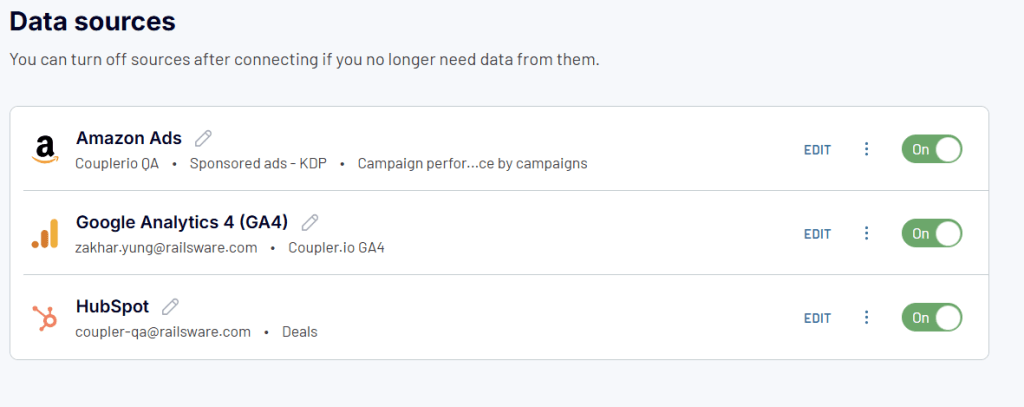
No. In the Coupler.io workflow, Claude works with the data shared through the Amazon Ads data connector. It does not receive permission to edit Amazon Ads campaigns. You can also filter and prepare the dataset before making it available to Claude.