Klaviyo gives you plenty of data about your email and SMS performance. The challenge is turning that data into answers. If you want to understand why revenue changed, which campaigns drove the biggest impact, or how your email and SMS programs work together, you often have to dig through multiple reports and connect the dots yourself.
Connecting Klaviyo to Claude makes that process much easier. Instead of manually analyzing reports, you can ask questions in plain language through an AI assistant and get insights quickly. Using Coupler.io to connect the two gives Claude access to reliable, up-to-date data, and helps you get more accurate answers and insights faster.
Choose the right method to connect Klaviyo to Claude
| Connection method | Setup effort | Who does the math | Best for | Watch out for |
| Coupler.io | Low; no-code setup | Coupler.io’s Analytical Engine runs calculations, Claude interprets them | Regular Klaviyo analysis in Claude with no engineering expertise required | Refresh frequency depends on your paid plan |
| Manual export | None; download a CSV from Klaviyo | You or Claude | One-off analysis | Data is stale the moment you download it; cross-report comparisons require manual stitching |
| Klaviyo MCP server | Low; connect via OAuth or API key in minutes, no coding required | Claude computes from raw data passed directly from Klaviyo | Quick lookups and simple data retrieval — no calculations, no cross-source analysis | Raw data reaches Claude without normalization or business context; no scheduled refresh or schema prep |
| Custom MCP server | High; requires engineering build and ongoing maintenance | Depends on implementation | Teams with strict data control requirements and in-house engineers | Full-stack ownership: hosting, Klaviyo API changes, authentication, monitoring |
| API scripts & function calling | High; scripting required | Depends on pipeline design | Developer-led setups, custom pipelines | Klaviyo’s API evolves; authentication and schema changes require ongoing attention |
🚩One Klaviyo-specific thing to flag: attribution windows differ by touchpoint (delivered SMS = 1 day, clicked email/SMS = 5 days by default), and you can customize them per channel. Any method that passes raw data to Claude without first applying your attribution settings will produce mixed signals.
If you want to move quickly and your team doesn’t have a developer to spare, Coupler.io is the right call. The engineering-heavy options give you more control, but they also require ongoing maintenance. Additionally, Klaviyo’s API does evolve, so anything you build needs ongoing upkeep.


Analyze email and SMS analytics in Claude with Coupler.io
Get started for freeConnect Claude to Klaviyo with the Coupler.io connector
Coupler.io is a no-code data integration and AI analytics platform that connects 400+ business apps (Klaviyo connector included) to AI tools like Claude, ChatGPT, Gemini, and other LLMs.
Once the connection is live, Coupler.io serves as an LLM data connector: Claude queries your customer data only through a secure, read-only channel powered by Coupler.io’s MCP (Model Context Protocol) server. You ask your marketing data in natural language => Coupler.io handles the calculations => Claude explains what’s happening.
Step 1: Create a data flow for Klaviyo data
Sign up for Coupler.io for free (no credit card required), head to Data Flows in the menu on the left and create a new data flow with Klaviyo as your source.
Or, simply click Proceed in the form below which will create a data flow with Klaviyo and Claude as source and destination apps.

Follow the instructions to connect a source account (you might need to generate a private API key) and you’ll be done:

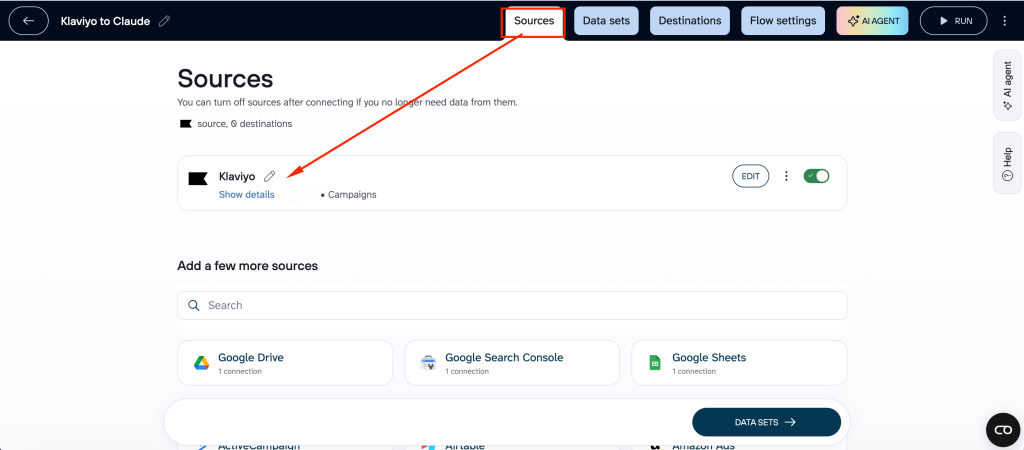
Once connected, you can export reports like metrics analytics and core entities like campaigns and flows.
For certain reports, you’ll also be able to specify the report period and metrics and dimensions.

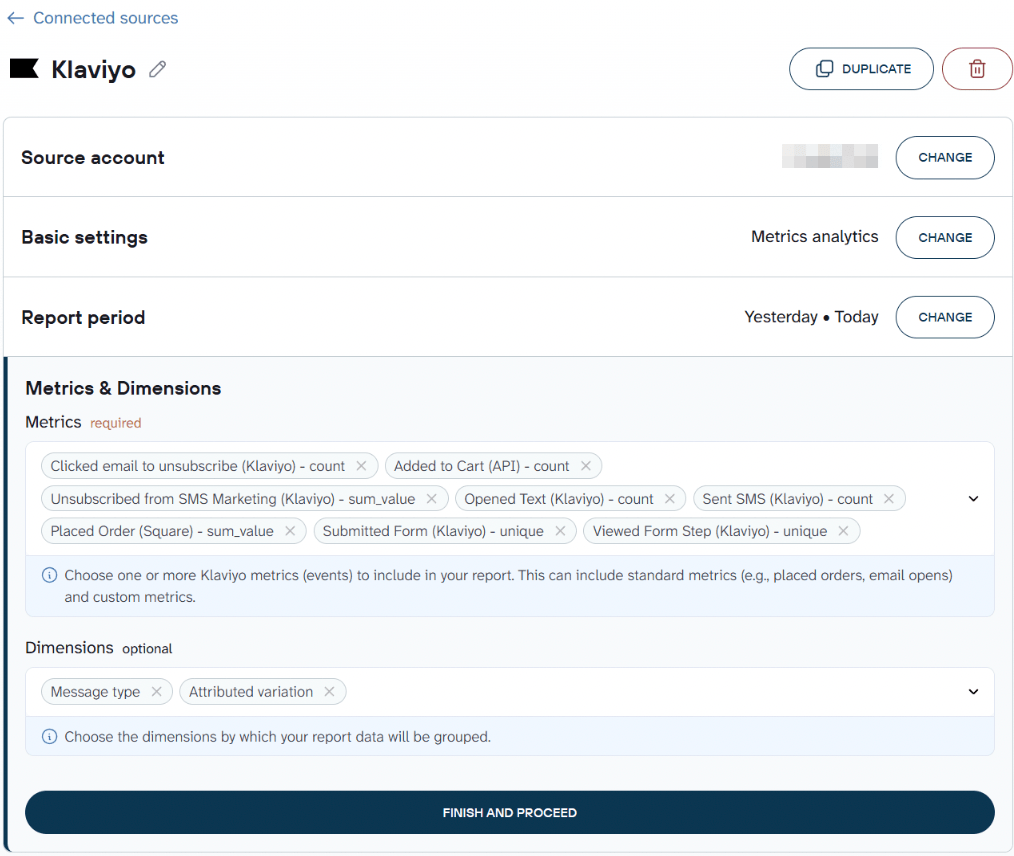
If you need to, you can also add multiple data sources within one flow and blend data from different Klaviyo reports — or enrich Klaviyo data with data from other sources (more on that later).
Step 2: Organize your data and add context
You’ll then be taken to Data Sets containing your Klaviyo data.
Before the data reaches Claude, you can filter out columns you don’t need, rename or reorder them, or aggregate by the dimensions and metrics.

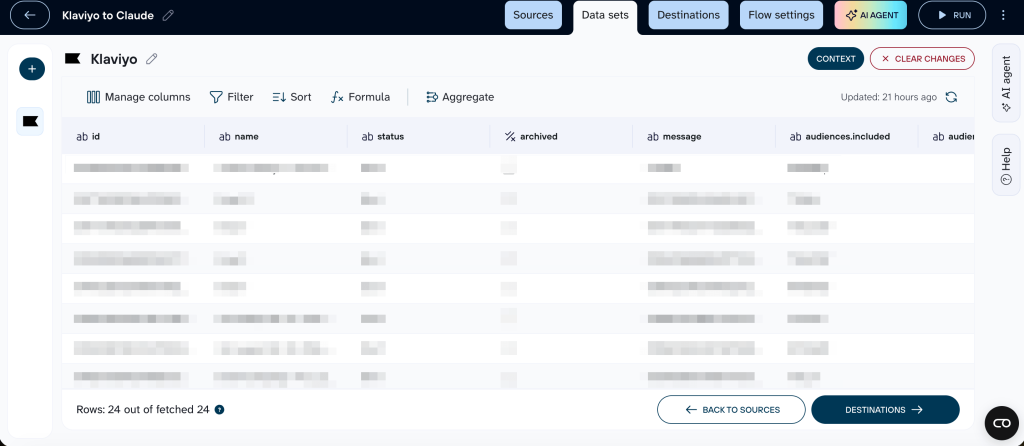
Most importantly, this is where you add business context to your data.
Every business is different, and factors like your industry, audience, products, and goals all shape how your metrics should be interpreted.
You can define:
- Historical events or seasonal adjustments
- Custom metrics definitions
- Attribution window — Klaviyo’s default 5 days for email, or something you’ve customised?
- ROAS definitions
- UTM rules, and much more.


➡️ For Klaviyo specifically, Coupler.io can’t automatically apply attribution settings. But, you can solve this by adding attribution metadata in Context, along with notes about which touchpoints use which windows.
Once you set all of these up in the Context editor, it will be applied to every query automatically.
Step 3: Connect Claude and start your conversation
When your data flow is ready, click Destinations and pick Claude.
Click Get connector and follow the instructions to authorise the connection. You’ll be redirected to Claude for the connector setup.
(By the way, the connector is also available through the Claude Connector Directory, so it’s easy to discover and enable directly from Claude.)
Then you’ll need to go back to Coupler.io.
Click Save and Run.
On that same screen, toggle Automatic data refresh on and set the interval, days of the week, and time preferences.

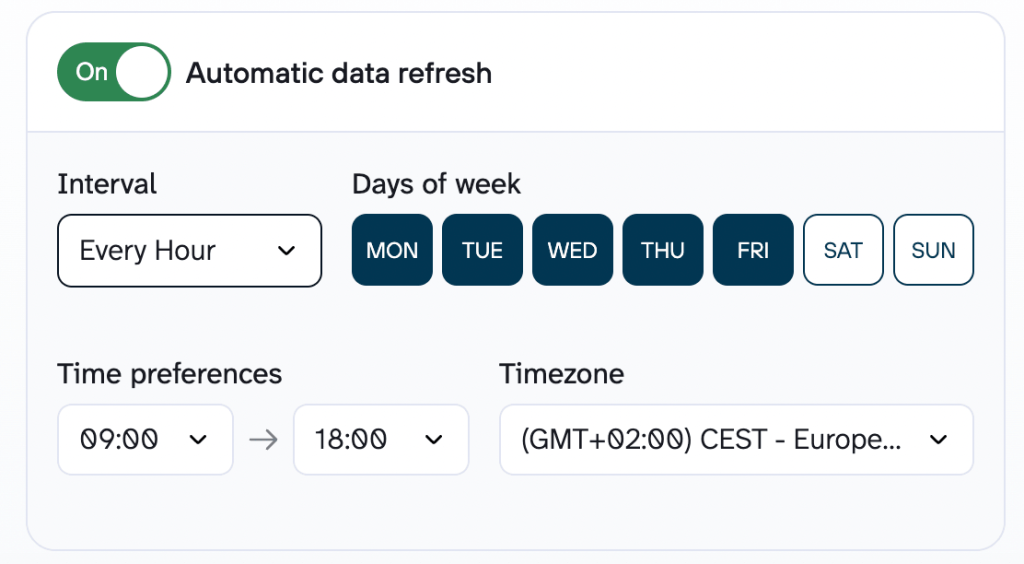
You can schedule your data flow runs with intervals ranging from monthly to every 15 minutes, depending on the billing plan.
For Klaviyo, daily is usually the right cadence for campaigns and flow performance. If you send frequently or are monitoring a live campaign, more frequent syncs make sense.
Once the first sync runs, open a new Claude conversation. You can check if your connection was successful:

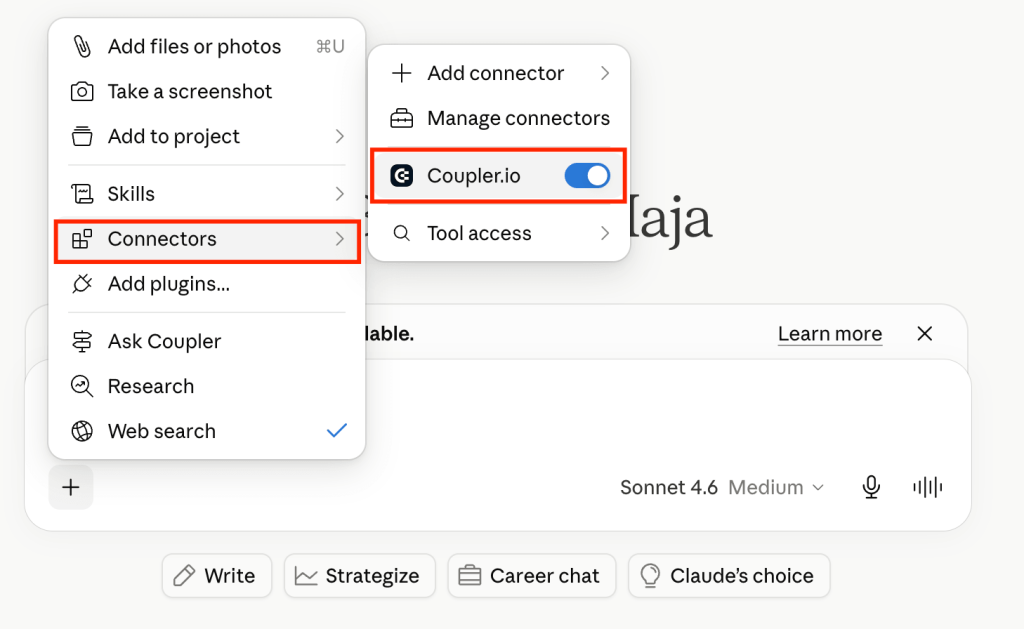
When you ask a question related to your Klaviyo data, Claude will confirm it can access your Coupler.io data flow and get to work.
A good opening prompt to test the connection:

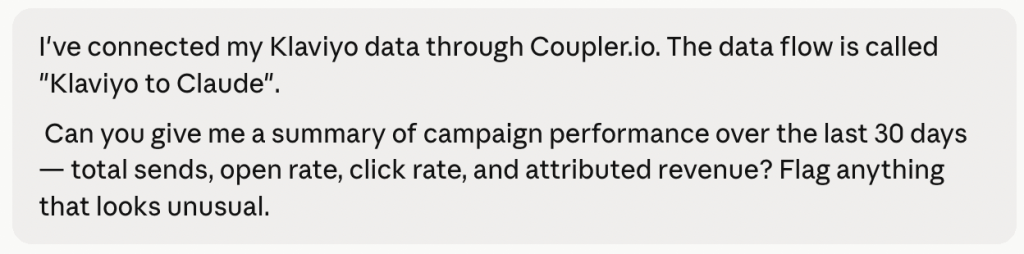
Claude will return something like this, and you can continue chatting to gain additional insights and ideas:

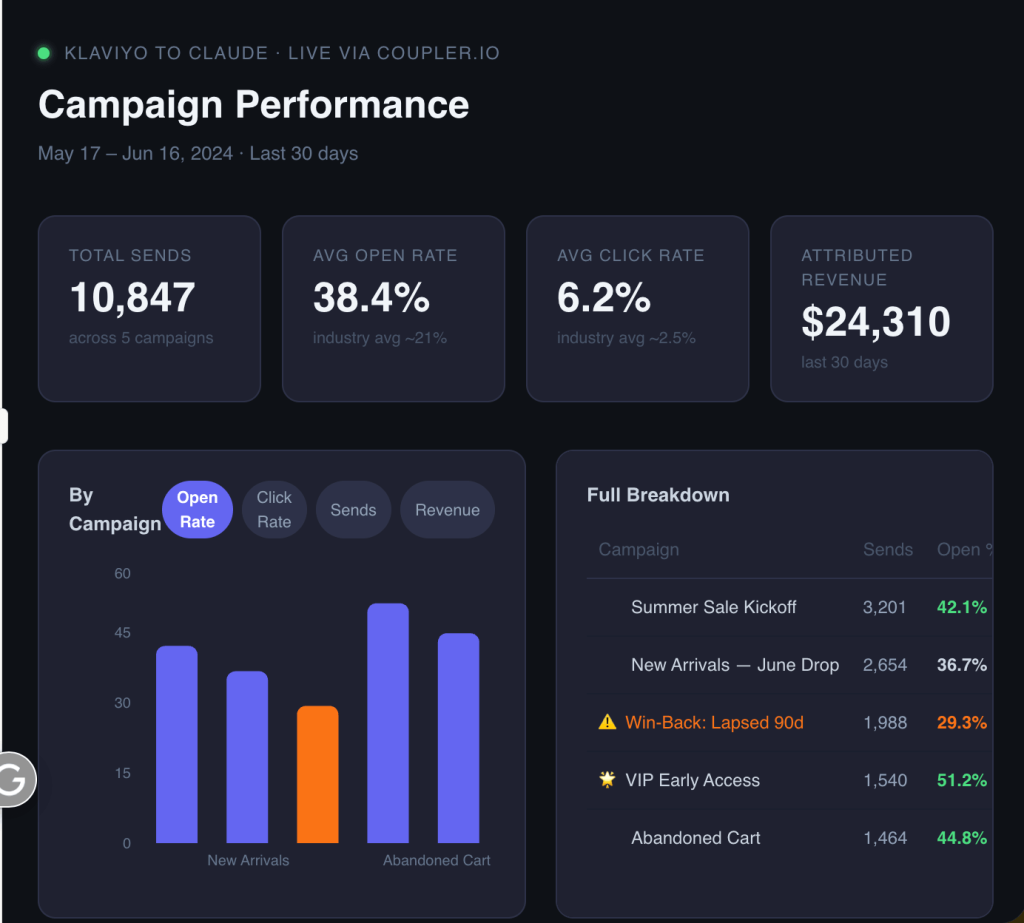

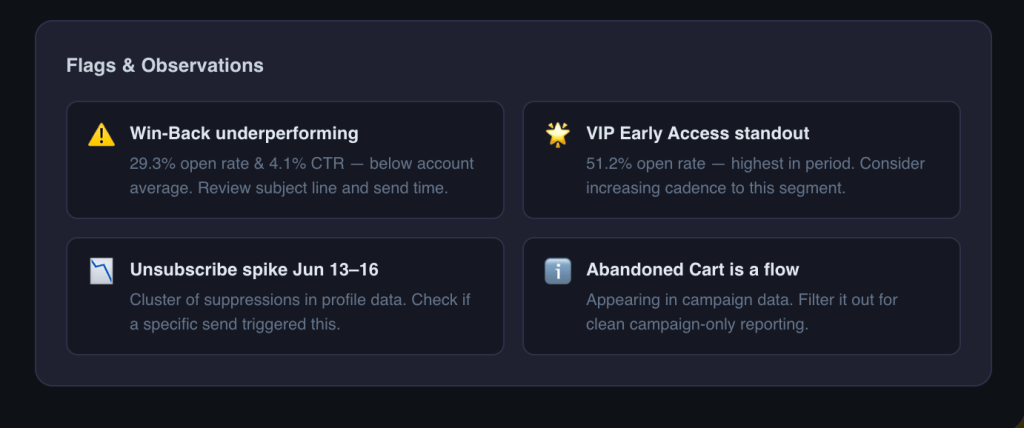
Examples of Klaviyo campaign performance analysis in Claude
Now that Klaviyo is connected to Claude via Coupler.io, here are some ways to put your data to work and make Claude identify patterns in customer behavior across campaigns, flows, and segments.
Flow revenue vs. list health: Klaviyo flow optimization priorities
Most flows run in the background with little day-to-day oversight. As a result, a flow can keep generating revenue while quietly driving unsubscribes that weaken your list over time.
Start with this prompt:
“For each active flow in my Klaviyo data, show total attributed revenue, revenue per recipient, total unsubscribes, and unsubscribe rate. Rank by revenue per recipient, highest to lowest. Then flag any flow where the unsubscribe rate is more than 1.5x the account average, those are my audit priorities.”
Claude returns a ranked table with revenue efficiency and subscriber list management metrics side by side. Klaviyo’s native flow views/reports won’t give you this; you’ll have to do it manually.

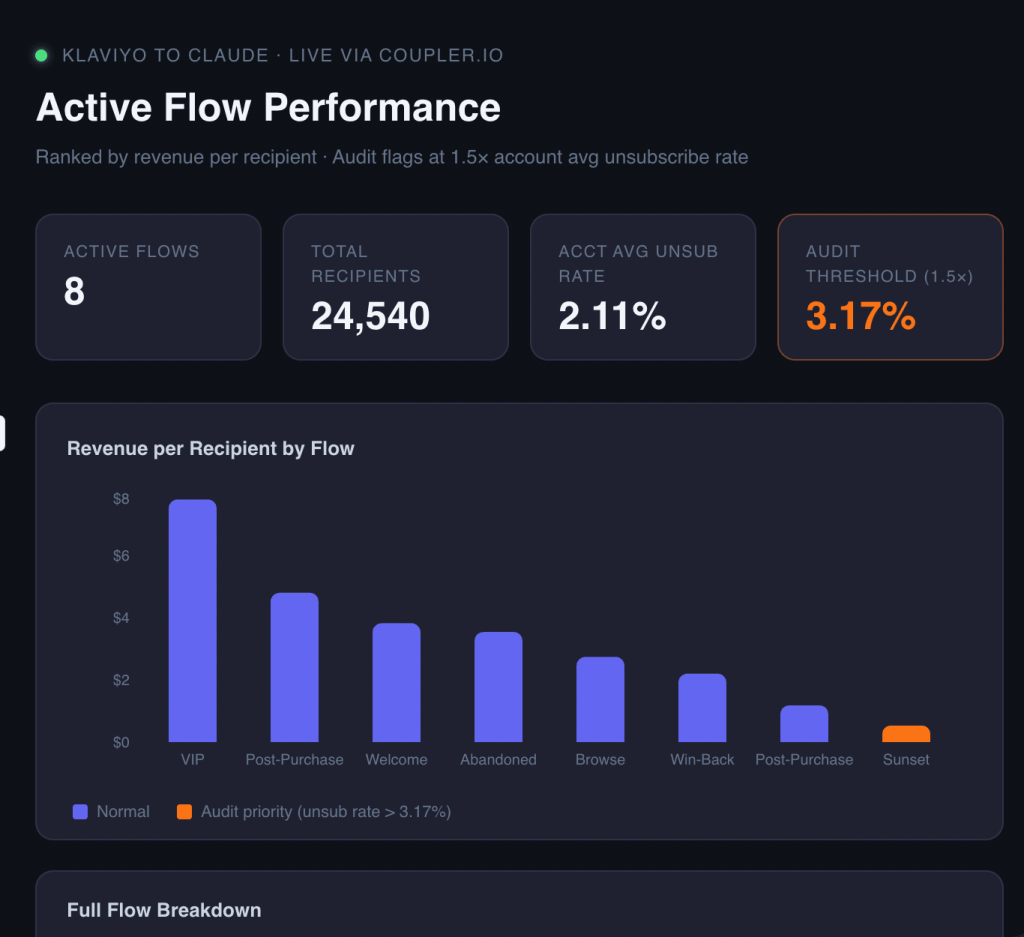
What to act on:
- A win-back or abandoned cart flow with above-average unsubscribes and low revenue per recipient is a strong candidate for analysis and retrigger adjustments.
- If unsubscribes spike at email 3 of 5 in a sequence, the issue is usually frequency or a hard-sell message that doesn’t match where the subscriber is in the journey.
- Post-purchase flows sitting at the top of the revenue table are worth expanding. Consider adding more steps, tighter personalisation, higher send frequency.
Diagnose a deliverability drop using Klaviyo and GA4 data together
When email revenue drops, Klaviyo only shows part of the picture. The root cause could be a deliverability issue, declining engagement, or a drop in website conversions.
By combining Klaviyo and GA4 data in Coupler.io, Claude can help pinpoint where the decline started and what to investigate first.
“I’m seeing a revenue decline from email over the last 30 days. My Klaviyo data includes campaign metrics — email open rate, click rate, bounce rate, unsubscribe rate, and attributed revenue for reporting. My GA4 data includes sessions from email, email-attributed conversion rate, and revenue. Look across both datasets and tell me: did the drop start in Klaviyo (deliverability or engagement issue) or in GA4 (site conversion issue)? Show me where the divergence began.”
Claude returns a timeline view across both sources. It can separate “email is not reaching people” (bounce/spam issue) from “email is reaching people but they’re not converting” (site or offer issue). This determines whether you fix your list hygiene or your landing page.

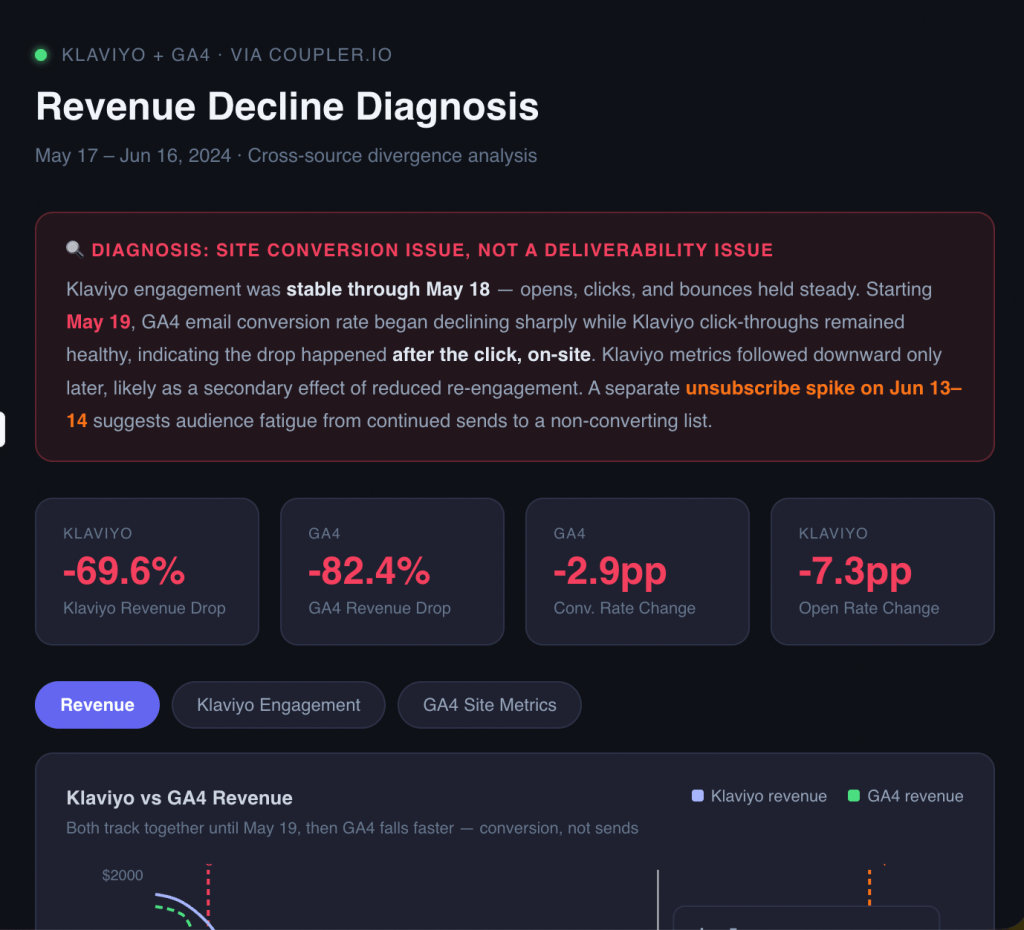
What to act on:
- If the bounce rate climbed 2–3 weeks before revenue dropped, the deliverability problem came first. Prioritise list suppression and re-engagement before your next campaign.
- If GA4 shows normal email sessions but declining conversion rate, the email isn’t the problem. Look at the site, the offer, or the audience match.
- If open rate dropped without a bounce rate change, check send frequency and subject line fatigue across that period.
Compare SMS vs. email revenue attribution
Most Klaviyo accounts run both email and SMS, but teams often manage them separately. If you’re deciding where to invest, you need a side-by-side comparison that accounts for their different attribution rules.
By default, Klaviyo attributes revenue within a 5-day window for clicked email and 5 days for clicked SMS, but SMS has two shorter tiers beneath that: 1 day for opens and 12 hours for deliveries. So a direct “email revenue vs. SMS revenue” comparison can still favor email if delivered SMS makes up a large share of your sends. Klaviyo also uses last-touch attribution across channels, so if a subscriber is in both an open email and SMS window at purchase, email takes the credit, further suppressing SMS figures.
“Compare the performance of email and SMS campaigns sent in the last 60 days. For each channel, show: total attributed revenue, revenue per recipient, click rate, and unsubscribe or opt-out rate. I want to understand which channel is more efficient per contact reached. Flag that attribution windows differ by touchpoint (clicked email/SMS = 5 days, opened SMS = 1 day, delivered SMS = 12 hours) and explain how that affects the comparison. Note that Klaviyo’s last-touch model means email can win attribution even when SMS was the more recent interaction. What would SMS revenue look like if we applied a consistent 5-day window for all SMS touchpoints?”

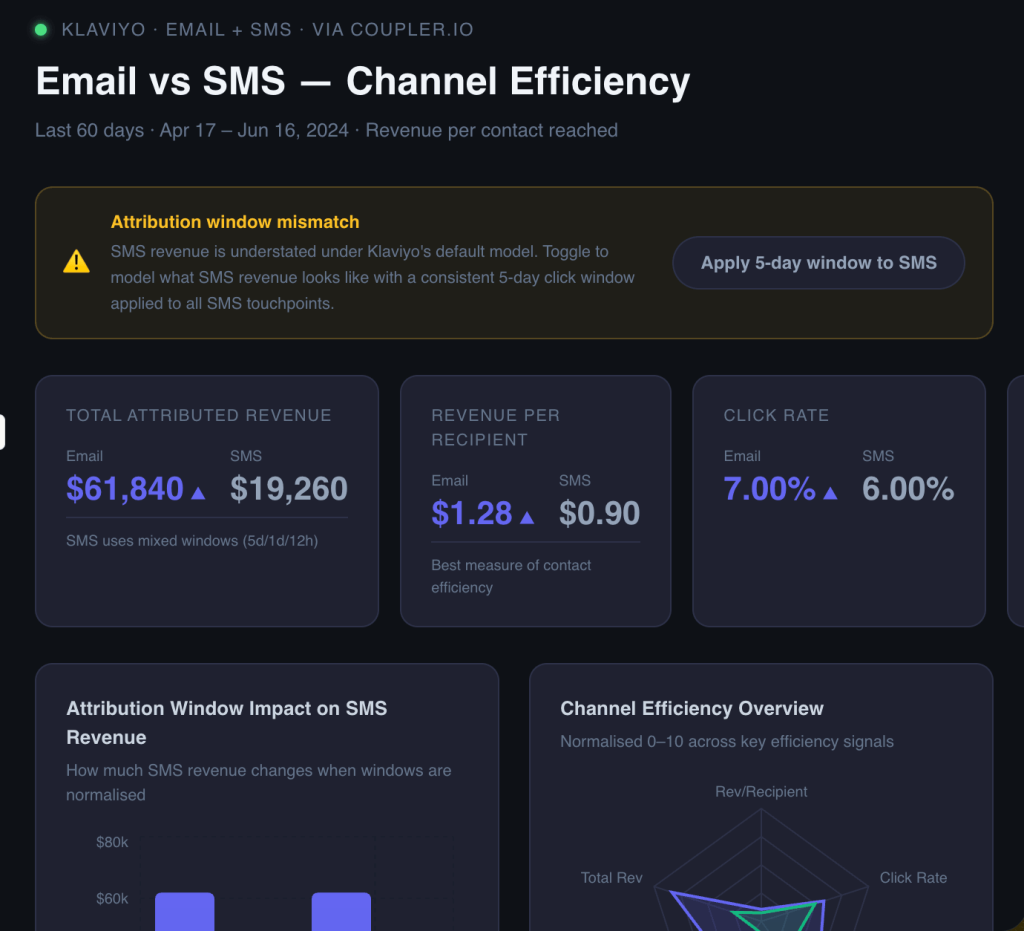
What to act on:
- If SMS click rate is high but revenue per recipient looks low, the attribution window is likely the culprit. The shorter open/delivery windows and last-touch competition from email can both play a role. A longer window would tell a different story.
- High SMS opt-out rate (above 2–3%) is a list health warning: reduce send frequency or tighten trigger criteria before scaling that channel.
- If SMS outperforms email on revenue per recipient even with the shorter open and delivery windows, that’s a signal to increase SMS investment for high-intent segments.
Matching content to the right subscriber segments
The same campaign can produce different results across subscriber segments. While Klaviyo lets you segment your audience, it doesn’t surface the customer segment insights that show which content types consistently resonate with which groups.
“Look at all campaigns sent in the last 90 days. For each campaign, I want to see performance broken down by the list or segment it was sent to: open rate (excluding Apple MPP opens), click rate, revenue per recipient, and unsubscribe rate. Group the results by segment type (promotional, content, loyalty, re-engagement) and tell me which segment types perform best for which content categories. Are there any segments that consistently underperform regardless of content type?”
Claude returns a cross-tabulation of segments by content type:

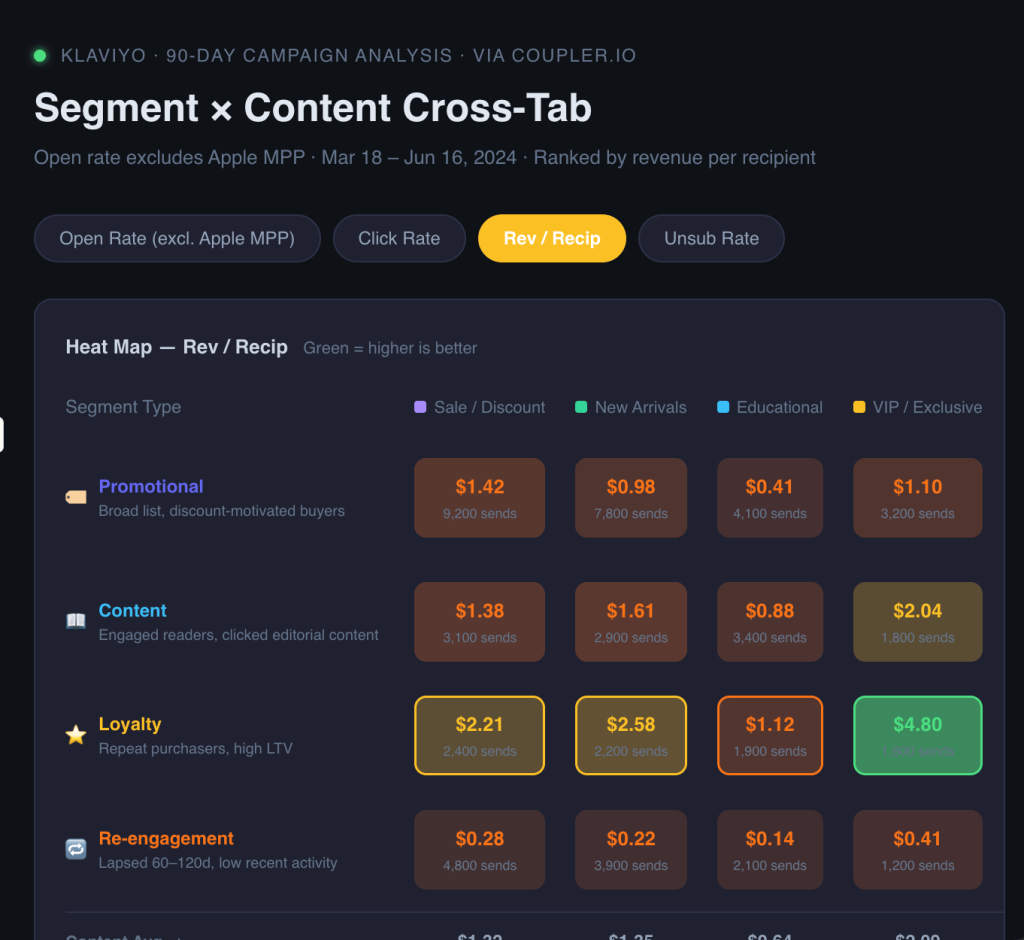
This is a report that doesn’t exist in Klaviyo. You’d need to build it manually by cross-referencing campaign reports against list membership, which takes time most teams don’t have.
What to act on:
- Segments that underperform on every content type are candidates for suppression or a dedicated re-engagement flow before the next broadcast.
- If promotional content drives strong revenue from one segment but high unsubscribes from another, split those lists and customize the offer.
- Loyalty segments with high open rates but low click rates often respond better to early access or exclusive content than straight discounts.
Check out available Klaviyo dashboards and reporting templates for more options for coherent data overview.
Prompts to generate Klaviyo insights with Claude
These cover different angles from the use cases above. Copy them directly into Claude once your Coupler.io data flow is running.
Unsubscribe rate by flow step
“For my [flow name] flow, show the unsubscribe rate at each individual step. Which step has the highest rate? Is there a pattern? For example, do unsubscribes spike after a promotional message or a particular CTA type?”
Campaign A/B test breakdown
“Compare the A and B variants of my [campaign name] campaign. Show open rate, click-through rate, attributed revenue, and revenue per recipient for each. Which variant won and by how much? Given the sample sizes, is the difference statistically meaningful or could it be noise?”
List health check before a major send
“Run a health check on [list name]. What’s the current active subscriber percentage, and how has it trended over the last 90 days? What’s the bounce rate doing? Flag any segments I should suppress to protect deliverability.”
Win-back sequence effectiveness
“Evaluate my win-back campaign. What percentage of recipients who entered the sequence made a purchase within the attribution window? What’s the unsubscribe rate across the full sequence? Is this flow recovering lapsed customers or accelerating churn among them?”
Subject line pattern analysis
“Look at all campaigns sent in the last 6 months. Group them by subject line pattern (question, urgency, personalisation, plain statement, emoji) and show the average open rate and click rate for each group. Which patterns consistently outperform the others for my list?”
Flow vs. campaign revenue split
“What percentage of total attributed email revenue came from flows vs. campaigns this quarter? How does that compare to last quarter? Which single flow and which single campaign contributed the most revenue in each period?”
Segment engagement decay
“For my top five segments by size, show how click rate has trended month by month over the last six months. Which segments are declining in engagement? At what point did the decline start, and did anything change in our sending behaviour around that time?”
What matters for the Claude Klaviyo integration
Business context; otherwise, Claude is guessing
Raw Klaviyo data doesn’t explain how your business defines its metrics. “Attributed revenue,” “open rate,” and even “active subscriber” can mean different things depending on your setup.
When raw data goes directly to Claude, it fills those gaps with assumptions. Sometimes those assumptions are fine. More often than not, they lead to misleading analysis.
Coupler.io’s Context editor lets you write those definitions once — and they travel with every query automatically.
A practical example: if your account uses a custom 7-day attribution window instead of Klaviyo’s default 5 days, that difference needs to be in the context before Claude starts comparing revenue figures across campaigns.
Accurate calculations
Claude is good at interpreting patterns, but it is not reliable for arithmetic across large datasets. Ask it to calculate revenue per recipient across twenty flows and it may give you a number that looks plausible, but is wrong.
Coupler.io’s Analytical Engine handles this correctly.
When you ask a question, Claude translates it into a SQL query, sends it to the Engine, which runs the calculation against your full dataset, validates the result, and returns only the verified answer for Claude to interpret.
The Analytical Engine can also query metric aggregates across large datasets before returning validated results to Claude.
Ready-to-use skills
Coupler.io offers pre-built analytics skills for common analysis patterns, including email marketing data.
For Klaviyo email automation, these cover recurring tasks like flow performance audits, campaign benchmarking by segment, and list health monitoring. These are queries that would otherwise require writing a fresh prompt from scratch each time.
This is useful when you want to run the same analysis on a weekly cadence without rethinking the approach. The skill handles the query structure, and you supply the timeframe and any account-specific parameters.
Multi-destination: the same data flow, more than one use
Once your Klaviyo data flow is running in Coupler.io, you can route it to multiple destinations simultaneously:
- Claude for conversational analysis
- Google Sheets or Looker Studio for a structured dashboard your broader team can read
- BigQuery if your data team wants to run their own queries

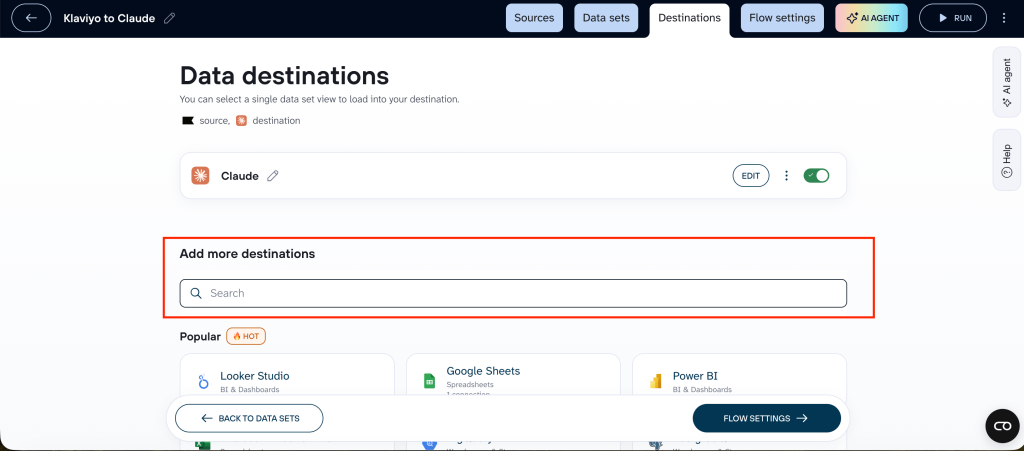
The practical use case: your Email Marketing Manager asks Claude questions about flow performance throughout the week, while the Head of Marketing checks a Looker Studio dashboard showing the same underlying data.
One sync, two views, no double export. When the data refreshes in Coupler.io, both destinations update automatically.
If you’re looking to connect Klaviyo with additional platforms, we got you covered:
- Connect Klaviyo to Google Sheets
- Klaviyo to Power BI integration
- Connect Klaviyo to Redshift
- Connect Klaviyo to Tableau
Other ways to get Klaviyo data into Claude
A few alternatives to Coupler.io, each with honest tradeoffs.
Manual export
Klaviyo lets you export campaign reports, flow reports, and list data as CSV files.
Upload it directly to Claude for a one-off question and it works fine. The limitations show up quickly if you try to use this regularly: the export is stale the moment you download it, cross-report comparisons require manual stitching between files, and any calculated metrics like revenue per recipient need to be worked out before Claude sees the data.
Klaviyo’s native MCP
Klaviyo’s MCP gives you direct conversational access to your Klaviyo account: you can ask questions, pull reports, look up profiles, and support campaign creation with AI directly from Claude.
It’s useful for quick lookups and exploratory questions where you’re not doing heavy calculation work. However, it’s not without issues. It might hallucinate and users have reported revenue figures that don’t match the dashboard:

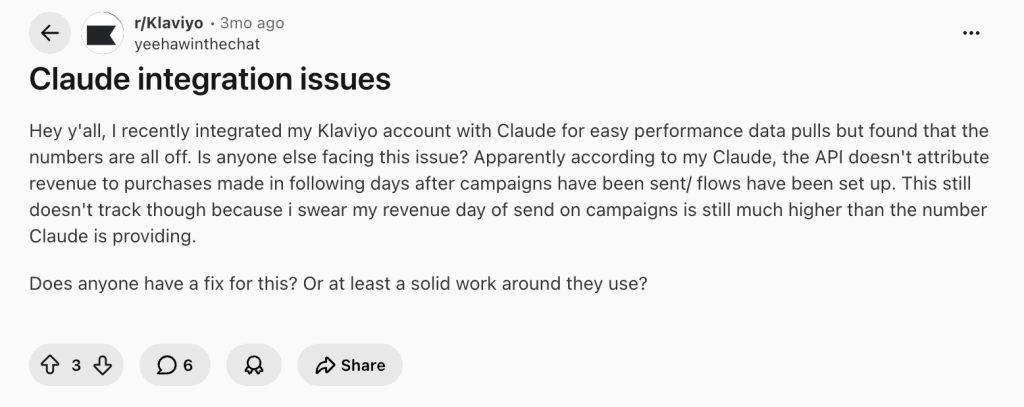
The API passes raw event data without applying Klaviyo’s attribution logic, so delayed conversions don’t get counted.
Coupler.io, on the other hand, is a data pipeline that prepares and structures your Klaviyo data before Claude sees it, handles calculations outside the AI model, and routes that same data to other destinations alongside Claude. This reduces the risk of misinterpreting metrics and leads to more trustworthy analysis.
API scripts and function calling
Both approaches require engineering effort and are worth understanding as distinct patterns.
API scripts pull Klaviyo data on a scheduled basis and pass it to Claude in a fixed format — good for recurring reports where the question doesn’t change week to week. You’ll need proficiency with Klaviyo’s API and whatever destination you’re pushing data to, and you’ll need to maintain the script as Klaviyo’s API evolves.
Function calling lets Claude decide at runtime which Klaviyo API endpoint to call based on the question being asked. It’s better suited to open-ended conversational queries where you don’t know in advance what data you’ll need. More flexible, but also more complex to implement reliably, and the attribution and calculation issues still apply unless you handle them in your pipeline logic.
Both are reasonable choices for teams with engineering capacity who need full control. For marketing teams without a developer available, Coupler.io covers the same ground without the build-and-maintain overhead.
Which method should you choose?
If you need a quick answer from your Klaviyo data right now, like a campaign lookup, a segment check, a one-off question, the native MCP connector gets you there in minutes.
If you’re doing recurring Klaviyo revenue reporting, comparing performance across flows and campaigns, or making decisions based on revenue figures, the method matters more.
The native connector pulls raw event data without applying attribution logic, which means the numbers Claude returns may not match your dashboard. That’s a problem when you’re deciding which flows to scale or cut. Manual exports sidestep that, but they’re a manual process you repeat every time you need fresh data.
For most marketing teams running regular Klaviyo analysis, Coupler.io is the straightforward path: no-code setup, verified calculations, scheduled refresh, and the option to send the same data to a dashboard alongside Claude.
The engineering-heavy options are there if you need full control — but most teams don’t.
Get analysis-ready data from 400+ sources to AI with Coupler.io
GET STARTED FOR FREEFAQs
Does connecting Klaviyo to Claude through Coupler.io require any coding?
No. Coupler.io is a no-code platform. You connect Claude to Klaviyo with an API key, configure your data flow, and connect to Claude with one click. No SQL, no scripts, no developer needed.
Does Claude store or learn from my Klaviyo data?
Each Claude conversation is independent — Claude does not retain information between sessions. Anthropic does not use data transmitted through the Coupler.io connector for model training.
Can I combine Klaviyo data with data from other platforms (like Shopify or GA4)?
Yes. Coupler.io lets you merge multiple sources in a single data flow. You can blend Klaviyo campaign data with Shopify revenue data, for example, to get a fuller picture of how email performance maps to actual purchase behaviour.
How often does Coupler.io refresh Klaviyo data?
You set the refresh schedule when you configure the data flow. Daily is the right cadence for most Klaviyo use cases. More frequent refreshes are available depending on your Coupler.io plan.
What Klaviyo data can I connect?
Coupler.io supports a range of Klaviyo report types including campaigns, flows, lists and segments, and metrics. You can configure which data you pull and filter it before it reaches Claude.
What if my open rate data includes Apple Mail Privacy Protection opens?
Klaviyo tracks MPP opens separately, so you can filter them out before your data reaches Claude. Use Coupler.io’s context editor to specify which open rate definition you’re using — this prevents Claude from interpreting inflated numbers as genuine engagement.
Can I send the same Klaviyo data to both Claude and a BI tool like Looker Studio?
Yes. One Coupler.io data flow can feed multiple destinations simultaneously, so your team can use Claude conversationally while stakeholders see the same data in a structured dashboard.
Is my Klaviyo data secure when routed through Coupler.io?
Yes. Coupler.io acts as a secure middle layer between Klaviyo and Claude; AI tools never connect directly to your source systems. The connection is encrypted, read-only, and you control exactly which data is shared. Coupler.io is SOC 2 Type II certified and GDPR, HIPAA, and DORA compliant. You can also exclude sensitive fields before data reaches Claude.