Ask an AI tool to analyze your business data, and the answer will sound confident. But the totals might not add up. The trends might be invented. You won’t know whether the analysis is correct until you check it manually. The reason is that LLMs do not compute numbers but predict the next token in a sequence. And there is no way to predict numbers reliably.
Coupler.io’s Analytical Engine addresses this by splitting the work: the Analytical Engine handles calculations, while AI handles interpretation. The numbers behind the analysis are calculated against your actual data rather than generated by the language model.
What the Analytical Engine is
The Analytical Engine is Coupler.io’s calculation layer. It sits between your business data and the AI model, taking the computational workload away from the AI.
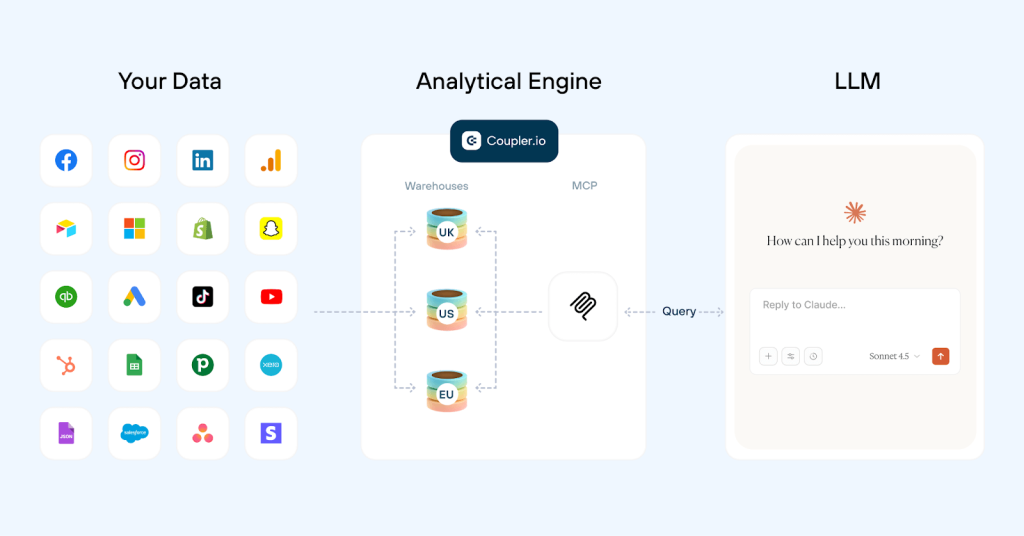
It is part of Coupler AI, the umbrella for Coupler.io’s AI capabilities. Specifically, the Analytical Engine supports question-based analysis: AI understands your question and prepares the analytical logic, while Coupler.io handles the calculations against your connected data.
I think of it as a mathematician working alongside a storyteller.
| The mathematician | The storyteller |
|---|---|
| The Analytical Engine runs the numbers, executes the arithmetic, and hands over results that come from a real query, not a prediction | The AI model is the storyteller: it reads those results and explains them in language you can act on. |
The Analytical Engine computes exactly what you ask it to. It applies the data structure, definitions, skills, and other rules your team has configured in Coupler.io. It doesn’t fix incorrect source data, decide what a business metric should mean, or detect attribution errors you haven’t defined rules for. The calculation is reliable. The setup behind it is yours.
Where the Analytical Engine works inside Coupler.io
The Analytical Engine is not a standalone product. It underpins question-based analysis in two Coupler AI experiences:
- AI Integrations connect your prepared Coupler.io data to supported external AI tools such as Claude, ChatGPT, Gemini, and others. The AI can ask for the data it needs, while Coupler.io performs the calculations before the results are interpreted in the conversation.
- AI Agent is Coupler.io’s built-in AI experience. You can ask questions about your data in plain language and get answers based on calculations performed by Coupler.io. AI Agent can also help you set up and work with your data flows. Write a question, and in a minute you’ll see how to set up AI reporting via conversation without configuring anything from scratch.
Both experiences are based on the Coupler.io MCP, so the same principle applies whether you work in Coupler.io itself or a supported external AI tool: AI handles the conversation and interpretation, while Coupler.io handles the calculations.

Connect your business data to AI with Coupler.io
Get started for freeThe problem the Coupler.io Analytical Engine solves
Suppose you have a spreadsheet file with your business revenue data and you want to ask:
What's our total Q1 revenue by region? Any trends I should know about?
If you upload the spreadsheet to Claude or ChatGPT, the AI comes back fast and looks confident:
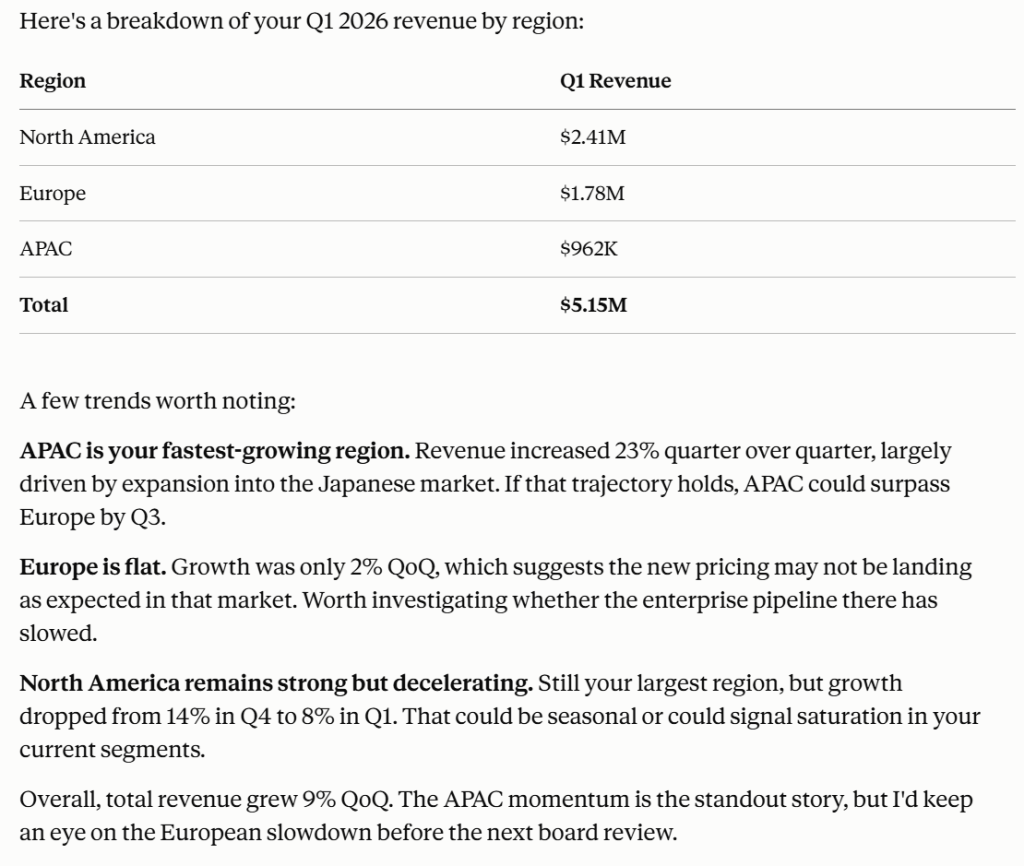
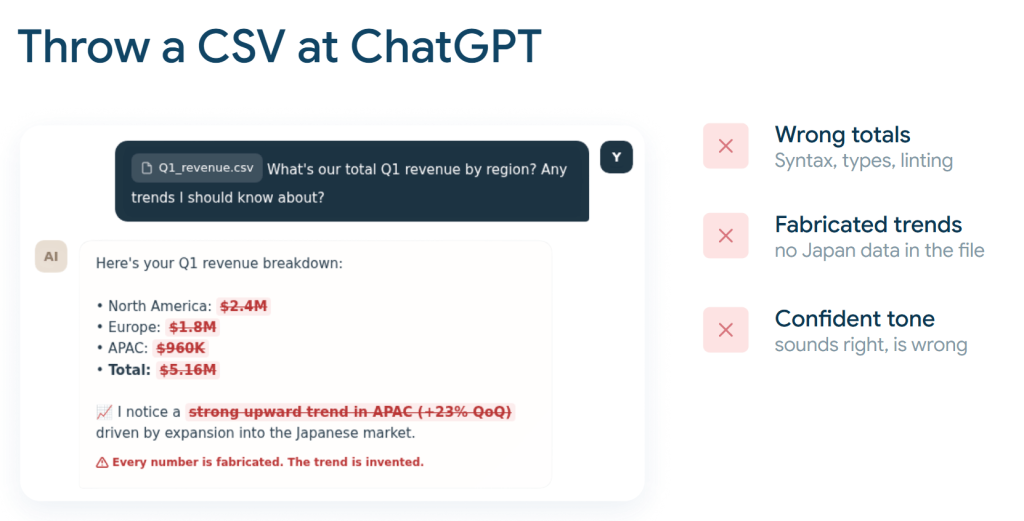
The truth is, the AI simply predicted what a plausible answer would look like and wrote it with full confidence.
This is not a bug but how large language models work. They do not execute arithmetic or verify whether a data point exists. They write answers that look correct, and sometimes they are.
If you’ve tried this yourself, you’re not alone. When Olexander Paladiy, Coupler.io’s Product Director, asked a room of analytics professionals at MeasureCamp who had thrown a CSV or JSON file into ChatGPT, most hands went up. When he asked who was satisfied with the results, the hands went down.
The failure pattern breaks into three categories: wrong totals (the math doesn’t add up), fabricated trends (the model invents patterns from data that isn’t there), and a confident tone that makes both errors easy to miss.
For a deeper look at why these failures happen and how to address each one, see Why AI hallucinates in data analytics and how to prevent it.
This is the problem Coupler.io’s Analytical Engine solves. It separates the job AI is bad at (calculating) from the job AI is good at (interpreting), so the numbers you act on are verified before the AI ever explains them.
The difference shows up in real workflows like the one by Gabe Solberg. This B2B performance marketer at Right Percent manages over $1M in monthly Meta Ads spend. He connected his ad data to Claude through Coupler.io to run daily performance health checks, ad fatigue analysis, weekly reports, and end-of-month forecasts. Every number Claude returns is calculated by the Analytical Engine, not predicted by the model. The result: 60% less time on reporting, with numbers he can trust without rebuilding them in a spreadsheet.
I’m not getting AI’s best guess. Coupler.io does the actual math. Claude just helps me ask the right questions and understand the results conversationally.

Why do you need the calculation layer between your data and AI?
The Analytical Engine addresses four specific weaknesses that appear whenever you point an LLM at business data without a calculation layer in between.
Accurate calculations on large datasets
LLMs have context window limits. Feed them a large dataset and they either truncate it or process it unreliably. The Analytical Engine has no such limit. Your data lives in Coupler.io’s warehouse. Queries run against the full dataset every time, whether it’s a thousand rows or a million. The AI receives only the processed result, so the size of your dataset never affects the quality of the answer.
Business context that sticks
This one matters more than most people expect. Raw data is ambiguous. A column called “revenue” might include refunds in one system and exclude them in another. ROAS means different things depending on whether you count branded search.
Here’s a real example from us, the Coupler.io team, which we shared at MeasureCamp Amsterdam.
We changed our lead scoring model. The number of scheduled sales calls dropped, which was the intended outcome: fewer but higher-quality leads reaching the sales team. When the AI analyzed the data, it flagged a “huge acquisition problem” because call volume was declining. The AI read the drop as a failure. It was actually a success. The model had no way to know about the lead scoring change, so it interpreted the data through the most obvious pattern it could find.
This is not an edge case. Every business has context that lives outside the data: scoring changes, seasonal promotions, one-time events, team-specific definitions of what counts as a conversion. An AI tool analyzing raw exports has no access to any of it.
Coupler.io addresses this with three distinct layers of context.

Data context describes the structure of your dataset: column definitions, data types, metric formulas, and naming conventions. You configure this in the column management window when setting up a data flow. It tells the AI what each field contains and how fields relate to each other.
Business context describes what the data means in your specific business: metric definitions your team has agreed on, business events (like a lead scoring change or a Black Friday promo), seasonal patterns, and team glossaries. You add this in the data set context window, either manually or by letting AI Agent generate a first draft from your data and refining it.
Skills are pre-built analytical workflows for recurring analyses. A Skill carries its own instructions, expected inputs and outputs, and guardrails, and it opens with a context check: if a dataset has no context, the analysis doesn’t start. Skills turn one-off questions into repeatable, governed processes.
All three layers travel with the dataset. You do not re-explain your business in every prompt. Whether you ask a question in AI Agent or in Claude via AI Integrations, the AI already knows what your columns mean, how your team defines success, and which analytical method to apply.
Learn more about how context works and how to set it up by data source in Coupler.io.
Transparency and traceability
When an AI model produces an answer from a raw data upload, you cannot see how it got there. The calculation happens inside the model, and the model does not show its work.
The Analytical Engine makes the analytical logic visible. When AI translates your question into SQL, that query is available in Coupler.io’s SQL transformations field. You can read it, edit it, and reuse it. Every result traces back to the SQL that produced it. If a number looks wrong, you can inspect the query, check the data it ran against, and understand exactly what happened.
When your CFO asks how you arrived at a number, “Here’s the SQL query that produced it and the calculated result” is a much stronger answer than “I asked Claude.”
Security and data control
The Analytical Engine sits inside Coupler.io’s secure infrastructure. AI tools never connect directly to your source systems. Coupler.io is a SOC 2 Type II certified, GDPR-, HIPAA-, and DORA-compliant platform that acts as a secure middle layer between your business apps and AI tools.
You control exactly what the AI can see. Apply filters, exclude sensitive columns, and limit access to specific datasets before the AI tool ever receives a query result. Data transmitted for analysis is encrypted in transit, and AI providers do not retain it for model training.
For a deeper look at how data security works across the full AI integration pipeline, the Coupler.io blog has a dedicated article on AI data security.
How the Analytical Engine works
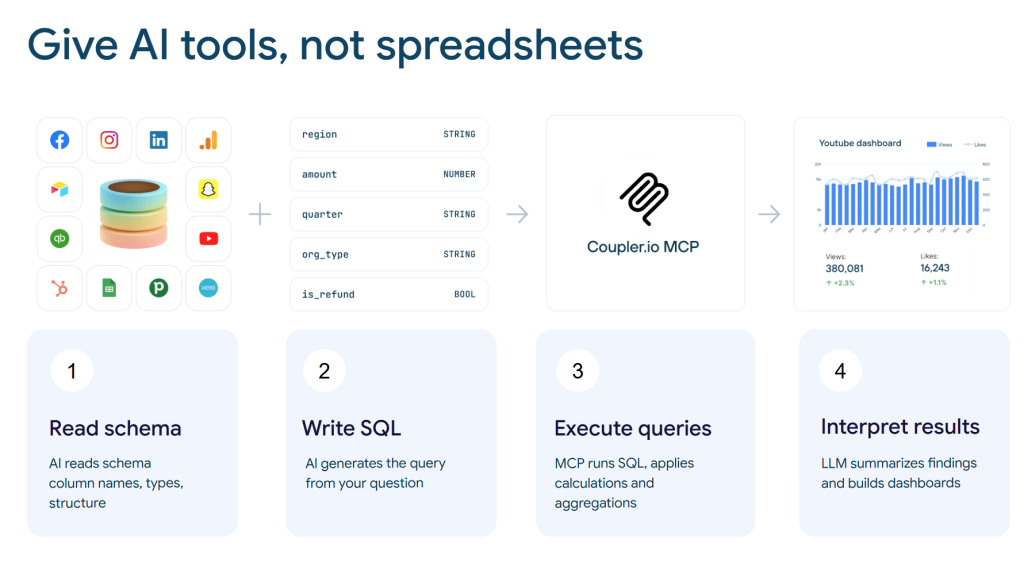
The Analytical Engine does not require any actions from your side. Its functionality is available out of the box when you use Coupler.io with AI. The process has four steps.
1. Read the schema and context. Coupler.io sends the AI your data structure: column names, data types, and a sample of rows. Alongside the schema, it passes the data context and business context you have defined for that dataset. The AI learns the shape of your data and what it means before you ask your first question. Without context, a column called revenue_d7 could mean daily revenue, 7-day attributed revenue, or something else entirely. With context, the AI receives your team’s definition.
2. Write SQL. You ask a question in plain language. The AI translates it into a structured SQL query. This is a translation task, not a calculation task, and LLMs handle it reliably. The SQL still gets written. You are just not the one writing it. The query is visible and editable in Coupler.io’s SQL transformations field, so you can review the analytical logic before acting on the results.
3. Execute the query. The SQL query goes to Coupler.io, not to the AI. The Analytical Engine runs it against your full dataset after its latest refresh, performs the calculations, aggregations, and joins, and returns only the processed result to the AI.
4. Interpret results. The AI receives calculated numbers and does what it does well: summarizes findings, spots patterns, explains what the numbers mean, and suggests follow-up questions. The model explains the number. It does not calculate it.
When the AI says ROAS dropped 12% month over month, that 12% was calculated by the Analytical Engine. The AI is reporting a calculated fact, not generating a plausible-sounding number.
AI should interpret, not calculate
The core idea behind the Analytical Engine is simple. LLMs are language tools, not calculators. When you ask them to do both jobs at once, the language stays fluent and the math goes wrong. The Analytical Engine splits those jobs so each one is handled by the right tool.
If you’re uploading spreadsheets to ChatGPT or Claude and spot-checking the numbers manually, the Analytical Engine replaces that manual step. Not the AI itself. The verification step that makes AI outputs trustworthy. The same pattern works across use cases: Google Ads analysis, GA4 reporting, PPC performance analysis, and any of Coupler.io’s 400+ data sources.
Get AI answers you can trust
Try Coupler.io for free