The paid media leads I talk to describe the same Monday: someone logs into each ad platform and pulls the numbers by hand to rebuild the same report they sent last month. For every client on the roster. Sign a new client and the reward is one more report to build, every cycle, from now on.
And almost none of that time goes into analysis. It goes into prep, before anyone can even look at what the numbers mean.
Coupler.io breaks that loop. Set one client’s report up once, and the numbers are already in it, fresh, every time you open it. You step in only when something looks off.
Where the hours actually go
Take a single monthly report for one client. Before you can write a word of analysis, you have to pull the numbers out of Google Ads, Meta, GA4, and the CRM, one login at a time. Then you rename and reformat everything so the columns line up. You blend the sources when the report needs ad spend sitting next to results. You rebuild or double-check the formulas behind CPA, ROAS, and the rest. You read back through the tables to catch anything missing or wrong.
Only then do you drop it all into the detailed report the client expects. And if you bill by the hour, there’s a second pile of prep. You pull time tracking from your project management tool. You tidy the timesheets and run the time calculations that turn raw work hours into decimal hours. Then you put it all in a clean decimal format so the client sees billed time next to results.
Now do that again for the next client. And the one after that, every reporting cycle.
Here’s the part worth noticing. Almost none of that is analysis. It’s prep. The actual thinking, the part clients pay you for, only starts once the data is clean and sitting in one place. The prep, the same repetitive work, is what eats the hours.
It doesn’t have to run this way. Gabe Solberg leads paid media at Right Percent, and his team cut reporting time by 60% once they moved this prep off their plate with Coupler.io.
“I’m not getting AI’s best guess. Coupler.io does the actual math. Claude just helps me ask the right questions and understand the results conversationally.”
— Gabe Solberg, Right Percent
The rest of this guide walks through how to set that up. Here’s what changes once you do:
| Reporting task | Manual process | With a Coupler.io workflow |
|---|---|---|
| Collect platform data | Export from each platform | Scheduled imports |
| Combine datasets | Copy and merge by hand | Automated blending |
| Update calculations | Rebuild or re-check formulas | Reusable calculated fields |
| Refresh the report | Replace data manually | Destination updates on schedule |
| Handle follow-up questions | Build a one-off analysis | Ask and get the answer from live data |
The table shows the shift, but it’s easy to assume a setup like this takes a technical team and a week of work. It doesn’t. You describe the report, and Coupler AI builds the flow for you.


Build a client report that runs itself with Coupler.io
Book a demoSet up a client reporting workflow once
The way out is to build the report once and let it run. You set it up for a single client, and the same workflow produces that report on its own, cycle after cycle. Social Unit, a marketing agency, set their reporting up with Coupler.io and cut client questions between reports by around 60%. The ones that still come in get answered in under 30 minutes, down from the two or three days it used to take.
This is an example of a dashboard for client reporting you get with Coupler.io (it can also be another reporting tool you’re using, such as Google Sheets).

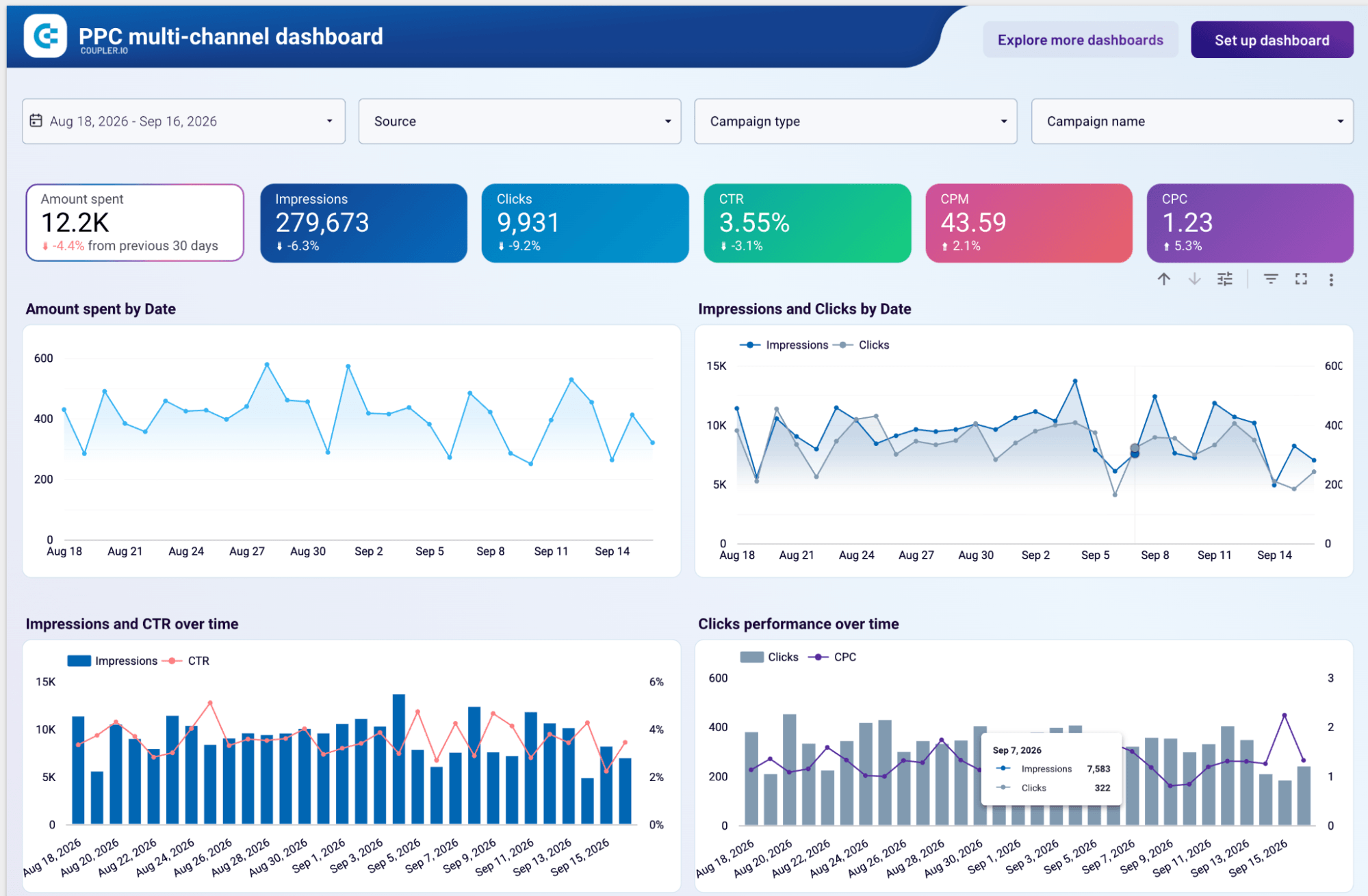
And here are simple steps to get such a time-saving report for your business routine with Coupler.io.
Choose one recurring report
Pick a report you already send on a schedule. It might be a weekly PPC summary or a monthly performance recap, whatever repeats. A report you rebuild every Monday pays back the setup far faster than one you touch once a quarter. Starting with a single report also keeps any early mistakes internal while you get it right.
Connect the client’s data sources
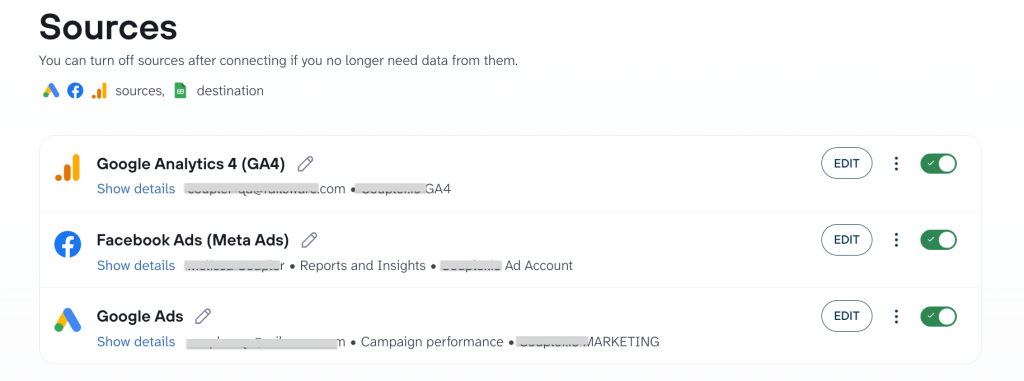
Tell Coupler AI to connect the accounts the report pulls from, like Google Ads, Meta, GA4, or the client’s CRM. You authorize each source once, and it keeps working from then on. Coupler AI builds the data flow from a plain description and checks with you when something is unclear, like which of two ad accounts you mean.

Prepare a reporting data set
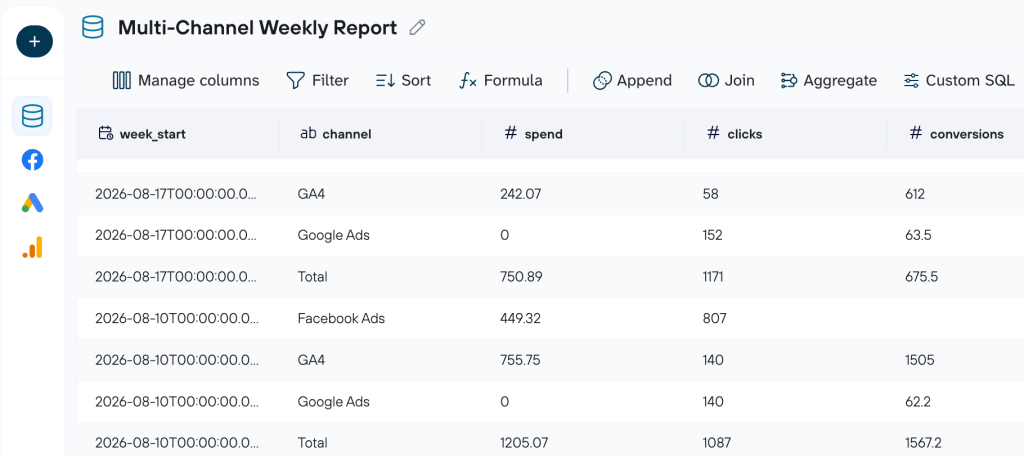
Numbers from five platforms don’t line up on their own. Here you choose the metrics the report needs, narrow the data to the right client and dates, and blend sources so ad spend sits next to the results it drove. And again, describe all these data transformations to Coupler AI, and it applies them.

Send the data where the report lives
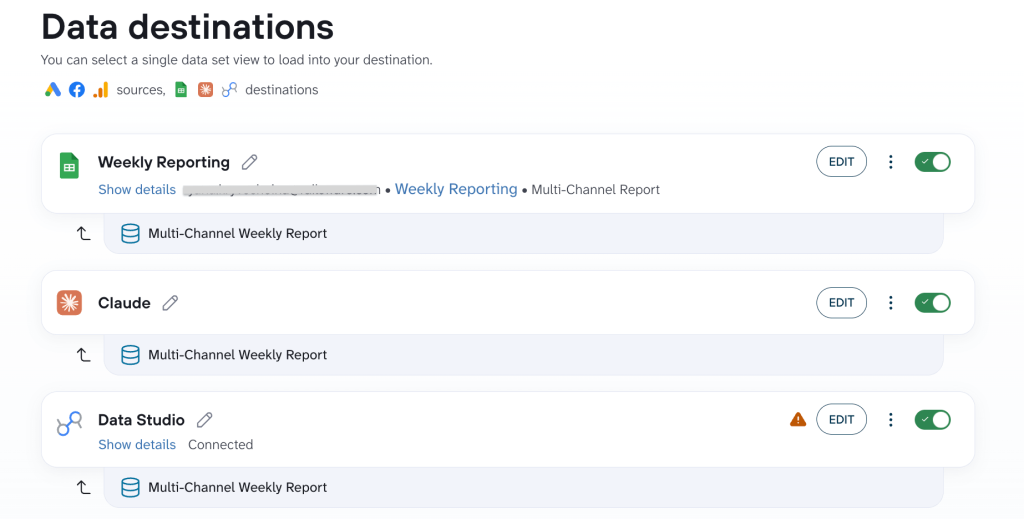
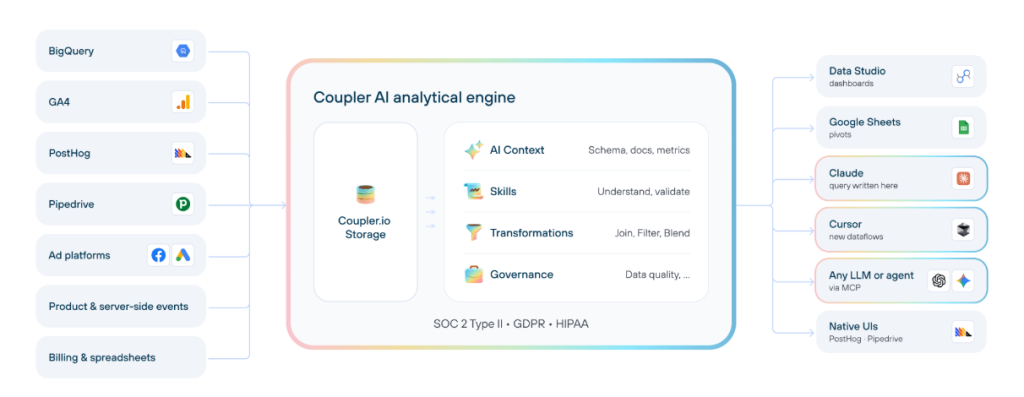
Your report already has a home, whether that’s a Data Studio dashboard, a Google Sheet, or an AI artifact the client opens and reads on their own. One connection can feed more than one place, including AI tools, such as Claude or ChatGPT. The same refresh updates the dashboard the client sees and the warehouse table your analyst works from.

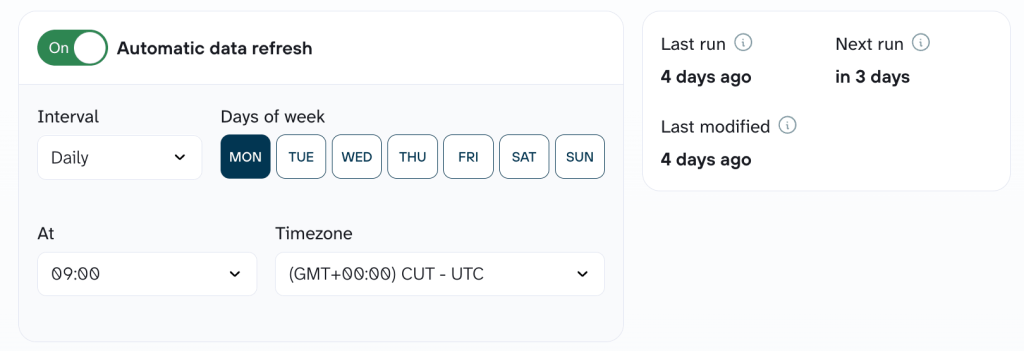
Schedule data refreshes
Decide how fresh the report needs to be. You might want it weekly, or refreshed the morning of each client call. With Coupler.io you get fresh data on that schedule you set.

Approve it and move on
Once it runs on its own, you become a reviewer. Check what the refresh flags, like a source that failed to sync or a number that jumped more than it should, and you look only there. The rest you can trust without reading every table.

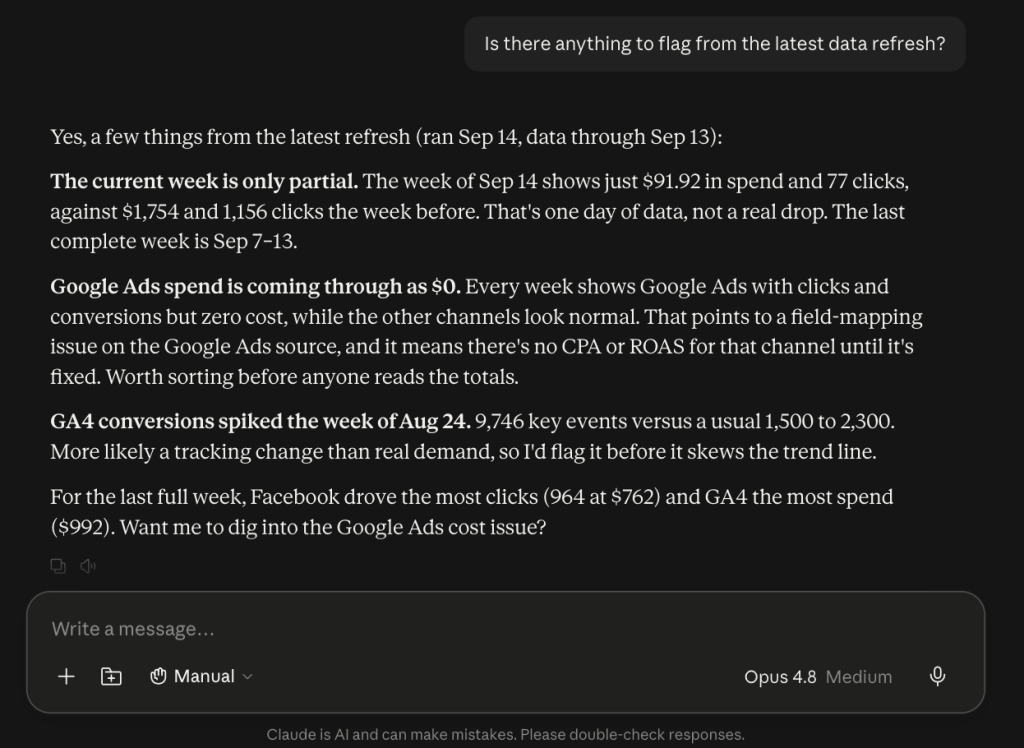
Clean data is one thing. Trusting the math is another, especially with AI involved. With Coupler.io, you get reliable numbers because it runs the calculations itself through its Analytical Engine and passes them to the AI. The model just has to explain those numbers. What lands in the report is a result you can send without checking it by hand.

Analyze the results with AI
Some questions come up every cycle: the same channel breakdown, the same pacing check. With Coupler AI Skills, you get that expert read-out in one ask, on any client’s data. You ask the question, and the Skill runs the same method that would require a long list of queries if conducted from scratch.
Answer client questions between reporting cycles
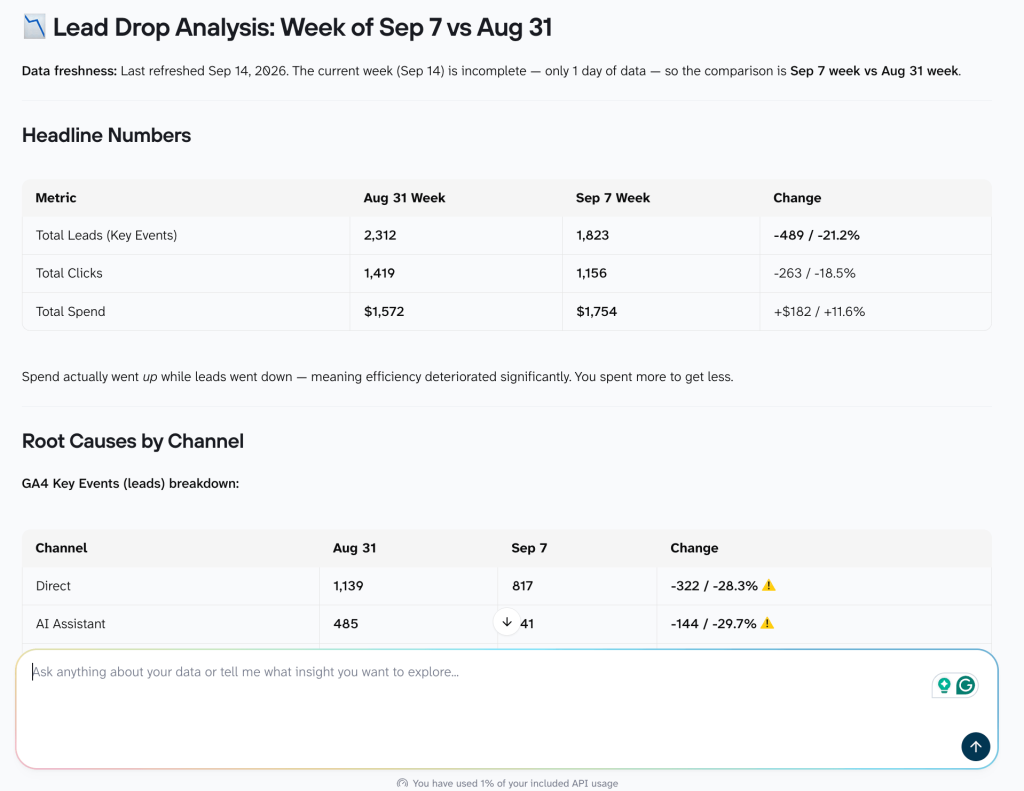
Reports go out on a schedule. Client questions don’t. Someone emails on a Tuesday asking why leads dropped last week. Because the data is already connected and up-to-date, you ask in plain language and get an answer from today’s numbers. This can be done either in Coupler.io’s AI Agent or in an AI tool your team already uses through its AI integrations.

Do this once per client and the weekly scramble goes away. The data stays fresh on its own, and you only step in when there’s something worth looking at.
The answer can also live as an AI artifact like the Lead Drop Analysis (a self-contained write-up the client opens without anyone rebuilding a thing).
Get answers to client questions from live data with Coupler.io
Try for freeWhat to automate and what to keep human
Automating a report can feel like handing the client over to software. It doesn’t have to, as long as you draw the line in the right place. Automate the work of moving and shaping data. Keep the work that needs someone who knows the account. Here’s where I’d draw the line and argue against automating further.
The tasks I’d automate share a quality: they happen every cycle and there’s a right answer to check against. Someone has to pull the data, tidy it up, run the same calculations, and notice when a number looks wrong. Coupler.io takes that over and does it on schedule, the same way each time.
The work I’d keep with a person is where an account manager earns the retainer. A dashboard can tell you leads dropped 40%. What it can’t do is connect that to the landing page change your team flagged last week, or say whether it’s worth shifting budget over. Someone has to explain why the number moved, notice what the data isn’t showing, and settle on the next step with the client.
| Automate | Keep human |
|---|---|
| Data extraction | Confirming that the report answers the client’s questions |
| Data cleaning and standardization | Explaining why performance changed |
| Cross-source blending | Judging whether the data is telling the full story |
| Recurring calculations | Connecting metrics to business outcomes |
| Report refreshes | Recommending campaign or budget changes |
| Initial anomaly detection | Handling sensitive or disappointing results |
| First commentary draft | Agreeing on the next actions with the client |
Two rows come with a catch. Anomaly detection is automated because “this number moved 40%” is just a check against a rule. Whether that 40% actually matters is a call for a person. The AI also drafts the first commentary, but only the draft. It suggests wording from the numbers, and a person edits it and owns what goes to the client.
Get the split right and automation buys your team more time for the second column. The routine work goes away. The thinking doesn’t.
Keep client data under your control with Coupler.io
Client data usually comes with strings attached. It can be a data processing agreement, an NDA, sometimes a clause about where the numbers can and can’t go. So being careful about “connect it to AI” is fair.
Coupler.io sits between your client accounts and any AI tool as a managed, read-only layer. The AI works from data Coupler.io has already prepared. It never receives the source credentials, and you decide which datasets it can reach. Nobody hands an AI tool your client’s API keys or database access. Coupler.io is SOC 2 Type II certified and GDPR compliant.

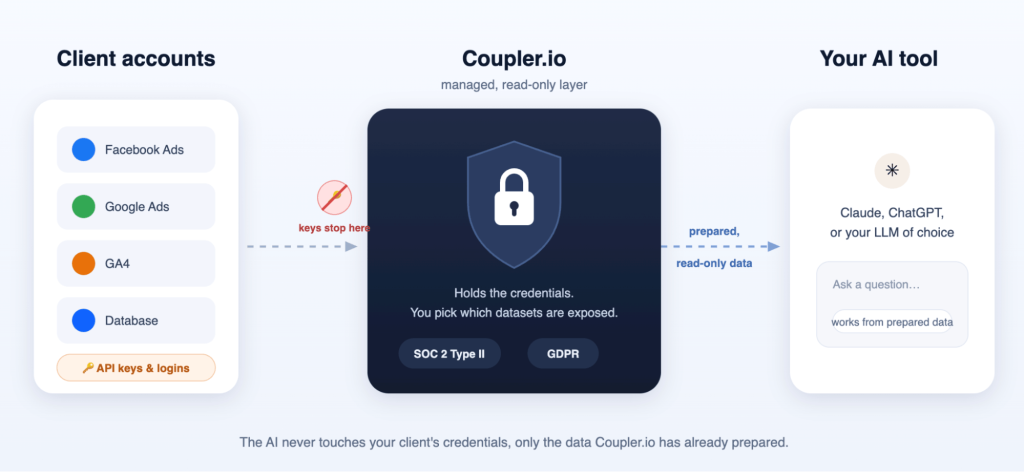
It also closes a quieter risk. The pattern I see: when there’s no safe path, people paste numbers into a personal ChatGPT account that sits outside your policies. A managed layer gives them the answer without the workaround, so client data stays where you can account for it.
Set up multi-client reporting at scale with Coupler.io
Book a demoWhere to start, and what it costs to scale
You don’t have to move the whole roster at once. Start with one report and prove it out.
- Pick one high-volume recurring report
- Set it up with Coupler AI
- Check the output against the up-to-date report
- Reuse and adapt the workflow for the next client
This is roughly how Clear Performance Ads, a PPC agency, got to the point where all of their client reporting takes about 15 minutes a week.
Growing your client base won’t blow up the bill. Coupler.io charges for the accounts and destinations you connect, so the cost follows the client work, not how many people are on your team. AI comes with every plan, and it starts at $24 a month. Hiring another account manager or signing a new client doesn’t add a per-seat charge on top.
My advice: prove the time saved on a single report first. Once you’ve seen it, roll it out across the roster. The bill grows with the clients you take on, not with the people you hire to serve them.
FAQ
How long does the first client take to set up?
Usually under an hour. The AI Agent builds most of the flow from a plain description of the sources and metrics you need. If a client uses an unusual source, Coupler.io’s support team can help you connect it.
Does the data stay up-to-date between reports?
Yes, on a schedule you set. You choose how often the data refreshes, daily, weekly, or before a client call, and the report updates on that cadence.
Can clients see reports in their own branding?
Yes. Coupler.io feeds white-label dashboards, so the report carries your agency’s or the client’s logo and colors instead of a vendor’s.
Is it safe to connect client data to AI?
Yes. Coupler.io works as a managed, read-only layer. The AI queries prepared data and never touches source credentials, and you control which datasets it can reach. It’s SOC 2 Type II certified and GDPR compliant.
Does automated reporting still require manual review?
Yes, but much less than before. You just check what the refresh flags: a sync that failed, or a number that jumped more than it should. A person still signs off on the analysis before it goes to the client.
What happens when a data source stops syncing or a platform changes its API?
Coupler.io maintains the connectors, so platform-side changes are handled on its end, not yours. A failed refresh shows up as an exception for you to review rather than a silent gap in the client’s report.