You ask your AI tool what Q3 revenue looked like. It gives you a confident, specific, formatted answer in seconds. You share it in a meeting, someone checks the actuals, and the number is off by 30%. The AI predicted a plausible answer that had nothing to do with your actual data.
It’s a structural problem.
AI systems powered by language models hallucinate in data analytics for specific, identifiable reasons. I’ll break down each of those failure modes and explain how Coupler.io’s Analytical Engine addresses them directly by handling calculations, schema, business context, and data freshness before the AI ever sees a number.
Why AI hallucinates and what it costs you
When AI gives wrong analytics results, the instinct is to blame the prompt.
The real issue runs deeper: AI tools are built for language, not arithmetic. Which means the fix for bad outputs is not a better prompt, but a different architecture.
LLMs predict text, they don’t calculate
A large language model works through statistical algorithms that predict the most statistically plausible next token in a sequence. That mechanism produces fluent, natural-sounding AI-generated content. It works well for that purpose.
But numbers are a different story.
When an LLM appears to calculate something, it is not actually running arithmetic. It is pattern-matching against its training data and generating text that looks like a calculation result.
For simple, well-documented math (for example, 1 + 1 = 2) there is enough training data for this to work reliably. But feed it a real business dataset with thousands of rows and the model is essentially guessing what a plausible answer would look like.
The context window makes this worse. When you paste a large CSV into a chat, the model either silently truncates it or processes an incomplete slice. The AI does not tell you this happened. So you end up with a “full dataset analysis” based on a fraction of your actual data.
↳ The result: reports that look right but aren’t
There is no visual difference between a verified result and a fabricated one. Both arrive in the same format, with the same confident tone. So human oversight and manual fact-checking remain irreplaceable for validating results and reducing AI hallucinations.
That manual check defeats the purpose of using AI for reporting. And in practice, teams respond in one of two ways over time:
- They stop using AI for anything that matters
- Or they stop checking and start making decisions on numbers they cannot trust
Neither outcome is good.
This experience is common enough that it came up at MeasureCamp, a community event for analytics professionals.
When Coupler.io’s Product Director Olexander Paladiy asked the room who had thrown a CSV into an LLM, almost every hand went up. When he asked who was happy with the results, the hands went down.

The failure pattern, as he described it, tends to fall into three categories:
- Totals that don’t add up
- Trends the model invented from data that wasn’t there
- A confident tone that makes both easy to miss.
AI has no idea what your data actually means
Even when the math is right, the analysis can still be wrong, and this type of error is harder to catch.
When you hand a raw data export to an AI tool, it has no way to know what your columns actually represent. It sees the field names, makes assumptions based on its training data, and runs with them.
A column called “revenue” might mean gross revenue in one company and net-of-refunds in another. “Leads” might be every form submission, or only the ones that passed a qualification threshold. ROAS, CAC, churn, all of these have standard textbook definitions and company-specific ones that frequently diverge.
The AI will pick the most common interpretation it encountered in training, which may have nothing to do with how your team actually measures things.
This is compounded by everything the file simply doesn’t contain:
- Which rows to exclude and why
- How fields relate to each other
- What changed in the business recently
- What counts as a conversion in your specific setup.
None of that is documented in a CSV export. The AI has no access to it.
↳ The result: Accurate math based on wrong assumptions
This is a subtler problem than a hallucinated number, and in some ways more dangerous. The calculation can be technically correct while the analysis is answering a completely different question than the one you asked.
The Coupler.io team ran into exactly this. After changing our lead scoring model, the number of scheduled sales calls dropped. It was intentional, because the goal was fewer but high-quality leads reaching sales.
When an AI analyzed the data, it flagged a serious acquisition problem. Call volume was declining, so the model interpreted it as a failure. It was actually working as designed. The AI read the data correctly and drew exactly the wrong conclusion, because it had no way to know the scoring model had changed.
This kind of error happens routinely. A seasonal dip the AI treats as a worrying trend, a revenue spike attributed incorrectly, a drop in a metric that your team already knows about…
The analysis looks thorough, but the conclusion is straight up wrong.
Stale data gets analyzed as if it’s current
A CSV export is a snapshot of one moment in time. When you upload it to an AI tool, the model has no way of knowing when it was created, whether the numbers have moved since, or whether the business situation it reflects still exists. It analyzes whatever you gave it as if that is the current state of things.
If your data is from last Tuesday and it is now Friday, the AI will describe last Tuesday’s reality with complete confidence.
There is no timestamp warning, no flag that the numbers might be outdated. You get a crisp, present-tense answer built on past data. And even the best model can’t produce decent insights from bad data.
↳ The result: stale numbers dressed up as current analysis
For a one-off question or a quick checkup, this is manageable.
The problem compounds in recurring workflows. Pulling an updated export, formatting it, and uploading it again defeats automation. Plus, it’s tedious enough that people start cutting corners. The re-export happens less often. Eventually, someone is running Monday’s standup based on data from the previous week. Or making a campaign decision based on numbers that were already outdated when the analysis was done.
Over time, this erodes trust in AI-assisted reporting because the outputs quietly stopped reflecting reality.
By the time someone catches it, the habit of checking has already broken down.
How to prevent AI hallucinations in analytics with Coupler.io
The problems described above are not fixable by prompting more carefully.
They are structural because artificial intelligence is being asked to do things it was not built to do.
The fix is giving each job to the right tool. Coupler.io’s AI Integrations sit between your data and the AI and handle the parts LLMs cannot do reliably:
- Calculations
- Data structure
- Business context
- Freshness.
Standard retrieval-augmented generation (RAG) retrieves relevant documents to ground responses. Coupler.io, on the other hand, grounds AI in structured analytical workflows, verified calculations, and business logic. It does not rely solely on retrieved text, making it a safe way to prevent AI reporting errors.
By the time the AI sees anything, the hard work is already done.

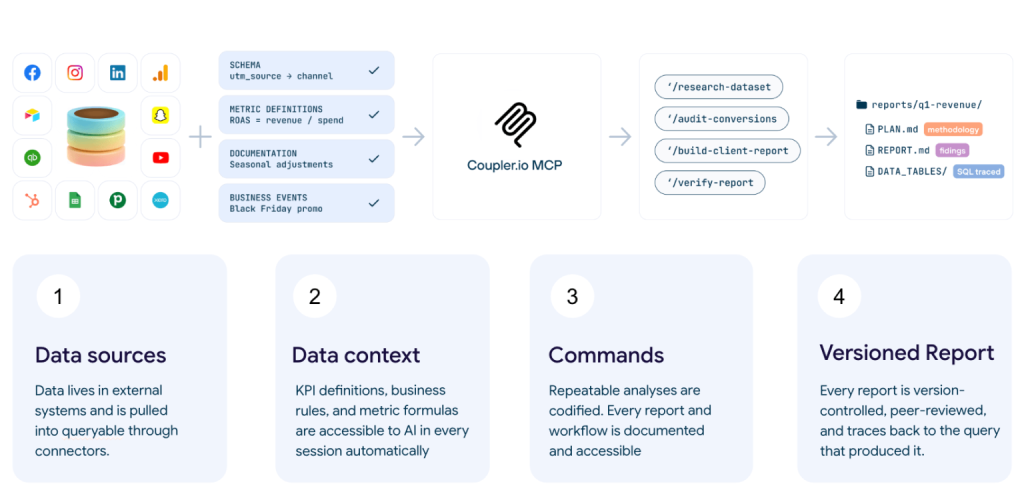
Calculations you can trust
The core issue is that LLMs cannot do math reliably; AI hallucinates math and there is no prompting trick that changes that. Coupler.io Analytical Engine solves AI calculation errors by removing calculations from the AI’s remit entirely.

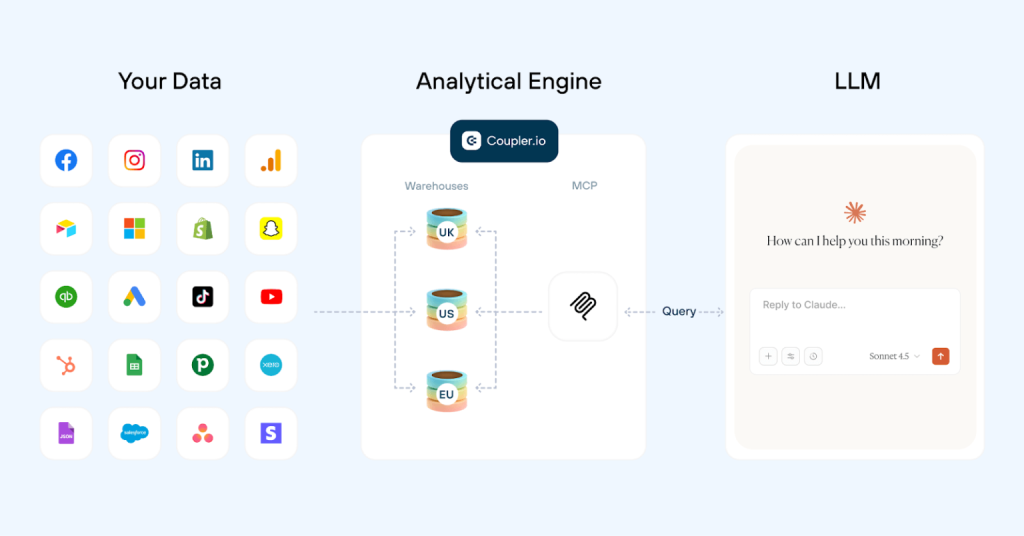
It’s like a mathematician working alongside a storyteller. The mathematician handles the numbers, runs the queries, checks the arithmetic, and validates the results. The storyteller takes those verified results and explains what they mean in plain language. Neither is doing the other’s job, each is doing what it’s best at.
How that works in practice:
When you connect your data through Coupler.io (via its connectors to Claude, ChatGPT, and other AI tools, powered by MCP) the AI receives your data schema (column names, data types, a sample of rows) rather than the full raw dataset. The sample rows give the AI concrete examples of what the data actually looks like. This reduces misinterpretation of fields before analysis begins.
Alongside the schema, Coupler.io passes the business context you have defined for that dataset. This can be metric definitions, exclusions, business events, naming conventions… That way, the AI already knows what your columns mean before you ask the first question.
When you ask a question, AI translates it into a SQL query and passes that query to Coupler.io’s Analytical Engine. (You don’t need to know SQL to check it; you can ask the AI to explain the query it used in plain language.)
The engine runs it against your full dataset, performs all calculations and aggregations, and validates the results. It returns only the processed answer to the AI.
The AI then interprets those verified numbers and explains what they mean.
The reason this eliminates hallucinated numbers is straightforward. The number the AI reports came from a real query engine executing real arithmetic against your actual data. It did not come from a language model predicting what a plausible result might look like.
There is also a traceability benefit that matters when someone questions a figure. Every result traces back to the SQL query that produced it. If a number looks wrong, you can inspect the query, check the data it ran against, and see exactly how the result was produced.


Connect your business data to AI with Coupler.io
Get started for freeAI knows your data before you ask the first question
When you upload a CSV to an AI tool and ask a question, the model is figuring out your data structure and trying to answer at the same time.
It is reading column names for the first time, making assumptions about what they mean, and producing an answer, all in one pass. That is where a lot of misinterpretation originates.
Coupler.io handles this differently.
Before any question is asked, it sends the AI your data schema: column names, data types, and a sample of rows. The AI gets oriented to the shape of your data before the conversation begins, not during it. By the time you type your first question, the model already knows what fields exist, what they contain, and how they relate to each other.
Here’s what this means in practice.
When you ask something like “What’s our ROAS this month?”, the AI is not guessing which column that maps to or whether it should be calculated from two fields or read directly. It already knows. The question gets translated into the right query against the right fields. The AI doesn’t make its best inference about what you probably meant.
This does not replace business context (I’ll cover this in the next section), but it removes a layer of structural ambiguity that causes errors before the analysis even starts.
Analysis that reflects how your business actually works
Knowing the shape of your data is not the same as knowing what it means.
A field called “deal_value” looks like revenue until you find out that every unreviewed deal in the CRM gets assigned a default value of $150 as a placeholder. The AI sees hundreds of $150 entries, treats them as real deal sizes, and every recommendation built on that foundation is wrong.
Context details like:
- What values are real versus placeholders
- What a drop in a metric actually means
- What changed in the business recently
live in your team’s heads. They’re not in the file, and no AI model can infer it from column names and sample rows alone.
Coupler.io has an AI Context layer where you define this once:
- Metric definitions
- Exclusions
- Business events
- Naming conventions
- Attribution rules
These load into every session automatically, so you are not re-explaining your business every time you open a new conversation. The context is attached to the dataset itself, so wherever the analysis happens (Claude, ChatGPT, Coupler.io’s AI Agent…), the data and its context always travel together.
You can set it up when creating a data flow within Coupler.io. It’s placed in the Data Sets section:

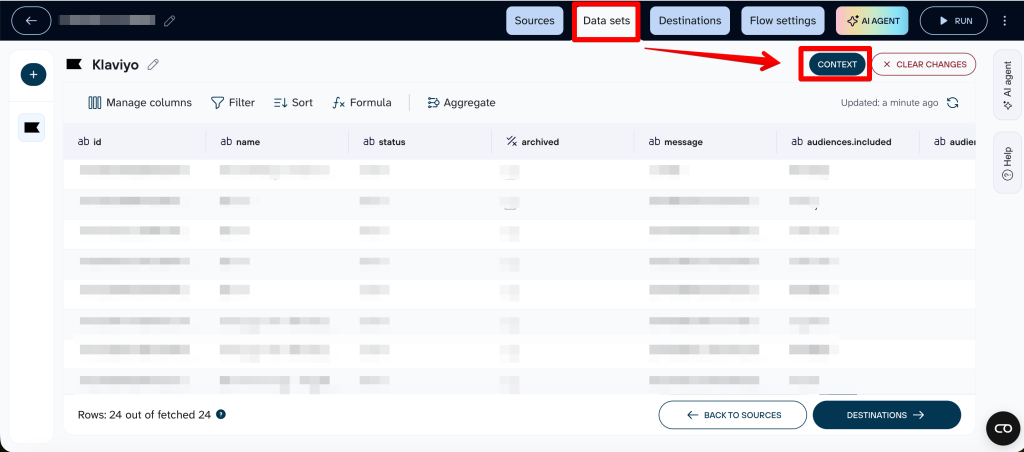
Two ways you can generate context:
- With AI, where Coupler.io’s AI agent helps you build context automatically by analyzing your complete dataset. It examines how records are structured, detects patterns such as duplicates, maps relationships between data points, and generates an initial context draft. From there, you can refine and expand the output using the built-in markdown editor, adding your own explanations, notes, tables, and formatting:

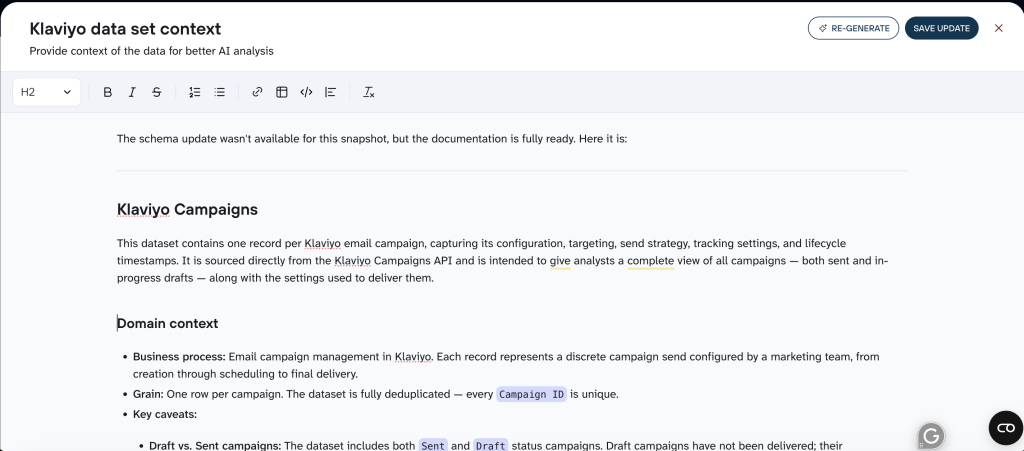
- Or Manually, where the same markdown editor will appear but it won’t be populated, and you’ll add the information yourself.
The lead scoring example I used earlier illustrates the difference directly: without context, declining call volume looks like an acquisition problem. With context in place, the AI knows the drop was intentional and interprets the data correctly.
➤ When you catch a case mid-analysis where the AI drew the wrong conclusion, you can correct it from the chat window and it gets saved to the context for all future sessions without rebuilding required.
Always working from fresh data, not last week’s export
When you paste a CSV into an AI tool, the model analyzes it as if it represents the current state of your business.
You could call this a temporal hallucination: not invented data, just accurate analysis of the wrong moment in time.
Coupler.io refreshes data on a schedule, so when you ask a question, the AI is working from real-time data rather than whatever you happened to export last.
This matters most in recurring workflows, like daily performance check, weekly pipeline review, or monthly reports, where the whole point is that the numbers reflect right now. If the data feeding those workflows is stale, the cadence is just theater.
You can set up automatic data refresh by navigating to your data flow, clicking on Flow Settings, and toggling Automatic data refresh on:
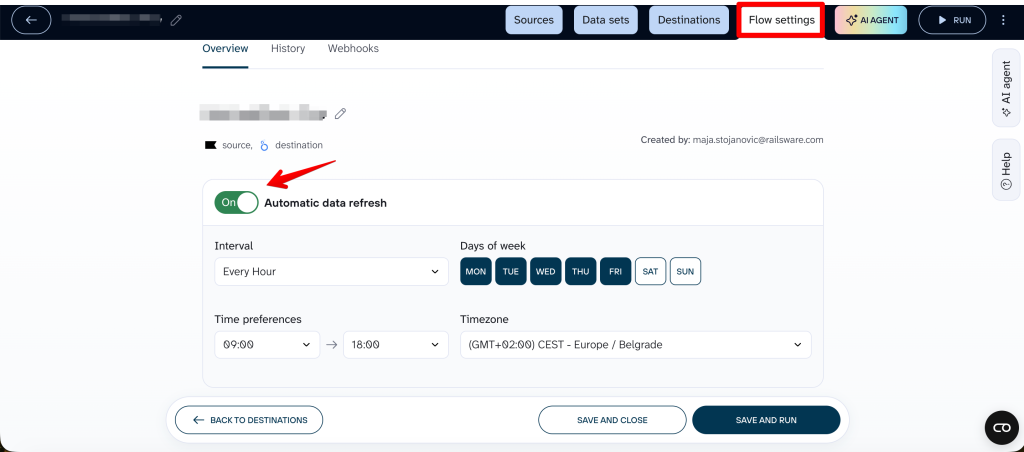
Refresh frequency will depend on your plan, and can run as frequently as 15 minutes for agency and enterprise plans.
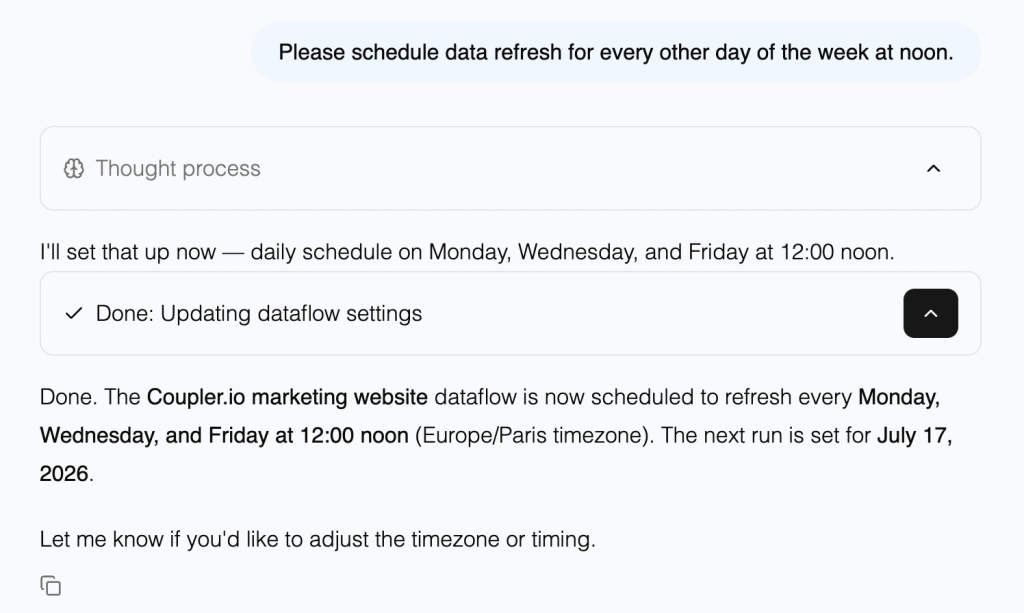
👉 With our latest update, you can ask AI Agent to schedule your data flow refresh by simply typing it into the chat box. (Scheduling is one of a growing number of things the Agent can handle. See the full AI skills library for what’s available.)

What about better prompts, Code Interpreter, or scripts?
There are alternatives, and they are worth addressing directly. Each one solves part of the problem; unfortunately, none of them solves all of it.
Prompt engineering
Better prompts help the AI understand what you are asking. They do not change how the AI processes numbers. They do not supply business context that is not already in the data. If the underlying data is a raw export with ambiguous columns, placeholder values, and no record of business events, a well-crafted prompt will produce a more clearly-worded inaccurate information.
The garbage is structural, not textual.
If you want to get better at prompting AI, check out some of our guides and case studies:
- How to Write a Prompt That Works: Start with Context
- 5 Essential Prompting Techniques for Better Results
- Advanced Prompting: Chain-of-Thought, Trees & Recursion
- Scaling Prompts: Templates, Systems & Troubleshooting
Code Interpreter / Advanced data analysis
ChatGPT’s Code Interpreter and similar tools run actual Python on your data, which does fix the arithmetic problem. The calculations are real.
But the data is still a pasted snapshot; there’s no scheduled refresh, no schema passed in advance, no business context attached.
The math is sound, but the blindness to what the numbers actually mean remains.
Custom Python scripts
Scripts give you accurate, reproducible results and full control over the logic. But they come with serious engineering work: someone has to build them, maintain them, update them when data structures change, and debug them when something breaks.
For technical teams with the bandwidth, this is viable. For a marketing team that needs answers on a Tuesday morning, it is not.
| Prompt engineering | Code Interpreter | Custom scripts | Coupler.io | |
| Accurate calculations | ❌ | ✅ | ✅ | ✅ |
| Business context | ❌ | ❌ | Manual | ✅ |
| Live data / scheduled refresh | ❌ | ❌ | Possible | ✅ |
| No technical setup required | ✅ | ✅ | ❌ | ✅ |
| Works in recurring workflows | ❌ | ❌ | Possible | ✅ |
➡️The thread connecting all three is what they cannot provide: a live data layer with domain-specific business context, scheduled refresh, and pre-calculated results delivered to the AI in a structured form. That is the architecture Coupler.io provides, and it is what makes the difference between a workaround and a system that works reliably.
Prevent AI hallucinations in business analytics before they hurt decision-making
AI tools are being asked to do things they were not designed for. Calculating from raw data, inferring business context from column names, treating a stale export as current reality… All of this produces output that sounds authoritative and may be wrong.
Coupler.io acts as a set of guardrails between your data and the AI and handles what LLMs cannot do reliably. It runs calculations through the Analytical Engine, passes the schema before analysis begins, applies business context that persists across sessions, and keeps data fresh through scheduled syncs. By the time the AI sees anything, the hard work is already done.
The practical result is that you stop spot-checking AI outputs to find out which ones to trust. The numbers come from a real query engine, the context reflects how your business actually works, and the data is fresh.
The AI does what it is actually good at: interpreting verified facts and explaining them in plain language. If you’re figuring out where AI fits into your analytics workflow more broadly, our guide on how to use AI for data analysis walks through the full picture.
Get AI answers you can trust with Coupler.io
Start your free trialFAQ
Can prompt engineering fix AI hallucinations?
Not for data analysis. Better prompts help the AI understand what you are asking, but they do not change how it processes numbers or supply business context that is not in the data. If the underlying data is ambiguous or the AI is doing the arithmetic itself, prompt engineering will not fix that.
Are some AI models associated with lower hallucination rates?
Newer models are improving, and some handle simple arithmetic more reliably than others (like Claude Opus 4.8 as of June 2026). But the fundamental issue is architectural. For a comparison of how different models perform, see our guide to the best LLMs for data analysis.
How do I verify whether an AI output is accurate?
With Coupler.io, every result traces back to the SQL query that produced it, so you can inspect exactly how a number was calculated. Without that, your options are manual cross-checking against source data or re-running the same question with different phrasing to see if the answer changes.
How is connecting Coupler.io to Claude or ChatGPT different from just uploading a CSV to them directly?
A CSV gives the AI a static snapshot with no business context, no schema orientation, and no refresh mechanism. The AI does the math itself, which is where errors creep in. Go through the article to see how Coupler.io handles data and improves AI accuracy in AI-powered business analytics.
Do I need to know SQL or anything technical to set up Coupler.io’s AI integrations?
No. You ask questions in plain language. The SQL translation happens automatically; that is part of what the Analytical Engine does.
How do I know the numbers Coupler.io returns are actually correct?
The Analytical Engine runs queries against your full dataset and validates results before returning them to the AI. Every output is traceable to the query that produced it. Gabe Solberg, a B2B performance marketer managing over $1M in monthly Meta Ads spend, spent his first weeks cross-checking Coupler.io outputs against his source data manually. They matched consistently, and he no longer rebuilds the numbers in a spreadsheet to verify them.
What happens if my data changes, does the AI work from outdated information?
Coupler.io refreshes data on a schedule you set, so the AI is always working from the latest sync.
Can I control what data the AI has access to, or does it see everything?
You control what gets shared. You can apply filters, exclude sensitive columns, and limit access to specific datasets before any of it reaches the AI tool.
Does Coupler.io work with the AI tools I already use?
Coupler.io currently supports AI chatbots like Claude, ChatGPT, Gemini, Perplexity, CursorAI, and OpenClaw with more destinations in development.
Is my business data used to train AI models?
For the Claude connector specifically, Anthropic does not retain data for training purposes. For other AI tools, Coupler.io recommends reviewing the tool’s privacy settings and opting out of data training where applicable, as options vary by subscription tier.