BFCM compresses a disproportionate share of annual revenue into four days. Every decision you make about what to discount or restock, and where to spend, lands harder than it would in a normal week. Most ecommerce reporting is built for a weekly or monthly rhythm, but BFCM runs on an hourly one. By the time a Monday report tells you which campaign carried Friday, the sale is already over. The merchants who win use AI to spot what changed and decide what to do about it before the margin is gone.
That only works when the AI reads fresh, structured data instead of a spreadsheet someone exported at breakfast. Coupler.io keeps your store, ad, email, and other ecommerce data up-to-date and delivers it straight to the AI tool your team already uses. Learn the exact prompts, mid-sale decisions they cover, and the setup that takes minutes to get running before November.
How to use AI for BFCM
The real power of AI for Black Friday is absolute visibility across the whole Black Friday Cyber Monday cycle. It stops you from flying blind when every minute costs real margin.
To use AI for BFCM means asking a plain-language question and getting an instant answer calculated across your real-time order, inventory, and ad data. In other words, it’s a shortcut to metrics you would otherwise waste time pulling from countless tabs by hand.
Most of that value comes from reading across your tools, not inside any single one. Your store platform tracks sales, whether that is Shopify, WooCommerce, BigCommerce, Magento, or Wix Stores. Ad spend data sits in Meta, Amazon, TikTok, and Google. Email performance metrics like opens, clicks, conversion rates, and flow revenue are locked inside Klaviyo, Mailchimp, Omnisend, or ActiveCampaign. None of these systems talk to each other, and nobody has 40 minutes on Black Friday to reconcile them in a spreadsheet.
It’s 11 AM on Friday.
- Meta says your bundle campaign has a strong ROAS.
- Your store says sales are steady.
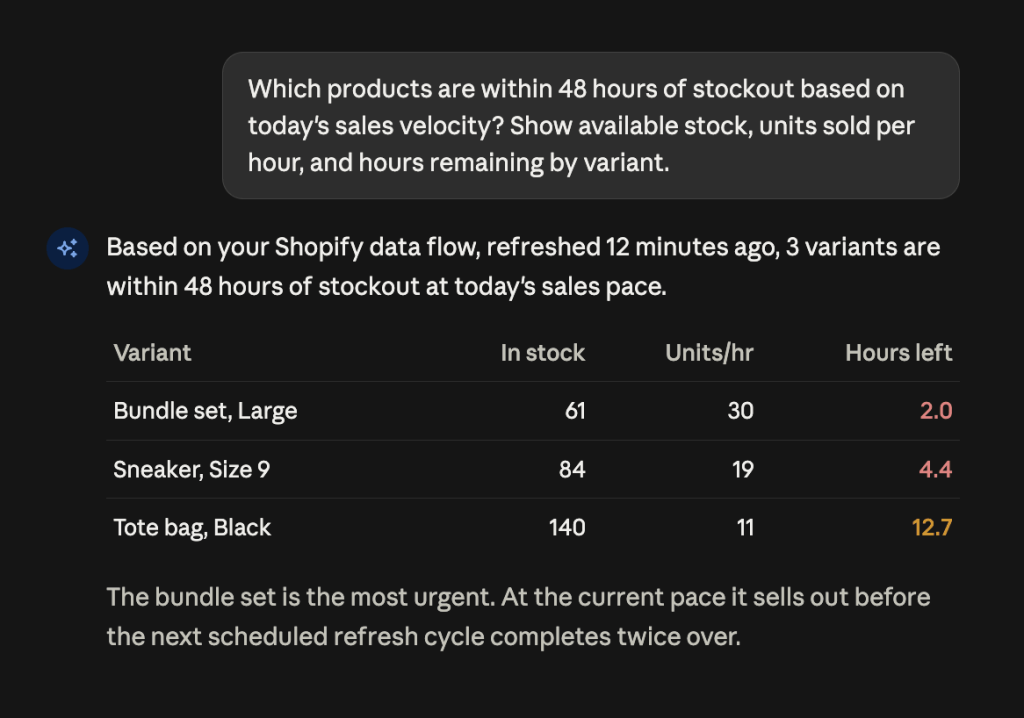
- Inventory says 61 large units left – and you’re selling 30 an hour.
Each dashboard is right. Only together do they tell you what matters: in two hours, you’ll be paying to advertise a product you can’t ship.
Catching that budget burn before it hits your profit requires an AI system connected directly to all three datasets, running the cross-platform arithmetic in seconds. Coupler.io connects your store, ad, and email platforms into one data flow and delivers structured, up-to-date data to the AI tool your team already works in.
Under the hood, the Analytical Engine separates what AI is good at from what it is bad at. The AI reads your data structure and translates your question into a query. The Analytical Engine runs that query against the full dataset, performs the calculations, validates them, and returns only verified results.

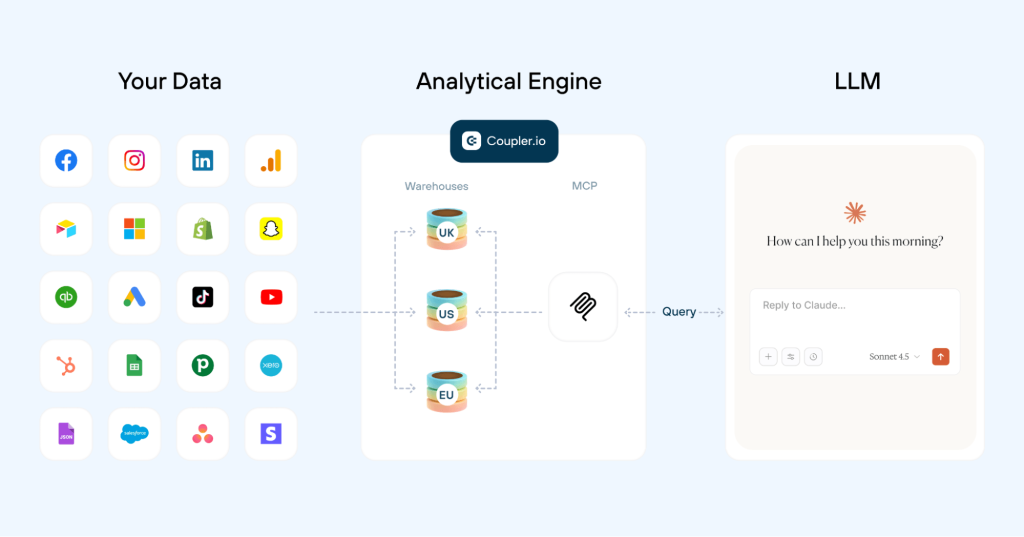
The LLM then does what generative AI is genuinely good at: explaining what the numbers mean.
Think of a mathematician working next to a storyteller. The mathematician handles the math. The storyteller explains it.
Once that data is prepared, you have two ways to access it:
Coupler AI connects that live data directly to Claude, ChatGPT, Gemini, Perplexity, or other tools, which fits teams already working inside those environments during the sale. AI Agent is Coupler.io’s built-in AI assistant, ideal if you want fast answers without leaving the platform. Pick whichever interface your team uses daily.


Ask AI about BFCM inventory and ROAS in Coupler.io
Get started for freeWhy pasting a CSV into ChatGPT falls apart on Black Friday
Uploading an export works fine for a one-off question in a quiet week. Under BFCM conditions, it breaks in four ways:
LLMs struggle with basic arithmetic. They predict plausible text rather than calculating exact totals. Asking a model to sum net revenue across 40,000 line items gives you a confident number that nobody checked: a risk you might catch on a normal Tuesday, but not at 1:00 AM on Cyber Monday.
Volume chokes the context window too, forcing the model to quietly drop data and work from a fraction of the full picture.
And one file means one isolated system, so cross-source questions, like matching Meta spend directly to store orders, still require manual stitching before you can even ask the question.
Even a clean file leaves the model guessing at what your numbers actually mean, not just what they say. A CSV shows rows and columns, but no data context: nothing tells AI how columns relate to each other or how metrics are calculated.
It has no business context either. A discount code showing $0 in revenue looks like a failed promotion unless someone explains it’s a free-shipping code that was never supposed to generate revenue. That explanation lives in your team’s heads, not in any export.
Coupler.io lets you attach both layers of context to the dataset before AI touches it. Column descriptions, data types, and aggregation rules go into the column management window. The dataset’s context field holds the rest: your metric definitions, internal logic, events like a mid-November campaign pause, and so on. Both travel with every query, so the AI reads your business rules before it starts calculating.
Here is how the two approaches compare side by side:
| CSV pasted into a chat | Data connected through Coupler.io | |
| Data freshness | Fixed at the moment of export | Refreshes on a schedule, from daily down to 15-minute intervals |
| Calculations | Generated by the model | Executed and validated by the Analytical Engine |
| Dataset size | Limited by the model’s context window | All source data queried, only needed data pushed to your LLM |
| Multiple sources | Stitched together manually | Blended in the data flow with join, append, and aggregate |
| Business context | Explained in chat and forgotten later | Attached to the data set and applied automatically |
| Repeating the question tomorrow | New export, new upload | Just ask again |
AI use cases for BFCM performance optimization
Once that live data pipeline is running, the real use-cases of using AI for BFCM come down to seven high-velocity decisions where traditional reporting moves too slowly.
1. Reviewing last year’s ad performance before committing budget
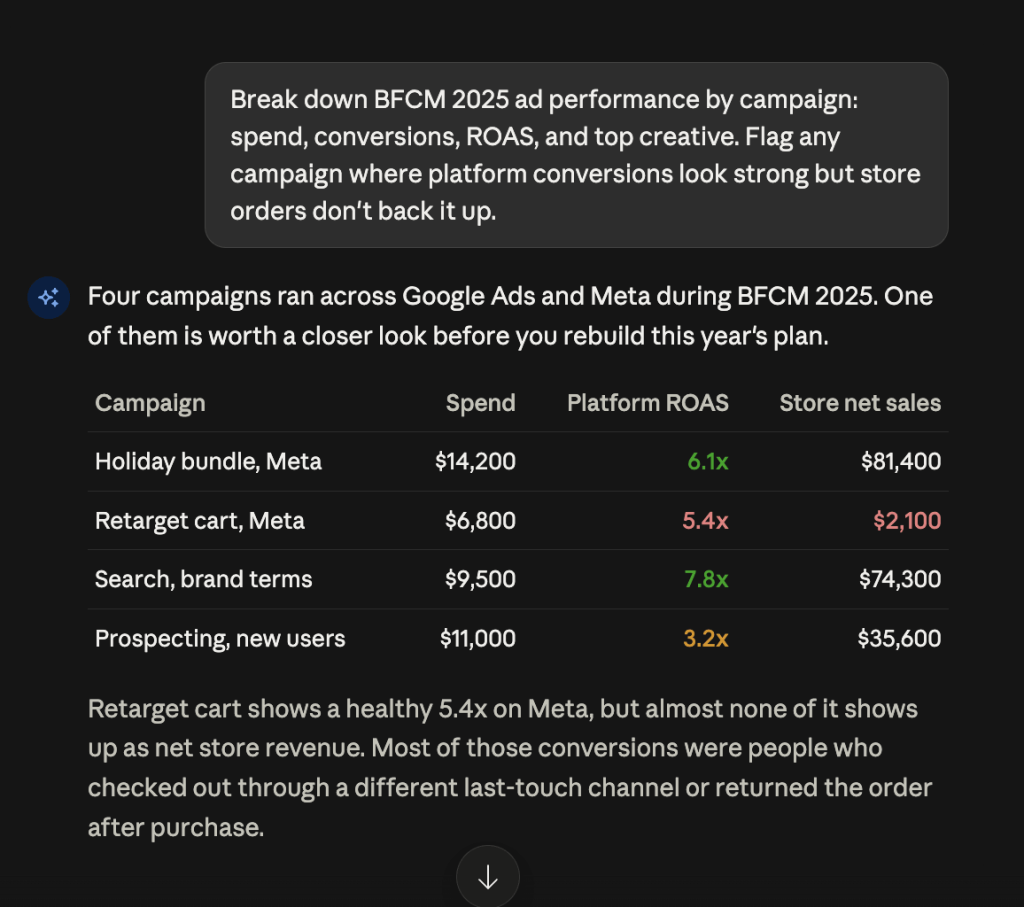
Two weeks out, you need your BFCM 2025 ad performance broken down by campaign: spend, conversions, ROAS, and top-performing creatives. Most teams only half-remember these details.
Ask Claude or ChatGPT through Coupler.io’s AI Integrations, or AI Agent inside the platform, to pull Google Ads and Meta data alongside last year’s store orders and break it down for you. The most valuable insight is rarely the winning campaign, which you already remember. It is the campaign the AI flags as reporting strong platform conversions while producing almost zero net sales in your store data.

2. Catching a stockout while you can still act on it
Blending store inventory with live order line items matches available stock against sales velocity per variant. Coupler.io refreshes ready-made stockout forecast datasets for Shopify stores on daily, weekly, and monthly cadences, so Claude, ChatGPT, or AI Agent can answer stockout questions directly. These deliver net items sold, average sales velocity, available stock, and days of stock remaining without requiring you to build custom logic.
Mid-sale, reordering is off the table. Ask AI which variants are closest to running out, then pause ads on low-stock items, shift budget to high-inventory products, swap creative, or reallocate stock between locations. Every single one of those decisions requires two hours of warning, not two days.

3. Checking whether a discount code is truly profitable
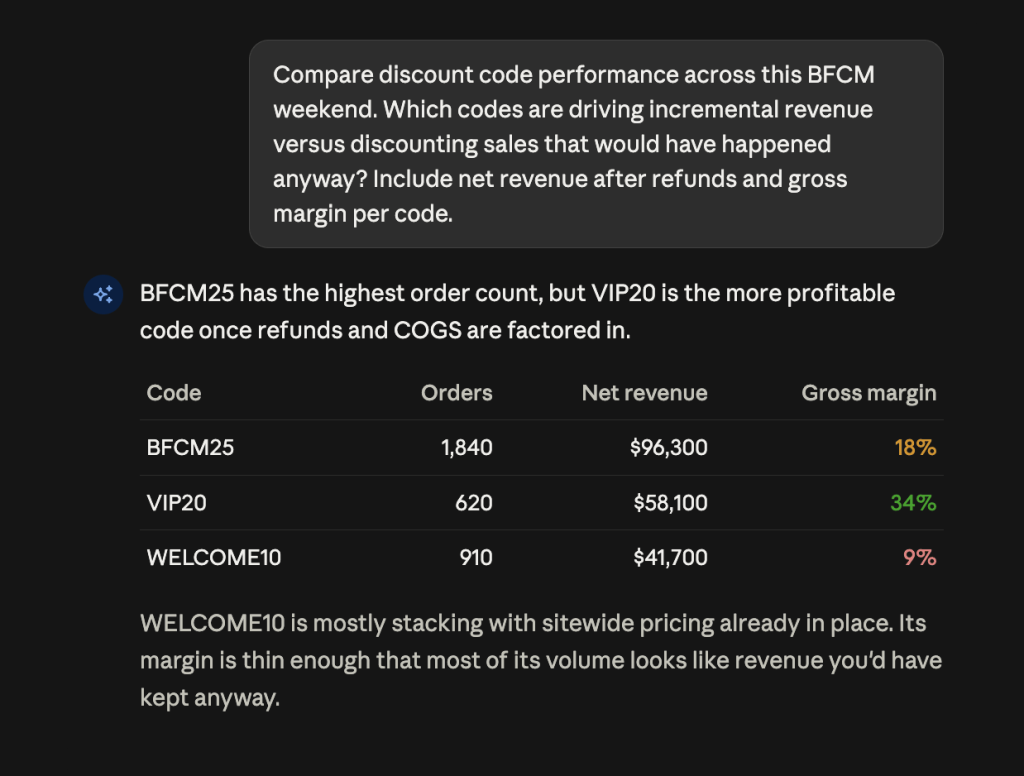
Headline order volume during BFCM masks a lot of margin erosion. A promo code can drive impressive top-line revenue yet still lose money once you factor in refunds, shipping, and COGS (Cost of Goods Sold). Especially if it stacks with sitewide discounts or gets claimed by customers who intended to buy anyway.
Coupler.io’s Shopify datasets combine order line items with COGS, placing gross profit and margin right alongside your discounts. When you ask Claude, ChatGPT, or an AI Agent which promo code performed best, the Analytical Engine calculates real profit rather than just revenue. This shifts the core question from “which code drove the most revenue?” to “which code drove the most profit?” These two answers rarely align.

4. Making same-day budget moves across channels
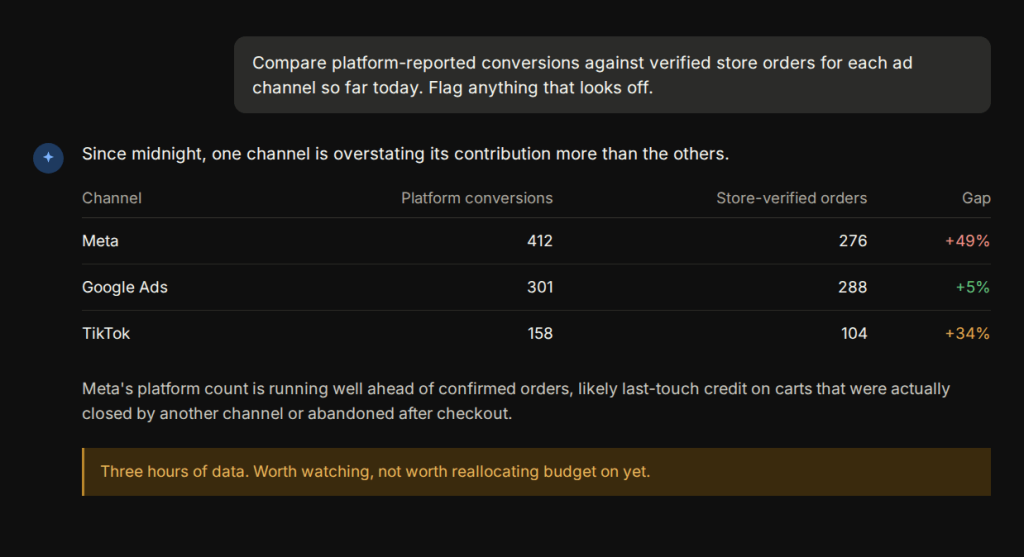
Ad platforms rely on their own attribution models, which tend to flatter themselves during peak shopping windows. Blending live ad spend and platform conversions directly against verified store orders and asking AI to compare them creates a single, unbiased metric to evaluate all channels.
One rule for performance marketers: do not reallocate budget based on three hours of early Friday data, no matter what the AI shows you. Morning shoppers behave completely differently from evening buyers, and sudden budget edits reset campaign learning at the worst possible time. Use the morning to spot outliers, but not to overhaul the account.

5. Detecting creative fatigue before performance drops
Creative burns out faster over BFCM than at any other point in the year. An ad set that stayed fresh for three weeks in October can be spent by Saturday lunchtime, because you are pushing peak budget at the same audience for four days straight.
ROAS tells you late. Frequency climbs first, then CTR slides, then CPM rises, and only after all of that does return drop far enough to notice. By then you have already paid for the decline.
Ask Claude, ChatGPT, or AI Agent to compare ad-level frequency and CTR across rolling 12-hour windows, measured against store-verified orders rather than platform conversions. The creative worth acting on is the one where CTR is falling while frequency rises and ROAS still looks acceptable.

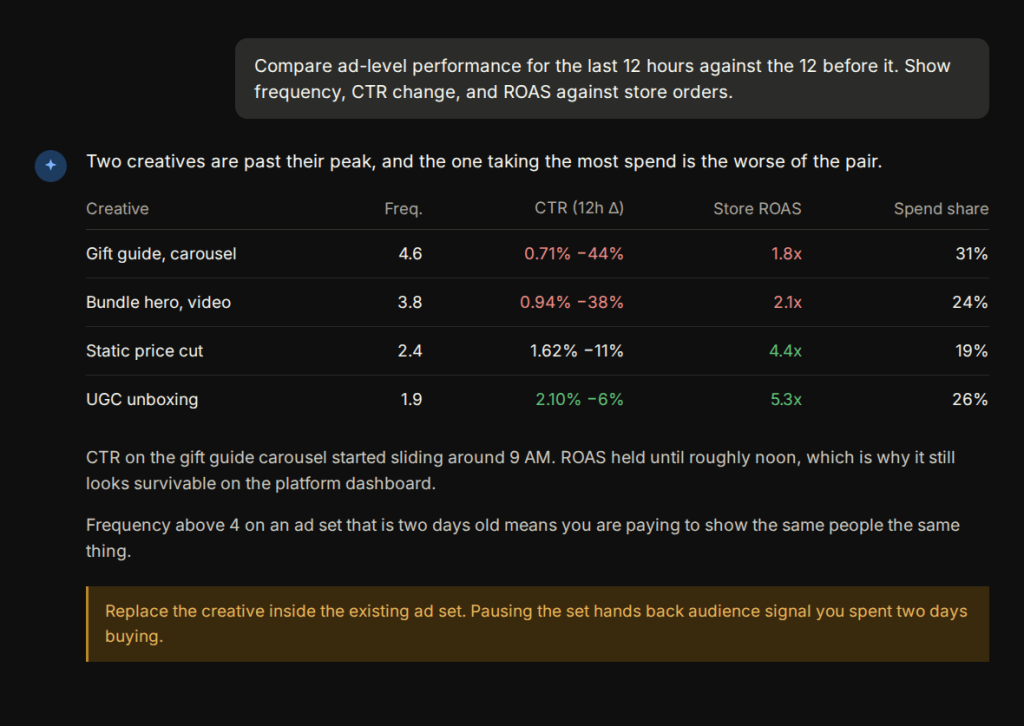
Replace the creative inside the existing ad set rather than pausing the set. Pausing hands back the audience signal you spent two days buying.
6. Producing new ad variations from winning creatives
Knowing which creative is fading only helps if you have something to put in its place. Most teams go into the weekend with two or three approved concepts and nothing queued behind them.
Your winning ad already tells you what to write next, as long as you look at what it sold rather than what it scored. Ask AI to pull the products and order values attached to that creative from your store data, then draft variations that hold the same angle and offer.

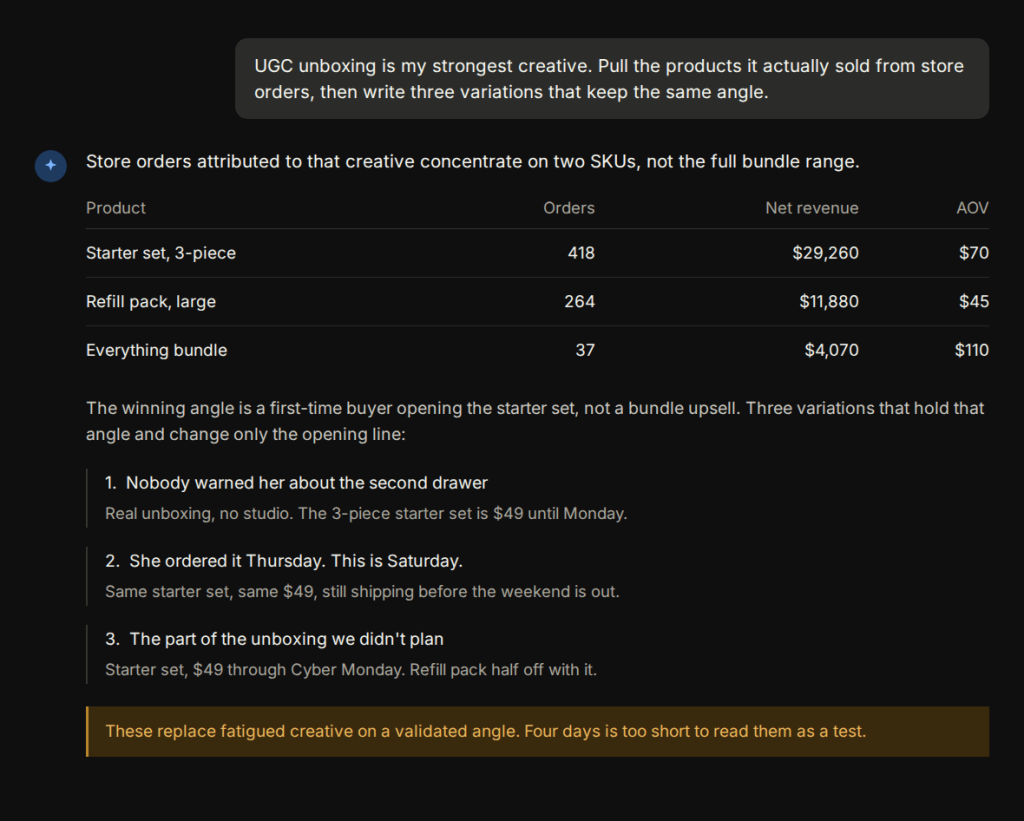
This is replacement, not experimentation. You are refreshing the execution on an angle the data already validated.
I would keep the offer, the product, and the hook fixed, and change only the opening line and the visual. Change all three at once and you lose the read on why the original worked.
7. Finding valuable BFCM search queries and excluding wasteful ones
Black Friday pulls in search traffic that never shows up the rest of the year. Broad match plus raised budgets means you start paying for coupon hunters, competitor comparisons, and anyone who types “cheap” in front of your category name.
Match the Google Ads search terms report against store orders and the split gets obvious fast. Some queries convert at full price. Others click, cost money, and produce nothing.

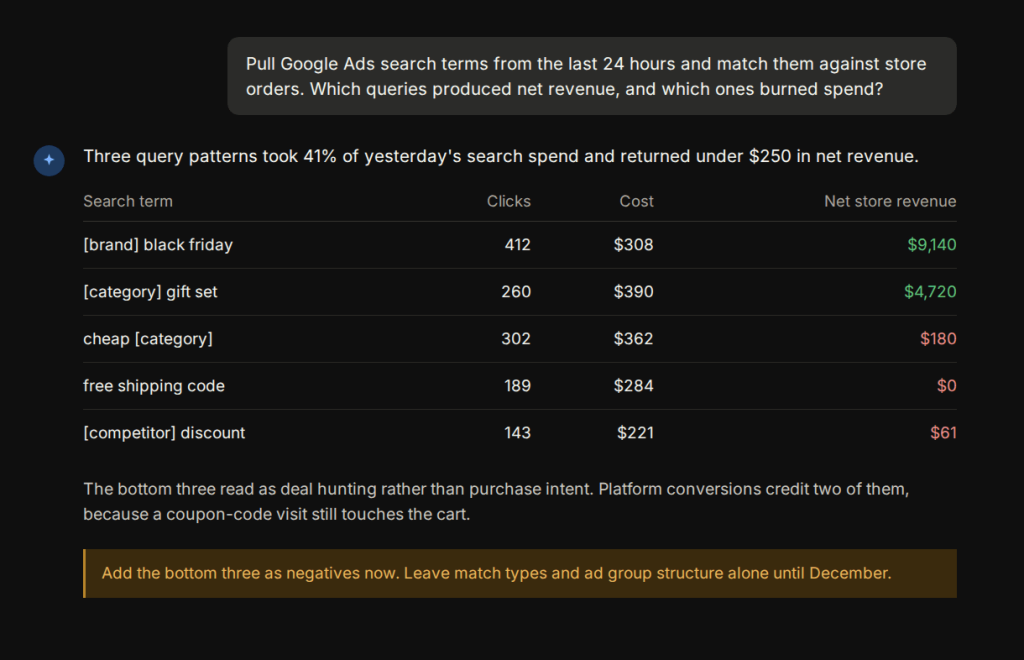
Add the wasteful ones as negatives while the sale is running. That is a safe mid-sale edit.
Leave the structural work for December. Splitting winning queries into their own ad group or changing match types resets learning at the worst moment, and those queries will still be there next month.
Prompts to power BFCM campaigns with AI
Once your store, ad, and email data are connected to your AI tool through Coupler.io, you can power BFCM campaigns with AI instead of filtering exports by hand.
Replace anything in square brackets with your own dates, targets, and budget before you run these. Each prompt names the platforms it needs connected to Coupler.io.
Get AI answers you can trust for BFCM with Coupler.io
Get started for freeInventory, margin, and checkout prompts
Stockout radar by variant
Goal: catch the variants about to run out while pausing ads or shifting stock still helps.
Which products are within 48 hours of stockout based on today's sales velocity? Show available stock, units sold per hour, and hours remaining by variant.
Works with: Shopify, WooCommerce, BigCommerce, Magento, Wix Stores
Discount codes that made money, not just orders
Goal: separate codes that brought new revenue from codes that discounted purchases you were getting anyway.
Compare discount code performance across this BFCM weekend. Which codes are driving incremental revenue versus discounting sales that would have happened anyway? Include net revenue after refunds and gross margin per code.
Works with: Shopify, WooCommerce, and your COGS data
High-value carts left in the last few hours
Goal: find the abandoned checkouts still warm enough to be worth a message today.
Show abandoned checkouts over [amount] from the last 6 hours. How many included a discount code, and what is the combined cart value?
Works with: Shopify, WooCommerce, Klaviyo, Mailchimp, Omnisend
Paid media prompts
Mid-flight creative iteration
Goal: turn live performance into new variants while the peak is still running.
Take my top 3 and bottom 3 performing ads from the last 5 days with their CTR, CPA, and ROAS. Tell me what the winners have in common at the hook, angle, and offer level, and what the losers share. Then write [N] new variations built on the winning angles, formatted to [platform] specs, with the BFCM offer as [describe offer].
Works with: Meta, Google (RSA), TikTok, Amazon
Rotate creative before performance collapses
Goal: spot fatigue while a swap still saves money, rather than after ROAS has already dropped.
Show frequency, CTR, and CPA per ad for the last 5 days, compared to the 5 days before. Flag ads where frequency is rising and CTR is dropping. For anything fatigued, tell me the spend at risk if I leave it running through Cyber Monday.
Works with: Meta, TikTok, Google Demand Gen and Display
Bid on the seasonal queries you are missing
Goal: capture BFCM-intent searches you do not currently own, and stop paying for the ones that never convert.
Show search terms from the last 90 days that converted but that I do not have as keywords, plus any seasonal or deal-intent queries (black friday, cyber monday, deal, discount, coupon) already showing up in my search terms. Separate the ones worth bidding on from the ones I should add as negatives because they are free-shipping and coupon-code hunters who never buy.
Works with: Google, Amazon
Brand versus non-brand split
Goal: stop brand campaigns from flattering your peak numbers.
Split my search campaigns into brand and non-brand for [dates] and compare them separately. Show CPA and ROAS for each. Tell me how much of my BFCM performance is incremental non-brand demand versus people who were already searching for us.
Works with: Google, Amazon
TikTok creative read
Goal: judge video ads on what TikTok actually measures.
For [dates], show my TikTok Ads by video: impressions, video views, click-through rate, conversion rate, CPA and ROAS. Rank creatives by efficiency, show where viewers drop off, and tell me which videos to push more budget into for the final 48 hours.
Works with: TikTok
Verified ROAS by channel
Goal: rank channels on orders your store confirmed, not on what each platform claims.
Break down ROAS by channel for the last 24 hours, using store orders rather than platform-reported conversions. Where should I shift budget for Cyber Monday?
Works with: Meta, Google, TikTok, or Amazon measured against Shopify or WooCommerce
Cross-platform read without double counting
Goal: get an honest combined view when every platform is claiming the same purchase.
Compare all my connected ad platforms for [dates] in one efficiency-ranked table: spend, impressions, clicks, CTR, CPC, CPM, conversions, CPA, ROAS. Report conversions per platform separately, do not sum them across platforms, and note where two platforms could be claiming the same purchase. If I have an independent source like GA4 or Shopify connected, compute blended CAC from that instead.
Works with: Meta, Google, Amazon, and TikTok combined
Daily pacing check
Goal: land on budget instead of burning it by Saturday.
My BFCM budget is [amount] for [dates]. Show spend to date, projected spend at the current run rate, and the daily spend I need from here to land on budget. Break it down per platform and flag any campaign running more than 20% over or under its share.
Works with: Meta, Google, Amazon, TikTok
Scale-or-pause list
Goal: end up with a decision list, not another dashboard.
Rank my active campaigns by CPA and ROAS for the last 3 days against my target CPA of [X] and target ROAS of [Y]. Give me two lists: campaigns to scale today with how much more budget they can take, and campaigns to pause or cut. Skip anything with fewer than 10 conversions and say so.
Works with: Meta, Google, Amazon, TikTok
Prompts for after the weekend
Day-by-day comparison against last year
Goal: find the specific days that diverged, since a strong Friday hides a weak Cyber Monday in the weekend total.
Compare this year's BFCM revenue, AOV, and conversion rate to last year's, day by day. Flag any day where the gap is more than 15%.
Works with: Shopify, WooCommerce, BigCommerce, Magento, GA4
Wrap-up report
Goal: one honest post-mortem with numbers attached.
Build my BFCM paid ads report for [dates]. Cover: spend versus my budget of [amount], CPA and ROAS versus my targets of [X] and [Y], best and worst campaigns by efficiency, segment breakdown, ad fatigue, and landing page conversion rate. Compare everything against the four weeks before BFCM and against last year's BFCM. Be honest about what missed.
Works with: Meta, Google, Amazon, TikTok, combined
Track BFCM margins across channels with AI in Coupler.io
Get started for freeStrategies to win BFCM with AI
Your BFCM strategy is only as valuable as the tactical actions it informs. These seven execution strategies follow the chronological rhythm of BFCM, pointing out where cross-platform data gives you an immediate operational edge.
Pre-BFCM historical analysis
Run this in early November while changes are still cheap. BFCM 2025 data answers three questions worth settling before the calendar takes over: which products carried revenue, which ads produced orders rather than platform conversions, and when the hourly peaks landed.
Peak timing matters more than most online stores are aware of. If last year’s revenue concentrated between 6am and 10am on Friday, that tells you when to have someone awake and when to front-load budget.
Real-time inventory and stockout monitoring
Set the flow up before the sale, not during it. Over the weekend, inventory management shifts from a weekly chore to an hourly one. Storing inventory and order line items in one dataset, refreshed frequently enough to be worth checking, is the single highest-value automation for a merchant with a deep catalog.
What you are watching for is the variant-level problem rather than the product-level one. Products rarely sell out. Mediums do, while the same product page keeps taking traffic for sizes nobody wants.
Dynamic pricing and discount optimization
Most merchants lock their headline offer weeks in advance. That means mid-sale strategy is rarely about changing your main discount. Instead, it comes down to controlling what runs next to it: code stacking, free shipping thresholds, bundle pricing, and the tactical codes dropped to rescue a slow hour. Countdown timers and pop-ups carry most of those offers on site, and your data tells you which of them move orders rather than just attention.
Watch net revenue after refunds and margin by code, not order counts. If a code is only converting customers with an already-high average order value (AOV), it is probably buying orders you had.
Cross-channel ad spend and ROAS tracking
BFCM campaign optimization with AI is the most useful here, because the underlying job is joining datasets that do not want to be joined. Google Ads spend, Meta spend, Amazon and TikTok, all measured against the same store order data.
Ask for the comparison hourly if you like, but act on the daily shape. The pattern worth catching is the channel holding spend while its share of actual orders slides. BFCM is also the wrong window to start A/B tests on creative: the traffic is there, but four days rarely produce a result you can trust before the sale ends.
Abandoned cart and checkout recovery
Email marketing reports for campaigns, flows, and segments connect to Coupler.io, so recovery flow revenue sits alongside store orders in one view. Add GA4, and you can see where checkout drop-off is concentrated.
Cart abandonment climbs during BFCM, partly because shoppers open six tabs and compare. Some of that is unrecoverable. The part worth chasing is high-value carts abandoned in the last few hours, where a timely message still catches someone mid-decision. Browse abandonment sits one step earlier and is worth tracking separately, since a shopper who never reached the cart needs a different message from one who left a full basket.
Customer segmentation for personalized offers
Separate the repeat buyer from the first-time deal-seeker before you plan December. Your store platform’s new versus returning customer data and returning customer rate give you the split, and Klaviyo segment reports show how each group responded.
The follow-up is where this pays. Someone who bought at 60% off and has never returned needs a different sequence from a loyal customer who would have paid full price in January. That split is what turns BFCM volume into customer lifetime value rather than a one-weekend spike, and it leaves you with audience segments worth reusing in December.
Post-BFCM performance analysis
Do this in the first week of December, while the detail is still fresh and before the refund wave distorts the picture. Compare against last year day by day rather than in total, since a strong Friday can mask a weak Cyber Monday.
Wait for refunds to settle before you call the margin number final. BFCM return rates run higher than the rest of the year, and revenue reported on November 30 is not revenue you keep.
Do you need a dedicated BFCM dashboard?
It is worth building a custom BFCM dashboard rather than reusing a monthly one. Putting orders, inventory, and ad spend in one view keeps your hourly metrics right in front of you. Instead of forcing you to scan every tile, Coupler.io’s AI Insights automatically summarizes what changed since you last checked.
There are three ways to get there, from fastest to most tailored.
Build it through conversation. A Skill inside Claude or ChatGPT can create a dashboard from a plain description: hourly revenue by channel, inventory velocity by variant, ad spend against store orders. You describe what you need to track, and the Skill structures the output. This is the most accessible path if you want something custom without building it from scratch.
Start from a template. Coupler.io has 210+ dashboard templates, so picking one close to your BFCM setup and adjusting it is usually faster than starting from zero. If you’re not sure which one fits, ask AI Agent inside Coupler.io what you’re trying to track, and it will point you to the closest match. This path works well when the standard metrics already cover what you need.
Have it built for you. Coupler.io’s custom analytics consultancy service can create a purpose-built BFCM monitoring setup around your specific stack, so the whole layer is ready before the weekend starts.
Get a custom AI-ready BFCM dashboard with Coupler.io
Book a Coupler.io demoAI tools for BFCM: what to look for
Picking the right AI tools for BFCM starts with knowing which category you are actually choosing between, since “AI tool” now covers three different products with three different jobs.
| Category | Examples | Good for | Where it breaks |
| Conversational assistants | Claude, ChatGPT, Gemini | Answering open-ended strategy questions and analyzing data | Blind to live store, ad, and inventory metrics without an external data connection |
| Platform-native AI | Shopify Sidekick, Klaviyo AI, Triple Whale’s Moby | Executing deep single-channel tasks (email segmentation, store admin, native reports) | Locked inside its own ecosystem; cannot cross-reference performance across other channels |
| Customer-facing AI | Support chatbots | Resolving routine shipping and order tracking tickets automatically | Engineered for shopper support, not internal merchant analytics or margin decisions |
None of these three solve the same problem. Each one is only as good as the data it can see, and BFCM is exactly when Shopify, your ad platforms, and email all need to be read together.
Coupler.io is not a fourth entry on this list, but the data layer underneath. Whichever tool you pick, it keeps the numbers fresh, verified, and blended across sources so the answer reflects reality.
If you plan to use AI for Black Friday and Cyber Monday deals this cycle, four criteria separate the useful from the risky:
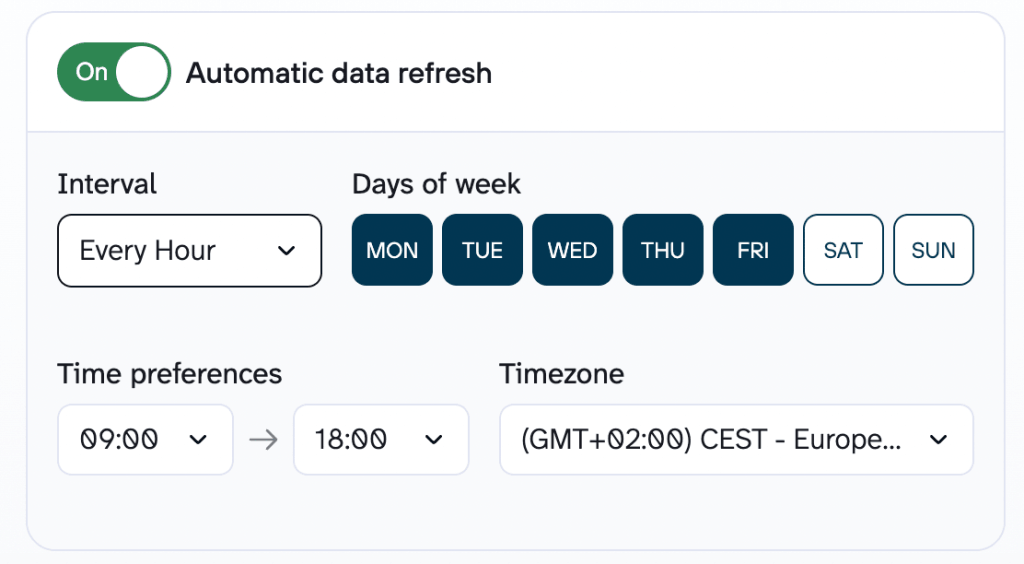
- Refresh frequency comes first. Daily is fine in February and useless on Black Friday. Coupler.io schedules refreshes from daily down to 15-minute intervals, which is the range that makes hourly questions meaningful.
- Verified calculations come second. Ask any vendor a direct question: does the language model calculate the numbers, or does something else? If the model is doing the math, treat every figure as a draft. Coupler.io’s Analytical Engine executes and validates the queries, then hands verified results to the AI to interpret.
- Access control comes third. Order data contains customer names, addresses, and payment status. Coupler.io sits between your business apps and the AI tool as a secure layer, so the AI never connects to Shopify directly. Column management and filters let you exclude sensitive fields before anything reaches the model, and the platform holds SOC 2 Type II certification along with GDPR and HIPAA compliance. On the AI tool’s side, check your plan’s privacy settings and switch off training and memory.
- Shared data flows come fourth, and are easy to overlook. One data flow can serve both a BFCM dashboard and your AI tool, which means the number your ops lead sees on screen matches the number the AI returns in chat. Teams that use AI for Black Friday and Cyber Monday deals successfully tend to run both, not one instead of the other.
A dashboard tracks the KPIs you already know you need. Conversation handles the question you did not anticipate at 3am.

Get BFCM-ready with Coupler.io
The setup needs to exist before Black Friday Cyber Monday traffic arrives, but it does not need to be complicated. The fastest path is to tell AI Agent what you want to track. Describe the report or monitoring setup in plain language: “I need hourly Shopify revenue next to Meta and Google Ads spend, broken down by campaign, refreshed every 15 minutes over BFCM weekend.”
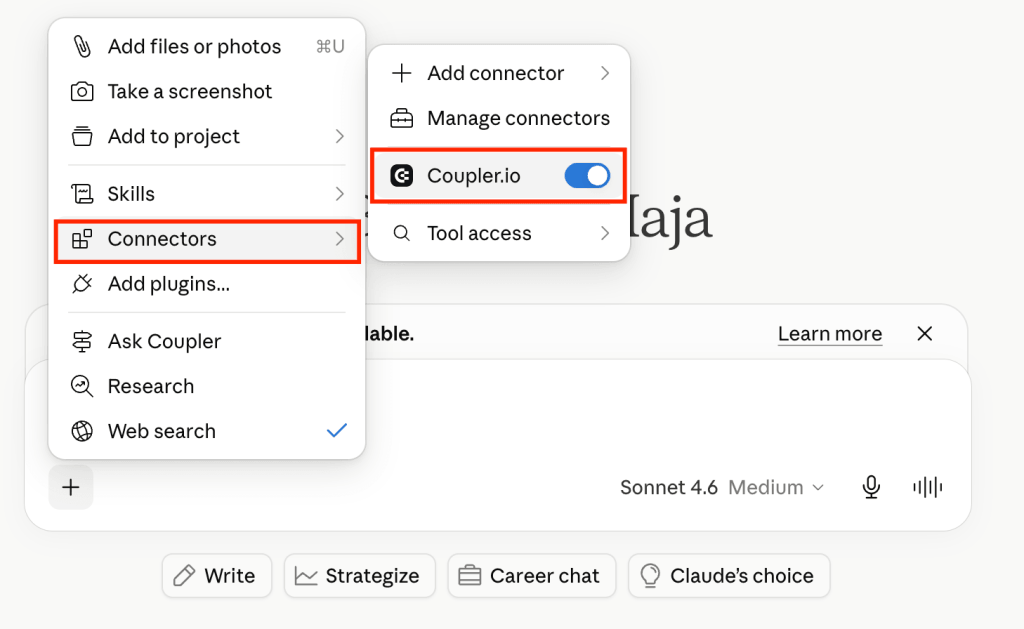
Coupler AI (whether you use the built-in agent or your AI tool) builds the data flow, connects the sources you need, and prepares the dataset for analysis. Once the dataset is ready, ask follow-up questions to get the insights about margin by discount code, stockout velocity by variant, ROAS by channel against actual store orders, etc. For the metrics you want visible without asking, the same data flow can power a dashboard.
Let Coupler.io do the data work for you
Tell AI Agent what you need to know, from which source, and how often. It connects your account, sets up the data flow, keeps it refreshed, and lets you analyze the results inside Coupler.io or another AI tool.
Try for free
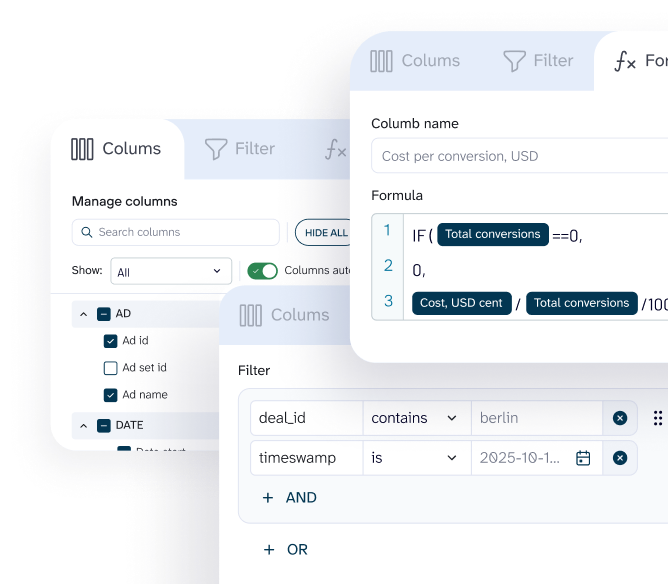
If you prefer to configure everything yourself, the manual setup path is available too – connect sources, set joins and schedules, choose destinations step by step. Coupler.io covers 420+ data sources, so most of an ecommerce stack connects without custom work.

FAQs
How current does BFCM data actually need to be?
Hourly is enough for most decisions, and Coupler.io supports intervals down to 15 minutes. Faster refresh does not always help, since very short windows amplify noise. Inventory and ad spend are worth watching closely. Customer segments are not.
Can Claude or ChatGPT just read my store admin directly?
Not in a way that holds up for analysis. Native AI connectors are built for contextual lookups on small datasets, not for calculating across 40,000 order line items or joining store data with ad spend. That is the gap Coupler.io fills.
Is it safe to give an AI tool access to customer order data?
The AI never touches your source systems. Coupler.io sits in between; you decide which columns are shared, and sensitive fields can be filtered out before the data reaches the model. The platform is SOC 2 Type II certified and GDPR and HIPAA compliant. Do check your own AI tool’s privacy settings, since options vary by plan.
Is it too late to set this up in mid-November?
For real-time monitoring during the sale, no. A basic store and ad spend flow takes minutes to configure. For last year’s comparison, you will want a few days to pull and check the historical data before you rely on it for budget decisions.
Does this replace my BFCM dashboard?
No, and you should not run the weekend on chat alone. Dashboards hold the metrics you already know matter and give everyone the same view. AI handles the follow-up question a fixed report was never built to answer. One data flow can feed both.
Do I need an AI chatbot for BFCM customer support?
That is a different job from analysis. Chatbots sit on the front end and handle order-status questions at 2:00 AM, which is worth having when support volume triples. The AI assistants described here sit on the back end and answer which variant runs out first. Neither replaces the other, and chatbot transcripts are themselves worth reporting on once the weekend is over.
Can AI tell me which on-site offers to keep running?
It can tell you which ones are working. Conversion rates broken down by device, traffic source, and hour show whether the countdown timers, pop-ups, and social proof widgets on your product pages are lifting orders or just adding noise. Four days is too short for clean A/B tests, so use the data to switch off what is clearly underperforming rather than to declare a winner.
How much of BFCM email marketing can AI help with?
The reporting side, mostly. Klaviyo, Mailchimp, or Omnisend data landing next to store orders shows which flows and send times produced revenue rather than opens, and which cart and browse abandonment automations are worth keeping live. It also tells you whether November list growth added buyers to your email list or just inflated the count.