What is revenue reconciliation?
Revenue reconciliation is an accounting control process that compares revenue recorded in your general ledger against source data from billing systems, contracts, and bank statements. It ensures that reported income reflects actual business activity. This process helps catch errors, missing transactions, or timing differences that could make the financial results inaccurate.
This guide covers why reconciliation of revenue matters, how to do it step by step, automation strategies that reduce manual effort, and practical solutions to common challenges.
How to do revenue reconciliation step by step
Here are the key steps in the revenue reconciliation process:
- Collect, standardize, and pre-validate data – to ensure you work with complete and accurate information.
- Define matching criteria – to set clear rules for comparing transactions across all sources.
- Match transactions – to identify which entries align and which require further review.
- Investigate and analyze discrepancies – to understand the causes of unmatched items.
- Resolve exceptions and make corrective entries – to correct errors and ensure your records reflect true revenue.
- Review and obtain management sign-off – to make roles clear and keep the company ready for audits.
- Maintain documentation and implement lessons learned – to improve future reconciliations and prevent recurring issues. 👇
Step 1: Collect, standardize, and pre-validate data
Accurate revenue reconciliation begins with pre-validation of data. This means you need to:
- Check for completeness (so all invoices and transactions are accounted for).
- Verify formats (dates, numbers, and currency are consistent).
- Catch obvious errors such as negative amounts or duplicates.
Next, standardize your entries to compare and reconcile. This can be tricky because different sources often use different date formats, currencies, or naming conventions for customers and products. Consistently aligning these fields is essential before reconciliation.
Depending on the volume of data, frequency of reporting, and number of sources, manual reconciliation can become time-consuming and error-prone. At this stage, automation helps optimize the process.
Coupler.io is a data integration platform that combines data from multiple systems, including accounting and billing platforms (QuickBooks, Xero, Stripe) and CRMs (HubSpot, Salesforce, Pipedrive), into a single, dynamic report. You can then export this report to a spreadsheet (Google Sheets or Excel) or a BI tool (Looker Studio, Power BI, Tableau) on schedule, so you always work with the latest data.
Collect and organize data from financial apps and CRM tools

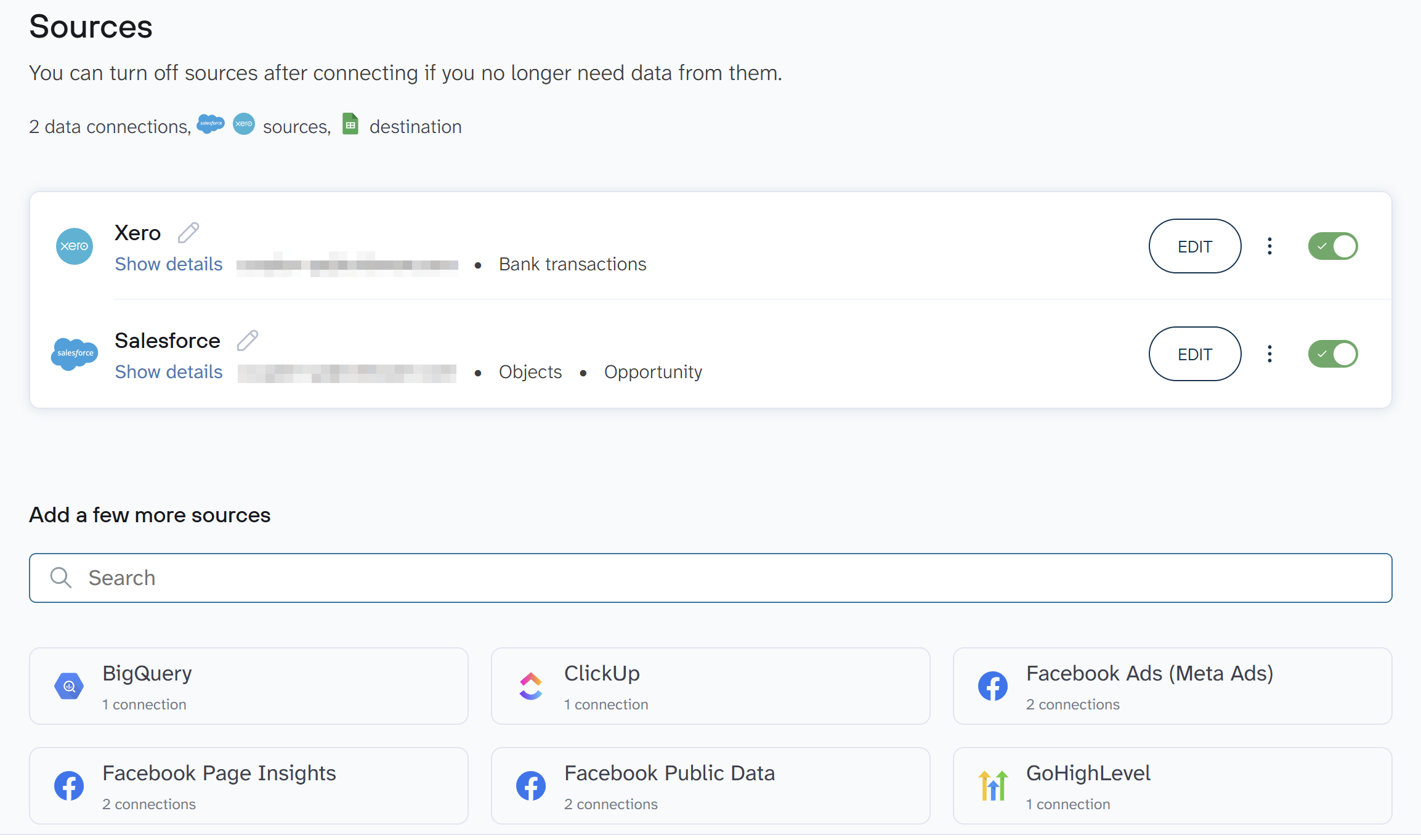
Collect and organize data from financial apps and CRM tools
Try Coupler.io for freeThis removes manual data collection, cuts human error, and frees up hours each week. Your numbers arrive clean, structured, and ready for reconciliation, so you gain clearer oversight and a reliable source of truth.
Step 2: Define matching criteria
Effective comparison of transactions requires clear rules for what counts as a match. The selection of matching criteria should align with your business needs. For example, if your goal is strict accounting reconciliation, an exact invoice number match may be required, whereas for high-volume operational reporting, matching by customer ID and transaction date may suffice.
It’s also important to define tolerance levels. Some comparisons require exact matches (e.g., amount and date), while others may allow small variances (e.g., rounding differences in currency conversions). Timing considerations are equally critical: some businesses need same-day matching, while others can tolerate a delay, such as a T+3 settlement window.
Documenting these rules ensures consistency and verifiability. Examples of commonly used matching criteria include:
- Entity matching: Customer ID, account number, or customer name (with standardized spelling).
- Transaction attributes: Invoice number, transaction amount, or transaction date.
- Tolerance thresholds: Allowable variance in amounts or date ranges.
By clearly defining and documenting these criteria, your transaction comparisons remain consistent, auditable, and aligned with business objectives.
Step 3: Match transactions
To accurately identify matches and exceptions while avoiding hidden errors, it is important to define a clear matching methodology, not just rely on tools. Start by determining the matching criteria, such as transaction ID, date, amount, or other key fields. Consider different matching scenarios:
- 1:1 matches – a single transaction in one source corresponds to a single transaction in another.
- 1:many matches – one transaction in the first source corresponds to multiple transactions in the second source (e.g., split payments).
- many:many matches – multiple transactions in each source collectively correspond to each other (e.g., batched entries).
For manual matching, use checklists or spreadsheets to systematically compare key fields. Highlight exact matches and note exceptions for further review. For automated matching, employ formulas, conditional formatting, lookup functions, or reconciliation software to quickly flag matches, partial matches, or discrepancies.
When categorizing results:
- Matched – transactions align completely based on defined criteria.
- Unmatched – no corresponding transaction found in the other source.
- Partial match – some fields align, but differences exist (e.g., amount discrepancies or missing dates).
Techniques beyond pivot tables include:
- Conditional formatting to flag discrepancies.
- VLOOKUP/XLOOKUP or INDEX-MATCH for automated comparisons.
- Summary tables to consolidate results by category.
- Reconciliation dashboards that visualize matched and unmatched totals.
This approach ensures both consistency and clarity in identifying exceptions, while providing a structured method to handle complex matching scenarios.
Step 4: Investigate and analyze discrepancies
To systematically investigate transaction discrepancies, follow a structured methodology:
- Identify and categorize discrepancies: Sort unmatched items by type (e.g., timing differences, missing invoices, mis-posted entries, data entry errors). Categorization helps target the investigation approach.
- Prioritize discrepancies: Focus first on items with the highest materiality (financial impact), the greatest risk (regulatory or operational), or recurring patterns that may indicate systemic issues. Lower-risk discrepancies can be addressed later.
- Investigate each type using targeted techniques:
- Timing differences: Compare transaction dates across systems; verify if cut-off dates or processing delays explain the mismatch.
- Missing invoices: Check vendor records, purchase orders, and receiving reports to locate or confirm absent documentation.
- Mis-posted entries: Review the general ledger, trial balances, and supporting journals to identify postings to incorrect accounts.
- Data entry errors: Match entries against source documents (invoices, receipts, contracts) and correct typos or numerical mistakes.
- Timing differences: Compare transaction dates across systems; verify if cut-off dates or processing delays explain the mismatch.
- Document your findings: Maintain detailed records for each discrepancy type, including:
- Description of the discrepancy and suspected cause.
- Steps taken during the investigation.
- Supporting evidence (screenshots, invoices, emails, ledger extracts).
- Resolution or corrective action taken.
- Analyze patterns and implement preventive measures: Track recurring discrepancies to identify systemic issues and improve processes, reducing future reconciliation problems.
Step 5: Resolve exceptions and make corrective entries
For your records to reflect true revenue and expenses, correct any accounting errors promptly using appropriate correcting entries. There are several types of corrections:
- Error correction entries – Fix mistakes such as incorrect amounts, accounts, or transaction details.
- Reclassification entries – Move amounts between accounts to properly reflect the nature of a transaction (e.g., moving prepaid expenses to expense).
- Accrual or deferral adjustments – Correct timing differences, such as recognizing revenue too early or adjusting accrued expenses.
All corrections must be reviewed and approved by a manager or controller before posting to maintain internal controls.
You should also maintain a complete audit trail for each correction, including:
- Original transaction details (invoice, receipt, or contract).
- Description of the error and reason for the correction.
- Date of correction and name of the person making it.
- Approval signature or electronic authorization.
Examples of correcting entries:
- Error correction: Debit office supplies $500, credit accounts payable $500 (if the wrong vendor was recorded originally).
- Reclassification: Debit prepaid rent $1,000, credit rent expense $1,000.
- Deferred revenue adjustment: Debit deferred revenue $2,000, credit revenue $2,000 (if revenue was recognized before delivery).
Step 6: Review and obtain management sign-off
Unreviewed reconciliations can leave errors undiscovered, so management sign-off is critical to ensure accountability, validate internal controls, and support audit readiness. Appropriate reviewers should be selected based on the materiality and risk of the account. For example, a finance manager for routine reconciliations, or the controller/CFO for high-value or complex accounts.
Management should use a review checklist to confirm that:
- All totals match across all sources and sub-ledgers.
- All reconciling items and exceptions are investigated and resolved.
- Supporting documentation is complete and accurate.
- Any unusual or significant transactions are properly explained.
Sign-off should occur after the reconciliation is prepared but before financial statements are finalized so that the financial close process is accurate and complete. Finance leadership should formally approve the reconciliation, confirming that it meets internal standards and is ready for audit.
Step 7: Maintain documentation and implement lessons learned
Without proper documentation, mistakes repeat, and errors persist. To improve future reconciliations, retain a comprehensive record of each reconciliation process, including:
- Components: Reconciliation spreadsheets, issue logs, supporting transaction documents, system screenshots, and approval communications.
- Format: Standardized digital templates (e.g., Excel, Google Sheets) stored centrally.
- Location: Secure, accessible shared drives or document management systems with controlled permissions.
- Retention period: Records kept according to regulatory or audit requirements (commonly 5 to 7 years, depending on jurisdiction).
Adopt a systematic approach to capturing lessons learned: maintain an “issues and resolutions log” to track recurring discrepancies, root causes, and applied solutions. Regularly review this log to identify patterns and implement process improvements such as updating matching criteria, automating validations, or adjusting procedures to reduce future errors.
Organize documentation in a clear, consistent structure, such as by date, department, reconciliation type, or issue category. This ensures that information is easily searchable and usable for audits, reporting, and continuous process improvement.
By following these steps, reconciliations become faster, more reliable, and less prone to errors. In the meantime, it will provide a clear record to support decision-making, compliance, and operational efficiency.
To save time, reduce human errors, and keep financial data accurate, let’s review how to automate the process.
How to automate revenue reconciliation
In many companies, the process of matching customer payments to recorded deals is initially manual. Let’s consider a SaaS business as an example: When a customer completes a purchase, the deal is recorded in a CRM like Salesforce, and the corresponding payment appears in your accounting system, such as Xero. During reconciliation, you must ensure that the payment in the bank matches the recorded deal or invoice, which can be time-consuming and error-prone as transaction volume grows.
Automation becomes necessary when the number of transactions increases, the reconciliation frequency is high, or the process involves complex rules. In this scenario, you need to reduce human error and free up time for analysis instead of manual matching.
General automation principles include:
- Data centralization: Combine records from multiple systems into one place for comparison.
- Rule-based matching: Automatically pair transactions based on criteria such as amount, date, or customer.
- Exception handling: Flag only unmatched or inconsistent records for manual review.
Revenue reconciliation can be automated in two ways:
- Collect data from your CRM and accounting systems into a spreadsheet or database to create a centralized place for reconciliation.
- Alternatively, integrate the data from your reconciliation workflow with AI conversational tools. Then ask them to analyze patterns and intelligently match transactions.
With Coupler.io, a data integration platform, you can centralize data from your CRM and accounting system into a spreadsheet or BI tool. In addition, it allows you to create revenue dashboards and even integrate business data with AI agents for conversational reconciliation.
Revenue reconciliation with Coupler.io
Note: This approach automates data collection and preparation, not the full revenue reconciliation process.
What gets automated:
- Extracting data from multiple systems.
- Standardizing formats.
- Delivering datasets to your spreadsheet or BI tool.
- Scheduled data refreshes.
What remains manual:
- Matching transactions.
- Investigating discrepancies.
- Correcting entries.
In other words, you save time preparing data, but human judgment is still required for the actual reconciliation. The automation process follows these steps:
- Export deals (revenue transactions) from your CRM or billing system (Salesforce, HubSpot, Pipedrive, Stripe, etc.) to Google Sheets, Excel, or a BI tool on an automated schedule.
- Load the bank statement (payment records) from your accounting system (QuickBooks, Xero, etc.) to the same destination with matching columns aligned.
Once both datasets are in your destination, you perform matching and analysis using spreadsheet formulas, pivot tables, or BI tool features. The automation eliminates manual exports and ensures you’re always working with up-to-date data.
Let’s dive into the process step by step.
1. Export deals (revenue transactions) from CRM
For this example, I’ll extract invoiced revenue data from Salesforce. Connect your Salesforce account, set the data type to Objects, and select Opportunity, which represents customer deals and associated revenue in Salesforce.

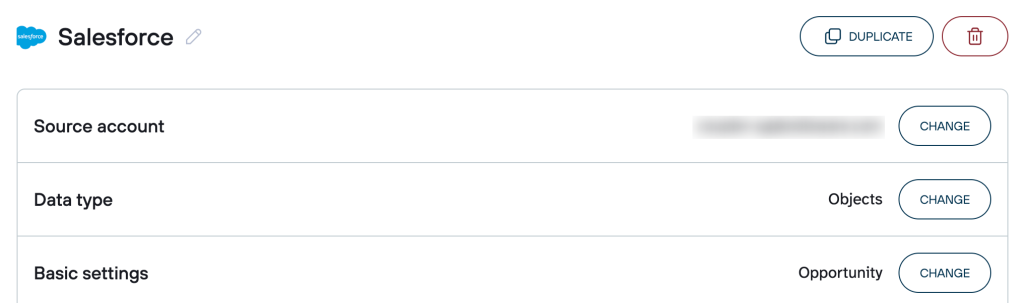
Configure your dataset:
After connecting, preview the extracted data. Key columns for reconciliation include:
- ID (deal identifier).
- Name (customer identifier).
- Amount (contract or invoice value).
- CloseDate (to track timing for revenue recognition and reporting).
- StageName (to filter for revenue-generating opportunities).
Apply filters to include only revenue-generating opportunities. For example, filter by StageName = Closed Won to show deals that have converted to actual revenue (excluding prospects or lost opportunities that shouldn’t appear in revenue records).
Sort and arrange columns to match the structure you’ll use for comparison with payment data.

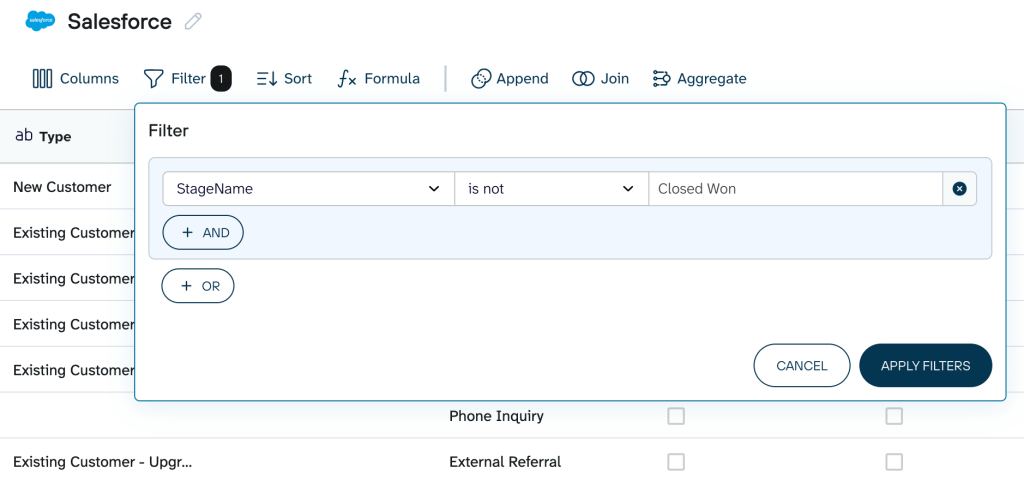
Once your revenue transaction data is configured, proceed to extract payment records.
2. Load bank statement (payment records) from the accounting system
Next, extract payment or bank transaction data from your accounting system to match against the revenue transactions from Step 1. In this case, revenue transactions and payment data are loaded into separate sheets/tabs in your destination. You manually compare them using spreadsheet formulas like VLOOKUP.
Create a new data flow for your accounting system. Connect to your accounting platform, e.g., Xero, authorize access, and select Bank transactions as your data entity.

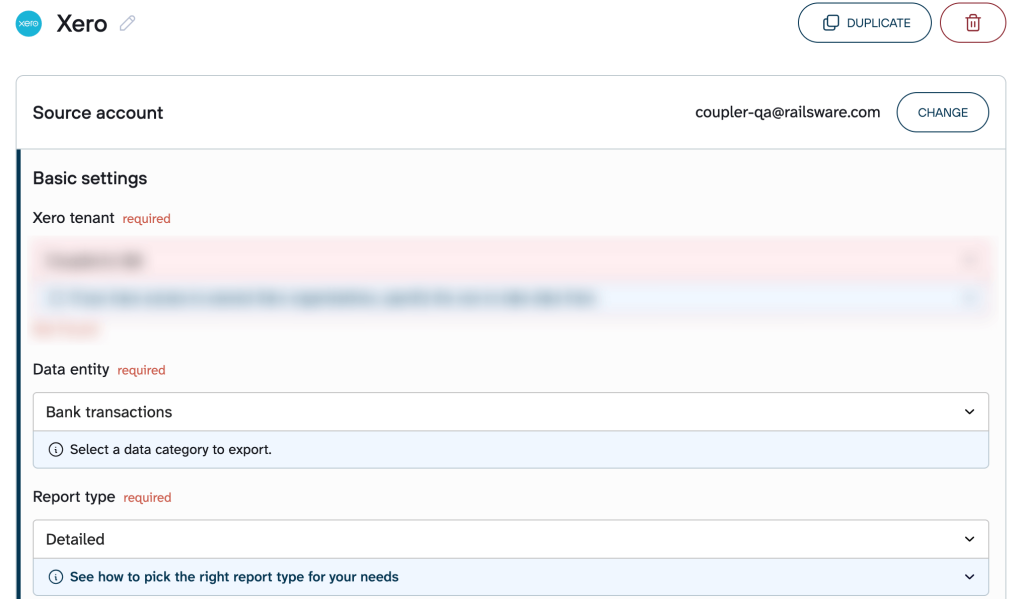
Preview your data and make the necessary adjustments, as you did with the Salesforce deals above. Filter by transaction type to include only customer payments (e.g., Type = RECEIVE to only show the payments customers made.

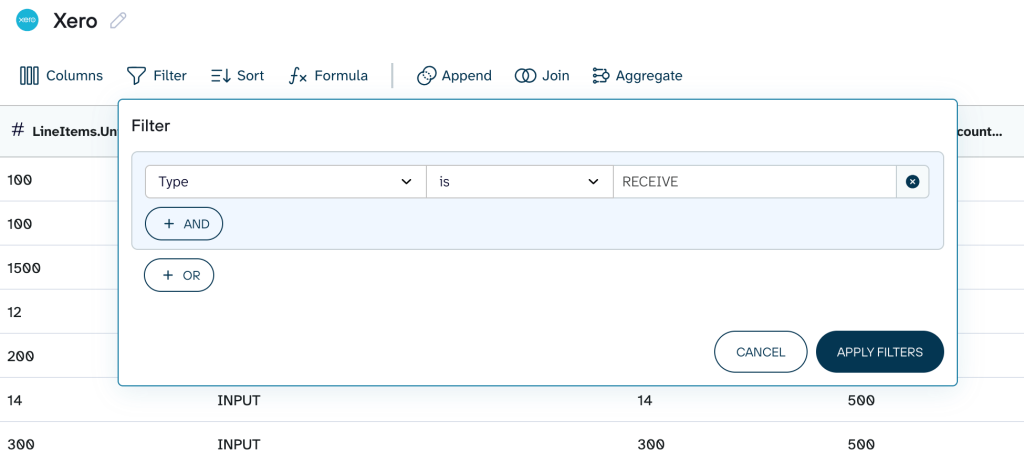
Select the destination where you previously loaded your Salesforce deals. Choose the spreadsheet/workbook you used for the Salesforce data, specify another sheet, and have your bank statement exported. Next, schedule the automatic data refresh.
Navigate to your destination and complete the reconciliation by verifying that the bank transactions match the deals.
With both datasets in your destination, use spreadsheet functions to match transactions. For example, the following formula should help you find payments that correspond to each invoice:
=IFERROR(VLOOKUP([invoice_cell],
[PaymentSheet]![lookup_range], [column_number],
FALSE), "Unmatched")
Where:
- [invoice_cell] = Cell containing the invoice number you want to match (e.g., A2)
- [PaymentSheet] = Name of the sheet/tab containing payment data
- [lookup_range] = Range in payment sheet with invoice numbers in first column (e.g., $A:$D)
- [column_number] = Which column in the range contains the payment amount (e.g., 3 for column C)
The IFERROR wrapper displays “Unmatched” for invoices without corresponding payments, making exceptions immediately visible.
Automate financial reporting with Coupler.io
Get started for freeRevenue reconciliation with AI
Revenue reconciliation can be slow and error-prone when handled through rigid, rule-based matching tools. AI can improve this process by spotting patterns that aren’t obvious in traditional systems, such as fuzzy matches, inconsistent naming, or contract notes that influence how a transaction should be interpreted. It can also compare fields in a more flexible, natural-language way to reconcile data that doesn’t line up perfectly but is still logically connected.
When AI reconciliation makes sense:
- Matching fields aren’t standardized (customer names are spelled differently across systems)
- Reconciliation involves unstructured data (contracts, emails, delivery confirmations)
- Business logic is complex (multi-currency, partial payments, bundled services)
That said, an AI-driven approach works best when your datasets are relatively clean and when the goal is rapid exploratory analysis or ongoing automated checks. For formal financial reporting, AI should complement, not replace, your established controls. Results still need human verification, and any high-impact discrepancies should be reviewed in the source systems.
Coupler.io allows you to integrate data from your data sources with generative AI tools, such as Claude and ChatGPT, to ask them to reconcile your revenue using conversations.
To use this for automated revenue reconciliation, all you need is to create two data flows, in our case, Xero and Salesforce. For each of them, connect the AI tool as a destination using in-app instructions and run the data flow. Then, go to your account in the AI tool and ask to reconcile the data from these data flows.
Here’s an example prompt for revenue reconciliation:
“I have two data flows connected to this chat: one containing my transaction data from Xero and another containing corresponding customer and sales contract data from Salesforce.
Please perform a comprehensive revenue reconciliation between these two datasets. Specifically, focus on the following steps and reporting:
Matching: Identify all transactions that match across both datasets. The primary matching criteria should be invoice number and customer ID, followed by a comparison of the transaction amount and transaction date.Discrepancy identification: Identify all unmatched items and variances. Classify them into the following categories:Xero only: Financial transactions present in Xero (financial ledger) but missing or not fully corresponding in Salesforce (CRM/Contract data).Salesforce only: Sales contracts or invoices present in Salesforce but not yet recorded or matched in Xero.Amount variance: Transactions that match on sales invoice number/customer ID but have a difference of $± 1.00 USD or more in the transaction amount.
Summary report: Provide a final summary table showing:Total revenue in XeroTotal revenue in SalesforceTotal reconciled revenueNet variance (total discrepancy amount)
Output the results in a structured format, using a table for the final summary and separate lists for each of the three discrepancy categories (Xero only, Salesforce only, amount variance).”
Wait for AI to process the data flows, perform the reconciliation, and return the results in the structured format you requested.

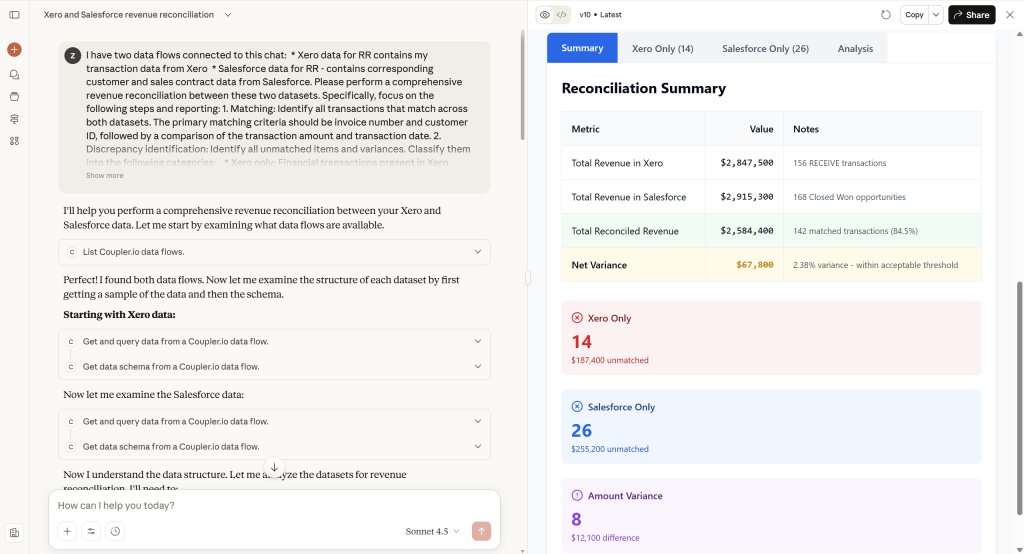
After the AI produces its analysis:
- Cross-check totals against source systems.
- Review a sample of matched and unmatched records manually.
- Confirm the AI’s matching assumptions align with your accounting policies.
- Re-run the prompt with clarifying instructions if something looks off.
Document AI-generated outputs as supporting material, not as final authoritative records.
Reconcile data with AI using Coupler.io
Get started for freeRevenue reconciliation examples
Reconciliation is often complex, especially when subscriptions or contracts bundle multiple products, services, or variable usage. That’s why concrete examples are essential: they show how the principles actually play out in real revenue scenarios. To make it concrete, we will cover three revenue reconciliation solutions:
- ASC 606 five-step model in practice – shows how the standard framework ensures revenue is recognized only when performance obligations are met, and cash flows align.
- Deferred revenue amortization – demonstrates a real-life scenario of an upfront payment being spread over a 12-month period and reconciled against the P&L.
- Complex usage-based revenue – illustrates how variable, usage-based revenue is matched to operational metrics, which highlights the challenges of integrating non-financial data.
1. ASC 606 five-step model in practice
To ensure that cash to revenue reconciliation meets accounting standards, you need a framework that links cash received to performance obligations. Without it, you risk misreporting revenue.
Example scenario:
A software company sells a $12,000 annual subscription that includes:
- Software license: $10,000.
- Support services: $2,000.
The $10,000 and $2,000 amounts represent the standalone selling prices (SSP) of each performance obligation. ASC 606 requires that the total transaction price be allocated to each obligation based on its relative SSP. Because the total SSP ($12,000) equals the contract price ($12,000), each obligation receives its full standalone amount. If the contract price were discounted, the discount would be allocated proportionally using these SSP ratios.
Step 1: Identify contract – confirm the customer agreement for the $12,000 subscription.
Step 2: Identify performance obligations – software access and support services.
Step 3: Determine transaction price – $12,000 total.
Step 4: Allocate price – software: $10,000; support: $2,000.
Step 5: Recognize revenue – monthly: $833 for software, $167 for support.
Reconciliation table:
| Month | Software revenue | Support revenue | Total revenue | Deferred revenue balance |
| Jan | 833 | 167 | 1,000 | 11,000 |
| Feb | 833 | 167 | 1,000 | 10,000 |
| Mar | 833 | 167 | 1,000 | 9,000 |
| … | … | … | … | … |
| Dec | 833 | 167 | 1,000 | 0 |
Reconciliation: Compare cash collected ($12,000) to total recognized revenue ($12,000) and the decreasing deferred revenue balance. Each month, recorded transactions must match this schedule.
2. Deferred revenue amortization
Unlike the previous example, which allocates a transaction price across multiple performance obligations under ASC 606, this focuses on a single obligation. It eliminates the need for allocation across multiple revenue streams.
Organizations track deferred revenue and its monthly transfer to the P&L to ensure accurate recognition of upfront payments. Through deferred revenue reconciliation, you prevent income from being overstated early or understated later.
Example scenario: Customer pays $1,200 upfront for a 12-month service starting Jan 1.
Step 1: Initial entry (Jan 1)
| Account | Debit | Credit |
| Cash | 1,200 | |
| Deferred revenue | 1,200 |
Step 2: Monthly revenue recognition
| Month | Debit | Credit | Notes |
| Jan | 100 | 100 | Recognize 1/12 of $1,200 |
| Feb | 100 | 100 | |
| Mar | 100 | 100 | |
| … | … | … | |
| Dec | 100 | 100 | Final month recognition |
Reconciliation table (partial):
| Month | Cash received | Revenue recognized | Deferred revenue balance |
| Jan | 1,200 | 100 | 1,100 |
| Feb | 0 | 100 | 1,000 |
| Mar | 0 | 100 | 900 |
| … | … | … | … |
| Dec | 0 | 100 | 0 |
Reconciliation: Check that the sum of recognized revenue plus remaining deferred revenue equals the original cash received ($1,200).
3. Complex usage-based revenue reconciliation
To verify that variable revenue (based on customer usage or consumption) is accurate, you need to match usage data to recognized revenue. If you don’t, recognized revenue may differ from actual cash earned.
Example scenario: A cloud API provider charges $0.05 per API call. January usage:
| Date range | API calls | Calculated revenue | Cash received |
| Jan 1–7 | 10,000 | 500 | 500 |
| Jan 8–14 | 12,000 | 600 | 600 |
| Jan 15–21 | 8,000 | 400 | 400 |
| Jan 22–31 | 15,000 | 750 | 750 |
Cash to revenue reconciliation will require the following steps:
- Step 1: Calculate usage-based revenue – multiply API calls by $0.05.
- Step 2: Compare to cash collected – ensure invoiced amounts match customer payments.
- Step 3: Identify exceptions – look for unbilled calls or late payments.
Reconciliation table:
| Period | Calculated revenue | Cash received | Variance | Notes |
| Jan 1–7 | 500 | 500 | 0 | Match |
| Jan 8–14 | 600 | 600 | 0 | Match |
| Jan 15–21 | 400 | 400 | 0 | Match |
| Jan 22–31 | 750 | 750 | 0 | Match |
| Total | 2,250 | 2,250 | 0 | Fully reconciled |
Reconciliation: Confirm that recognized revenue ($2,250) aligns with both cash received and usage metrics. If there is any discrepancy, investigate and correct it.
👉Bottom line: Whether you follow the ASC 606 framework, amortize deferred revenue, or track complex usage-based income, the key principle is the same. Make sure recognized revenue matches cash received and the underlying contracts or operational data.
Consistent, structured reconciliation turns an error-prone process into a clear and reliable system. This supports both accurate financial records and smooth business operations.
Why is revenue reconciliation important?
Beyond giving a clear, trustworthy view of business performance, revenue reconciliation delivers seven critical benefits.
Ensure compliance with ASC 606 and IFRS 15
ASC 606 requires recognizing revenue as performance obligations are satisfied. This means that revenue should be recorded only as the promised goods or services are delivered, not all at once. For example, if a company offers a software subscription but records the entire revenue upfront, it inflates early-period revenue and depresses later-period revenue. This creates a misleading picture of the company’s financial health.
Through revenue reconciliation, you can check that the timing of revenue recognition actually matches the underlying contracts. By systematically comparing recorded revenue against contract terms and delivery schedules, you confirm that every reported figure is complete, accurate, and consistent across multiple systems.
This also supports compliance: if companies underreport taxable revenue or misclassify contract income, they face penalties, fines, restatements, regulatory action, and reputational damage. Reconciliation reduces these risks by proving that revenue has been recognized properly under tax laws, contracts, and internal policies.
Improve fraud detection and strengthen internal controls
Revenue reconciliation helps prevent and detect fraud by creating a strong control environment. It matches each recorded sale against the corresponding payment records and supporting bank statements.
For example, consider a regional branch that records fake sales near quarter-end to meet targets. In this scenario, the fake sales would not have real customer payments or deposits linked to them. During reconciliation, these mismatches stand out: the sales ledger shows a transaction, but the payment system and bank records show nothing.
This cross-system verification, comparing sales entries, payment data, and bank activity, makes it extremely difficult for fraudulent entries to go unnoticed.
Make audits easier and lower audit costs
Regular revenue reconciliation creates an audit-ready documentation trail that significantly reduces audit time and costs. By consistently comparing revenue records with invoices, payments, and contracts, you ensure every document is accurate, complete, and organized.
This results in faster auditor walkthroughs, fewer document requests, and lower audit fees associated with revenue verification.
Increase accuracy in forecasts and valuations
Revenue reconciliation provides a foundation for accurate forecasting, budgeting, and strategic decision-making. For example, when a sales team reports incorrect revenue, forecasting becomes unreliable, and budgets quickly fall apart. Through reconciliation, those figures are corrected, giving an accurate historical revenue baseline.
With clean data, trend analysis becomes meaningful, and patterns like seasonality, growth rates, and customer behavior can be identified with confidence. These reliable trends feed directly into stronger forecasts, more defensible valuation models, and more realistic budget planning. Reconciled figures ultimately ensure that strategic decisions are grounded in how the business is actually performing.
Build trust with stakeholders and investors
Stakeholders, such as investors, lenders, and board members, value consistency, accuracy, and transparency in financial reporting. Revenue reconciliation helps achieve this by ensuring that reported figures are correct and verifiable.
By systematically comparing and verifying revenue data, reconciliation demonstrates financial control and reliability. It provides clear, documented evidence that results are trustworthy. This strengthens governance and supports strong relationships with stakeholders.
Optimize workflows for better efficiency
Regular reconciliation improves operational efficiency by revealing process inefficiencies. When organizations reconcile revenue, recurring discrepancies highlight broken workflows, duplicate entries, and data gaps. Addressing these issues enables standardized procedures, automated data feeds, and earlier detection of problems. This helps shorten month-end close cycles and optimize financial operations.
Now that you understand all the whys behind revenue reconciliation, let’s go over how to do it for your business.
Challenges in the revenue reconciliation process and how to tackle them
Even with a clear reconciliation process, finance teams frequently encounter obstacles that slow reconciliation, create errors, or require workarounds. These challenges often stem from data complexity, system limitations, or timing mismatches between operational and financial systems. The following sections address four common challenges and provide practical solutions:
- High transaction volumes and complex revenue streams.
- Timing differences.
- Limitations of traditional ERP systems in complex matching.
- Disparate systems and data silos👇
High transaction volumes and complex revenue streams
Example: An e-commerce retailer processes 10,000 daily orders, including subscriptions, gift cards, and usage-based services. Manual reconciliation causes delays, and some transactions are mis-posted, leading to overstated monthly revenue.
In this case, you need a scalable method to handle large volumes and complex billing. This would allow you to group similar transactions, automate calculations, and flag anomalies.
Solution: Implement batch reconciliation scripts or software that automatically match transactions and highlight discrepancies, reducing human error and processing time.
Timing differences
Example: A consulting firm bills a client $24,000 for a year-long contract on January 1 but recognizes revenue monthly. The client prepays $6,000 for the first quarter. At month-end, the ledger shows $6,000 in cash but only $2,000 recognized as revenue. Finance teams see a gap between cash and revenue recognized.
Solution: Maintain a clear deferred revenue schedule and compare it to the P&L and bank statements every month. This prevents misstatements and ensures timing differences are managed accurately.
Limitations of traditional ERP systems in complex matching
Example: A subscription-based streaming service has thousands of bank accounts with monthly and usage-based billing. Their legacy ERP cannot automatically match API usage, promotional credits, or multi-element subscription bundles. This leads to incomplete revenue records.
To prevent reconciliation delays, you need systems that handle complex matching and modern revenue rules.
Solution: Upgrade to an ERP with advanced revenue modules or use account reconciliation software to automate matching and ensure all subscription revenue is captured accurately.
Disparate systems and data silos
Example: A SaaS company uses Salesforce for subscriptions, Stripe for payments, and QuickBooks for accounting processes. When a customer upgrades their plan, the CRM records the new plan, Stripe shows an extra payment, but QuickBooks is not updated. This creates duplicates and missing revenue in the general ledger.
To avoid errors, you need a unified view of revenue data. This requires you to collect, standardize, and reconcile entries across all systems.
Solution: Use Coupler.io to pull data from CRMs, accounting systems, and other sources into a single spreadsheet, table in a BI tool, or database. This eliminates hours of manual data entry and error correction. Once the Coupler.io data flow is set up, the tool runs in the background and provides fresh records at the destination without requiring constant attention.