Skyvia and Airbyte both move data into your warehouse, but they handle the upkeep differently. Skyvia takes care of it for you. With Airbyte, you decide whether Airbyte does it or your own team does. That’s the real Skyvia vs Airbyte decision, and it affects your costs more than any feature does.
Get it wrong and you either pay for engineering time you didn’t plan for, or outgrow a tool your team can’t extend. Here’s how the two compare where it counts.
Key takeaways
- “Free” has a price tag. One team estimated self-hosted Airbyte at about $180 a month against $310 on Airbyte Cloud, before engineering hours.
- Speed sets Skyvia’s bill. Daily runs start at $79 a month on annual billing, and hourly runs need the $159 plan.
- Airbyte Cloud grows with usage. It starts at $20 a month for 5 credits, which Airbyte says covers about 1 GB of syncs. Larger volumes need more credits.
- More sources or more jobs. Airbyte connects to more sources: 700+, against Skyvia’s 200+. Skyvia handles more types of work in one tool, including ETL, reverse ETL, two-way sync, and backup.
- Where your data lives. Skyvia runs on Azure in West US data centers. Airbyte Cloud offers US and EU data planes, and Core runs wherever you host it.
Which tool suits your team, at a glance
| Skyvia | Airbyte | |
|---|---|---|
| Best for | SMB and mid-market teams without a data engineer | Data teams with engineering capacity or an open-source requirement |
| Deployment | SaaS only (Skyvia agent for on-premises databases) | Self-hosted Core, Airbyte Cloud, hybrid Enterprise Flex |
| Pricing model | Plan by refresh speed, plus monthly record volume | Core: no licence fee, you pay for servers; Cloud by credits (Standard, Plus) or capacity (Pro) |
| Entry price | $79/month annual, $99 monthly (Basic, daily runs) | $20/month with 5 credits (Standard, hourly syncs) |
| Free option | Free plan: 10k records a month, 2 daily schedules for 30 days | Core is technically free to self-host; 14-day Cloud trial with 400 credits |
| Data sources | 200+, strongest in CRMs, databases, and e-commerce apps | 700+, maintained by Airbyte or by the community (Marketplace) |
| Destinations | Warehouses, databases, file storage, SaaS apps | Warehouses, data lakes, databases, vector databases, a few SaaS apps |
| Workflow coverage | ETL, ELT, reverse ETL, two-way sync; Backup as a separate product | ELT, CDC, Data Activation (reverse ETL; limited app destinations) |
| Transformations | Expression and lookup mapping; Data Flow pipelines from Standard | Light mappers on Plus and up; dbt custom transformations removed |
| AI capabilities | MCP endpoints (in Skyvia Connect), AI assistant in the mapping editor | MCP server for plain-language pipeline setup (open beta), Airbyte Agents, AI Connector Builder (beta) |
| Security | SOC 2 (type not disclosed), GDPR, HIPAA; hosted on Azure West US data centers | SOC 2 Type II, ISO 27001, GDPR; self-hosted runs on your own controls |
| Ownership | Vendor-run, no access to code | Source-available under ELv2; you can modify connectors |
| G2 rating | 4.8 (323 reviews) | 4.4 (79 reviews) |
Verified October 2026.
Skyvia sells several separate products. This comparison covers Skyvia Data Integration, the one that competes with Airbyte. Backup, Query, Automation, and Connect come up only where they affect the choice.
Working with each tool: Skyvia vs Airbyte ease of use, support
Day-to-day work with Airbyte depends on which version you choose. Airbyte Cloud runs in your browser, much like Skyvia, while Airbyte Core is the open-source version your team installs and maintains. Because the experience differs so much, I cover each version separately.
Skyvia
Skyvia is a no-code cloud platform for data integration, covering ETL, replication, reverse ETL, and two-way sync.
How it works: You pick a source and a target in a wizard, then map fields visually. There’s nothing to install unless you connect an on-premises database through the Skyvia Agent, a Windows app.
Support channels: Email, live chat, tickets, and a forum, with first replies from 5 hours on standard support and 3 with priority.
G2 scores: 9.4 for ease of setup and 9.3 for quality of support. Some reviewers mention slow replies across time zones.
Learning curve: ●○○ Low
Airbyte Cloud
Airbyte Cloud is Airbyte’s fully managed service: Airbyte hosts and maintains the platform, and you configure pipelines in the browser.
How it works: You add a source and a destination in the browser and set a schedule. Airbyte runs the servers and handles upkeep.
Support channels: A portal, 7am to 7pm ET on Standard, with a 24-hour response on Plus and 12 hours for critical issues on Pro.
G2 scores: 8.7 for ease of setup and 8.0 for quality of support. G2 rates Airbyte as one product, so these cover Cloud and Core together.
Learning curve: ●●○ Medium
Airbyte Core
Airbyte Core is the open-source edition you deploy and maintain on your own infrastructure, on-premises or in your own cloud.
How it works: You install the full platform with abctl, which Airbyte recommends running on 4 CPUs and 8 GB of RAM. Upgrades and stuck jobs fall to your team.
Support channels: No paid support. Help comes from the community Slack and GitHub.
Learning curve: ●●● High
On setup and support alone, Skyvia is the easiest of the three and scores higher on G2. Airbyte Cloud asks for a little more technical comfort, and Core’s learning curve is mostly about running the infrastructure.


Get pipelines and reports in one tool with Coupler.io
Talk to our teamManaged cloud vs self-hosted open source: what you own, what you don’t
Before you compare features, decide who will run the pipelines. That choice shapes your costs and how much engineering time the tool takes.
Who runs what in Skyvia, Airbyte Cloud, and Airbyte Core
With Skyvia, you pay a subscription and Skyvia runs the platform on Azure. It handles patching and keeps the service available. You own your pipeline settings and nothing below them. If Skyvia has an outage, your syncs wait.
With Airbyte Core, you run the software on your own servers. You own the deployment and can change connector code. Airbyte uses the Elastic License 2.0 (ELv2), which allows commercial self-hosting. Its main restriction is that you can’t offer Airbyte to others as a managed service.
Airbyte Cloud sits in the middle: Airbyte runs the servers, and you pay by credits or capacity. Enterprise Flex goes one step further, with your team running the data plane inside your own network.
Here’s how the work splits across the three setups:

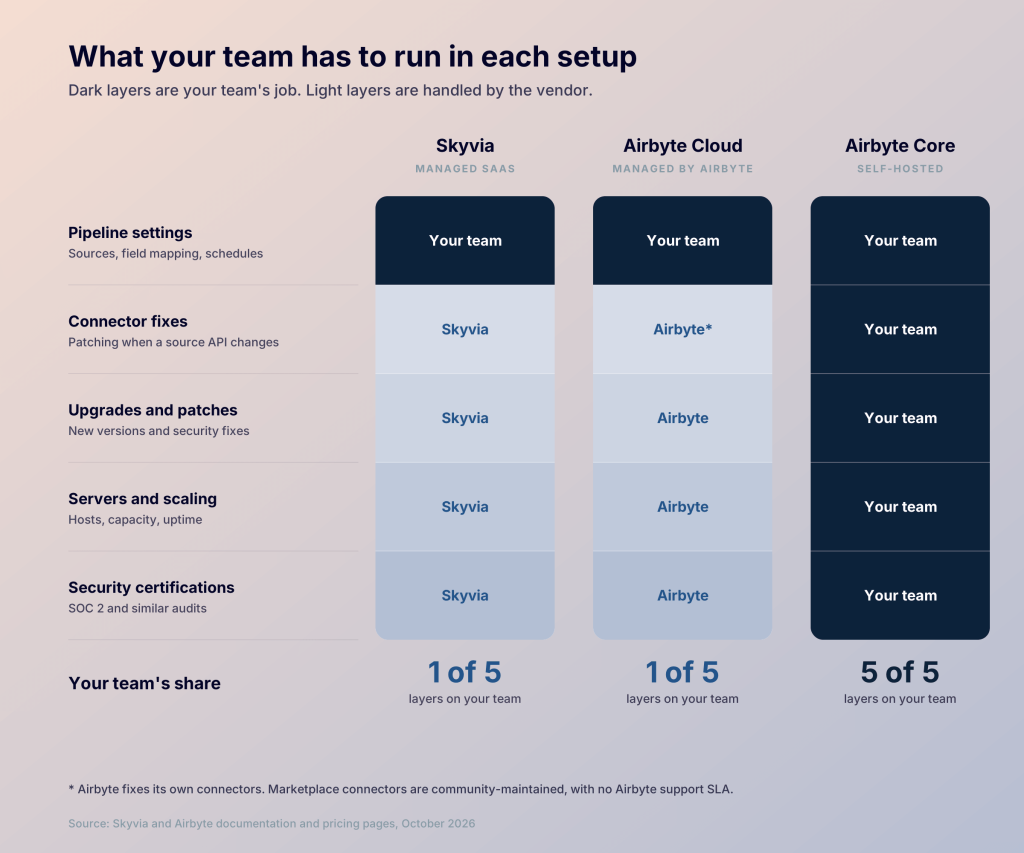
Neither path is free of lock-in. A managed tool ties you to its platform and pricing, and a self-hosted stack ties you to maintaining it. Leaving either one means rebuilding pipelines somewhere else.
What self-hosting costs in practice
Free software still costs money to run. In June 2026, Enterprise DNA published practitioner accounts of self-hosted Airbyte, including one matched comparison.
One analytics engineer was paying about $310 a month for 12 connectors on Airbyte Cloud. They estimated the same setup self-hosted at roughly $180 a month in cloud spend, plus about 4 hours a month of their own time.
The picture changes as the connector count climbs:
- At 50+ connectors, a practitioner breakdown put infrastructure at $400 to $800 a month, mostly a Kubernetes cluster with persistent storage and a managed Postgres.
- A data engineer running about 30 connectors said they spend roughly a fifth of their week keeping it running.
These are reported figures, not Airbyte’s. Still, they point the same way: engineering time starts to outweigh the server bill as you add more connectors.
Which Skyvia vs Airbyte audience each tool serves
Skyvia fits SMB and mid-market teams where an analyst or operations lead owns integrations, often syncing Salesforce or HubSpot with a database or warehouse. Airbyte Core fits data and platform teams who want code they can change. Airbyte Cloud fits smaller data teams that want the catalog but not Kubernetes.
The deciding factor is usually staff. If someone on your team already maintains servers or Kubernetes clusters, self-hosting Airbyte is realistic. If not, Skyvia or Airbyte Cloud saves you hiring for it.
The Skyvia vs Airbyte key features that matter most
Skyvia’s main strength is workflow coverage:
- Data Integration handles import, replication, export, and two-way sync.
- Data Flow (Standard and up) builds multi-step pipelines that combine and transform data on the way.
- Control Flow (Professional) adds orchestration and error handling.
Airbyte focuses on getting data into a warehouse at scale:
- Change data capture (CDC) syncs database changes without full reloads.
- The Connector Builder creates connectors for unsupported APIs without code.
- PyAirbyte and the API let developers trigger syncs from their own code.
The gap shows up in transformations. Skyvia handles them inside the platform with expression and lookup mapping. Airbyte deprecated custom dbt transformations in its open-source edition, so you model data in your warehouse. Its light mappers, like hashing or filtering rows, start on Plus.
Which Skyvia vs Airbyte data sources each tool supports
Airbyte has 700+ connectors to Skyvia’s 200+, and each leads in a different area:
- Skyvia: CRMs like Salesforce, HubSpot, and Dynamics 365, plus e-commerce and accounting apps.
- Airbyte: niche APIs and databases with change data capture, like PostgreSQL and MongoDB.
Skyvia maintains all its connectors. Airbyte’s Marketplace ones come from the community, so fixes depend on contributors rather than Airbyte. Check who maintains the ones you need.
If a source is missing:
- Skyvia: describe a REST or GraphQL API in JSON using Skyvia’s REST and GraphQL connectors.
- Airbyte: build one point-and-click in the Connector Builder.
Where Skyvia vs Airbyte destinations route your data
Both tools load into the main warehouses, including Snowflake, BigQuery, Redshift, and Databricks. Skyvia also writes to SQL Server, Oracle, and file storage like S3. Its reverse ETL sends data back into Salesforce or HubSpot.
Airbyte adds data lakes and vector databases such as Pinecone. Its reverse ETL feature, Data Activation, writes to a handful of apps like HubSpot, Zendesk, Marketo, and Customer.io.
For pushing data back into business apps, Skyvia is the more mature option today.
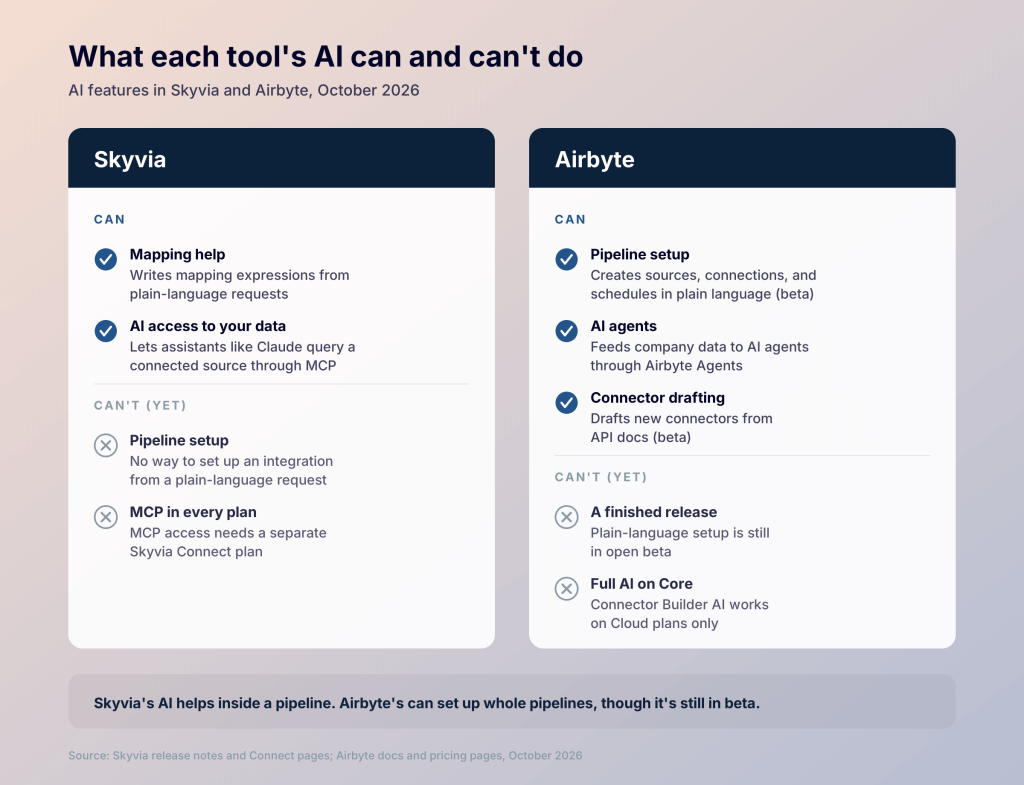
The Skyvia vs Airbyte AI capabilities inside each
Skyvia’s AI works inside a pipeline you’ve built. Ask in plain English, like “combine first and last name”, and it writes the mapping. Skyvia Connect turns a source into an MCP endpoint that Claude can query, billed under Connect.
Airbyte goes further. Its MCP server (open beta) lets you set up pipelines in plain language from an AI client like Claude. It runs on all Cloud plans, and locally on Core with known issues. Airbyte Agents add an Agent SDK for feeding company data to agents. A beta AI assistant in the Connector Builder also drafts connectors from API docs.
As of October 2026, Skyvia has no equivalent for setting up pipelines in plain language.

💡 Both tools use AI to move data, but turning it into an answer is still your job. With Coupler AI, you start from a question like “Which channel had the lowest cost per lead last quarter?” It helps set up the data flow, then calculates the answer from your refreshed data.
How Skyvia vs Airbyte pricing works in each model
Skyvia pricing for Data Integration depends on refresh speed and record volume. You pick the plan for how often data must refresh. On paid plans, you then choose a monthly record volume, up to 200 million.
| Plan | Price from (annual / monthly) | Fastest runs | Extra records |
|---|---|---|---|
| Free | $0 | Daily, 10k records a month | Not available |
| Basic | $79 / $99 | Daily | Not available |
| Standard | $159 / $199 | Hourly | $0.06 per 1,000 |
| Professional | $399 / $499 | Every minute | $0.02 per 1,000 |
Skyvia counts every row it writes to the target on each run, even if the data hasn’t changed. Frequent refreshes on busy data use up records fast, and Basic stops at the limit.
Airbyte pricing on Cloud’s lower plans runs on credits. API sources use 6 credits per million rows, and databases and files use 4 credits per GB. Here’s how the plans compare:
| Plan | Price | What you get | How it’s billed |
|---|---|---|---|
| Core | No licence fee | Self-hosted, all open-source connectors | Your servers and engineering time |
| Standard | From $20/month | 5 credits, about 1 GB of syncs | Credits; extra usage billed afterwards |
| Plus | From $189/month | 40 credits, 15-minute syncs | Credit packages, up to 2,000 credits |
| Pro | Custom | Capacity-based, flat annual price | Data Workers |
| Enterprise Flex | Custom | Adds in-boundary and hybrid deployment | Data Workers |
Side by side, each setup charges for something different as your usage grows:

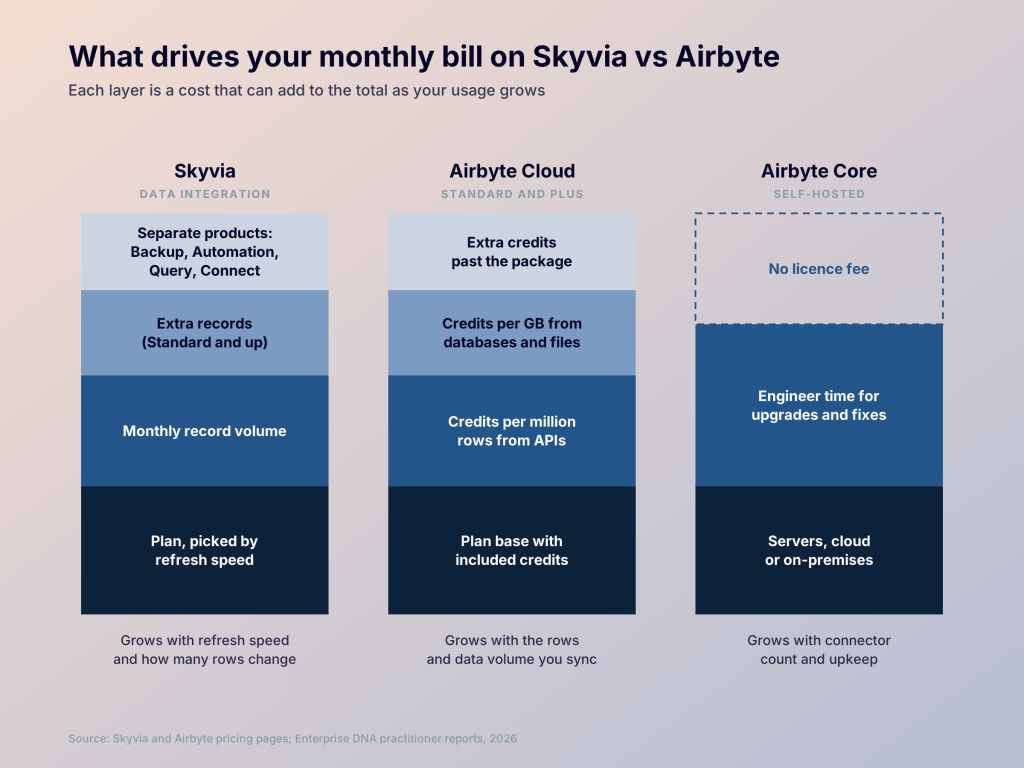
Airbyte doesn’t publish a price per extra credit on Standard, so check usage costs in the app before you budget. For more managed tools in this range, see Skyvia alternatives.
💡 On both tools, costs grow with your data: records on Skyvia, credits or servers on Airbyte. Coupler.io prices by the accounts and destinations you connect, so from the Active plan up, data volume doesn’t change your bill. See Coupler.io pricing.
Keep your bill tied to accounts with Coupler.io
Book a demoWhere Skyvia vs Airbyte security & stability land
Skyvia has SOC 2, GDPR, and HIPAA with a BAA. Airbyte Cloud has SOC 2 Type II, ISO 27001, and GDPR. For EU teams, location usually decides it: Skyvia runs only in the US, while Airbyte Cloud offers an EU data plane.
Self-hosting Core gives you full control but no built-in role-based access, so it suits teams with their own security function.
On reliability, the complaints differ. Engineers running Airbyte at scale report stuck jobs and memory errors in practitioner reviews, while Skyvia users on G2 and Capterra mention thin logs on failed runs.
Looking beyond Skyvia and Airbyte
Sometimes neither tool fits. You want a managed service like Skyvia, but you also want reports at the end, not just tables in a warehouse. That’s the gap Coupler.io fills.
Coupler.io is a reporting automation platform for business teams. It connects 400+ data sources to warehouses, BI tools, spreadsheets, and AI tools like Claude and ChatGPT. It also offers 250+ dashboard templates, so the pipeline ends in a report. Plans start at $24 a month on annual billing.
| Coupler.io | Skyvia | Airbyte | |
|---|---|---|---|
| Deployment | Managed SaaS | Managed SaaS | Self-hosted, Cloud, or hybrid |
| Pricing model | Connected accounts and destinations; refresh speed by plan | Refresh speed plus record volume | Core is “free”; Cloud by credits or capacity |
| Data sources | 400+ | 200+ | 700+ |
| Dashboard templates | 250+ | None | None |
| AI capabilities | Coupler AI: AI Agent, AI Integrations, Skills | MCP endpoints, mapping assistant | MCP pipeline setup (open beta), Agents, Connector Builder AI (beta) |
| Workflow coverage | ELT, dashboards, reporting, AI analysis | ETL, ELT, reverse ETL, two-way sync, backup | ELT, CDC, Data Activation |
| Open-source option | No | No | Yes (ELv2) |
Skyvia and Airbyte stop once data lands in its destination. Coupler.io pulls data from your sources into ready-made dashboard templates and refreshes it on a schedule. Coupler AI then answers questions from the same data, so you don’t build reports from scratch. Take the question: “Why did we lose deals last quarter, and what should I fix first?”
The answer looks like this:

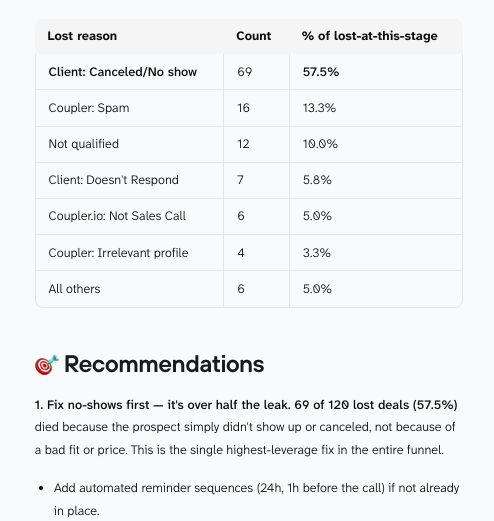
Coupler AI also works inside Claude and ChatGPT. Security covers SOC 2 Type II, GDPR, HIPAA, and DORA. You control which data flows the agent can reach.
Coupler.io isn’t the right pick for every team. If you already run a warehouse with dbt and analysts who build in Power BI, raw replication at scale is the job. Airbyte is open source and has more connectors for databases and custom APIs. Skyvia covers more workflow types, including two-way sync, reverse ETL, and backups.
If you’re weighing Coupler.io against Skyvia or Airbyte directly, see Coupler.io vs Airbyte or Coupler.io vs Skyvia for the full head-to-head.
Give your dashboards and AI one set of numbers with Coupler.io
Book a demoVerdict: which should you choose?
Budget, sources, and in-house skills all shape the choice, but I’d decide first on who will keep the pipelines running. Here are three typical teams and the tool I’d pick for each.
Pick Skyvia: the RevOps team without an engineer
You sync Salesforce with SQL Server and want backups from the same vendor, but nobody on the team writes code. I’d start on Skyvia’s Basic plan and move to Standard when you need hourly runs.
Pick Airbyte: the data team with a platform engineer
Your engineer already runs Kubernetes, and you need connectors for internal APIs. Self-host Core and build them yourself. If nobody has time to maintain it, switch to Airbyte Cloud. See also Airbyte alternatives.
Pick Coupler.io: the marketing team that needs a Monday dashboard
You report weekly on Google Ads and HubSpot, with no warehouse and no data engineer. Connect both accounts to a customer acquisition template, and Coupler.io refreshes the dashboard on a schedule. When leads drop, ask Coupler AI which campaign caused it and get an answer from the same data.
Walk away from all three if:
Your needs sit outside this middle ground. Go with Fivetran for enterprise-scale ELT with dbt, Adverity for governed data across many ad platforms, or Supermetrics for simple ad reports in Sheets.