Supermetrics and Improvado both move marketing data into reports, but they suit very different teams. A marketer who updates one Data Studio report a week needs a different tool from a brand team combining campaigns from three countries. The differences show up in setup, cost, and where your data ends up.
This comparison covers pricing, data sources, destinations, AI, security, and support, plus where Coupler.io fits if your reports span marketing, sales, and finance.
Key takeaways
- Supermetrics is self-serve on every plan. Plans start at $44 a month, with caps on how many sources and destinations you connect.
- Improvado is built for enterprise marketing teams. The full platform starts at $20,000 a year with every connector and destination. A $100-a-month MCP Only plan covers AI access alone.
- Improvado has the bigger catalog. It lists 1,400+ connectors, while Supermetrics lists 100+ in its docs and about 170 on its pricing page.
- Your reporting tool decides a lot. Supermetrics feeds Google Sheets and Data Studio, while Improvado is built around warehouses.
- Both are adding AI that changes campaigns. It’s in early access on Supermetrics, and Improvado doesn’t say which plans include it, so decide who gets write access before you turn it on.
- Coupler.io fits teams with many sources on a smaller budget. A reporting automation platform for business teams, with all 400+ apps on every plan and paid plans from $24 a month.
Comparing Supermetrics vs Improvado at a glance
The key difference: Supermetrics sends data straight to your reporting tools, while Improvado sends it to a warehouse first. Here’s how the rest compares:
| Supermetrics | Improvado | |
|---|---|---|
| Built for | Marketers and agencies reporting in tools they already use | Enterprise marketing teams and large agencies with a warehouse |
| Entry price | $44/mo billed annually; 14-day trial | $100/mo (MCP Only); full platform from $20,000/yr |
| Billing model | Bundles of users, sources, accounts, and destinations, plus AI credits | Rows loaded per year and MCP actions per week |
| Data sources | 100+ documented, plus custom data import | 1,400+, plus custom connectors on request |
| Destinations and AI tools | Sheets, Excel, Data Studio, Power BI; Claude, ChatGPT, and Copilot via MCP; warehouses on Enterprise | Snowflake, BigQuery, Databricks, Redshift, managed warehouse; Data Studio, Tableau, Power BI; Claude and ChatGPT via MCP |
| Transformations | Enterprise plan only | Built in: field mapping, currency conversion, and data modeling |
| AI | Insights Agent and MCP server; campaign edits in early access | AI Agent; a separate MCP server with read and write access |
Audience and use cases for Supermetrics vs Improvado
The first question is who will run the setup. If one marketer will set it up alone, look at Supermetrics. If a data or marketing ops team will own it, Improvado makes more sense.
Supermetrics: for marketers who own their reports
Supermetrics is a marketing intelligence platform, and media agencies make up about half its customer base. Its typical user builds reports without a data team. Common jobs include:
- Monthly client reports that pull Google Ads and TikTok Ads data for 15 clients into Data Studio templates
- A weekly budget pacing sheet in Google Sheets
- Asking Claude or ChatGPT how campaigns performed, then editing them from the same chat (in early access)
Picture an agency that reports on Google Ads and TikTok Ads for 15 clients. Two sources fit within Growth, but each source needs 15 accounts and the plan includes seven. At $11 per extra account, the bill comes to about $350 a month, double the $177 base price. Setup is self-serve: connect the accounts and copy a Data Studio template.
As the client list grows, so do costs and reporting complexity. Blending paid media takes calculated fields in every Data Studio report, since transformations sit on Enterprise. Keeping the data in BigQuery means an Enterprise quote too.
Improvado: for multi-brand teams with a warehouse
Improvado is a marketing analytics platform that connects 1,400+ data sources and lets teams query them with an AI agent. Its site says it’s built “for large enterprises and agencies whose data is spread across many sources and many owners,” with ASUS and AdRoll among its customers. Typical jobs look different:
- Mapping campaign names from several regions into one model, so global reports add up
- Feeding a warehouse that a BI team builds Tableau or Power BI dashboards on
- Reporting for healthcare brands that need HIPAA coverage
Now picture a retailer with three brands selling in the US, the UK, and Germany. Each market runs Google Ads, Meta, TikTok, and Amazon Ads, and each team names campaigns its own way. With Shopify and GA4, that’s about 50 accounts. Improvado loads all of it into one warehouse, converts spend into one currency, and splits campaign names into brand, region, and channel fields, so the BI team can build a single Power BI dashboard.
Here the friction is cost and pace. The contract starts at $20,000 a year, setup runs as a project with Improvado’s team, and support starts at 8am Eastern, early afternoon in Germany.
Both teams could run on Coupler.io’s Pro plan, which includes 50 accounts (room to scale) for $199 a month with annual billing. That’s more than 40% less than the agency’s Supermetrics bill and a fraction of the retailer’s $20,000 Improvado contract.
Why Supermetrics vs Improvado pricing is so far apart
One vendor sells bundles, the other charges by data volume. Here’s each plan with annual billing:
| Plan | Price (billed annually) | What’s included |
|---|---|---|
| Supermetrics Starter | $44/mo | 1 user; 3 sources with 3 accounts each; 1 destination; 4,000 AI credits |
| Supermetrics Growth | $177/mo | 2 users; 6 sources with 7 accounts each; 1 destination; 12,000 AI credits |
| Supermetrics Enterprise | Custom quote | Warehouses, transformations, storage, SAML SSO |
| Improvado MCP Only | $100/mo | AI access only; 2M rows a year; daily sync |
| Improvado Starter | From $20,000/yr | 20M rows a year; 1 workspace; daily sync |
| Improvado Growth | From $41,700/yr | 60M to 200M rows a year; up to 10 workspaces; setup help credits |
| Improvado Enterprise | Custom quote | 1B rows a year; unlimited workspaces |
On Supermetrics, you pay for what you connect. With annual billing, an extra source on Growth costs $37 a month and an extra destination $149. The Supermetrics pricing guide covers every add-on.
Improvado’s plans are set by the rows you load each year and the AI actions you run. A niche source costs nothing extra, but every plan except MCP Only starts with a demo. Row limits per plan are in the Improvado pricing guide.
How much would your setup cost on either tool?
Here are four typical setups at list prices: one user with three sources in Google Sheets, two users with six or eight sources in Data Studio, and two users with eight sources plus BigQuery:

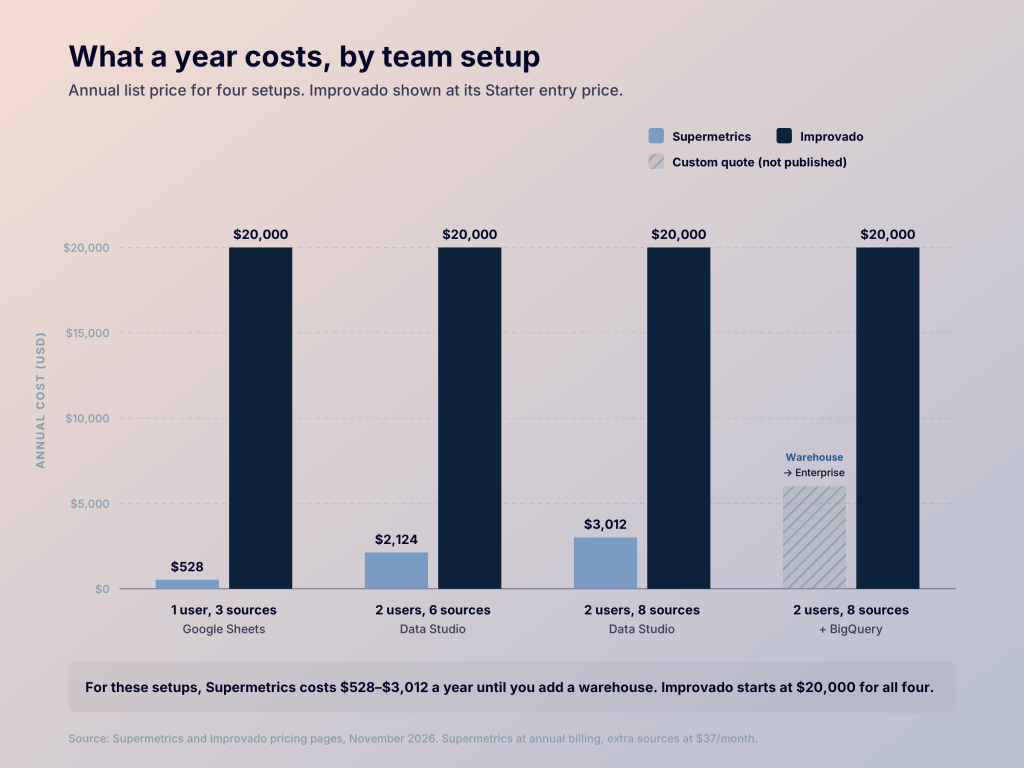
Each setup stays within the plan’s account limits, and the $3,012 one is Growth plus two extra sources. The biggest jump comes with a warehouse: an Enterprise quote on Supermetrics, part of the full platform on Improvado.
Coupler.io includes all 400+ apps on every plan and prices by connected accounts. With annual billing, paid plans run $24/mo for 3 accounts, $99/mo for 15, and $199/mo for 50 with hourly refresh, each with Coupler AI. There’s also a free plan, and the Coupler.io pricing page has the full details.


Report on all your apps from $24 a month with Coupler.io
Get a demoData sources and connector coverage in Improvado vs Supermetrics
Catalog size matters less than whether your own sources are covered, so check your list against both.
For most marketing reports, Supermetrics has you covered: ads, web analytics, social, CRM, ecommerce, and email. For other data, Custom Data Import pulls files from a URL or SFTP on a schedule, and the paid Connector Builder add-on lets you configure other APIs yourself.
Improvado adds niche marketing and sales platforms and builds missing connectors on request. One catch: its MCP server has a separate, shorter catalog of 187 systems, so check that list if you plan to query data through AI.
Both catalogs lean toward marketing. Coupler.io connects marketing and finance apps alike, so ad spend can sit next to revenue from QuickBooks or Xero in one report.
Destinations in Supermetrics vs Improvado, from sheets to warehouses
If your team checks numbers in a Google Sheet every Monday, where the data lands matters most. Supermetrics feeds the tools you already open, while Improvado routes data through a warehouse first:

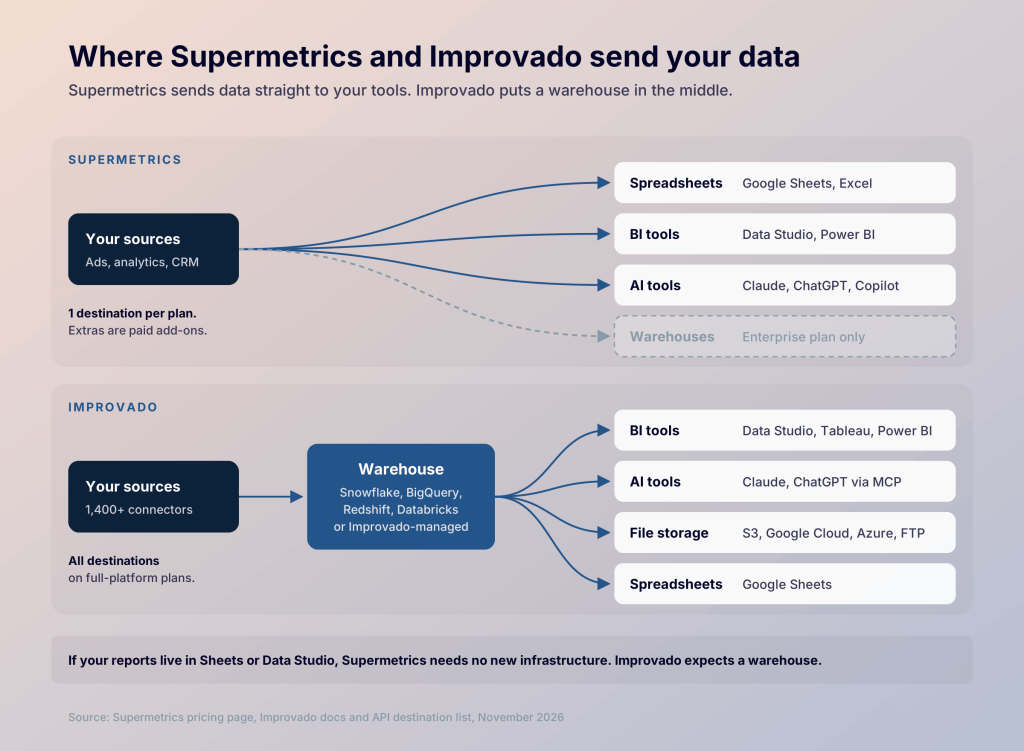
Supermetrics sends data to Google Sheets, Excel, Data Studio, and Power BI, and to Claude, ChatGPT, and Copilot through its MCP server. Each plan includes one destination, and warehouses are Enterprise-only.
Improvado loads data into Snowflake, BigQuery, Redshift, Databricks, or a warehouse it hosts, and BI tools read from there. Its integrations page also lists Google Sheets as a destination, though the setup docs don’t cover it.
Some teams need both: a Google Sheet for the weekly check-in and BigQuery behind a Power BI dashboard. Coupler.io sends the same data to Google Sheets and a warehouse from the Active plan up, which includes three destinations, so one setup feeds both.
Supermetrics vs Improvado key features
Scheduled data pulls are standard on both. They differ in what happens to the data before it lands.
Transformation and data modeling
Modeling is Improvado’s core product. Its no-code layer maps fields across platforms, so Google Ads’ “Cost,” Meta’s “Amount spent,” and Microsoft Ads’ “Spend” land in one spend column. It converts currencies and splits campaign names like “US_Brand_Search_Q4” into separate fields.
On Growth plans, Improvado’s team uses services credits to help build that model with you. Its AI Agent can help too: it writes formulas, suggests joins, and maps fields from plain-English requests, and it asks before applying any change.
For the retailer with 50 accounts, that’s what makes a single Power BI dashboard possible. Doing the same by hand means rebuilding the mapping in every report.
On Supermetrics, transformations sit on Enterprise, so lower plans shape data with Sheets formulas or Data Studio fields. That works for one report but drifts across 15 client reports. Supermetrics’ AI tools focus on analysis and reporting, and none of them builds transformations.
Governance and dashboards
Improvado’s naming rules, currently in beta, enforce campaign conventions across teams. Supermetrics’ Business Context saves shared rules, such as attribution models, and applies them in AI chats and Studio.
Supermetrics Studio builds dashboards from a prompt and can migrate Data Studio reports. Improvado builds them through its AI Agent or your own BI tool.
How Supermetrics vs Improvado AI works with your data
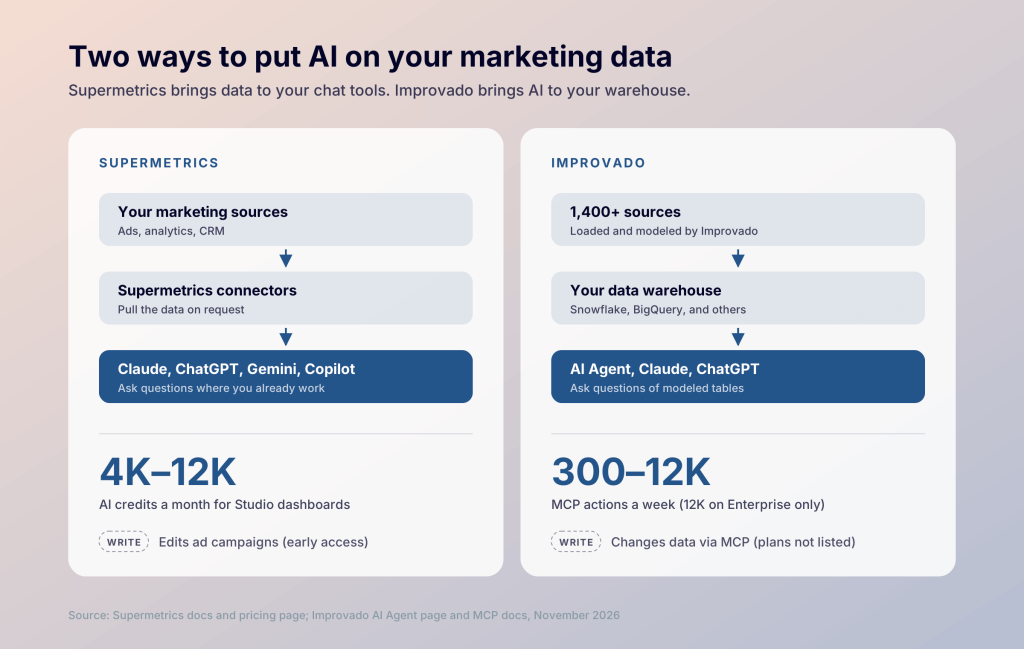
Both vendors offer AI that reads your data, and both now offer some write access. The bigger difference is where you use the AI and what data it sees:

Supermetrics: Insights Agent and campaign edits
The Insights Agent answers questions inside Supermetrics. AI chat integrations and an MCP server bring your data into Claude, ChatGPT, Gemini Enterprise, and Copilot. In early access, those tools can also create and edit campaigns on seven ad platforms, including Google Ads, Meta, and TikTok. New campaigns start paused, with optional approvals.
Supermetrics Studio, its AI dashboard builder, runs on monthly AI credits: 4,000 on Starter and 12,000 on Growth. Supermetrics doesn’t publish how many credits a task takes, so test that during the trial.
Improvado: AI Agent and a warehouse-aware MCP server
Its AI Agent answers questions and forecasts spend, sharing only metadata, such as column names, with the AI model. The MCP server goes further: Improvado says it has read and write access, with pausing an ad set as an example. Usage runs within a weekly action cap: 300 on the MCP Only plan, 400 on Starter, and 12,000 on Enterprise.
Improvado vs Supermetrics security and stability
Both tools have SOC 2 Type II reports and comply with GDPR and CCPA. They differ on health data, where your data is stored, and SSO.
Supermetrics adds ISO 27001 and processes data on AWS and Google Cloud servers in the EU, though some sub-processors may transfer data outside it. Standard SSO comes with every plan, while SAML SSO and data residency options are Enterprise-only. A public status page lists past incidents, so you can check its track record before you buy.
Improvado is the stronger fit for regulated data. HIPAA coverage with signed BAAs comes with Growth and Enterprise plans, along with EU data residency and a full audit trail. For AI use, MCP credentials stay on Improvado’s servers.
For health data, Improvado is the safer pick of the two. Otherwise, Supermetrics and Improvado are close, and Supermetrics is easier to vet.
Ease of use and support in Supermetrics vs Improvado
You can try Supermetrics on your own: start a 14-day trial without a card, connect an ad account, and pull data into Google Sheets or Data Studio the same day. Help comes through tickets and chat in the Supermetrics Hub, with no published support hours. Some reviewers mention re-authenticating accounts and failed queries.
Improvado starts with a demo and a setup project run with its team. Growth plans include 120 to 240 professional services credits for that work, and the ticket desk runs 8am to 8pm Eastern. Reviewers mention a learning curve and relying on Improvado’s team for changes.
Reviewer scores reflect that split:
- Supermetrics: 4.4/5 on G2 from 826 reviews. On Capterra, 4.4/5 overall, 4.1 for ease of use, and 3.8 for customer service.
- Improvado: 4.4/5 on G2. On Capterra, 4.5/5 overall from 22 reviews and 4.8 for customer service.
If nobody on your team wants to own a data project, that alone points to Supermetrics. If you’d rather hand setup to a vendor, Improvado’s services are the point.
Where Coupler.io fits: automated reporting across all your apps
Once your reports pull from more than a few sources, Supermetrics gets expensive, and Improvado still needs a data team to run it. Coupler.io is a reporting automation platform for business teams. It automatically collects and blends data from 400+ apps and keeps it up to date for your reports and AI. Here’s how it compares with both:
| Coupler.io | Supermetrics | Improvado | |
|---|---|---|---|
| Entry price | Free plan; paid from $24/mo (annual) | $44/mo (annual) | $100/mo (MCP Only); platform from $20,000/yr |
| Sources | 400+ in catalog, all on every plan | 100+ in catalog; 3 to 6 per self-serve plan | 1,400+ in catalog, all on full-platform plans |
| Billing unit | Plan tier and connected accounts | Users, sources, accounts, destinations, AI credits | Rows and actions |
| Warehouses | BigQuery, Supabase, Snowflake, PostgreSQL, and Redshift on standard plans | Enterprise only | Full-platform plans |
| Spreadsheets | Google Sheets, Excel | Google Sheets, Excel | Google Sheets on its integrations page |
| Transformations | Joins, appends, and aggregation on paid plans | Enterprise only | Included |
| AI | Coupler AI on every paid plan; AI integrations, including Claude and ChatGPT | Insights Agent, MCP | AI Agent, MCP |
With Coupler AI, you start by asking the question you care about, like “Which channel had the lowest cost per lead last quarter?” Ask in Coupler.io or in the AI tool you already use, such as Claude or ChatGPT. Coupler AI helps connect the data behind it and calculates the answer from your actual numbers, so you can trace every figure back.
Checks you repeat every month can run as pre-built AI agent skills in Claude or ChatGPT, for example a Google Ads wasted-spend check or a sales pipeline review. Every plan includes them.
If a client or manager would rather see a dashboard, the same data can feed one of 250+ dashboard templates for Data Studio, Power BI, Google Sheets, and more. Coupler.io is SOC 2 Type II certified and compliant with GDPR, HIPAA, and DORA. Neither of the other two lists DORA, which matters for financial-services teams.
For plan-by-plan detail, see Coupler.io vs Supermetrics and Coupler.io vs Improvado.
Get ads, CRM, and finance in one report with Coupler.io
Book a demoSupermetrics vs Improvado vs Coupler.io: which one fits your team
For one or two marketers who report in Sheets or Data Studio, Supermetrics does the job for $528 to $3,012 a year, based on the setups priced above. You can start today. It’s also the pick if you want AI to edit ad campaigns from a chat, a feature now in early access.
A $20,000+ Improvado contract pays off when you run marketing across regions with a warehouse and a data team, or load billions of rows a year and want a vendor to model them.
Teams that need ads, CRM, and finance data in one report without an enterprise contract fit Coupler.io. Whichever you lean toward, build the same report in each before you commit. Supermetrics has a 14-day trial, Coupler.io has a free plan, and Improvado offers a demo.