
Planning a budget around Improvado pricing takes some digging. Only MCP Only has a fixed price. The plans built for regular reporting list a starting price, but you need a demo to get a quote.
I’ll separate what you can work out before the sales call from what only a quote will settle. That way, you’ll know which questions to bring to sales, and whether Coupler.io, a reporting automation platform for business teams, already covers your reporting needs.
TL;DR: Improvado’s prices at a glance
- MCP Only costs $100 a month and stores up to 2 million rows a year
- Starter starts at $20,000 a year and Growth at $41,700 a year. Both need a demo
- Enterprise needs a custom quote
- The quote depends on data volume, sync frequency, AI usage, workspaces and add-ons
- For reporting and AI analysis without enterprise extras, Coupler.io lists every plan price up to Pro, starting at $24 a month billed annually
Improvado pricing plans: what each one includes
As of November 2026, Improvado’s pricing page lists four plans: MCP Only, Starter, Growth and Enterprise. Three show a price, and all four show their limits.
| MCP Only | Starter | Growth | Enterprise | |
|---|---|---|---|---|
| Price | $100/month | From $20,000/year | From $41,700/year | Custom |
| Unique rows per year | 2M | 20M | 60M to 200M | 1B |
| Sync frequency | Daily | Daily | Daily to 2x a day | Custom |
| MCP actions per week | 300 | 400 | 800 to 1,800 | 12,000 |
| AI agent actions per day | None | 20 | 40 to 90 | 600 |
| Governance rules | None | 3 | 10 to 25 | 100 |
| Professional Services credits per year | None | None | 120 to 240 | 960 |
| Workspaces | 1 | 1 | Up to 10 | Unlimited |
| SSO (Azure, Okta) | No | No | Paid add-on | Included |
| HIPAA | No | No | Included | Included |
| SOC 2 Type II | Yes | Yes | Yes | Yes |
| Premium Customer Support | No | No | Included | Included |
| Measurement add-ons | No | No | Paid add-ons | Paid add-ons |
Prices make more sense next to the job you need done. Here’s how the plans map to four common ones.
- Analyzing weekly campaign data in Claude or ChatGPT: MCP Only costs $100 a month and keeps up to 2 million rows a year, synced daily. Its 300 MCP actions a week work out to roughly 40 a day, enough for a small team’s regular questions. It runs inside your own AI tool, with your own LLM setup.
- Running managed reporting for one team: Starter, from $20,000 a year, stores up to 20 million rows a year with daily sync. It includes 20 AI agent actions a day and 3 governance rules in one workspace, with no measurement add-ons.
- Running cross-channel reporting across brands or markets: Growth, from $41,700 a year, syncs up to twice a day and gives you up to 10 workspaces, 10 to 25 governance rules and Premium Customer Support. Attribution, creative analytics, mix modeling and incrementality testing are paid extras on this tier.
- Reporting for dozens of clients, or measuring what your budget really drives: Enterprise has no workspace cap, so an agency can give every client its own. It adds SSO and hands-on Professional Services, and takes the same measurement add-ons as Growth.
Improvado’s own plan calculator shows the scale the quoted tiers are built for:
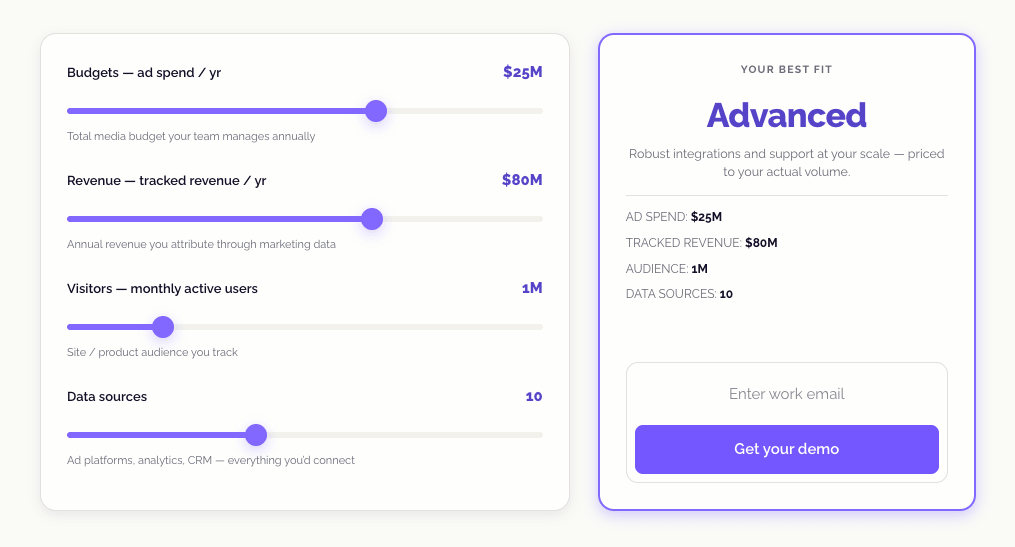
Improvado has no free plan on its pricing page. Its onboarding post references a 14-day free trial with no credit card required, though no trial appears on the pricing page. Past that, MCP Only bills monthly at $100, which comes to $1,200 over a year. It’s the only Improvado plan you can start without talking to sales. Starter, Growth and Enterprise start with a demo.
Improvado changed its plans around July 2026 and again by November 2026, so older pages may still list its Free Limited and Advanced plans, which are gone.
A simpler option for reporting and AI analysis: Coupler.io
If you mainly need data integration, reporting and AI analysis, you don’t have to wait for a quote to see what it’ll cost. Coupler.io’s pricing is public up to the Pro plan.
Coupler.io is a reporting automation platform for business teams. It automatically collects and blends data from 400+ apps and keeps it up to date for your reports and AI. It connects 400+ sources, including Google Ads, Meta Ads, GA4, HubSpot and Shopify. It sends that data to spreadsheets, BI tools like Data Studio and Power BI, data warehouses like BigQuery, Snowflake, Supabase, Redshift, and PostgreSQL, and AI tools.
Every source is available on every plan, so your price depends on accounts, destinations and refresh frequency. Here’s what each self-serve plan includes.
| Starter | Active | Pro | Custom | |
|---|---|---|---|---|
| Price, billed annually | $24/month | $99/month | $199/month | Custom |
| Price, billed monthly | $32/month | $132/month | $259/month | Custom |
| Data sources | 400+ | 400+ | 400+ | Custom |
| Accounts | 3 | 15 | 50 | Custom |
| Data volume | 5,000 rows/run | Unlimited | Unlimited | Unlimited |
| Data destinations | 1 | 3 | Unlimited | Custom |
| Data refresh | Daily | Daily | Hourly | Every 15 minutes |
| Users | 1 | Unlimited | Unlimited | Unlimited |
| Workspaces | 1 | 1 | 3 | Unlimited |
Above Pro, the Custom plan is priced individually. It adds SAML single sign-on, refresh every 15 minutes, a personal account manager, an enterprise SLA and onboarding.
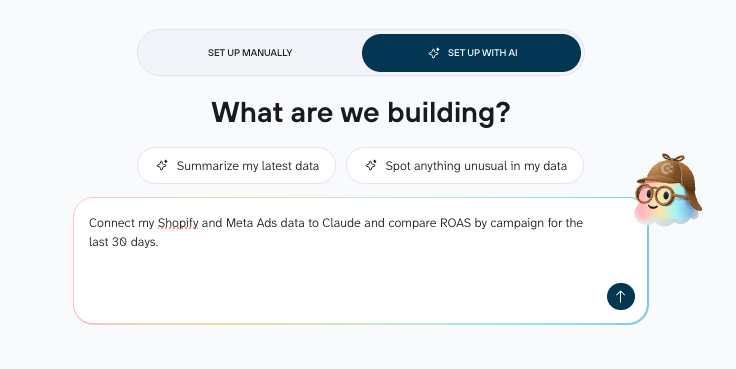
Every paid plan also includes Coupler AI. Ask it to “Connect Shopify and Meta Ads to Claude and compare ROAS by campaign“, and it helps you set up the connection, then answers questions. It works inside Coupler.io or from your own AI tool. Pre-built AI Skills handle recurring tasks, such as a weekly campaign review.
Both platforms handle data integration and reporting, but they’re built for different jobs. Here’s how they compare, need by need:
| Need | Improvado | Coupler.io |
|---|---|---|
| Public pricing and billing options | Partial fit (fixed price for MCP Only, starting prices for Starter and Growth, Enterprise by quote) | Strong fit (public up to Pro, monthly or annual billing) |
| Governance across many workspaces | Strong fit | Good fit (team and client workspaces, access controls) |
| Attribution, mix modeling, incrementality | Strong fit (add-ons) | Not covered |
| Refresh frequency | Partial fit (up to 2x daily on Growth, custom on Enterprise) | Strong fit (hourly on Pro, every 15 minutes on Custom) |
| AI integrations and capabilities | Strong fit (AI agent and MCP) | Strong fit (Coupler AI, in-app or in your own AI tool) |
| Destinations | Similar (BI tools, warehouses) | Strong fit (spreadsheets, BI tools, warehouses, AI tools) |
| Dashboard templates | Partial fit (Recipe Library, team templates) | Strong fit (200+ templates) |
In practice, one person can run multi-client reporting with Coupler.io. Paid media specialist Palmer Krehel pulls each client’s Google Ads, Facebook Ads, Google Analytics, HubSpot and Shopify data through Coupler.io, and Claude builds the dashboards. He hasn’t written any code, and a new client dashboard takes about two minutes to start.
If you’re considering a setup like Palmer’s instead of Improvado, the full feature comparison is in Coupler.io vs Improvado.

Get 400+ data sources and Coupler AI on any paid plan
Book a demoHow the Improvado pricing model works for custom quotes
Improvado calls its pricing usage and consumption-based, with all connectors and destinations included in every plan. Once you need more data, more syncs, more AI capacity or more workspaces, you move to Starter, Growth or Enterprise. Improvado prices those around your setup, using the factors on its “Is Improvado right for you” page.
That’s a different model from Supermetrics pricing, which starts from the destination you send data to and adds fees for extra users, sources, and accounts. It’s also different from the Funnel.io pricing model, where you buy flexpoint capacity for each connector, account and destination you switch on.
Data volume
Starter raises the yearly row allowance from 2 million on MCP Only to 20 million. Growth covers 60 million to 200 million, and Enterprise 1 billion. Growth has one starting price for that whole range, and Improvado doesn’t publish how the price changes within it.
Practical example: an online store running 20 campaigns with 50 ads each, tracked daily, creates about 1,000 rows a day from one ad platform. That’s roughly 365,000 rows a year before you add a second platform or more breakdowns.
Sync frequency
Starter syncs daily, Growth daily to twice a day, and Enterprise on a custom schedule. Improvado’s data extraction docs say hourly sync is “available by request only,” and the number of extraction schedules is set by your contract.
Practical example: if your team checks spend before a morning and an afternoon stand-up, Growth’s two syncs a day cover it. If you adjust bids every hour during a sale, ask for hourly sync in the quote.
AI agent and MCP actions
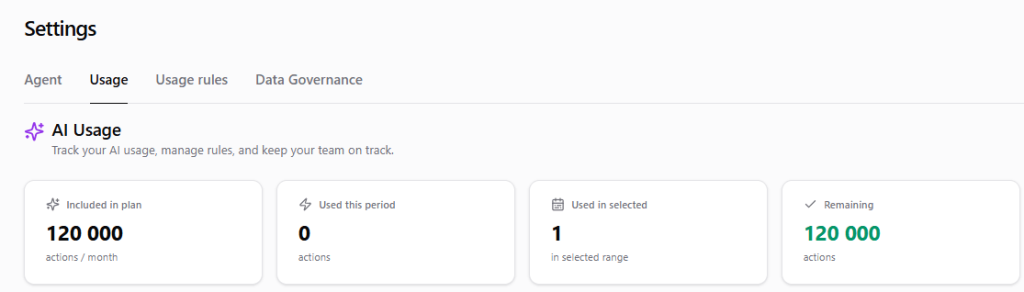
Starter allows 400 MCP actions a week and 20 AI agent actions a day. Growth allows 800 to 1,800 and 40 to 90, and Enterprise 12,000 and 600. Improvado’s AI agent docs count one credit per tool call, so one multi-step question can use several. Ask sales how many questions a day the cap covers in practice. If you bring your own LLM key, your AI provider bills the model calls instead.
Practical example: a five-person team asking three questions a day uses about 75 agent actions. That fits within Growth’s top range of 90 but is well past Starter’s 20, and one multi-step review can spend ten in a single session.
Improvado’s AI usage settings show the actions included in your plan, how many you’ve used and how many remain, so you can see how close your team is to the cap:
Measurement add-ons
Improvado lists its measurement features as paid add-ons. None has a public price.
On Growth and Enterprise (not available on MCP Only or Starter):
- ✅ Multi-Touch Attribution
- ✅ Creative Analytics Intelligence
- ✅ Incrementality Testing
- ✅ Marketing Mix Modeling
Practical example: if you want to know which channel drove a sale, that’s attribution. If you want to know what happens when you move budget from search to social, that’s mix modeling. Both are add-ons on Growth or Enterprise.
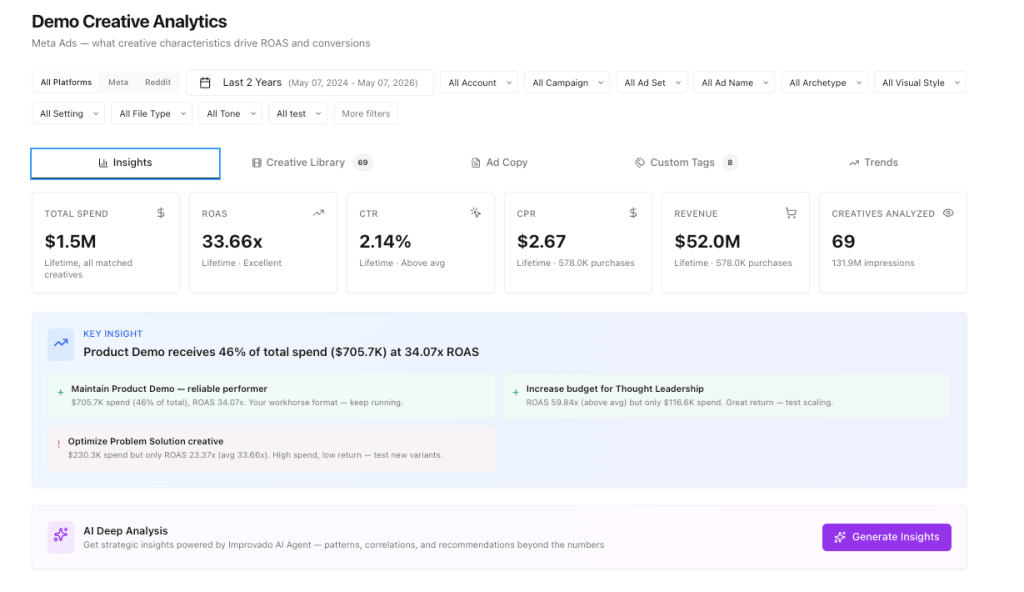
Each add-on is its own analytics module, built on the same marketing data. Creative Analytics, for example, ranks ad creatives by spend and ROAS (in Improvado’s demo), then flags which formats to scale/rework:
Workspaces
MCP Only and Starter include one workspace. Growth allows up to 10, while Enterprise has no stated cap. Improvado’s workspace docs say you raise the limit through your customer success manager.
Practical example: if you run an agency with one workspace per client and you have 60 clients, you’d pass Growth’s cap, so your quote would start at Enterprise.
Governance rules and Professional Services credits
Marketing data governance comes with Starter, Growth and Enterprise. Starter includes 3 governance rules, Growth 10 to 25, and Enterprise 100. Growth also includes 120 to 240 Professional Services credits a year, and Enterprise 960. Ask sales what one credit covers.
Practical example: an agency with 12 clients, each with its own naming convention, needs a rule per client. That’s past Starter’s 3 and about half of Growth’s top limit of 25, before covering anything else.
Security, support and professional services
Improvado says each enterprise contract includes a dedicated customer success manager, a professional services team, and custom data connectors.
Extra professional services are billed “at Improvado’s then current rates” under a separate statement of work, per its Services Agreement. Ask where included services end.
Put together, Improvado pricing comes down to how much data you move, how often, how much AI you use and which extras you add.
The cost questions to ask before an Improvado sales call
Before the call, it helps to know one number. According to G2, buyers get an average discount of 13–14% off the list price, so it’s worth asking for one.
Beyond the discount, these questions shape your final price. Next to each, I’ve noted what Improvado’s docs already tell you:
| Ask sales | What’s already known |
|---|---|
| What do the add-ons cost? | Attribution, creative analytics, mix modeling and incrementality are all paid add-ons, and none has a public price |
| What happens when I hit a limit? | The AI agent docs indicate usage can stop when you reach a limit. I couldn’t find a published overage rate, so ask whether going over means an upgrade, an extra charge, or a temporary block |
| Is onboarding included? | No onboarding fee is published, and setup times are loosely estimated between 2-4 weeks |
| What contract term is required? | Improvado’s standard Services Agreement invoices fees in advance and makes the rest of the term’s fees due if you end early. Your Order Form can set different terms |
| What if my workspaces or rows grow? | Limits go up through your customer success manager, at a price you won’t see until you ask |
If you expect your data or team to grow, I’d focus on the limit and growth questions. When going over a limit means an upgrade, you could end up renegotiating halfway through your contract. Ask for expansion pricing in writing before you sign.
None of the reviews since the 2026 plans update mention price, so I went back to older ones. In those, team size seemed to shape whether the price felt worth it:
- Smaller teams: a mid-market reviewer on G2 wrote that it “can be expensive, particularly for smaller businesses or startups with limited budgets.”
- Larger teams: an enterprise reviewer said the row-based pricing suited their data needs, and a Capterra reviewer felt the features justified a high price tag.
Overall, Improvado rates 4.4/5 on G2 (89 reviews) and 4.5/5 on Capterra (22 reviews), and G2 reviewers report about 14 months to see a return on investment.
Improvado pricing vs Coupler.io: which is better value?
Comparing price alone won’t help much here, because the two tools solve different problems. Improvado is a measurement platform with data integration built in. Coupler.io connects your data to the reports, dashboards and AI tools you use every day. So the real question is which problem you’re paying to solve.
Improvado makes sense if you:
- need multi-touch attribution or creative analytics built into your marketing ETL platform
- want to run marketing mix modeling or incrementality testing in the same platform
- manage data for many brands or clients and need governance rules across workspaces
Coupler.io makes sense if you:
- want transparent pricing and flexible billing, with every plan price up to Pro listed before you sign up and the option to pay monthly or annually
- want to start small and move up a plan as your accounts grow
- want your marketing data connected and ready for reports, dashboards and AI, without paying for measurement features you won’t use
Look at the questions your team asks each week. Coupler AI can answer “what happened?” and “why did it change?” from your reports. If your questions need statistical modeling to answer, that’s where Improvado’s price starts to pay off.
FAQ
Can Improvado change its prices without notice?
Its terms of use say “Prices and availability… are subject to change without notice.” On a quoted plan, renewal terms sit in your Order Form, so ask what happens to the price when your term renews.
Is Improvado affordable for small businesses?
Usually not, and Improvado says as much. Its “Is Improvado right for you” page describes the platform as “built for large enterprises and agencies.” It also says that if three or four systems and one warehouse cover all your data, Improvado isn’t the right buy.
Does Improvado offer refunds?
Generally, no. Improvado’s refund policy covers only duplicate payments, and its standard Services Agreement calls subscription fees non-refundable.