AI adoption across marketing agencies is broad but shallow. Most teams have it writing first drafts and generating ad variants. Fewer have it doing anything with client data, like monitoring campaign performance or catching problems between reviews. That part depends on whether the AI has access to connected, fresh numbers or just whatever someone exported last week.
Marketing agencies happen to be among Coupler.io’s most active users, so we see up close where AI starts delivering and where it falls short. What follows comes from that vantage point and from the agency operators doing the work.
How marketing agencies use AI in 2026
The adoption numbers are high, with HubSpot putting it at 86% and Jasper’s survey of 1,400 marketers at 91%, but those figures measure whether AI is being used at all, not whether it’s doing anything load-bearing. In our survey of 149 marketing professionals, only 15% said AI had made it clearer which channels and touchpoints drive conversions.
Here is where AI for marketing agencies actually shows up:
1. Reporting and analytics. Most AI reporting still relies on features built into the BI platforms agencies already use, generating commentary from charts and dashboards. More advanced setups bring ad spend, GA4, and CRM data into a shared dataset, so the AI can answer questions using the full account rather than looking at one platform at a time. Once that data structure is in place, the same approach can be adapted across client accounts. The key calculations happen before the data reaches the model, keeping the analysis grounded in actual account data.
2. Content and search. Generative AI handles first-draft copywriting and ad copy variants, and large language models (LLMs) cluster keyword research into topic groups faster than anyone can by hand. Clients now ask how their brand appears in ChatGPT and Perplexity answers, so AI search visibility gets tracked alongside conventional SEO metrics.
3. Campaign management. A/B testing is where AI earns its place on volume, running more variants than a team would manually review and monitoring pacing across accounts. It flags creative fatigue before performance drops far enough for anyone to notice. Campaign optimization tweaks still sit with the account lead, but the monitoring no longer depends on someone remembering to check.
4. Audience and targeting. Machine learning has run inside ad platforms for years, and most agencies meet it through automated bidding rather than building anything. The newer work sits above that: CRM and site analytics feed predictive analytics that flag which segments are likely to convert or churn, which informs audience segmentation and targeting rather than replacing the strategist’s call. On e-commerce accounts, the same inputs drive product recommendations and on-site personalization that used to need a data team.
5. Lifecycle and retention. Marketing automation platforms have absorbed AI into features agencies already use, like send-time optimization and subject line testing. Past that, sentiment analysis on reviews and support tickets reads customer engagement in a way survey data misses, and lead scoring separates an inbound form fill from a real opportunity.
What are top agencies doing differently?
AI for marketing agencies is close to universal now, so the gap between the top tier and everyone else sits somewhere other than adoption.
Salesforce’s 2026 State of Marketing report points to the differentiator: high-performing marketing teams are nearly twice as likely as underperformers to use AI agents. They also tend to have the foundations around it in place. Two things show up repeatedly in the examples further down:
- Connected, verified data. An agency running paid media, SEO, and email marketing for the same client might have performance data across five or six platforms, as well as a CRM. AI needs access to the relevant sources to analyze the account properly. Coupler.io brings those sources together and handles the analysis underneath, so the AI works from prepared numbers instead of raw exports.
- Defined, context-rich processes. AI needs a clear idea of what it is expected to do. Agencies can define which metrics matter, what needs to be included in a weekly review, which changes should trigger further investigation. Once those decisions are documented, AI can follow the same process across accounts and reporting cycles.
Practical AI use cases for marketing agencies
The examples below show AI for marketing agencies as it runs day to day, from client onboarding to paid media. Each one started with a specific bottleneck rather than a general productivity goal.
On-demand campaign analysis with verified data
Most client reporting still runs on a cycle. Someone exports the numbers, someone else builds the narrative, and by the time it reaches anyone, the data is already a few days old.
Gabe Solberg, a B2B growth performance marketer at advertising agency Right Percent, manages more than $1 million a month in Meta ad spend across 50-plus live ads. He used to pull that together with Supermetrics and manual spreadsheet work, slow enough that a declining ad could waste $5,000 or more before anyone caught it.
He replaced that with a system built on Coupler.io and Claude. Coupler.io connects his Meta Ads and Data Studio data to Claude and handles every calculation through its Analytical Engine before Claude sees the results. Claude interprets, it doesn’t do the math.
I’m not getting AI’s best guess. Coupler.io does the actual math. Claude just helps me ask the right questions and understand the results conversationally.


His daily reviews now take under 10 minutes, down from a process that used to let a declining ad waste $5,000 or more before anyone noticed. The key is that he didn’t just speed up one report. He built a library of saved analyses (health checks, fatigue detection, forecasting templates) that he reruns against fresh data whenever he needs them, without rebuilding anything from scratch.
The takeaway: Route ad platform data to your AI tool through Coupler.io so the calculations are done before the model sees them, then save the first useful analysis as a reusable template. Run it again tomorrow with fresh numbers. Each new question you solve becomes part of the library.


Get a walkthrough of AI reporting for your agency
Talk to Coupler.ioEarly detection of campaign cost drift
A campaign doesn’t usually fail all at once. CPMs drift upward over days while ROAS still looks acceptable, and the account that needed attention yesterday doesn’t get it until someone sits down for the weekly review.
Kalash Jain, an E-commerce Growth Specialist, saw this play out on a Meta account where CPMs crept up during a week his team was buried in new creative work. Their monitoring setup flagged the drift early enough to shift spend to Google before it did real damage. The reallocation decision stayed human; the difference was timing.
It’s not like the AI told us to do anything smart. It just doesn’t get tired or distracted the way a person does when they’ve got five other accounts on fire that day.
[We] probably saved the client a few grand from burning money on a tired creative for another week before a human would’ve caught it.


The takeaway: Pick one steady-spend account and define a threshold for CPM or ROAS movement. Have an AI tool flag it daily. The ROI shows up in the first week, as drift you would otherwise have missed.
Faster client onboarding with AI-built context
Most of what an agency needs to know about a new client comes out in early calls and emails. It gets written down eventually, but by then the team has already been working off assumptions for weeks.
Denis Capko, Co-Founder of digital advertising agency Adsrepo, skips most of that lag. His team narrates goals and constraints into voice-to-text software on the first call, capturing the specific variables they’re tracking along the way, rather than typing up notes afterward. That transcript becomes a document the team checks every future report or campaign against.
We are building context — a dataset or a set of insights — for the client that makes our work easier and more precise, even in a small team. There is huge value for the client: if we leave, they keep everything. Technically they don’t lose our know-how.

The takeaway: Record the next kickoff call and have AI turn the transcript into a structured brief covering goals and terminology. Use it as the reference for every deliverable going forward.
AI-powered analysis that keeps client data private
Most AI data analysis workflows assume you’re comfortable sending raw client data into the model. For agencies bound by data handling agreements, or simply cautious about where named client information ends up, that’s a problem worth solving before it becomes an incident.
Ana Kostic, Founder of PPC and SEO marketing agency Bigmomo, built her workflow around a simple rule: the AI never sees real client names. Before any analysis runs, every identifying detail gets swapped for meaningless placeholder values. The AI works with the numbers, a separate script handles the actual calculations, and only after everything is done do the real names get put back in. She measured the efficiency:
We estimate at least a 25% cut in background effort. We expect that figure to rise, but we also protect expert time on purpose: criteria and judgement still need a human in the loop, and that capacity is not something we want to automate away.

The takeaway: Before connecting client data to any AI tool, strip out the names and identifying details first. Run the analysis on scrubbed data, then add the real labels back in afterward. The output is just as useful and the client’s data never leaves your control.
Diagnosing tracking and measurement problems
When a client’s conversions drop, the instinct is to look at the campaign. Often the campaign is fine and the measurement is what broke, but that takes weeks to surface because nothing about the report looks wrong.
Sadman Shahadat, a Digital Analytics Leader who has run more than 1,450 tracking and analytics implementations, uses AI as an investigation layer across GA4, ad platforms, and CRM data.
That came in useful this year when conversion counts stopped lining up between a client’s website, GA4, and the ad platforms. Comparing the patterns with AI narrowed a large debugging job down to a question about the consent and tracking flow, which is where the fault turned out to be. His own GTM validation produced the fix, but the time saved was in knowing where to look.
AI can continuously compare signals across GTM, GA4, server-side tagging, Meta, Google Ads and CRM data to detect unusual drops, missing events, conversion mismatches, or changes in the tracking pattern and then help prioritize what should be checked first.
That is a major shift for analytics teams: the measurement system can increasingly tell you that something looks wrong before it becomes a business reporting problem.

The takeaway: Next time a client metric moves sharply, check the measurement layer before the campaign. Have AI compare the same conversion across your ad platforms, GA4, and the CRM, and treat any gap as a tracking question until you have ruled it out.
How can I use AI agents for my marketing agency right now?
One agent on one task is easy enough to set up. Scalability is the harder problem, and it requires a well-defined system.
Zohe Mustafa, Founder of Growth Hakka, runs one across four brands and eight marketing channels. Research, planning, briefing, production, QA, publishing, and performance analysis all move through the same operating model, and the results feed the next planning cycle rather than ending in a report.
AI isn’t just writing a blog post for me. It is increasingly coordinating work that would previously have been distributed across researchers, strategists, writers, editors, channel managers, analysts and marketing operations.


He mapped the workflow first, then decided which parts an agent should handle.
1. Start with an expensive process. Take one workflow and write down every step someone performs, looking for the points where a person moves information between tools or rebuilds an output that already exists.
Reporting is usually the safest first pick, since the time it takes is easy to measure before and after, and a mistake stays internal. The common failure is the reverse order, where an agency buys a tool and then looks for a process to put it on.
2. Sort the work before you hand any of it over. Parts of the workflow are deterministic and belong to software and rules, like a scheduled data refresh or a check that campaign names follow your convention.
The rest is probabilistic, where interpretation or a first draft is useful and you accept some variation. Human approval sits across both, and Zohe builds those gates in at defined points rather than reviewing everything at the end.
3. Decide where the agent lives. AI tools for digital marketing agency stacks fall into two camps here. An assistant built into a tool your team already uses takes almost no setup, but it only sees that platform’s data. An external AI tool connected through Coupler.io’s AI integrations sees across ad platforms and your CRM at once, but only if the data is already in one place and refreshing on a schedule.
4. Review everything for a month, then check what it saved. Treat the first month like a new hire’s first month and verify output against the source — a confident summary of the wrong number looks much like a correct one. Then check whether the manual work is actually gone. If the team still does the same tasks and now maintains an agent as well, the setup has added work.
Start with one painful workflow, redesign the operating model, instrument it, introduce AI only where it improves the process, and measure whether human work actually disappears. Otherwise AI often creates an additional layer of work rather than removing one.
How to automate marketing with AI for agencies
Gabe’s daily review and Zohe’s operating model depend on the same thing: the AI reads from accounts that are already connected and up to date. Coupler.io for marketing agencies is built around that.
Connect your data and make it refresh automatically
In Coupler.io, you don’t click through that setup yourself. Describe the sources and metrics you need, and the AI Agent configures the flow. When something is unclear, like which of three Google Ads accounts you mean, it asks.

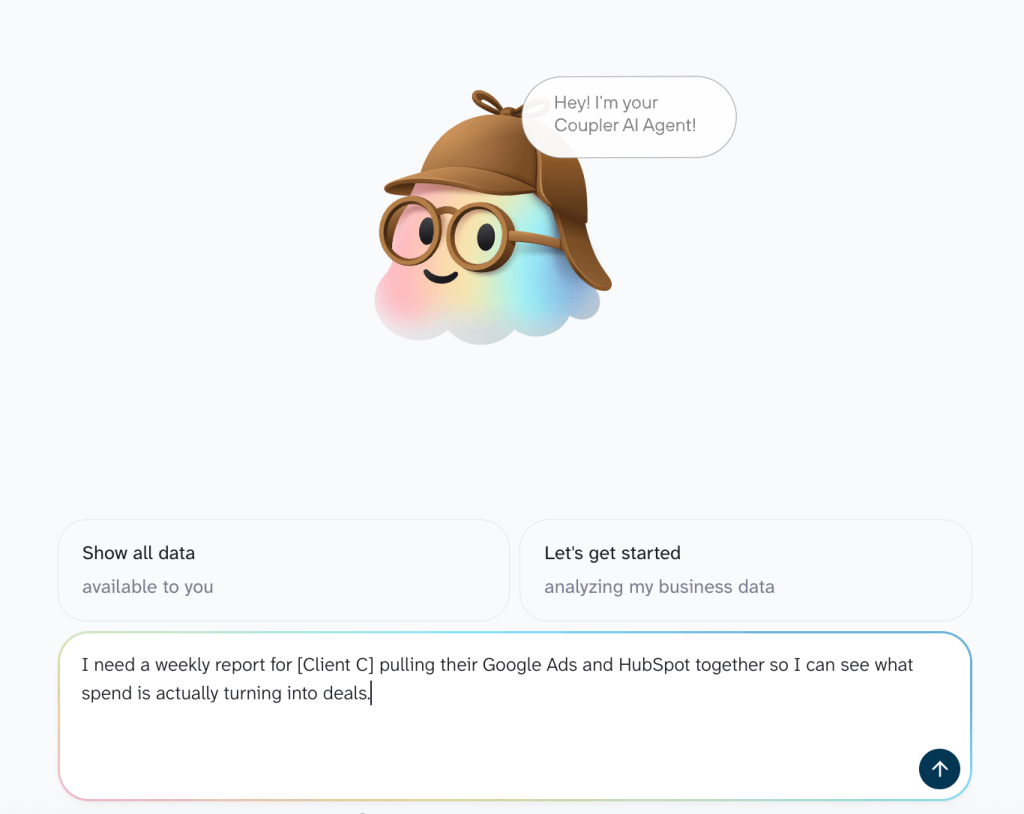
Sources that don’t line up on their own, like ad spend in one platform and closed deals in a CRM, can be combined into one dataset so the AI reads them together rather than as separate files. Just ask for it in the chat.
One connection can also feed multiple destinations. A client’s Google Ads account connected once runs their Data Studio dashboard, lands in the warehouse table your analyst works from, and is available to the AI, all from the same data.
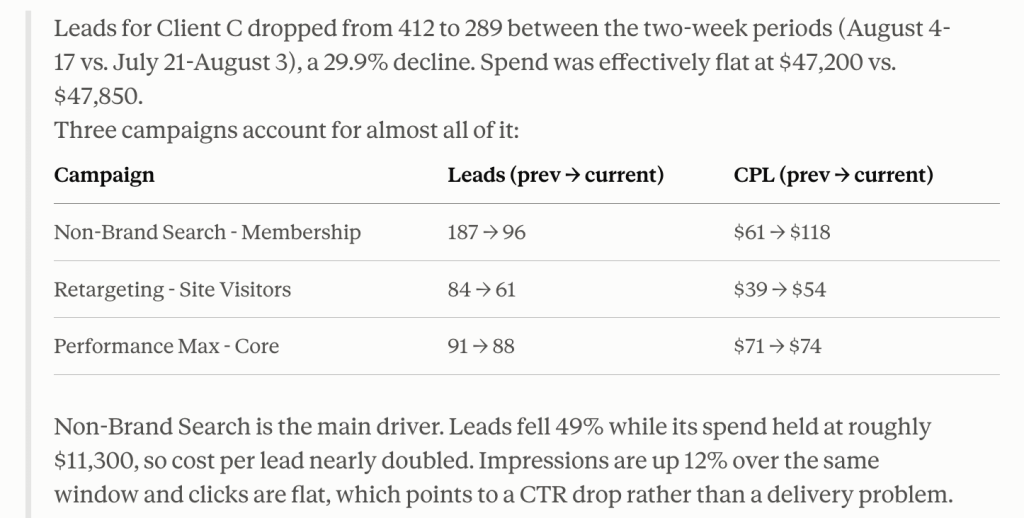
Once it’s running, the AI Agent answers questions about those accounts without opening another tool. Ask why a client’s lead volume dropped over the past two weeks and the answer comes from the accounts as they stand today. If you’d rather stay in the AI tool you already use, the same data goes there instead. Here’s an example in Claude:

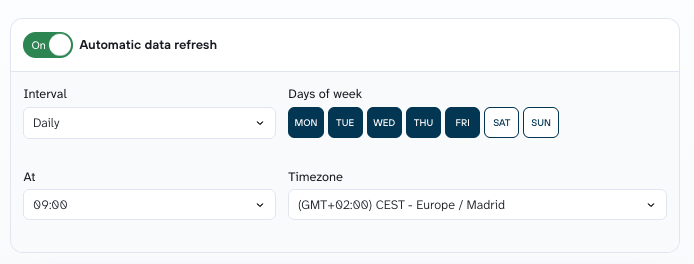
Scheduled updates keep everything accurate. Say when you want fresh data, daily at 7am in the client’s timezone or Friday afternoons, and every dashboard and AI session downstream works from that refresh with minimal tweaking.

Give the AI context and brand guidelines
AI for marketing agency work needs context the ad account never contains, and no amount of prompt engineering fills that gap. Tomas Kliment, Co-Founder of Adsrepo, ran into that limit testing how far AI could evaluate campaign performance on its own.
It worked well for obvious cases, but struggled when the decision required business context that wasn’t visible in the ad account: margin differences, stock levels, promotions, seasonality, creative strategy, or even internal priorities.
That made it clear to me that giving AI access to data is not enough. It also needs structured context about how the business actually works

Give the AI client brand guidelines, past campaign results, escalation thresholds, and the terminology the team actually uses internally. The more business context it has upfront, the less room it has to guess.
In Coupler.io, you write it down once and attach it to the client’s data. From then on it comes along with every question anyone asks about that account, whether they’re asking inside Coupler.io or in an AI tool.

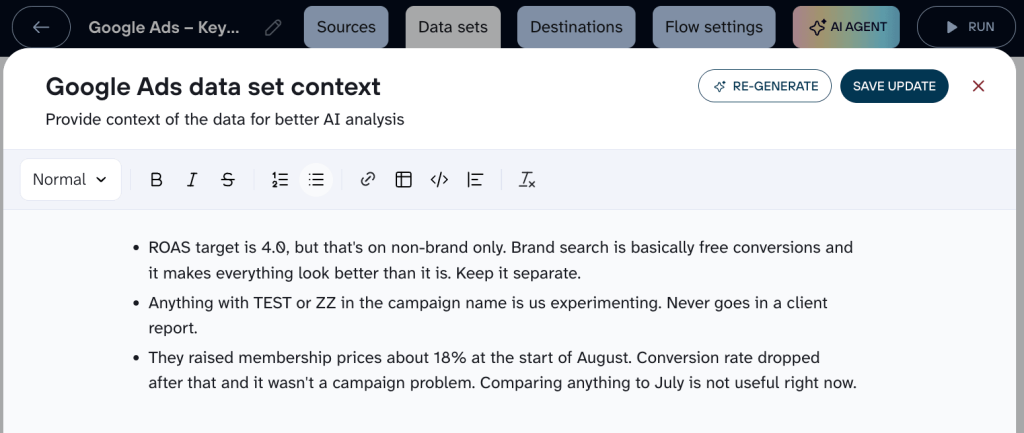
So you note that branded search doesn’t count toward the ROAS target, or that Q3 looked odd because the client changed pricing in August. Nobody has to explain it again, and a new account manager gets the same answer as the person who set it up.
Need help connecting your client accounts to AI?
Book a demo with Coupler.ioAI tools for marketing agencies: what’s actually in the stack
The AI tools for marketing agencies below cover seven parts of your agency stack, from content and creative through to reporting.
General assistants (e.g. ChatGPT) are left out because I assume you already use at least one. Social media management suites and client-facing chatbots are also out, since both mostly embed drafting and support models you already have access to.
| Jobs | Tools | Best when | Pricing |
| Content & SEO | Surfer SEO, Jasper | Output is inconsistent across writers | $49 to $250 per month |
| Creative production | AdCreative.ai, Adobe Firefly | Testing is capped by design capacity | $10 to $250, mostly credit-metered |
| AI search visibility | Profound, Peec AI | A client asks how they appear in ChatGPT | $99 to $399, enterprise custom |
| PPC / paid media | Optmyzr, Madgicx | Account hygiene eats more hours than strategy | $49 to $800, scales with managed spend |
| Outreach and lead generation | Clay, Smartlead | Pipeline depends on list quality | Free tier to $379 per month |
| Data & reporting | Coupler.io | Answering one question means opening multiple platforms | From $24 per month |
| Workflows & agents | Zapier, n8n | A process is documented and repeatable | Free tier to $70 per month |
Content and SEO
Content generation is where most AI tools for marketing agencies still get used, and where output quality varies most between teams.
Surfer SEO scores drafts against what currently ranks, and it now tracks answer engines alongside search. Content gap analysis surfaces weak pages and missing topics, and AI visibility monitoring covers ChatGPT, Gemini, and Perplexity. That combination makes it the easier sell on organic retainers where ranking and AI visibility get reported together.
Jasper solves the brand drift problem. Brand Voice profiles apply a client’s tone to every output, and Content Pipelines handle campaign-level production, which matters once several writers share the same account and the client starts noticing that two blog posts don’t sound like the same company.
Data and reporting
Reporting is where AI tools for digital marketing agency work run into a data problem rather than a model problem.
Coupler.io keeps client accounts refreshed everywhere your team works, and answers questions about them without opening another tool. It connects 400+ business sources across ad platforms, analytics, email, and CRM, and blends them into one dataset when a question spans several. One connection then feeds a dashboard, a warehouse, a spreadsheet, and an AI tool from the same refresh, so a new destination doesn’t mean a new export.
The part that matters for AI work is the Analytical Engine. It runs the calculations and hands the AI computed results, so the model interprets numbers rather than producing them.
Pre-built skills handle the analysis you repeat. Ask about a client’s channel performance and the marketing analytics AI skill runs the same checks it ran last month, so the answer is comparable across cycles and across accounts.
Let our team connect your client data to AI
Book a demoCreative production
Volume is the argument here, though the constraint is usually review capacity rather than generation.
AdCreative.ai generates batches of variants from a brand kit and scores each one before you spend on it. Colours, fonts, and logos get pulled in automatically. It earns its place on accounts burning through creative faster than a designer can supply it.
Adobe Firefly is trained on licensed material, which is the whole point when image generation output goes into client campaigns. Generative fill and expand adapt assets across ad formats, and it works with the Creative Cloud files your designers already have open. Worth it for agencies whose contracts make image provenance a procurement question.
AI search visibility
The newest category here, and the one I’d buy reactively rather than speculatively. Wait until a client asks.
Profound tracks brand presence in AI answers and reports citation share against competitors, with daily prompt tracking across the assistants clients care about. Agent Analytics also shows how AI crawlers read the site. It suits enterprise clients where AI visibility reaches board reporting.
Peec AI is the cheaper entry point. Multi-engine tracking starts at lower tiers than the enterprise options, and competitor benchmarking runs against a prompt set you define. AI for small marketing agencies has to earn its budget, and the lower tiers are where you find out whether clients will pay for this line item.
Paid media
Neither of these is AI-first in origin. They earn their place because agencies open them daily.
Optmyzr is built for many accounts rather than one. The rule engine automates bid changes, pausing, and budget alerts, and PPC Investigator diagnoses shifts down to device and keyword level. Search-heavy agencies get the most out of it.
Madgicx layers automation on machine learning signals from the Meta API. The Autonomous Budget Optimizer shifts spend toward better performers, and creative analytics surface fatigue before performance drops. It needs volume to work with, so it suits accounts with a real spread of ad sets.
Outreach and lead generation
Relevant to agencies selling demand generation, and to filling your own pipeline.
Clay turns a list of company names into researched, personalized records. Waterfall enrichment runs providers in sequence to fill gaps, and AI research agents answer custom questions about each account. On B2B and ABM work, list quality decides the campaign, and this is where that gets fixed.
Smartlead is priced on sending volume rather than seats, which suits running outbound across several clients at once. Unlimited mailboxes, plus inbox rotation and warmup to protect deliverability.
Workflows and agents
Workflow automation is where the rest of the stack gets connected, and where most agency agent projects start.
Zapier is the default connector between tools that don’t talk to each other natively. The AI Zap Builder takes a plain-language description and suggests triggers, and its agents run across connected apps rather than one platform. Reach for it when you want something running this week without developer time.
n8n keeps client data on your own infrastructure. Self-hosting means it never leaves your environment, and the node-based builder is more granular than trigger-and-action tools. The obvious pick for agencies with data clauses that rule out third-party processing.
Risks marketing agencies face as AI adoption grows
As you bring AI into more client work, there are a few places where things tend to go off the rails.
No human in the loop
AI output sounds confident even when it’s wrong. A report might show a metric that doesn’t match the source file, or attribute a traffic drop to seasonality when the real cause was a tracking change last week. These errors are hard to catch because the surrounding analysis looks polished and reasonable.
For agencies, the stakes are higher because the output goes to clients. Giving the AI business context reduces these mistakes, but doesn’t eliminate them.
What’s left is human oversight, and Andriy Zapisotskyi, Founder and CEO of GrowthMate, has been deliberate about keeping it intact:
The biggest impact is that AI removes routine work, not human judgment. It helps our project managers clear operational backlogs faster and allows link builders to spend more time on outreach, relationships, and work that genuinely requires human input.

So, treat AI-generated reports the way you’d treat work from a junior analyst on their first week: verify key claims against the source and make sure someone who understands the account signs off before it goes out.
Protecting client data and confidentiality
AI for marketing agency work usually touches client data covered by a handling agreement. You’re giving the tools access to confidential information like revenue numbers and strategic plans, so your setup has to meet those provisions.
A few things to get right:
- Know how data is handled. Check whether the AI provider stores prompts and outputs, uses them for training, where data is processed, and how long it’s retained.
- Limit access. Give AI access only to the data it needs. Permissions should also keep one client’s data separate from another’s.
- Avoid shadow AI. If people use personal AI accounts for client work, they may bypass the security and data privacy policies your agency has in place.
- Use a managed data layer. Coupler.io controls which datasets the AI can access, without handing it API credentials or direct database access.
Then there’s what you tell the client. Most agencies now mention AI somewhere in their process documentation, and clients rarely push back when the work holds up. The EU AI Act’s transparency rules came into force in August 2026 and cover labelling AI-generated content, so it’s worth checking where your deliverables sit.
Losing quality in the name of speed
AI lets you produce twice the output in half the time, but that can make volume feel like progress. There’s a reason LinkedIn added a “seems like AI slop” button to let users flag low-effort AI posts. If what you produce sounds like everything else in the feed, speed won’t make up for lower quality.
The same pattern shows up in analytics work:
AI is an amplifier, not a repair tool. If the data and process underneath are weak, AI will simply help you make wrong decisions faster and with more confidence.
I see another problem, too: when AI makes a deliverable easy to produce, teams can stop asking whether it’s needed. A weekly report nobody reads doesn’t become useful just because it takes five minutes instead of three hours. Before you automate something, make sure someone plans to use it.
Get your AI setup working from connected client data
Book a demo with Coupler.io