AI assistants can already help you analyze Meta Ads performance, but their answers depend on the data they can access. MCP servers provide a direct connection to your ad account, allowing assistants to retrieve campaign data and, depending on the integration, make changes. Meta released its official Ads MCP server in 2026, and third-party providers have since introduced their own versions.
This guide compares the best Meta Ads MCP servers, what sets them apart, and which one might suit your workflow. It also covers setup, pricing, and what to consider before connecting your ad account.
Key takeaways
- Start with the task: reporting, editing campaigns, or tying ad spend to sales, and most teams need more than one.
- Meta’s official server is free in beta and can edit campaigns, so plan how you’ll check its changes.
- Coupler.io blends Meta Ads with your other ad platforms, store, and CRM data before your AI tool sees it, so every answer comes from one set of numbers.
- For edits across several ad platforms, look at Adspirer or Pipeboard.
- Skip the Meta Ads CLI unless a developer runs bulk launches.
Meta Ads MCP servers compared side by side
Read across a row to see what data a server covers, whether it edits campaigns, how it charges, and the job it fits best.
| Server | Covers | Edits campaigns? | Pricing model | Best for |
|---|---|---|---|---|
| Meta Ads MCP | Meta Ads | Yes | Free during the beta | Meta-only campaign edits |
| Coupler.io | Meta, Shopify, HubSpot, and more (400+ apps) | No, reporting only | Plan tiers, 7-day trial | Cross-channel reporting with sales and CRM data |
| Adspirer | Meta, Google, TikTok, and 3 more | Yes | Per tool call, 15 free calls a month | Campaigns on several platforms |
| Pipeboard | 11 ad platforms, GA4 | Yes | By number of ad accounts, 2 free | Agency bulk edits |
| GoMarble | Meta Ads | No (open source) | Free open source; paid platform by ad spend | Self-hosted and free |
| Synter | 43+ ad platforms | Paid plans only | Per write, free reads | Free cross-platform reads |
| Flyweel | Google, Meta, TikTok | No | Free | Quick free checks |
| Adzviser | Meta and 40+ sources | No | Per data source, trial | Agency reporting |
Best MCP servers for Meta Ads
Eight servers made the list, each checked against its docs and pricing pages in November 2026. I compared four things: supported AI tools, campaign control, setup, and cost.
Official Meta Ads MCP server
Best for: Meta-only advertisers who want to create and edit campaigns from chat at no cost.
Meta launched it in April 2026 as part of Meta Ads AI Connectors, an open beta. Beyond campaign, ad set, and ad data, it has tools that come straight from Meta: auction and industry benchmarks, anomaly signals, and your opportunity score. It also checks pixel and Conversions API health and searches the Ad Library. It can also set up A/B tests, build custom audiences, and read the account’s activity logs.
The catch is scope and speed. It covers Meta only, and Meta is enabling it one ad account at a time, so some accounts can’t connect yet. It builds campaigns, ad sets, and ads one call at a time, and it has no tool for uploading creative files from your computer. Meta’s documentation lists every tool.
- Supported AI tools: Claude, ChatGPT, and Perplexity. Claude Code and other AI tools need your own Meta developer app.
- Campaign control: Yes. It creates and edits campaigns, ad sets, ads, audiences, and catalogs. New items start paused in Ads Manager, but the AI can switch them on, so paused isn’t a safety net. If Meta offers agent rules for your account, set them in Meta Business Suite before you allow edits. They aren’t available to every business yet.
- Setup: Add mcp.facebook.com/ads as a connector and sign in with Facebook.
- Cost: Free during the open beta.
Coupler.io
Best for: marketing teams and agencies that report on Meta Ads alongside sales, CRM, and other channels.
Coupler.io is a reporting automation platform for business teams. It automatically collects and blends data from 400+ apps and keeps it up to date for your reports and AI.
Its Facebook Ads MCP shows what your ads actually brought in. Coupler.io blends Meta Ads with Shopify, HubSpot, QuickBooks, or Google Ads into one dataset, so you can set ad spend against store revenue or CRM deals instead of reading Meta’s reported ROAS on its own.
The AI asks, and Coupler.io calculates. Your AI tool writes a query, Coupler.io runs it on the blended dataset, and you can open that query to see how each number was worked out.
Ready-made AI skills work across your ad platforms. PPC Analytics compares Meta and Google Ads on spend, CPA, and ROAS without double-counting conversions, and Marketing Analytics adds LinkedIn Ads and GA4. Coupler.io is rated 4.9/5 on Capterra.
- Supported AI tools: Claude, ChatGPT, Gemini, Perplexity, Cursor, Copilot, and other MCP clients.
- Campaign control: You control what Coupler.io can do in your apps. It doesn’t change your Meta campaigns, and inside Coupler.io the AI updates data flows only after you confirm.
- Setup: Connect Meta Ads and your other apps, and let Coupler AI build the data flow from a chat. Add your AI tool as a destination of that data flow, because Claude and other AI tools only query flows that send data to them. Then add Coupler.io from the Claude connector directory, the ChatGPT app, or the MCP setup in Gemini CLI, Cursor, and other tools.
- Cost: A 7-day free trial, then paid plans. Coupler AI comes with every paid plan.
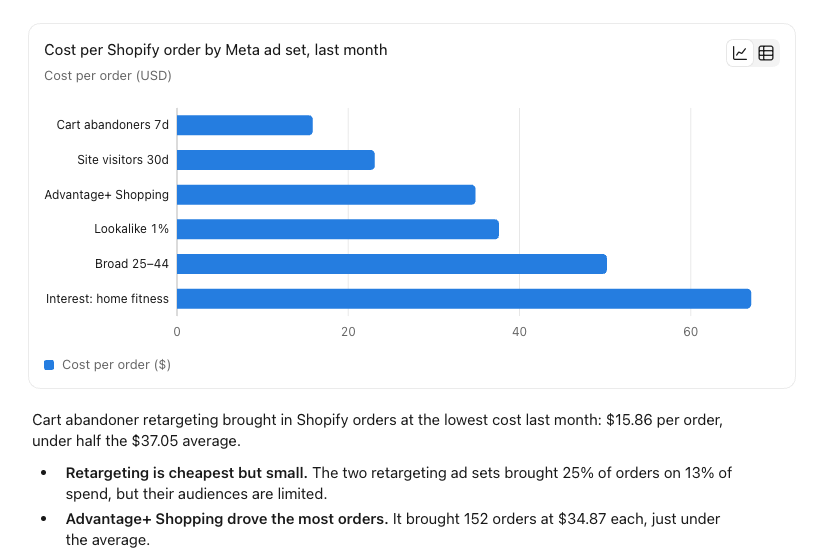
Ask Claude “Which Meta ad sets brought Shopify orders at the lowest cost last month?” and it answers from one dataset that holds both Meta spend and Shopify orders.



Get cross-channel answers in your AI with Coupler.io
Book a demoAdspirer
Best for: creating campaigns on several ad platforms, including Amazon and ChatGPT Ads, from one connection.
Adspirer connects one MCP server to six ad platforms: Meta Ads, Google Ads, TikTok Ads, LinkedIn Ads, Amazon Ads, and ChatGPT Ads. Its 36 Meta tools cover campaign creation, budgets, and bids, plus audits such as a monthly review of which campaigns to keep or cut. New campaigns start paused, and Adspirer says its tools can’t delete campaigns.
Watch the call count. Every tool call counts toward your plan, and one report can take several calls, so the free tier suits a test more than weekly work.
- Supported AI tools: Claude, ChatGPT, Claude Code, Cursor, Codex, and Perplexity.
- Campaign control: Yes. It creates campaigns and edits budgets and bids, with new campaigns paused.
- Setup: Add the connector and sign in to your ad accounts.
- Cost: A free tier with 15 tool calls a month, enough to test it, then paid plans by number of tool calls.
Pipeboard
Best for: agencies that duplicate and bulk-edit campaigns across many client accounts.
Pipeboard runs hosted MCP servers for 11 ad platforms plus GA4, with 42 tools on its Meta server. It covers the jobs that eat agency hours: duplicating campaigns, bulk edits, creative uploads, and Advantage+ creative settings. You can give each client connection its own read-only or write token, and Pipeboard says it’s a badged Meta Business Partner.
The trade-off is cost at scale. Each plan covers a set number of ad accounts, extra ones cost more, and bulk edits only come on higher plans, so a long client list adds up.
- Supported AI tools: Claude, ChatGPT (developer mode), Cursor, Claude Code, and n8n.
- Campaign control: Yes. New items start paused, and you can give each connection a read-only or write-scoped token.
- Setup: Add the remote URL, log in to Pipeboard, and connect Facebook.
- Cost: A free tier for two ad accounts and 30 AI requests a week, enough to try it, then paid plans by number of ad accounts.
GoMarble
Best for: a free, self-hosted Meta Ads MCP that runs on your own computer.
GoMarble’s Facebook Ads MCP is open source under the MIT licence and runs on your own computer. Its 21 tools pull accounts, campaigns, ad sets, ads, insights, and activity history. If you add your own Meta access token, it’s saved on your machine.
It can’t change anything, and you look after it yourself, from installs and updates to your Meta token. GoMarble’s paid platform adds AI agents that edit campaigns after you approve, priced by monthly ad spend.
- Supported AI tools: Claude Desktop and other local MCP clients.
- Campaign control: The open-source server only reads. On the paid platform, higher plans make changes after approval.
- Setup: Run the installer or install it locally with Python.
- Cost: The open-source MCP is free. The hosted platform is priced by monthly ad spend.
Synter
Best for: free reports across many ad platforms, with paid edits when you need them.
Synter connects 43+ ad platforms through a hosted server or an open-source npm package. Reading data, running reports, and pixel audits are free, so you can pull cross-platform numbers without a subscription. Its docs list spend caps and approval gates for changes.
Edits need a paid plan and a payment method, and each change is metered. If you tweak campaigns daily, those fees add up faster than a flat plan would.
- Supported AI tools: Claude, ChatGPT, Cursor, Codex, and Claude Code.
- Campaign control: Yes, on paid plans and with approvals. Each change is metered.
- Setup: Sign in with OAuth for the hosted server, or add an API key to the npm package.
- Cost: Free reads. Paid plans add a fee per change.
Flyweel
Best for: free Google, Meta, and TikTok checks, with no query limits.
Flyweel’s MCP reads 222 metrics across Google, Meta, and TikTok Ads, plus Pipedrive deals, so B2B teams can see ad spend next to their pipeline. Data refreshes when it’s more than 15 minutes old, and Meta figures usually trail by one to three hours.
Each query returns up to 500 rows and 30 metrics, which suits quick checks more than large exports.
- Supported AI tools: Claude, Claude Code, ChatGPT (developer mode), Cursor, VS Code, and Gemini CLI.
- Campaign control: No.
- Setup: Add the server URL and sign in. You need a Flyweel account with your ad accounts connected.
- Cost: Free, with unlimited MCP queries.
Adzviser
Best for: agencies reporting on many Meta ad accounts in Claude, ChatGPT, or Google Sheets.
Adzviser brings Meta Ads and 40+ ad and analytics sources into Claude and ChatGPT, and the same data into Google Sheets, Data Studio, and Power BI. Every plan allows unlimited ad accounts per source, which helps agencies with long client lists. It asks for no campaign-management permission, so the AI can’t touch your campaigns.
Pricing goes by number of data sources, so costs grow with each platform you add rather than with ad accounts.
- Supported AI tools: Claude, ChatGPT, Gemini CLI, Perplexity, n8n, and Manus.
- Campaign control: No.
- Setup: Connect Meta in Adzviser, then add it from the Claude connector directory or the ChatGPT plugin.
- Cost: Paid plans by number of data sources, with a low-cost trial.
Two more servers are worth a look if approvals matter most to you. AdKit saves every change as a draft you approve in its dashboard, and Ryze AI asks for approval before each change.
How to choose a Meta Ads MCP server
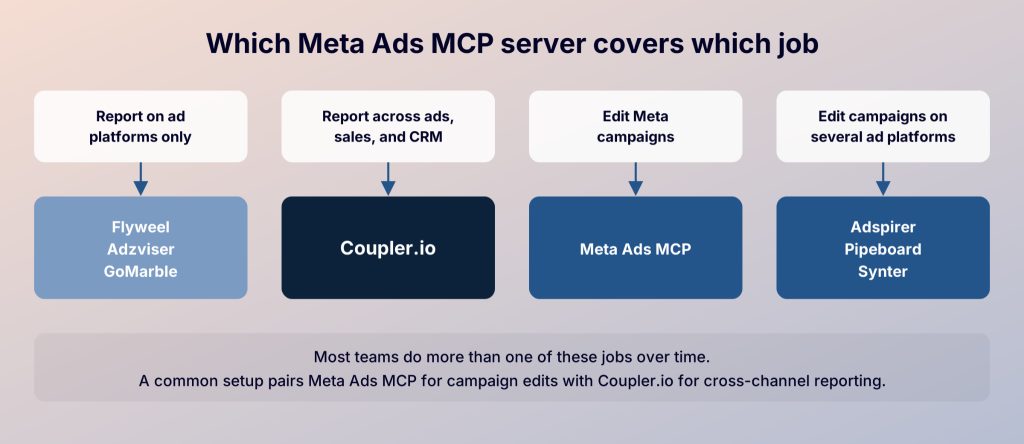
The best Meta Ads MCP servers for paid social marketers depend less on tool counts than on the job you need done. Then check what each one can change and what it costs.

Read-only Meta Ads MCP server or write access?
If you only need reports, choose a read-only Meta Ads MCP server such as Flyweel, Adzviser, or GoMarble’s open-source MCP. That removes the risk of an AI changing a running campaign.
If you want campaign edits, check whether new campaigns start paused and whether you approve each change. Meta’s official server can edit campaigns, so check whether agent rules are available for your account before you allow it.
Open source Meta Ads MCP or hosted?
An open source Meta Ads MCP, like GoMarble’s, is free, but you install it, update it, and look after your own Meta token. A hosted server takes a sign-in, and the vendor keeps it working when Meta’s Marketing API changes. Most marketing teams are better off with a hosted one.
Meta Ads MCP vs CLI
Most marketers will find an MCP easier. It connects Meta Ads to Claude or ChatGPT, where you ask questions, build reports, and make campaign changes without a terminal.
The Meta Ads CLI suits developers who automate bulk campaign work through scripts or coding agents like Claude Code. It needs a command-line setup, and unlike Meta’s remote MCP server, it can upload creatives straight from files on your computer. The CLI calls Meta’s Marketing API directly. Our MCP vs API guide compares the two routes in more depth.
What an MCP can and can’t tell you about performance
A single-app MCP gives your AI tool the numbers that app reports, but it doesn’t reconcile them with your other apps. That gap shows up in three places:
- Recent Meta Ads figures can change for a day or two as conversion data comes in.
- Meta’s reported conversions may differ from Shopify orders or GA4 conversions, because each platform uses its own attribution model.
- Comparing Meta with Google Ads or TikTok Ads means lining up dates, currencies, and metric definitions. With one server per app, the AI redoes that work on every question.

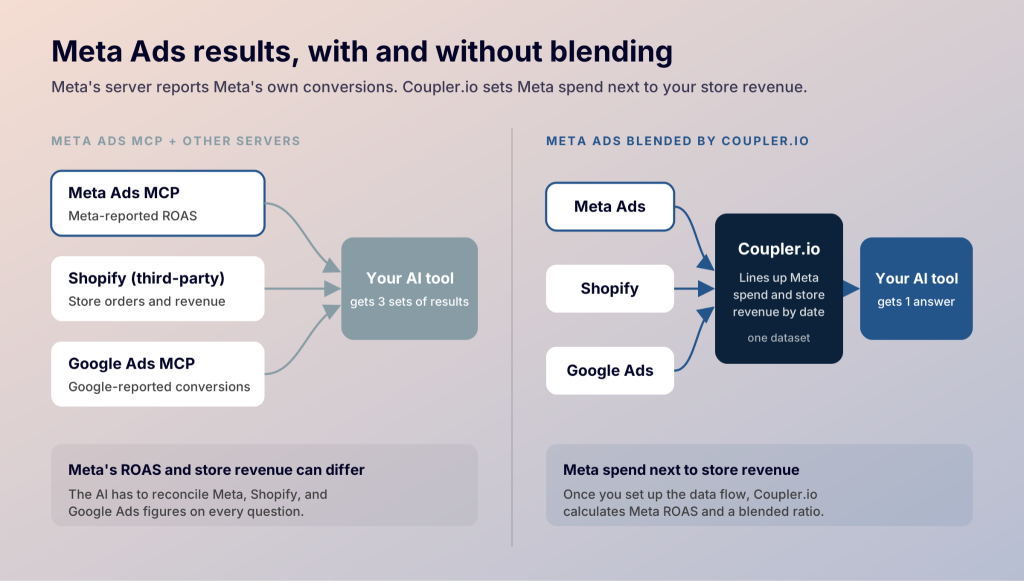
Coupler.io blends your apps before the AI queries them, so you get one set of numbers. Need one app in your AI tool for a quick question? The native connector may be enough. Need several apps, history, or the same numbers in your reports? That’s Coupler.io.
Meta Ads prompts that get answers you can act on
Good prompts read like a brief to a media buyer. Name the campaign, date range, metrics, and a threshold, and say what output you want. Check that your server supports the breakdowns you ask for.
Basic reporting (most servers that read Meta Ads)
Compare last week’s Meta Ads results with the week before. Show spend, purchases, CPA, and ROAS by campaign, flag any CPA rise over 20%, and give me three bullets for our team update.
Historical creative analysis (needs ad-level history)
Flag active prospecting ads with frequency above 3 and a CTR drop of 20% or more versus the previous 14 days. Show spend, frequency, CTR, and ad set, sorted by spend.
Campaign optimization (needs campaign control)
Find ad sets that spent over $300 in the last 14 days with a CPA 50% above the account average. List them, and don't pause anything until I approve.
Asking for a list first keeps every change under your control, even on servers that can act straight away.
Ad spend against store revenue (Coupler.io, with Shopify connected)
Show weekly Meta Ads spend next to Shopify revenue for the last 8 weeks, plus a blended ratio of total Shopify revenue to total Meta Ads and Google Ads spend. Flag weeks where Meta's ROAS and the blended ratio move in opposite directions.
The blended ratio uses all store revenue, so it shows your overall return on ad spend, not one campaign's performance.
Coupler.io has more ready-made AI skills for many of these jobs, so you don't need to copy-paste a prompt:
Facebook Ads creative fatigue skill
Shows which Meta ads are wearing out, how long each one has left, and how many new ads you need each month.
Facebook Ads budget pacing skill
Shows where your Meta ad spend will land by month end and which ad sets would get more results with more budget.
Facebook Ads wasted spend and scaling skill
Finds the Meta campaigns and ad sets spending without results and shows where to move that money instead.
See all 200+ AI skills
Before you connect a Meta Ads MCP server
- Start with one ad account.
- Check your AI plan. Claude's free plan allows one custom connector, and some servers need a paid Claude or ChatGPT plan.
- When you sign in with Facebook, share only the ad accounts and Pages the AI needs.
- Check every AI change in Ads Manager, since the AI can switch paused campaigns on.
- Do a dry run first: ask the AI to list the changes it plans to make, then approve them.
Connect Meta Ads to your AI tool with Coupler.io
Start free trialFAQ
Can I use a Meta Ads MCP server with ChatGPT?
Yes. Meta's server connects to ChatGPT, Claude, and Perplexity with a Facebook sign-in. Claude Code and other AI tools need your own Meta developer app. Coupler.io works with ChatGPT too, along with Claude, Gemini, and other MCP clients. If the Model Context Protocol is new to you, MCP servers explained covers the basics.
Why does my ad account say it isn't enabled for the Ads MCP?
Meta is switching the server on gradually, one ad account at a time, and there's no setting to force it on. Until your account is enabled, a third-party server built on Meta's Marketing API can fill the gap.
How do I set up a Meta Ads MCP for Claude?
In Claude, open Settings, go to Connectors, and add a custom connector with the server's URL. For Meta's server, that's mcp.facebook.com/ads, followed by a Facebook sign-in. Servers in Claude's connector directory, like Coupler.io, take one click instead. The full steps are in how to connect Facebook Ads to Claude.
Can one MCP server cover several Meta ad accounts?
It depends on the server. Meta enables its server account by account. Adzviser allows unlimited ad accounts on every plan. Coupler.io brings several ad accounts into one dataset, so your AI tool compares them in a single answer.
Do Meta Ads MCP servers cover Instagram ads?
Yes. Facebook and Instagram ads both run through Meta Ads Manager, so most Meta Ads MCP servers can report on Instagram placements if they support a platform breakdown. Meta's official server can also boost Instagram posts. To compare the two, ask the AI to break results down by platform.