You ask Claude about last week’s ad spend. You ask again on Monday and might get a different number. Meanwhile, the script that feeds your client dashboard breaks every time an ad platform changes its API.
Both problems come from using the wrong route to your data. The MCP vs API difference comes down to who decides what to call next: a large language model (LLM) or your code. Use MCP where code should run, and you pay for tokens and get answers that shift between runs. Hand-code everything, and you maintain a script for every app. Coupler.io, a reporting automation platform for business teams, gives you both routes on the same blended data. Below you’ll see how each one works and when to use it.
What Coupler.io MCP does
MCP (Model Context Protocol) is an open standard for connecting AI tools to outside systems. Coupler.io runs an MCP server. Once you connect your AI tool to it, the tool works directly with your data flows. There are no exports to run, and in clients like Claude, there are no API keys to manage.
Access is set per data flow. You add an AI tool as a destination, connect it once, and run the data flow. An AI tool sees only the datasets from data flows that list it as a destination. Adding Claude to a data flow doesn’t make that data visible in ChatGPT. The AI Agent inside Coupler.io is the exception: it sees every dataset in your workspace.
The MCP client gets these tools:
| Job | Tools | What they do |
|---|---|---|
| Find data | list-datasets, search-datasets, list-templates | List datasets, find one by name or keyword, browse ready-made templates |
| Read and analyze | get-schema, get-data | Read columns, types, and saved business context; run a SQL query against a dataset |
| Shape data | create-dataset, update-dataset-query, update-dataset-schema | Build SQL datasets from datasets in the same data flow, such as a join or a pivot |
| Build data flows | create-dataflow, create-dataflow-from-template, get-dataflow, source and destination tools, update-dataflow | Create data flows, add sources and destinations, rename or reschedule |
| Connect services | list-credentials, list-integrations, get-integration, get-integration-field-options | Check which services you’ve authorized and what a connector needs |
| Remember and refresh | update-dataset, run-dataflow | Save what a metric means; refresh a data flow when you ask |
| Skills | list-skills, get-skill | Load a skill’s instructions so the AI follows a set procedure |
get-data is where answers come from. The querying happens on Coupler.io’s side, so large datasets don’t have to fit into the AI’s context. The AI asks, Coupler.io calculates. The model writes the SQL, and Coupler.io runs it and returns the computed result.
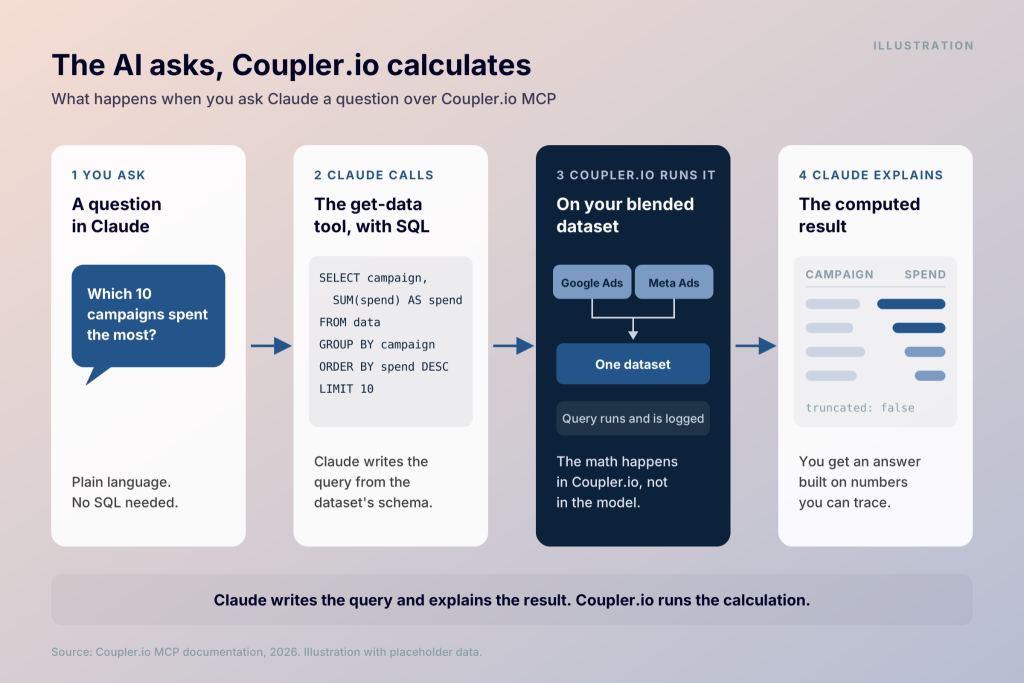
Gabriel Solberg, a B2B Growth Performance Marketer at Right Percent, manages over $1 million in monthly ad spend for a single Meta advertiser. He connected his Meta Ads data to Claude through Coupler.io’s AI Integrations and saved 60% of his time on data analysis and reporting.
“I’m not getting AI’s best guess. Coupler.io does the actual math.”
Permissions work in two directions. The AI can’t edit, delete, or overwrite the rows Coupler.io has imported. It can change your configuration, though. It can create data flows, add sources and destinations, and change a schedule. Coupler.io instructs it to confirm with you before making a change you didn’t ask for.

Analyze blended business data in Claude with Coupler.io
Start your free 7-day trialHow you connect an AI tool
MCP powers every Coupler.io AI destination, which Coupler.io calls AI Integrations. The list includes Claude, ChatGPT, Cursor, Gemini CLI, Gemini Enterprise, Microsoft Copilot Studio, OpenClaw, Perplexity, and Custom MCP.
In Claude’s chat app, you select Claude as the destination in your data flow. Then you install the Coupler.io connector from the Claude directory, connect, and authenticate. Claude users on a Team or Enterprise plan need admin access to add a new connector.
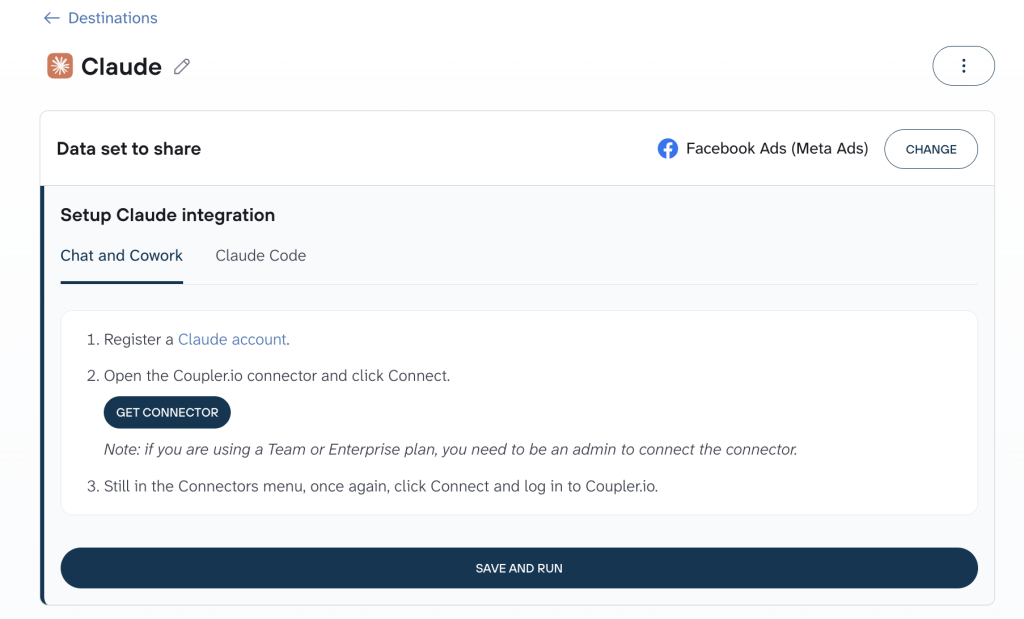
Claude Code works a little differently. You copy the connection command from the Claude destination step, paste it into Claude Code, and restart the session.
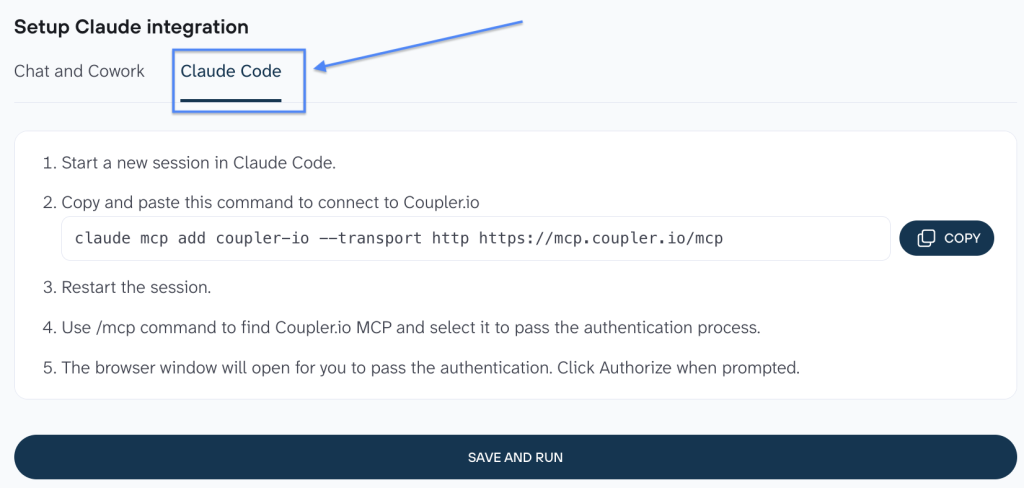
Then you open /mcp, select Coupler.io MCP and authorize it in the browser window that opens.
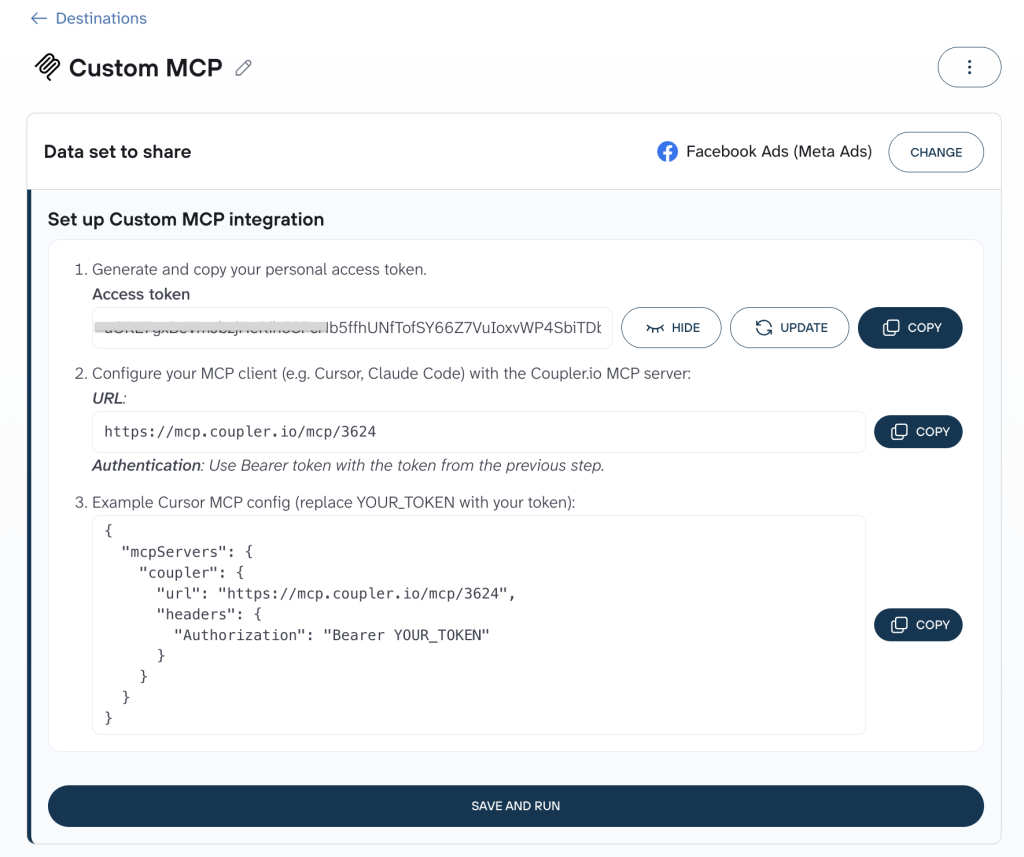
Any other MCP client goes through the Custom MCP destination. Click “Generate token”, copy it along with the MCP server URL, and add both to your client’s JSON config. The client authenticates with a Bearer token. The docs name Cursor, n8n, Make, and custom applications as examples.
What the Coupler.io public API does
The public API is a REST API at https://api.coupler.io. It covers workspaces, data flows, datasets, connectors, credentials, templates, and execution data. Requests use JSON over HTTPS, and every API endpoint path is relative to that host.
According to Coupler.io’s launch post, the API exposes the same operations Coupler.io MCP already offers. Your code calls the API directly, with no LLM at execution time.
Here’s what your code can do with it:
- Query a dataset. POST /v1/workspaces/{workspace_id}/datasets/{id}/query takes a DuckDB SELECT statement and reads from a table named data. It runs on the latest successful run of the dataset.
- Create a data flow from a template. POST /v1/workspaces/{workspace_id}/dataflows accepts a template_id, and the new data flow is a copy of that template.
- Set or pause a schedule. PATCH /v1/workspaces/{workspace_id}/dataflows/{id} takes a schedule_config with intervals from quarterHourly to monthly. If your plan doesn’t include an interval, the API returns 422.
- Trigger a run. POST …/dataflows/{dataflow_id}/executions with {“run_mode”: “full”} queues the run and returns 204.
- Check status. GET /v1/workspaces/{workspace_id}/dataflows returns up to 200 data flows with last_success_run_at.
- Reuse agent skills. Two endpoints list agent skills and return a skill’s prompt.
The launch post puts coverage at about 90–95% of what you can do with data flows in the UI. One step still needs a person. The API can start a source connection, but it can’t authorize a source on its own, so someone finishes the OAuth step.
These limits shape how you build:
| Limit | Value |
|---|---|
| Rate limiting | 100 requests per minute per organization, shared by all tokens and workspaces; over that, 429 with Retry-After: 60 |
| Query size | Up to 10,000 rows; truncated is true when there are more |
| Query time | 60 seconds to load the snapshot and return rows |
| Listing data flows | Up to 200 per call, no pagination parameters |
The query endpoint is built for analytical queries. For full exports, add a destination to the data flow instead, such as a warehouse or a JSON file.
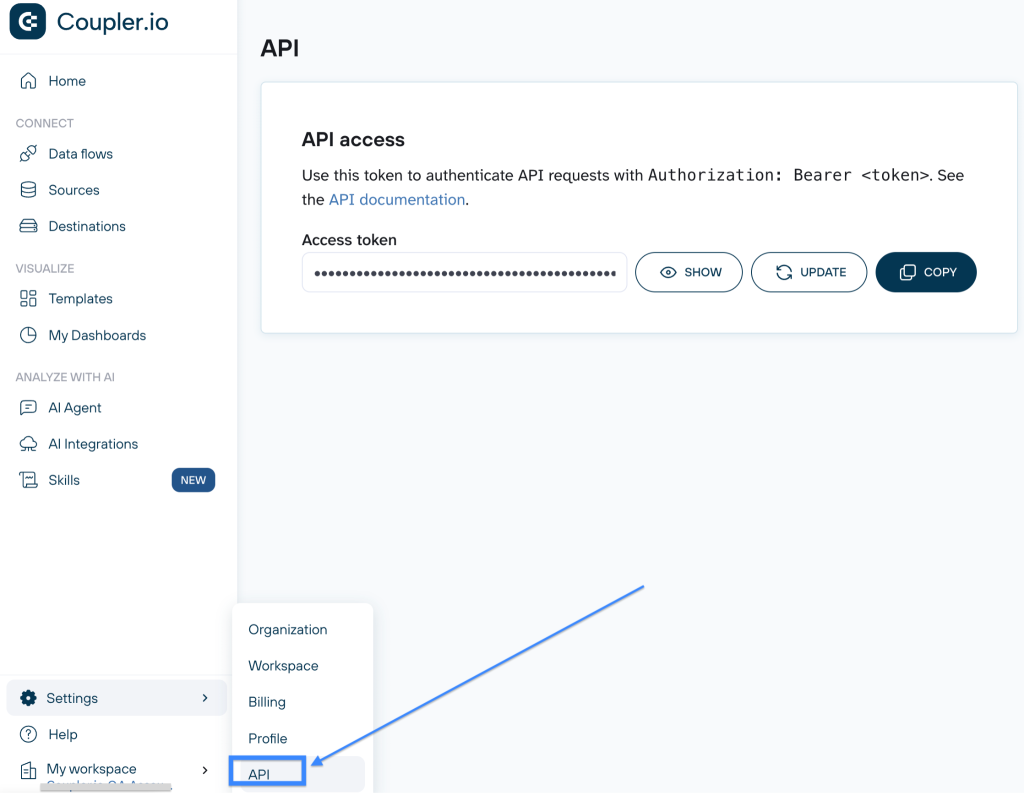
To get access, generate a personal API token on the API page in Settings. The launch post says workspace owners and admins can do this. Send the token as Authorization: Bearer <token>. It doesn’t expire, and regenerating it replaces the old one.
API access is included in the Active, Pro, and Custom plans. On other plans, the API returns 403.
Get computed results in your app via the Coupler.io API
Try it free for 7 daysMCP server vs API: the differences in practice
Most MCP server vs API questions come down to the rows below. Here’s the API vs MCP comparison, side by side:
| Coupler.io MCP | Coupler.io public API | |
| Caller | An AI tool’s MCP client | Your code, script, or workflow tool |
| Who picks the operation | The model, based on your prompt | The developer, in advance |
| Protocol | JSON-RPC 2.0 | REST, JSON over HTTPS |
| Authentication | Browser authorization in Claude; Bearer token for Custom MCP | Personal API token as a Bearer token |
| Data in scope | Datasets from data flows with that AI tool as a destination | Workspaces you have access to |
| Cost per request | LLM tokens on the AI side | No inference cost |
| Same request, same result | Not guaranteed: the model writes the SQL each time | Your code sends the same statement every run |
A traditional API (application programming interface) publishes its endpoints in docs or an OpenAPI spec. A developer reads them and writes code. With an MCP server, the client sends a tools/list request and gets each tool’s name, description, and input schema. The MCP spec calls tools “model-controlled”: the model decides which to call based on the user’s prompt. That’s the core of API vs MCP server design. Docs are written for people, while tool lists are written for models.
Over MCP, the model writes a fresh query for each question, so two runs of the same question can produce different SQL. A direct API call runs exactly the statement your code sends. The launch post describes this as “no model drift between runs.”
Each MCP question also uses LLM tokens, often across several tool calls, such as reading the schema before querying. A direct API call skips the model entirely.
The same question as an MCP tool call and an API call
Say you want the top 10 campaigns by spend from a dataset that blends Google Ads and Meta Ads.
Over MCP, you ask Claude in plain language. Claude’s MCP client then sends Coupler.io a tools/call request, structured like this:
{
  "jsonrpc": "2.0",
  "id": 2,
  "method": "tools/call",
  "params": {
    "name": "get-data",
    "arguments": { "...": "fields defined in get-data's input schema" }
  }
}
The client fills in the arguments from the input schema it received through tools/list.
Over the API, your code sends the SQL itself:
curl -X POST "https://api.coupler.io/v1/workspaces/WORKSPACE_ID/datasets/DATASET_ID/query" -H "Authorization: Bearer YOUR_TOKEN" -H "Content-Type: application/json" -d '{"statement": "SELECT campaign, SUM(spend) AS spend FROM data GROUP BY campaign ORDER BY spend DESC LIMIT 10"}'
The response holds rows, one object per row keyed by column name or alias, plus the truncated flag.
That’s the MCP vs API call difference in one example. Both routes run SQL against the same dataset on Coupler.io’s side. Over MCP, Claude writes the query and explains the result. Over the API, you write the query and your app decides what to do with the rows.
MCP vs REST API: Is MCP just another API?
MCP is a protocol for connecting AI applications to tools and data. Anthropic introduced it as an open standard on November 25, 2024. Anthropic’s announcement described the problem it targets: “Every new data source requires its own custom implementation.”
The MCP vs REST API comparison is about who each one is designed for. A REST API, like most traditional APIs, is built for developers: they read the docs and call the endpoints they need.
MCP is built for AI applications. Messages use JSON-RPC 2.0, connections are stateful, and client and server negotiate capabilities at the start. The spec defines two standard transports: stdio for a server running locally and Streamable HTTP for a remote one. Servers offer tools for the model to execute. They can also offer resources and prompts.
Often, the REST API vs MCP question is about layers. An MCP server can sit in front of an existing REST or GraphQL API and present its operations as tools. Coupler.io offers both routes to the same operations, so the MCP server vs REST API choice depends on who’s calling.
MCP also differs from function calling. Function calling lets a model request a function that you defined inside your own app. MCP standardizes how tools are described and served, so one server works with many AI clients. Without a shared protocol, M AI apps and N data sources need up to M×N custom connections. With MCP, each app and each source implements the protocol once.
People also compare an MCP server vs API gateway. An API gateway sits in front of APIs and handles traffic concerns like routing and rate limiting. It doesn’t make an API readable for a model. An MCP gateway can do a similar governance job for teams that run many MCP servers.
MCP vs API vs CLI
A CLI wraps an API in commands that people and scripts can run in a terminal. Coding agents with shell access, such as Claude Code, can run CLI commands as well.
The trade-off is the environment. A CLI needs a terminal and a local install. MCP also works in chat apps where there’s no terminal, and the model discovers the tools on its own. With Coupler.io, you work through MCP or the REST API. In a terminal, Claude Code connects to Coupler.io MCP, and scripts call the API with curl or any HTTP library.
When to use MCP vs API
For the MCP vs API decision, I’d ask who sits at the other end of the request. The same test works when you compare MCP vs API for AI agents. A person with a question points to MCP. Code that runs unattended points to the API.
| Scenario | Route |
|---|---|
| A marketing lead asks Claude why CPA rose last week across Google Ads and Meta | MCP |
| You want to set up a data flow by describing it | MCP |
| An agency renders client dashboards in Evidence, Lovable, v0 or a React app | API |
| A new client in your CRM triggers n8n, Zapier or Make to create data flows from templates | API, with a person finishing OAuth |
| Your team wants a Slack or PagerDuty alert when a data flow stops refreshing | API, checking last_success_run_at |
| A tool needs the latest data at a stable URL it can fetch | JSON destination |
A third option is the JSON destination. It generates a stable URL that serves your data as a JSON file. Every time the data flow runs, the URL updates with fresh data. The URL includes an access token that controls who can read the data. Unlike a webhook, nothing is sent to your system. Your tool fetches the URL with a GET request whenever it needs the data.
In practice, API vs MCP is rarely either-or. Analysts ask questions in Claude during the week, while a script feeds the client dashboard. Both read the same dataset, so the numbers line up.
Replace per-app API scripts with one blended dataset
Book a demo with Coupler.ioMCP vs custom API integrations
Before tools like Coupler.io, getting ad and CRM data into an AI agent or a dashboard meant custom API integrations. You’d write code for each app’s API. Each data source brings its own API keys or OAuth flow, pagination rules, rate limits, and schema changes. Then you maintain that code every time an API changes.
ULTRA\OPS, a consultancy that builds custom apps and operational tools, faced this choice for a client’s campaign management app. The team considered a custom API connection but found it would be “a complex, time-consuming, and expensive process.” It chose Coupler.io instead. The team estimates that Coupler.io was 10 times faster than any alternative method for connecting each data source. Its Data Studio dashboards were running in a single day.
The other path is a separate native MCP server for each app. Need one app in your AI tool for a quick question? The native connector may be enough. Need several apps, history, or the same numbers in your reports? That’s Coupler.io.
With Coupler.io, the data from Google Ads, Meta, HubSpot, Shopify, and other apps arrives blended in one dataset. Metric definitions saved with update-dataset travel with the data. Both MCP and the API read the same refreshed dataset, so an AI answer and a dashboard work from the same numbers.
Prototype over MCP, then move to the API
You don’t have to settle the MCP server vs API question up front. Coupler.io’s launch post recommends a sequence: prototype a workflow with your AI assistant over MCP, then run it through the API. The dataset context and AI skills you built along the way carry over.
- Build the data flow. Connect your sources, add Claude as a destination, and run it.
- Explore in Claude. Ask questions, let Claude build a SQL dataset with create-dataset, and save metric definitions with update-dataset.
- Move the query into code. Once a dataset answers the question, send your SQL to the query endpoint from your app or workflow tool.
- Automate refreshes. Set the schedule with schedule_config, or trigger a run with {“run_mode”: “full”}.
- Watch for failures. Poll the data flow list and alert when last_success_run_at falls behind.
The same split suits agentic workflows. An AI agent explores over MCP, and your code runs the settled steps through the API. Coupler.io runs the queries in both cases.
Keep reports and AI on the same numbers with Coupler.io
Start your free 7-day trialWhich one to start with
The MCP vs API choice doesn’t have to be permanent. If you’re new to Coupler.io, start with MCP. Connect Claude or ChatGPT, ask your first question, and see how your data is shaped before you write any code. Move to the API when a workflow has to run on its own or live inside your product. The same applies when the output has to match from run to run.
Coupler.io is trusted by 200K+ users and rated 4.8/5 on G2 and 4.9/5 on Capterra. It’s SOC 2 certified and GDPR compliant.