Ask Claude how last month’s coupon codes performed in your WooCommerce store, and it instantly summarizes the results that help you plan better promotions next time.
But for that to happen, you need to know how to connect WooCommerce to Claude. Manually exporting and uploading a CSV to Claude works, but a CSV exported this morning is already wrong by afternoon if the store is still taking orders. A scheduled integration keeps your data fresh, so Claude always works with the latest information.
Coupler.io does that. It automatically syncs your WooCommerce data on a schedule. I’ll start with this easiest setup first. Then I’ll also walk you through the other ways to connect WooCommerce to Claude.
Connect WooCommerce to Claude with Coupler.io
The recommended way to connect WooCommerce for Claude is through Claude.ai web app. Once you add the connector, you can describe the what kind of data or WooCommerce analytics you need in natural language, and Claude automatically builds the data flow for you.
This removes most of the manual setup while giving you control over what data is pulled and how often it refreshes.
Set up a WooCommerce integration in Claude
Step 1: Add Coupler.io in Claude
Open Claude, go to Connectors, and install Coupler.io as your WooCommerce Claude connector. Here is a direct link.
Coupler.io connector for Claude

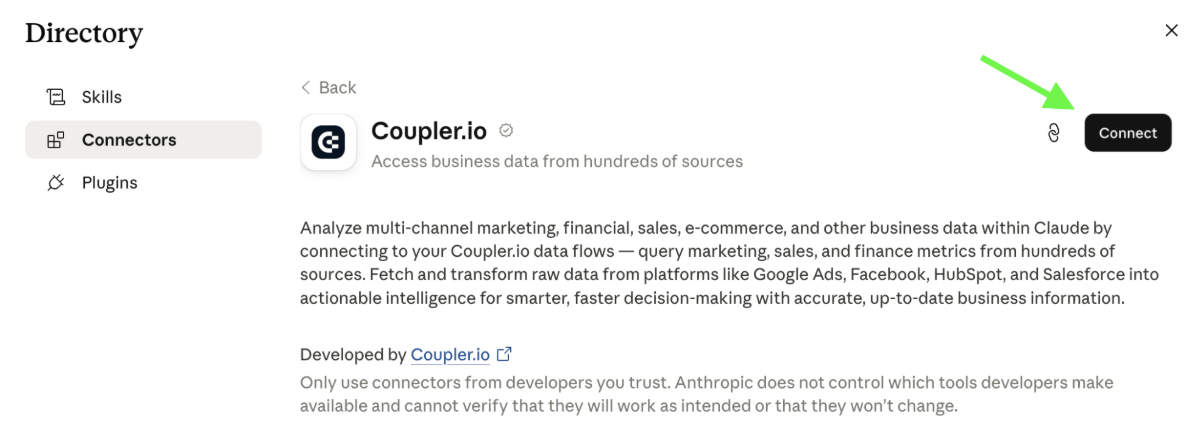
Coupler.io connector for Claude
Install the connectorStep 2: Ask it to build the data flow
Describe the data flow you want. For example, give the prompt: “Create a data flow to connect my WooCommerce store, pull orders, store profile, products, coupons, and customers from the last 12 months, and provide a complete performance analysis”. You can also add a request to refresh the data on a schedule, and it will configure automatic refreshes for you.

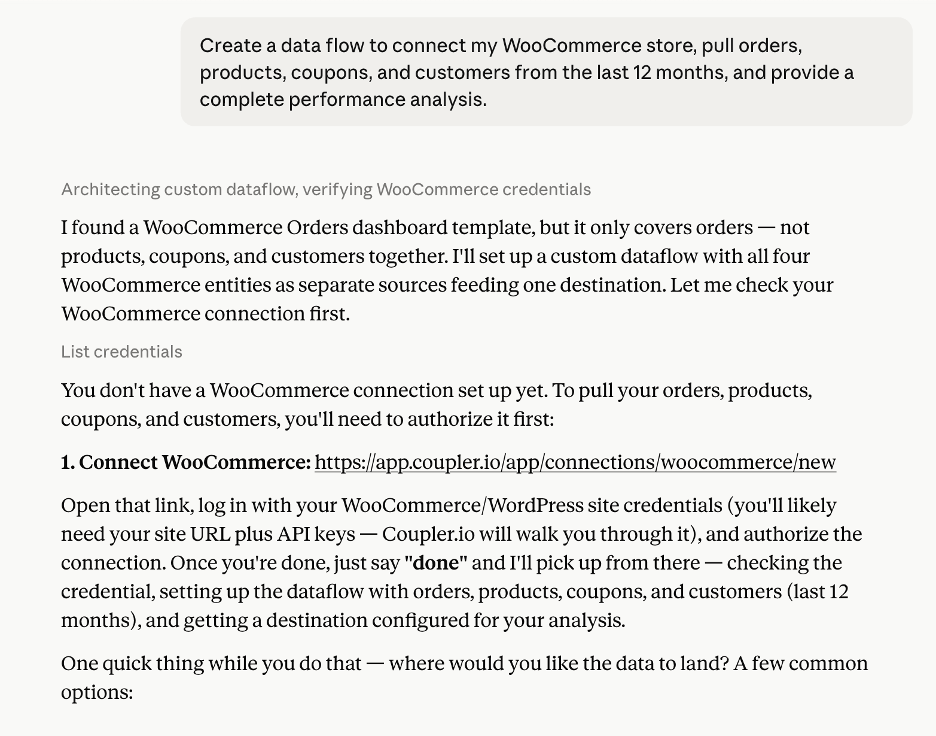
The AI gives a direct link to authorize your WooCommerce connection to build the flow. Then it automatically creates the complete data flow and analyzes the data you asked for.
You don’t have to worry about unintended changes here. Before performing any write action on your data, the AI asks for your confirmation.


Connect your WooCommerce store to Claude with Coupler.io
Get started for freeConnect WooCommerce to Claude in Coupler.io’s UI
The alternative way to connect WooCommerce to Claude is to ask the Coupler AI agent to build the data flow or set it up manually in Coupler.io’s UI. This lets you choose the entities, fields, transformations, and business context yourself before connecting the flow to Claude.
Let Coupler AI do the data work for you
Tell Coupler AI what you need to know, from which source, and how often. It connects your account, sets up the data flow, keeps it refreshed, and lets you analyze the results inside Coupler.io or another AI tool.
Try for free

Here is what it looks like if you want to go through each step of the WooCommerce connector yourself.
Step 1: Create a WooCommerce data flow
Use the form below to sign up for Coupler.io for free (no credit card required) and create a new data flow.

Then connect and authorize your WooCommerce account.
Next, select the data entity (the data you want to analyze), such as coupons, product attributes, reports, or shipping zones. You can also use the Search option under Advanced settings to return only records that match your search query. Under Columns, choose which fields you want to include in the data flow.

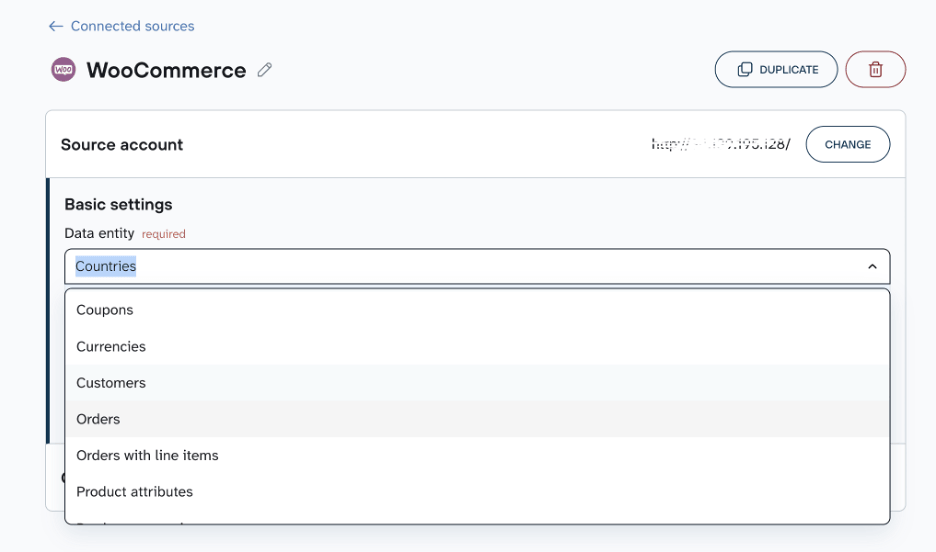
In addition to WooCommerce, Coupler.io supports over 400 Claude integrations, the data from which you can blend with WooCommerce records. Add the sources you need here and combine them in a single dataset for analysis.
Step 2: Organize dataset and add context
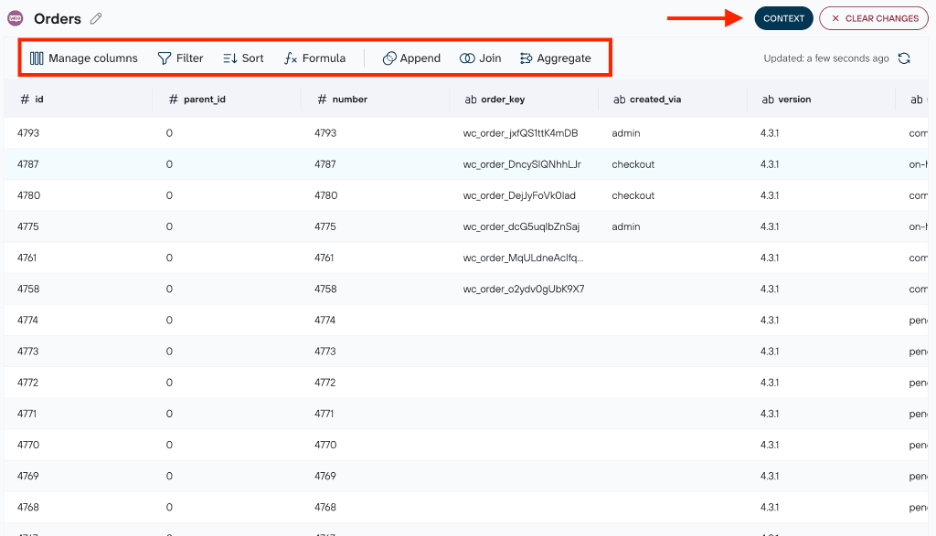
This is the data preparation step to transform your data before sending it to Claude. You can filter records, sort data, hide unnecessary columns, aggregate rows, or combine data from multiple sources. Every time the data flow runs, Coupler.io automatically applies those transformations.
You’ll also see a Context option, highlighted in the image below. This is where you explain what your data means to your business. Add columns definitions, explain how your business calculates net revenue, specify whether coupons count toward revenue, or define what qualifies as a suspicious refund. Claude then applies these business rules when answering your questions.

Step 3: Connect Claude and set your refresh schedule
To connect data to Claude, click Get connector. Coupler.io opens the connector page inside Claude. Click Connect to add the connector.
Now go back to Coupler.io and set a refresh schedule. After that, Claude will be able to query your WooCommerce dataset and answer the questions you set.
Get WooCommerce insights in Claude with Coupler.io
Get started for freePrompts to analyze WooCommerce data in Claude + examples
Once Coupler.io syncs your WooCommerce data, you can start asking Claude business questions in plain English and get answers in seconds. These prompts cover the most common WooCommerce store analytics AI teams run regularly
Explore more about how to use Claude for data analytics.
Find products that drive net revenue
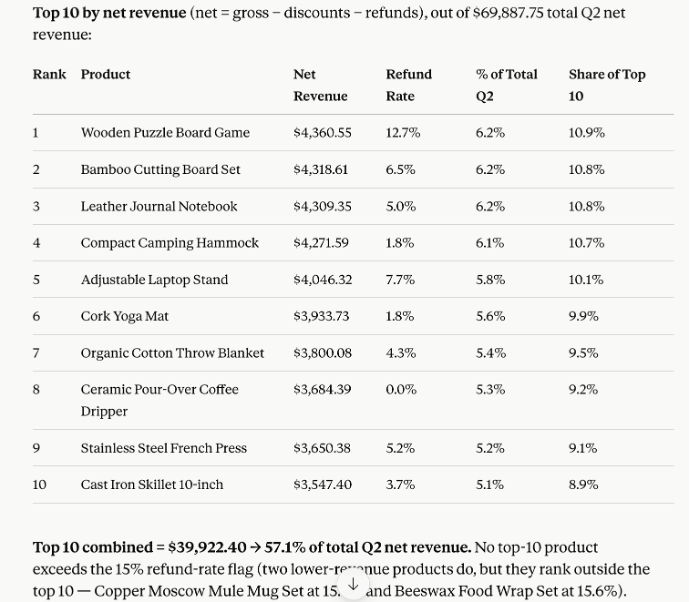
Not all top-selling products contribute equally to your business. This analysis helps you identify the products that generate the most net revenue, uncover products with unusually high refund rates, and understand whether your business relies too heavily on a small number of products. Those insights help you make better decisions about pricing, promotions, inventory, and growth strategy.
Prompt: Show me our top 10 products by net revenue after refunds and discounts for Q2, and flag any where the refund rate is above 15%. Also, show what percentage of our total Q2 net revenue comes from these top 10 products and each product's share of that total.

Spot stockout risks early
Stockouts happen when you run out of a product, either because demand is higher than expected or inventory wasn’t replenished in time. In both cases, you miss out on sales and leave customers disappointed. On the flip side, you shouldn’t overstock and waste your capital on low demand inventory.
This prompt identifies the products most likely to run out over the next two weeks based on recent sales, current stock levels, and sell-through rate. It also tells you whether demand is part of a genuine sales trend or just a temporary spike from a promotion or coupon, so you can confidently decide whether to reorder.
Prompt: List our top 20 products by order volume and order status over the last 30 days. Cross-reference against current stock levels and sell-through rate, and flag anything that will run out within 2 weeks at the current pace. For the three closest to stockout, tell me whether the recent order volume looks like a genuine sales trend or was driven by an active coupon/campaign that's about to end.

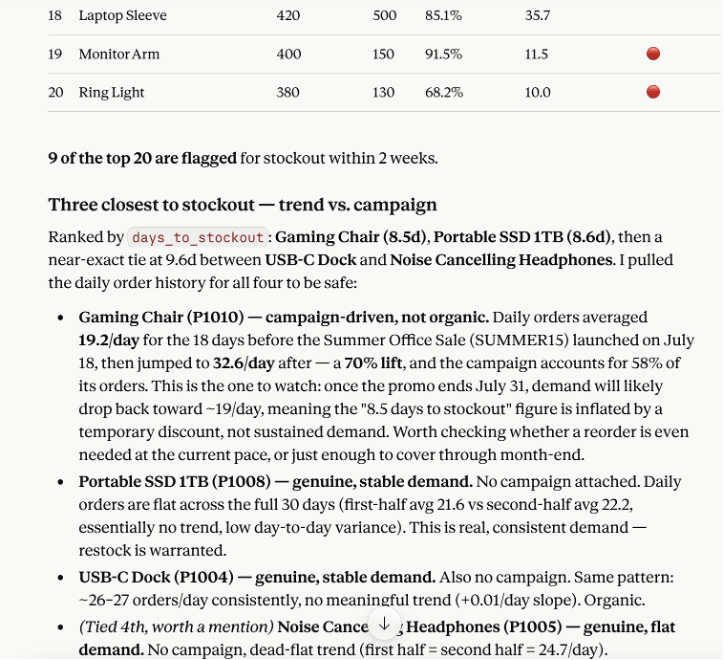
Since Coupler.io refreshes your WooCommerce data on a schedule, you can run this prompt regularly against your latest sales and inventory data to catch stockout risks early.
Coupon performance
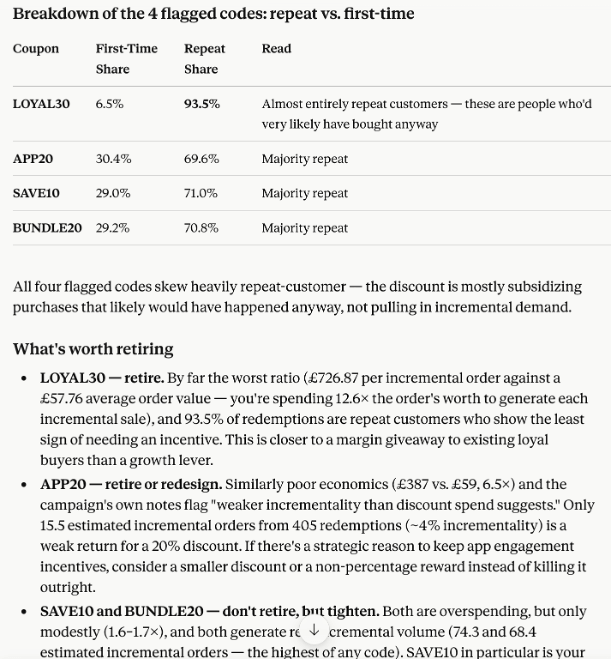
Understanding which coupon codes create incremental demand and which simply reduce margins helps you spend your discount budget more effectively. The prompt below identifies which coupon codes generate new demand and which mostly discount purchases that would have happened anyway.
Prompt: Using coupon totals and orders from the last 6 months, rank our active coupon codes by total discount given against incremental order volume. For any code where discount spend outpaces order lift, break down whether it's mostly being redeemed by repeat customers or first-time buyers, and tell me which codes are worth retiring.

Other prompts that might be useful for WooCommerce data analysis
Identify products with high refund risk
Prompt: In the last two quarters, find which products show up most often in orders with a refund status, along with the refund rate for orders containing each product. Which products should I flag for a quality or listing review?
Measure customer retention trends
Prompt: What's our repeat purchase rate over the last 6 months, and is it trending up or down compared to the 6 months before that?
Compare regional sales performance
Prompt: Break down order volume and average order value by shipping country/state for the last 6 months. Which region has the highest order volume, and which has the highest AOV? Are they in the same region?
Identify changing customer buying behavior
Prompt: Find customers whose purchasing frequency, order size, or product preferences have changed significantly during the past year. Highlight patterns that could indicate changing customer needs or emerging trends.
It’s good practice to save your reports as Claude AI artifacts, so you can reuse them once the data is refreshed.
What matters in WooCommerce Claude integration
Teach your e-commerce business definitions to Claude
Claude gives much more relevant insights when it understands what your business data actually means.
For example, if you select the “Order with line items” entity, explain that each row represents an individual product within an order, including its variation and quantity purchased. This tells Claude that the data is at the product level rather than the order level, allowing it to answer questions about product performance, frequently purchased combinations, and purchasing patterns at a more granular level.
You can also define business-specific terms that don’t exist in standard WooCommerce data. For example, you might explain what qualifies as a high-value customer, how you classify wholesale orders, or how your business calculates net revenue. With this additional context, Claude analyzes your data like a domain expert, so the insights are more specific to your business. You can add the context directly in your Coupler.io data flow, as shown in the walkthrough earlier in this guide.
Combine multiple sources for Claude analytics
Your WooCommerce store only tells part of the story. It shows what customers bought, but not necessarily how they found your store, what they did before purchasing, or how your sales team followed up afterward.
So combine WooCommerce with Google Analytics to see which traffic sources bring customers who spend more. Connect your CRM to compare customer lifetime value across sales segments, identify repeat buyers, or see which customer groups are most likely to churn. You can also blend multiple advertising platforms to compare ad spend with actual sales and profits. It’s easy in Coupler.io, you add or edit multiple sources to the same data flow, Claude then analyzes the combined dataset.
Accurate calculations
Almost every question you ask about your WooCommerce store, whether it’s customer behavior or revenue metrics, starts with crunching numbers. First, you calculate the right metrics. Then comes the analysis and interpretation. While Claude does an excellent job explaining the results, it alone cannot run math on raw data.
So consider approaches that perform the required calculations before sending the results to Claude or other AI agents. With Coupler.io, Claude turns your question into an executable query. Coupler.io’s Analytical Engine runs that query on your data, and then passes the results to Claude for analysis. That gives you consistent calculations along with AI-powered insights.
Ready-to-use skills
If you want to run recurring WooCommerce store analytics with AI without writing the same prompts every time, use Claude Skills.
A Skill is a Markdown (.md) file that contains reusable instructions for Claude. Download the free ecommerce analytics Skill, add it to your Claude Skills, and simply ask Claude to run it whenever you need. Combined with Coupler.io’s scheduled data refreshes, the Skill always runs on your latest WooCommerce data.
Run accurate store analytics in Claude with Coupler.io
Get started for freeHow else you can connect WooCommerce to Claude
| Connection method | Setup effort | Who does the math | Best for | Watch out for |
| Coupler.io | Low | Coupler.io’s Analytical Engine | Recurring analysis and accurate calculations | Refresh frequency depends on your plan |
| Manual export | None | Claude | One-off analysis | Stale data |
| API scripts / function calling | High | Your backend script | Teams with engineering resources needing full control | Build-and-maintain cost, ongoing upkeep as the API changes |
| Official MCP server | High | Claude | Technical users comfortable self-hosting | Raw data is directly passed to Claude |
Manual export
If you don’t want any technical setup and just need a quick, one-off analysis, this is the simplest option. Export your WooCommerce orders, reports, or customers as a CSV file, upload it to Claude, and ask your questions.
There are two main limitations with this approach. First, the whole process is manual. Every time you want fresh insights, you have to export the data yourself, so it’s not practical for recurring analysis.
Second, results can become inaccurate when you ask an LLM questions that involve calculations. That’s because LLMs generate responses based on patterns in data rather than actually performing calculations on raw datasets. This leads to errors in metrics such as revenue, averages, or refund rates and, in turn, incorrect conclusions.
How to export data from WooCommerce to other destinations and automate data refresh.
API scripts and function calling
API scripts automatically pull data from your WooCommerce store and store it in a data warehouse. Because they run on a schedule, Claude always has access to the latest data whenever it queries the database.
With function calling, you expose the data you need as functions, and Claude decides which one to call based on the user’s question. In both cases, you define the metrics and transformation logic in those scripts or functions, so Claude receives processed data instead of raw records and produces more accurate results.
The trade-off is the setup. You need to generate WooCommerce REST API keys, write backend scripts to handle the calculations, authentication, and data pipelines. That requires solid experience with Python, Node.js, or another backend language, along with ongoing maintenance to make sure your integration doesn’t break when upstream systems or APIs change.
WooCommerce MCP server
The WooCommerce MCP (model context protocol) server lets Claude interact with your WooCommerce store using natural language. It provides nine core CRUD abilities like `woocommerce/products-list`, `products-create`, `products-update`, `orders-get`, and others. These are originally defined by WordPress Abilities API and exposed as MCP tools for external AI applications.
When you ask Claude a question, it calls the appropriate tool to fetch the data it needs. If these native nine aren’t enough, you can build your own custom tools and expose them to Claude.
However, this setup also requires technical expertise and ongoing maintenance. You need to handle authentication, manage API/consumer keys, and add the server to your Claude Desktop configuration. The available nine tools are currently limited to products and orders, with no support for customer, coupon, or report data yet. If you need that data, you’ll have to build your own custom abilities.
Out of all these approaches, some require a developer team and ongoing technical maintenance, while others don’t support recurring analysis or consistent metric calculations. Coupler.io brings both together. Its Analytical Engine handles the calculations, while scheduled data flows keep your WooCommerce data up to date. Sign up for Coupler.io for free and start analyzing your WooCommerce data in Claude today.
FAQs
Is it safe to connect WooCommerce to Claude?
Yes. Coupler.io doesn’t send your raw WooCommerce records to Claude. Instead, it sends filtered data samples and Analytical Engine results for analysis. That helps protect your data while giving Claude accurate business metrics to work with instead of relying on raw records.
Can I connect multiple WooCommerce stores?
Yes. You can add multiple WooCommerce source accounts to the same data flow in Coupler.io. You can also apply transformations to join or append the data before sending it to Claude for consolidated reporting and analysis.
What WooCommerce data can I analyze in Claude?
You can import WooCommerce data entities such as countries, coupons, product reviews, orders, reports, shipping zones, and many others into Coupler.io. Once connected, you can analyze any of this data in Claude.
Does Claude support recurring WooCommerce data analysis?
Yes. First, set up a schedule in Coupler.io so your WooCommerce data refreshes automatically. Then create or add a Skill to your Claude account. Whenever you want to run the analysis, simply open Claude and run the Skill. It will instantly create reports on your latest synced WooCommerce data.