Instagram gives you reach, engagement, follower demographics, and content performance data, but no simple way to export it. You can view the numbers inside the app or download occasional CSV files from Meta Business Suite, and that’s about it.
In this article, I/m going to show how to set up an automated Instagram Insights export with Coupler.io, build dashboards that refresh on a schedule, and use AI to ask questions about your content performance directly.
Let Coupler AI do the data work for you
Tell Coupler AI what you need to know, from which source, and how often. It connects your account, sets up the data flow, keeps it refreshed, and lets you analyze the results inside Coupler.io or another AI tool.
Try for free

How to set up an automated export of Instagram Insights data on a schedule with Coupler.io?
Coupler.io is a data integration and AI analytics platform that connects Instagram Insights to spreadsheets, BI tools, data warehouses, and AI tools without code. You set up the connection once, configure what data to pull and how to prepare it, and Coupler.io handles the rest with automted refresh on a schedule. You can also combine Instagram data with other sources like TikTok, LinkedIn, or Facebook in the same workflow.
Complete these steps to collect, organize, and load your Instagram Insights data using Coupler.io.
Step 1. Collect Instagram Insights data
To start collecting your data, use the form below: select the desired destination app and click Proceed to create an automated Instagram Insights importer.

You can start with the most popular destination app and connect Instagram Insights to Looker Studio. In addition to insights, Coupler.io lets you also export Instagram public data.
Create a Coupler.io account for free, or sign in if you already have one. Then, authorize your Instagram account from where you’d like to extract data and configure the source settings:
- Basic settings – select the Instagram profile from the dropdown.
- Report type – select the report type for export.
- Report period – for the profile insights report, you also need to specify the start and end date for your report.

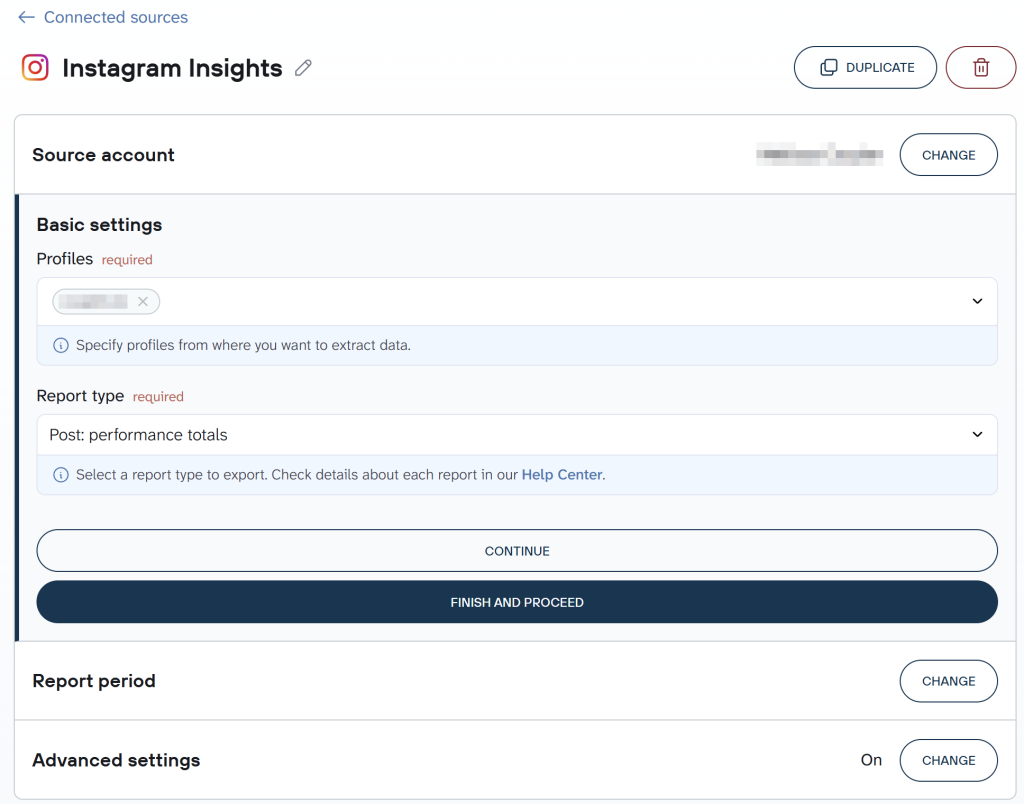
Make sure all the needed information is indicated in the source settings, and proceed.
Coupler.io connects to 400+ sources, so if you’re tracking multiple social channels, you can add TikTok Ads, LinkedIn Ads, or Facebook Insights as additional sources within the same data flow and blend them.
Step 2. Organize and transform data
If you need to prepare data for further analysis or storage, Coupler.io offers a range of data management and transformation options:
- Column management – select only those columns that are important for your specific objective.
- Filtering – indicate criteria for picking up specific items for analysis (for instance, posts with <200 likes).
- Sorting – select the parameter based on which the Instagram posts are sorted.
- Formula – this option allows you to create new columns using mathematical operands and functions (for instance, a column that shows the relation of likes and shares).
- Aggregate – to summarize and reveal key insights of your data by performing operations like sum, average, count, min, or max.

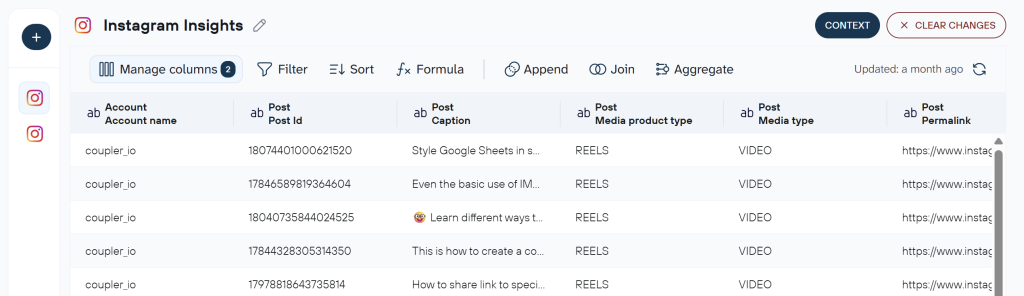
If you’ve connected multiple accounts or want to blend Instagram Insights data with information from other sources, you’ll also see the Join and Append options for data consolidation.
This step also controls what data reaches AI tools if you plan to use them. Filtering out irrelevant columns and hiding sensitive fields here means the AI layer only works with the dataset you’ve approved. You can also add business context to your data flow, which improves the quality of AI-generated answers when you ask questions about your Instagram performance later.
Tip: If you’re planning to analyze this data with AI Agent or send it to an external AI tool, add a short description of your business and what the metrics mean in the data flow settings. This gives AI the context it needs to produce more relevant answers.
Step 3. Load data and schedule refresh
Once the data preparations are complete, follow the in-app instructions to connect and set up the chosen destination. For example, here is how to connect Instagram Insights to Claude.
Coupler.io supports multiple destinations per data flow, so you can send the same Instagram Insights data to a Looker Studio dashboard for visual reporting and to an AI tool for conversational analysis at the same time.
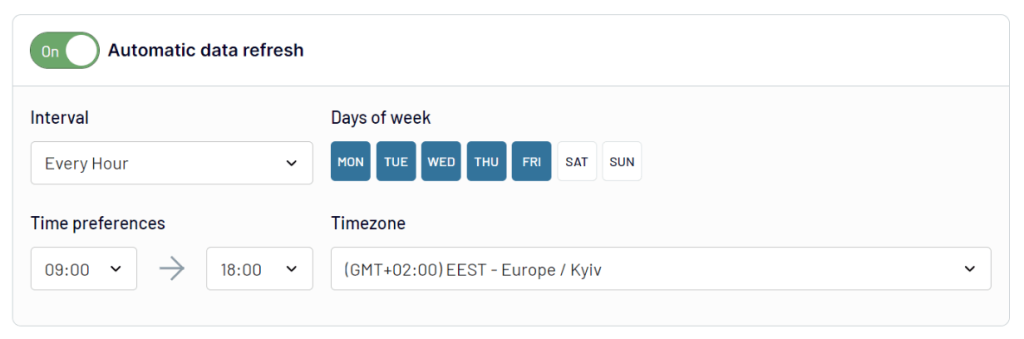
If you wish to regularly export Instagram Insights data, toggle the Automatic data refresh button. The system will then ask you to specify when and how often to transfer data from Instagram analytics to your chosen destination.

Step 4. Analyze Instagram Insights data with AI
Once your Instagram data is flowing and refreshing on schedule, you can go beyond dashboards and ask questions about it directly.
Coupler.io has a built-in AI Agent that lets you ask questions about your Instagram Insights data in plain English. You type a question, Coupler.io’s Analytical Engine queries your dataset, runs the calculations, and passes only the computed results to AI. The AI doesn’t work with raw data or guess.

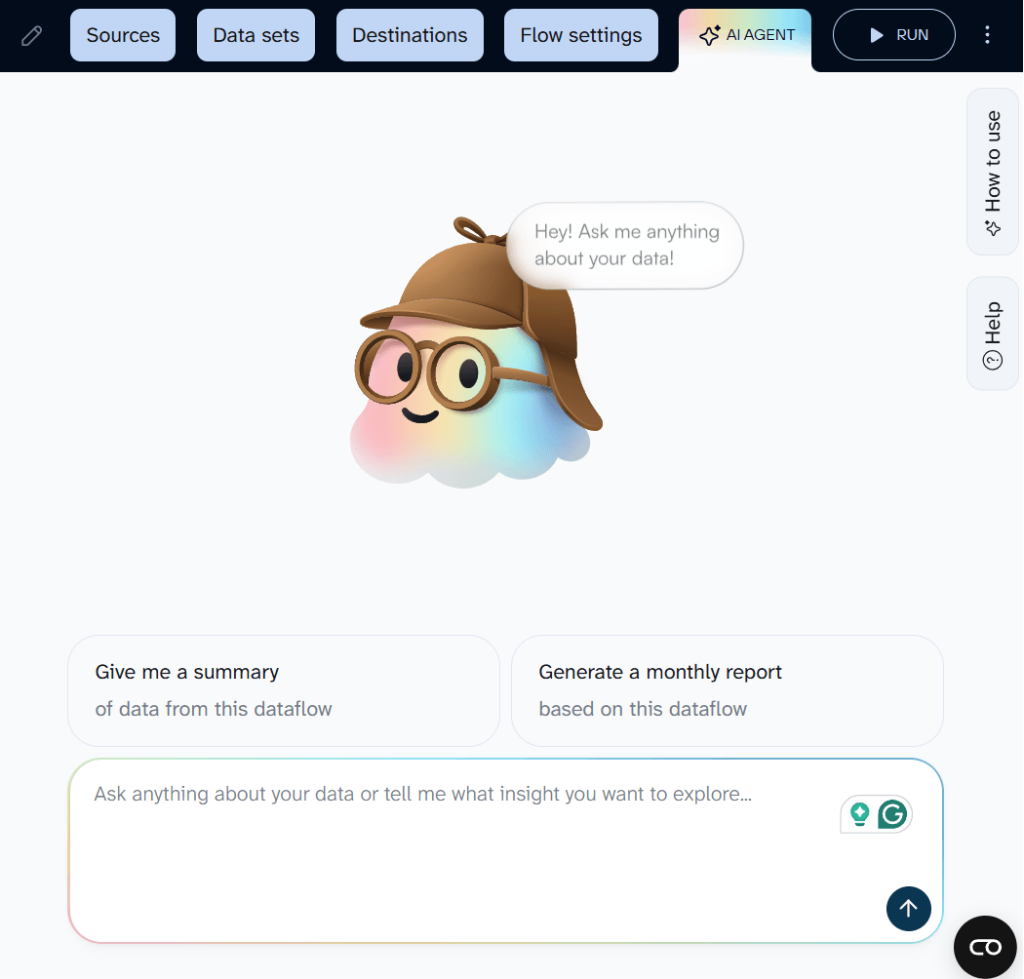
If you prefer working in external AI tools like Claude, ChatGPT, Gemini, or Perplexity, Coupler.io supports that too. You can connect your Instagram Insights data flow to these tools via AI Integrations based on the MCP, and have the same kind of conversation about your data inside the AI tool you already use.
Here are a few examples of what you can ask:
- Which posts had the highest engagement rate this month, and what do they have in common?
- Compare reach for reels vs. feed posts over the last 90 days.
- What day of the week gets the most profile visits from non-followers?
- Show me follower growth trend by week for the last quarter.
- Which content type drives the most shares relative to impressions?
AI never connects to your Instagram account directly but only sees the structured dataset you built and approved in Coupler.io. You control the scope.


Connect data from Instagram to your reporting tool with Coupler.io
Get started for freeWhile selecting the report type during the source setting, you might have noticed multiple options in the dropdown. It might seem confusing which category to choose and when a particular report type might be useful. So, we’d like to shed light on all those report types and available metrics for you to better understand when and how to apply them.
| Report name | Description |
|---|---|
| Profile: performance totals | This report type provides a comprehensive view of your Instagram posts’ performance. It includes such Instagram data: profile visits, comments, likes, shares, reach, accounts engaged, follower count, etc. |
| Profile: performance by day | Similarly to the previous report type, this one also provides all the principal indicators. The major difference is that it presents the breakdown for each day, so you may clearly observe when the peak activity and interactions take place. |
| Profile: performance by follow type | This report focuses on all the characteristics associated with your followers. In particular, it includes the number of accounts reached and total followers in the indicated period. Thus, you’ll clearly see where most of your Instagram followers come from. Coupler.io also allows you to blend this data with other social media marketing channel data. |
| Profile: performance by media type | If you need to have a clear overview of your target audience’s reactions to posts, this report may come in handy. Combined with reports on reels and stories statistics, you’ll be able to analyze which content type works best. |
| Profile: links taps by contact button type | If you have contact buttons on your Instagram profile, this report shows which one is most frequently used. Thus, you’ll see whether your visitors and subscribers prefer to contact you via email, messages, or calls. |
| Profile: reach by media product type and follow type | This report shows the number of follower and non-follower accounts reached for each post for the specified period of time. |
| Profile: new audience demography insights | Here you get a detailed overview of your followers and a number of unique accounts from a demographic perspective. You may generate a report based on parameters such as age, gender, city, and country. |
| Profile: followers daily breakdown (last 30 days) | It shows the followers’ activity for the last 30 days in terms of impressions, contact button clicks, and profile views. |
| Post: performance totals | This report provides a detailed breakdown of each of the posts, including images and videos. It contains all the Instagram metrics describing the interactions with the post and the follower growth. |
| Story: performance totals (last 24 hours) | Similarly to Instagram internal analytics, this report provides user interactions with the story for the last 24 hours at maximum. You may export this report within the scheduled period of every 24-hour period to preserve the historical information. |
| Story: navigation by action type (last 24 hours) | This report depicts the number of navigation actions for each story for the last 24 hours. |
| Post: profile interactions breakdown | It contains details on each post (media type, URL, permalink, etc.) and the corresponding profile activity and comments. |
| Story: profile interactions breakdown (last 24 hours) | It contains details on the story product and media type with the corresponding profile activity numbers. |
| Profile: followers demography insights | It provides follower demographics data, including age range, gender, and top locations to help you understand audience composition. |
| Profile: account overview | It offers a summary of your profile’s overall activity and growth including metrics like total followers, reach, and interactions. |
| Post: comment details review | It includes details on the number of comments, types of comments, and sentiment analysis for each post to assess engagement quality. |
Where you can import Instagram Insights data with Coupler.io
With Coupler.io, you’re not limited to creating one import scenario for your Instagram analytics data. You can create different import scenarios, each designed for a particular destination, which makes Coupler.io a flexible data management and orchestration tool.
- Spreadsheets. Coupler.io supports Google Sheets and Microsoft Excel software. You can use in-app functionality to create formulas for analysis or build charts for data visualization.
- BI and reporting tools. Coupler.io connects to a wide range of business intelligence tools, including Looker Studio, Power BI, Tableau, and Qlik Sense. Exporting Instagram Insights data there enables you to create descriptive and predictive analytics models that power up business decisions.
- AI tools. AI Agent is built into Coupler.io and works with any data flow with no extra setup. For external AI tools, you can connect your data to Claude, ChatGPT, Gemini, Perplexity, CursorAI, Copilot, and OpenClaw.
- Data warehouses. BigQuery, PostgreSQL, Snowflake, Supabase, and Redshift are among the supported data warehouses. Export data from Instagram Insights there if a warehouse is the preferred option in your organization.
- Other. You can save data as a JSON file if you intend to use it in various applications supporting this format. You can also send data to monday.com for crafting social media reports.
Bonus: Visualize data from Instagram Insights with dashboard templates
Coupler.io lets you create reports in Looker Studio, Power BI, and other BI tools by setting up a data import flow from Instagram Insights (as described above). This way, you can design custom dashboards to analyze and report on your data. At the same time, Coupler.io provides a library of pre-configured dashboard and report templates that you can use right away. Here are a couple of examples:
Instagram business dashboard (+ template)
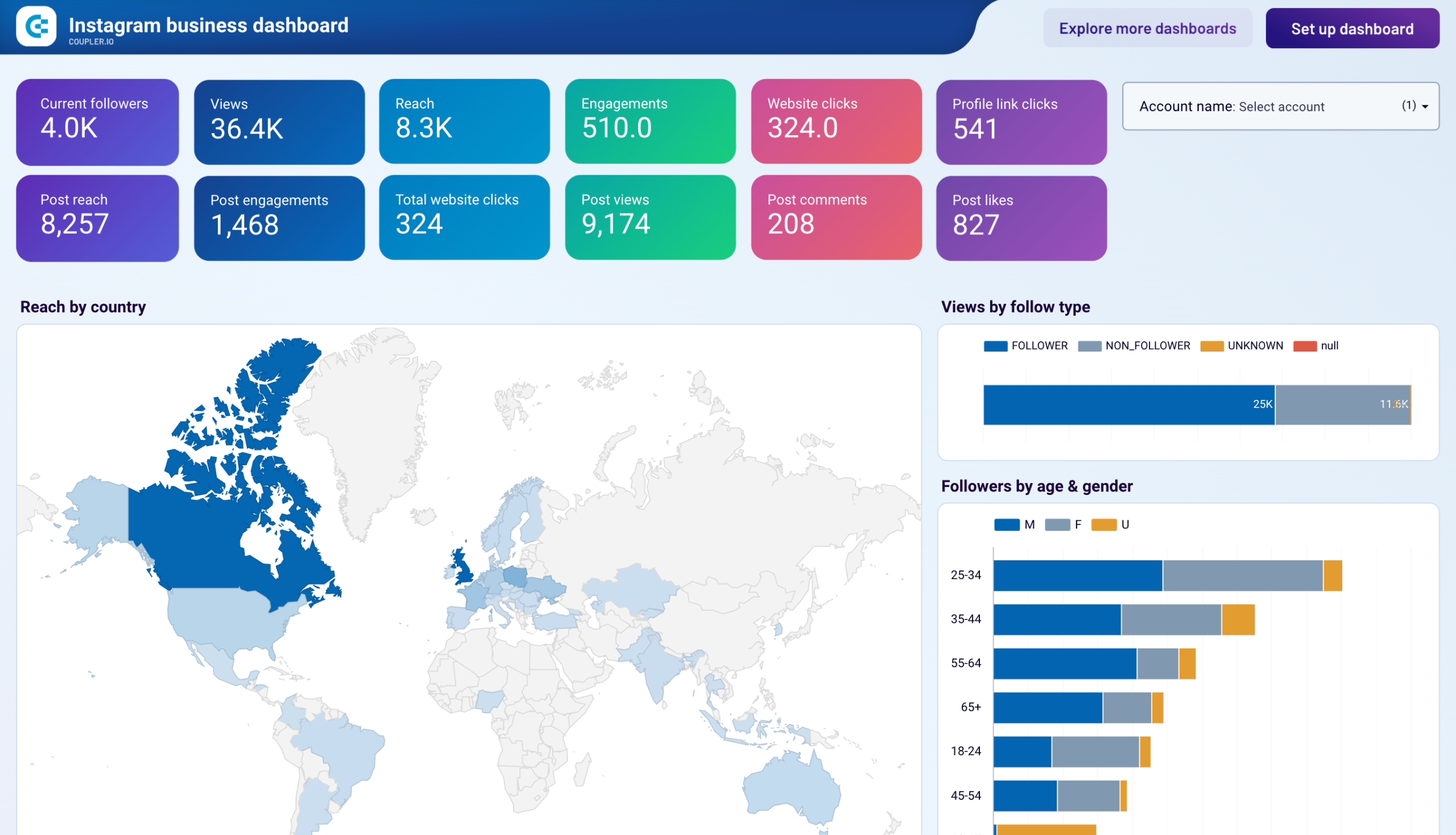
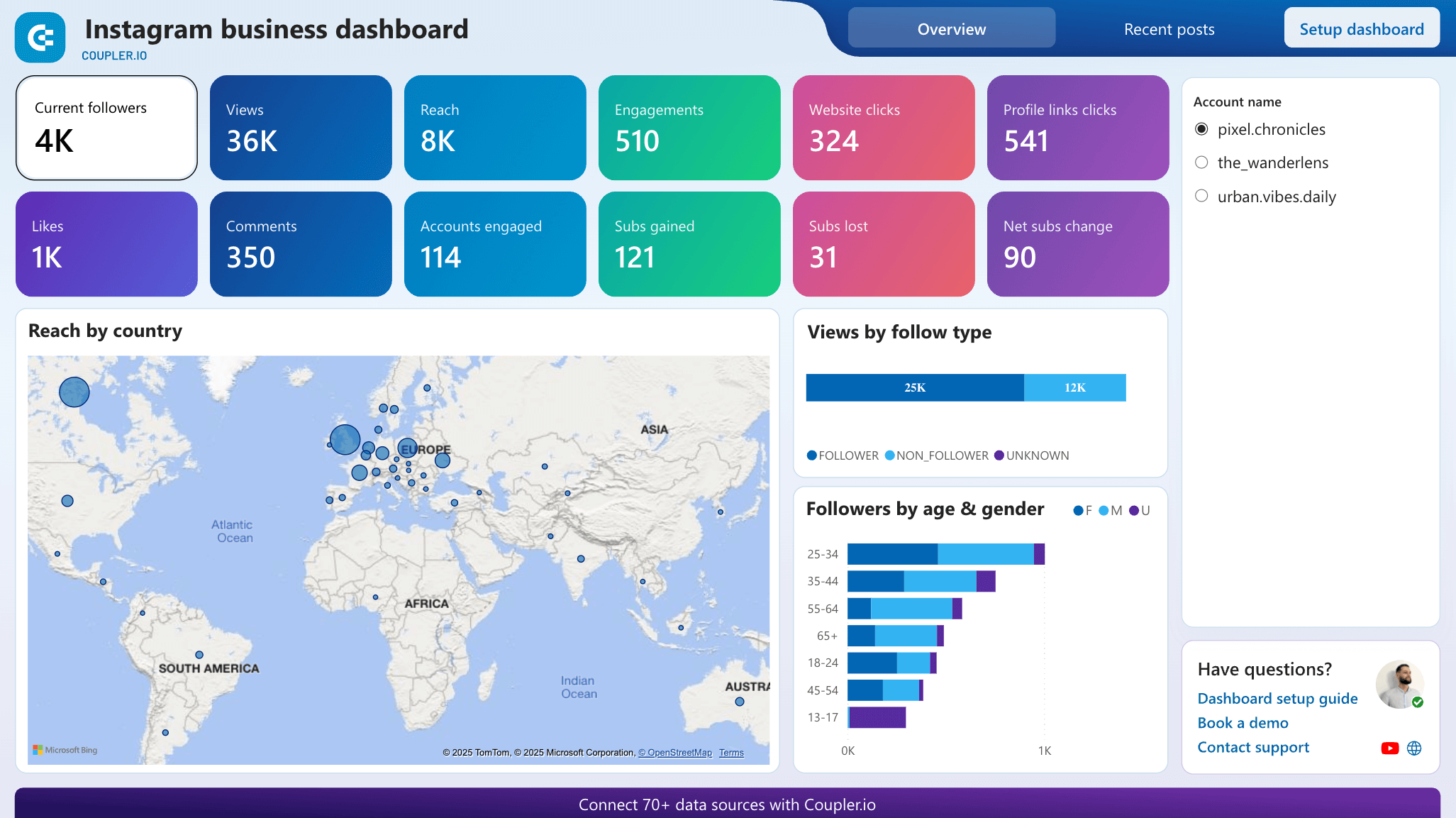
This dashboard pulls data from Instagram Insights to show how your company’s account performs on Instagram. You can track follower growth, post engagement, and profile interactions to understand which content drives the most business value.

What you can do with this dashboard:
- Analyze follower demographics (age, gender, and location) to better understand your target audience and optimize your targeting strategy.
- Track profile interactions like website clicks and new subscribers to measure how Instagram drives business engagement.
- Monitor content performance across different media types (feed posts vs. reels) to focus on formats that resonate with your audience.
- Evaluate individual post metrics, including reach, engagement, shares, likes, views, and comments, to understand what’s working and replicate the formula in future posts.
To start using this dashboard, sign up for Coupler.io for free, connect your Instagram account, and follow the in-app instructions to load your data into the report. The dashboard is available as a template in Looker Studio and Power BI, so pick the version that fits your reporting needs. The whole setup process takes less than 5 minutes to complete.




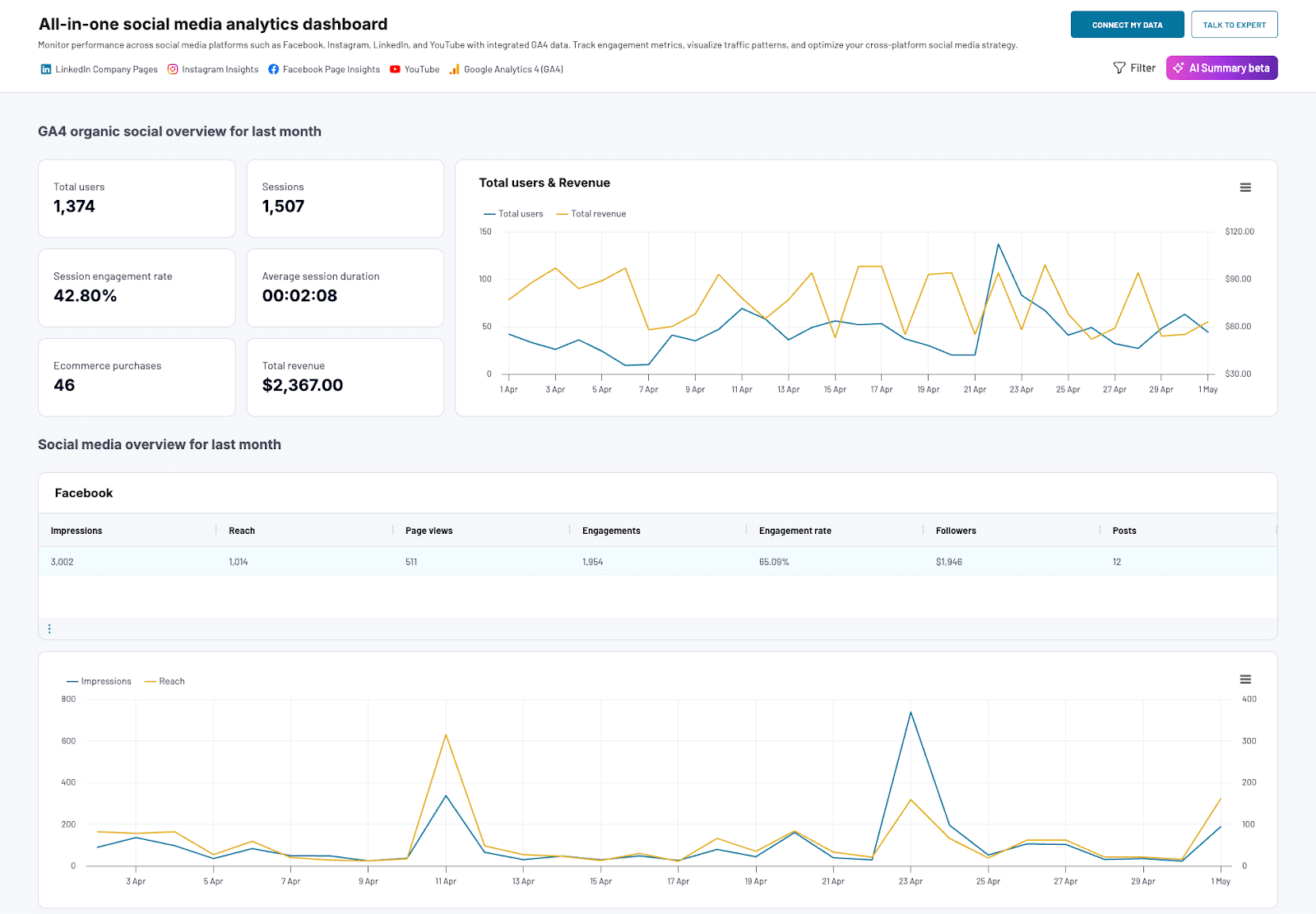
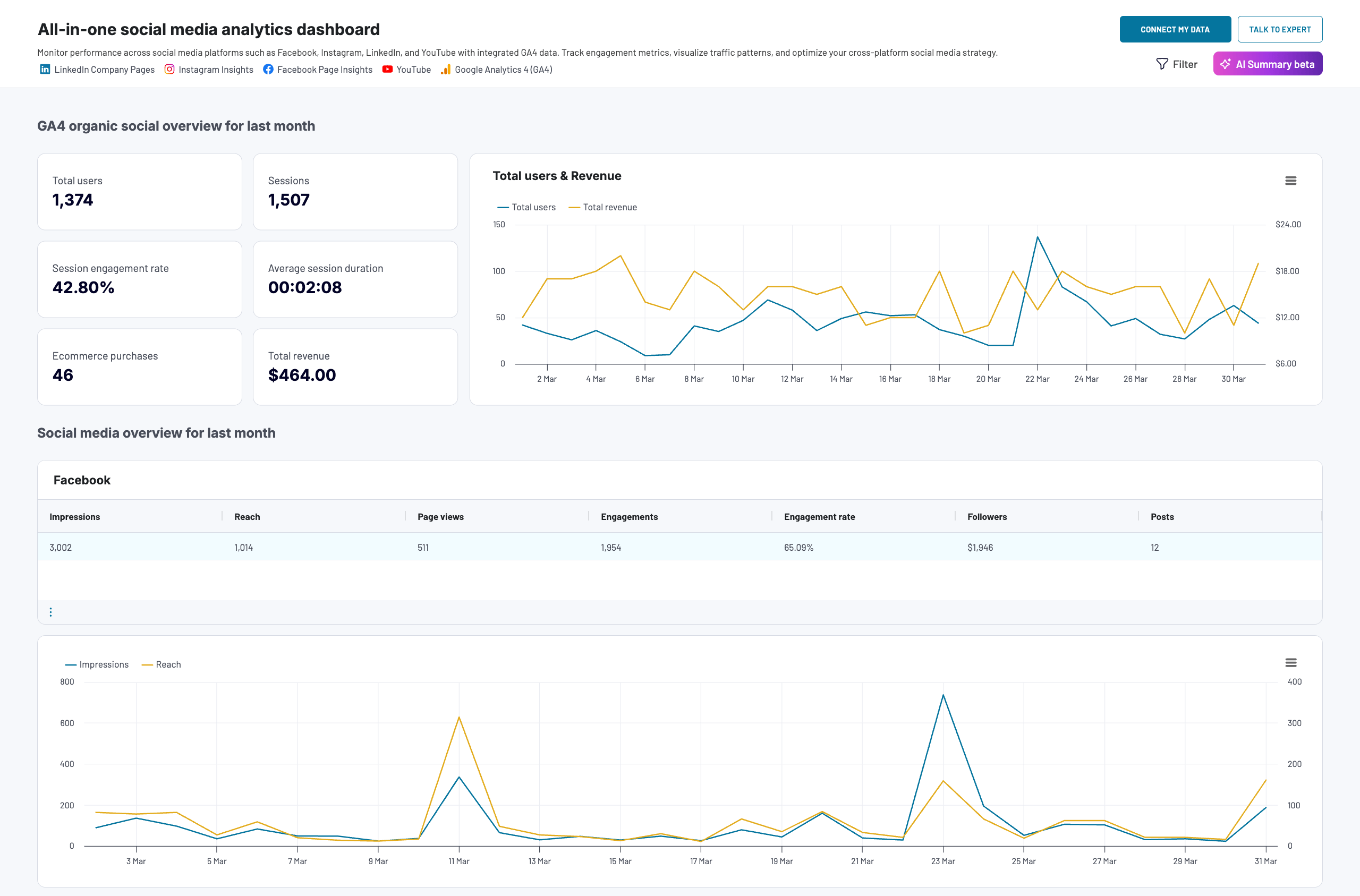
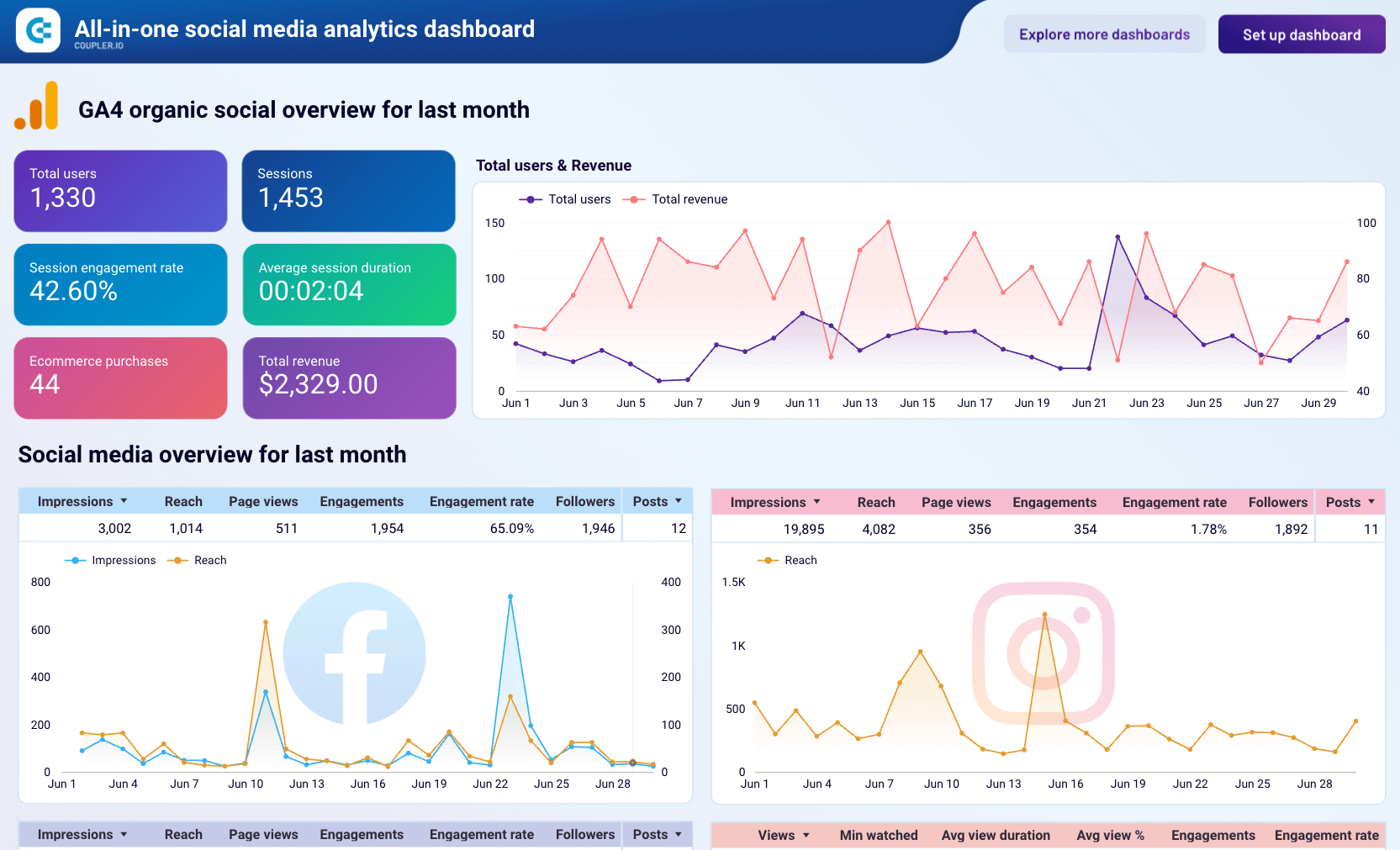
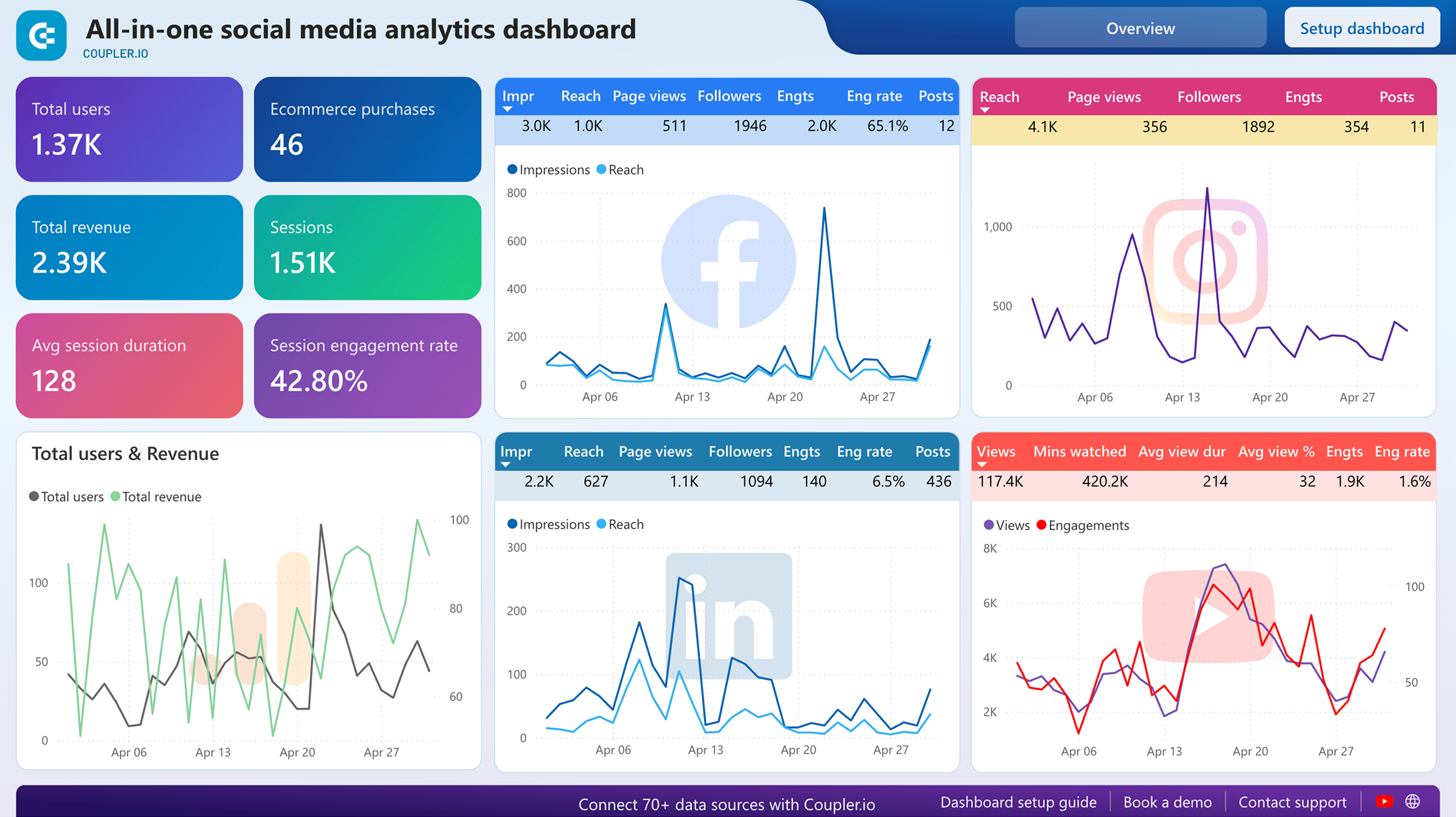
This dashboard brings together performance data from Instagram, Facebook, LinkedIn, YouTube, and GA4. It’s a handy tool for evaluating the impact of your social media marketing efforts across platforms.
All-in-one social media dashboard

All-in-one social media dashboard
Preview dashboardWhat you can do with this dashboard:
- Compare impressions, reach, views, and followers dynamics for each social platform to identify high-performing channels and content types.
- See which platforms generate the most engagement to improve marketing budget allocation and refocus your strategy.
- Understand how your social media activity translates into website visits and drives revenue generation for your business.
- Spot trends and patterns across platforms to optimize posting schedules and content strategies.
To get a free copy of this template for Coupler.io UI, Looker Studio, or Power BI, sign up for a free Coupler.io account. It only takes a few minutes to connect your social media accounts, load your data, and set up automatic data refreshes on a custom schedule.




If you use Instagram in advertising campaigns, you can connect Instagram Ads to Looker Studio or consider our PPC multi-channel dashboard templates. They support the Instagram Ads source and include all the principal metrics for analyzing your ad campaigns.
Explore other Instagram reporting templates and how to build an Instagram analytics dashboard from scratch.
Other methods to export Instagram Insights data
Beyond the automated Coupler.io workflow, there are a few other ways to get Instagram analytics data out.
Instagram Graph API. The Instagram Graph API offers programmatic access to your analytics data. It is a complex exporting option that requires technical expertise and coding skills. At the same time, you can gain a deeper dive into your Instagram Insights data.
Desktop Access to Instagram Insights. With access to Instagram via a desktop browser, you can use web scraping tools to collect analytics data. This approach also requires technical skill, and it may conflict with Instagram’s usage policies. So it’s not something I’d recommend.
Manual data export. It’s also possible to export data from Instagram Insights manually. Neither the mobile application nor its web version allows you to do that right within the Instagram pace. Analytics data can be viewed and downloaded from Meta Business Suite. This method is very time-consuming and can’t be automated, which doesn’t align with contemporary business objectives. Anyway, the manual method might be convenient for downloading occasional reports.
How to export Instagram Insights manually
The in-app functionality of Instagram provides user interaction data, but only for a short time. Meta Business Suite partially resolves this issue allowing users to download reports for longer timeframes in CSV files.
Here is how to download reports for posts and stories performance from Meta Business Suite manually.
- Log into your Instagram business account.
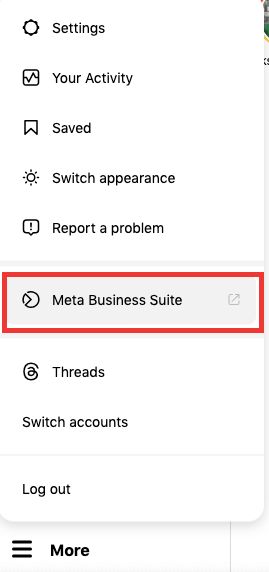
- Go to More->Meta Business Suite. You’ll be redirected to the main page of the Meta Business Suite.

- Click on Insights in the menu on the left and select the Content tab.

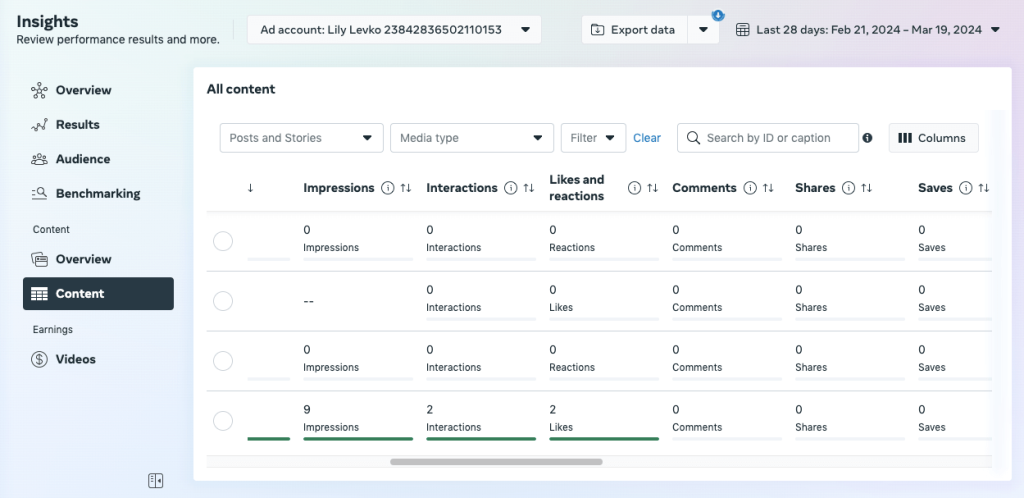
- Click on Export Data in the right corner. Go to the Instagram tab, select the business account(s), time period, and post/stories. Then click Generate.

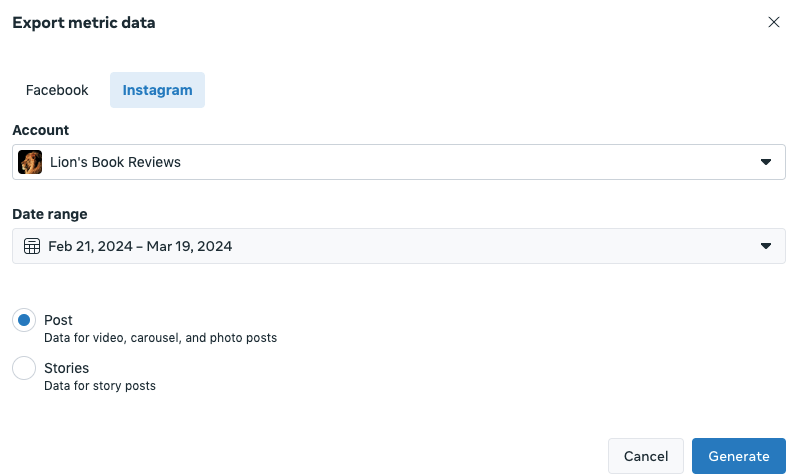
- The report creation may take some time. Once the circle in the upper-right corner of the Export Data button stops, the report is ready.
- Click on Export Data, select the needed report, and click on the Download icon next to it.
- The report is downloaded on your computer in a CSV file.


Given that report generation can’t be automated, you’ll have to create and download it every time on demand. The manual method is fine for point-in-time snapshots, but if you need to continuously monitor Instagram performance, the automated approach with Coupler.io is the better fit.
Automating the Instagram Insights export is the first step. The real value comes from what you do with the data afterward — whether that’s tracking performance in a Looker Studio dashboard, comparing channels in a cross-platform report, or asking an AI Agent why engagement dropped last week.
Coupler.io handles the full path: collect Instagram data, prepare it with filters and transformations, send it to any destination on a schedule, and analyze it with AI when you need answers fast.
Automate data export with Coupler.io
Get started for free