If your business data already lives in Coupler.io, you can now put it in front of the AI tools your team uses every day. Coupler.io MCP server is the piece that makes that work. Ask Claude, ChatGPT, Gemini, Copilot, or any other supported client a question about your Shopify orders or Google Ads performance. In a couple of moments, the AI retrieves and analyzes query results from your Coupler.io data flows through a set of MCP tools. Beyond analysis, AI can also build new data flows, run SQL across your datasets, apply reusable AI Skills, and remember the business context you’ve saved about what your metrics mean.
What is Coupler.io MCP server and how does it work?
The Model Context Protocol (MCP) is an open standard, introduced by Anthropic in late 2024, for connecting AI tools to outside systems. An MCP server is a piece of code that acts as a bridge between data coming from an external source (like Coupler.io, Facebook, a database, etc.) and an AI tool. It lets you connect AI for data analysis to external data and teaches it how to read it. As a result, AI can process the data, analyze it, and instantly provide insights, calculations, charts, and more.
Coupler.io runs its own MCP server as the engine behind its AI Integrations: the product category that connects external AI tools like Claude, ChatGPT, Copilot, and more to your Coupler.io workspace. Once you connect an AI client, it can read your business data and act on your data flows directly, with no exports or copy-paste. If you’d rather chat with your data inside Coupler.io itself, the built-in AI Agent is the other main entry point into Coupler AI.
Dedicated integrations and custom MCP
Every AI tool that connects to Coupler.io does so through the same MCP server. The server is the engine; your AI integrations are the front doors to it. Coupler.io offers two options:
- Dedicated AI integrations are polished setup paths for specific AI clients: Claude, ChatGPT, Copilot, Cursor, Gemini, OpenClaw, and Perplexity. Each one has its own destination option in Coupler.io and its own setup page with instructions tailored to that client’s installation process. If your AI tool is on this list, the dedicated route is the shorter path.
- Custom MCP is a destination option for AI clients that support the MCP protocol but don’t have a dedicated Coupler.io integration. It gives you the raw endpoint and access token, which you then plug into whatever configuration your tool uses. This includes custom AI applications, automation platforms like Zapier, n8n, Make, and other MCP-compatible tools and AI clients that support external MCP connections. See Custom MCP integrations for the full picture.
Both approaches use the same Coupler.io MCP infrastructure and available MCP tools. The main difference is how you configure the connection. Data access depends on which destination you configure for each data flow, and the AI client’s available functionality may vary.


Connect over 400 data sources to AI
Try Coupler.io for freeHow Coupler.io MCP server processes data requests
When you ask a question, your AI assistant uses Coupler.io MCP tools to discover data sets, inspect their structure, and run SQL queries through Coupler AI Analytical Engine. Coupler.io performs calculations, and the AI assistant receives the query results.

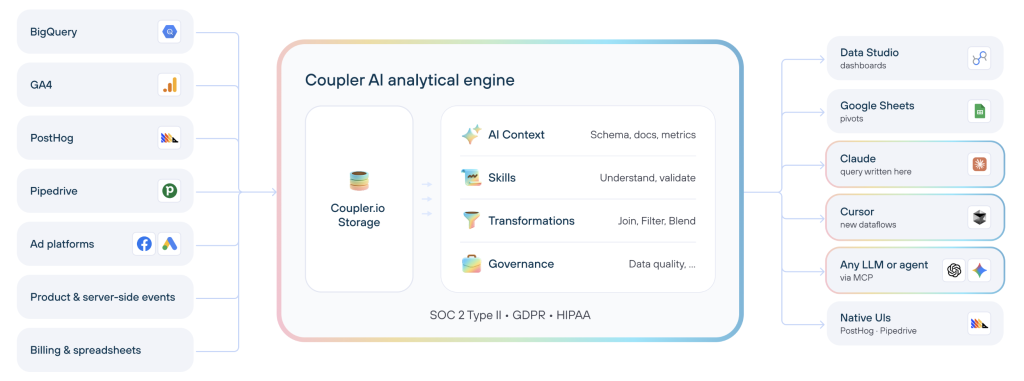
This lets AI tools analyze large datasets without loading all records into the conversation. Instead of calculating everything from raw data, the AI works with the results of executed SQL queries.
a may be sufficient. Coupler.io MCP is more useful for recurring analysis, large datasets, and workflows that rely on up-to-date business data.
What you can do with Coupler.io MCP
The MCP server gives connected AI tools a working toolkit, not just a read-only dataflow. In practice, that covers four kinds of work:
- Data set discovery and analysis. AI can list what data you have in Coupler.io and run SQL queries against individual data sets.
- Data flow management. AI can create a new data flow from scratch or from a template, add sources and destinations, change the schedule, or trigger a run on request.
- SQL data set creation and transformation. AI can build a new SQL data set that joins, aggregates, or pivots data sets inside the same data flow, and can edit the SQL later.
- Context and Skills. AI can save and reuse business definitions on a data set (what a metric means, which currency it’s in, which rows to exclude), and can load AI Skills that encode a standard procedure for a recurring task.
Configuration changes are real changes to your workspace, so the AI may ask you to confirm before making one, depending on the request and the AI client you’re using.
RAG vs. MCP for AI data analysis
When connecting AI to business data, you may also come across Retrieval-Augmented Generation (RAG). Like MCP, RAG allows AI to work with information beyond its training data. However, the two serve different purposes.
RAG retrieves relevant information from external sources and adds it to the AI’s context. For example, a RAG-based assistant can search your company’s marketing reports, retrieve passages about campaign performance, and use them to answer questions. It’s especially useful for finding and summarizing information from documents and knowledge bases.
MCP connects AI tools to external systems so they can retrieve data, execute queries, and perform supported actions. With Coupler.io MCP, an AI assistant can query Google Ads campaign metrics, calculate performance changes through the Analytical Engine, or create a SQL data set for analyzing Shopify customer purchase cohorts.
The differences become clearer when comparing how each approach works with business data:
| RAG | Coupler.io MCP | |
|---|---|---|
| Main purpose | Retrieve relevant information for AI-generated answers | Analyze and manage business data through AI |
| Data access | Retrieves relevant content from an indexed knowledge source | Accesses data sets exposed through Coupler.io AI destinations |
| Calculations | Can provide existing figures and information for the AI to interpret | Executes SQL calculations through Coupler.io’s Analytical Engine |
| Data freshness | Depends on when the knowledge source was updated or indexed | Depends on the configured data flow refresh schedule |
| Available actions | Primarily retrieves information | Queries data, creates SQL transformations, and manages data flows |
| Example | Find an explanation of declining conversions in a previous marketing report | Compare actual conversion metrics across campaigns and identify performance changes |
RAG and MCP aren’t competing technologies. A RAG system can even expose its retrieval functionality through MCP.
For business analysis, the distinction is practical. If you want AI to find what your team previously wrote about campaign performance, RAG may be appropriate. If you want AI to calculate how campaign performance has changed using your latest synchronized data, Coupler.io MCP provides the tools to do that.
How to set up Coupler.io MCP server
Prerequisite: You’ll need a Coupler.io account and access to a supported AI integration or AI client that can connect to MCP.
The setup has a few short steps you can do yourself or ask the Coupler AI agent to do for you. The AI-chat-first experience will guide you and request only the actions you can take, like authorization. This applies to the supported AI integrations like Claude or ChatGPT and custom AI agents.
Let Coupler AI do the data work for you
Tell Coupler AI what you need to know, from which source, and how often. It connects your account, sets up the data flow, keeps it refreshed, and lets you analyze the results inside Coupler.io or another AI tool.
Try for free

And here is what these steps look like if you handle them yourself in the Coupler.io UI.
Step 1. Connect your data to Coupler.io and organize the dataset for AI
Any data you want AI to see needs to be in a Coupler.io data flow. If you already have the flows you need, skip to Step 2. If you’re starting fresh, pick a source from the 400+ supported options and build a flow the way you normally would. The guide to getting data into any AI tool covers the basics if you’ve never built one.
Coupler.io allows you to turn data from your sources into an AI-ready dataset. Use the data transformation options to shape what the AI will see. You can hide sensitive fields, rename columns so an AI reads them without guessing, filter rows to the scope you want to analyze, and reshape the data however the destination step allows. The AI will query exactly the data sets you’ve exposed through this destination, respecting the field and row scope you’ve set.

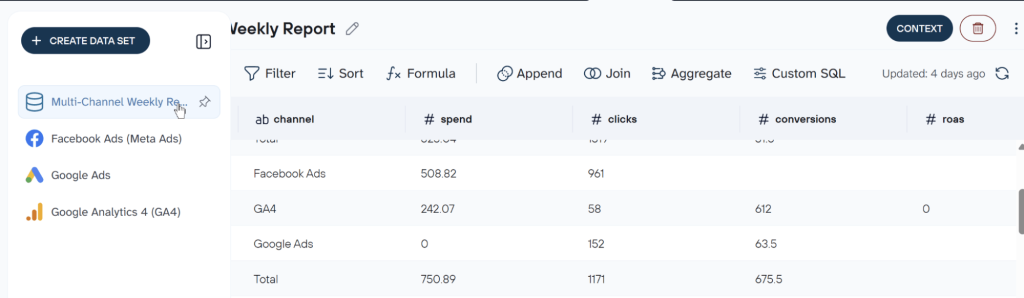
While you’re at it, consider adding business context to the dataset. It’s the definition layer that tells the AI what your data actually means. Without context, the AI sees columns. With context, it sees the business. Context covers four kinds of definitions:
- Relationships: how your tables connect, like orders to line items or campaigns to ad groups.
- Metric formulas: how your ROAS, LTV, or any derived metric is calculated.
- Field descriptions: what each column represents, including the meaning of specific values.
- Business terminology: what terms like “qualified lead” or “active customer” map to in your data.
Add context up front, and it will grow as the AI asks clarifying questions during conversations.
Step 2. Connect Coupler.io to your AI tool
In the data flow destination step, select the AI client you want to send the data to. This is the crucial step for MCP visibility: an AI tool connected over MCP sees only data sets from data flows that have that specific tool as a destination. Adding Claude as a destination makes a data flow available in Claude. It does not make it available in ChatGPT. To use the same data across several AI tools, add each one as a destination.

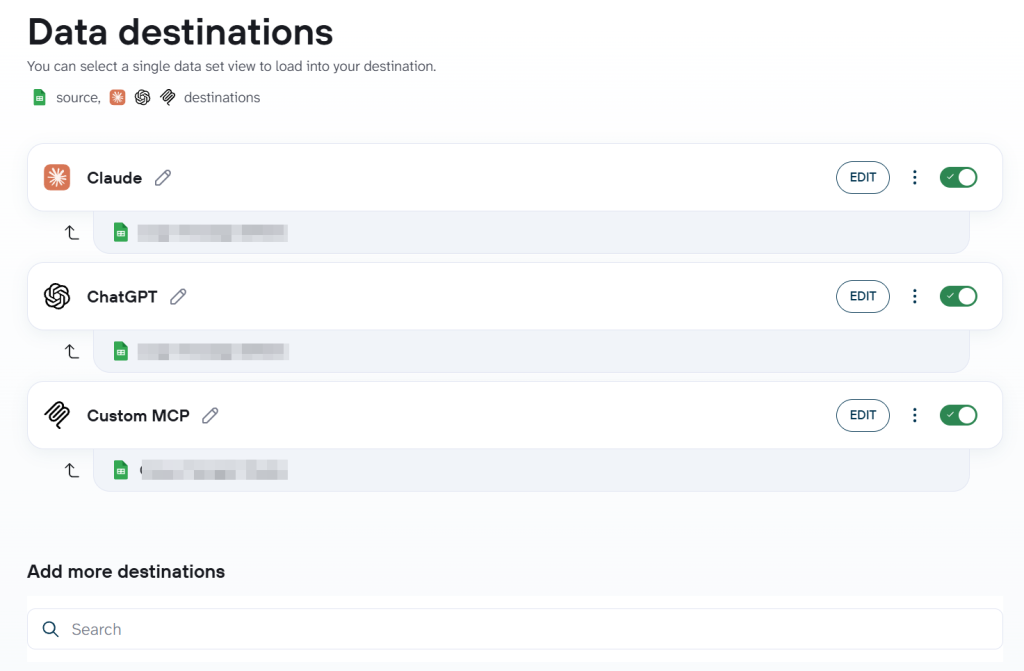
If your client supports MCP but doesn’t have a dedicated Coupler.io integration, select Custom MCP as the destination. Coupler.io provides an endpoint and access token that you can configure using your client’s supported connection method. See the Custom MCP setup documentation for the full configuration guidance, and the Custom MCP integrations page for an overview.
Important: Treat your access token like a password. Anyone with the token and endpoint can read the data sets routed to it.
| AI client | Dedicated integration page |
|---|---|
| Claude | Claude integrations |
| ChatGPT | ChatGPT integrations |
| Copilot | Copilot integrations |
| Cursor | Cursor integrations |
| Gemini | Gemini integrations |
| OpenClaw | OpenClaw integrations |
| Perplexity | Perplexity integrations |
| Any MCP-compatible tool | Custom MCP |
Step 3. Test the connection and access your data sets
Open your AI client and ask it to list what it can see. A prompt like this works in any client:
What Coupler.io data sets can you see?
The AI should return the data sets from every data flow that has your current AI tool configured as a destination. If one you expected is missing, the usual reason is that its data flow doesn’t yet have this specific tool as a destination, or the flow hasn’t run successfully. Add the destination or run the flow, and ask again.

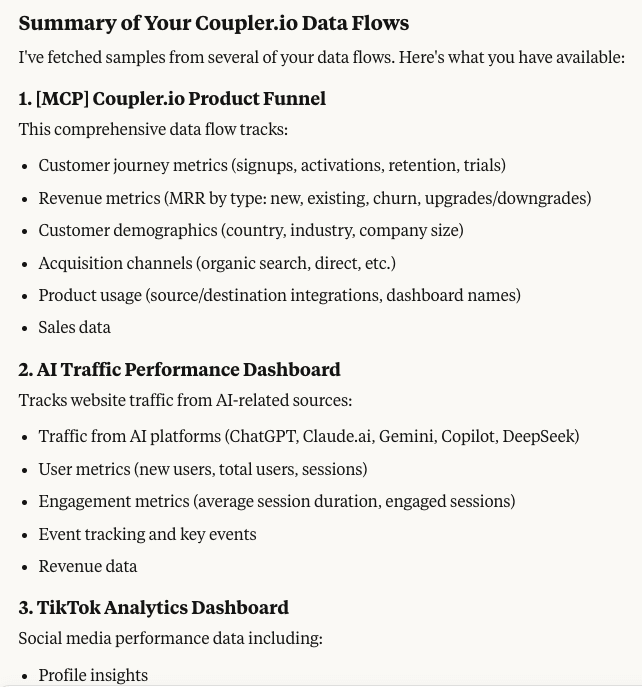
If the AI returns the right list, try reading one data set:
Give me a summary of the <data flow name> data set.
You should get a short overview of the columns, scope, and recent values. That confirms the AI can read the data, not just see it in the index.

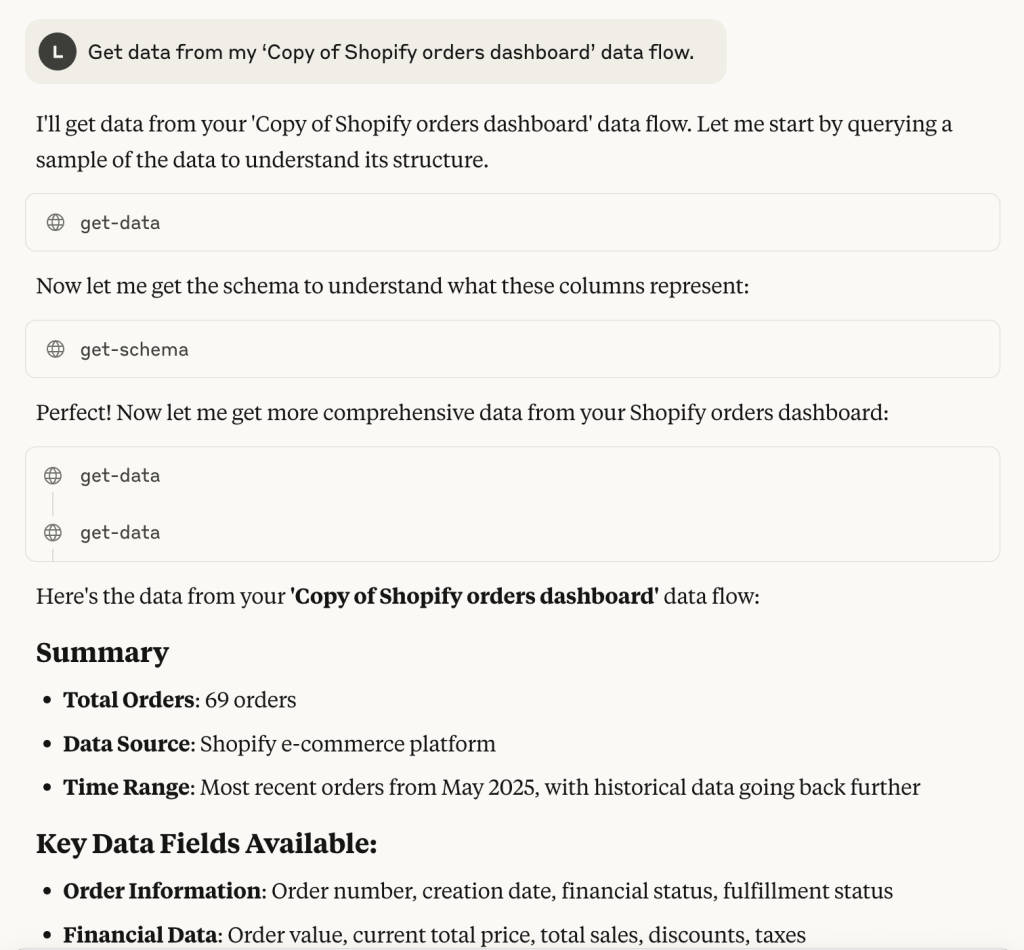
Examples of how to use Coupler.io MCP server to interact with data through AI
The interaction possibilities are virtually endless. Below, I’ll show you only some basic and common examples, as well as share best practices for prompting.
Use case 1: Analyze your business data with natural language
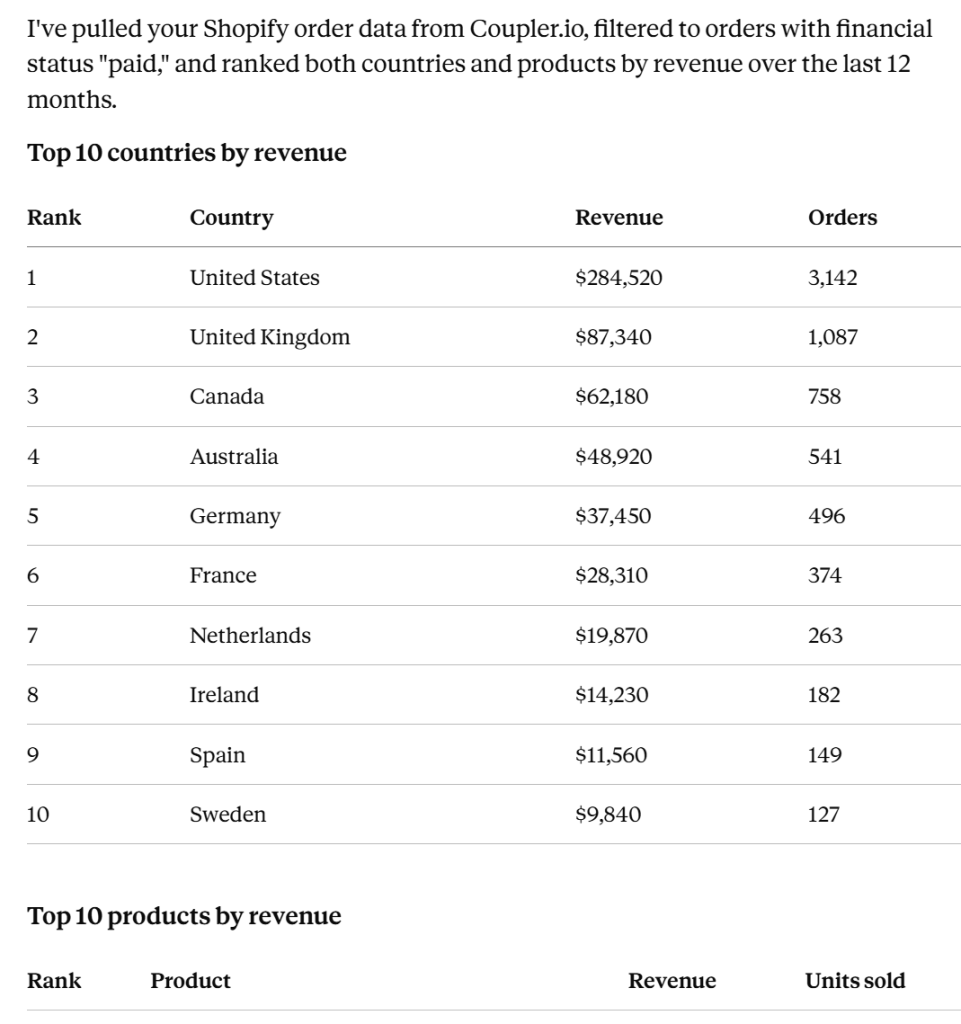
Say you have a Shopify data flow with your orders, and you want to know who’s buying and what’s selling. A single prompt can carry both the ranking and a filter:
What are my top 10 countries and top 10 products by revenue over the last year? Then narrow it to orders with financial status "paid" only.
What happens behind the scenes: the AI reads the schema of your Shopify data set so it knows which column holds revenue, country, product, and financial status. It then runs the two rankings as SQL queries against the data set, inside Coupler AI Analytical Engine. The results come back to the AI, which presents them as readable tables or lists.
Important to understand: the AI isn’t flipping through every order row in its head. The calculation runs server-side, and only the ranked summary reaches the AI client. The scope of what you can analyze matches what you exposed on the data flow destination step. If you hide revenue or filter to a specific store, that’s what the AI sees.

Use case 2: Investigate performance changes and find optimization opportunities
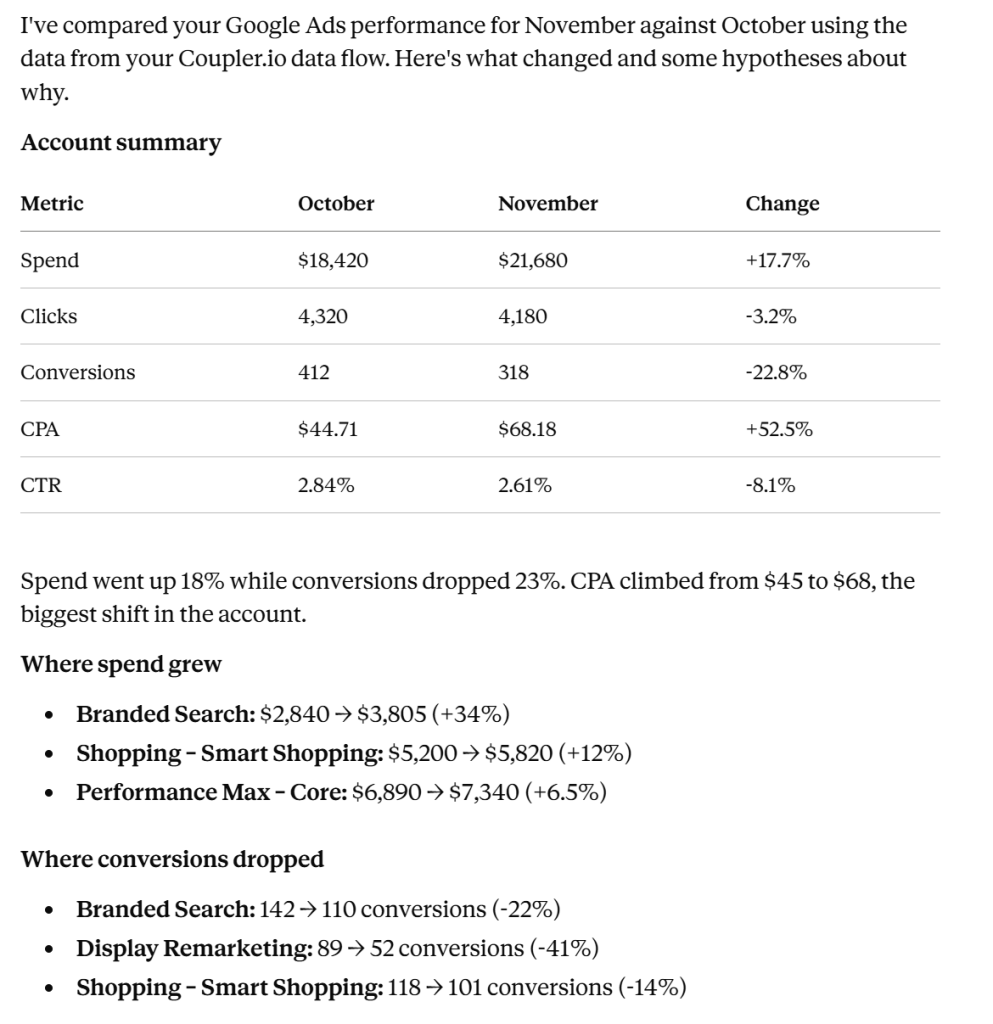
A Google Ads report shows this month looks worse than last month. You want to know where the gap is before you touch anything:
Compare this month's Google Ads performance against last month. Where did spend increase, and where did conversions drop? Suggest likely explanations, but flag them as hypotheses, not conclusions.
The AI runs period-over-period queries on your Google Ads data set, surfaces the biggest movements by campaign, and separates what it can see from what it’s guessing. You might get a response along these lines:

Use case 3: Create and manage data flows through AI
New capability worth highlighting: with MCP, you don’t have to leave your AI client to set up a data flow. Suppose you want a quick Google Ads flow for the last 30 days:
Create a Google Ads data flow for campaign performance over the last 30 days, including campaign name, date, impressions, clicks, cost, and conversions. Set a daily refresh. Show me the proposed configuration before you run it.
The AI can inspect available Google Ads integration settings, check your authorized accounts, and prepare the data flow configuration. If authorization is missing, it will provide a link to connect the account.
AI can’t bypass authentication for external sources, so new source connections may require you to authorize them in your browser. Review each proposed configuration before you say yes.
Use case 4: Combine and transform data using SQL
Suppose you run a Shopify store and want to understand how often customers return after their first purchase. You can use Coupler.io MCP to create a SQL data set that groups customers into monthly cohorts and tracks their repeat purchases over the next six months. With Shopify order data connected to Coupler.io, ask your AI assistant:
Using my Shopify orders data, create a SQL data set that groups customers by their first purchase month. For each cohort, calculate the percentage of customers who make another purchase in months 1 through 6. Include cohort size and exclude incomplete months from the retention calculations. Save the SQL transformation so I can reuse it for future analysis.
The AI inspects the Shopify data set schema and generates a SQL transformation. It identifies each customer’s first purchase, assigns them to a monthly cohort, calculates subsequent purchases relative to the first purchase month, and aggregates the results into a retention table.

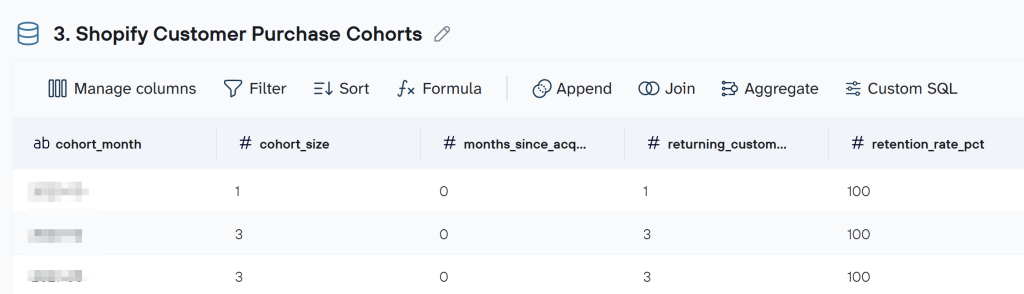
Unlike a one-time SQL query, the saved transformation becomes a reusable data set in your Coupler.io data flow. It is recalculated when the flow runs, so you can analyze updated cohorts without rebuilding the calculation each time. You can also ask follow-up questions, such as which cohorts have the strongest repeat-purchase rates.
Scope note: direct MCP data queries work on one data set at a time. To combine two data sets, use the SQL data set approach; it works on data sets in the same data flow. For the full technical picture, see the SQL-based transformations documentation.
Connect your data to AI with Coupler.io
Get started for freeUse case 5: Reuse business context and Skills across analyses
Two features that quietly make everything else better: business context and Skills.
Business context is what the AI knows about what your data actually means. The first time an AI client asks “which column is your qualified lead flag?” and you answer, you can tell it to save that answer on the data set so the next conversation starts informed. The same goes for the currency a revenue column is in or what “active customer” means in your business. Context attaches to the data set and travels with it. AI clients may still interpret the same context differently, so clear, specific phrasing matters.
Skills are ready-to-use analytical workflows for specific business tasks. Coupler.io provides a library of Skills for analyzing advertising campaigns, auditing marketing performance, preparing client reports, reviewing sales pipelines, and more.
For example, the Google Ads client report Skill can guide an AI through preparing a structured client report from connected campaign data. You can explore and download Skills from the Coupler.io AI Agent Skills Library and use them with a compatible AI workflow. A prompt using an existing Skill looks like this:
Prepare a monthly Google Ads client report using the Google Ads client report Skill and my connected campaign data. Compare results against the previous month, highlight significant performance changes, and summarize recommended actions.
Each AI client has its own way of making a Skill available, so the exact step depends on the tool you’re using. You can also create custom Skills for recurring analytical tasks and share them with your team.
The difference between the two features is worth remembering: context tells the AI what the data means, Skills tell the AI how to perform the task.
Best practices for working with Coupler.io MCP
A short checklist to keep the output honest:
- Pick the data set that fits the question. If you ask the AI about customers but you only exposed orders, the answer will reflect that gap. Switch flows or expose the right data set first.
- Confirm freshness. AI reads the data that’s synchronized in Coupler.io, not live from the source. If the data flow last ran three days ago, that’s the ground truth of the answer. Ask the AI to refresh the flow first if freshness matters.
- Add business context. Tell the AI what your fields mean once and save the context, so later conversations start from the same ground truth. This reduces repeated clarification and improves consistency across analyses.
- Specify the period and the metrics. “Analyze my data” gets you a generic summary. “Compare conversions and CPA for Q3 vs Q2, by campaign” gets you a useful answer.
- Validate conclusions before acting. AI explanations of performance changes are hypotheses. Spot-check against the raw data or the source platform before you shift budget.
- Review workspace changes before confirming them. When the AI proposes a new flow or an edit to a SQL data set, read the configuration back before you say yes.
Why use Coupler.io MCP instead of direct AI connections?
Several AI clients and source platforms now offer direct MCP connections. ChatGPT can talk to a Postgres database. Platform-specific MCPs for Google Ads, Facebook Ads, and others exist as standalone options. These are fine for narrow jobs. Coupler.io MCP addresses a different problem: giving AI access to your business data across many sources, with the data preparation and SQL execution happening inside a secure layer you control.
What the Coupler.io route gives you that a direct connection doesn’t:
- Managed connectivity across 400+ sources. One MCP endpoint reaches every source you’ve connected and configured as a Coupler.io data flow, instead of configuring a separate MCP for each tool.
- Data synchronization. The data the AI reads is the data Coupler.io has synchronized. You decide the schedule, the scope, and the freshness.
- Selective data set access. You expose only the data sets and specific columns you want the AI to see, per AI tool.
- Coupler.io-side SQL execution. Queries run inside the Analytical Engine, with verified results returned to the AI. Large data sets don’t have to fit in the AI’s context window.
- Configuration via conversation. AI can build and update data flows and SQL data sets without you leaving the chat.
- Reusable context and Skills. Business definitions and standard procedures persist across conversations and across team members.
- Less integration maintenance. New source needed? It’s in the Coupler.io catalog, ready to connect and configure as a flow. New AI tool at your company? Add it as a destination.
For a worked comparison with a platform-native MCP, see Coupler.io vs Meta Ads MCP and the Google Ads MCP page for the Coupler.io managed approach to a single ad platform.
Coupler.io MCP vs. the built-in AI Agent
Coupler.io MCP connects external AI clients (Claude, ChatGPT, Copilot, and the others listed above) to your Coupler.io data flows. The AI tool is wherever you already use it, and it sees the data sets you’ve routed to it as a destination.
The built-in AI Agent lives inside Coupler.io itself, with access to every data set in your workspace from the start, no per-tool destination routing step needed. The conversation and data live together in one interface, and the Skills library is available there as well. For teams that want a single home for data questions and answers across the workspace, the AI Agent is often the simpler fit.
Both approaches use the same underlying infrastructure, so you can run them in parallel on the same workspace.
Start working with your data through Coupler.io MCP
I’ve just provided you with a couple of examples of ‘talking’ to your data. However, this is just the proverbial tip of the iceberg. Once you gain more experience, you’ll be able to use the Coupler.io MCP server to your advantage in an increasingly better way. It is especially beneficial if:
- You have little time to devote to data analysis but still want to make decisions based on data insights, not gut feelings.
- You want to gain insights quickly to identify trends and expedite the decision-making process.
- You work with complex or large data sets and would need days or even weeks to blend and analyze them manually.
Coupler.io MCP turns the AI tools your team already uses into a working interface for your business data: ask questions, build flows, run SQL, and keep the business context in one place. If you’ve been copy-pasting CSVs into AI chats, this is the shortcut.