Summarize this blog post with:





Supermetrics is a solid tool for automating marketing data flows, and the last year has made it stronger: Supermetrics AI (Dashboard Agent, Insights Agent, Connector Agent), an MCP Server, and a native Claude integration all shipped under one roof in late 2025. The bill still scales with destinations, sources, users, and connected accounts, though, so the “should I switch” question is still worth asking. The eight alternatives below cover the main switch cases, with per-vendor 3-way comparison tables so you can scan each one against Coupler.io without scrolling back. Where AI matters to the comparison, I’ll call out how each tool stacks up against Coupler AI (AI Agent + AI Integrations + Skills).
TL;DR: Should you switch from Supermetrics?
Switch if:
- You’re paying separately for each data destination and want a single tool that covers all of them
- You want Coupler AI’s three-part stack: an AI Agent inside the platform, native AI Integrations to Claude/ChatGPT/Gemini/Copilot/Cursor/Perplexity, and reusable Skills
- You want prebuilt dashboard and dataset templates ready to go from day one
- You need custom SQL transformations that Supermetrics’ no-code editor does not offer
Stay if:
- You rely heavily on Supermetrics’ scheduled email delivery of reports to Slack or Microsoft Teams channels (this is a native workflow that requires extra setup to replicate elsewhere)
- Your team has built deep custom query logic in Supermetrics for Google Sheets that would take significant effort to rebuild
- You already run inside Supermetrics Studio and your Enterprise contract covers the AI credits you need
Fastest way to test Coupler.io: Start a free trial, pick a prebuilt dataset template, and rebuild one of your current data flows end-to-end before you compare numbers.
Try Coupler.io as your Supermetrics alternative
Get a tailored demo of Coupler.io next to the Supermetrics setup you're running today and compare the differences.
Book a call
What are the Supermetrics alternatives?
I’ve reviewed eight apps offering features similar to or identical to Supermetrics. Some are more affordable, while others compete against Supermetrics with their extensive features. Here’s a quick breakdown of key features, then more detail on each tool in the next section.
| Features | Supermetrics | Coupler.io | Funnel.io | Adverity | Fivetran | Whatagraph | Windsor.ai | Porter Metrics | Dataslayer | Stitch |
|---|---|---|---|---|---|---|---|---|---|---|
| Free trial | ✅ 14-day | ✅ Free plan + 7-day | ✅ Tailored to your needs | ⛔ Demo only | ✅ 14-day | ⛔ Not on current pricing page | ✅ 30-day + Forever Free | ✅ 14-day + Free plan | ✅ 15-day + Free plan | ✅ 14-day |
| All data sources in all plans | ⛔ | ✅ | ⛔ | ⛔ | ⛔ | ⛔ | ⛔ (quota per tier) | ✅ on paid plans | ✅ on paid plans | ⛔ |
| Data destinations | BI tools Spreadsheets Data warehouses Databases SFTP | BI tools Spreadsheets Data warehouses Databases JSON AI tools (8) | BI tools Spreadsheets Analytics platforms Data warehouses AI tools (MCP) | BI tools and spreadsheets Databases CRMs Social advertising & analytics platforms | Data warehouses Data lakes Databases | Whatagraph reports BigQuery (Prime add-on) Data Studio (Prime) AI tools (MCP) | BI tools Spreadsheets Data warehouses Databases AI tools (MCP) | Data Studio Google Sheets Power BI BigQuery AI tools (MCP) | Spreadsheets BI tools Data warehouses Morpheus (MMM) AI tools (MCP) | Data warehouses Data lakes Databases |
| Data transformations | Custom fields Dynamic currency conversion Naming conventions decoding | No-code: column management, filter, sort, custom calculations, aggregation, blending (append & join) Custom SQL (DuckDB) | Field mapping Data type normalization Automatic currency conversion Semantic layer (business rules, naming) | 7 no-code tools 80+ Python functions dbt integration Data Mapping | dbt Core integration Fivetran-hosted dbt Quickstart data models (destination-side transforms) | Custom metrics Custom dimensions Source blends Reusable data-modeling templates | Pre-built data model kits delivered to the warehouse (customization in SQL/dbt/LookML/DAX) | Data blending Custom fields (blending inside AI chat supported) | Data blending (Advanced+) Alerts Agent Atlas AI analyst (early access) | Nested data handling Post-load webhooks (ELT: modeling in warehouse) |
| AI-powered functionality | Supermetrics AI: Dashboard Agent Insights Agent Connector Agent MCP Server Claude integration | Coupler AI: AI Agent AI Integrations Skills (AI Insights = dashboard add-on, separate) | Funnel AI Funnel MCP Funnel as Code (beta) | Adverity Atlas (AI knowledge layer, BYO LLM, MCP) Transformation Copilot Ask Your Dashboards AI Insights Widget | Agent Context MCP dbt Wizard Agents Schema AI Support Assistant | Whatagraph IQ IQ Agents IQ+ IQ Chat Smart sources Whatagraph MCP | Windsor MCP (Claude, ChatGPT, Copilot, Perplexity, Gemini, Cursor) | AI chat via MCP (Claude, ChatGPT, Gemini) AI credits Scale-tier agents Research, Creative generation | Dataslayer MCP (Claude, ChatGPT, Gemini, Copilot, Mistral) AI Agent Dataslayer GPT Alerts Agent Atlas (early access) | ⛔ |
| Dataset templates | Basic single-source, limited by destination | ✅ Prebuilt dataset templates | ⛔ | ✅ | Quickstart data models | ✅ Data-modeling templates | ✅ Pre-built data model kits | ⛔ | ⛔ | ⛔ |
| Dashboard templates | Studio templates (count not published) | 230+ | 12+ (Funnel Dashboards) | Explore / Present | ⛔ | 54 | 122+ | ~89 Data Studio | 34+ (mostly Data Studio) | ⛔ |
| Min. refresh frequency | Not published per plan | Every 15 min (Custom) | Not published per plan | Every 15 min | Every 1 min (Enterprise & Business Critical) | Every 30 min platform-wide | Every 15 min (Professional only) | Hourly default, daily fallback | Hourly (Advanced), custom hours (Pro+) | Configurable minutes to hours |
| Pricing starts at: | $44* | $24 | $300 | Custom | Usage-based (MAR) | From $1,118 | $19 | From $12.50/account | $35 | From $100 (row-based) |
The best alternative to Supermetrics in pricing, functionality, and more – Coupler.io


Among the well-known Supermetrics alternatives is Coupler.io, a data integration and AI analytics platform that turns raw data into insightful reports. It pulls data from 400+ sources that include marketing apps, financial software, social media and advertising tools, CRM systems, and many other application types.
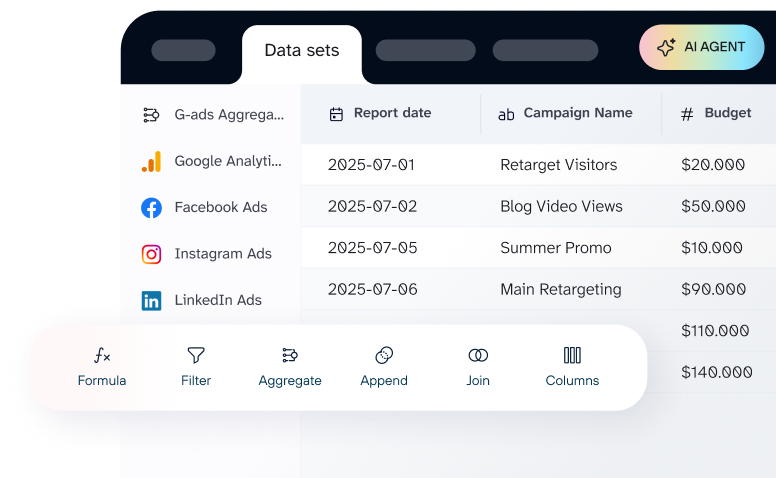
On top of standard ETL, Coupler AI is the umbrella for the platform’s AI stack: AI Agent (a conversational analytics assistant built into Coupler.io), AI Integrations (native connectors to Claude, ChatGPT, Gemini, Copilot, Cursor, Perplexity, OpenClaw, and Custom MCP), and Skills (reusable AI skills that extend what the Agent can do). The Analytical Engine runs the math and the Context layer keeps your business definitions, so answers come back grounded in the dataset rather than invented from column names. The platform also ships prebuilt dashboards, dataset templates, and both no-code and SQL (DuckDB) data transformations.

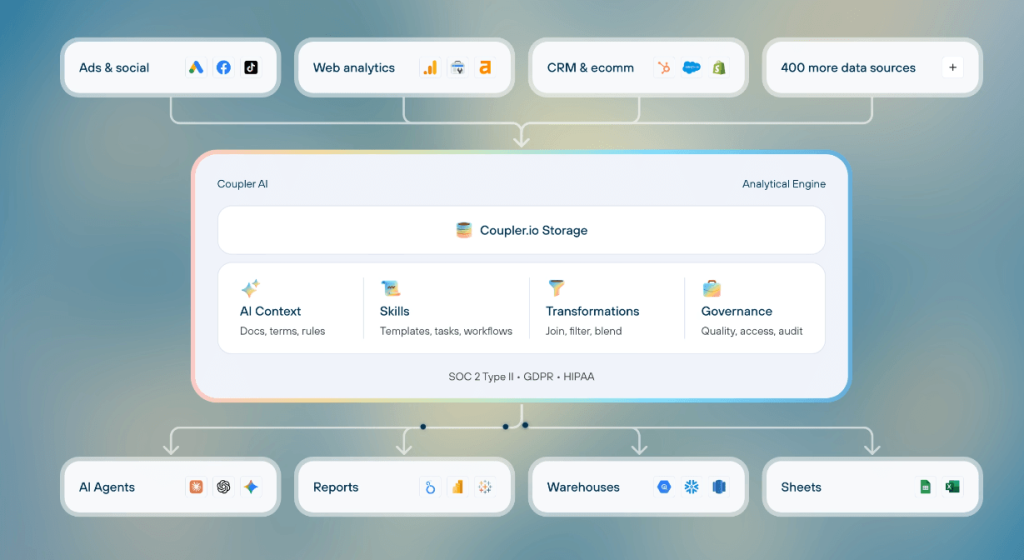
With Coupler.io, you create custom reports and load them into spreadsheets, BI tools, data warehouses, and native AI destinations. Every paid plan includes all 400+ sources from day one. What varies by plan is the number of connected accounts (3 on Starter, 15 on Active, 50 on Pro, custom on the top tier) and the refresh frequency.
All sources and all destinations are available on every paid plan.
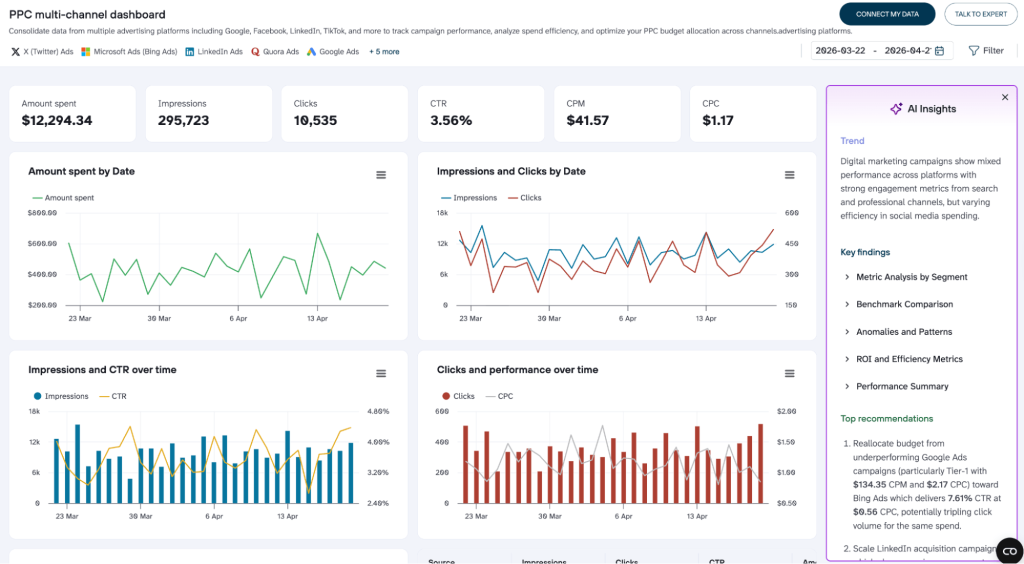
For immediate insights without building reports yourself, Coupler.io has a library of 230+ dashboard templates for PPC, finance, sales, ecommerce, social media, and more, designed in Data Studio, Google Sheets, Power BI, and Tableau. Native Coupler.io Dashboards also include an optional AI Insights add-on at the dashboard level: a one-click summary that reveals key trends, highlights areas of concern, and suggests next steps. (This is a separate dashboard-level feature, not part of the Coupler AI umbrella above.)

AI Integrations, one of the three Coupler AI capabilities, are the backbone of conversational analytics: you feed specific datasets to AI and ask questions in plain language. Unlike native ChatGPT or Claude connectors, you don’t hand over an entire data source. Coupler.io lets you connect data flows to AI, so you decide which dataset to make accessible. AI Agent, the second Coupler AI capability, lives inside Coupler.io itself and can build or adjust supported data flows, prepare data for reports, and answer questions against the connected dataset without context-switching to a third-party chat.
Scheduling is flexible: refresh on a custom schedule or trigger imports via incoming and outgoing webhooks for event-driven workflows. Pricing starts at $24/month (billed annually), and you can start on the Free plan.
Supermetrics vs Coupler.io: head-to-head
| Feature | Coupler.io | Supermetrics |
| Data sources | 400+ (all plans) | 170+ (plan limited: 3 / 6 / all) |
| Unified UI to manage all destinations | ✅ One tool, one price | ⛔ Add-ons per destination |
| Min. refresh frequency | Every 15 min (Custom plan) | Not published per plan |
| Data transformation | No-code: column management, filter, sort, custom calculations, aggregation, blending (append & join) Custom SQL (DuckDB) | Custom fields Dynamic currency conversion Naming conventions decoding |
| Data blending | ✅ Native no-code and SQL | ✅ |
| Prebuilt transformation and dataset templates | ✅ | ⛔ (basic single-source only, limited by destination) |
| Data destinations | BI tools Spreadsheets Databases Data warehouses JSON AI tools (8 destinations) | BI tools Spreadsheets Data warehouses Databases SFTP |
| Dashboard templates | 230+ | Studio templates (count not published) |
| AI umbrella | Coupler AI: AI Agent + AI Integrations + Skills | Supermetrics AI: Dashboard, Insights, Connector Agents + MCP Server |
| AI tool integration | ✅ AI Integrations: Claude, ChatGPT, Gemini, Copilot, Cursor, Perplexity, OpenClaw, Custom MCP | ✅ MCP Server + native Claude integration |
| Agentic AI inside the platform | ✅ AI Agent (builds / adjusts data flows, prepares data, answers questions) | ✅ Dashboard, Insights, Connector Agents |
| Dashboard-level AI add-on | AI Insights (separate from Coupler AI umbrella) | Insights Agent in Studio |
| Webhooks and automation | ✅ | ⛔ |
| Pricing starts at | $24/month (annual) | $44/month (annual, US Starter) |


Rebuild your Supermetrics flow in Coupler.io
Book a demoSupermetrics vs Coupler.io – the detailed comparison
If your budget for data automation is limited and you don’t need hundreds of sources, you’ll often end up choosing between these two. Here’s where they differ in practice.
Interface
Coupler.io is a web-based platform where you set up connections between all sources and destinations in one UI. If you prefer working in Google Sheets, the Coupler.io add-on lets you configure flows directly from the spreadsheet, but the web app is the more convenient way to manage integrations at scale.

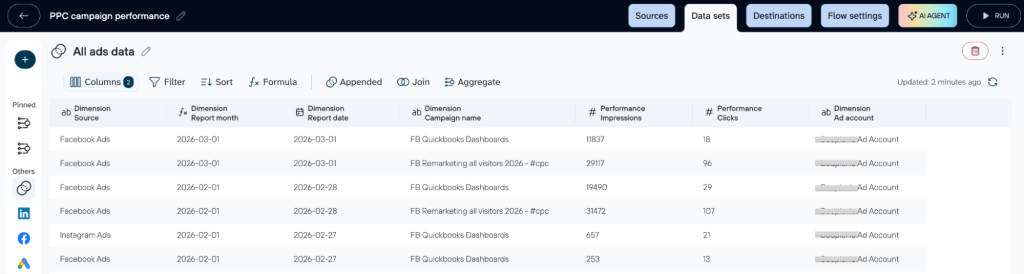
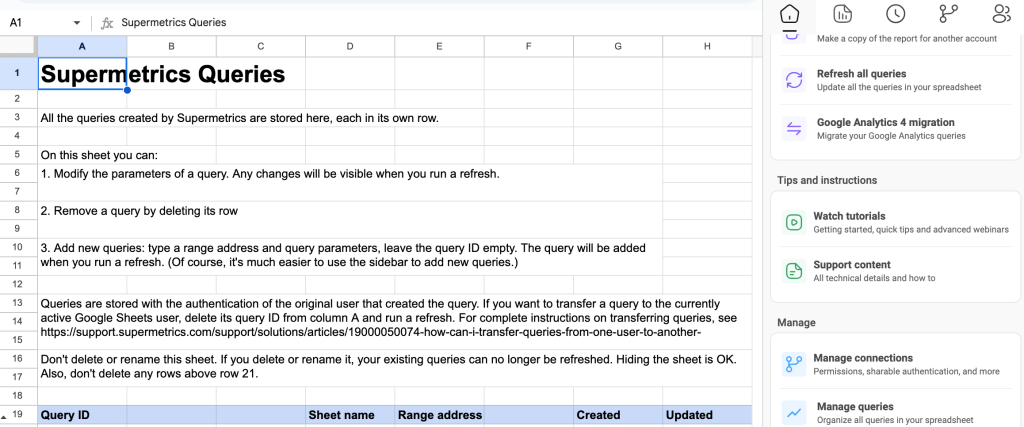
In Supermetrics, the setup depends on your destination. Google Sheets requires the add-on. Excel needs the Excel add-in. Data Studio runs in the browser. Managing queries in Google Sheets means working in a separate Query tab (to delete a query, you delete its row). There’s no single interface across all destinations.

Sources
Coupler.io supports 400+ data sources, all accessible on any paid plan by default. They include CRM systems, marketing platforms, accounting tools, and more. Coupler.io users can suggest new sources for production. This is not just a marketing trick. The Coupler.io team does take customers’ suggestions into account. For example, WooCommerce and MySQL data source connectors were initiated by existing Coupler.io users.
Destinations
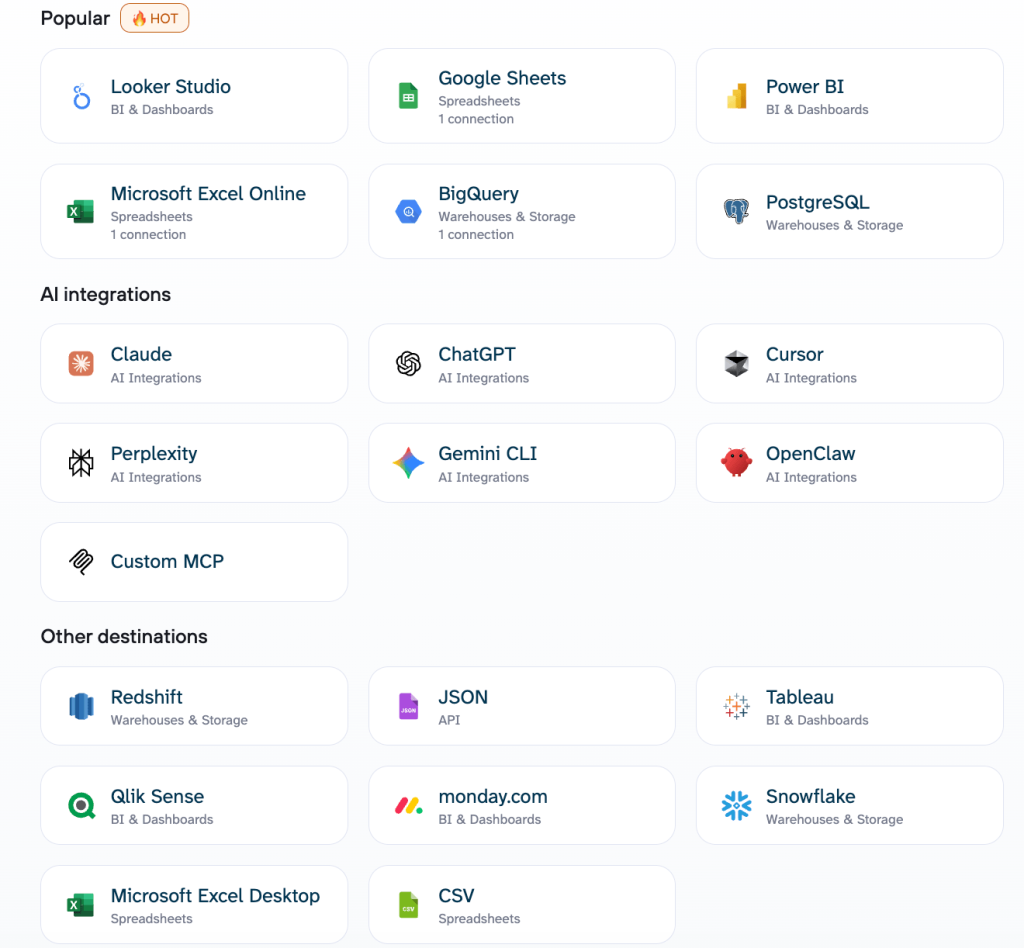
Coupler.io offers the full set of destinations on all paid plans. You can simultaneously send data to different destinations and even transfer it between such apps. The available destinations include:
- Spreadsheet apps: Google Sheets, Microsoft Excel, CSV
- Data warehouses: BigQuery, Redshift, PostgreSQL, Snowflake, Supabase
- BI tools: Data Studio, Power BI, Tableau, Qlik, monday.com
- AI tools: Claude, ChatGPT, Gemini, Copilot, Cursor, Perplexity, OpenClaw, Custom MCP
- Other destinations: JSON

Supermetrics supports four main destinations with publicly available pricing: Google Sheets, Excel, Data Studio, and Power BI. Other options, such as data warehouses, data lakes, and others, are only accessible with a custom Enterprise plan. This means that you’ll need to send your requirements or questions to the Supermetrics sales team to get a quote for the chosen destination.
Dashboard templates
Coupler.io has a gallery of 230+ prebuilt dashboard templates for Google Sheets, Data Studio, Power BI, and Tableau. Each template includes a built-in connector so you can configure the data export from within Coupler.io.

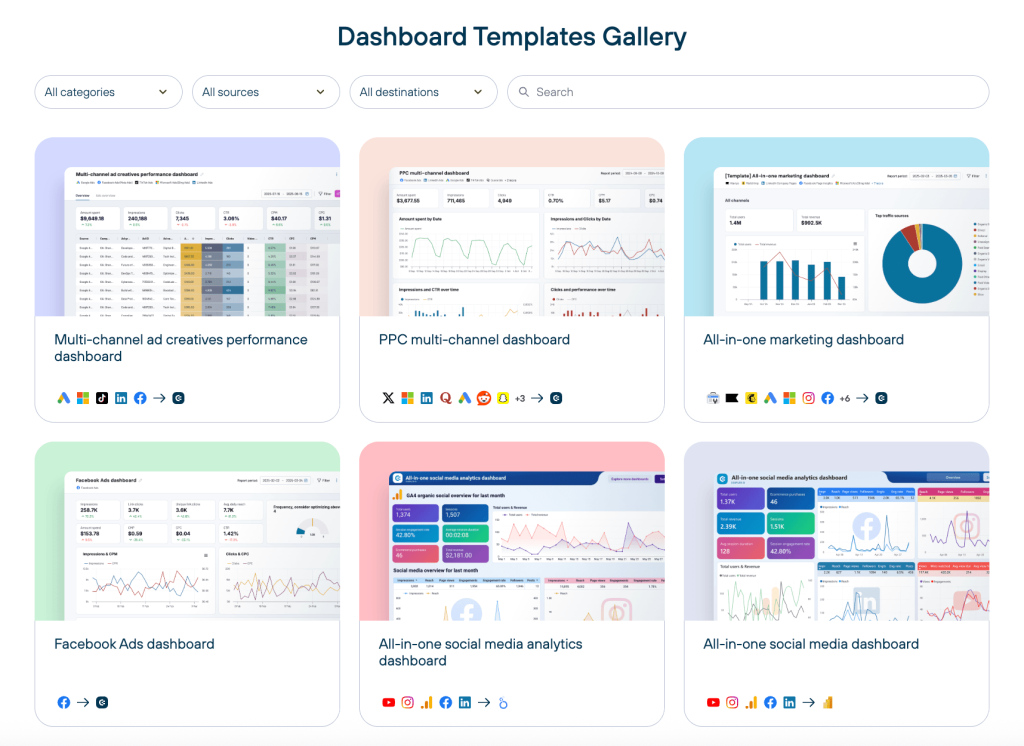
You can also use the native Coupler.io Dashboards feature, an alternative to external BI platforms. It only requires selecting a template, connecting your data sources, and running the dashboard. No additional connectors or accounts for other tools are needed. Coupler.io Dashboards are enhanced with the AI Insights feature and are optimized for mobile viewing.
In comparison, Supermetrics offers white-label dashboard templates for Google Sheets, Excel, Data Studio, and Power BI. These templates work in conjunction with the Supermetrics connectors installed in each destination platform to pull and refresh data.
Data transformations
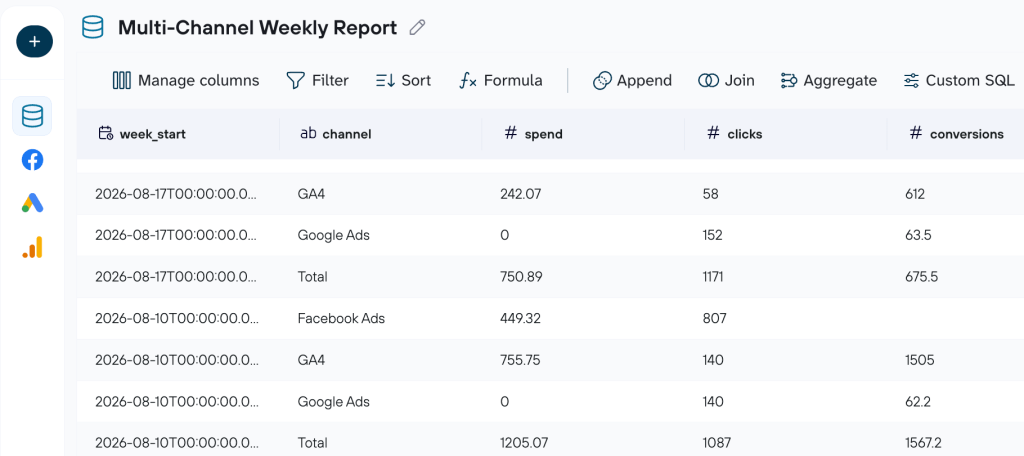
Coupler.io lets you transform data before loading it into a destination directly within the app. You can:
- Edit, reorder, hide, or add columns
- Sort and filter data
- Create custom columns with formulas
- Aggregate data with sum, avg, count, min, or max
- Blend data from multiple accounts from the same source or different sources into a single destination file
- Run custom SQL transformations using DuckDB, saved to the flow and refreshed on schedule

Supermetrics supports data merging from various sources and custom fields to manipulate your data by performing calculations, adding new metrics or dimensions, etc. However, this is available directly in the app only for specific destinations, such as Power BI and data warehouses. For others, like Google Sheets, Excel, and Data Studio, you’ll need to handle transformations in the destination.
Customizable data refresh schedule
Coupler.io supports refresh intervals as frequent as every 15 minutes on the Custom plan, around the clock. Supermetrics does not publish a per-plan minimum on its pricing page; the vendor describes schedules as “define your own.” You can also send updated reports by email or to Slack/Microsoft Teams.
Note: Neither Supermetrics nor Coupler.io provides real-time automated data refresh. Coupler.io’s minimum interval is every 15 minutes on the Custom plan; Supermetrics does not publish a per-plan refresh floor.
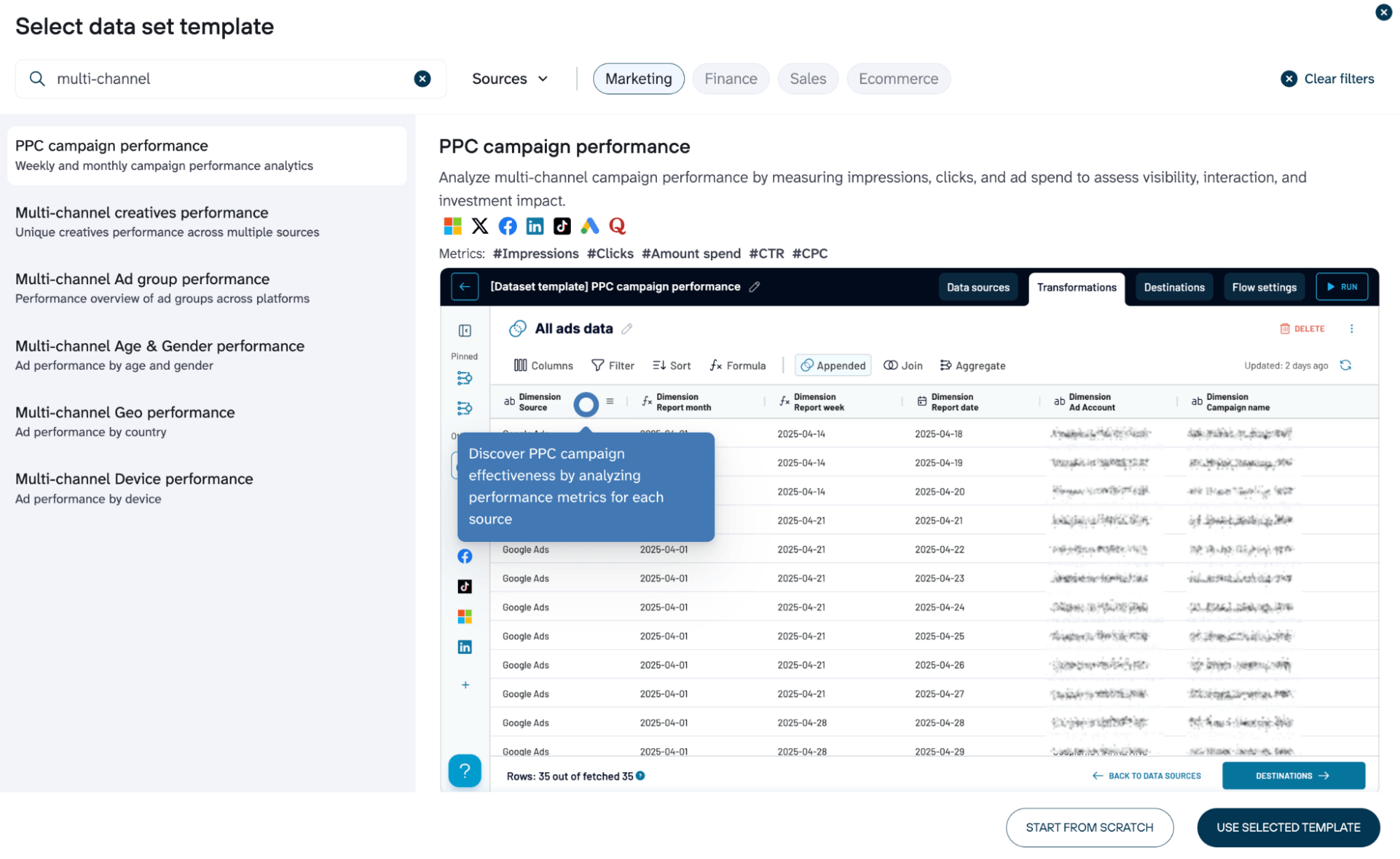
Data set templates available
With Coupler.io, you can select pre-built dataset templates that already contain data pipeline setup and transformations. The library covers various business cases, including marketing, sales, finance, and others. Such pre-built scenarios appear to be a good starting point for analysis since they contain pre-configured transformations, aggregations, and other operations on data. Meanwhile, in Supermetrics, tables support basic single-source dataset templates functionality, limited by destinations.

Coupler AI vs Supermetrics AI
Coupler AI is the umbrella covering three capabilities.
- AI Agent is a conversational assistant inside Coupler.io that can build or adjust data flows, prepare data for reports, and answer questions against your connected dataset.
- AI Integrations connect prepared data to external AI assistants (Claude, ChatGPT, Gemini, Copilot, Cursor, Perplexity, OpenClaw, Custom MCP) so you can query it there in plain language.
- Skills are reusable AI skills you can select, apply automatically, or create yourself to extend what the Agent does. The Analytical Engine executes the math and the Context layer carries your business definitions, which is why Coupler.io’s own framing of AI answers is grounded in the dataset rather than reasoning from column names alone.
Let Coupler AI do the data work for you
Tell Coupler AI what you need to know, from which source, and how often. It connects your account, sets up the data flow, keeps it refreshed, and lets you analyze the results inside Coupler.io or another AI tool.
Try for free

Supermetrics shipped a comparable stack in late 2025 under the Supermetrics AI banner: Dashboard Agent, Insights Agent, Connector Agent, an MCP Server for Claude/ChatGPT/Gemini/n8n, and a dedicated Claude integration page. AI credits are a Studio unit on each plan (4,000 on Starter, 12,000 on Growth, custom on Enterprise). Where the two differ in practice: Coupler AI leads with AI Agent + AI Integrations + Skills as one connected story across your flows, destinations, and connected AI tools; Supermetrics AI leads with named Agents inside Studio and the MCP Server as the bridge out.
Pricing
Supermetrics pricing is destination-based. Each plan includes one core destination (Data Studio, Google Sheets, Excel, or Power BI). Adding more destinations means paying for each separately. Data warehouse destinations (BigQuery, Snowflake) require the Enterprise plan with a custom quote.
How Supermetrics pricing works: You pick a destination, then a plan tier. The Starter plan ($44/mo, US annual) includes 3 data sources, 1 user, and 1 core destination. Growth ($177/mo, US annual) includes 6 sources, 2 users, and 1 destination. On Growth, extra data sources are $37/mo each, extra users are $99/mo each, extra destinations are $149/mo each, and extra accounts are $11/mo each. Data warehouses require Enterprise with custom pricing. That means a multi-destination, multi-source setup gets expensive fast.
Coupler.io pricing is account-based. All 400+ sources are available on every plan, including the Free one. Plans start at $24/month (annual billing). What pushes you to a higher plan is needing more connected accounts, more destinations, or faster refresh intervals (daily, hourly, or every 15 minutes). You can also add extra accounts individually without upgrading. There are no per-source fees, no credit system, and no usage-based surprises.
How Coupler.io pricing works: You pick a plan based on how many accounts you need to connect and how often you want data refreshed. The Active plan ($99/mo annual) includes 15 accounts and 3 destinations with daily refresh. If you need hourly refresh or more than 50 accounts, the Pro plan ($199/mo) covers that with unlimited destinations. No per-source add-ons.
Take a look at a pricing comparison for the most regular setup:
| Requirements | Supermetrics cost | Coupler.io cost | Winner | |
| Setup | 1 user 8 marketing sources (GA4, Google Ads, Facebook Ads, LinkedIn Ads, HubSpot, Google Search Console, TikTok Ads, Shopify) 3 destinations (Google Sheets, Data Studio, BigQuery) Daily refresh | ~$549/mo + Enterprise quote: Growth plan ($177) covers 1 destination + 6 sources + 2 users. Adding 2 extra sources = $74. Adding 2 extra destinations (Google Sheets + Data Studio) at $149 each = $298. BigQuery requires Enterprise (custom quote). | $99/mo (Active plan: 15 accounts, 3 destinations including BigQuery, daily refresh) | Coupler.io saves at least $450/mo before the Enterprise quote for BigQuery |
Switching from Supermetrics?
Data flows need to be recreated in Coupler.io. There’s no automated migration. Historical data stays in your current destinations, so nothing is lost. The recommended approach: rebuild 1-2 key flows first, run both tools in parallel for a week to confirm the numbers match, then cut over. Most flows can be set up quickly using a prebuilt template.
One thing to account for: if you rely on Supermetrics’ scheduled email delivery of reports, you’ll need to replicate that with external automation (e.g., a scheduled export combined with an email trigger) or switch to Coupler.io’s webhook-based notifications.
Why Coupler.io beats Supermetrics for most switching users: The setup is no-code, all 400+ sources are available on any paid plan from the first day, and both no-code and SQL (DuckDB) transformations are built in. Coupler AI covers the three capabilities most teams actually use: an AI Agent inside the platform, AI Integrations with eight native AI destinations (Claude, ChatGPT, Gemini, Copilot, Cursor, Perplexity, OpenClaw, Custom MCP), and Skills to make the Agent repeatable. Supermetrics AI matches the agentic side with Dashboard, Insights, and Connector Agents plus an MCP Server, but the destination-based pricing model still forces you to buy separate seats for each destination. Many business users consider Coupler.io a worthy option among Supermetrics alternatives.
When to use Coupler.io over Supermetrics: Opt for Coupler.io when you need a cost-effective, all-in-one platform for ETL, reporting automation, AI analytics, and pre-configured reporting templates. It’s built for growing teams who want speed and simplicity without juggling multiple subscriptions. The Coupler.io vs Supermetrics breakdown lays out the differences side by side. If you want to try it on your own data, check out how to migrate from Supermetrics to Coupler.io and book a call with the team to discuss details.
Plan a multi-client migration from Supermetrics
Talk to Coupler.ioOther Supermetrics alternatives in detail
Now, let’s cover other Supermetrics alternatives in more detail.
Funnel.io

Funnel.io is a marketing data hub with a semantic layer. Business rules, naming harmonization, campaign-name splitting, custom metrics, and currency conversion live in Funnel before data reaches the warehouse. The connector catalog shows 640 integrations, and if a connector you need is missing, Funnel will build it for you on Business and Enterprise plans.
Funnel’s 2025-2026 release wave added Funnel AI (natural-language questions on your data, no-code custom fields, dashboard creation, scheduled analyses), Funnel MCP (a server exposing Funnel data to Claude, ChatGPT, Cursor, Gemini, and MCP clients), and Funnel as Code (configuration-as-code, private beta). Measure (MMM, MTA, incrementality) is available as a separate add-on.
Pricing is on the higher end. The Starter plan starts at $300/mo billed annually with 117 connectors; Business is from $600/mo annual with 579 connectors; Enterprise is a custom quote with 600+ connectors and enterprise SSO/SCIM.
| Feature | Funnel.io | Coupler.io | Supermetrics |
| Data sources | 640 (plan-limited: 117 / 579 / 600+) | 400+ (all plans) | 170+ (plan limited) |
| Unified UI to manage all destinations | ✅ | ✅ One tool, one price | ⛔ Multiple tools, higher costs |
| Min. refresh frequency | Not published per plan | Every 15 min | Not published per plan |
| Data transformation | Field mapping Data type normalization Automatic currency conversion Semantic layer | No-code (column mgmt, filter, sort, calculations, aggregation, blending) + custom SQL (DuckDB) | Custom fields Dynamic currency conversion Naming conventions decoding |
| Data blending | ✅ | ✅ | ✅ |
| Prebuilt dataset templates | ⛔ | ✅ | ⛔ |
| Data destinations | BI tools and spreadsheets Analytics platforms Data warehouses AI tools (MCP) | BI tools Spreadsheets Databases Data warehouses JSON AI tools (8) | BI tools Spreadsheets Data warehouses Databases SFTP |
| Dashboard templates | 12+ (Funnel Dashboards) | 230+ | Studio templates (count not published) |
| AI tool integration | ✅ Funnel MCP (Claude, ChatGPT, Cursor, Gemini) | ✅ Coupler AI (AI Integrations): Claude, ChatGPT, Gemini, Copilot, Cursor, Perplexity, OpenClaw, Custom MCP | ✅ MCP Server + Claude integration |
| AI-generated insights | ✅ Funnel AI | ✅ Coupler AI (AI Agent inside the platform); AI Insights add-on at the dashboard level | ✅ Insights Agent |
| Webhooks and automation | ✅ | ✅ | ⛔ |
| Pricing starts at | From $300/mo (annual) | $24/month | $44/month (US) |
Why Funnel.io is better than Supermetrics: Funnel acts as a centralized “data hub,” allowing you to connect, transform, model, and store data in a single interface. Compared to Supermetrics, it offers a wider connector catalog, a built-in semantic layer, and a native MCP server for AI assistants.
When to use Funnel.io over Supermetrics: Funnel.io is the smarter option when you manage complex, multi-channel campaigns and need a tool that lets you clean, unify, and explore data before it reaches the reporting destination. If you’re weighing Coupler.io alongside it, see the Coupler.io vs Funnel.io breakdown.
Adverity

Adverity is a marketing data integration and governance platform aimed at enterprise teams. It pulls from 600+ pre-built connectors and ships 31 destinations covering warehouses, lakes, BI, and ad platforms. The platform’s strength is a two-track transformation layer: seven no-code tools for business users, plus 80+ Python functions and dbt integration for engineering.
In 2026, Adverity added Atlas, an AI knowledge layer on top of an existing warehouse (Snowflake, BigQuery, Databricks, or Redshift) with a bring-your-own LLM model, SQL agents, anomaly detection, budget pacing, and an MCP server for Claude Desktop and VS Code. Transformation Copilot, Ask Your Dashboards, and the AI Insights Widget are additional AI features on top of the Connect product.
There’s no fixed pricing; each case is discussed individually. Adverity is SOC 2 Type II, ISO 27001, GDPR, and HIPAA (BAA on request) compliant, with EU or US hosting.
| Feature | Adverity | Coupler.io | Supermetrics |
| Data sources | 600+ (plan availability not stated) | 400+ (all plans) | 170+ (plan limited) |
| Unified UI to manage all destinations | ✅ | ✅ One tool, one price | ⛔ Multiple tools, higher costs |
| Min. refresh frequency | Every 15 min (custom via API) | Every 15 min | Not published per plan |
| Data transformation | 7 no-code tools 80+ Python functions dbt integration Data Mapping | No-code (column mgmt, filter, sort, calculations, aggregation, blending) + custom SQL (DuckDB) | Custom fields Dynamic currency conversion Naming conventions decoding |
| Data blending | Harmonization layer across sources | ✅ | ✅ |
| Prebuilt dataset templates | ⛔ | ✅ | ⛔ |
| Data destinations | BI tools and spreadsheets Databases CRMs Social advertising and analytics platforms | BI tools Spreadsheets Databases Data warehouses JSON AI tools (8) | BI tools Spreadsheets Data warehouses Databases SFTP |
| Dashboard templates | Explore / Present dashboards (template count not published) | 230+ | Studio templates (count not published) |
| AI tool integration | ✅ Adverity Atlas (MCP for Claude Desktop, VS Code) Transformation Copilot Ask Your Dashboards | ✅ Coupler AI (AI Integrations): Claude, ChatGPT, Gemini, Copilot, Cursor, Perplexity, OpenClaw, Custom MCP | ✅ MCP Server + Claude integration |
| AI-generated insights | ✅ AI Insights Widget | ✅ Coupler AI (AI Agent inside the platform); AI Insights add-on at the dashboard level | ✅ Insights Agent |
| Webhooks and automation | ✅ | ✅ | ⛔ |
| Pricing starts at | Custom (vendor-silent) | $24/month | $44/month (US) |
Why Adverity is better than Supermetrics: What Adverity lacks in dashboard templates and ease-of-use, it makes up for in strong customer support, extensive AI capabilities, and an impressive array of transformation options. Atlas is a differentiator for teams that already keep marketing data in a warehouse.
When to use Adverity over Supermetrics: Choose Adverity if you regularly handle large volumes of complex, multi-source data. The platform’s range of sources, transformations, and destinations promises greater control over data workflows, especially for companies looking to scale their data operations. For a direct comparison with Coupler.io, see the Coupler.io vs Adverity breakdown.
Fivetran


Fivetran is an automated data movement platform designed for teams managing complex data and AI workflows. In June 2026 it completed its merger with dbt Labs, and the combined platform now ships Agent Context MCP (public preview), dbt Wizard (beta), and Agents Schema on top of Fivetran’s managed data movement.
Fivetran’s connector count varies by page: 700+ on the Standard plan, 750+ on the connectors page, and 900+ marketed on the homepage. Unlike most others on this list, it covers enterprise databases and ERPs: Oracle, SAP, NetSuite, SQL Server, and more. Destinations are warehouses, lakes, and databases; there are no spreadsheet destinations or native BI tools. For transformations, the platform uses Quickstart data models and Fivetran-hosted dbt Core; blending happens destination-side.
Pricing is usage-based on monthly active rows (MAR) and monthly model runs (MMR). A Free plan (up to 500K MAR and 5K MMR) and a 14-day trial are available. List prices for Standard, Enterprise, and Business Critical plans are not published as fixed numbers.
| Feature | Fivetran | Coupler.io | Supermetrics |
| Data sources | 700+ Standard; 750+ catalog; 900+ marketed | 400+ (all plans) | 170+ (plan limited) |
| Unified UI to manage all destinations | ✅ | ✅ One tool, one price | ⛔ Multiple tools, higher costs |
| Min. refresh frequency | Every 1 min (Enterprise & Business Critical) | Every 15 min | Not published per plan |
| Data transformation | Fivetran-hosted dbt Core Quickstart data models Advanced data replication Data blocking & column hashing (destination-side) | No-code (column mgmt, filter, sort, calculations, aggregation, blending) + custom SQL (DuckDB) | Custom fields Dynamic currency conversion Naming conventions decoding |
| Data blending | ✅ (destination-side via dbt) | ✅ | ✅ |
| Prebuilt dataset templates | Quickstart data models | ✅ | ⛔ |
| Data destinations | Data warehouses Data lakes Databases | BI tools Spreadsheets Databases Data warehouses JSON AI tools (8) | BI tools Spreadsheets Data warehouses Databases SFTP |
| Dashboard templates | ⛔ | 230+ | Studio templates (count not published) |
| AI tool integration | ✅ Agent Context MCP (Claude, Claude Code, Cursor, ChatGPT, Codex) | ✅ Coupler AI (AI Integrations): Claude, ChatGPT, Gemini, Copilot, Cursor, Perplexity, OpenClaw, Custom MCP | ✅ MCP Server + Claude integration |
| AI-generated insights | ✅ dbt Wizard (beta) | ✅ Coupler AI (AI Agent inside the platform); AI Insights add-on at the dashboard level | ✅ Insights Agent |
| Webhooks and automation | ✅ | ✅ | ⛔ |
| Pricing starts at | Usage-based (MAR); Free up to 500K MAR | $24/month | $44/month (US) |
Why Fivetran is better than Supermetrics: Fivetran is uniquely positioned to serve enterprises with extensive data integration needs and AI/ML workflows, thanks to its engineer-grade flexibility, dbt-native transformations after the merger, and MCP access for AI agents.
When to use Fivetran over Supermetrics: If your main priority is to centralize marketing data in storage solutions (e.g., Redshift), automate backups, and prepare data for AI projects, then Fivetran is the obvious choice here. Supermetrics’ warehouse destinations are only available on Enterprise with a custom quote.
Whatagraph


Whatagraph is an agentic marketing intelligence platform built specifically for performance marketers and agencies, not for data teams. Unlike most tools on this list, it takes care of the entire reporting workflow, from pulling data to delivering client-facing reports and internal dashboards.
It connects to 60+ native marketing sources (68 on the integrations page) and offers 1000+ more via Smart sources, where AI agents build a connector from a description. Whatagraph’s engineering team maintains the native connectors, so you don’t need to monitor them constantly.
The September 2025 Whatagraph 3.0 release added IQ Agents, IQ Chat, IQ+, Smart sources, and Whatagraph MCP (Claude, ChatGPT, Cursor, and MCP clients, with read access live and write marked coming soon). You can blend data from different sources, create custom metrics and dimensions, and ship your data to BigQuery or Data Studio on the Prime plan.
Pricing is credit-based: 1 source account equals 1 credit. The Max plan starts at $1,118/mo billed annually (€999 in EUR) and includes IQ Agents, advanced integrations, data groups and blends, white-label reports, KPI overviews with alerts, and a Dedicated Success Manager. Prime is a custom annual quote that adds premium integrations, custom report domain, public API access, transfer to BigQuery and Data Studio, priority support, and tailored onboarding. The vendor is ISO 27001 certified; it does not claim its own SOC 2.
| Feature | Whatagraph | Coupler.io | Supermetrics |
| Data sources | 60+ native (68 on integrations page) + 1000+ via Smart sources | 400+ (all plans) | 170+ (plan limited) |
| Unified UI to manage all destinations | ✅ | ✅ One tool, one price | ⛔ Multiple tools, higher costs |
| Min. refresh frequency | Every 30 min platform-wide | Every 15 min | Not published per plan |
| Data transformation | Custom metrics Custom dimensions Source blends Reusable data-modeling templates IQ+ (prompt-based, Prime only) | No-code (column mgmt, filter, sort, calculations, aggregation, blending) + custom SQL (DuckDB) | Custom fields Dynamic currency conversion Naming conventions decoding |
| Data blending | ✅ Native source blends | ✅ | ✅ |
| Prebuilt dataset templates | ✅ Data-modeling templates | ✅ | ⛔ |
| Data destinations | Whatagraph reports/dashboards BigQuery (Prime add-on) Data Studio (Prime) Spreadsheets AI tools (MCP) | BI tools Spreadsheets Databases Data warehouses JSON AI tools (8) | BI tools Spreadsheets Data warehouses Databases SFTP |
| Dashboard templates | 54 | 230+ | Studio templates (count not published) |
| AI tool integration | ✅ Whatagraph MCP (Claude, ChatGPT, Cursor) | ✅ Coupler AI (AI Integrations): Claude, ChatGPT, Gemini, Copilot, Cursor, Perplexity, OpenClaw, Custom MCP | ✅ MCP Server + Claude integration |
| AI-generated insights | ✅ IQ Chat, IQ Agents | ✅ Coupler AI (AI Agent inside the platform); AI Insights add-on at the dashboard level | ✅ Insights Agent |
| Webhooks and automation | ⛔ | ✅ | ⛔ |
| Pricing starts at | From $1,118/mo annual (Max, US); €999 in EUR | $24/month | $44/month (US) |
Why Whatagraph is better than Supermetrics: Supermetrics stops at the data destination. You’ll need to use a third-party tool like Data Studio to build client-facing reports. Whatagraph handles both the data pipeline and the reporting layer in one place, with AI agents for drafting commentary and bulk-editing client reports.
When to use Whatagraph over Supermetrics: Choose Whatagraph when client reporting is your main bottleneck and you want a branded dashboard or scheduled report as the deliverable, not a dataset for someone else’s BI tool. If your team spends hours every month building and updating reports manually, Whatagraph is built for agencies that need reliable client reporting at scale.
Windsor.ai

Windsor.ai is a no-code data integration platform that pulls data from 350+ sources into BI tools, spreadsheets, warehouses, and AI chat assistants via MCP. The 2026 push is Windsor MCP, with native integrations for Claude, ChatGPT, Microsoft Copilot, Perplexity, Gemini, Cursor, and additional MCP-compatible agents like Lovable and Manus.
Windsor.ai delivers data to BI tools (Data Studio, Power BI, Tableau), spreadsheets (Google Sheets, Excel), warehouses (BigQuery, Snowflake, Redshift, Databricks, Microsoft Fabric), databases (PostgreSQL, MySQL, Supabase), object storage (S3, Azure Blob), and AI chat assistants via MCP. For transformations, Windsor ships pre-built data model kits that handle cross-channel joins (ad spend joined with GA4 conversion events, for example). There is no in-platform no-code transformation builder; customization happens in SQL, dbt, LookML, or DAX in the destination.
There are 6 pricing tiers (Free, Basic $19, Standard $99, Plus $249, Professional $499, Enterprise custom; all US annual), with a 30-day free trial and a Forever Free plan. One trade-off: 15-minute refresh is Professional-only; SSO, custom connectors, invoicing, and NDA/DPA onboarding are Enterprise-only. Windsor Group AG completed its SOC 2 Type II audit this year.
| Feature | Windsor.ai | Coupler.io | Supermetrics |
| Data sources | 350+ (quota per tier: 1 to 200) | 400+ (all plans) | 170+ (plan limited) |
| Unified UI to manage all destinations | ✅ | ✅ One tool, one price | ⛔ Multiple tools, higher costs |
| Min. refresh frequency | Every 15 min (Professional only) | Every 15 min | Not published per plan |
| Data transformation | Pre-built data model kits (customization in SQL/dbt/LookML/DAX) | No-code (column mgmt, filter, sort, calculations, aggregation, blending) + custom SQL (DuckDB) | Custom fields Dynamic currency conversion Naming conventions decoding |
| Data blending | ✅ Cross-channel joins in data model kits | ✅ | ✅ |
| Prebuilt dataset templates | ✅ Pre-built data model kits | ✅ | ⛔ (basic single-source only, limited by destination) |
| Data destinations | BI tools Spreadsheets Data warehouses Databases AI tools (MCP) | BI tools Spreadsheets Databases Data warehouses JSON AI tools (8) | BI tools Spreadsheets Data warehouses Databases SFTP |
| Dashboard templates | 122+ (Data Studio, Power BI, Tableau, Sheets, Excel) | 230+ | Studio templates (count not published) |
| AI tool integration | ✅ Windsor MCP (Claude, ChatGPT, Copilot, Perplexity, Gemini, Cursor) | ✅ Coupler AI (AI Integrations): Claude, ChatGPT, Gemini, Copilot, Cursor, Perplexity, OpenClaw, Custom MCP | ✅ MCP Server + Claude integration |
| AI-generated insights | ✅ via Windsor MCP in AI chat | ✅ Coupler AI (AI Agent inside the platform); AI Insights add-on at the dashboard level | ✅ Insights Agent |
| Webhooks and automation | ⛔ | ✅ | ⛔ |
| Pricing starts at | $19/month (Basic, US annual) | $24/month | $44/month (US) |
Why Windsor.ai is better than Supermetrics: Windsor MCP is a flagship AI-first push: your prepared data is directly queryable from Claude, ChatGPT, Copilot, Perplexity, Gemini, and Cursor out of the box. The platform also offers a generous Forever Free plan plus a 30-day trial, with SOC 2 Type II now certified.
Coupler.io is very similar to Windsor.ai in terms of unified data flow management, AI capabilities, and data blending. However, Coupler.io offers preconfigured dataset templates, a broader set of data transformations, and a larger collection of reporting templates, improving analytics quality and speed.
What’s more, Coupler.io makes all sources and destinations available under any pricing plan, while Windsor.ai limits the number of available sources for each pricing plan.
When to use Windsor.ai over Supermetrics: Windsor.ai is the better option when MCP-first analytics and AI chat are your primary interface. If your team’s workflow starts in Claude or ChatGPT rather than in a dashboard, Windsor’s native MCP destinations are the easiest way to get prepared marketing data in there.
Porter Metrics
Porter Metrics is an AI-native marketing data connector focused on Data Studio, Google Sheets, Power BI, and BigQuery. The vendor pivoted to an AI-native story in 2026: AI chat via MCP (Claude, ChatGPT, Gemini), AI credits as the usage unit, a Scale tier that unlocks workflows and agents, and a standalone Automation SKU.
The connector catalog has 29 named integrations covering paid media (Meta, Google, TikTok, LinkedIn, Reddit, Pinterest, Microsoft, Apple, X Ads, DV360, StackAdapt), analytics (GA4), social (Instagram, TikTok, Facebook, LinkedIn Pages), ecommerce (Shopify, Amazon Seller, Northbeam, Triple Whale), CRM (HubSpot, Klaviyo, Mailchimp, ActiveCampaign), SEO (Search Console, Google Business Profile), and spreadsheets. Destinations are tightly scoped to Data Studio, Google Sheets, Power BI, BigQuery (the only warehouse), plus Slack and Zapier.
Pricing starts from $12.50 per connected data source account per month billed annually, with volume discounts starting at 5 accounts (down to $2/account at 200+). The Free plan is capped at 30-day history, 100 AI credits per month, and no exports. One thing to flag: Porter publishes no SOC 2, ISO 27001, GDPR DPA, SSO, MFA, RBAC, or SLA on its site. If any of those is a hard requirement, this is not your tool.
| Feature | Porter Metrics | Coupler.io | Supermetrics |
| Data sources | 29 (all included on paid plans) | 400+ (all plans) | 170+ (plan limited) |
| Unified UI to manage all destinations | ✅ | ✅ One tool, one price | ⛔ Multiple tools, higher costs |
| Min. refresh frequency | Hourly default, daily fallback | Every 15 min | Not published per plan |
| Data transformation | Data blending Custom fields (blending inside AI chat supported) | No-code (column mgmt, filter, sort, calculations, aggregation, blending) + custom SQL (DuckDB) | Custom fields Dynamic currency conversion Naming conventions decoding |
| Data blending | ✅ (paid plans) | ✅ | ✅ |
| Prebuilt dataset templates | ⛔ | ✅ | ⛔ |
| Data destinations | Data Studio Google Sheets Power BI BigQuery AI tools (MCP) Slack, Zapier | BI tools Spreadsheets Databases Data warehouses JSON AI tools (8) | BI tools Spreadsheets Data warehouses Databases SFTP |
| Dashboard templates | ~89 Data Studio | 230+ | Studio templates (count not published) |
| AI tool integration | ✅ MCP for Claude, ChatGPT, Gemini | ✅ Coupler AI (AI Integrations): Claude, ChatGPT, Gemini, Copilot, Cursor, Perplexity, OpenClaw, Custom MCP | ✅ MCP Server + Claude integration |
| AI-generated insights | ✅ AI chat + Research + Creative generation (paid plans) | ✅ Coupler AI (AI Agent inside the platform); AI Insights add-on at the dashboard level | ✅ Insights Agent |
| Webhooks and automation | ✅ Automation SKU + Zapier | ✅ | ⛔ |
| Pricing starts at | From $12.50/account/mo (annual) | $24/month | $44/month (US) |
Why Porter Metrics is better than Supermetrics: For agencies whose reporting lives entirely in Data Studio, Porter’s per-account pricing drops sharply at volume (down to $2/account at 200+). The MCP-first AI story also lands well for teams already working inside Claude or ChatGPT.
When to use Porter Metrics over Supermetrics: Pick Porter Metrics when the reporting stack is already Data Studio, the agency is price-sensitive, and enterprise security certifications are not a buying requirement. For anyone needing SOC 2 or SSO, this is not a fit.
Dataslayer
Dataslayer is a marketing data pipeline with a strong MCP-first AI story. The platform has 70 live connectors and 14 destinations across spreadsheets (Google Sheets, Excel), visualization (Data Studio, Power BI, API Query Manager for Tableau/Qlik), warehouses (BigQuery, Snowflake, Redshift, S3, Google Cloud Storage, SQL databases, Azure SQL/Storage), and Morpheus for MMM.
The 2026 AI stack covers Dataslayer MCP (Claude, ChatGPT, Gemini, Copilot, Mistral, with Mistral highlighted for EU data residency), a Dataslayer AI Agent in-platform, Dataslayer GPT inside ChatGPT, an Alerts Agent for anomalies, and Atlas (early access) for warehouse + dashboards hosted inside Dataslayer.
Dataslayer does not publish US pricing on its public pricing page; the EUR figures are Starter €29/mo, Advanced €99/mo, Pro €299/mo (all annual), with Free and Business options. The vendor is ISO 27001 and ISO 27701 certified by Bureau Veritas and claims GDPR compliance; it does not claim SOC 2, HIPAA, SSO, MFA, or RBAC. Public ratings are G2 4.8/5 across 311 reviews and Capterra 4.7/5 across 88 reviews.
| Feature | Dataslayer | Coupler.io | Supermetrics |
| Data sources | 70 (connector quota per tier) | 400+ (all plans) | 170+ (plan limited) |
| Unified UI to manage all destinations | ✅ | ✅ One tool, one price | ⛔ Multiple tools, higher costs |
| Min. refresh frequency | Hourly (Advanced), custom hours (Pro, Business) | Every 15 min | Not published per plan |
| Data transformation | Data blending (Advanced+) Custom fields Alerts Agent Atlas AI analyst (early access) | No-code (column mgmt, filter, sort, calculations, aggregation, blending) + custom SQL (DuckDB) | Custom fields Dynamic currency conversion Naming conventions decoding |
| Data blending | ✅ (Advanced+) | ✅ | ✅ |
| Prebuilt dataset templates | ⛔ | ✅ | ⛔ |
| Data destinations | Spreadsheets Data Studio Power BI Warehouses (BigQuery, Snowflake, Redshift, S3, GCS, SQL databases, Azure) Morpheus (MMM) AI tools (MCP) | BI tools Spreadsheets Databases Data warehouses JSON AI tools (8) | BI tools Spreadsheets Data warehouses Databases SFTP |
| Dashboard templates | 34+ (mostly Data Studio) | 230+ | Studio templates (count not published) |
| AI tool integration | ✅ Dataslayer MCP (Claude, ChatGPT, Gemini, Copilot, Mistral) | ✅ Coupler AI (AI Integrations): Claude, ChatGPT, Gemini, Copilot, Cursor, Perplexity, OpenClaw, Custom MCP | ✅ MCP Server + Claude integration |
| AI-generated insights | ✅ AI Agent + Dataslayer GPT + Atlas | ✅ Coupler AI (AI Agent inside the platform); AI Insights add-on at the dashboard level | ✅ Insights Agent |
| Webhooks and automation | ⛔ (Alerts Agent for anomalies) | ✅ | ⛔ |
| Pricing starts at | US pricing not published; EUR: €29/month (Starter, annual) | $24/month | $44/month (US) |
Why Dataslayer is better than Supermetrics: Dataslayer leads with MCP as a native destination and offers a lower entry price in EUR than Supermetrics’ Starter in USD. Public G2 ratings (4.8/5 across 311 reviews) also reflect strong user sentiment.
When to use Dataslayer over Supermetrics: Choose Dataslayer when you want an MCP-first workflow with a lower price point, and you don’t need SOC 2 or SSO. Teams in Europe who want Mistral as the model provider will also appreciate the data-residency framing.
Stitch

Stitch is a warehouse ingestion tool that pulls data from 130+ source apps and loads it into data warehouses, lakes, and lakehouses. The platform is now actively folding into Qlik Talend Cloud: the homepage leads with “Stitch and Qlik. One Vision.”, and legacy stitchdata.com paths like /platform/security/ and /company/ redirect to Qlik properties. The ownership chain is Stitch → Talend (2018) → Qlik (2023).
Unlike many other Supermetrics competitors, Stitch doesn’t support data imports into visualization tools or spreadsheets. It offers 11 destinations covering Amazon Redshift, S3, Azure Synapse, Delta Lake on Databricks, data.world, BigQuery, SQL Server, MySQL, Panoply, PostgreSQL, and Snowflake. Stitch follows an ELT philosophy and does not do in-tool transformations beyond nested-structure handling; modeling happens in the destination warehouse. There are no AI features surfaced on current Stitch pages.
Pricing is row-based. The Standard plan starts at $100/month, Advanced is $1,500/mo billed annually, and Premium is $3,000/mo billed annually. The Standard plan is capped at 1 destination; Advanced and Premium include HIPAA BAA and advanced connectivity (site-to-site VPN, AWS PrivateLink, VPC peering). A 14-day free trial is available.
| Feature | Stitch | Coupler.io | Supermetrics |
| Data sources | 130+ (150 Standard + 4 Enterprise sources) | 400+ (all plans) | 170+ (plan limited) |
| Unified UI to manage all destinations | ✅ (Standard capped at 1 destination) | ✅ One tool, one price | ⛔ Multiple tools, higher costs |
| Min. refresh frequency | Configurable minutes to hours | Every 15 min | Not published per plan |
| Data transformation | Nested data handling Post-load webhooks (Advanced+) ELT: modeling in warehouse | No-code (column mgmt, filter, sort, calculations, aggregation, blending) + custom SQL (DuckDB) | Custom fields Dynamic currency conversion Naming conventions decoding |
| Data blending | ⛔ in-tool (warehouse-side) | ✅ | ✅ |
| Prebuilt dataset templates | ⛔ | ✅ | ⛔ |
| Data destinations | Data warehouses Data lakes Databases | BI tools Spreadsheets Databases Data warehouses JSON AI tools (8) | BI tools Spreadsheets Data warehouses Databases SFTP |
| Dashboard templates | ⛔ | 230+ | Studio templates (count not published) |
| AI tool integration | ⛔ | ✅ Coupler AI (AI Integrations): Claude, ChatGPT, Gemini, Copilot, Cursor, Perplexity, OpenClaw, Custom MCP | ✅ MCP Server + Claude integration |
| AI-generated insights | ⛔ | ✅ | ✅ |
| Webhooks and automation | ✅ Post-load (Advanced+) | ✅ | ⛔ |
| Pricing starts at | From $100/mo (row-based) | $24/month | $44/month (US) |
Why Stitch is better than Supermetrics: Stitch’s strength is warehouse ingestion with SOC 2 Type II, ISO 27001, and HIPAA BAA (Advanced+). It handles source types (Oracle, Workday RaaS, databases) that marketing-focused tools don’t.
When to use Stitch over Supermetrics: Stitch is the way to go when you need a reliable ELT tool for moving large volumes of data into storage infrastructure. It’s a different job from marketing reporting, and the Qlik Talend Cloud transition means its roadmap is now set by Qlik. For a longer rundown, see Stitchdata alternatives.
Stitch, along with Coupler.io, is also considered one of the best Dataddo alternatives.
Security and compliance
When switching data tools, security posture matters. Here’s how the alternatives compare on key compliance controls, sourced from each vendor’s official security page.
| Control area | Supermetrics | Coupler.io | Funnel.io | Adverity | Fivetran | Whatagraph | Windsor.ai | Porter Metrics | Dataslayer | Stitch |
| SOC 2 Type II | ✅ | ✅ | ✅ | ✅ | ✅ (SOC 1 and 2 listed) | ⛔ Not claimed by vendor | ✅ (Windsor Group AG) | ⛔ Not documented | ⛔ Not claimed | ✅ |
| ISO 27001 | ✅ | Not publicly documented | ✅ | ✅ | ✅ (ISO/IEC 27001:2022) | ✅ (listed on features page) | Not publicly documented | ⛔ Not documented | ✅ (also ISO 27701) | ✅ |
| GDPR / DPA | ✅ | ✅ | ✅ | ✅ | ✅ | ✅ | ✅ | ⛔ Not explicitly claimed | ✅ | Not publicly documented |
| HIPAA / BAA | Not publicly documented | HIPAA-compliant (BAA terms not stated) | Not publicly documented | BAA on request | BAA on request; HITRUST on Business Critical | Not publicly documented | Not publicly documented | ⛔ Not documented | ⛔ Not claimed | BAA on Advanced+ |
| Encryption in transit | TLS 1.2+ | TLS | Not stated on fetched pages | SSL/TLS | Yes (version not stated) | TLS 1.2+ | Stated for all data | SSL/HTTPS | TLS | Not stated on fetched pages |
| Encryption at rest | Encrypted databases | Credentials AES-256 | Not stated on fetched pages | Yes (algorithm not stated) | Yes (algorithm not stated) | AES-256 mentioned | Yes; per-customer keys | Not specified | Yes (cached data) | Not stated on fetched pages |
| SSO / MFA / access controls | ✅ SSO (SAML on Enterprise) | ✅ SSO (SAML) on Custom; AI access controls | ✅ SAML, OIDC, SCIM (Enterprise) | ✅ 2FA + SSO + RBAC | ✅ RBAC + SCIM (Enterprise); customer-managed keys (Business Critical) | Google-login SSO (Max); SAML add-on (Prime); RBAC | SSO on Enterprise; RBAC | Not documented | Not claimed | Not stated on fetched pages |
| Data residency options | ✅ EU; Enterprise offers US or EU | Not publicly documented | ✅ US, EU, global (select subs) | ✅ EU and US | ✅ Multi-region per destination | EU data center on both plans | Not publicly documented | Not stated | EU hosting claimed in meta | Not stated on fetched pages |
All the enterprise-focused tools meet the baseline compliance requirements most teams need: SOC 2 Type II, GDPR, encryption in transit and at rest, and SSO. For regulated industries with HIPAA requirements, Fivetran, Stitch, and Adverity all offer BAA agreements. For teams where data residency is a hard requirement, Supermetrics (Enterprise), Funnel.io, Adverity, Fivetran, and Whatagraph all offer explicit region options.
How to choose the best Supermetrics alternative
The right tool depends on what’s actually driving you away from Supermetrics.
- If you want an affordable, all-in-one platform with 400+ sources, prebuilt templates, AI analytics, and no per-destination pricing, go with Coupler.io. It handles ETL, reporting automation, and AI integrations without requiring multiple subscriptions.
- If you manage complex multi-channel campaigns and need to clean and unify data before it reaches reporting, go with Funnel.io. The data hub model, semantic layer, and 640 connectors make it the strongest option here.
- If you need enterprise-grade AI-powered transformations and work with large, complex, multi-source data at scale, go with Adverity. Atlas is a strong story if your data already lives in Snowflake or BigQuery.
- If your priority is centralizing data in a warehouse for AI/ML workflows, go with Fivetran. The 700+ sources, dbt integration after the merger, and Agent Context MCP make it the obvious choice for data engineering teams.
- If client reporting is your main bottleneck, go with Whatagraph. The IQ Agents, Smart sources, and white-label dashboards eliminate manual reporting work for agencies.
- If MCP-first analytics and AI chat are your primary interface, go with Windsor.ai. Windsor MCP covers Claude, ChatGPT, Copilot, Perplexity, Gemini, and Cursor out of the box.
- If your stack is Data Studio and budget is tight, go with Porter Metrics. Per-account pricing drops sharply at agency scale, and MCP for Claude/ChatGPT/Gemini is included.
- If you want an MCP-first platform at a lower published price point, go with Dataslayer. The destination list reaches warehouses too, and Mistral support is useful for EU residency. (US pricing is not published on the vendor site; EUR is the only currency available on the public page.)
- If you need a reliable ELT pipeline into a data warehouse and your team has the technical skills, go with Stitch. The Qlik Talend Cloud transition is worth tracking before signing a long contract.
Replace Supermetrics with Coupler.io
Book a demoSupermetrics competitors – roundup
If you’re looking for a comprehensive, affordable, and user-friendly platform for automating data imports and reporting, Coupler.io is the place to start. The platform is used by 200K+ users worldwide, with all 400+ sources on every paid plan and both no-code and SQL transformations built in.
If you need a complex ETL solution with custom pricing, Funnel, Adverity, Fivetran, or Stitch can serve as a Coupler.io alternative as well. Check out the best Stitch data alternatives for more options in the warehouse-first category.
For a custom setup, Coupler.io’s data analytics service is worth a look. The Coupler.io team can help build cross-channel reports, set up notifications and alerts, and configure tailored data flows. Contact them for a free quote.
Start a free trial and rebuild your first data flow using a prebuilt dataset template, or check if your sources are supported (400+ apps). If you’d prefer a guided walkthrough, book a demo, and the Coupler.io team will map your current setup and identify the fastest way to migrate from Supermetrics.