
Supermetrics pricing feels complex. Most plans, except Enterprise, let you pick one destination and only a few sources, accounts, and users. So, your monthly cost climbs fast when you add more extras, such as destinations, users, accounts, or sources. It also uses different pricing plans for the US and the EU, which adds more confusion.
In this post, I’ll break down how Supermetrics pricing works in 2026 and explain how these extras affect your monthly bill. You’ll also get to know a Supermetrics alternative with more user-friendly pricing, Coupler.io, and see why this platform meets your data integration needs better.
Supermetrics pricing – how good or bad is it?
Supermetrics is focused on helping businesses send data securely from numerous marketing platforms to a variety of destinations.


Some other features include real-time data refresh, data transformation, automated reporting, and customizable dashboards.
When it comes to cost, you should know that your final pricing depends on various factors such as the number of destinations, data sources, user accounts, etc.
Let’s take a look at a typical use case when you want to visualize your marketing data in Looker Studio.
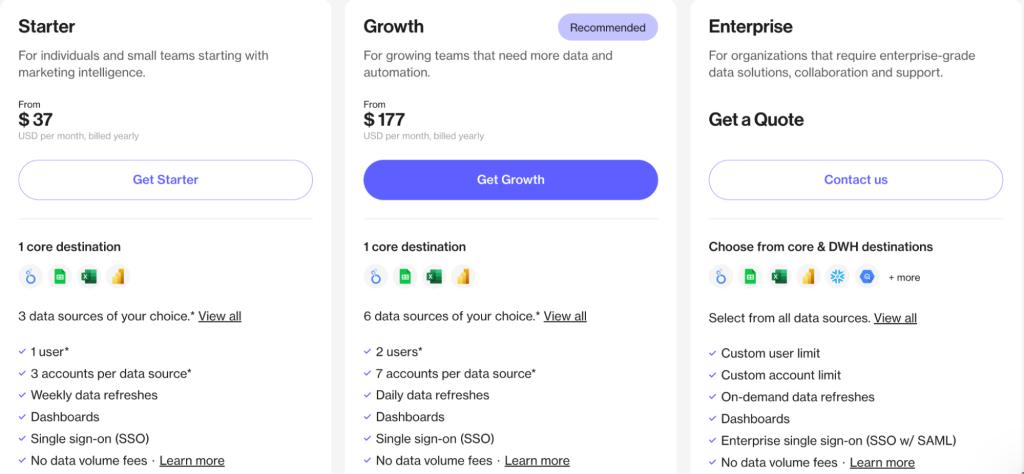
The cheapest plan, Starter, costs $37 per month when billed annually. It supports only three data sources of your choice and one destination – in this case, Looker Studio. For many solo marketers or small teams starting out, this setup works fine. You connect your Facebook Ads, Google Ads, and Google Analytics to Looker Studio, and you’re done.
It gets tricky when your reporting needs grow. For example, you want to add Google Sheets as a destination to share raw data with your team. Supermetrics doesn’t allow adding extra destinations on the Starter plan. You’re locked into your single destination choice.
To add just one more destination, you have to:
- Upgrade from Starter to Growth plan: $177/month
- Pay for the additional destination: +$177/month
In total, your expenses increase to $354/month, which is 9.5x from your starting point of $37/month…just to add one more destination. And this doesn’t include extra costs for additional users, data sources, or ad accounts, which all come with separate charges.
On top of that, there’s another restriction. Starter and Growth plans let you pick only one out of four destinations: Looker Studio, Google Sheets, Excel, and Power BI.
If you need more than 3 destinations or want to load data to Snowflake or BigQuery, you have to subscribe to the Enterprise plan with custom pricing.
Costs don’t just rise with extra features. There’s also a regional twist.
Supermetrics regional pricing: USA vs EU
Supermetrics charges different prices depending on your location, which can significantly impact your costs.
If you’re in the United States, you’ll see three pricing tiers: Starter ($37/month), Growth ($177/month), and Enterprise.

However, if you’re from any EU country, you will see a different pricing page, which mentions the following plans:


Here is the approximate pricing conversion in USD.
- Starter – €29 ($34)
- Growth – €159 ($184)
- Pro – €399 ($462)
- Enterprise (custom pricing)
All the plans listed use annual billing.
At first glance, the Starter plan in the US is costlier than the EU one ($37 vs $34). However, the Growth plan tells a different story.
The US Growth plan costs $177/month and includes 6 data sources. The EU Growth plan costs $184/month, but includes 7 data sources. Here’s where it gets tricky: to get the same 7 data sources in the US, you’d need to pay $177 for Growth plus $37 for one extra data source, bringing your total to $214/month. That’s $30 more than EU customers pay for the same setup.
This means US customers pay more than EU users when comparing equivalent features.
Supermetrics pricing pros and cons
Although Supermetrics pricing is a little complicated, it has both advantages and significant drawbacks, depending on your team size and budget. Here are the key pros and cons you need to know.
| What is good | What is not good |
|---|---|
| Highly optimized for each destination | Destination-specific pricing, with US plans costing more than EU ones |
| Extensive data source library (150+ connectors) | Plans are quite limited, offering only four data destination options to choose from in standard plans |
| Custom enterprise solutions available | Costs escalate rapidly when adding destinations, users, or data sources |
The bottom line: Supermetrics works well for large companies with substantial budgets and complex needs. However, for small businesses and growing teams, the pricing structure creates several challenges:
- If you’re in the US, you’ll pay more due to regional differences in Supermetrics pricing.
- Your monthly costs will rise significantly if you want extras, such as destinations, users, or data sources. This makes Supermetrics challenging for small businesses that want simple and steady monthly pricing.
- Furthermore, you have to go for the Enterprise plan to access data warehouses like BigQuery or Snowflake – any destination other than Looker Studio, Google Sheets, Excel, and Power BI.
If Supermetrics pricing feels too expensive or intricate, Coupler.io offers a compelling alternative with similar features at a more transparent price point.
Coupler.io: A Supermetrics alternative with better pricing
Coupler.io is an all-in-one data integration and AI analytics platform that lets you collect data from business apps, organize it in data sets, and load them to:
- Spreadsheet apps – Google Sheets, Microsoft Excel
- BI tools – Looker Studio, Power BI, Tableau, Qlik
- Data warehouses – BigQuery, Amazon Redshift, PostgreSQL
- AI tools – Claude, ChatGPT, Cursor, Perplexity
- Other destinations like Monday.com, JSON, etc.
Does it support most of the data sources you can get with Supermetrics? Absolutely! Coupler.io provides connections to over 390 apps and tools, including Facebook Ads, Airtable, HubSpot, LinkedIn Ads, GA4, and so on.

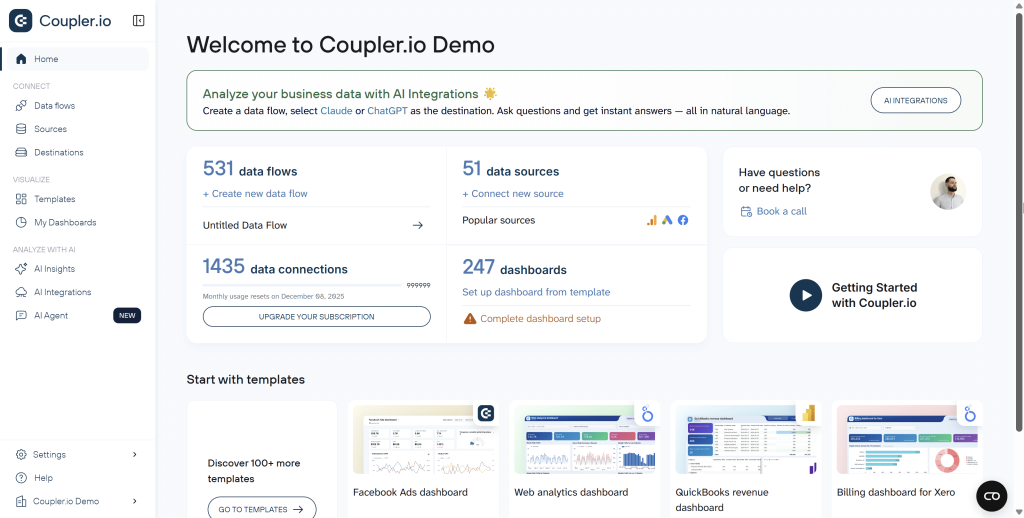
For automated reporting and analytics, Coupler.io offers the following capabilities:
- Automatic data refresh to schedule updates of your data at a custom frequency (up to every 15 minutes).
- Data transformations to filter and sort data, combine information from multiple sources, aggregate data, manage columns, create new calculated fields, etc.
- Data set and dashboard templates to get your data analysis-ready without any effort.
- AI capabilities, including AI destinations, AI insights for native dashboards, and AI agent.
Unlike Supermetrics’ destination-focused pricing with regional differentiation, Coupler.io uses account-based billing with straightforward plans.
To see the differences clearly, here’s a quick side-by-side comparison between Supermetrics and Coupler.io.
| Plan Level | Supermetrics | Coupler.io |
| Entry-level plan | Starter – $37/month | Starter – $24/month |
| Mid-level plan | Growth – $177/month | Active – $99/month |
| Pro-level plan | Pro – €399 ($462/month, EU only) | Pro – $199/month |
| Business plan | Enterprise (custom) | Business (custom) |
From the perspective of billing, Coupler.io looks more affordable than Supermetrics. However, the real difference lies in what you get for your money. Let’s compare specific use cases to see how Coupler.io delivers more value at every level.
Real-world cost comparisons: Supermetrics vs Coupler.io
Scenario 1: Solo marketer or small business owner
| Requirements | Supermetrics Cost | Coupler.io Cost | Winner | |
| Setup | • 1 user • 2 data sources • 2 destinations • Daily refresh | Growth: $177/month Extra destination: +$177/month Total: $354/month | Active: $99/month (Includes unlimited users, 15 accounts, 3 destinations, unlimited sources) | ✅ Coupler.io Saves $255/month ($3,060/year) |
Why Coupler.io: Supermetrics forces you to upgrade to Growth and pay extra for a second destination. Coupler.io includes 3 destinations in the Active plan with no hidden costs.
Scenario 2: Small marketing team
| Requirements | Supermetrics Cost | Coupler.io Cost | Winner | |
| Setup | • 5 users • 10 data sources • 2 destinations • Daily refresh | Growth base: $177/month Extra destination: +$177/month 3 extra users: +$297/month 4 extra sources: +$148/month Total: $799/month | Active: $99/month (Includes unlimited users, unlimited sources, 3 destinations) | ✅ Coupler.io Saves $700/month($8,400/year) |
Why Coupler.io: No per-user charges, no per-source charges, no destination add-ons. Everything you need is included in one straightforward plan.
Scenario 3: Marketing analyst + team
| Requirements | Supermetrics Cost | Coupler.io Cost | Winner | |
| Setup | • 15 users • 25 data sources • 4 destinations (BI + warehouse) • Hourly refresh | Business plan (custom) Estimated: $800-1,400/month | Pro: $199/month (Includes unlimited users, unlimited sources, unlimited destinations, hourly refresh) | ✅ Coupler.io Saves $600-1,200/month ($7,200-14,400/year) |
Why Coupler.io: Transparent pricing with no need for custom quotes. Pro plan delivers enterprise-grade features at a fixed, affordable rate.
Scenario 4: Large marketing agency
| Requirements | Supermetrics Cost | Coupler.io Cost | Winner | |
| Setup | • 50+ users • 50+ data sources • 6+ destinations • 15-minute refresh | Enterprise plan Custom pricing (Contact sales) | Business plan Custom pricing (Significantly lower starting point) | ✅ Coupler.io More predictable and transparent custom pricing |
Why Coupler.io: Even at the enterprise level, Coupler.io offers more straightforward pricing with unlimited users, sources, and destinations included.
As these scenarios demonstrate, Coupler.io consistently costs less while providing more flexibility:
- No per-user charges – Active and Pro plans include unlimited users
- No per-source charges – All 390+ sources available on every plan
- No per-destination charges – Pro plan includes unlimited destinations
- No regional pricing differences – Same rates globally
- Transparent scaling – You know exactly what you’ll pay as you grow
With Coupler.io’s account-based billing, you pay for the number of connected accounts, not for destinations, users, or sources. This makes budgeting straightforward and eliminates surprise costs.
Here’s the breakdown of the Coupler.io pricing:
| Pricing plan | Price per month | Users | Accounts | Data destinations | Rows per run | Schedule |
| Free | $0 | 1 | 1 | 1 | 100 | Manual |
| Starter | $24 (billed annually) | 1 | 3 | 1 | 5,000 | Every day |
| Active | $99 (billed annually) | Unlimited | 15 | 3 | Unlimited | Every day |
| Pro | $199 (billed annually) | Unlimited | 50 | Unlimited | Unlimited | Every hour |
| Business | Custom pricing | Unlimited | Custom | Unlimited | Unlimited | Every 15 minutes |
Additional accounts can be added to Active and Pro plans for $4.49/account. All 390+ data sources are available on every plan.
Automate reporting and analytics with Coupler.io
Get started for freeHow to switch from Supermetrics to Coupler.io
After seeing the cost savings—potentially $3,000 to $14,000 per year—the next question is obvious: How difficult is the switch?
The short answer: Most teams complete the migration in 1-2 weeks, depending on the number of data flows. While you can’t directly migrate existing Supermetrics configurations, Coupler.io’s intuitive setup and pre-built templates make recreating your data flows straightforward.
What you need to know about migration
Data flows need to be recreated – Supermetrics and Coupler.io use different architectures, so you’ll have to rebuild your data connections from scratch. The good news: Coupler.io’s setup is faster—most data flows take 5-10 minutes to configure.
Your historical data stays in your destinations – All your existing data in Google Sheets, Looker Studio, BigQuery, or other destinations remains intact. You’re only changing how new data flows in.
You can run both platforms in parallel – During transition, keep Supermetrics running while you set up Coupler.io. Test your new data flows, verify accuracy, then switch over—no data gaps.
Data dest and dashboard templates accelerate setup – Coupler.io offers around 100+ pre-built data set templates and over 160 dashboard templates for common use cases (PPC, social media, e-commerce, etc.). Instead of building reports from scratch, start with a template and customize it.
Step-by-step migration process
- Audit your current setup – List all Supermetrics data flows, sources, and destinations
- Create a Coupler.io account – Select the appropriate subscription plan based on the audit results.
- Recreate your most critical data flows first – Focus on 2-3 key flows to validate the platform
- Use templates – Browse the template library to find pre-built reports that match your needs
- Set up automated refreshes – Configure your schedule (daily, hourly, or every 15 minutes)
- Run parallel for 1-2 weeks – Verify data accuracy while keeping Supermetrics active
- Switch over and cancel Supermetrics – Once confident, deactivate Supermetrics
Coupler.io provides multiple resources to support users during migration:
- Knowledge base – Comprehensive guides and tutorials
- Email support – Get help directly from the team
- Book a demo – Get a personalized walkthrough
- Guided onboarding – Available for Pro and Business plans
Detailed breakdown of Supermetrics cost
It’s important to know that the pricing system isn’t exactly simple, and the costs can add up quickly, especially when you require multiple destinations, accounts, or data sources.
You’ve seen the high-level comparison. Let’s break down exactly how Supermetrics pricing works and what you’ll actually pay.
Standard destination pricing
Supermetrics offers three publicly available pricing tiers for its four core destinations: Looker Studio, Google Sheets, Excel, and Power BI. The pricing structure is the same regardless of which destination you choose, but costs vary by region.
USA pricing
| Pricing plan | Price per month (annual billing) | Users | Accounts per source | Data sources | Data refresh | Extras |
| Starter | $37 | 1 | 3 | 3 of your choice | Weekly | • Up to 3 extra users at $37/each • No extra destinations allowed • Limited add-ons |
| Growth | $177 | 2 | 7 | 6 of your choice | Daily | • Up to 2 extra destinations at $177/each • Up to 5 extra users at $99/each • Up to 9 extra sources at $37/each • Up to 15 extra accounts at $11/each |
| Enterprise | Custom | Custom | Custom | Custom | On-demand | • Unlimited destinations • Unlimited users • Unlimited sources • Custom features |
EU pricing
| Pricing plan | Price per month (annual billing) | Users | Accounts per source | Data sources | Data refresh | Extras |
| Starter | $33 (€30) | 1 | 3 | 3 of your choice | Weekly | • Up to 3 extra users at $33/each • No extra destinations allowed • Limited add-ons |
| Growth | $184 (€175) | 2 | 7 | 7 of your choice | Daily | • Up to 2 extra destinations at $177/each • Up to 5 extra users at $99/each • Up to 9 extra sources at $37/each • Up to 15 extra accounts at $11/each |
| Pro | $462 (€440) | 3 | 10 | 10 of your choice | Hourly | • Up to 2 extra destinations at $177/each • Up to 5 extra users at $99/each • Up to 15 extra sources at $37/each • Up to 20 extra accounts at $11/each |
| Enterprise | Custom | Custom | Custom | Custom | On-demand | • Unlimited destinations • Unlimited users • Unlimited sources • Custom features |
Key regional differences:
- EU customers get an additional Pro plan tier ($462/month) not available in the US
- US Growth includes only 6 data sources vs 7 in EU Growth
- US customers need more add-ons to match EU feature parity, making US pricing effectively higher
- Example: To get 7 data sources in the US, you pay $177 (Growth) + $37 (extra source) = $214/month vs $184/month in the EU
Important limitations:
- Starter and Growth plans restrict you to one destination only from the four core options
- You cannot add extra destinations on the Starter plan
- On Growth/Pro, you can add up to 2 additional destinations for $177/month each
- For more than 3 destinations total, you need the Enterprise plan
How extra customization multiplies your costs
Beyond the base plan, Supermetrics charges separately for nearly everything:
Extra destinations: $177/month each
- Available only on Growth plan and above
- Maximum 2 extra destinations on Growth (3 total)
- For more destinations, upgrade to Enterprise plan
Additional users: $37-99/month per user
- Starter plan: $37/user in US, $33/user in EU (up to 3 extra users, 4 total)
- Growth plan: $99/user (up to 5 extra users, 7 total)
- Pro plan (EU only): $99/user (up to 5 extra users, 8 total)
- Enterprise plan: Custom user limit
Extra data sources: $37/month each
- Growth plan: Up to 9 additional sources
- Enterprise plan: Custom sources included
Additional ad accounts: $11/month each
- Allows connecting more accounts per data source
- Growth plan: Up to 15 extra accounts
Example of how costs escalate:
Let’s say you start with Growth plan ($177/month) and need:
- 1 extra destination (Google Sheets): +$177/month
- 3 extra users: +$297/month (3 × $99)
- 4 extra data sources: +$148/month (4 × $37)
- 8 extra ad accounts: +$88/month (8 × $11)
Total: $887/month – nearly 5x the base plan price.
Data warehouse destinations
If you need to send data to BigQuery, Snowflake, Amazon Redshift, Azure Synapse, or other data warehouses, the standard plans won’t work. You have to subscribe to the Enterprise plan with custom pricing and contact Supermetrics sales for a quote.
This means that small teams needing data warehouse access face high entry barriers, and there is no way to estimate costs without sales consultation.
Supermetrics API pricing
Supermetrics offers API access for custom integrations and pulling data from sources like Shopify, HubSpot, and others programmatically. There’s no fixed pricing for Supermetrics API. You have to submit a form that contains your company’s information and wait for their sales team to reply with a quote. However, some online sources suggest that Supermetrics API pricing starts at $499 per month.
Supermetrics destination-based pricing vs. Coupler.io account-based pricing
When choosing a data integration platform, you should understand which approach to pricing suits your requirements. Supermetrics and Coupler.io have two different pricing philosophies.
- Supermetrics charges based on destinations (where you send data), plus separate fees for users, data sources, and accounts. Costs multiply as you add each element.
- Coupler.io, being an alternative to Supermetrics and one of the best Adverity alternatives, charges based on accounts (number of data source connections), with destinations, users, and sources included in each plan tier.
| Factor | Supermetrics | Coupler.io |
| What you pay for | Destinations + multiple add-ons | Number of accounts |
| Cost behavior | Multiplies with each addition | Predictable plan tiers |
| Users | $37-99/each extra | Unlimited on Active/Pro plans |
| Data sources | $37/each extra | Unlimited on all plans |
| Regional pricing | US pays more than EU | Same globally |
Learn more about the alternatives to other tools for reporting and data automation on our blog:
Which approach is better for you?
Supermetrics works if you’re a large enterprise with a substantial budget and need only basic setup or specialized premium sources.
Coupler.io works better if you want:
- Predictable pricing without surprise add-ons
- Multiple destinations without paying separately for each
- Unlimited team access without per-user fees
- The same price regardless of your location
For most growing businesses, Coupler.io’s account-based pricing delivers 3-10x cost savings while providing more flexibility and eliminating hidden charges.
Automate reporting with Coupler.io
Get started for freeFAQ on Supermetrics pricing
1. Is Supermetrics worth the cost?
Supermetrics can be worth it for large enterprises with substantial budgets ($2,000+/month) that need specialized premium data sources like Adobe Analytics or Optimizely. However, for small to mid-size teams, the destination-based pricing makes it expensive compared to alternatives like Coupler.io that offer similar features at 3-10x lower cost.
2. Which platform offers unlimited destinations?
Coupler.io’s Pro plan ($199/month) includes unlimited destinations, unlimited users, and unlimited data sources.
Supermetrics limits you to one destination in Starter and Growth plans. Additional destinations cost $177/month each (maximum 2 extra on Growth). Only the Enterprise plan offers unlimited destinations with custom pricing.
3. Does Supermetrics charge differently in the US vs EU?
Yes. US customers face higher effective costs because:
- US Growth includes only 6 data sources vs 7 in the EU
- EU customers get access to a Pro plan ($462/month) not available in the US
- To match EU features, US customers must purchase more add-ons
Coupler.io charges the same price globally regardless of location.
4. Can I try Supermetrics or Coupler.io before buying?
Both platforms offer free trials:
- Supermetrics: 14-day free trial, no credit card required
- Coupler.io: 7-day free trial with full access to all features, no credit card required
5. How difficult is it to switch from Supermetrics to Coupler.io?
Most teams complete the migration in 1-2 weeks. You cannot directly migrate configurations, but Coupler.io’s pre-built templates and intuitive setup process make recreating data flows straightforward. You can run both platforms in parallel during the transition to ensure no data gaps.
6. What happens if I need to scale up my plan later?
With Coupler.io, upgrading is transparent: move from Starter ($24) → Active ($99) → Pro ($199) with clear feature increases at each tier. You can add extra accounts at $4.49/each if needed.
As an alternative to Coupler.io, with Supermetrics, scaling means purchasing multiple extras ($37-177 each) for destinations, users, and sources, which can quickly multiply your costs. Many users report costs doubling or tripling as needs grow.