Say you’re pulling data from ten different platforms. You need that data updated regularly and available whenever someone reads a report.
Supermetrics and Stitch Data both automate this. Supermetrics sends marketing data to reports and AI tools. Stitch loads raw data into a warehouse and leaves the reporting to you.
Let’s jump into Supermetrics vs Stitch Data comparison. I’ll walk through their pricing, data transformation capabilities, AI features, and supported sources and destinations. You’ll also see how Coupler.io competes with both tools from the perspective of reporting automation.
Key takeaways
- Supermetrics is built for marketers and agencies. Stitch Data is built for data engineers and technical teams. Coupler.io is a reporting automation platform that serves both audiences.
- Supermetrics sends data to spreadsheets, BI tools, warehouses, and AI tools. Stitch only loads into warehouses and data lakes. Coupler.io’s range of destinations covers all the mentioned ones.
- On AI, Supermetrics wins. Stitch has no native AI support.
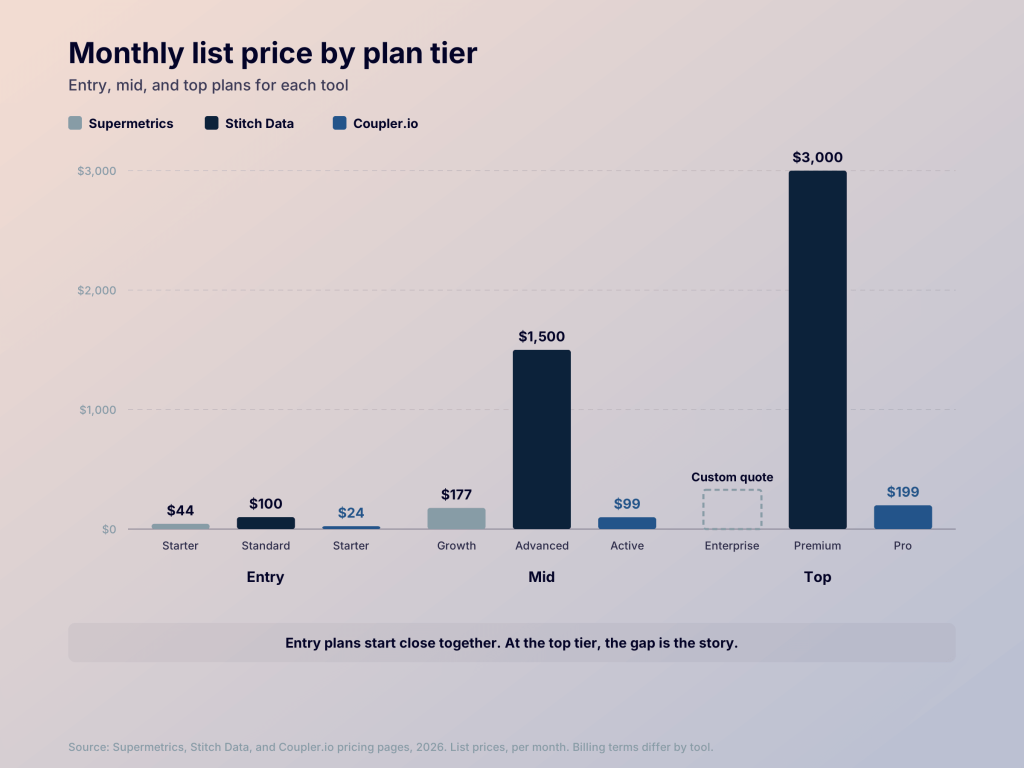
- Supermetrics starts at $44/month for basic plan, while Stitch starts at $100/month and scales based on the number of rows you move. The cheapest Coupler.io plan is only $24/month.
Supermetrics vs Stitch Data at a glance
| Factor | Supermetrics | Stitch Data |
|---|---|---|
| Best for | Marketing teams and agencies | Data and technical teams |
| Primary purpose | Pulls marketing data and delivers it to reporting and AI tools | Copies data from various sources into a data warehouse |
| Data sources | 170+ pre-built data sources | 150+ data sources |
| Destinations | BI tools, spreadsheets, data warehouses, and others. | Data warehouse and data lakes. |
| Transformations | Allows you to modify the data in-transit | No native user-defined transformations |
| Pricing | Predictable/fixed-fee per tier | Usage-based pricing |
| AI capabilities | Supermetrics Studio, AI integrations, Insights Agent | Not available |
| Technical requirements | No-code platform | Requires technical expertise |
| G2 rating | 4.4/5 | 4.4/5 |
Who uses Supermetrics and Stitch Data
Supermetrics is built for marketers. It pulls data from your ad platforms, SEO tools, and analytics into one place, so you can report on it without relying on coders or data engineers.
Stitch Data, now owned by Qlik, is a cloud-first ELT platform. It moves raw data from different sources into a cloud data warehouse, and that’s all it does. There is no dashboard, analytics, or reporting layer. Setup also takes some technical work, especially with custom connectors, so you’ll mostly find data engineers and technical teams using it.
Supermetrics vs Stitch Data: Which offers better data source coverage?
Supermetrics offers over 170 built-in data source connectors, covering popular tools across SEO, paid media, ecommerce, sales, and other marketing channels.
Most major marketing and advertising platforms are available through standard connectors. But Supermetrics also offers premium data source connectors for more specialized requirements. These typically cover customer-requested integrations or complex setups that need additional support. Examples include Adform, Adobe Analytics, Google Ad Manager, and Ignite.
Stitch Data has 150+ built-in connectors across three main categories: databases, SaaS applications, and files. These include databases like MySQL, PostgreSQL, SQL Server, Oracle, and MongoDB; SaaS platforms like Salesforce, Shopify, Stripe, Zendesk, and Google Ads; and file-based sources like Amazon S3 and Google Sheets.
If a source isn’t in Stitch’s connector list, you build the connection with Singer, an open-source framework for custom data integrations. It has two parts, a tap and a target. A tap is a small script that pulls data out of a source. A target loads that data into the destination. You write the tap for your custom source, then use Stitch’s target to send the data in.
This gives you full control. You decide exactly what data gets pulled and how. And Singer has a community of existing taps, so check if someone has already built what you need and reuse it.
Neither tool covers every source. Supermetrics focuses on marketing and sales data, and Stitch covers databases, SaaS apps, and files. If your source isn’t on either list, use Coupler.io as it has more than double the coverage of either tool: 400+ sources across SaaS platforms, sales, marketing, databases, and more.


Plan a multi-destination setup with Coupler.io
Book a demoWhere do Supermetrics and Stitch Data send your data?
Supermetrics sends data to AI tools, data warehouses, visualization tools, and data lakes. The AI and visualization destinations work differently from the warehouses.
With Claude or ChatGPT, your data stays at the source. Supermetrics fetches it on demand, or into a temporary cache, based on your queries. A similar approach applies to visualization tools like Looker Studio and Power BI. Through the configured connection, these tools fetch data when a report loads or refreshes, rather than requiring you to maintain a separate data warehouse.
Supermetrics also has its own storage solution, called Supermetrics Storage. It gives you a managed place to store your data, although it’s available only as part of the Enterprise package.
Stitch Data is more focused on moving data into storage destinations. It supports destinations such as Amazon Redshift, Amazon S3, Databricks Delta, and MySQL. Unlike Supermetrics, Stitch doesn’t offer built-in storage or direct integrations with AI and visualization tools.
If you really want to use it with such destinations, there’s an additional step. Once Stitch loads your data into a warehouse destination, connect that warehouse to your preferred BI or AI tool and work with the data from there.
So the difference is fairly straightforward: Supermetrics gives you more options for destinations, including reporting tools and AI connections. Stitch focuses on getting data into a central storage system only.
Coupler.io covers all destinations that both Supermetrics and Stitch offers. It sends data to spreadsheets (Google Sheets, Excel), BI tools (Looker Studio, Power BI), warehouses (BigQuery, Snowflake, Redshift, PostgreSQL), and AI tools (Claude, ChatGPT, Perplexity, Cursor, and others). Connect any source to Claude or ChatGPT with Coupler.io, then ask business questions on your data.
How do Supermetrics and Stitch Data compare on key features?
Here’s how Supermetrics and Stitch Data compare on key data integration features.
In-app data transformations
Supermetrics has standard transformations built in. You can create custom fields, normalize text, run VLOOKUPs, or use conditional statements. You can also blend data from different sources using Unions and Joins. There are pre-configured blending templates too, and they merge and organize your data.
Stitch doesn’t transform data in flight. It’s strictly ELT, so transformations happen after the data lands in your warehouse. You’d use dbt, SQL, or Snowflake queries for that.
You do have some flexibility through Singer taps, though. Since you control the tap script, you can add custom logic to reshape or modify records before sending them to the destination. But this requires some engineering effort, so it’s not an option for marketers.
Data replication and refresh
Supermetrics pulls data on a schedule for warehouses and visualization tools, and on demand for AI tools. You get aggregated or transformed data for reporting, or data shaped to the destination’s API schema. So it’s built around dashboards and reports, not for full database replication or change data capture (CDC).
Stitch, on the other hand, focuses on replicating raw data from databases, applications, and other sources into warehouses or data lakes. It supports automated incremental replication, so the destination tables stay updated without loading everything from scratch.
The difference is what you get at the destination. Supermetrics focuses on delivering marketing data with predefined dimensions and metrics that you use for reporting. Stitch focuses on moving raw records and tables, giving your team the flexibility to model that data afterward.
Support
Both Supermetrics and Stitch Data have extensive documentation, troubleshooting guides, and knowledge bases to help you set up integrations and resolve common issues.
Stitch’s documentation is available through both the Stitch Data and Qlik websites. Supermetrics also has a documentation hub. Its AI-powered search makes searches and navigation much easier.
Since Stitch is part of Qlik, you can reach out to the Qlik support team via its chatbot. Or raise the issue ticket to its support portal.
Supermetrics also has a chatbot that tries to answer first and hands you to a human if needed. Human support is available through chat and email during business hours, five weekdays.
Scalability
Stitch Data scales better with data volume than Supermetrics. It’s a simple ELT tool built only for ingestion, so moving large volumes is what it’s designed for. The pricing is also per number of data rows moved. In terms of marketing data sources, Supermetrics scales better: all the major marketing sources are built in.
Both platforms also offer a 14-day free trial, so test their capabilities before committing to a paid plan.
Which is easier to use, Supermetrics or Stitch?
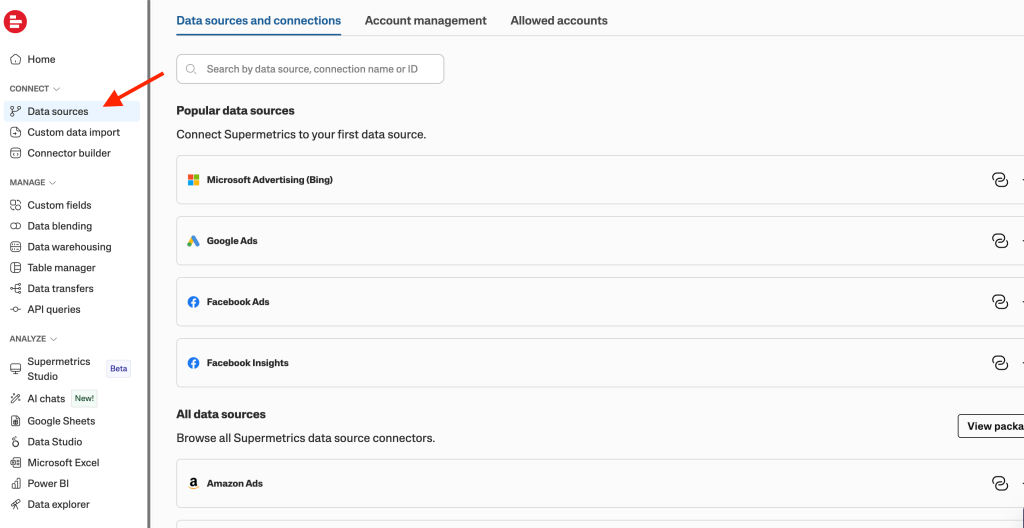
Supermetrics is built for marketing teams, agencies, and non-technical users so setup is simple. Go to a Supermetrics Hub and log in with your Google account. Then navigate to Data Sources, select the marketing platforms you use, and authenticate the accounts. All of this happens in a simple UI, which means there is no code or configuration scripts you need to write. Even the transformation steps are simple forms or drag-and-drop tools.

Stitch is also straightforward for what it’s built for: connect a source to a warehouse and let it automatically replicate the data. It’s easy for initial setup and no-code data replication with the built-in connectors available.
But if you want custom connectors, then Singer tap application requires engineering experience to configure it. Also, data transformation isn’t available in its UI. You need to get the raw data to the warehouse and then use other tools or manual transformation steps for it. This is also an extra manual effort compared to fully managed alternatives like Coupler.io.
Coupler.io automates reporting for business teams, with the same no-code setup as Supermetrics. You get the same no-code experience as Supermetrics, but it isn’t limited to marketing data. You can pull in data from various sources like sales, finance, ecommerce, or any other business tool. You connect a source, transform the data, and send it to a spreadsheet, dashboard, warehouse, or AI tool. For analytics, you can ask questions with the built-in AI Agent, or connect your data to Claude or ChatGPT.
Price your reporting workflow with Coupler.io
Book a callSupermetrics vs Stitch Data pricing: What should you expect to pay?
Supermetrics and Stitch Data comparison at a glance:
| Supermetrics | Stitch | |
|---|---|---|
| Price varies by | Sources, destinations, and AI credits | Sources, users, destinations, and rows moved per month |
| Entry plan | Starter: $44 per month | Standard: from $100-1250/mo based on the data volume |
| Mid plan | Growth: $177 per month | Advanced: $1,500/mo |
| Premium plan | Enterprise: custom quote | Premium: $3,000/mo |
| Data sources | Supports 3 on Starter, 6 on Growth, and all on Enterprise | 10 on Standard, unlimited on Advanced and Premium |
| Destinations | 1 destination on Starter and Growth, unlimited on Enterprise | 1 destination in Standard, 3 on Advanced, and 5 destinations in Premium plan |
| Data volume limit | None listed | 5M to 300M rows on Standard, 100M on Advanced, 1B on Premium |
| AI features | Supermetrics Studio | Nothing built-in |
| Free trial | 14 days | 14 days |
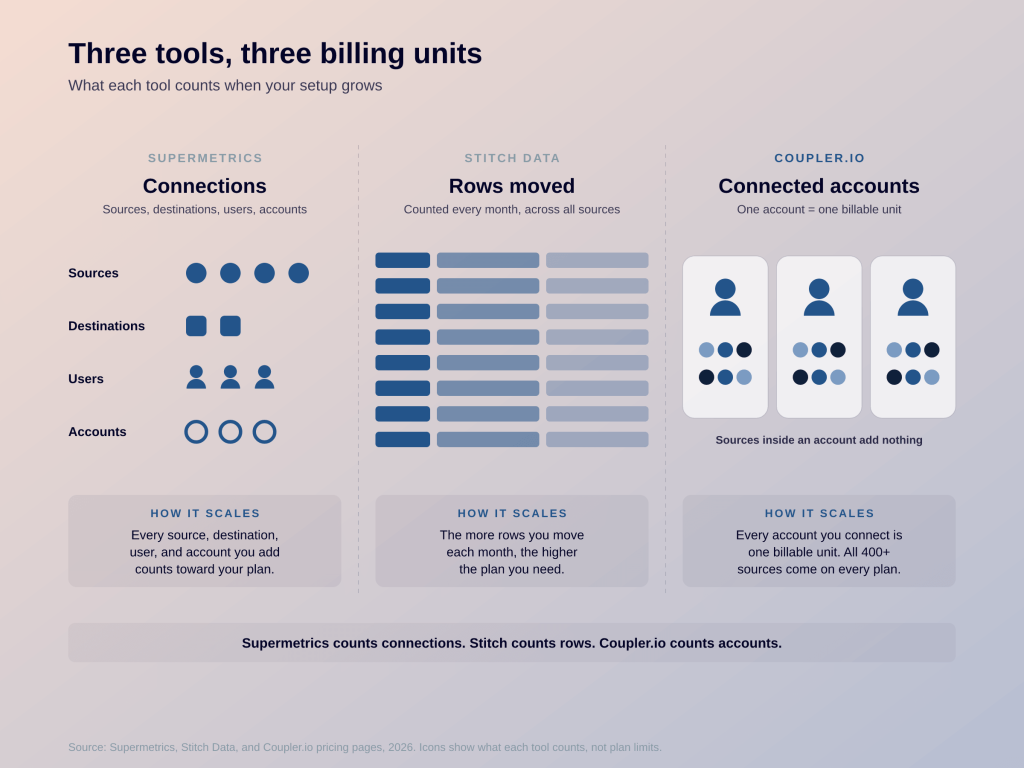
Supermetrics prices by connections: how many sources, destinations, users, and accounts you set up. Stitch prices by volume, meaning how many rows you move each month. If you don’t want to count sources or rows, Coupler.io prices by accounts instead. It offers all 400+ data sources and unlimited data rows on all plans. You pay for the accounts you connect, not per source or per row. Check Coupler.io’s pricing page for current plans.

Entry-level pricing:
Let’s start with the entry plans. Supermetrics Starter costs $44 a month for 3 data sources, 1 destination, and 4,000 Supermetrics Studio credits. Stitch Standard starts at $100 a month for 5 million rows, 10 sources, and 1 destination.
Supermetrics is cheaper to start, but Stitch gives you more for the money. Starter costs less than half of Standard, yet you get 3 sources and a single seat. Stitch’s $100 covers 10 sources and 5 users. If you use every source slot, that is about $10 per source on Stitch, against $15 to $18 on Starter. So a freelancer connecting three ad platforms will pay less on Supermetrics, while a team connecting ten tools will pay less on Stitch.
Mid-tier pricing:
The next plan, Supermetrics Growth costs $177 and gives you 6 data sources, 1 destination, and 12,000 Studio credits. When you compare this with Stitch Standard (the entry-level plan itself), it costs $100, which is $77 cheaper than Growth, and it gives you a total 10 sources. The catch is volume. On Supermetrics, the price stays the same every month no matter how many rows you load. On Stitch, your price goes up when your data grows, from $100 a month for 5 million rows, and it keeps climbing as you add rows, up to 300 million on the same Standard plan. So if you know your data stays small, Stitch is the better deal. If you don’t know, Supermetrics is safer for your budget.
Premium pricing:
Stitch’s Premium tier costs $3000 per month. It offers 1 billion rows/month, 5 destinations, unlimited users, and extra security features. The closest Supermetrics plan is Enterprise, which is a custom quote from sales. It includes all sources and destinations, custom user limits, API access, and Supermetrics Storage.
Supermetrics vs Stitch AI capabilities
In AI capabilities, Supermetrics clearly wins. You connect it to any AI tool like Claude, ChatGPT, or Gemini and ask questions about your data in plain language. Setting this up takes just a few authentication steps in the UI, and behind the scenes, it runs on an MCP connection.
You can also build marketing dashboards using these AI tools and push them to Supermetrics Studio. From then on, the dashboards refresh with live data on the schedule you set. The Studio also has its own AI agent. Use it to build a dashboard, add filters, adjust the design, or recreate one from scratch.
Supermetrics also has its own Model Context Protocol (MCP) server that you can use to connect with any MCP compatible AI client.
Stitch Data, on the other hand, has no native AI support, it’s a traditional ELT platform.
How secure and reliable are Supermetrics and Stitch Data?
Both tools clear the basic security bar. Supermetrics is SOC 2 Type II, GDPR, and CCPA compliant, and its enterprise page also lists ISO 27001. It doesn’t permanently store the data you load through its connectors, and everything is encrypted in transit and on its systems.
Stitch is SOC 2 compliant on all plans and encrypts data in transit and at rest with AES-256. SSO, SSH tunnels, and IP whitelisting come with every plan. Advanced and Premium add advanced connectivity options like VPNs, reverse SSH tunnels, and AWS PrivateLink.
For stability, Stitch holds your data in durable storage until the destination takes it, so a warehouse outage doesn’t mean lost data. Supermetrics publishes a status page and has usage reports, monitoring, and alerts so you can see what’s happening with your own data.
Supermetrics vs Stitch Data: Verdict
These two aren’t really competitors. Pick Supermetrics if you’re a marketer or agency that wants reports and AI answers without writing code, and you’re fine with a fixed price and limits on sources and destinations. Pick Stitch Data if you have a data team that wants raw tables in a warehouse and would rather pay for volume than for the number of connections.
If you’re looking for a no-code alternative to Supermetrics with more affordable pricing, use Coupler.io. It collects and blends data from 400+ apps, keeps it up to date for your reports, and sends it to AI tools through AI Integrations. The AI Agent answers questions about your data inside Coupler.io.