Managing inventory at one location is straightforward: track what comes in, what goes out, and reorder when low. But scale to three warehouses and five retail stores? Suddenly, you’re dealing with disconnected systems, manual stock transfers, regional demand variations, and returns that disappear into black holes. What worked at one location creates chaos at multiple ones.
The solution isn’t just adding more locations to your inventory management spreadsheet. It requires real-time data synchronization, location-specific forecasting, and automated processes that keep every site working as one ecosystem.
In this guide, we explore inventory management across locations and provide real strategies to improve it.
What is multi-location inventory management?
Multi-location inventory management is a system that tracks product stocks across warehouses, retail outlets, fulfillment centers, and other locations. Beyond showing you where your products are, it provides the real-time inventory visibility you need to make strategic operational decisions:
- Which warehouse should fulfill this order?
- Should you transfer stock between locations or place a new order?
- Where is inventory moving fast versus sitting stagnant?
- Which locations are at risk of stockouts?
This visibility helps you proactively manage demands, prevent stockouts in high-traffic areas, and avoid tying up capital in slow-moving inventory at low-demand locations. The end benefits are lower shipping costs, faster fulfillment, and increased customer satisfaction.
Common challenges of managing inventory across locations
Multi-site inventory management sounds simple until each site starts operating on its own numbers and timeline. Here are the most common challenges and their business impact:
Lack of real-time visibility
When inventories are out of sync, your business struggles with order fulfillment and customer expectations. A product shows “in stock” on your online store, but it actually sold out at the warehouse an hour ago. The customer places an order expecting quick delivery, but you discover the stockout only when the warehouse tries to fulfill it. Now you’re apologizing, offering expedited shipping from another location, and absorbing the cost while the customer’s trust erodes.
Disconnected systems
Your Shopify store shows 47 units available. Your warehouse ERP shows 52. Your retail POS system has yet another count. None of these systems talk to each other, so when a customer buys online, your warehouse doesn’t know to reduce the count until someone manually updates it. During that gap, you’ve oversold. Now you’re calling customers to apologize and offer discounts to salvage the sale. And your operations team is burning 15 hours weekly reconciling spreadsheets to figure out what’s actually in stock.
Lexi Petersen, Founder and CCO of Cords Club, experienced this problem firsthand when scaling to omnichannel sales:
You reach a stage pretty quickly where data silos prevent you from reliably answering simple questions like how many units you have of your current top seller. Or happening to have an extra unit somewhere and transferring it between locations when a customer wants it.
Manual errors
If the team relies on manual spreadsheets to manage stock, there is a high risk of human error. A single typo in SKU or an extra zero in stock quantity can cause an inventory disaster.
For example, your e-commerce system shows 1,000 units in inventory when your warehouse actually has 100. You sell 500 units before discovering the error. Now you’re facing mass cancellations, angry customers, vendor emergency orders at premium prices, and a scramble to fix corrupted data across all systems.
Handling returns
A customer orders an item online and returns it to a retail outlet or ships it back to the warehouse. If this unit isn’t synced properly in the system, you may show “out of stock” even though the product is physically available and ready to sell. This sellable item becomes dormant stock until someone manually adds it back to the inventory system, creating cash flow strain and lost sales opportunities. Multiply this across dozens of daily returns, and you’re sitting on thousands of dollars in invisible, unsellable inventory.
Complex demand forecasting
Product demand varies across locations due to regional factors like weather, festivals, local events, and store traffic patterns. Sunglasses might fly off shelves in Florida during summer beach season, while sitting untouched in Seattle. Umbrellas sell out in Portland while gathering dust in Phoenix. If you stock products equally across all locations using a single formula, you’ll face overstocking in low-demand areas and stockouts in high-demand areas.
To overcome these challenges, your business needs a strategic inventory workflow in which all points are in sync. The following sections break down how you can achieve this and get a single source of truth.
How to track inventory in multiple locations? – Practical steps
When the inventory is spread across locations, the biggest challenge is not stock movement, but fragmented visibility. Each system (e.g., online store, ERP, and POS) maintains its own version of inventory, using different product identifiers, update cycles, and formats.
This fragmentation makes it difficult to answer basic operational questions: How much stock do we really have? Where is it located? Can we safely accept new orders?
Therefore, the first step for multi-location stock management is to centralize inventory data into a single, consistent view. Once inventory data is unified, it can be monitored, analyzed, and acted upon reliably. There are multiple approaches to this:
- No-code data integration platforms like Coupler.io let you pull data from all systems via APIs, normalize it, and merge it into a single dataset. You can then use this data to build a custom inventory-tracking dashboard in tools such as Looker Studio, Google Sheets, and Power BI. This option is suitable for small teams looking for a fast and low-maintenance solution for inventory tracking.
- ERP (enterprise resource planning) software helps you track inventory across sources by integrating with e-commerce platforms, POS, and warehouse systems. They often include inventory management features like demand forecasting, replenishment rules, and logistics workflows. However, multi-location inventory management software comes with high implementation costs and ongoing maintenance, making it suitable for large businesses.
- Custom solution involves building your own integrations to extract data from inventory systems using APIs, storing it in a centralized database, and building tools or dashboards on top of it. This option offers you the maximum flexibility over the data logic and synchronization rules.
Regardless of the option you choose, the core principle of data centralization remains the same: inventory data is pulled from each system, standardized into a common structure, and converted into dashboards or reports for decision-making.
Luca Dal Zotto, Co-Founder of Rent a Mac, emphasizes the impact of choosing the right centralization approach:
We reduced stock discrepancies by 73% in the first quarter alone after implementing cloud-based inventory management software. The key is having a centralized system that every location updates in real time, not multiple spreadsheets or disconnected point-of-sale systems. This means when a MacBook Pro leaves our London location, our Dublin team sees it instantly.
How you can use Coupler.io for inventory management
The no-code solutions are the fastest and most efficient method to centralize inventory data. Coupler.io is one such data integration platform, which connects 400+ business apps (including e-commerce platforms, inventory systems, and custom APIs) to destinations like spreadsheets, BI tools, and data warehouses. It also includes data transformation to standardize the data and merge them into a single dataset for your custom inventory location system.
Getting started is simple. Sign up for Coupler.io for free (no credit card required) and create a data flow:
- Step 1. Collect data. Connect your inventory sources to a data flow. Coupler.io allows you to collect data from multiple sources in one data flow and unify this data.
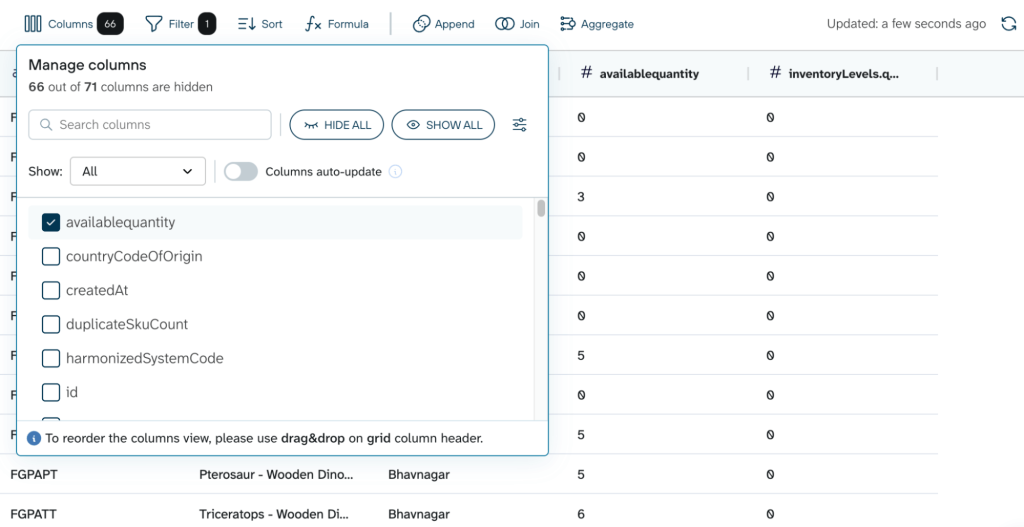
- Step 2. Prepare a data set. Once connected, you can clean and prepare the data by renaming or rearranging columns, filtering or sorting records, creating calculated fields, aggregating data, and joining data sets.
These transformations help align data across systems. For example, removing a “SKU-” prefix, so product identifiers match between sources.
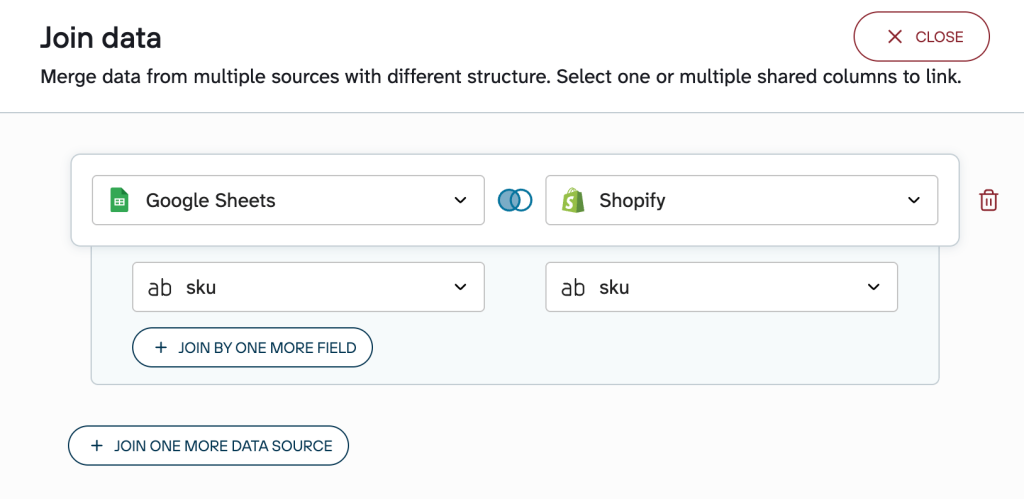
After preparing each dataset, use the Join option to combine data from multiple sources by a common column, such as SKU.
- Step 3. Load data set to the destination. You can load the final unified data set to:
- Spreadsheets – Google Sheets, Excel
- Data warehouses – BigQuery, PostgreSQL, RedShift
- BI tools – Looker Studio, Power BI, Tableau, Qlik
In addition, Coupler.io supports AI integrations with such tools as Claude, ChatGPT, Perplexity, and others. The data flow can also be automatically refreshed on a schedule (up to every 15 minutes) to keep the multi-site inventory management data up to date.

Automate inventory tracking with Coupler.io
Get started for freeThis three-step workflow creates the foundation for effective multi-location inventory management. With centralized data, you can finally answer those critical operational questions: exact stock levels across all locations, which warehouse should fulfill each order, and where inventory imbalances exist.
However, centralizing data is just the beginning. The real value comes from how you visualize and act on that data.
Use dashboards for inventory management for multiple locations
Building an inventory tracking dashboard from scratch takes up weeks of setup, data modeling, and ongoing maintenance. The pre-built dashboard templates remove this overhead, offering you professional-grade tracking in minutes instead of months.
Coupler.io offers ready-made templates that are automated and only require you to connect the data sources. These templates come with proven metrics and visualizations, helping you monitor stock levels, identify risks, and make decisions immediately.
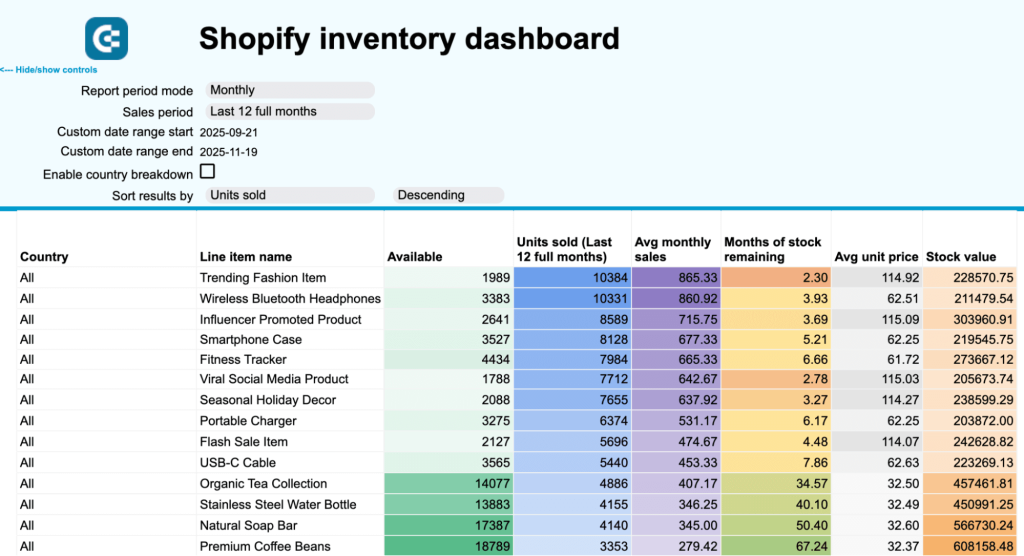
For example, here’s a Shopify inventory dashboard by Coupler.io. The dashboard uses Shopify inventory data, but you can build a similar dashboard for other platforms like WooCommerce, BigCommerce, Magento, or inventory management solutions.
What insights the Shopify inventory dashboard provides
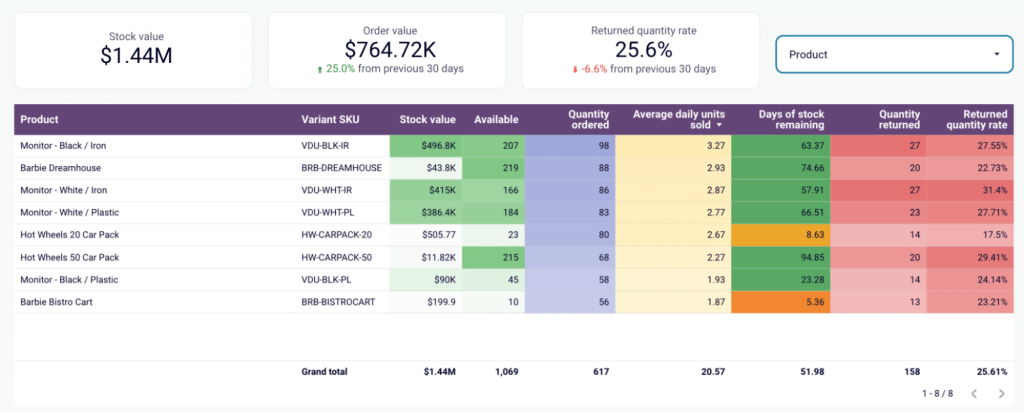
The inventory dashboard keeps you on top of inventory health, profitability, and the current state of the supply chain. It offers key metrics like stock value vs. order value to help you understand the capital tied up in inventory.
You also get a SKU-level breakdown of inventory, which tells when a certain product will stock out so that you can restock them. It also highlights the products with high return rates, which could be draining your profits. The entire report can also be filtered by certain product(s) for a granular analysis.
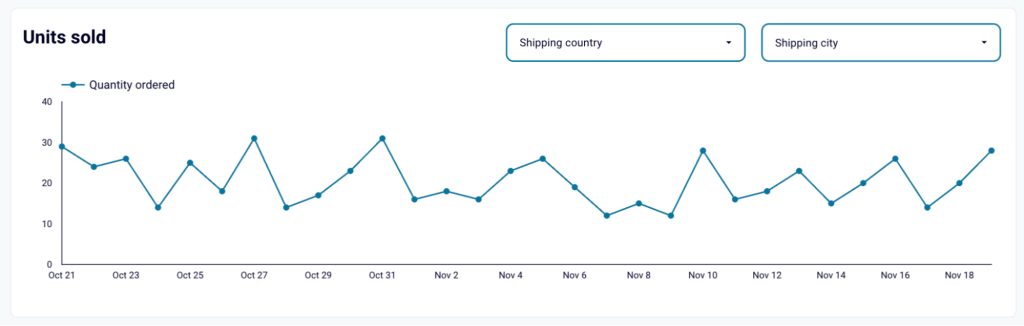
In addition to stock levels, the dashboard also visualizes daily demand trends.
This helps you spot seasonal peaks and emerging trends in product demands. You can also filter this chart by geographical locations so that you consider product replenishment at the right location at the right time.
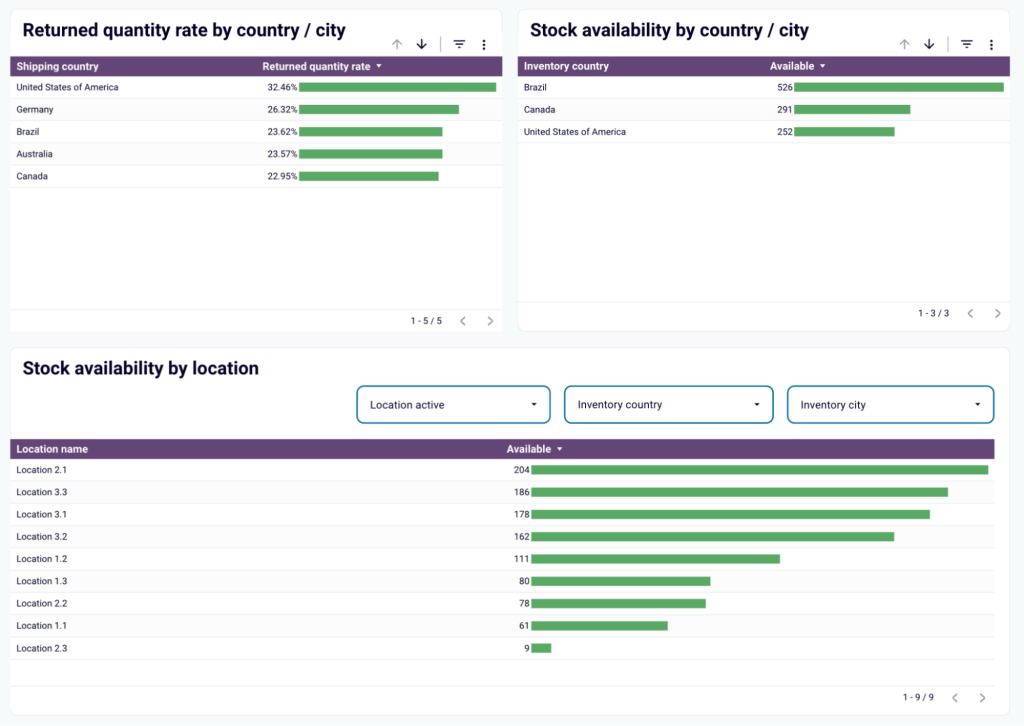
You also get a clear picture of product stocks and returns by warehouse locations. For example, identify certain locations with high return rates and take steps to investigate market-specific issues like sizing discrepancies.
The report helps with multi warehouse inventory management by spotting overstocked and understocked locations to move items to high-demand locations.
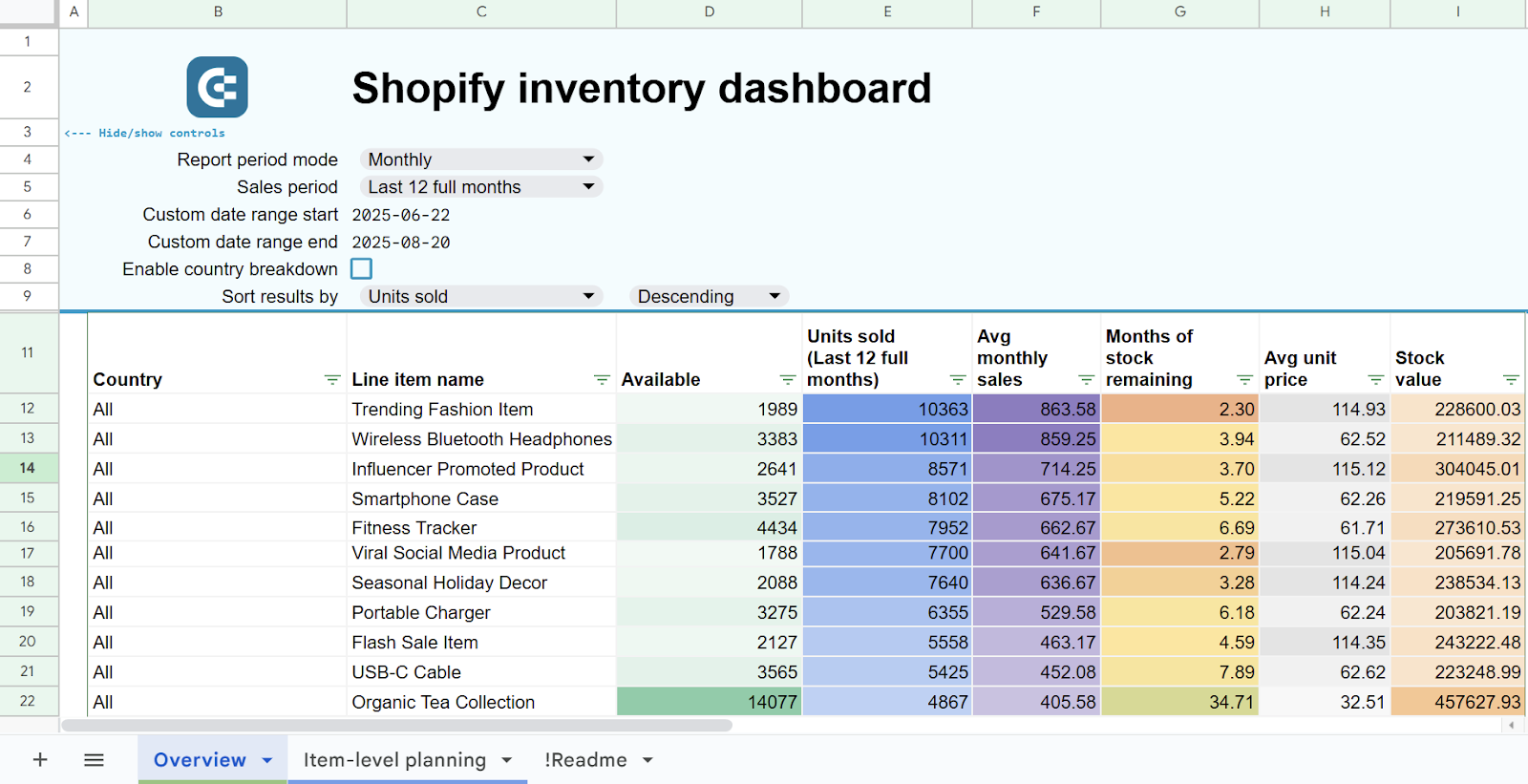
The dashboard is available as a template in Looker Studio and Google Sheets. Choose the version you like and follow the instructions to connect your Shopify data using the built-in Coupler.io connector


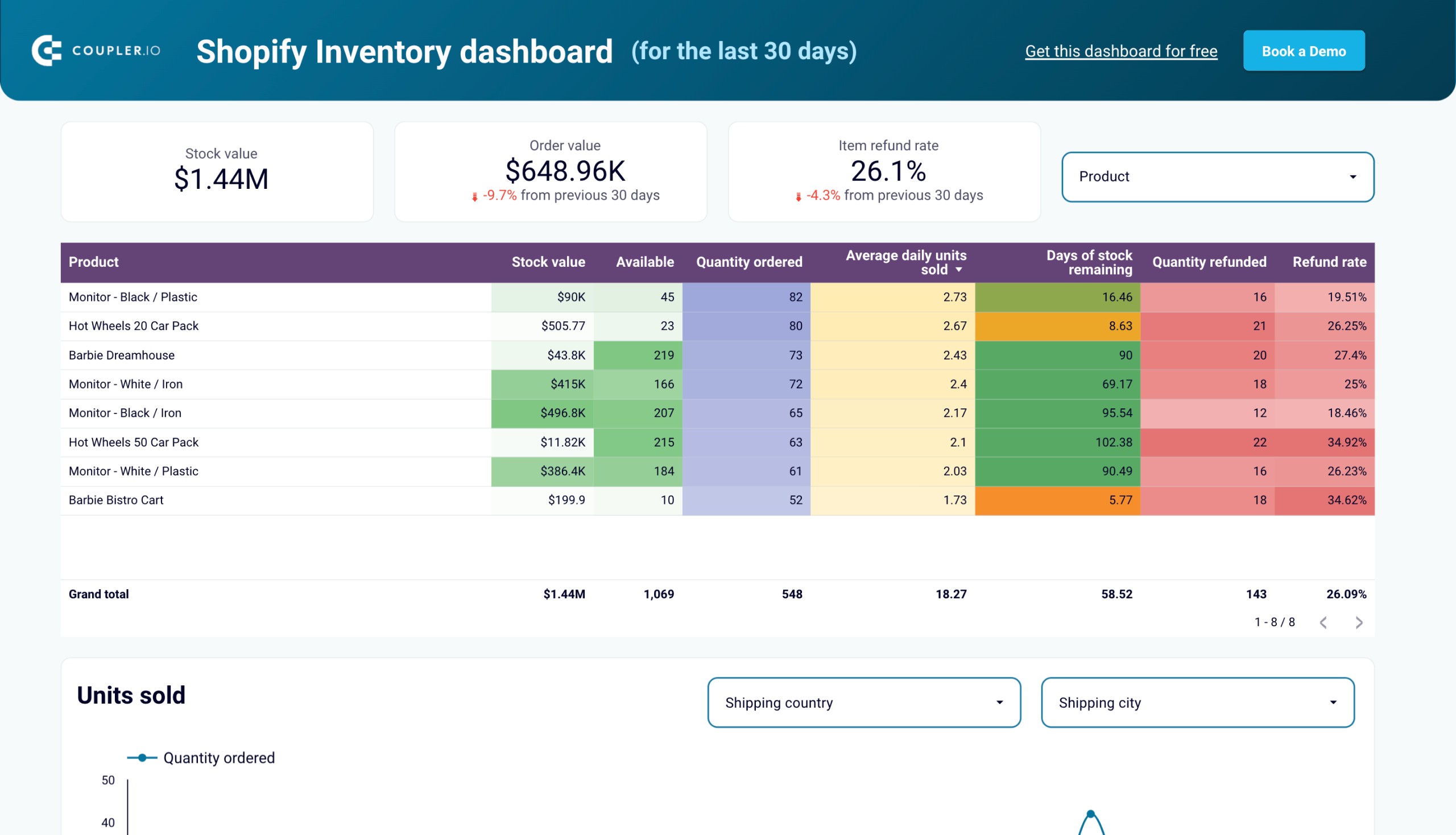

This dashboard template is specifically for Shopify. However, for other platforms, you can still use Coupler.io to pull data into any reporting tool and build a similar dashboard. In addition to inventory tracking, the platform offers other Shopify dashboards and ecommerce dashboards.
Leverage AI-powered analytics
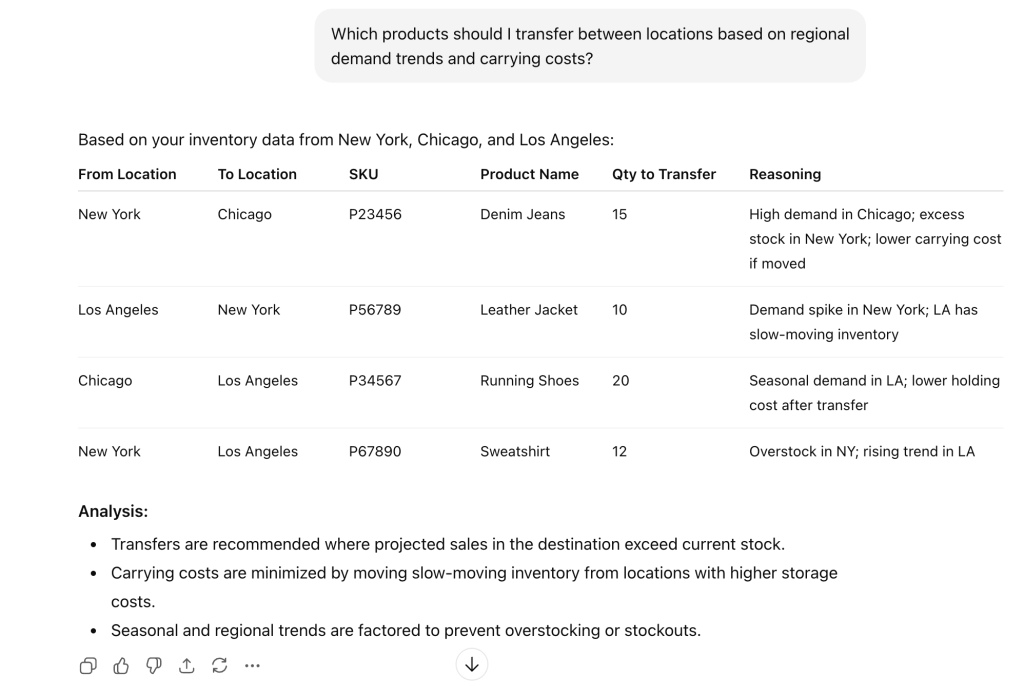
Standard reports and BI tools provide valuable insights, but they often require SQL knowledge or BI expertise to extract specific insights and answer nuanced questions. You might know how to view overall stock levels, but answering questions like “Which products should I transfer between locations based on regional demand trends and carrying costs?” requires technical skills most operations teams don’t have.
AI-powered analytics accelerates decision-making by letting you ask questions in plain English and get immediate, data-driven answers without writing queries or building custom reports.
Coupler.io helps you connect inventory data to AI tools like ChatGPT and Claude in a few minutes. This enables you to chat with your data using AI. For example, you can ask: “Which products should I transfer between locations based on regional demand trends and carrying costs?”
Or investigate anomalies.
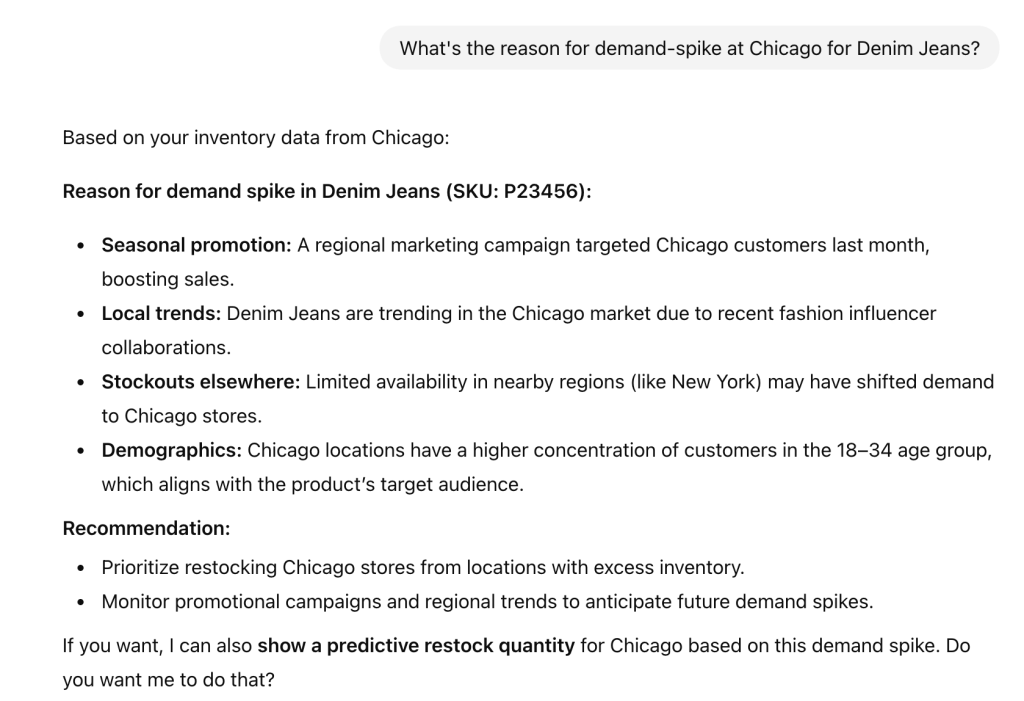
This conversational approach allows you to explore your inventory data interactively, uncover insights, and make faster, more informed decisions.
Learn more about how is AI changing data analytics.
Coupler.io ensures that your inventory data remains fully secure. The entire dataset is never exposed to AI models, but only a part of it required to generate insights is shared. Also, none of the data used for model training, giving you full control and privacy while leveraging AI for actionable insights.
Use AI for inventory management tracking
Try Coupler.io for free5 multi-location inventory management best practices
Knowing multi-location inventory management and actually implementing it are two totally different things. Therefore, we also asked industry experts to collect their “best practices” based on their experience.
Here are the recommended strategies:
1. Data centralization
You can’t scale inventory locations if the systems are disparate and information is siloed. Data from all the systems should be centralized at a single place to get real-time visibility and have a centralized inventory control.
Luca Dal Zotto, the co-founder of Rent a Mac, mentions centralization as their number one strategy. He highlights that moving away from fragmented systems delivers immediate, measurable results:
We reduced stock discrepancies by 73% in the first quarter alone after implementing cloud-based inventory management software.
The key takeaway here is to implement a system to aggregate all data to offer a single source of truth.
2. Standardize & automate processes
The multi-location inventory tracking system collapses when each location runs on its own rules. For example, the warehouse tracks “pack of 12 cases” while the online store counts individual units. This corrupts the entire stock count across the locations, making inventory tracking impossible.
Therefore, it’s crucial to standardize the inventory management processes across locations. You can prepare a standard operating procedure (SOP) to follow, including inventory tools, product identifiers, update frequency, and reporting format to ensure that inventory data can be easily merged together.
Standardization also enables you to automate most of the manual processes, leading to higher efficiency and accuracy.
3. Plan location-specific demands
The product demand trends vary greatly across locations due to factors like regional preferences, weather, events, and culture.
For example, the demand for sunglasses may increase for Florida during summer beach vacations and Colorado during winter ski season (due to snow glare). You cannot apply a single stocking formula to both; if you do, you will end up overstocked in one region and sold out in the other.
As Monica Jarog (Owner, Cocomi Boutique) warns, businesses that ignore these geographical variances pay a price:
Companies that split inventory evenly across locations end up with dead stock in low-demand areas while running out in hot zones.
The core point here is to identify these micro-patterns for each inventory location tracking to ensure that products are stock exactly where and when the customer needs. You may consider evaluating past data or local events to forecast the location-specific demands.
4. Set safety stock levels
Unexpected demand surges happen. You forecast 100 units will last a week, but they sell out in hours due to viral social media attention or a local event you didn’t anticipate. Without a buffer stock, that product remains out of stock until it gets restocked, potentially days or weeks away.
Safety stock provides a cushion against these unpredictable scenarios. It also offers protection during supply chain disruptions, ensuring you have adequate inventory before everything returns to normal.
However, maintaining equal safety stock for all products at all locations is inefficient and ties up unnecessary capital. Ben Read, CEO of Mercha, recommends considering customer delivery expectations and maintaining 4 to 6 week lead time buffers as a baseline
We work backwards from customer “need by” dates and maintain 4-6 week lead time buffers as our golden rule. This isn’t just about warehouse locations—it’s about managing supplier relationships across continents. We keep European suppliers synced with Australian demand through weekly sell-through reviews, which saved us during our first holiday season when a Melbourne construction company order nearly failed due to supply chain assumptions.
5. Perform frequent inventory audits
Regular audits help you detect stock discrepancies or problems earlier, preventing minor projects from turning into major financial losses. It also ensures a continuous flow of accurate data, which is important for effective decision-making.
However, halting operations for frequent full-scale audits isn’t feasible. Instead, adopt Cycle Counting, i.e., counting small subsets of inventory on a rotating schedule. Here are two recommended approaches to this:
- The Velocity Method: Perform daily checks on your top 20% best-selling SKUs. Since these items move the fastest, they are the most prone to error and have the biggest impact on revenue.
- The Random Sample Method: Perform weekly audits on 10 to 20% of random SKUs. This keeps staff alert and catches issues across the wider catalog.
If these sampled audits reveal some level of discrepancies, you may trigger a full inventory audit to fix the issue.
Real-world examples of brands using inventory management for multiple locations
Scaling inventory across locations enables regional brands to become national players. Let’s go through some examples of inventory principles used by Zara, Target, and Amazon, which are surprisingly also accessible to growing retailers.
Zara
The brand operates on a hub-and-spoke model, where a central warehouse (hub) keeps buffer stock, while the retail stores (spokes) carry fast-moving units. Every item in the system is tagged with RFID, which enables Zara to track inventory in real-time and fulfill orders in the most efficient manner.
For example, if an item is not available in the central warehouse, the system can automatically find a nearby store to fulfill the order.
Retailer businesses can also replicate this strategy at a smaller scale by implementing the following:
- Track every unit through RFIDs or Barcodes with real-time inventory sync
- Enable ship-from-store or store-to-customer for fast-moving SKUs
The core advantage here is centralized control with dynamic fulfillment (store-to-customer or warehouse-to-customer).
Target stores
Target fulfills 96% of its orders (including online) through its wide network of physical stores. Instead of warehouses, the brand uses its physical stores as local fulfillment hubs.
When a customer orders online, the algorithm doesn’t ping a distant distribution center; it routes the order to the store nearest the customer. This offers advantages like:
- Speed – The brand can offer same-day delivery options to customers
- Reduced cost – Shipping the item from the nearest store is much cheaper than shipping it from a distant warehouse
- Efficiency – Customers can opt for options like “In-store pickup” that further reduce delivery costs
Businesses having multiple retail store locations can leverage this strategy to reduce fulfillment costs. First, start by unifying inventory tracking across retail stores to treat them as a single inventory pool. You’ll also need an automated system to route orders to the nearest retail store having available stock.
Amazon
It’s a perfect example to understand when and where to restock items. Amazon uses demand forecasting to manage inventory levels across locations ahead of time. This enables the brand to offer fast delivery options like same-day or 2-day deliveries.
For example, the data shows sunscreen demand spikes during May in Chicago, Amazon will move the units to the warehouse in April. This eliminates the last-minute stock transfers.
You can also implement such a strategy for multi-location inventory management:
- Analyze historical data for demand trends for each region
- Define location-specific recorder points or safety stock levels
- Schedule pre-season inventory transfers between locations
This way, you can stay ahead in order fulfillment, reduce delivery costs due to expedited stock transfers, and offer a better customer experience.
Real-time inventory tracking and management is at the core of all of these multiple-location inventory management examples. You need connected systems with standardized and automated operations to achieve maximum efficiency.
Multi-location inventory management FAQs
1. How do I handle products that have different SKUs or names in different systems?
This is the most common problem in multi-location stock management. For example, you’ll find that the warehouse uses a different product identifier (e.g., manufacturer code), while your online store uses a different one (e.g., SKU).
In this case, an automated system may not understand that they are the same products.
To solve this, you can build a “Master SKU” table to map product identifiers across the inventories. For example, here’s what it should look like:
| Product Name | Master SKU | Shopify SKU | Warehouse/ERP ID | POS Code |
| Blue T-Shirt (Large) | TS-BLU-L | SHIRT-BL-L | MFG-8821 | POS-992 |
| Red T-Shirt (Small) | TS-RED-S | SHIRT-RD-S | MFG-8822 | POS-993 |
Then, you can use this mapping in your automated system to unify data from all the inventory sources.
2. How do I prevent double-selling when products are available online and in stores?
Double selling or overselling happens when an in-store customer buys a product at the last moment, when an online order for it comes through. In this case, the retail POS and online store both think that the item is available due to a synchronization gap.
To avoid this, you can set a buffer threshold for the online store, i.e., mark the product as “Out of stock” in the online store when the inventory stock falls below a safe level. You can also increase the sync frequency between the online store and retail POS system to avoid overselling due to delayed syncs.
3. When should I transfer stock between locations vs. order new stock?
It’s a strategic act of balancing shipping costs, time, and capital. Here are the factors you can consider:
- Dead stock – Prioritize transfers to units that are sitting idle at one location. This helps you liquidate the slow-moving inventory capital.
- Transfer costs vs. margins – If shipping a low-margin item from location A to B eats up the profit, a better decision is to order new stock for those units.
- Consider lead times – If a supplier is taking weeks to restock an in-demand item, but the transfer will take only a few days, then it’s worth considering transfers.
- Global demand – Transfers between locations are inefficient for products that are high in demand across inventory points. You should consider ordering new stocks in such a case.