
Best AI Tools for Data Analysis in 2026: Power BI, Tableau, Coupler.io & More

Data rarely lives in one place. Your ad results sit in Meta and Google, your pipeline is in a CRM, product data is in analytics, and “the latest numbers” are scattered across spreadsheets. You’ve probably felt the drag to make a report: repetitive CSV exports, copy-paste workflows, inconsistent metric definitions, and insights that arrive after the moment to act has passed.
AI tools can’t fix messy data by themselves, but they can make analysis faster once your inputs are reliable. Today’s AI-powered data analytics tools help you ask questions in plain language, detect anomalies, forecast performance, and generate insights without waiting for an analyst to write SQL or build a model from scratch.
Comparison table of top AI tools to analyse data
| Coupler.io | Microsoft Power BI | Tableau | Qlik Sense | DataRobot | HubSpot Data Hub | Julius AI | IBM Watson Studio / Cognos Analytics | |
|---|---|---|---|---|---|---|---|---|
| 🎯 Best for | Marketing & business teams, automated reporting | AI-assisted BI in Microsoft environments | AI-driven visual analytics & agents | AI-powered associative discovery | AutoML & AI model deployment at scale | Centralizing data, AI-powered data management & analysis | Conversational analysis of warehouse data | Custom AI apps with governance |
| 🧠 AI capabilities | · AI Agent · AI Integrations via MCP (ChatGPT, Claude, Gemini, Perplexity) – Dashboards with AI Insights | · Natural language Q&A · Copilot · Anomaly detection · AutoML · AI Forecasting | · Agentforce agents · Tableau Agent assistant · Tableau Pulse · Enhanced Q&A · MCP integration | · Insight Advisor · Natural language queries · Auto-insights · Anomaly detection · Predictive analytics | · AutoML · Agentic AI platform · Forecasting · Explainability · Model monitoring · Generative + Predictive AI | · AI data agent · Data quality assessments · Bulk duplicate management · Data enrichment | · Natural language queries · Auto charts · Custom agents · Automated reporting · Basic stats/cleaning | · Foundation model studio · AutoAI · AI governance · Specialized AI tools (chatbot, workflow automation, code generation) |
| 🔗 Integrations | 400+ business tools | Wide ecosystem + Azure | Broad connectors + Salesforce | 100+ sources | Enterprise data stacks | Snowflake, BigQuery, Amazon AWS S3, HubSpot Ecosystem + third-party integrations | Snowflake, BigQuery, Postgres, Google Drive | IBM ecosystem |
| 💰 Pricing (AI capabilities included) | From $24/mo; 7-day trial | Requires Fabric F64 or Premium P1 capacity (~$5,000+/mo for the org) | From $75/user/mo (Creator); full AI in Tableau+ (custom pricing) | Premium plan with AutoML & Qlik Predict (~$2,700/mo for 20 users) | Custom enterprise (~$2,000+/mo per user) | From $7/user/mo; free tools available | From $35/mo (AI is core functionality) | Premium at $42.40/user/mo (AI Assistant & Watson Insights) |
In this guide, you’ll also learn:
- Which AI tools are best for different use cases (BI dashboards, predictive modeling, no-code reporting)
- Which AI capabilities matter most (natural language queries, AutoML, forecasting, automated insights)
- How to evaluate tools based on your team’s skill level and data needs
Top AI data analysis tools
Below are ten AI data analysis tools, each reviewed with what it does, key features, pros/cons, pricing, and who it’s best for, so you can choose what fits your workflow (and what doesn’t).
Coupler.io
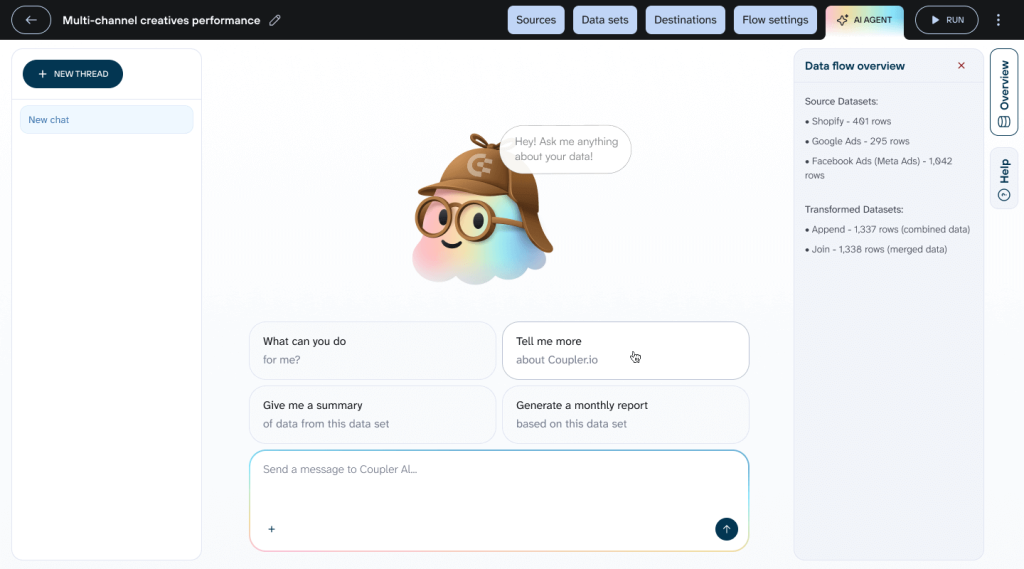
Coupler.io is a no-code data integration platform and AI analytics that helps you build a unified view of performance data without engineering help.
It connects to 400+ marketing, sales, analytics, and business tools, then organizes your data to make it analysis-ready for AI. You can blend data from multiple sources, aggregate metrics, filter datasets, and customize columns to create the exact view you need. This prepared data flows directly to Claude, ChatGPT, Perplexity, or Gemini for data analysis, or to the built-in AI Agent for instant insights.
Coupler.io also supports sending data to spreadsheets (Google Sheets, Excel), BI tools (Looker Studio, Power BI), and data warehouses (BigQuery) for broader reporting needs.
Best for
Marketing and business teams that need AI-powered analysis of data scattered across multiple platforms. Coupler.io’s Analytical Engine prepares and organizes your data from ads, CRM, and analytics tools, making it analysis-ready for AI. You can use the built-in AI Agent for instant conversational insights directly on your data flows. Or connect data flows to Claude, ChatGPT, and Perplexity via AI Integrations to analyze pre-organized datasets without wrestling with raw, messy data.
Key features
- AI Agent lets you chat with your data directly inside Coupler.io to uncover insights, create quick reports, and understand performance
- AI integrations enable conversational AI data analysis inside ChatGPT, Claude, Perplexity, and other AI tools.
- AI Insights spot trends, anomalies, top/bottom performers, and industry benchmarks, providing 5-6 findings and 3 recommendations from your dashboards to turn raw data into quick action plans
- Data transformation (filtering, sorting, custom metrics) to merge sources into a single dataset that AI models can analyze more easily
- Scheduled automated data refresh (as frequently as every 15 minutes) to analyze up-to-date information
- Pre-built dashboard templates to speed up reporting workflows in spreadsheet/BI destinations
Pros
- No technical skills required
- Access to analysis-ready data with prebuilt data set templates
- Create a single source of truth across teams
- Pre-calculated data from Coupler.io’s Analytical Engine eliminates AI hallucinations and math errors
Cons
- Not a full BI suite (pairs well with visualization tools and AI tools)
- Better fit for small-to-mid teams than enterprise ML programs
Pricing
Coupler.io uses an account-based billing model where you pay based on the number of connected accounts rather than individual connections or data flows. An “account” is one connected data source. For example, connecting Facebook Ads, Google Ads, and TikTok Ads means you’re using 3 accounts total.
The key advantage: once you connect an account, you get unlimited data flows from it. You can build as many dashboards, reports, or data pipelines as needed from each connected account without additional costs.
To access AI features (AI Agent, AI Integrations, and AI Insights), you’ll need the Starter plan at $24/month at least. It includes up to 3 connected accounts with unlimited data flows and no import size limits. Plans scale based on the number of accounts you need to connect: up to 15 accounts on the Active plan, up to 50 accounts on the Pro plan, with custom enterprise options available for larger teams. Check out pricing to choose the best tier for your needs.

Analyze your data with AI using Coupler.io
Get started for freeMicrosoft Power BI
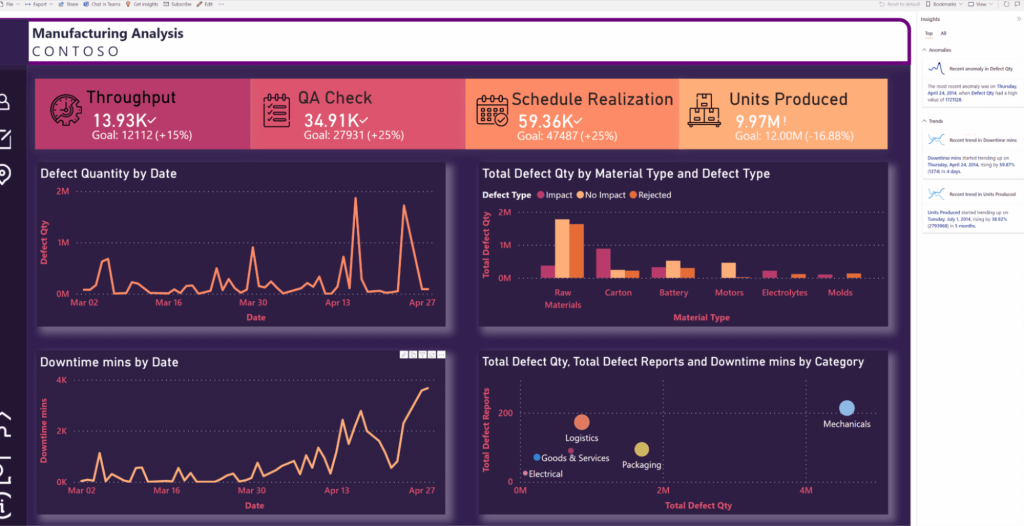
Microsoft Power BI is an enterprise business intelligence platform built for interactive reporting, governance, and team collaboration. If your organization runs on Microsoft (Azure, Office, Teams, Dynamics), Power BI often becomes the default layer for dashboards when you need controlled access, standardized metrics, and scalable distribution.
Best for
Teams that need enterprise reporting, controlled sharing, and tight Microsoft ecosystem integration (especially in mid-market and enterprise environments).
Key features
- Core AI visuals (Decomposition Tree, Key Influencers, Smart Narrative) break down data layers, spot what drives results, and auto-generate plain-English summaries of charts
- Automated insights (Quick Insights, Anomaly Detection, AI Forecasting) scan for trends, flag odd data points, and predict future numbers from past patterns
- Text and data processing (Text Analytics, AutoML, Power Query AI) pull sentiment and key phrases from text, build no-code machine learning models, and clean messy datasets with smart matching
- Natural language tools (Q&A, Copilot) let you ask questions in everyday words for instant visuals and create full reports through simple chat prompts
Pros
- Strong Microsoft ecosystem integration
- Multiple AI capabilities in one platform
- Mature security, permissions, and governance options
Cons
- Advanced modeling has a steeper learning curve
- Best experience is Windows-centric (Desktop)
- Complex deployments can require admin and architecture work
Pricing
Power BI Free offers limited AI (personal use only, no sharing). Pro ($14/user/month) includes core AI visuals (Decomposition Tree, Key Influencers), basic forecasting, anomaly detection, and Q&A. Premium Per User ($24/user/month) unlocks advanced AI like AutoML, enhanced text analytics, Copilot, and larger-scale processing.
Tableau
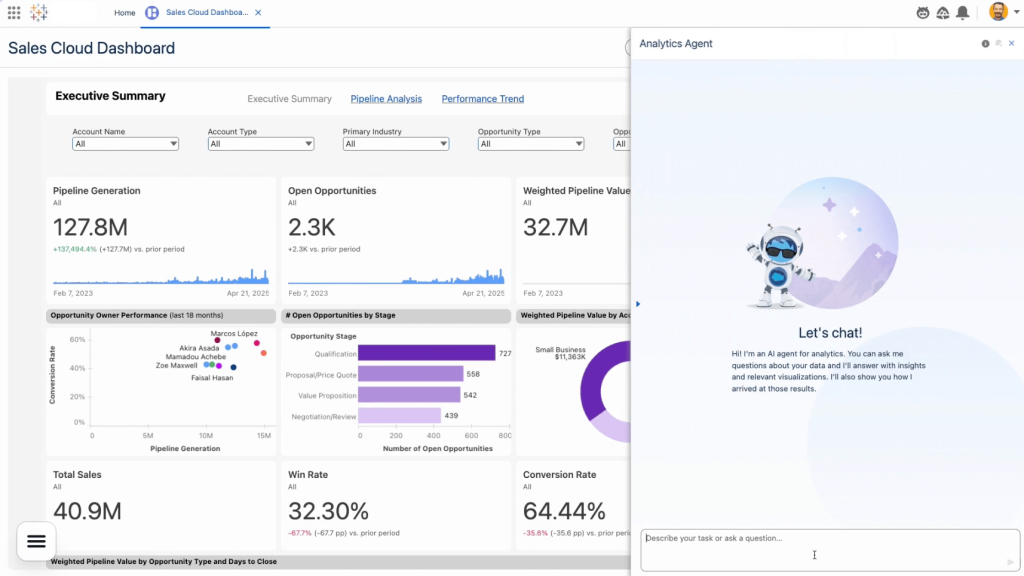
Tableau (part of Salesforce) is a leading analytics and data visualization platform built for exploration and data storytelling. It’s a strong choice when you need highly interactive dashboards, drill-down analysis, and polished visuals that help stakeholders understand what’s happening without having to read spreadsheets.
Best for
Data analysts and BI teams that prioritize visual exploration, interactive dashboards, and explainable “why did this change?” analysis.
Key features
- Agentforce Tableau agents work 24/7: Concierge for conversational Q&A in natural language, Inspector for proactive monitoring that alerts you when metrics change, and Data Pro for automated data prep and semantic model building
- Tableau Agent assistant preps data with natural language instructions, auto-generates comprehensive documentation for data sources and workbooks, and turns conversational prompts into visualizations and calculations
- Tableau Pulse delivers personalized AI-powered insights directly in Slack, Teams, email, or wherever you work—no need to open dashboards
- Enhanced Q&A for conversational analysis across multiple metrics with clear explanations and source citations so you can trust the insights
- Model Context Protocol (MCP) integration lets you embed Tableau’s analytics into your custom AI agents and applications with open-source implementations
Pros
- Strong visualization and exploratory analysis capabilities
- Large community and learning ecosystem
- Great for analyst-led dashboard development
Cons
- Higher price point than many alternatives
- Complex prep may require Tableau Prep or external tooling
- Salesforce workflows tend to be prioritized for CRM-centric teams
Pricing
Tableau Cloud Standard Edition starts at $75/user/month (Creator license, annual billing) and includes Tableau Pulse for AI-powered insights. To access the full AI suite—including Tableau Agent, Agentforce agents (Concierge, Inspector, Data Pro), and agentic analytics—you need the Tableau+ Bundle, which requires custom enterprise pricing and uses both user-based licensing and consumption-based credits (Agentforce Flex and Data Cloud Credits). All plans require annual contracts with at least one Creator license.
DataRobot
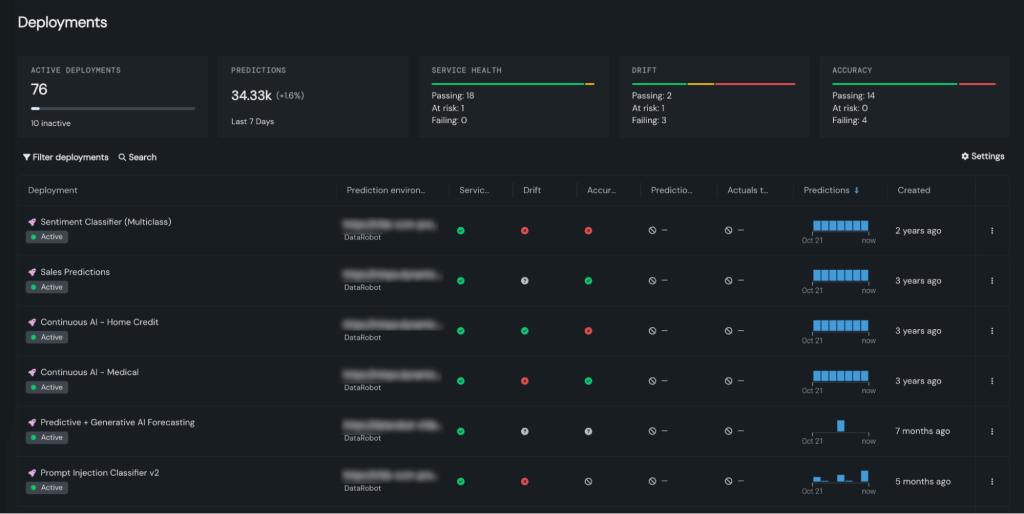
DataRobot is an enterprise automated machine learning (AutoML) and MLOps platform that takes predictive models from idea to production with less manual effort. This isn’t a reporting tool; it’s built for when you need machine learning models like churn prediction, demand forecasting, lead scoring, or risk modeling, and you want repeatable deployment and monitoring.
Best For
Enterprises building predictive models, AI agents, or custom AI applications at scale, especially organizations in regulated industries (finance, healthcare, energy) that need strong governance, explainability, and flexible deployment options (cloud, on-premise, or hybrid).
Key features
- Agentic AI platform for building, deploying, and managing autonomous AI agents that execute complex multi-step workflows across business functions
- Automated machine learning (AutoML) automatically tests algorithms, selects the best performers, tunes parameters, and generates production-ready predictive models without data science expertise
- Generative AI and predictive AI combined to build conversational interfaces, content generation, forecasting, risk modeling, and demand prediction from one platform
- AI governance and observability with enterprise-grade controls including model monitoring, explainability, compliance documentation, and real-time quality tracking
Pros
- Makes advanced machine learning accessible to non-data scientists
- Reduces time to build predictive models
- Strong governance and compliance features for regulated industries
- Excellent for forecasting, churn prediction, risk modeling
- Helps teams ship models without building every component from scratch
Cons
- Pricing is not publicly listed
- Overkill if you mainly need dashboards and KPI reporting
- Works best with clean, well-prepared input data
Pricing
DataRobot uses custom enterprise pricing with no publicly listed rates. Pricing typically depends on the number of users, compute resources, deployment type (cloud, on-premise, or hybrid), and specific platform capabilities needed (agentic AI, predictive AI, generative AI, governance). A free trial is available to test the platform, but you’ll need to contact sales for specific pricing.
HubSpot Data Hub
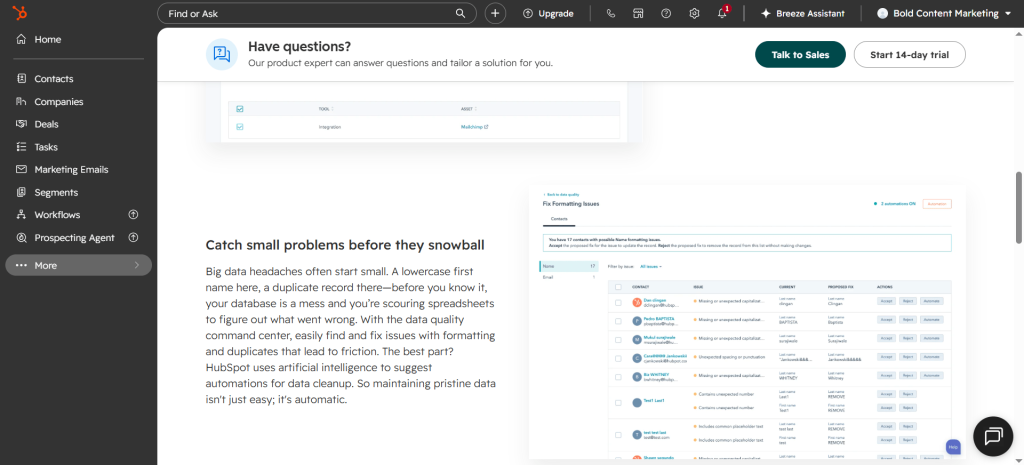
HubSpot Data Hub is a data management and analytics tool that brings datasets from multiple resources under unified dashboards. The platform then uses AI to keep data cohesive, organized, and easy to access.
Best for
Marketers, analysts, and small- to large-scale businesses wanting to centralize large sets of customer data so they can boost efficiency across customer-facing departments.
Key features
- Automated data quality overviews to spot and fix any database-related issues, like duplicate records, missing information, and inconsistent formatting.
- Data Studio for seamlessly merging datasets from multiple first- and third-party resources.
- AI data enrichment that auto-populates prospect details using proprietary CRM data as well as information from publicly available resources (websites, LinkedIn profiles, and more).
- Prospect Agenting for building large-scale sales outreach campaigns that use information from your database to personalize messages at scale.
Pros
- Little to no learning curve
- Free tools available and a small-business-friendly pricing plan
- Integrates with an ample set of third-party platforms, plus products within the HubSpot ecosystem
Cons
- Steep pricing differences between paid plans might make scalability a challenge
- More focused on data management, not necessarily analytics
Pricing
HubSpot Data Hub includes a free version and three paid plans. The free plan covers two-way data sync between both HubSpot products and third-party platforms. The entry-level paid plan ($7/user/month) unlocks data and prospecting AI agents (extra usage-based pricing applies), and data quality overview capabilities. The Professional plan ($720/month) includes features like data health trends, bulk duplicate management, programmable automation, and workflow triggers. The Enterprise plan ($2,000/month) unlocks Snowflake integration capabilities.
Julius AI
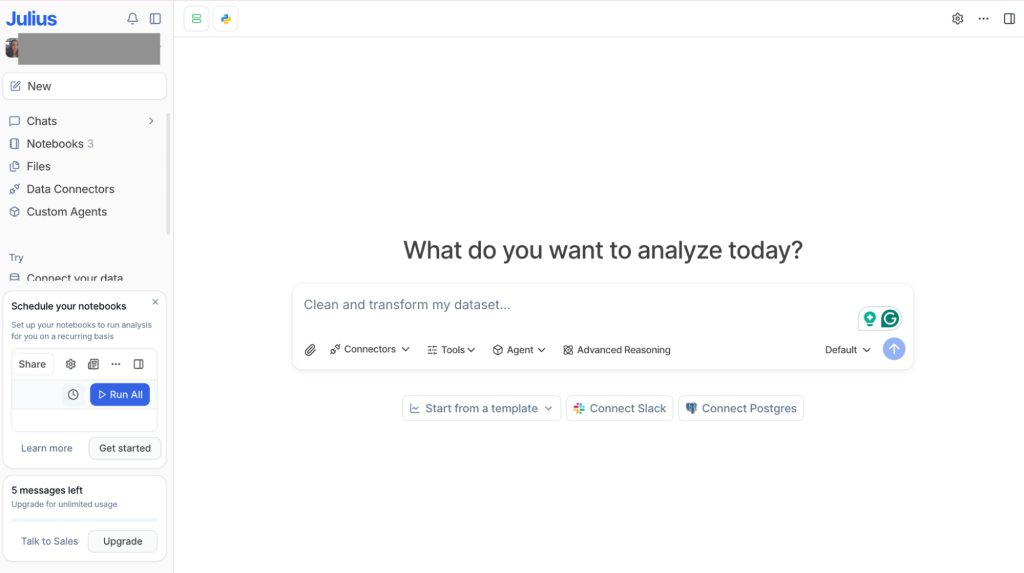
Julius AI is a conversational AI tool that lets you analyze data by asking questions in plain language, similar to ChatGPT but focused on your datasets. You upload files or connect to data sources (limited), then generate charts and summaries quickly. This is useful for ad hoc exploration when you don’t want to build a full dashboard.
Best For:
Analysts, marketers, and business owners who need quick exploratory data analysis and ad-hoc reporting without coding, and who already have their data in warehouses or databases.
Key features
- Conversational data analysis where you ask questions in plain English and get instant insights with automated visualizations (charts, tables, statistical analysis)
- Multi-source data connections including spreadsheets (CSV, Excel), databases (Snowflake, BigQuery, Postgres), and data warehouses (BigQuery, Snowflake, Databricks)
- Automated reporting delivers scheduled reports via Slack or email on your preferred cadence (daily, weekly, monthly)
- Custom agents that learn your business logic and surface relevant insights based on your specific data patterns
Pros
- Very low learning curve for beginners and non-technical users
- Fast for quick analysis and “what changed?” questions
- Templates for prebuilt marketing agents (Churn Analysis Agent, Google Ads Expert) and financial agents (Cash Flow Agent, Budget vs Actual Agent)
Cons
- Focused on data warehouses and database connectors, not marketing platforms
- Doesn’t offer connectors for Google Analytics, Google Search Console, LinkedIn ads, Facebook ads, or other common marketing tools
- You need to get data into warehouses/databases first before Julius can analyze it
- No automated data pipeline, so you’re responsible for keeping sources fresh
Pricing
Julius AI operates on a consumption-based model tied to how many AI conversations you have with your data. The free tier gives you a taste with 5 messages, but meaningful analysis requires a paid subscription. AI capabilities scale across tiers: basic conversational analysis and visualizations at the entry level ($16/month), unlimited queries and automated reporting at mid-tier ($37/month), and advanced custom agents that understand your business context at the top tier ($375/month annually)
Qlik Sense
Qlik Sense is a business intelligence platform combining conversational analytics with an associative engine for data exploration. It’s available as cloud-based Qlik Cloud Analytics or on-premises Qlik Sense for organizations needing client-managed deployments.
Best For
Mid-size to enterprise organizations needing powerful business intelligence, especially those in highly regulated industries (finance, healthcare, government), requiring on-premises deployment.
Key features
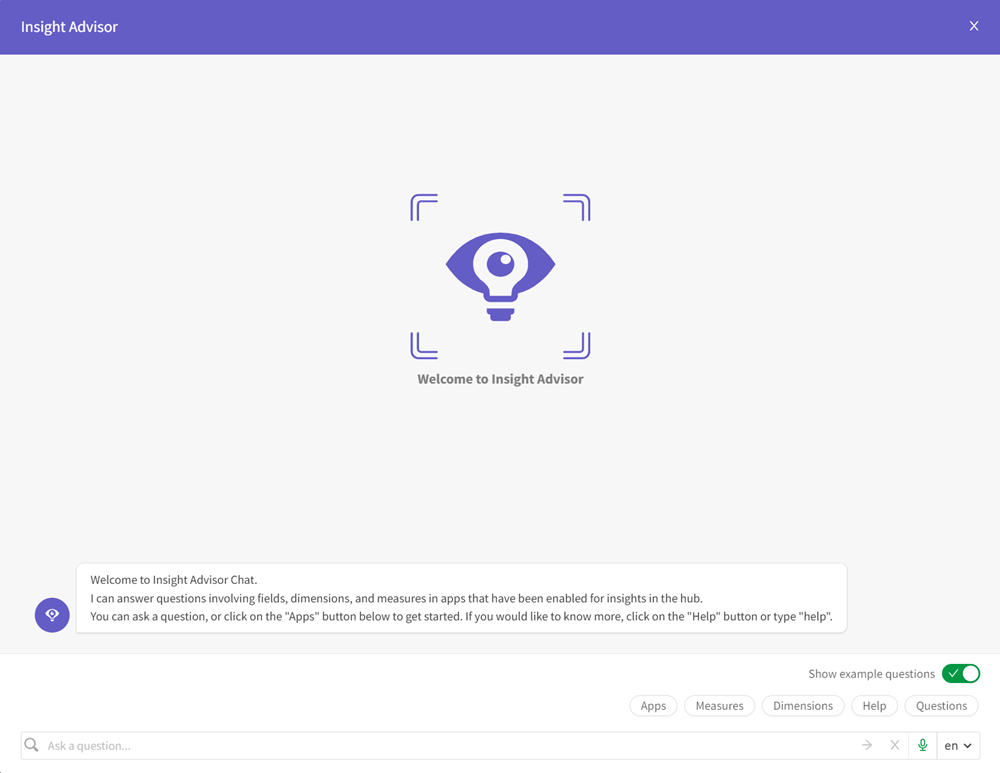
- Associative analytics engine (Insight Advisor Chat) for instant, multi-directional data exploration without query limitations
- Conversational analytics with natural language interaction and AI-powered Insight Advisor that auto-generates analyses
- Interactive dashboards and visualizations that update instantly as you explore
- AI-powered augmented analytics with automated insight generation, AI-assisted creation, and data prep
- Predictive analytics and AutoML (via Qlik Predict) for forecasting and what-if scenarios
- Real-time alerting and automation that monitors all your data and triggers actions across systems
Pros
- Strong for exploring complex, interconnected datasets (100+ data sources including databases, cloud services, and SaaS applications)
- Useful AI guidance for charting and insight discovery
Cons
- Learning curve if your team is new to associative concepts
- Requires technical expertise, like knowledge of SQL and the platform’s native scripting language
Pricing
Qlik Sense pricing reflects two dimensions: team size and data scale. AI features like Insight Advisor and natural language queries come standard in Qlik Cloud Analytics, which starts at $200/month for small teams (10 users, 25GB data). As your needs grow (more users, larger datasets, or advanced capabilities like AutoML and predictive analytics), you move into Premium or custom enterprise tiers. Organizations requiring on-premises deployment work directly with Qlik for tailored pricing that matches their infrastructure needs.
IBM Watson Studio/ Cognos Analytics
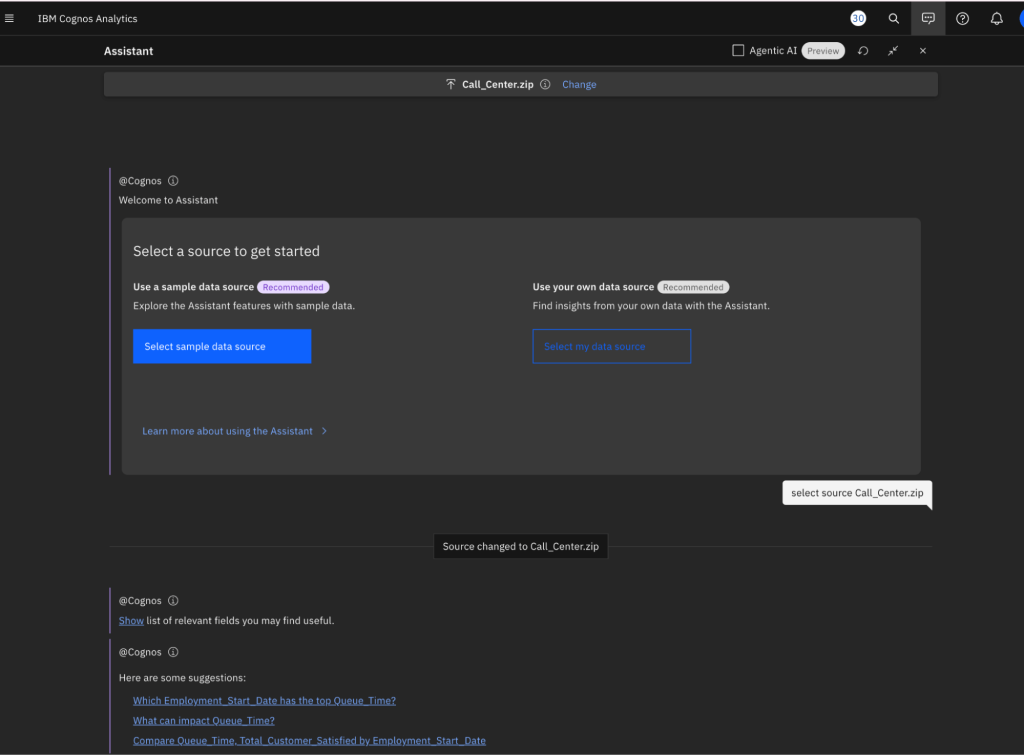
IBM offers multiple AI and analytics products under different brands. Watson Studio (part of the watsonx platform) is for building custom AI applications with foundation models and governance. Cognos Analytics is IBM’s separate business intelligence tool for dashboards and reporting. Both are designed for large enterprises with IT teams and data scientists, not for everyday business users looking to analyze marketing or sales data.
Best for
Large enterprises in regulated industries (finance, healthcare, government) building AI applications at scale with strong governance requirements, or organizations needing unified data management across hybrid cloud environments with embedded AI capabilities.
Key features
- Foundation model studio with IBM and third-party models for building custom AI applications
- Enterprise data management that unifies structured and unstructured data across hybrid cloud environments
- AI governance and compliance with automated monitoring and explainability controls
- Specialized AI tools, including chatbot builder (watsonx Assistant), workflow automation (watsonx Orchestrate), and code generation (watsonx Code Assistant)
Pros
- Comprehensive enterprise AI platform covering the full lifecycle from data to deployment
- Strong governance and compliance features for regulated industries
- Fits IBM-centric enterprise environments well
Cons
- Designed for enterprises, not accessible for small teams or non-technical users
- Complex setup requiring IT resources and data science expertise
- Significantly more expensive than analyst-focused tools
- Steeper learning curve compared to self-service analytics platforms
- Overkill for straightforward data analysis and business intelligence tasks
Pricing
IBM’s AI and analytics offerings are split across multiple products, which can be confusing. Watson Studio is part of the watsonx platform (free trial available, then custom enterprise pricing). Cognos Analytics is a separate business intelligence product with its own pricing (also custom enterprise pricing). If you need both AI development capabilities and BI dashboards, you’re likely looking at multiple licenses and contracts. Expect high costs and implementation time as this is enterprise software built for large IT budgets.
Quick checklist: what matters most when choosing an AI data analysis tool
Before you compare feature lists, it helps to align on what will make the tool succeed in your environment, since no single tool does everything well. You may need an integration/automation layer to stop manual exports, a BI layer for dashboards, and an AI layer for faster questions or predictions.
- Ease of use (non-technical friendliness): Can you build reports or ask questions without engineering help? Expect a learning curve with enterprise BI and AutoML platforms.
- Data connectivity: Look for connectors to your real sources (ads, CRM, web analytics, email, databases) and destinations (Sheets, BI tools, warehouses). API support matters for edge cases.
- Automation capabilities: Scheduled refreshes, pipeline orchestration, and alerts determine whether you get real-time insights or another stale dashboard.
- AI depth: Decide what you actually need, such as natural-language queries, generative summaries, forecasting, AutoML, anomaly detection, or model monitoring.
- Visualization and reporting strength: If dashboards are the deliverable, prioritize BI features (templates, customization, AI insights layered on top).
- Governance and security: For enterprise teams, access controls, compliance, and auditability are non-negotiable.
- Pricing model and scalability: Watch how costs scale and map it to your team’s needs. Is it per user, per capacity, per usage, or per connected account?
How to choose the right AI tool for your needs
Use this section as a quick decision map, as the “best” AI data analysis tool depends on what you’re trying to achieve and how your team works.
| Your Need | Best Tool | Why |
| No-code data unification + AI-powered insights | Coupler.io | Best when your data is scattered across marketing, sales, and analytics tools and you don’t have dedicated data engineers. Automate data pipelines, chat with the AI agent, or send unified datasets to Claude/ChatGPT for conversational analysis. |
| AI-assisted BI dashboards (Microsoft stack) | Power BI | Best for teams already using Azure, Office, Teams, or Dynamics who need AI-powered insights, natural language queries, and AutoML with enterprise governance. |
| AI-driven visual analytics + agents | Tableau | For data analysts who want AI agents working 24/7, conversational Q&A, and AI-powered insights delivered directly in Slack or Teams without opening dashboards. |
| AI-powered associative discovery | Qlik Sense | When you need conversational analytics with AI guidance across 100+ interconnected data sources, especially in regulated industries needing on-premises deployment. |
| AutoML & AI model deployment | DataRobot | For enterprises building and deploying predictive models and AI agents with automated machine learning, governance, and MLOps capabilities. |
| Conversational AI for warehouse data | Julius AI | Great for chat-based data analysis and ad-hoc questions if your data is already in databases or warehouses, but not a replacement for automated data pipelines. |
| Custom AI application development | IBM Watson Studio / Cognos Analytics | For large enterprises building custom AI applications with foundation models, governance, and compliance in regulated industries. |
| Centralized datasets with easy management and maintenance workflows | HubSpot Data Hub | Best for customer-facing teams with data spread across departments and third-party tools. Data Hub keeps everything centralized, includes data management and maintenance workflows, and gives teams the tools needed to act on stored data through the HubSpot product ecosystem. |
Why Coupler.io stands out for AI-powered data analytics
If you’re evaluating AI tools for data analysis, it’s easy to focus on the “AI layer” (chat, forecasting, AutoML). But in practice, the biggest blocker is often upstream: getting consistent, refreshable data into the place where your team actually works.
Coupler.io stands out because it’s built for the reality of business reporting:
- Unlike BI platforms (Power BI, Tableau, Qlik), Coupler.io doesn’t require you to learn a new visualization environment or build complex data models. It sends unified data to the tools you already use, such as Google Sheets, Excel, Looker Studio, and directly to ChatGPT and Claude.
- Unlike AutoML platforms (DataRobot, IBM Watson), Coupler.io isn’t built for data scientists building predictive models. It’s built for marketing and business teams who need automated reporting and quick AI-powered insights without technical expertise.
- Unlike conversational tools (Julius AI), Coupler.io doesn’t assume your data is already in warehouses. It connects directly to 400+ marketing, sales, and analytics platforms, automates the refresh schedule, and keeps your datasets current so AI analysis is based on real-time data, not stale exports.
- Unlike pure integration tools, Coupler.io adds practical AI on top: AI Insights gives you structured analysis (trends, recommendations, benchmarks) in 20 seconds, and the MCP server lets you analyze unified data conversationally inside Claude, ChatGPT, or Perplexity without switching contexts.
In short, Coupler.io doesn’t try to replace your BI or ML platform; it solves the “data scattered everywhere” problem first, then adds AI features that fit how business teams actually work.
Integrate your data with AI for conversational analysis
Try Coupler.io for freePractical example: using Coupler.io for AI data analytics
Challenge: You notice overall traffic declining, but can’t quickly identify whether the drop is a problem or a natural shift in audience quality. You need to understand which traffic sources are driving the change and whether conversions are impacted.
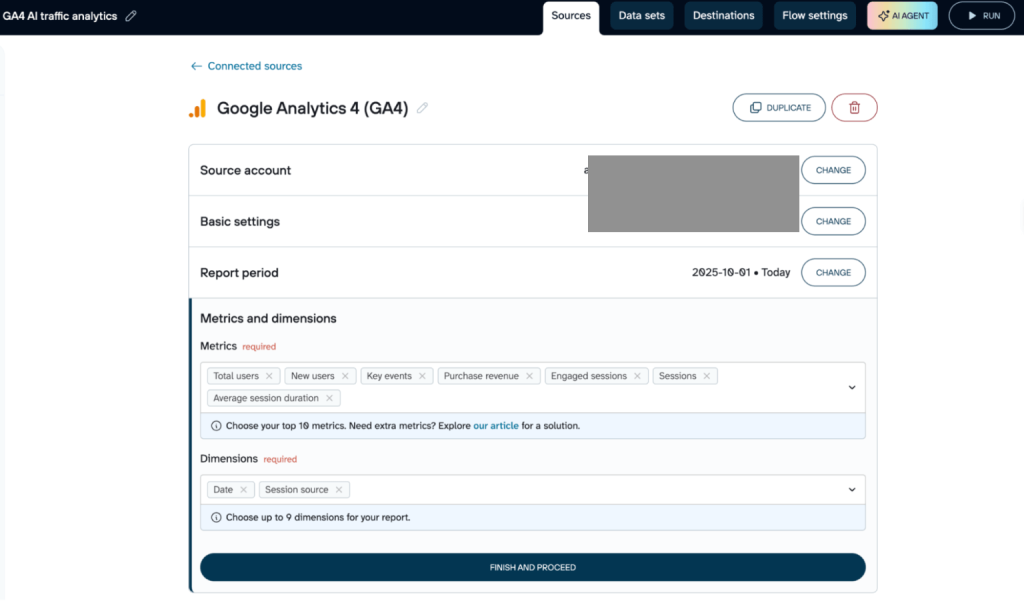
Setup: You connect your GA4 property and other relevant sources to Coupler.io in 5 minutes and create data flows with the dimensions and metrics you need for analysis.
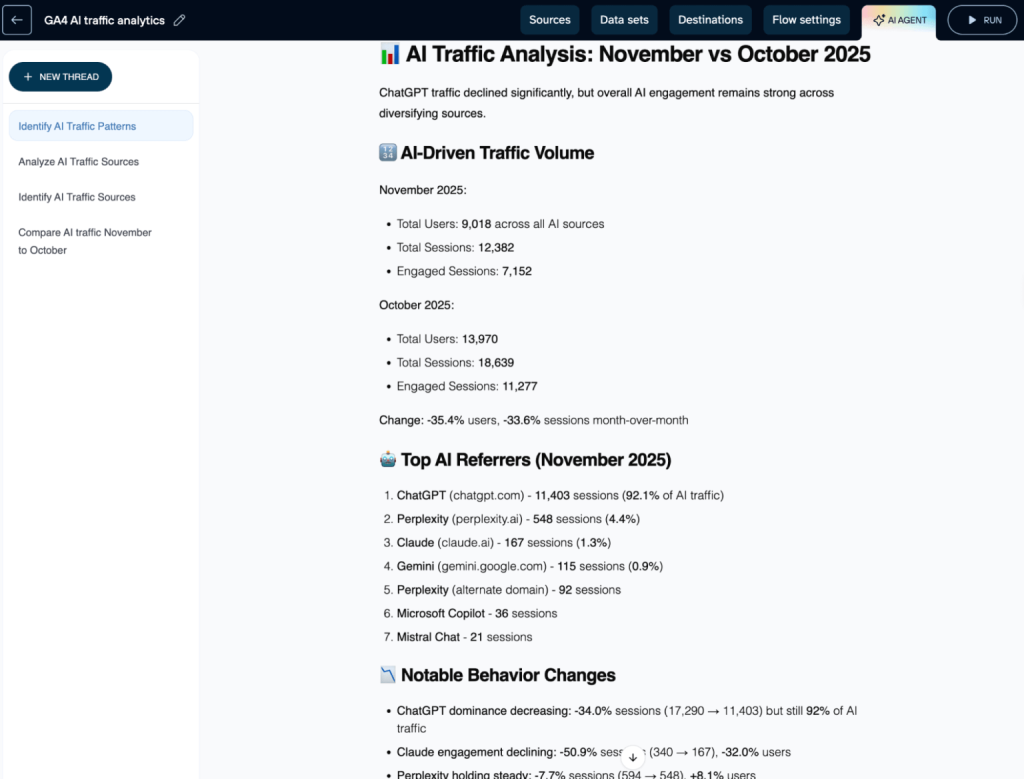
For quick, day-to-day insights: Coupler.io AI Agent
You ask the AI Agent directly inside Coupler.io: “Compare October vs November traffic from AI sources. What changed?“
Result: Instant answers at a granular level without switching tools. The AI Agent identifies that while overall traffic dropped, high-intent product pages (/pricing, /signup) see conversion rates jump. You can act on insights immediately, no need to build dashboards or wait for reports.
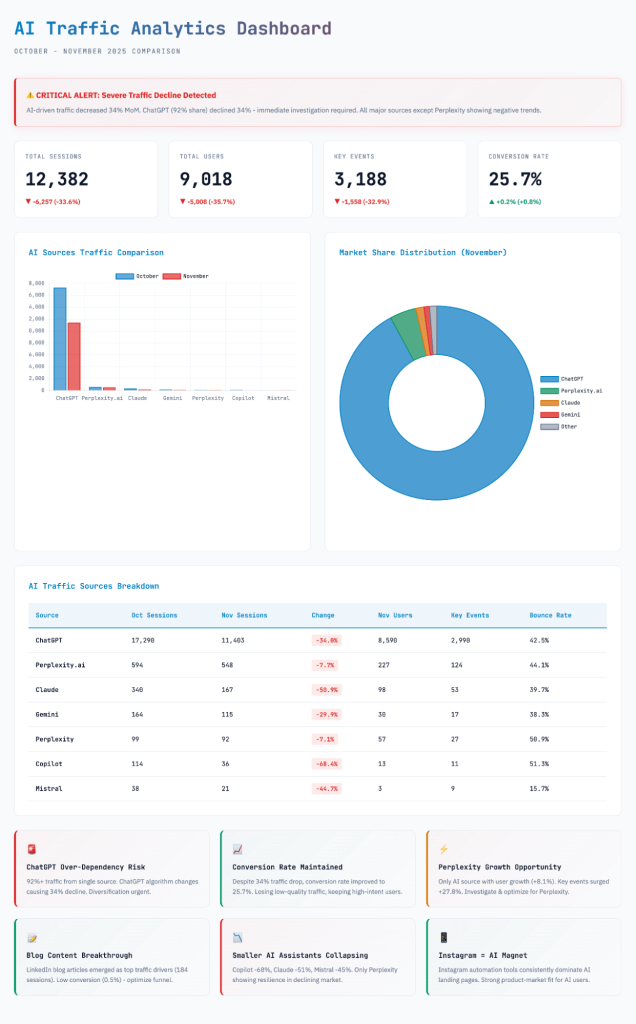
For in-depth analysis with visualizations: Coupler.io AI Integrations
You connect your Coupler.io data flows to Claude and ask: “Analyze AI referral patterns and show me which landing pages convert best.“
Result: Claude accesses accurate, unified data and generates interactive dashboards using Artifacts. You get monthly reports with visualizations, conversion context, and behavioral patterns, all based on verified numbers that match your GA4 dashboard exactly. Perfect for stakeholder presentations and strategic planning.
Attribute🟣 Coupler.io🔵 Power BI🔷 Tableau🟢 Qlik Sense🤖 DataRobot💬 Julius AI🔶 IBM Watson/Cognos🎯 Best ForMarketing & business teams, automated reportingAI-assisted BI in Microsoft environmentsAI-driven visual analytics & agentsAI-powered associative discoveryAutoML & AI model deployment at scaleConversational analysis of warehouse dataCustom AI apps with governance🧠 AI CapabilitiesAI Insights · AI Agent · MCP integrations (ChatGPT, Claude, Gemini)NL Q&A · Copilot · Anomaly detection · AutoML · ForecastingAgentforce · Tableau Agent · Pulse · Q&A · MCPInsight Advisor · NL queries · Auto-insights · Predictive analyticsAutoML · Agentic AI · Forecasting · Explainability · Model monitoringNL queries · Auto charts · Custom agents · Automated reportingAutoAI · AI governance · Foundation models · Workflow automation🔗 Integrations400+ business toolsWide ecosystem + AzureBroad connectors + Salesforce100+ sourcesEnterprise data stacksSnowflake, BigQuery, Postgres, Google DriveIBM ecosystem💰 PricingFrom $24/mo; 7-day trialFree–$24/user/moFrom $75/user/moFrom $200/mo (10 users)Custom; free trialFree–$375/moFree tier; enterprise pricingLearn more about how to use Claude.ai for data analytics.
With AI Agent’s user-friendly interface for quick checks and AI Integrations for deep learning, the entire workflow streamlines from hours to minutes, helping you make smarter decisions.
Analyze data in Coupler.io AI agent or with your AI tools
Get started for freeFAQ: AI tools for data analysis
What are AI tools for data analysis, exactly?
AI tools for data analysis typically fall into three categories:
- BI platforms with AI features (Power BI, Tableau, Qlik): Dashboards plus natural language queries, automated insights, and explanations
- AutoML and ML platforms (DataRobot): Build predictive models like churn forecasting, demand prediction, or lead scoring
- Conversational analysis tools (Julius AI, Coupler.io AI Agent): Chat-based exploration and visualization over datasets
In practice, you’ll often use more than one: a tool to unify data, another to visualize, and sometimes another for predictive modeling.
Do I need a data warehouse before using AI-powered data analytics?
Not necessarily. Many teams start in Google Sheets or Excel and still get value from AI-assisted analytics. A data warehouse becomes important when you need very large datasets, strong governance and permissions, advanced modeling, or long-term historical retention.
With Coupler.io, users can store their data for AI analysis within the platform. Once your data flows are created, they’re stored and ready to query through the AI Agent or connect to AI platforms like Claude and ChatGPT.
For teams managing high-volume data flows, you can load data into traditional data warehouses like BigQuery or PostgreSQL for additional capacity and advanced use cases.
Is Coupler.io an AI analytics tool or a data integration tool?
It’s primarily a no-code data integration platform with AI analytics support, layered with AI features (AI Agent, AI integrations, and AI Insights). This positioning is ideal when your biggest bottleneck is getting trustworthy, refreshable data into the tools your team already uses.
Are AI insights reliable if my metrics differ across platforms?
They can be misleading if you haven’t standardized definitions (for example, “conversions” in an ad platform vs. “purchases” in analytics). The fix isn’t more AI, it’s consistent metric mapping and a unified dataset. You can get this with Coupler.io data flows and then layer AI analytics on top.


